White Label Social Media Platform: A Developer's Guide
Published on
Tags:
You know the failure mode already. The post is queued, the token is “valid,” the UI says publishing, and then one network sticks the job in limbo while another throws a quota error you didn't budget for. If you've shipped directly against Meta, TikTok, or YouTube, you've probably also watched a refresh flow invalidate a session at the worst possible time, or had a scheduled campaign collide with a rate-limit bucket that no one on the client side ever saw coming.
A white label social media platform exists because those problems don't go away when you add more customers. They get harder. The question isn't whether you can send posts through an API, it's whether you can do it across multiple networks, multiple tenants, and multiple failure states without making your own product feel brittle.
Table of Contents
The Moment Every Social-API Developer Knows Too Well
The breakage usually doesn't start with the biggest feature. It starts with something small and maddening, like a carousel container that never leaves IN_PROGRESS, or an OAuth refresh that bumps one token version and leaves three workers holding stale credentials. Then the actual publishing window hits, and you're reading API docs while your queue keeps growing.
That's the part nobody puts in the demo. You don't just “connect to social.” You manage app reviews, rotating auth, content-state transitions, platform-specific upload rules, and rate limits that don't behave like a single shared bucket. On top of that, you're usually doing it for more than one network at a time, which means one clean abstraction in your codebase and six different ways for the same post to fail.
The scale behind this is not small. DataReportal reported 5.24 billion active social media user identities worldwide in January 2025, equal to 63.9% of the global population, and the same analysis found that internet users access an average of 6.83 platforms monthly (DataReportal, January 2025). That's why a single-destination integration almost always feels incomplete in production.
The pain point isn't “social media posting.” It's orchestration across identities, quotas, and state machines that don't share the same rules.
By October 2025, the global total had risen again to 5.66 billion social media user identities, or 68.7% of the world's population, and users were spending more than 15 billion hours on social-platform content each day (DataReportal, October 2025). That's the backdrop for why a unified publishing layer exists at all. If your product serves creators, agencies, or AI agents, the thing you're really building is not a “post button,” it's a reliability layer.
What a White Label Social Media Platform Actually Is
A white-label product is software you ship under your own brand, where the customer never sees the original vendor. In social publishing, that means your users connect accounts, schedule content, and handle failures inside your interface, not someone else's dashboard.
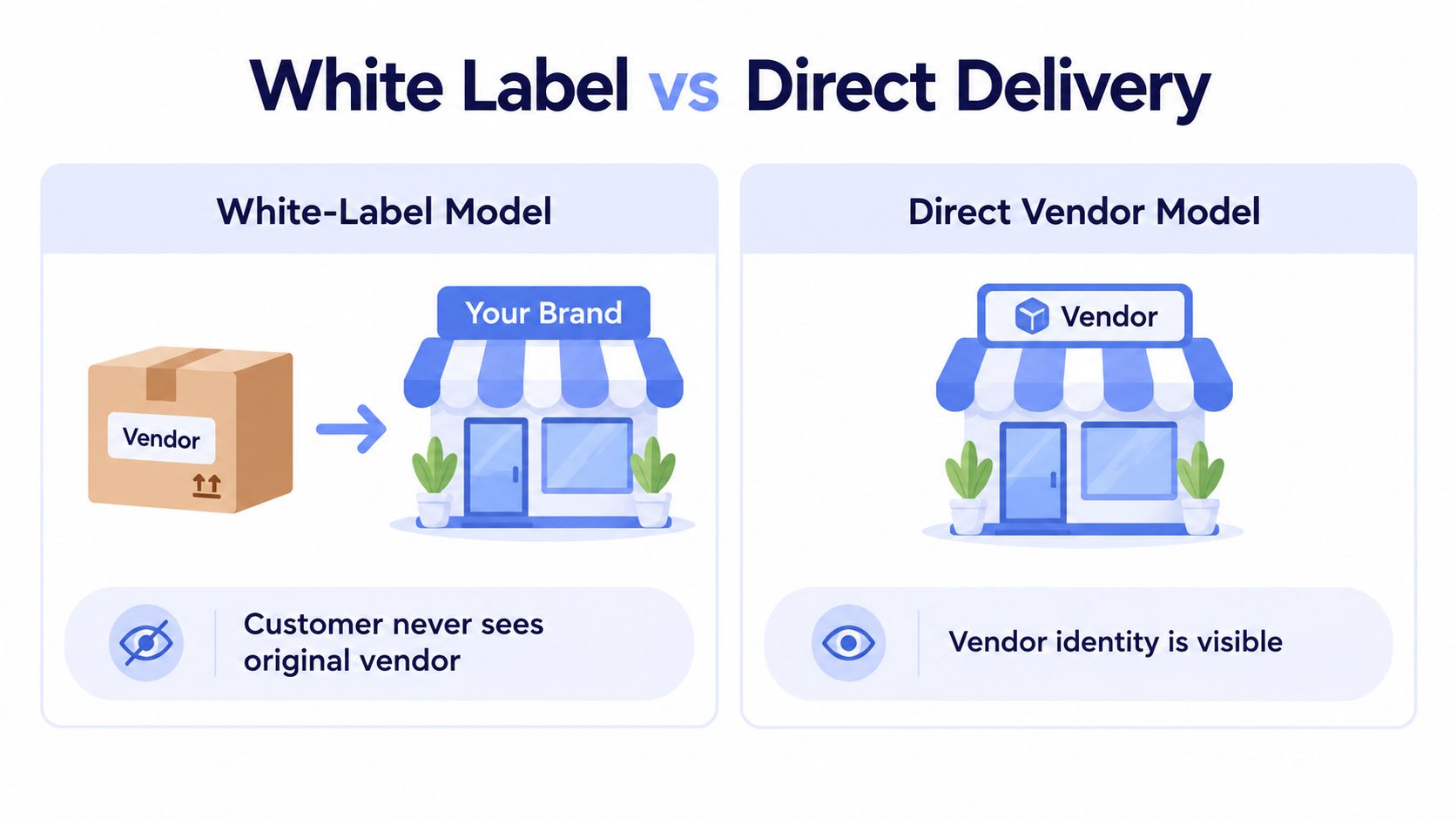 Comparison illustration showing the difference between a white label model and a direct vendor delivery business model.
Private-Label and Full White-Label Are Not the Same
A lot of writing mashes these together, but the operating model is different. Private-label usually means your app calls a provider behind the scenes, while the provider still owns the core flow. Full white-label means the connect flow, dashboard, error states, and branding all live inside your product.
Dimension | Private-Label | Full White-Label |
Branding surface | Limited, usually behind-the-scenes or partially branded | Entire user-facing flow carries your brand |
Engineering effort | Lower at launch | Higher integration effort up front |
Time-to-launch | Faster | Slower than a thin wrapper |
Ideal customer | Internal tools, solo builders, small teams | SaaS products, agencies, resellers |
UX ownership | Shared with vendor | You own the whole experience |
If you want the plain-language version of the broader software model, the overview in whitelabel AI deployment services from Cyndra is useful as a general frame, even though social publishing has its own operational quirks. For a deeper software-only definition, the internal explainer on what white label software is fits well with this distinction.
Practical rule: if your client can tell where your brand stops and the vendor's brand starts, you don't have full white-label yet.
The difference matters because buyers don't really care about the label. They care about whether the product feels native, whether the operational burden stays inside your team, and whether failures are visible in a way they can explain to their own users.
Who Actually Buys This and What They Care About
The buyer list is broader than most sales pages admit. SaaS developers want to add social publishing as a feature, not as a separate product category. No-code builders want a node they can drop into n8n or Make.com without building token choreography by hand. AI-agent builders want machine-to-machine publishing through an MCP server or a clean REST surface. Agencies and resellers want something they can put in front of clients without exposing a third-party brand. Creators and solopreneurs usually want the same thing, just with less ops overhead.
What each group judges first is different. SaaS founders care about whether the publishing flow looks native inside their app and whether they can get to first publish without a long integration tail. Agencies care about per-client isolation, predictable cost behavior, and whether one client's burst of activity can spill into another client's queue. AI-agent builders care about idempotency, retry semantics, and whether the API behaves like infrastructure rather than a marketing tool. No-code builders care about node ergonomics and whether the platform's object model is simple enough to reason about in automation.
A good vendor doesn't pretend these are the same problem. A strong white-label layer makes the social side look easy while keeping the work, authorization, queueing, state transitions, and platform-specific error handling, where it belongs.
The buyer lens changes the feature priority
SaaS teams: want branded UX and lower integration drag.
Agencies: want client isolation and failure transparency.
AI builders: want stable programmatic publishing and clean retries.
No-code users: want simple nodes and fewer auth headaches.
Creators: want fewer places to log in and fewer steps to publish.
That's why the best evaluation starts with the buyer, not the platform list. A feature that looks impressive to a founder can be irrelevant to an operator, and a cheap-looking abstraction can become expensive the moment a customer asks what happened to a post that half-published.
Build, Buy, or White-Label the Stack
Building native against nine social APIs sounds clean until you've lived through the maintenance cycle. Every network has its own auth model, its own media rules, its own quota math, and its own review process. The cost isn't just the first integration, it's the ongoing work of keeping that integration alive every time a platform changes policy or a client starts posting at a volume your queue wasn't designed for.
A white-label layer compresses a lot of that work into one surface. You get one integration path, one billing surface, and one security boundary. The trade-off is that you also inherit one abstraction layer as a dependency, which means vendor choice matters more, not less.
Here's the hard version of the decision.
Criterion | Build in-house | Buy a dashboard | White-label layer |
Time-to-market | Slow | Fast | Fast |
Audit coverage | You own it | Vendor-owned | Vendor-owned |
Isolation model | You design it | Limited by product | Depends on architecture |
Failure transparency | You control it | Usually partial | Must be checked carefully |
Exit cost | High engineering cost | High migration cost | Moderate to high, depending on data model |
For agencies, the most useful framing is whether the product is a tool or a platform. A tool helps your team work. A platform lets you expose the workflow under your own brand and pricing. If you're evaluating who needs a white label agency platform, the common thread is almost always the same, the buyer wants client-facing control without rebuilding the backend from scratch.
The internal guide on how to white label an app is also a useful lens if you're deciding where the branding layer ends and your own product starts.
My rule of thumb: if your roadmap depends on staying ahead of nine platform changes at once, you're already paying a hidden tax that white-label may reduce, but never eliminate.
That's the trade-off. You can save engineering time and still create a single point of dependency. The only honest way to choose is to score vendors on the things that hurt you in production, not on logo placement.
The Five Operational Pillars That Decide If It Works
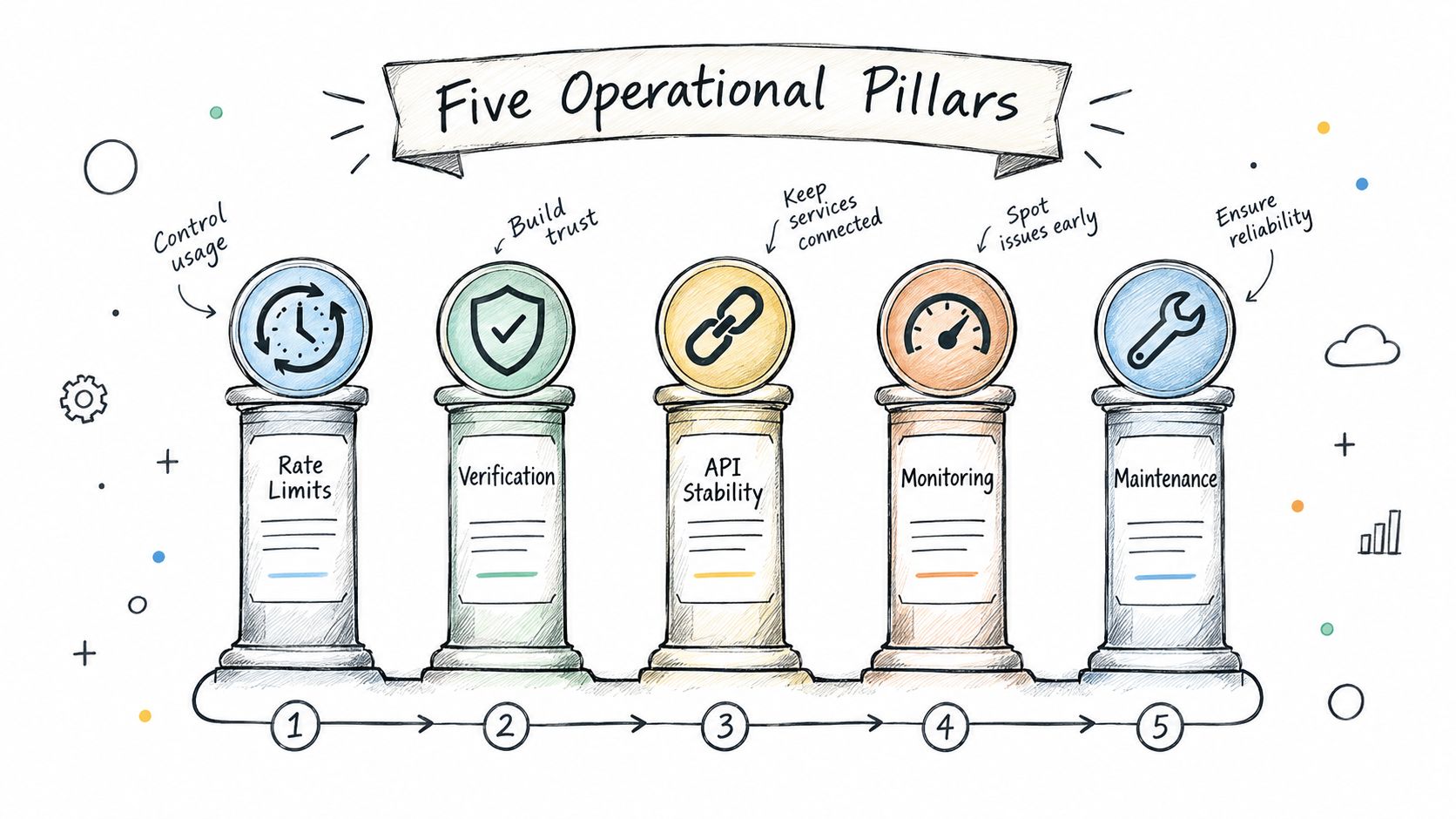 A hand-drawn illustration depicting five operational pillars for a white label social media platform.
Rate limits need isolation by platform and account
Nine social APIs mean nine sets of quotas, response codes, and scheduling constraints. TikTok uses a one-minute sliding-window request limit and returns HTTP 429 after the threshold is exceeded. Its Direct Post API also applies creator-level daily posting limits, typically around 15 posts per creator per day (TikTok API rate limits). A shared queue can therefore let one busy customer consume capacity intended for others.
Use separate platform throttles, reserve capacity per connected account, and classify failures before retrying. A transient timeout deserves a controlled retry. A policy or quota rejection needs a visible status and a different recovery path. For a single-network example of this discipline, see this linkedin post scheduler.
OAuth is an ongoing lifecycle
RFC 9700 places refresh-token rotation and sender-constrained handling at the center of delegated access. Refresh tokens are credentials, so a production white-label layer should encrypt them at rest, isolate them by connected account, and replace them atomically. Without atomic rotation, two workers can use the same token and invalidate each other.
Authorization also needs account-level ownership and audit history. For how permission scopes should map to connected accounts, see permission management.
Validate media before enqueueing
LinkedIn's Images API accepts JPG, GIF, and PNG images under 36,152,320 pixels, while GIF uploads can contain up to 250 frames (LinkedIn Images API). YouTube's videos.insert endpoint accepts video/* or application/octet-stream media and permits files up to 256 GB. The upload call also uses a quota bucket with a default allowance of 100 calls per day (YouTube videos.insert reference, YouTube quota guide).
Check type, dimensions, duration, file size, and expected quota use before a job enters the queue. That turns a predictable validation error into a user-facing correction instead of a failed downstream publish.
A unified API hides platform differences from your application. It does not remove those differences from operations.
Preserve state for multi-step publishing
Some surfaces use an upload-and-publish sequence rather than a single post request. The asset may exist in a processing or container state before the final post is created. Your abstraction should expose that state, retain identifiers, and define timeout and retry behavior. Otherwise, support staff must explain an internal state machine to someone waiting for a finished post.
Handle reauthorization and policy drift explicitly
Meta's developer policy, updated February 3, 2025, requires compliance with Meta standards and notes that some API access may be downgraded after 30 days of non-use (Meta developer policy). Treat that possibility as a product state, not an exceptional support case. Show whether a rejected publish reflects a queue failure, a missing permission, expired authorization, or required reauthorization.
A white-label layer is ready for production when it isolates quotas, protects tokens, validates media, exposes state, and explains authorization failures. Without those controls, it is a wrapper with a polished sales page.
How the Pricing Models Actually Work in Practice
The pricing question usually gets flattened into “cheap” versus “expensive,” which is useless. The actual decision is whether your usage pattern matches a per-publication model, a per-account model, or a flat platform fee plus active-account charging.
In private-label usage, the simpler path is often pay-as-you-go at roughly $0.20 per publication, or a subscription around $5 per account per month for accounts that post regularly. In full white-label, the common pattern is a flat platform fee plus a per-active-account charge, where an active account is one that publishes at least one post in the month. Idle connected accounts don't bill.
The difference becomes obvious when you look at how often your customers publish. A SaaS embedding social posting for a large customer base can have many connected accounts with only a fraction of them active in any given month. An agency might have a smaller total account count but a much higher active ratio. An AI agent with autonomous publishing can push volume hard enough that per-post costs become the wrong lens entirely.
Scenario | Pay-as-you-go | Subscription private-label | Full white-label |
SaaS with many idle connections | Better for low activity | Better if activity is steady | Better if many accounts remain inactive |
Agency with regular client posting | Can add up quickly | Often more predictable | Often best if branding matters |
AI agent publishing heavily | Usually costly at scale | Usually less efficient | Depends on active-account count |
The embedded walkthrough above the video is where the trade-offs are easiest to spot, but the rule is simple. Pick the model that matches your active-account ratio, not the one that sounds cheapest in the headline.
A practical example is the difference between a content-heavy customer base and a long-tail customer base. If only a minority of accounts publish each month, active-account billing makes a lot more sense than charging for every connected account. If almost every account is active, subscription pricing usually becomes easier to forecast.
If you want a concrete implementation path, PostPulse is one option for teams that need a white-label social publishing layer, plus private-label access through REST, n8n, Make.com, or MCP. The relevant part isn't the brand name, it's that the pricing and delivery model should line up with how often your customers publish.
A Pre-Launch Checklist You Can Run in Thirty Minutes
The fastest way to avoid a bad vendor choice is to check the boring things first. Start with the app review story. If the provider already maintains verified Meta and TikTok apps, you avoid building around the longest part of the integration cycle.
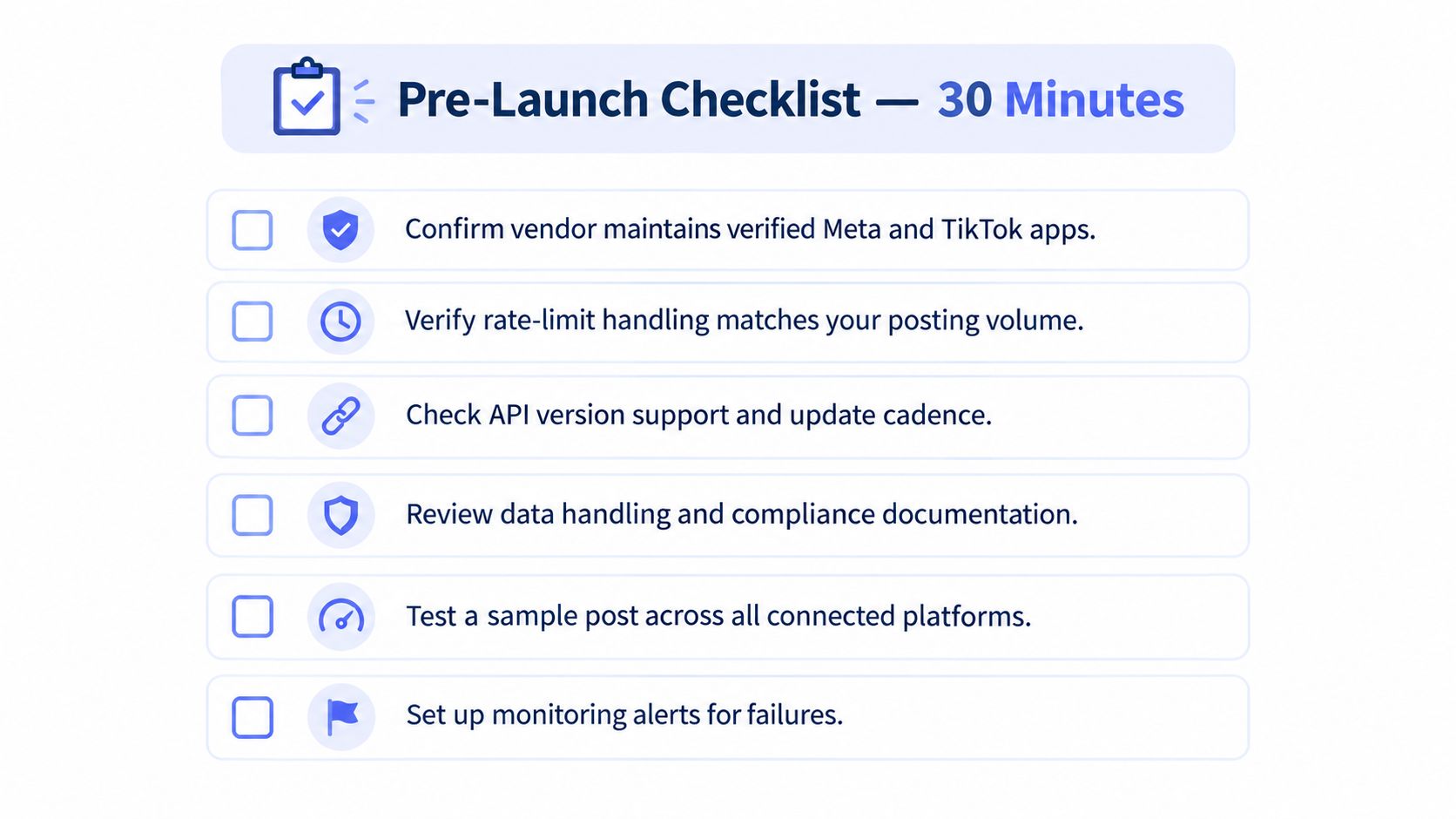 A pre-launch checklist graphic for social media tools detailing technical verification steps for platform integration.
Ask these questions before you sign
Rate-limit isolation: does the vendor throttle by platform and connected account, or is everything funneled through one shared queue?
Token handling: are refresh tokens encrypted at rest, rotated properly, and isolated by tenant and account?
Media rules: does the system validate LinkedIn image size and GIF frames, and does it handle YouTube's upload size and daily upload bucket correctly?
State handling: does it show container or pending states clearly for workflows that aren't immediate publish calls?
Failure reporting: if one platform rejects a post, does the system tell you exactly why and what succeeded?
Reauthorization flow: when Meta access needs renewal, does the product expose that cleanly instead of just surfacing a generic auth error?
The point isn't to memorize API trivia. It's to see whether the vendor has translated platform constraints into product behavior. If they haven't, your team will be the one discovering the edge cases in production.
If the docs only talk about “publish everywhere” and never explain what happens when one network says no, keep looking.
The same check applies to scopes and account ownership. If the product can't explain how permissions map to connected accounts, you'll end up debugging access failures that look random from the outside but are usually just bad abstraction. A good vendor makes those boundaries visible before launch, not after the first support ticket.
Why One Integration Is Not the Same as Zero Risk
Running nine social APIs through one branded layer reduces integration work, but it does not remove operational risk. A policy change on Meta, a tighter TikTok limit, or a YouTube quota reset can affect every customer if queues, credentials, and failure states are poorly isolated.
Ask vendors “how do you fail?” before you ask “how many platforms do you support?” The answer should cover the resilience model: platform-specific workers, durable jobs, bounded retries, tenant isolation, and clear recovery paths when an API refuses a request. A shared queue that stalls every account after one provider slows down is a single point of failure, even when the product advertises broad coverage.
Support staff also need an actionable event record. If a campaign sends one post successfully, while another is rejected because its media or permission is invalid, the agent should see the platform response, account identity, attempt history, and whether retrying is safe. “It failed” forces the customer to become the integration debugger.
Meta's developer policy sets rules that can affect app access and continued operation, so vendor monitoring must reach beyond the publish button. The product should show policy or authorization changes before they become unexplained customer failures.
The best implementation feels uneventful in production. It keeps provider-specific behavior out of your interface, gives support a traceable account-level record, and limits one network's outage to the work it affects.
PostPulse provides one branded publishing layer across nine platforms through REST, n8n, Make.com, or MCP. Visit PostPulse to assess whether its account, queue, and branding model fit your product.
About the Author

Founder of PostPulse — a social media scheduling platform for creators and teams. Software engineer with a passion for building developer tools and simplifying complex API integrations across social media platforms.