Permission Management for Multi-Platform Apps
Published on · Updated on
Tags:
Why does a token that worked yesterday die in the middle of a post queue at 3 AM, and why does the failure always show up when a client is waiting on a launch? If you've shipped anything that touches social APIs, you've probably seen the same pattern, a scope was missing, a refresh step was skipped, or a tenant boundary leaked and an audit caught it before production did. That mess is exactly where permission management stops being theory and starts being the difference between a calm release and a long night.
It's not just about “who can log in.” It's about who can do what to which resource, under which context, and whether that access still makes sense after the original use case is gone. The hard part is that “who” now includes people, service accounts, delegated apps, and AI agents that can accumulate scope faster than a human reviewer can keep up. If you've ever debugged a cryptic Git permission error, the Git SSH key troubleshooting guide is a useful reminder that access failures usually come down to a very specific missing link, not a vague security problem.
Table of Contents
The Day My Token Expired at 3 AM
The failure usually doesn't look like a security incident at first. It looks like a post stuck in a queue, a publish job that returns a bland denial, or a carousel container that sits in progress because one scope never made it through the consent flow. Then someone opens the audit trail and realizes the tenant can see its own draft but not the downstream resource the publish job needs, or worse, it can see a sibling tenant's metadata and shouldn't have been able to get that far.
That's the day permission management stops being an abstract IAM topic and becomes operational plumbing. The discipline is simple to say and hard to implement: decide who can do what to which resource, under which constraints, and keep that decision accurate as tokens rotate, integrations accumulate, and humans forget what they granted six weeks ago.
What breaks first in real systems
Teams don't fail because they chose the wrong buzzword. They fail because access was granted once and never re-evaluated, or because the app assumed a token outlived the workflow that depended on it. The result is the same: blocked releases, noisy support tickets, and a lot of “it worked in staging” debugging.
A white-label publishing stack makes this worse because the product hides the underlying platform from end users. If the permission layer is leaky, the integrator sees opaque failures, while the platform sees only a denied call or an overbroad grant that should never have existed.
Practical rule: if the access path can't be explained to a support engineer in one minute, the permission model is already too fuzzy.
The reason this matters goes beyond one broken token. Microsoft's cloud permission risk reports showed a broad pattern of over-provisioning, unused access, and privilege concentration, which is exactly the kind of environment where “temporary” access becomes permanent drift. That's why modern permission management is really lifecycle control, not just an authorization check at request time.
What Permission Management Actually Means
At the technical level, permission management is the continuous practice of answering four questions for every protected action: which principal is asking, what action they want, which resource it targets, and under what context it happens. Context is where the world's mess shows up, tenant, time, device posture, request source, or whether the caller is a human or an automation running on behalf of a human.
Concrete CMS makes this feel less abstract by treating permissions as structured objects, built from users and groups, permission keys, and permission access objects rather than a flat on/off switch. That model matters because it shows permissions are reusable parts of the system, not just flags on a record. In CiviCRM, the ACL framing is even more explicit, the question is which role gets the permission, what action it can perform, and which data that action applies to, which is a clean way to think about scoped access in any app.
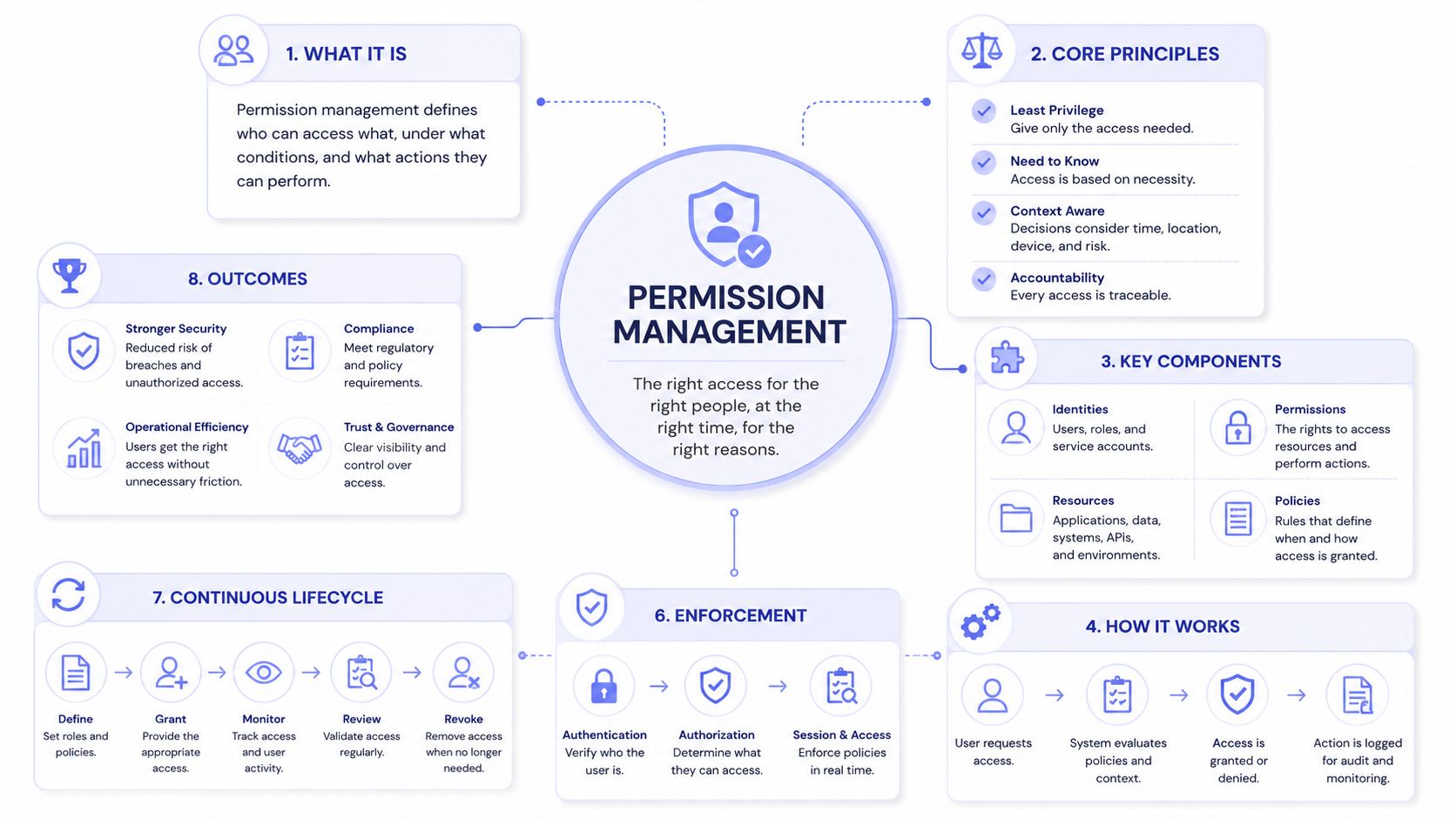 A diagram illustrating the core concepts, principles, components, and lifecycle of permission management systems.
Core questions every authorization system answers
The reason these models keep coming back is that they all answer the same core questions with different trade-offs. A simple role check is easy to understand, but it starts leaking as soon as one tenant needs a slightly different path, or one automated workflow needs narrower access than the person who configured it.
In practice, the useful vocabulary is smaller than the jargon around it:
Principal: the actor, human, workload, service account, or agent.
Action: the thing being requested, read, publish, delete, approve.
Resource: the object under protection, a draft, a connected account, a tenant workspace.
Context: the constraints that make the decision safe, tenant, time, and request conditions.
Permission systems get brittle when teams encode business logic in a single yes-or-no role check. They get durable when access is expressed as a relationship between actor, action, resource, and context.
That framing carries through everything else. If the principal is a delegated automation instead of a person, the same questions still apply, but the answer has to be narrower and easier to audit. If the resource is tenant-scoped content, the model has to preserve that boundary even when tokens, groups, and inherited permissions all stack together.
RBAC, ABAC, and ACLs Compared
RBAC, ABAC, and ACLs are usually taught like competing religions. In production, they're more like tools in a kit, and the only useful question is which one fails least badly under your workload. For a multi-platform publisher, the answer is rarely “pick one forever.” It's usually “start with one, then add another when the first one becomes awkward.”
Axis | RBAC | ABAC | ACLs |
Decision shape | Role-centric | Attribute-centric | Resource-centric |
Strength | Easy to reason about | Flexible with context | Precise per object |
Weakness | Role sprawl | Harder to debug | Painful at scale |
Tenant fit | Good for coarse separation | Strong when tenant data drives rules | Strong for ownership-heavy objects |
Staleness risk | Roles can outlive need | Policies can accrete complexity | Entries can pile up per resource |
AWS Verified Permissions is a good reference point because its launch material explicitly supports both RBAC and ABAC inside one policy engine. That matters because many real systems need role simplicity for humans, attribute logic for context, and resource-level checks for exceptions. Capgo's discussion of app access management is also a good reminder that real products usually end up blending access styles instead of defending one model to the death.
Where each model fits best
RBAC is useful when the business wants clarity more than precision. “Editor,” “approver,” and “admin” are easy labels, and support teams understand them fast. The problem is that roles multiply as soon as exceptions show up, and suddenly you've got a role for each customer tier, each region, and each product quirk.
ABAC handles that complexity better because it can encode attributes like tenant, region, and request context. The trade-off is that policy debugging gets harder, because now you're tracing expressions instead of memberships. ACLs are the surgical option, best when ownership and per-resource exceptions matter more than broad reuse.
If the system is small, RBAC is usually enough. If the system is multi-tenant and policy-heavy, ABAC often becomes the backbone. If the product has lots of one-off sharing or object-specific ownership, ACLs stay in the picture whether the team likes it or not.
OAuth and the Token Lifecycle You Have to Maintain
OAuth looks simple in tutorials because the tutorial stops at the first token. Real systems don't get that luxury. You have to handle the authorization request, redirect flow, token exchange, refresh timing, revocation behavior, and the ugly fact that every long-lived grant becomes a secret you now have to inventory.
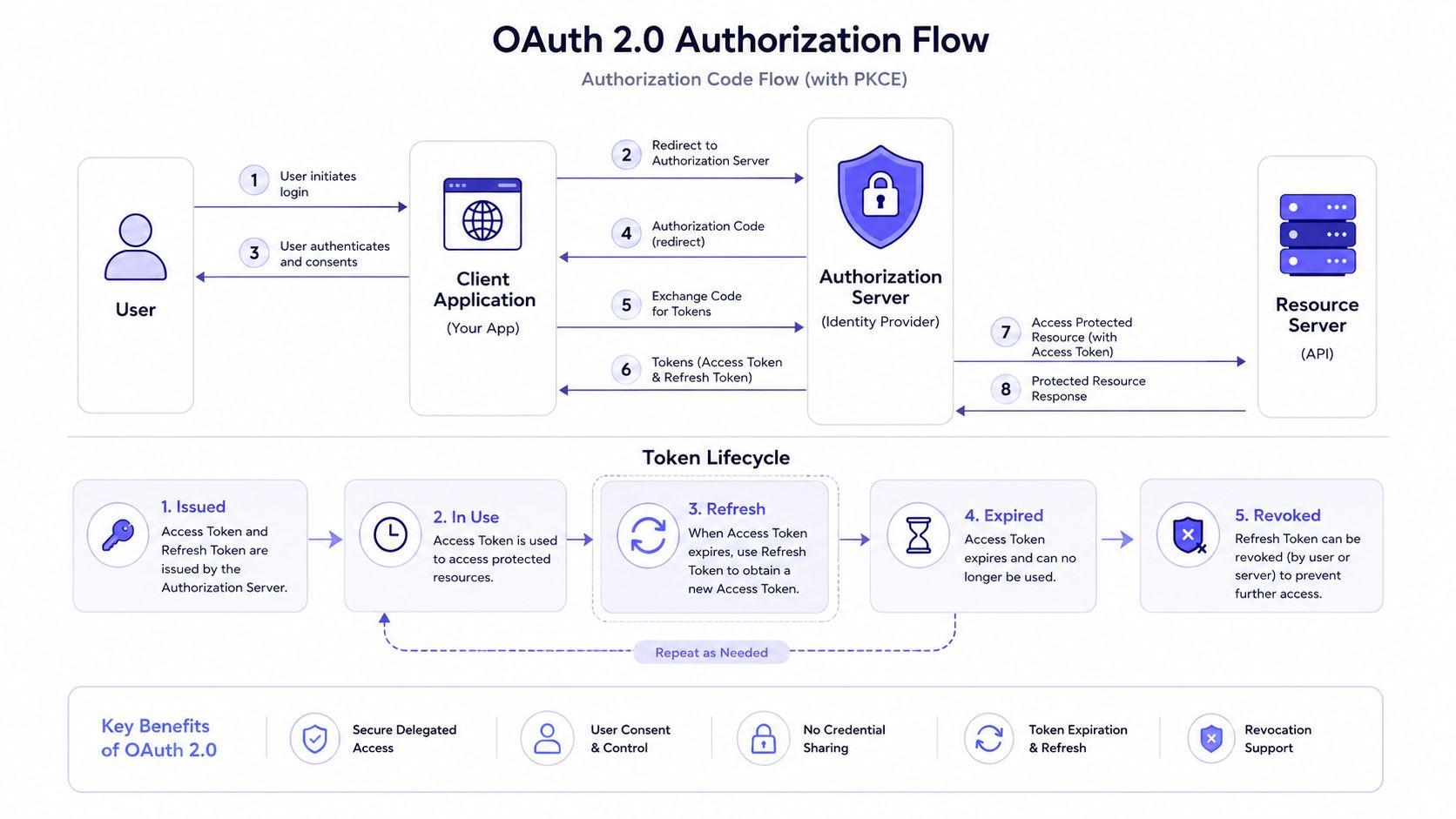 A diagram illustrating the OAuth 2.0 Authorization Code flow with PKCE, token lifecycle, and key security benefits.
The operational mistake is treating OAuth as a one-time login event. In a publishing app, consent is just the start, because the token has to survive scheduling delays, retry jobs, and downstream platform quirks. If your workflow depends on a refresh path, that refresh path needs to be monitored like any other production dependency.
What the lifecycle actually looks like
The clean way to think about it is simple. First, ask only for the scopes the workflow really needs. Then exchange the authorization result for the token type your app uses, store it with the same care you'd use for a signing key, and make the refresh logic predictable enough that support can tell whether a failure is timing, revocation, or missing scope.
Meta is the familiar cautionary example because the short-lived token most developers see first is only part of the story. The core work is in handling the upgrade path, keeping the refreshed credential alive, and knowing exactly which connected accounts depend on it. If you want a broader overview of auth choices around this, the internal guide on API authentication methods is a useful companion.
The revocation problem is where teams get surprised. Once a user disconnects an account or a consent grant is withdrawn, anything that depended on that grant has to fail clearly. That includes background jobs, scheduled publishes, and any downstream automation that assumed the permission would still be there tomorrow.
Operational rule: every token needs an owner, a refresh path, and an expiration story. If one of those is missing, the incident will show up later in support, not earlier in code review.
What to watch for in production
Scope creep is the quiet problem here. Teams add one more integration, then another, and the permission set becomes a pile of historical decisions that nobody wants to revisit. Refresh tokens also deserve the same seriousness as other long-lived secrets, because they let the system keep acting long after the original login moment is forgotten.
Video walkthroughs help when the flow is already familiar and you just need a visual check of the moving parts.
The cleanest systems treat OAuth as an ongoing maintenance surface, not a checkbox. That's the difference between a product that keeps publishing and one that wakes the on-call engineer every time a token ages out.
Least Privilege and the Audit That Actually Catches Things
Least privilege sounds obvious until you look at what teams grant. Microsoft's 2021 State of Cloud Permissions Risks Report said that more than 90% of identities were using less than 5% of permissions granted, while only <2% of permissions were used on average, based on risk assessments with 150+ organizations worldwide (Microsoft 2021 report). That wasn't a one-off anomaly, it was the shape of the problem.
By 2023, Microsoft was describing organizations with 40,000+ permissions across major cloud platforms, and more than 50% of those permissions were classified as high-risk because misuse could cause catastrophic damage. The same report said identities were using only 1% of granted permissions, over 60% of identities were inactive for the prior 90 days, and more than 50% of identities were super admins (Microsoft 2023 report). That's not a missing-access problem, that's an over-grant and never-clean-up problem.
What the audit has to inspect
A useful audit doesn't just ask who clicked the button. It asks who could have clicked it, which path the permission took, and whether that path still makes sense. That means reviewing effective access, not just assigned roles, because role reviews can miss direct grants, inherited group permissions, temporary access that became permanent, and broad-scoped tokens or API keys.
The checklist is straightforward enough to run without fancy tooling:
Inspect effective access: trace the permission path, not just the label on the role.
Time-box grants: give temporary access a real end date.
Remove unused permissions: don't wait for a breach to justify cleanup.
Log the decision path: keep the evidence needed to explain why access existed at all.
Review inactive identities: stale accounts and dormant service identities should not keep standing privilege.
If the audit can only prove who acted, it's half an audit. The harder question is who was in a position to act and should no longer be there.
The reason this matters in a publishing system is simple. A missed permission doesn't just break one API call, it can stall a release, expose the wrong tenant, or keep a dormant integration alive long after nobody remembers why it exists. Least privilege is not a design-time slogan, it's a cleanup habit with a security payoff.
Multi-Tenant and White-Label Permission Design
Single-tenant systems can get away with sloppy boundaries for a while. Multi-tenant systems can't. Once one deployment serves many customers, every permission bug turns into a potential cross-customer incident, which is a much uglier class of failure than a broken button.
IBM's TBM Studio permission model is a good concrete example of defense in depth because it separates report collection, report, component visibility, and row-level security for data (IBM docs). That layered structure is valuable because access is constrained independently at each level instead of depending on a single global role check to save the day.
What has to carry the tenant boundary
Tenant identity needs to travel through the full stack, from the API entry point to the policy engine to the data layer. If a tenant ID disappears in one hop, the rest of the system can make a perfectly valid authorization decision on the wrong object, which is the kind of bug that becomes a customer escalation very quickly.
That's why white-label products need boring, explicit isolation. The permission model has to decide whether the blast radius is data-level, schema-level, or policy-store-level, and it has to make that decision before the first integration goes live. For a broader product framing, the multi-tenant architecture guide is a good companion piece.
The white-label wrinkle is supportability. If end users never see the underlying platform, permission failures can't be shrugged off as “an internal detail.” The API has to tell the integrator enough to diagnose the problem without revealing another tenant's data or the exact internal policy shape.
Practical rule: in a white-label system, every denial message is a product decision. If it leaks too much, it's a data issue. If it says too little, it's a support issue.
That's also where observability matters. You want a clean split between what the integrator owns and what the platform owns, because those are different debugging surfaces. The fewer long-lived secrets the integrator keeps, the smaller their audit burden and the smaller your shared blast radius.
API Design Patterns That Keep Permissions From Leaking
Permission bugs often start as API shape bugs. If the request doesn't carry enough context, the server guesses. If the server guesses, the wrong tenant eventually gets involved. A good permissions-aware API makes the caller state its intent clearly and makes the authorization layer treat that intent as data, not folklore.
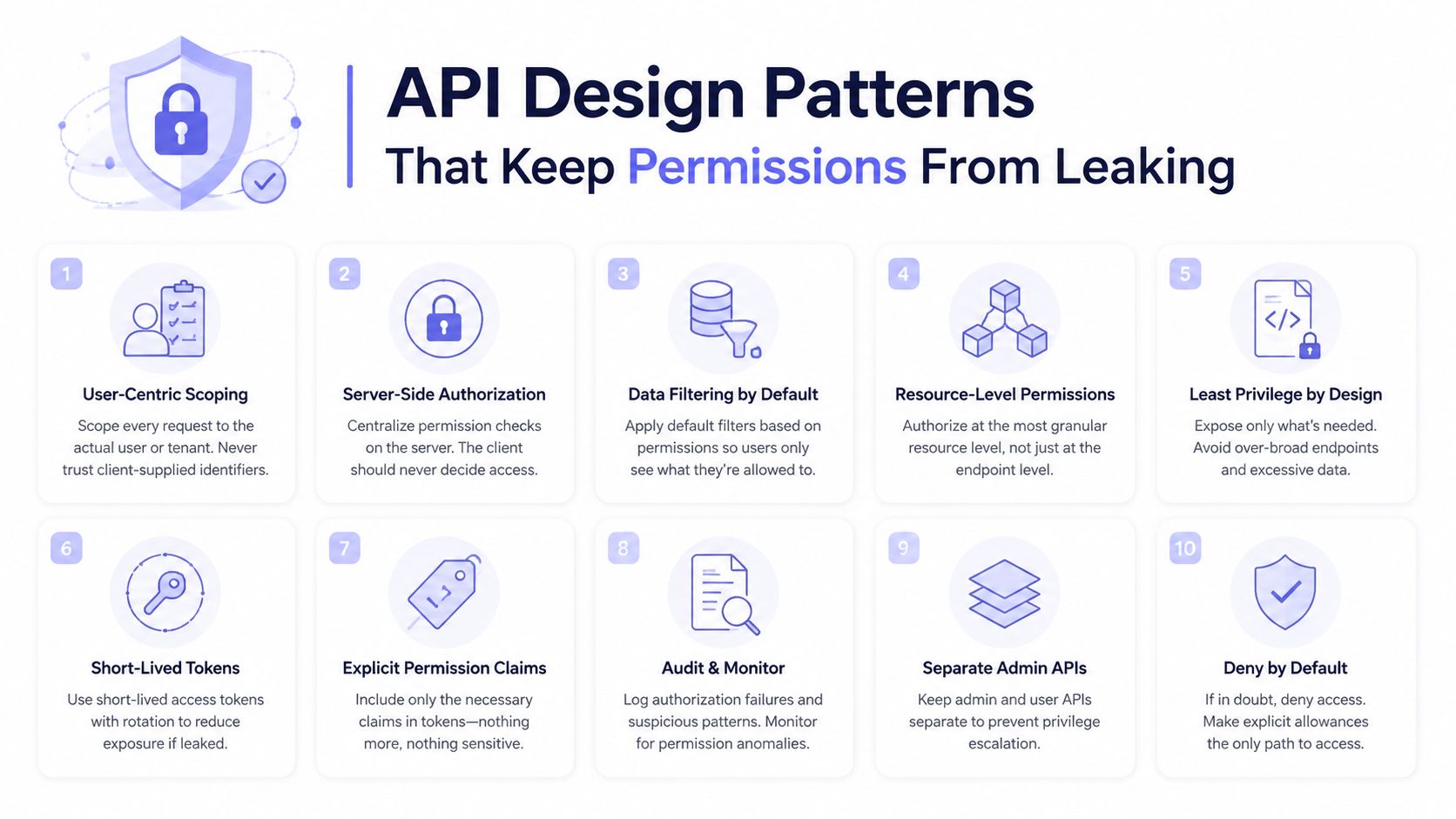 An infographic titled API Design Patterns That Keep Permissions From Leaking featuring ten essential security best practices.
Patterns that hold up under load
The first pattern is scope on every request, not scope inferred from whatever happened earlier in the session. The second is policy as data, because rules that live in code reviews and version control are much easier to audit than permissions embedded inside a controller branch. The third is deny by default, with explicit allow lists for the actions that need to exist.
That's also where architecture starts to matter. An academic design for scalable permission management describes storing permission relationships in an in-memory graph for fast evaluation while persisting the record in a BigTable-like NoSQL database for scale (arXiv paper). That pattern makes sense when low-latency authorization checks sit on a hot path and the access graph is large enough to punish naive lookups.
For API security habits around the rest of the stack, the best practices for API security guide is a useful companion. The point is the same here, keep the request explicit, keep the policy inspectable, and keep the default state closed.
The AI agent wrinkle
AI agents change the shape of this problem because they can request, chain, and accumulate permissions much faster than a human reviewer can comfortably inspect. That makes long-lived delegated access a bad default in a lot of workflows, especially when a task-scoped or time-bounded grant would do the job with less blast radius.
The right primitive is often narrower than old app consent models assumed. Think direct access only when the task needs it, delegated access when the human relationship matters, and task-scoped access when the agent should do one thing and then disappear. That's the difference between governable automation and scope drift with a chatbot attached.
Putting It Together in a White-Label Publishing Stack
A white-label social publishing stack is where all of this turns into product design. One integration publishes to ten platforms, the customer never sees your internal plumbing, and the permission model has to cover humans, automations, and agents without leaking tenant data or secret handling into the client app.
PostPulse fits that shape because it provides the verified Meta, TikTok, and Google apps, handles OAuth and refresh mechanics on behalf of the integrator, and exposes the flow through a REST API, official n8n and Make.com nodes, and an MCP server for AI agents. That means the integrator's permission story is mostly about their own tenant boundaries, billing attribution, and workflow access, while the platform carries the heavier token and review burden.
If you build this yourself, the hardest part isn't posting content. It's keeping the access surface small enough that your audit trail stays understandable when a client asks why a draft was visible, why a publish failed, or why one connected account can act across multiple workflows. The cleanest stack is the one where permissions are boring because the boundaries are obvious.
If you want a social publishing layer that keeps tokens, scopes, and multi-tenant access out of your core app, take a look at PostPulse. It's built for apps, automations, and AI agents that need to publish across multiple networks without carrying every platform integration themselves.
About the Author

Founder of PostPulse — a social media scheduling platform for creators and teams. Software engineer with a passion for building developer tools and simplifying complex API integrations across social media platforms.