
What Is White Label Software: A Developer's 2026 Guide
Published on
Tags:
You add what sounds like a small feature. Social publishing. Maybe approvals. Maybe a branded dashboard so your customers never leave your product.
Then the work fans out. OAuth flows break. Tokens expire at awkward times. Platform reviews eat calendar time. An API version changes and suddenly your support inbox gets the blame for behavior you don't control. The request wasn't “build a second company inside our company,” but that's where it goes if you're not careful.
That's why the core question usually isn't just what is white label software. It's whether licensing an existing product is the sane move when a feature starts dragging your team away from the thing you sell.
Table of Contents
The Feature Request That Spirals Out of Control
A lot of engineering pain starts with a harmless sentence in Slack.
“Can we add social posting?” “Can clients see it under our brand?” “Can approvals happen in-app?”
None of that sounds outrageous. The trap is that the visible feature is small, but the invisible system behind it isn't. You're not just adding a composer and a publish button. You're inheriting authentication flows, account permissions, provider-specific quirks, retry logic, audit requirements, support playbooks, and long-term maintenance for integrations you didn't plan to own.
I've seen teams estimate this kind of request as “an integration sprint” and discover it's really a new product surface with its own operational burden. The code isn't even the hardest part. The hard part is carrying the feature after launch, when customers expect it to work every day and your team becomes the first line of support for somebody else's API behavior.
Practical rule: If the feature depends on another company's platform rules, you're not estimating a build. You're estimating a maintenance contract with reality.
White label software proves interesting. Not as a buzzword. As an escape hatch. Instead of building the whole stack, you license software from a vendor, rebrand it, and offer it inside your own product or service. Your customers see your brand. The vendor handles the underlying system.
That doesn't mean white label is automatically the right answer. Some teams really should build. But when the feature request starts pulling engineers into endless support for edge cases outside the roadmap, it's usually time to get disciplined about scope. The same thinking behind mastering project scope creep applies here. You need to separate “what customers want to do” from “what your company needs to own.”
Understanding The White Label Model
White-label software is defined as a product developed by one company (the vendor) and licensed to resellers who can rebrand, customize, and deploy it to their own customers as if it were their own product, with the end user having no visibility into the underlying platform's creator (Noloco glossary on white-label software).
That definition matters because people use “white label,” “reseller,” and “OEM” as if they mean the same thing. They don't.
A simple way to think about it
Use the bakery analogy. One bakery makes the bread. A café buys it, puts it in its own branded bag, and sells it under the café's identity. The customer interacts with the café, not the bakery.
Software works the same way. The vendor builds and maintains the product. The reseller puts its own brand on top and delivers it as part of its own offering. In practice, that often means custom domains, branded emails, customer-facing dashboards, client portals, and UI customization.
The appeal is obvious. You skip the deepest engineering work while still shipping a feature that appears native to your customers.
If you want another practical breakdown from a SaaS angle, Refgrow has a useful piece on white labeling for SaaS businesses that's worth reading alongside this one.
Where people get confused
The confusion usually comes from who owns the product experience and who the end user thinks the vendor is.
Model | Branding Control | Customization | Who is the Vendor to End User? |
White Label | High. Reseller presents the product under its own brand | Usually moderate to high, depending on vendor controls | The reseller |
Private Label | High, often tailored for one buyer or a narrow group | Often deeper, sometimes more exclusive | The buyer's brand |
OEM | Limited customer-facing branding emphasis | Usually technical embedding or component-level integration | Often the product maker or an embedded partnership |
Reseller | Low to moderate | Usually limited | The original vendor is still visible |
White label sits in a specific middle ground. It's not full custom software. It's not simple affiliate resale either. You're buying speed and branded distribution, but within the boundaries of someone else's platform.
A logo swap isn't the same as a white-label product. If users keep seeing the underlying vendor in URLs, emails, or support flows, you're closer to resale than true white label.
That distinction matters when legal, support, and customer trust enter the picture. If customers think the software is yours, they'll expect your team to answer for uptime, bugs, and policy changes. That can be fine, but only if the vendor relationship is strong enough to support the promise your brand is making.
The Business Case Benefits and Hidden Risks
A white-label feature usually looks cheap in the kickoff meeting. Then support asks who owns incidents, finance asks how usage is billed, and engineering realizes every upstream API change can become your outage. That is the business case in full. Faster launch, plus a new layer of operational dependency.
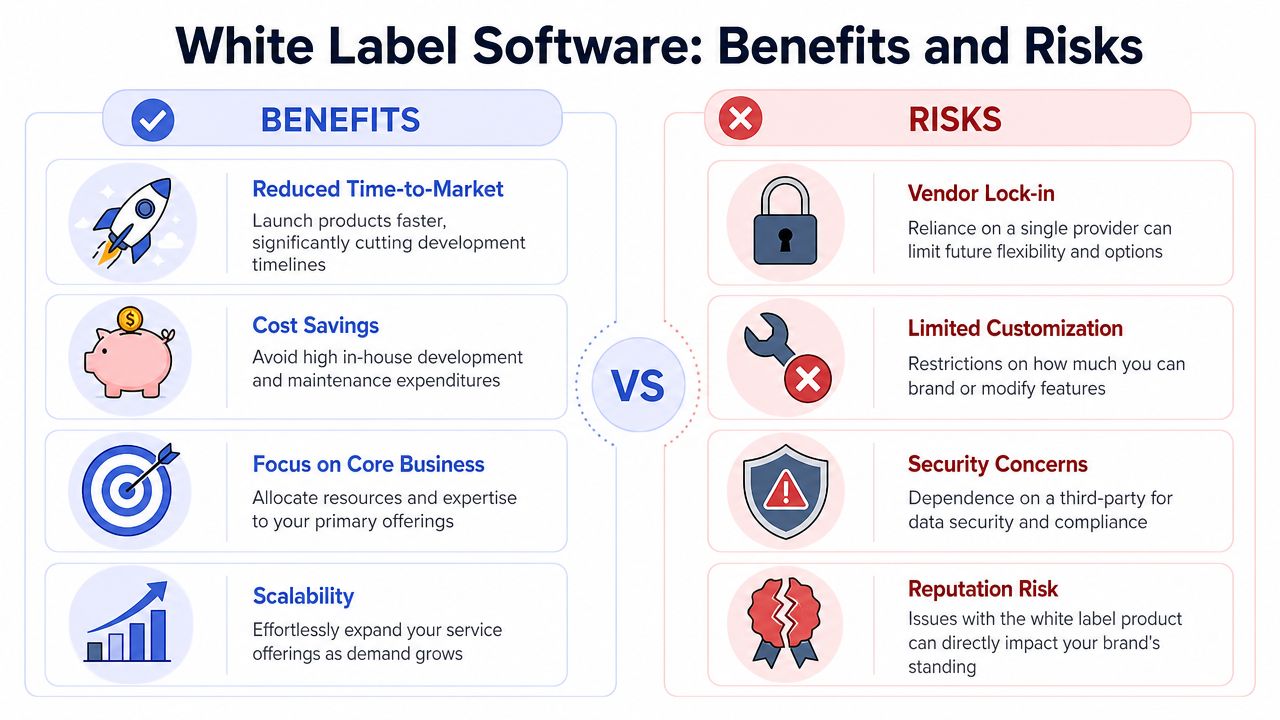 A comparison infographic showing the key benefits and potential risks of using white label software solutions.
Why teams license instead of build
Teams license white-label software for one practical reason. Shipping a commodity feature from scratch ties up engineers on infrastructure, edge cases, admin tooling, billing hooks, and maintenance work that customers may never notice.
That trade can be rational. If messaging, scheduling, payroll, forms, analytics, or onboarding is not the product advantage, licensing can protect roadmap capacity for the parts customers pay you for. It can also reduce the time between feature request and launch enough to win deals that would otherwise stall.
The margin story is also attractive for agencies and service firms. Reselling a working product under your own brand can create room between vendor cost and client price, especially when the buyer wants one invoice and one support contact instead of another software contract.
A short video helps frame the trade-offs before teams confuse speed with simplicity.
The operational risk most guides skip
The hidden burden starts after launch.
White-label software shifts build work to a vendor, but it does not remove accountability from your team. Your brand is still on the login screen, the invoice, the support email, and the renewal conversation. If the provider misses an API change, rate-limit update, webhook failure, or OAuth policy revision, your customers blame you first.
That risk is easy to underestimate because vendor pricing pages focus on setup speed, feature count, and rebranding controls. They spend less time on what happens when upstream platforms change behavior every few weeks. Social, payments, identity, email, and ad platforms all do this. A provider with weak release management can turn a licensed feature into a steady stream of support tickets.
The vendor relationship needs to be evaluated like an operational dependency, not a design choice. Review their API docs the same way you would review an internal platform. Ask for versioning policy, deprecation notice periods, incident communication flow, and rollback options. If their answers are vague, read their public docs before signing, including any developer references such as these API documentation examples for integration review.
A few questions expose the risk quickly:
Who patches upstream breakage first? Ask for a named SLA or response window for API and OAuth changes.
How are incidents communicated? Email after the fact is not enough if your support team faces customers in real time.
What does pricing track? Seats, tenants, API calls, contacts, messages, storage, and support tiers can all grow at different rates.
What happens on overages? Sudden per-event billing can erase the margin that made white label attractive in the first place.
How portable is the data? If you need to leave, exports should be documented, complete, and usable.
Many teams encounter a common trap. The base subscription looks low, but the operating model is not. One provider may charge per tenant, another per active user, another per event volume, and another for branding, sandbox access, or priority support. Procurement sees one line item. Engineering inherits the integration limits.
The security and trust layer
Security risk is part of the business case too, because your brand absorbs the fallout from mistakes you do not directly control.
A vendor should be able to explain tenant isolation, encryption at rest and in transit, key management, audit logging, file validation, and how they review third-party dependencies. Branding controls matter here as well. If a platform says it supports white label, check what can be changed in practice, including hosted form pages, emails, and footer treatment in resources like the Static Forms branding documentation.
Trust breaks in small ways before it breaks in public. A stray vendor domain in a password reset email, a support portal with another company's logo, or an unexplained permission prompt can make customers question who is handling their data. Those details affect retention as much as feature depth.
White label can still be the right call. License the feature when it is adjacent to your core product, when the vendor has a clear operating model, and when the support burden is cheaper than owning the stack. Build it yourself when API volatility is high, compliance obligations are strict, or the pricing model gets harder to predict as you scale.
Implementation and Integration Considerations
Senior engineers typically make or save money based on key considerations. The vendor demo looks polished. The reseller pitch sounds easy. The only thing that matters now is whether the integration is clean, supportable, and survivable.
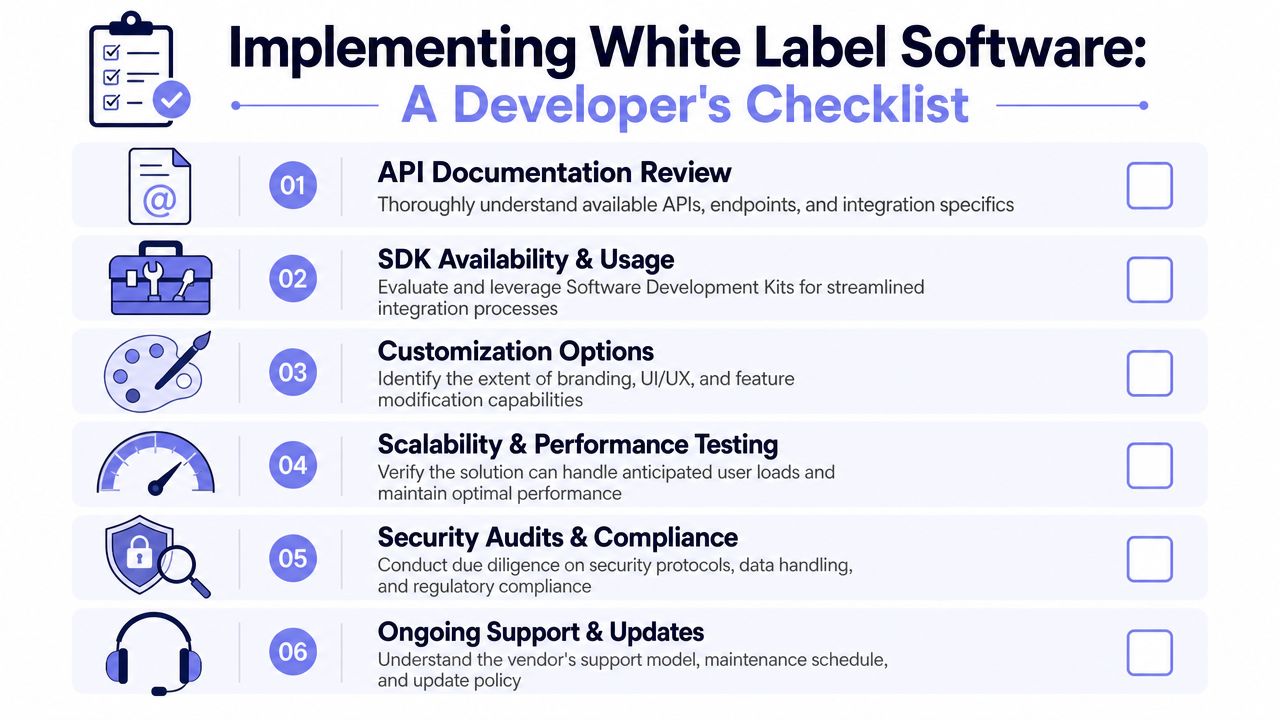 A professional checklist outlining six essential steps for developers when implementing white label software solutions.
API and architecture questions first
A white-label platform has to separate shared logic from tenant-specific state. That isn't optional if you want scale. White-label software requires a stateless, microservices-oriented architecture to isolate core services from tenant-specific configurations, ensuring horizontal scalability and preventing performance spikes from noisy neighbors in a shared environment. This mandates a design where tenant data and branding are managed via a robust metadata layer (Developex on scalable white-label SaaS architecture).
That sounds abstract, but the review questions are practical:
Ask for API boundaries. Can you tell what's core product behavior versus tenant configuration?
Check tenant handling. How does the platform know which brand, user role, and asset set to apply on each request?
Review docs before sales calls. If the API docs are vague, the integration will be worse than the demo.
A provider that exposes clear documentation is already doing half the trust-building work. If you're evaluating social publishing specifically, reviewing the PostPulse API documentation is the kind of concrete step I'd take early, because docs quality usually predicts integration quality.
Good white-label APIs make tenant identity explicit. Bad ones hide it behind support tickets and manual setup.
Branding that goes beyond a logo swap
Many vendors say “custom branding” when they mean “upload your logo and pick a color.” That's cosmetic. Real white label usually needs more.
CloudCampaign's guidance on selecting white-label software is useful here. It recommends checking whether the product supports only basic logo changes or deeper UI customization, custom domains, branded email templates, and a user experience that matches your own brand personality (CloudCampaign on choosing white-label software).
That's also how I'd separate strong vendors from weak ones:
Check | Weak implementation | Strong implementation |
Brand control | Logo only | Domain, emails, UI elements, workspace branding |
UX consistency | Vendor patterns leak through | Native-looking flow under your product identity |
Multi-tenant setup | Manual one-off changes | Centralized metadata and admin controls |
If you want a simple example of what branding controls should look like in documentation, the Static Forms branding documentation is a nice reference point. It shows the difference between “branding exists” and “branding is specified and operationalized.”
Support contracts and exit paths
The integration work isn't finished when the API call succeeds.
You need to know who supports whom. If an end user gets a publishing failure, does your support team diagnose it first? Can the vendor give you tenant-specific logs? How quickly do they respond when a bug only affects one branded workspace?
Legal and licensing questions are just as important:
Data ownership: If the relationship ends, how do you export customer data?
Termination terms: Can the vendor change its white-label policy or pricing model abruptly?
Continuity risk: What happens if the provider is acquired, sunsets the feature, or changes roadmap priorities?
The vendor's partner model matters here too. A reliable white-label provider should have white-label-specific support, responsiveness to feature requests, and enough business stability that your service model won't get wrecked by a sudden change upstream. That's part of the evaluation criteria called out by CloudCampaign in the source above.
White Labeling in Action Real World Use Cases
White label software makes more sense when you look at the jobs teams are trying to avoid.
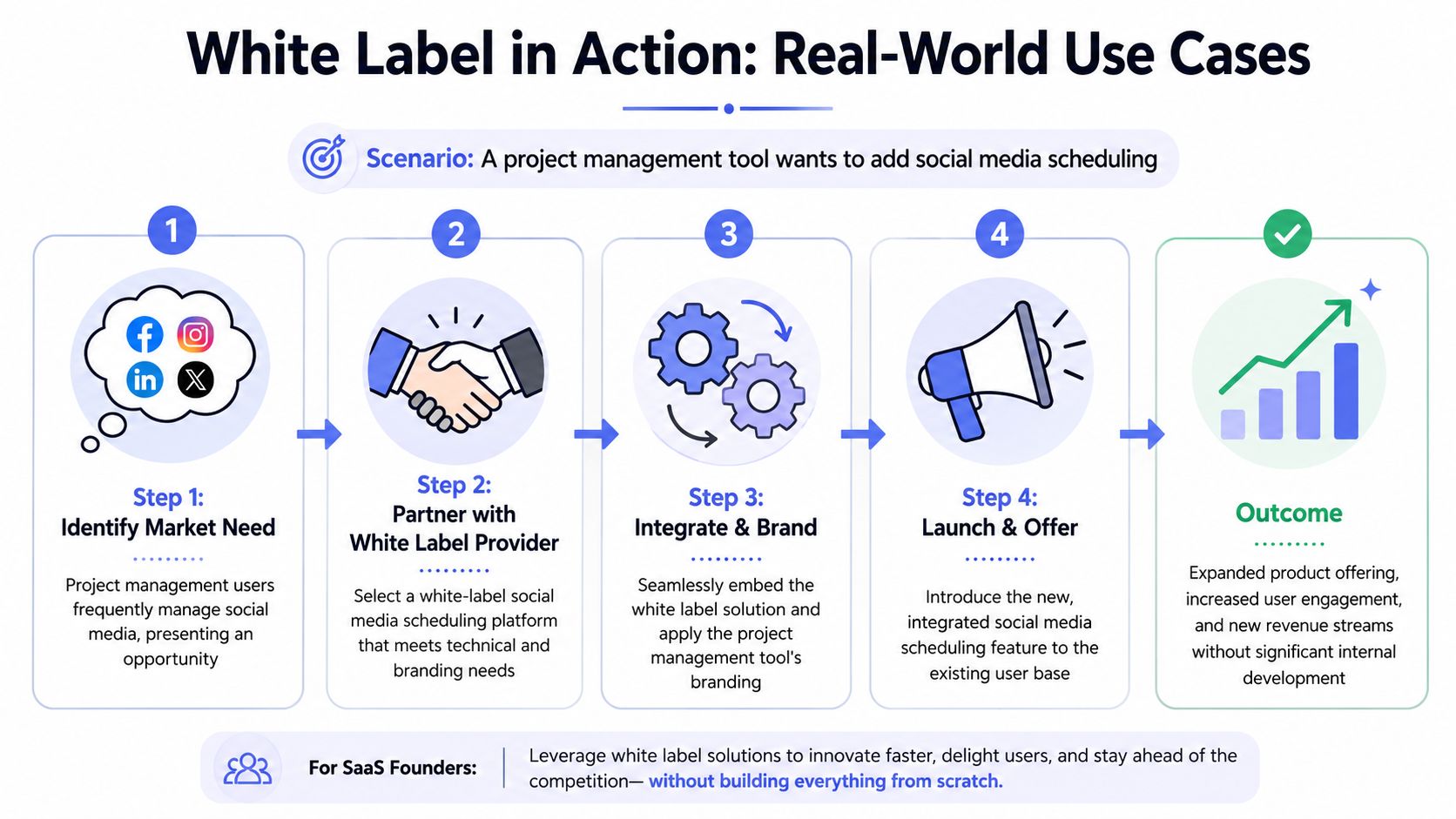 A diagram illustrating the four-step process for implementing a white label software solution in a business.
A SaaS team shipping a missing feature
A project management company sees the same support request every week. Customers plan campaigns in one tool, then leave to publish somewhere else. Adding social scheduling looks like a straightforward feature until engineering starts listing the actual work: network APIs, token expiry, rate limits, webhook failures, audit logs, and support cases that only appear after launch.
That is a classic white-label decision. The team licenses publishing, sells it under its own premium tier, and keeps its own developers focused on planning, approvals, and reporting. The gain is not just speed. It is avoiding a new operational surface area that would need constant maintenance.
The trade-off is real. The company now depends on a vendor for API coverage and platform changes. If LinkedIn or Meta changes a publishing rule, the vendor becomes part of the incident path. For a team whose product value lives in workflow, that is often still the right call.
An AI agent builder avoiding platform plumbing
An AI agent that writes posts still needs a reliable way to publish them.
A lot of teams underestimate what "reliable" means here. It means handling retries without duplicate posts, refreshing expired credentials, surfacing channel-specific errors in a way support can understand, and keeping up when upstream APIs change behavior without much notice. That work can consume a roadmap fast.
So the smarter move is often to buy the distribution layer and keep building the part customers are paying for. If the product's edge is generation, planning, or orchestration, publishing infrastructure is usually a dependency, not the differentiator. Teams evaluating that model can look at this white-label social media management approach as an example of how publishing can live inside another product instead of sending users to a separate app.
A no-code agency keeping the client experience native
A no-code agency has a different problem. It is not trying to build a SaaS platform from scratch. It is trying to keep client delivery clean.
The agency already runs approvals and dashboards in Make.com. The moment a client gets pushed into a third-party tool with another logo, another login, and different terminology, the service feels patched together. White label fixes that packaging issue and reduces training overhead at the same time.
There is still hidden work. The agency has to test each client setup, document what the embedded feature can and cannot do, and account for pricing models that bill by workspace, user, active brand, or publish volume. Those details matter more in agency environments because small per-client charges can stack up fast.
The pattern behind these examples
The common thread is simple. White label works best when the feature is necessary but not where your team should spend its engineering budget.
It shows up in SaaS, agencies, HR systems, fintech tools, and internal platforms for the same reason. The buyer wants one branded product experience. The seller wants to avoid owning a messy layer of integrations that changes every quarter. Used well, white label software is less about cosmetics and more about refusing to inherit an entire maintenance category just to close one feature gap.
Evaluating Providers and Understanding the Real Cost
You don't choose a white-label vendor on feature lists alone. You choose one on whether it reduces work after launch.
A provider checklist that actually matters
I'd evaluate providers in this order:
Reliability first: Can the vendor explain uptime practices, incident handling, and tenant-specific debugging?
Customization depth: Is this true white label or just light rebranding?
Support model: Do they offer partner support that matches the promise your brand makes to customers?
Business stability: Could a roadmap shift, pricing change, or business-model change break your service layer?
Data and contract terms: Can you leave cleanly if the relationship stops working?
That last point gets ignored too often. The best white-label decision is reversible. If you can't migrate off the provider without chaos, you haven't bought speed. You've bought a future constraint.
Why pricing surprises happen in beta
Pricing is where a lot of indie teams get burned because “white label” often gets described as a flat monthly fee when the billing logic is more specific.
The Startup Support paradox in white-label pricing models is frequently misunderstood. Most guides do not clarify that costs are often usage-based ($1 per active account) where active means publishing at least one post. This creates a hidden cost trap for users in beta testing, where testing can be indistinguishable from production in the vendor's billing logic (EPAM SolutionsHub on white-label pricing traps).
That one definition changes your forecast. Connected-but-idle accounts may cost nothing in a usage-based model, while test accounts that publish can start generating charges immediately.
This matters a lot for automations and AI systems, because test runs often look exactly like production events from the vendor's perspective. If your workflow auto-posts during QA, you may be triggering “active” billing before you think you've launched.
For a concrete example, review a provider page like the PostPulse white-label social media API and map its billing terms against your test plan, not just your launch plan. The right question isn't “what's the monthly fee?” It's “what event flips an account into billable usage?”
If you're weighing build versus buy for social publishing, PostPulse is worth a look. It's built for apps, automations, and AI agents that need one publishing layer across multiple platforms, and it supports both private-label and fully white-label setups. The practical appeal is simple. You can ship the feature under your own brand without turning OAuth, token refresh, and upstream API maintenance into a permanent side mission for your team.
About the Author

Founder of PostPulse — a social media scheduling platform for creators and teams. Software engineer with a passion for building developer tools and simplifying complex API integrations across social media platforms.