What Is Workflow Automation: A 2026 Guide
Published on · Updated on
Tags:
You know the feeling. A workflow looks perfect in staging, the token is fresh, the test post lands everywhere, and then production decides to humble you at 2 AM. One API returns a timeout, another one keeps a job in progress forever, and the retry you assumed would fire never does.
That's usually the moment people stop treating workflow automation like a nice-to-have and start treating it like infrastructure. What is workflow automation at that point? It's not a fancy synonym for scripts. It's the governed layer that routes work, data, and decisions between systems using predefined rules, triggers, retries, and state so the process still makes sense when one service misbehaves. If you want a useful primer before the deeper stuff, workflow automation basics is a solid starting point.
Table of Contents
The Automation Chain That Broke at 2 AM
The failure mode is usually predictable. A developer wires together a content queue, a publishing API, and a notification step, tests it a few times, and ships it. Then an access token expires, a downstream service changes a field, or the workflow engine drops the execution context after the first step, and the whole chain goes quiet.
That silence is what separates a script from a real workflow system. A script can send a request, loop over items, or move a file. A workflow automation system persists state, tracks where a run is in the process, handles retries, and emits telemetry so you can see what happened instead of guessing.
Practical rule: if a process needs ordering, auditability, and recovery after partial failure, it is a workflow problem, not a scripting problem.
Orchestration is the useful mental model here. Workflow automation coordinates triggers, state, branching logic, authorization, retries, and compensation across services instead of relying on ad hoc point-to-point glue, which keeps the process understandable when multiple systems are involved. A macro only knows the next step, a governed engine knows the process history.
That difference gets painful fast in social publishing and AI agent integrations. One expired token can break a scheduled post, an agent handoff can fail after the first tool call, and a retry without idempotency can duplicate the same update across channels. Teams that route calls through an API proxy service usually do it to centralize auth, token refresh, and request shaping before the workflow touches the external platform. workflow automation basics only matter once the plumbing has to survive those failures in production.
The broader market reflects that shift, without needing the full sales pitch. Teams keep buying workflow tools because operations, product, finance, support, and engineering all need repeatable work that keeps moving without constant manual intervention.
The same pattern shows up in enterprise adoption. 67% of organizations worldwide now use business process automation in at least one function, up from 57% two years earlier, and 60% of organizations achieve ROI within 12 months (Kissflow). Those numbers make sense if you have ever had to babysit a flaky API chain. Once the process touches multiple systems, workflow automation stops being optional plumbing and becomes the thing that keeps the process recoverable.
How Triggers, Conditions, and Actions Actually Work
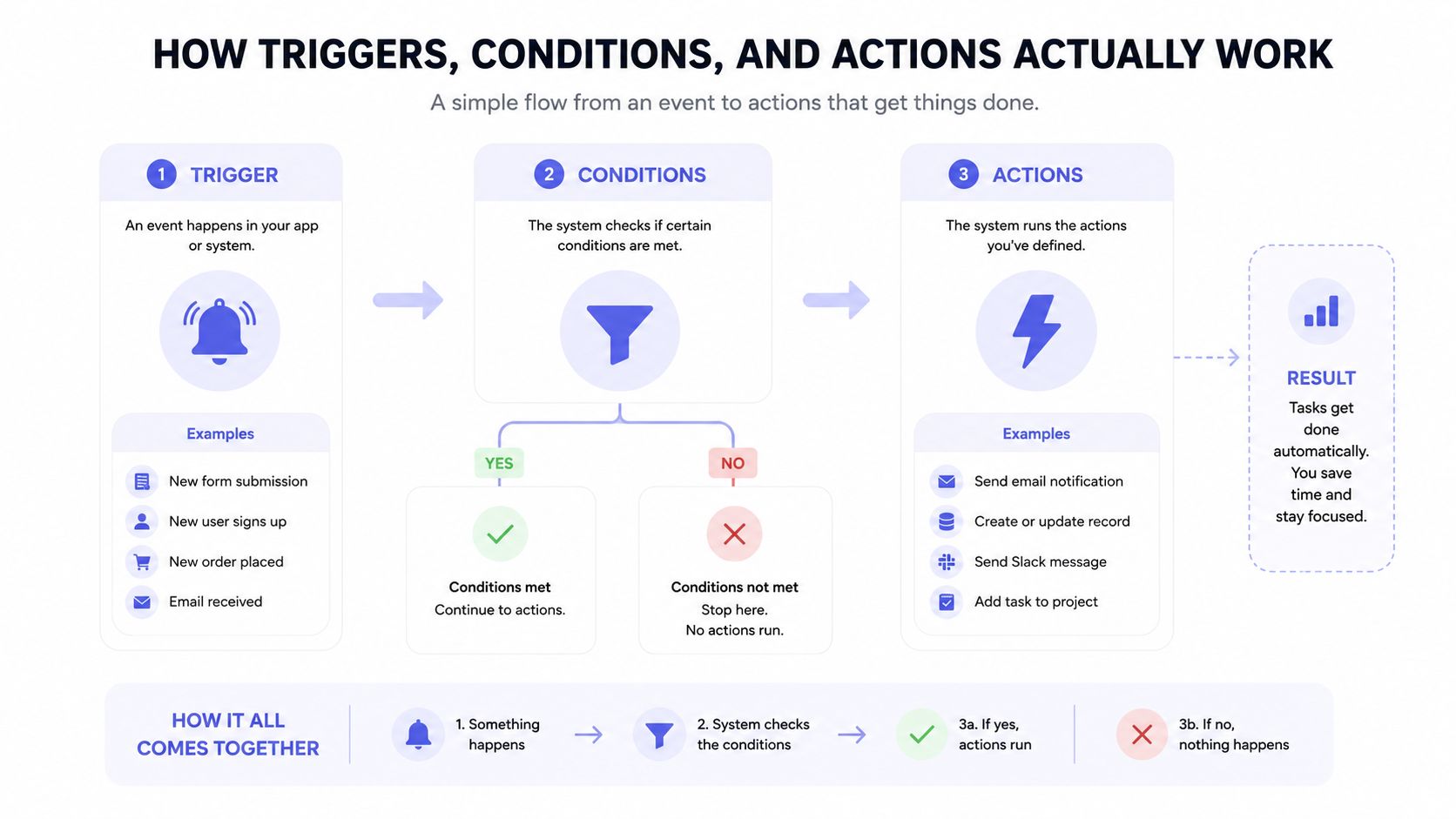 A diagram explaining workflow automation using three steps: triggers, conditions, and actions to complete tasks.
The simplest workflow engine is built from three parts: trigger, condition, and action. Zoho describes the pattern directly as, “When something happens (trigger) -> Do this (action),” and Paycor adds the rule layer with triggers, actions, rules, and logic (Zoho Flow). In practice, that means you can start a workflow from an API call, a schedule, or a record change, then branch based on business data before doing the actual work.
A social publishing example that actually holds up
Say a new blog post lands in Airtable. That record change is the trigger. The workflow then checks whether the post is tagged for LinkedIn, Instagram, or TikTok, which is the condition layer. If the post is a short video, the action might publish to a video-first channel first, then queue the text version for a professional network, then send a confirmation to Slack or email.
That is very different from a brittle script. A real engine persists execution context, so if the Instagram step fails after the LinkedIn step succeeds, the system can retry the failed step and keep the earlier success recorded. The architecture described in the workflow automation literature also includes observability and compensation logic, which means failed steps are visible, retryable, and, when necessary, reversible before the run is marked complete or failed (AIOps School).
The useful question isn't “can this be automated?” It's “what state do I need to keep so I can recover when a downstream service flinches?”
A technical detail developers care about is data mapping. Rework's workflow overview treats the core as trigger, condition, and action, then adds centralized monitoring so missing data, API limits, or failed tasks surface instead of breaking without notice (Rework). That matters in social publishing because one platform may need a title field, another may need a caption, and another may need media metadata. If the mapping is sloppy, the run might look successful while half the payload is malformed.
For a no-code perspective on how this looks in builders like n8n or Make.com, what is no-code automation is a useful companion read. The structure stays the same whether you're dragging blocks or writing code. Only the interface changes.
Benefits and Hidden Maintenance Costs
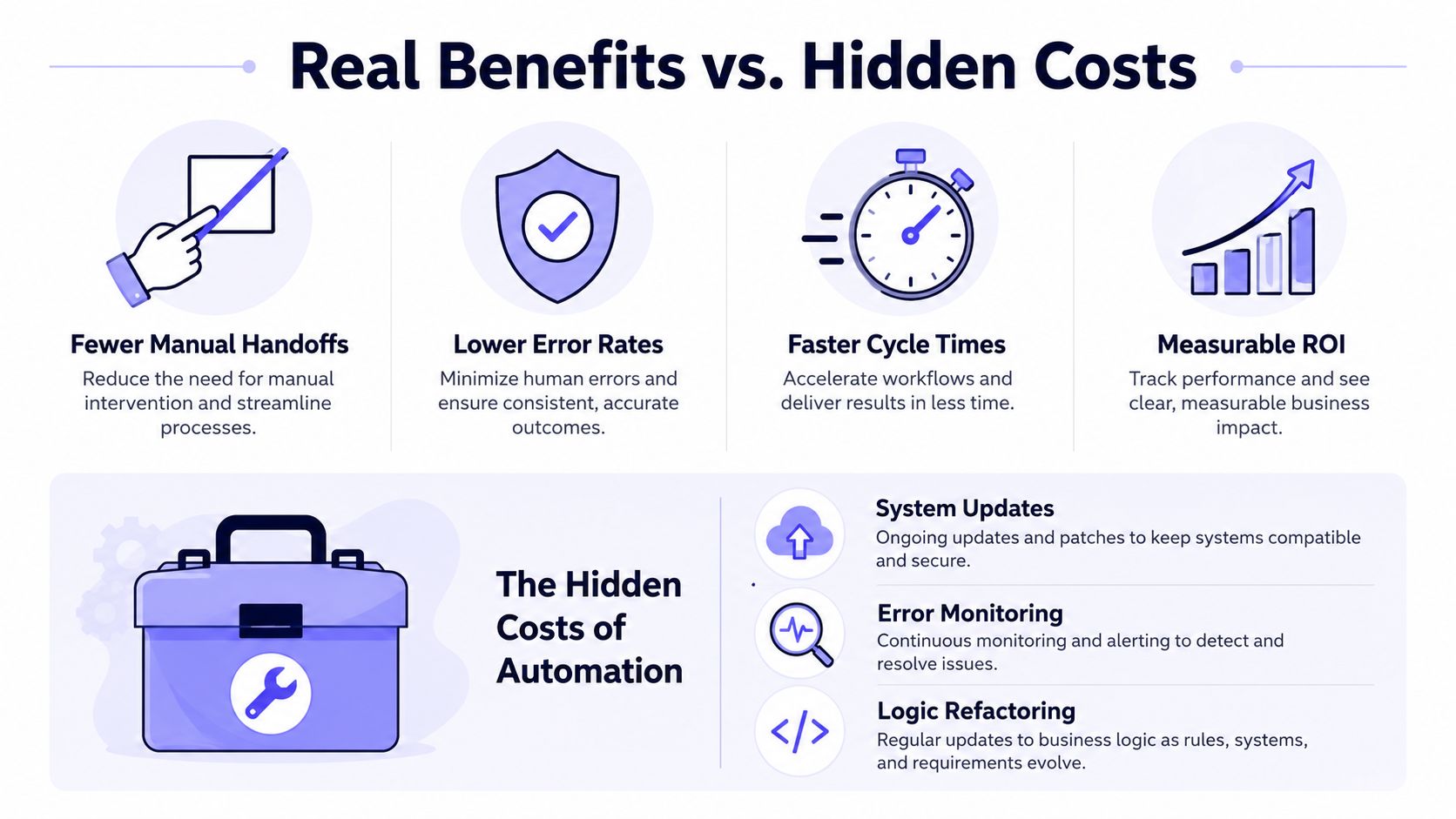 An infographic comparing the real benefits of automation like efficiency against its hidden operational maintenance costs.
The obvious wins are real. Workflow automation cuts manual handoffs, reduces errors, and shortens cycle times because software follows the same rules every time. That matters in social publishing and AI agent workflows, where one missed field, one stale token, or one skipped approval can turn a simple run into a cleanup job.
The business case is easy to understand. Teams get less copy-paste work, fewer rework loops, and fewer fragile handoffs between systems. Industry summaries from Mordor Intelligence point to those same gains, which helps explain why automation keeps spreading beyond IT and into core operations.
Why the ROI story holds up
Adoption figures from Kissflow show why operators pay attention. Their summary says 67% of organizations use business process automation in at least one function, 60% see ROI within 12 months, and automated processes can improve productivity by 25% to 30%. Those are the kinds of outcomes teams feel immediately, less waiting, fewer status pings, and fewer people copying the same data into different tools.
A workflow that removes approval chasing, notification sending, and record duplication saves real time because it standardizes the repetitive parts of the process. That is why automation shows up first in back-office work and then spreads into customer-facing operations, content pipelines, and AI-assisted internal tools.
What generic explainers leave out
The maintenance burden is where many teams get surprised. Every workflow that depends on APIs, rules, and external services has to survive version changes, auth churn, edge cases, and shifts in user behavior. Elementum calls out the need to test for bottlenecks, silos, and data leaks, and to keep training and communication active after launch instead of treating rollout as a one-time event.
That cost does not stop at deployment. You keep paying in monitoring, exception handling, integration drift, and logic updates as platforms change. If you have ever had to fix a social publishing flow after a downstream field changed or a token policy shifted, that cost is not abstract, it is the thing that makes automation either dependable or brittle.
The practical takeaway is straightforward. Automate the repeatable parts, but budget for the work of keeping them trustworthy. A workflow only stays efficient if someone still understands how it behaves when the services around it change.
Static vs Dynamic Workflows and When to Keep Humans in the Loop
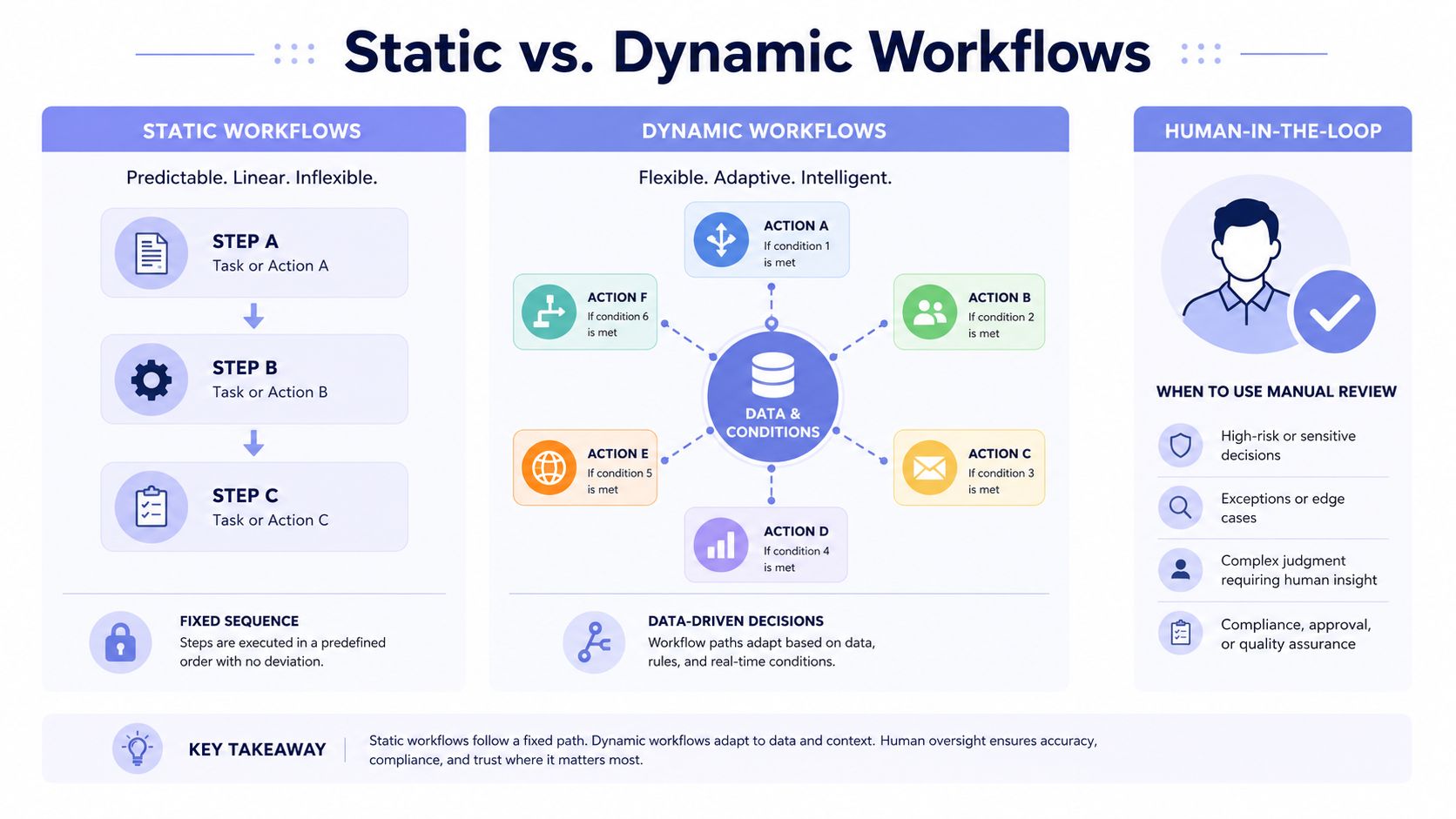 An infographic comparing linear static workflows with adaptive dynamic workflows and manual human-in-the-loop review processes.
Static workflows follow a fixed path. Dynamic workflows let software choose the next step based on conditions and data. ServiceNow draws that distinction clearly, workflow automation can coordinate tasks, data routing, and decision-making across the whole process, while SolarWinds separates static flows from dynamic ones where conditions decide the next step (ServiceNow).
Where static works and where it doesn't
A static flow is fine when every run should behave the same way, like a fixed approval chain. It's predictable, easy to reason about, and simple to audit. The problem starts when business rules change depending on media type, channel, audience segment, or a platform-specific constraint.
Dynamic workflows handle that variability better because the engine makes branching decisions from data. In content publishing, that could mean one path for a plain text post, another for a short video, and another for a carousel with extra validation. The software doesn't need a person to decide every branch, it just needs clean rules and good inputs.
Keep humans in the loop when the work is sparse, ambiguous, or high-cognition. That's usually cheaper than forcing full automation onto a process that changes every time someone touches it.
IBM's workflow guidance is the sharpest version of that nuance. Tasks with shifting responsibilities, infrequent repetition, or high human cognition are poor fits for full automation, while high-ROI workflows tend to be high-frequency, rules-heavy, multi-system, and high-SLA-risk (IBM). That distinction saves teams from automating the wrong part of the process.
For exception-heavy work, the design question is where escalation should happen. If a workflow hits missing data, a policy conflict, or a failed approval, it shouldn't keep guessing. It should stop, flag the issue, and hand the decision back to a person who can resolve it quickly.
That's the middle ground teams need. Semi-automation often beats full automation when the edge cases are expensive or the decision quality matters more than raw speed.
Real-World Workflows for Social Publishing and AI Agents
A no-code builder usually starts simple. Someone connects Airtable to n8n or Make.com, schedules a daily post, and maps a caption field into a social publishing action. That works until the workflow needs platform-specific media rules, token refreshes, or a reliable way to know whether the post made it out the door.
An AI agent changes the shape of the problem, not the problem itself. If the agent can draft content, choose the target channel, and publish autonomously, it still needs a governed publishing surface underneath it. AI social media agent setups live or die on the same basics as any other automation, clean triggers, reliable state, and a way to handle failure without the entire chain collapsing.
Where the pain shows up first
Social APIs are full of small traps. OAuth tokens expire, platform review processes drag on, carousel containers can stall in progress, and rate limits can shift without warning. If you integrate each platform separately, every one of those quirks becomes your problem to debug, document, and keep current.
That's why unified publishing layers exist. PostPulse is one option in that space for developers, no-code builders, and AI agent systems that need to publish through one REST API, official n8n and Make.com nodes, or an MCP server, while also supporting white-label and private-label setups. It covers Instagram, TikTok, YouTube, LinkedIn, X, Threads, Bluesky, Facebook Pages, Telegram, and Pinterest, which means one integration can fan out to 10 platforms without rebuilding the auth and publishing logic for each one.
The time sink is rarely the post request itself. It's the upkeep around tokens, retries, and platform-specific behavior that turns “done” into “almost working.”
For app developers, the upside is straightforward. If social publishing is part of your product, you can expose it as a branded feature instead of sending customers into a patchwork of separate platform flows. For AI builders, the win is that an agent can act through a stable publishing interface instead of juggling multiple OAuth implementations. For no-code users, the workflow stays visual and less fragile.
The practical difference is speed. Teams spend less time on platform audits, token handling, and version drift, and more time shipping the actual product logic. That's the core value of workflow automation in this space, not the diagram, but the fact that one reliable surface can absorb a lot of messy integration work.
Implementation Checklist for Reliable Workflow Automation
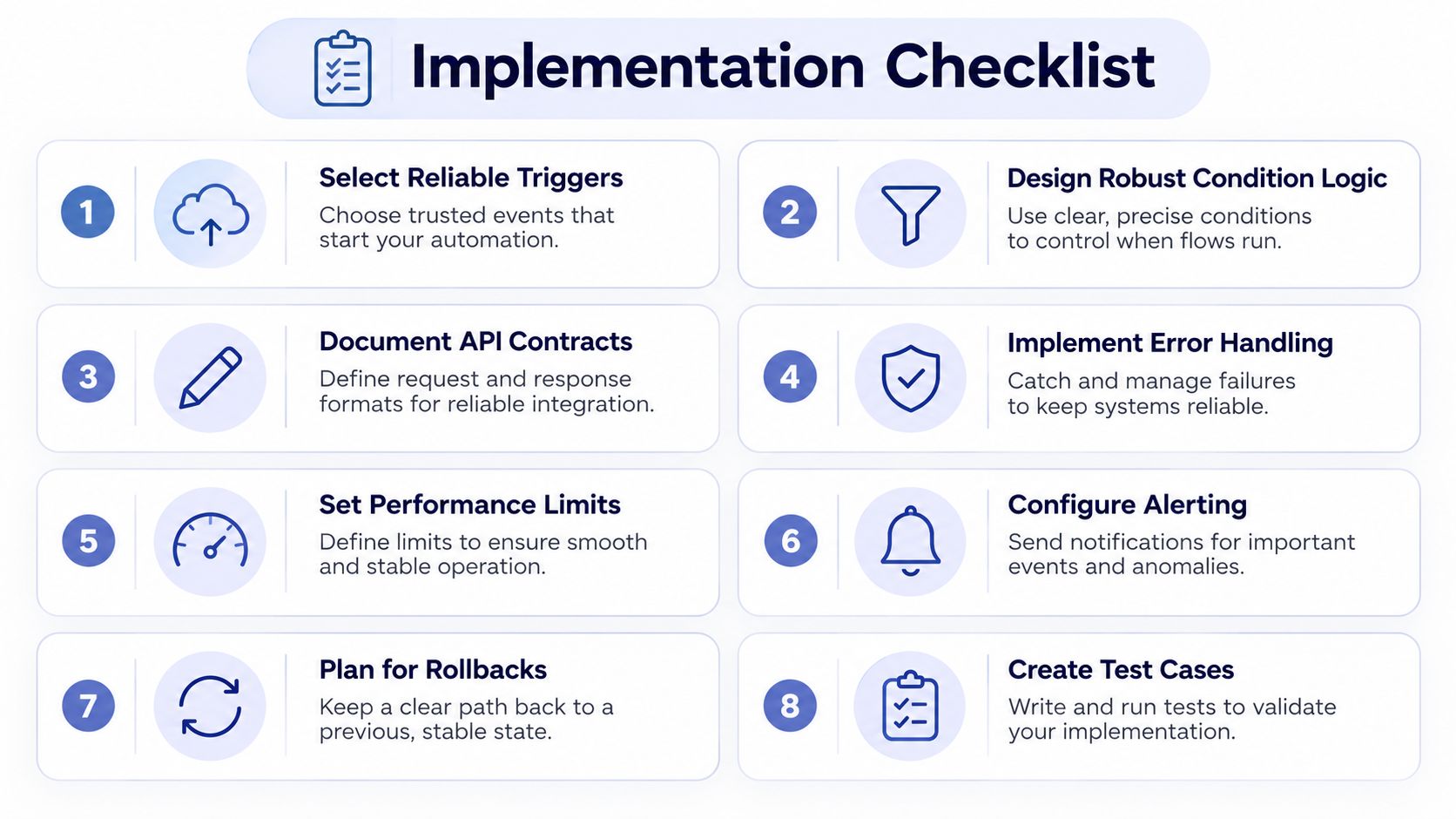 A structured implementation checklist with eight steps for designing and maintaining effective automation workflows and systems.
A workflow that survives production usually has the same boring strengths. It starts from a reliable trigger, branches on explicit rules, logs enough detail to debug, and gives operators a way to retry or roll back when something goes sideways. The checklist below is the stuff teams regret skipping.
Start with the trigger, not the fantasy
Choose a dependable trigger source: Use an API call, record change, or schedule that you can observe and test, not a hidden side effect.
Design condition logic for edge cases: Treat missing fields, partial records, and conflicting rules as first-class cases, not exceptions you'll “fix later.”
Document the API contract early: If one system expects a media URL and another expects an upload ID, write that down before the first release.
The maintenance story is where implementation gets real. Elementum's guidance stresses testing for bottlenecks, silos, and data leaks, then keeping users involved with repeated communication and ongoing training, not a one-time announcement (Elementum). If you want a broader checklist from a founder's angle, automation guide for startup founders is a useful complement.
Make failure visible and recoverable
Implement retry and compensation logic: A failed API call should retry cleanly, and partial success should be reversible where it matters.
Set alert thresholds that people will read: If a workflow fails without notification, it's already broken from an operations point of view.
Capture logs, metrics, and traces: You need a path from “the job failed” to “this step failed because this field was malformed.”
A workflow engine that hides failure modes behind a glossy UI is usually worse than no automation at all. The point is not just to move work faster, it's to make the process diagnosable when the outside world changes. That's especially important when integrations drift over time or when teams tweak business rules without telling the people who own the automation.
Plan for change before launch
Test rollbacks before rollout: If a publish step fails after three downstream updates, know exactly what should be undone.
Support ongoing user training: People need to understand where the automation ends and where manual escalation begins.
Review the workflow periodically: APIs, permissions, and business rules will change whether the workflow is ready or not.
The best automation teams don't treat launch as the finish line. They treat it as the beginning of upkeep. That mindset keeps the workflow useful long after the first demo looks impressive.
Ship Faster Without Owning the Plumbing
Workflow automation is the orchestration layer that keeps multi-step processes predictable, auditable, and recoverable. The hard part isn't understanding the idea, it's keeping triggers, tokens, retries, and integrations stable while the outside systems keep changing.
That's why social publishing, AI agents, and no-code workflows are such a good stress test for automation. If the plumbing is fragile, you spend your week re-authing accounts and patching edge cases. If the plumbing is solid, you focus on the product.
PostPulse fits that second model for teams that want one publishing surface instead of hand-built integrations. It gives apps, automations, and AI agents a single way to publish across 10 platforms, with private-label and white-label options, so the integration work stays centralized instead of leaking into every feature you ship.
If you want to stop babysitting social platform quirks and keep your workflow layer from turning into a maintenance tax, take a look at PostPulse. It gives developers and AI builders one publishing surface for multi-platform social automation, so you can integrate once and spend less time chasing broken token flows.
About the Author

Founder of PostPulse — a social media scheduling platform for creators and teams. Software engineer with a passion for building developer tools and simplifying complex API integrations across social media platforms.