Build an AI Social Media Agent That Actually Works
Published on
Tags:
You're probably here because the “easy” version already failed.
You wired up OAuth, got a token, hit a publish endpoint, and found out social APIs don't fail like normal APIs. They fail somewhat obscurely. A media object sits in processing. A permission scope looks valid until the final publish call. A retry creates duplicates on one platform and no-ops on another. Then somebody says, “let's add AI so it can post automatically,” as if the hard part was the caption.
That gap is why a real AI social media agent matters. Not as a writing toy, and not as a chatbot that spits out hashtags, but as an orchestration layer that can absorb messy inputs, reason against business goals, and take bounded actions across platforms without turning your integration into a haunted house.
By 2026, AI is already part of normal social operations. Around 88 to 90% of marketers use AI tools weekly, Meta says about 15% of Facebook feed content comes from AI-driven recommendations, and teams report roughly 10 to 15 hours per week saved on content creation and management tasks according to these 2026 AI social media statistics. The demand is real. The implementation details are where projects live or die.
Table of Contents
The Developer's Nightmare Before AI Agents
The first version of most social automation stacks is a pile of adapters and hope.
One script formats text for LinkedIn. Another uploads media somewhere else. A cron job republishes blog posts. A webhook listens for mentions. None of those pieces share context, and every platform wants its own auth model, payload shape, error handling, and approval logic. You don't notice how fragile it is until someone asks for one small change like “reply to positive mentions automatically, but only if the post is about the new feature and only during business hours.”
That's where hand-coded workflows start to crack.
Why the old approach keeps hurting
A lot of teams accidentally build social tooling like ETL pipelines. Input comes in, string transformations happen, output goes out. That works for deterministic jobs. It doesn't work well when your system needs to decide whether to publish, wait, escalate, rewrite, or skip.
Common pain points show up fast:
Context lives in too many places: brand voice is in a doc, campaign timing is in a calendar, product updates are in the CMS, and customer state is in the CRM.
Platform behavior isn't uniform: one platform accepts a draft immediately, another needs asynchronous processing, and another rejects content late in the flow.
Retries are dangerous: the same retry policy that fixes a transient timeout can also create duplicate posts or duplicate replies.
Approval logic gets bolted on later: people add “just one review step” after the publish call already exists, and now the architecture fights the workflow.
Most social automation pain isn't model quality. It's integration drift plus missing control points.
The ugly part is that demand for automation keeps going up even while the plumbing stays brittle. Teams want content repurposing, scheduled publishing, lightweight community management, and analytics-aware adjustments. They also want it across multiple platforms, from one system, with auditability.
Why an agent architecture helps
A proper agent gives you a place to put decision-making. Instead of hard-coding dozens of if/else branches across separate jobs, you centralize perception, reasoning, and action. That doesn't remove platform complexity. It puts that complexity behind a system that can work with it.
The shift is architectural, not cosmetic:
Problem | Script stack behavior | Agent-oriented behavior |
New content appears | Trigger one formatter | Ingest content, classify intent, generate channel-specific drafts |
Mention arrives | Fire canned reply logic | Evaluate sentiment, policy, audience, and escalation rules |
Engagement drops | Human notices later | Agent can detect trend and adjust within policy |
Brand review required | Manual side-channel | Built-in approval queue before execution |
An AI social media agent isn't interesting because it can write a post. It's useful because it can coordinate messy work without forcing you to encode every decision path by hand.
What an AI Social Media Agent Actually Is
A lot of product pages blur this beyond usefulness. A caption generator is not an agent. A chatbot connected to one API is usually not an agent either.
A production-worthy AI social media agent runs a simple loop: perceive, reason, act.
The loop that matters
Perceive means the agent gathers inputs from the world it operates in. That can include incoming mentions, scheduled campaigns, analytics, a new blog post, product release notes, or customer state from a CRM.
Reason means the model evaluates those inputs against goals and policies. Not “write a catchy post,” but “we launched a feature for existing B2B customers, engagement on educational posts is stronger than promotional content right now, customer support backlog is high, so publish the explainer thread first and hold the promo.”
Act means calling tools. Draft the copy. Route it for review. Schedule it. Publish it. Reply to a low-risk mention. Open a ticket if the message smells like support instead of marketing.
That's the difference between generation and agency.
If you want a good companion read on the broader implementation mindset, implementing AI marketing agents does a solid job framing the jump from “model output” to systems that can carry out work.
Why guardrails beat full autonomy
The most practical pattern in production isn't “let the model do whatever it wants.” It's autonomous with guardrails.
According to this guide to AI agents for social media, most production AI social media agents in 2026 operate with that model. They can perceive data from multiple APIs, reason with an LLM, and execute actions without step-by-step supervision, but only inside explicit policies. That setup supports logic like adjusting posting frequency when engagement drops past a configured threshold, including examples like -15% week over week in policy definitions.
That's the sweet spot because social execution is high consequence in subtle ways. A bad answer in a private prototype is embarrassing. A bad answer on a brand account becomes a screenshot.
A useful guardrail set often includes:
Allowed actions: draft, schedule, reply, route, tag, but not delete or change account settings.
Channel boundaries: different behavior for LinkedIn thought leadership versus support-heavy channels.
Sentiment thresholds: positive mentions can get low-risk replies, ambiguous or negative ones go to a human.
Time windows: publish only during approved windows, even if the agent wants to act sooner.
Escalation rules: regulated topics, legal risk, account issues, and support complaints always route out.
Practical rule: give the agent enough autonomy to remove repetitive work, not enough to invent policy.
A chatbot answers. An agent observes, decides, and takes scoped action. That mental model clears up a lot of design mistakes early.
The Anatomy of a Production Ready Agent
The fast demo version is one prompt, one tool, and one publish call. It feels great for a day.
The production version is an orchestration system. Different components handle reasoning, tool execution, memory, and human review. If you collapse all of that into one loop, you'll spend the next month debugging prompt side effects that should have been architecture decisions.
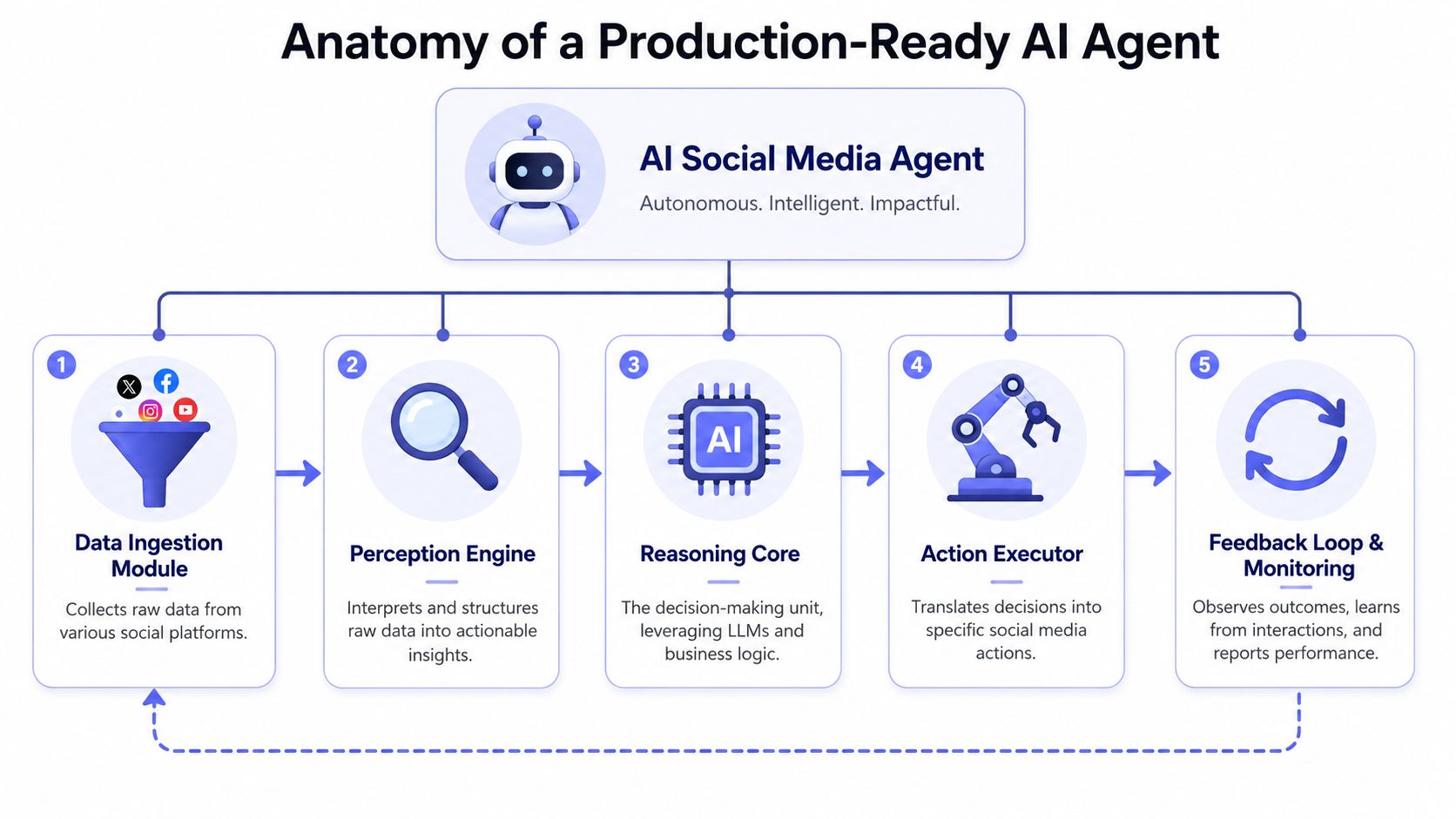 A diagram illustrating the five key architectural components of a production-ready AI social media agent.
The four parts that separate a demo from a system
According to the LangChain social media agent blueprint, production-grade social agents are built as orchestration layers around four core components: a reasoning engine, a tool connector, a memory layer, and a human-in-the-loop approval layer. That's the right starting point.
Here's what each piece does in practice.
Reasoning engine
This is your LLM layer. It interprets goals, evaluates current context, chooses which tool to call, and generates structured outputs.
Keep it narrow. The model should decide from a constrained toolset, not hallucinate capabilities. Give it clean schemas, clear system instructions, and explicit policy text.
Tool connector
This is the agent's hands. It exposes operations like fetch_new_blog_posts, get_recent_engagement, create_draft, schedule_post, publish_post, or route_for_review.
The key move is abstraction. Your model shouldn't know how every social API differs. It should ask for a generic business action and let the connector translate that into platform-specific calls.
Memory layer
Often, a lot of teams underbuild.
You need short-term working context, plus durable memory. In practice that often means one store for semantic retrieval, like prior high-performing posts or brand guidance, and another for structured history such as approvals, task state, publication history, and error outcomes.
Human-in-the-loop approval
This isn't an optional enterprise add-on. It's part of the control plane.
Humans should be able to approve, reject, edit, or escalate drafts before execution. That approval needs to preserve context so the system learns from the decision instead of treating every revision as random noise.
Here's a compact view:
Component | Job | Failure if missing |
Reasoning engine | decides what to do | random or shallow actions |
Tool connector | executes actions safely | model knows goals but can't act |
Memory layer | preserves context and history | repeated mistakes, brand drift |
HITL approval | enforces governance | unsafe or unreviewable automation |
A second resource worth reading here is how to build an AI agent, especially if you're mapping these pieces into a broader agent stack and not only social workflows.
The architecture is easier to grasp with a live walkthrough:
Why abstraction matters more than model choice
Teams love debating which model writes better captions. That matters less than whether your tool layer is clean.
The same LangChain blueprint notes that best practices recommend abstracting platform-specific constraints into a shared configuration layer, and that unified publishing endpoints like a single REST API or MCP server are becoming an architectural standard for AI-first stacks. That design is what keeps your agent from turning into a giant switch statement keyed on platform name.
A good abstraction layer gives the model tools like these:
publish_text_postinstead of “call LinkedIn UGC endpoint”publish_video_captioninstead of “build payload variant per platform”queue_for_approvalinstead of “write to some custom review table”fetch_brand_contextinstead of “query three systems and stitch it in prompt text”
If your prompt has to know platform quirks, your architecture is leaking.
That leak is what makes agents hard to maintain. Fix the boundary first.
Connecting Your Agent to the Social Media World
A clean architecture drawing inevitably meets the practical world and gets mud on its boots.
Your agent can reason beautifully and still be useless if the only tool it has is “return draft text.” To do meaningful work, it has to publish, schedule, fetch account context, maybe pull analytics, and route items for review. The question is whether you build all of those platform connections yourself or sit on top of a unified layer.
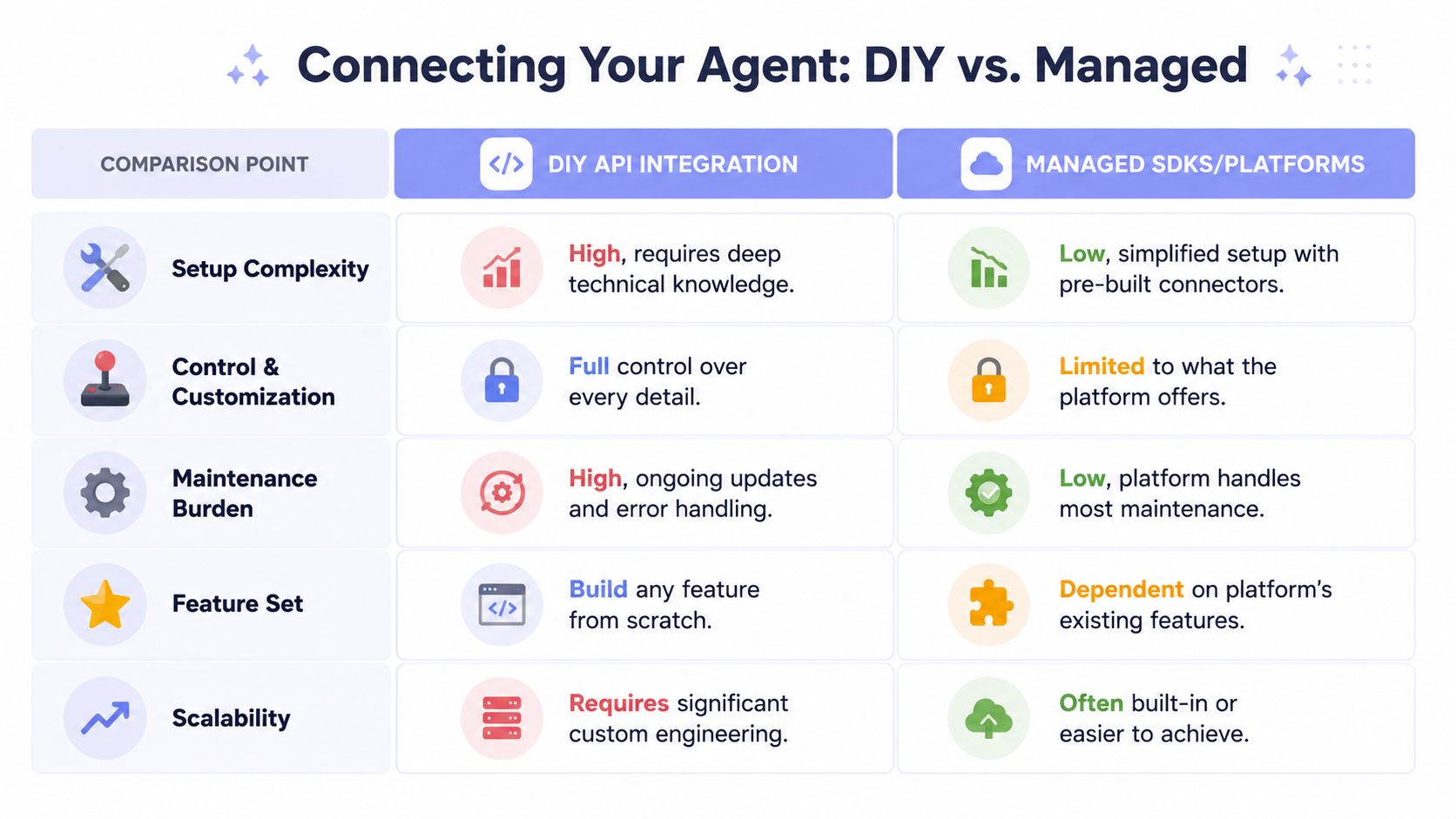 A comparison table illustrating the differences between DIY API integration and managed SDK platforms for AI agents.
The DIY route
The DIY path gives you maximum control. It also gives you maximum surface area.
You build and maintain separate clients for Instagram, TikTok, YouTube, X, LinkedIn, Threads, Facebook, Bluesky, Telegram, or whatever else you need. Each one gets its own auth flow, token storage logic, permission model, media handling path, publishing schema, and retry behavior.
That can be the right choice if you have unusual product requirements and a team that treats social APIs as a product area, not a side feature.
But be honest about the work:
Authentication differs per platform: getting accounts connected is not the same problem everywhere.
Publishing primitives differ: text-only, mixed media, short-form video, and account-type limitations all affect tool design.
Error semantics differ: one API returns clean validation errors, another gives a status you have to poll around, another fails late.
Maintenance never ends: API versions move, fields deprecate, scopes change, and docs improve slower than you'd like.
A lot of teams start DIY because “we only need two platforms.” Then the roadmap says four, then six, then approvals, then analytics-aware retries.
The unified layer route
A unified publishing layer trades some low-level control for a cleaner agent interface. That's often the better deal.
The core idea is simple: your AI social media agent makes one high-level call like publish_post, schedule_post, or create_draft_for_review, and the integration layer translates that into platform-native behavior. The agent reasons in business terms. The connector handles transport, payload shaping, and auth complexity.
This pattern is especially good when you want to expose the same workflow through multiple integration surfaces:
REST API for app backends and internal tools
n8n or Make.com nodes for automation builders
MCP for direct agent-to-tool communication
If you're trying to consolidate fragmented publishing operations, a practical reference point is this guide on running all social media in one app. The appeal isn't just convenience. It's that one publishing surface gives your agent a stable contract while the underlying APIs keep changing.
A quick comparison helps:
Decision factor | DIY integration | Unified layer |
Initial control | highest | bounded by provider surface |
Build time | heavier | faster to operationalize |
Ongoing API maintenance | your team owns it | mostly externalized |
Agent tool design | more fragmented | cleaner and more generic |
Cross-platform expansion | slower | easier |
The best connector for an agent is the one that hides protocol chaos without hiding operational visibility.
That last part matters. You still need logs, statuses, and failure reasons. Abstraction should simplify action design, not blind you.
Handling the Messy Reality of Social APIs
Most hobby projects die here. Not because the prompt is bad, but because live systems are annoying in non-glamorous ways.
A social agent becomes trustworthy when it behaves well under partial failure. That means auth expiration, delayed media processing, malformed inputs, transient errors, duplicate event delivery, policy rejections, and confusing status transitions. If your architecture doesn't account for those, you don't have autonomy. You have a background task that sometimes posts.
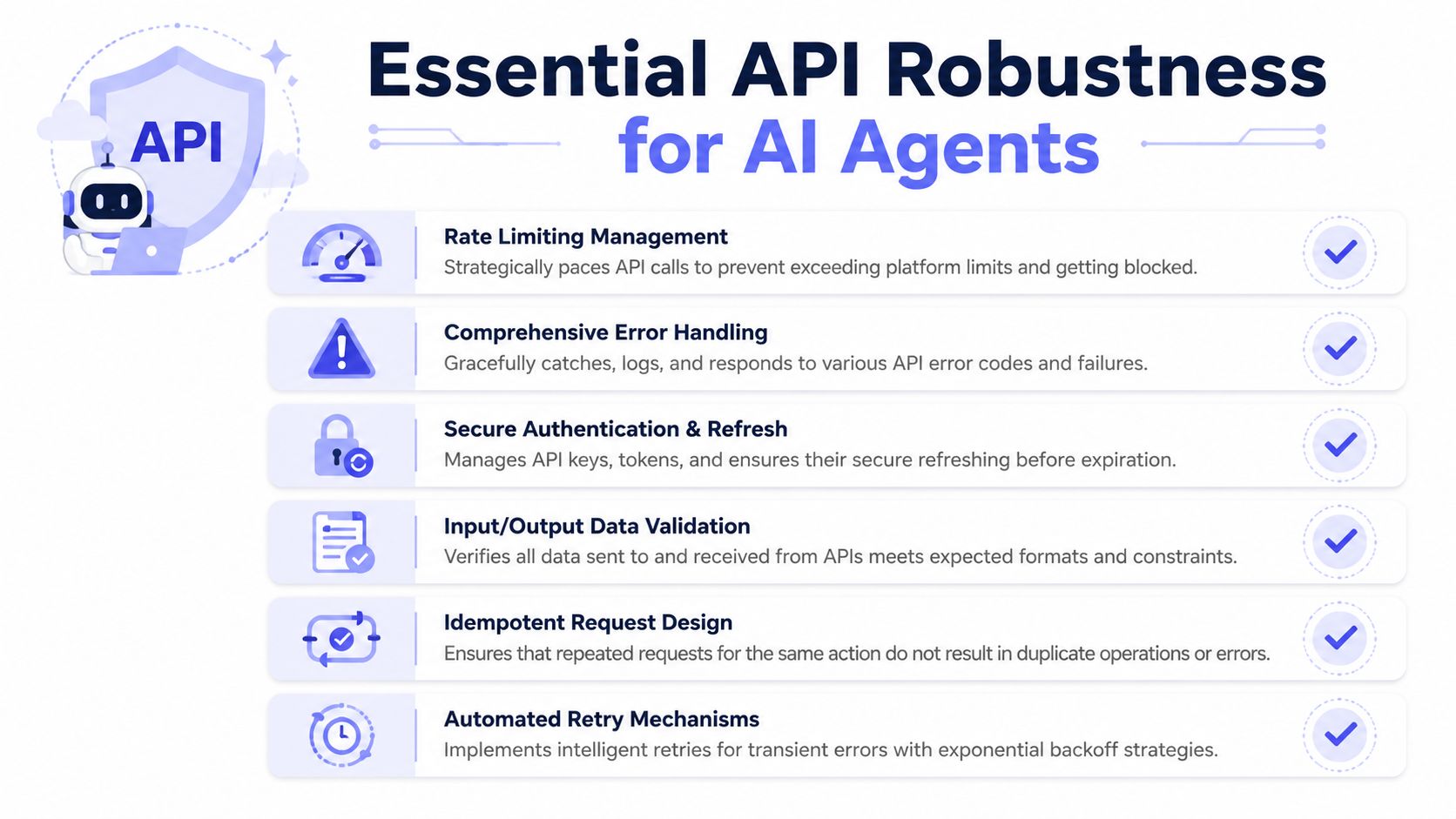 A visual guide outlining six essential practices for ensuring API robustness and reliability for AI agents.
Operational concerns that break naive agents
Authentication comes first. Not just storing access tokens, but managing refresh, scopes, revocation, and reauthorization paths. Agents need explicit permission boundaries, and those permissions need to be auditable.
Then rate limiting. You can't assume bursty agent behavior is acceptable just because a single human could click through the same actions manually. Agent loops need pacing, queueing, and sensible retry windows.
A reliable stack usually includes these controls:
Secure token handling: store credentials separately from prompt context and never expose them to model-visible text.
Retry discipline: retry transient failures, but only with idempotency keys or equivalent duplicate protection.
Validation before publish: verify that structured content matches the target tool schema before any external call.
Dead-letter handling: if a job fails repeatedly, quarantine it and route it to a human instead of looping forever.
Audit logs: record who triggered what, what the agent decided, what tool it called, and what happened next.
For developers working directly with Meta-related workflows, this walkthrough on the Instagram Graph API is useful background on the sort of integration details that make “simple publishing” less simple in production.
What reliable execution looks like
The cleanest pattern is to separate decisioning from execution.
The model decides on an action and emits a structured command. A deterministic execution layer validates that command, checks policy, runs preflight tests, and then calls the external API. That keeps the model from directly controlling low-level side effects.
A mature execution path often looks like this:
Receive task from webhook, schedule, or content trigger.
Fetch context from memory and source systems.
Generate structured action with allowed tools only.
Validate inputs against policy and platform requirements.
Execute call with idempotency and retries for transient failures.
Record outcome in logs and memory.
Escalate if the result is ambiguous or repeatedly failing.
“If the agent can't explain why it acted, and the system can't show what happened, you don't have governance.”
Monitoring needs the same discipline. Don't just log exceptions. Log business outcomes. Did the agent publish, schedule, route, or skip? Did approval fail because of tone, compliance, or malformed data? Did a retry succeed after a transient error or create an inconsistent state?
That observability is what lets you improve prompts, policies, and connectors without guessing.
Your First Autonomous Post with PostPulse
The fastest useful workflow is not “let the agent run the whole account.” It's one bounded, repeatable loop.
A good starter example is this: a new blog post appears in an RSS feed, your agent reads it, creates a short LinkedIn summary, picks a restrained hashtag set, and publishes it through one tool call. That gives you real value without handing too much discretion to the model.
A simple workflow that is actually useful
The pieces are straightforward:
Trigger on new RSS item
Fetch the article body or summary
Pass the content into your reasoning engine
Generate a LinkedIn-ready post in a structured JSON shape
Send that payload to the publish tool
Record the publication result
The important part isn't the trigger. It's the boundaries.
Your agent prompt should specify things like:
audience type
tone constraints
forbidden claims
desired output length
whether emojis are allowed
whether the agent can publish directly or must queue for review
A minimal structured output might include fields such as platform, post_text, hashtags, cta_style, and requires_review. That keeps the model from returning prose when your executor expects a command.
Here's the kind of logic I'd use in plain English:
Read the article. Write a concise LinkedIn post aimed at technical buyers. Keep the language concrete. Do not invent metrics or quotes. Use a small number of relevant hashtags only if they fit naturally. If the article touches legal, security, or customer incidents, set requires_review to true.
That one rule catches a surprising amount of risk.
Prompting for bounded autonomy
You don't need a fancy agent framework to get the first result. n8n, a small worker service, or a simple API-driven job runner is enough. What matters is the division of responsibilities.
Use the model for judgment. Use the execution layer for certainty.
That means:
Let the model summarize and adapt tone
Don't let the model decide raw auth details
Let the execution layer validate the final payload
Store every output and response for review
If you want to speed up post generation itself, this guide on creating social media posts with AI is a useful implementation reference for the content side of the workflow.
The business case gets stronger once that loop is stable. Organizations deploying AI agents report cost reductions around 37%, average ROI of $3.50 per dollar spent, and employees working with these systems report efficiency gains around 60 to 70% according to these AI agent marketing statistics. You don't capture that value by asking a model for captions. You capture it by automating the full path from signal to safe execution.
The first autonomous post should feel boring. That's a good sign. Boring means the system is behaving.
If you want the shortest path from agent logic to real publishing, PostPulse is built for exactly this problem. It gives apps, automations, and AI agents one integration surface for publishing across multiple platforms through a REST API, official n8n and Make.com nodes, or an MCP server. That means you can keep your agent focused on reasoning and workflow, instead of rebuilding social publishing infrastructure from scratch.
About the Author

Founder of PostPulse — a social media scheduling platform for creators and teams. Software engineer with a passion for building developer tools and simplifying complex API integrations across social media platforms.