What Is No Code Automation and How It Works in 2026
Published on
Tags:
You're usually not asking “what is no code automation” in a vacuum. You're asking it after the third time a token expired, a connector broke, or a workflow that looked simple in the demo turned into a pile of fragile scripts, version checks, and manual retries. That's the moment when a visual builder stops sounding like a toy and starts looking like a maintenance strategy.
No-code automation is worth understanding because it changes who owns the glue between systems. Instead of forcing every cross-app workflow through custom code, it gives teams a managed layer for triggers, conditions, actions, authentication, and connector upkeep, which is why it's become part of the broader low-code and no-code shift in software development. Gartner forecast that 70% of new applications would use low-code or no-code technologies by 2025, up from less than 25% in 2020, and projected the market would reach $44.5 billion as large enterprises moved toward 4 times more citizen developers than professional developers by 2026 (Gartner forecast summary).
Table of Contents
The Problem No-Code Automation effectively Addresses
The pain usually doesn't show up on day one. It shows up when the workflow is already live, the team depends on it, and the platform changes under your feet. One day the token is valid, the next it isn't. One integration works until an API version shifts. A media type that used to publish cleanly now stalls the release pipeline, and suddenly someone has to explain why a simple automation now needs a maintenance sprint.
That is the problem many teams miss when they treat no-code automation as a convenience layer. The core issue is platform drift, the steady mismatch between what your workflow expects and what the upstream tools do this week. No-code systems exist so you do not have to keep rebuilding that glue by hand every time an auth flow, connector, or endpoint changes.
Practical rule: if the workflow fails because of integration maintenance more often than business logic, a managed orchestration layer starts to make sense.
The other reason teams look for this layer is organizational, not technical. Enterprise benchmarks cited in the briefing note that no-code workflow automation can reduce process cycle time by 65%–70%, and many workflow apps, approval systems, dashboards, and internal tools can be built and deployed in 1 to 3 days by non-technical users (Kissflow statistics). Those numbers do not mean every workflow should be no-code. They do explain why teams stop tolerating a setup where simple automations require a ticket, a code review, and a follow-up patch every time the platform shifts.
The audience widened for the same reason. By 2026, 80% of low-code users were expected to come from outside formal IT departments, and large enterprises were projected to have 4 times more citizen developers than professional developers (Kissflow statistics). The shift is not just about speed. It is about moving repetitive workflow ownership closer to the people who run the process.
What matters in practice is less obvious than the drag-and-drop surface. The platform is also handling OAuth refresh, connector upkeep, API versioning, retries, and the boring failure modes that show up after launch. That matters until the workflow starts carrying a lot of context, because then the abstraction leaks. Conditional branches sprawl, edge cases pile up, and the same visual simplicity that made the workflow easy to start can make it harder to reason about later. For a useful comparison of how that plays out in production, see ShortsNinja workflow automation insights.
PostPulse sits in the same category of tooling choice. A content automation platform like PostPulse for content automation is valuable when the repeated work is operational and the inputs stay structured. It becomes less attractive when every run depends on judgment calls that are hard to express as rules.
What No-Code Automation Is
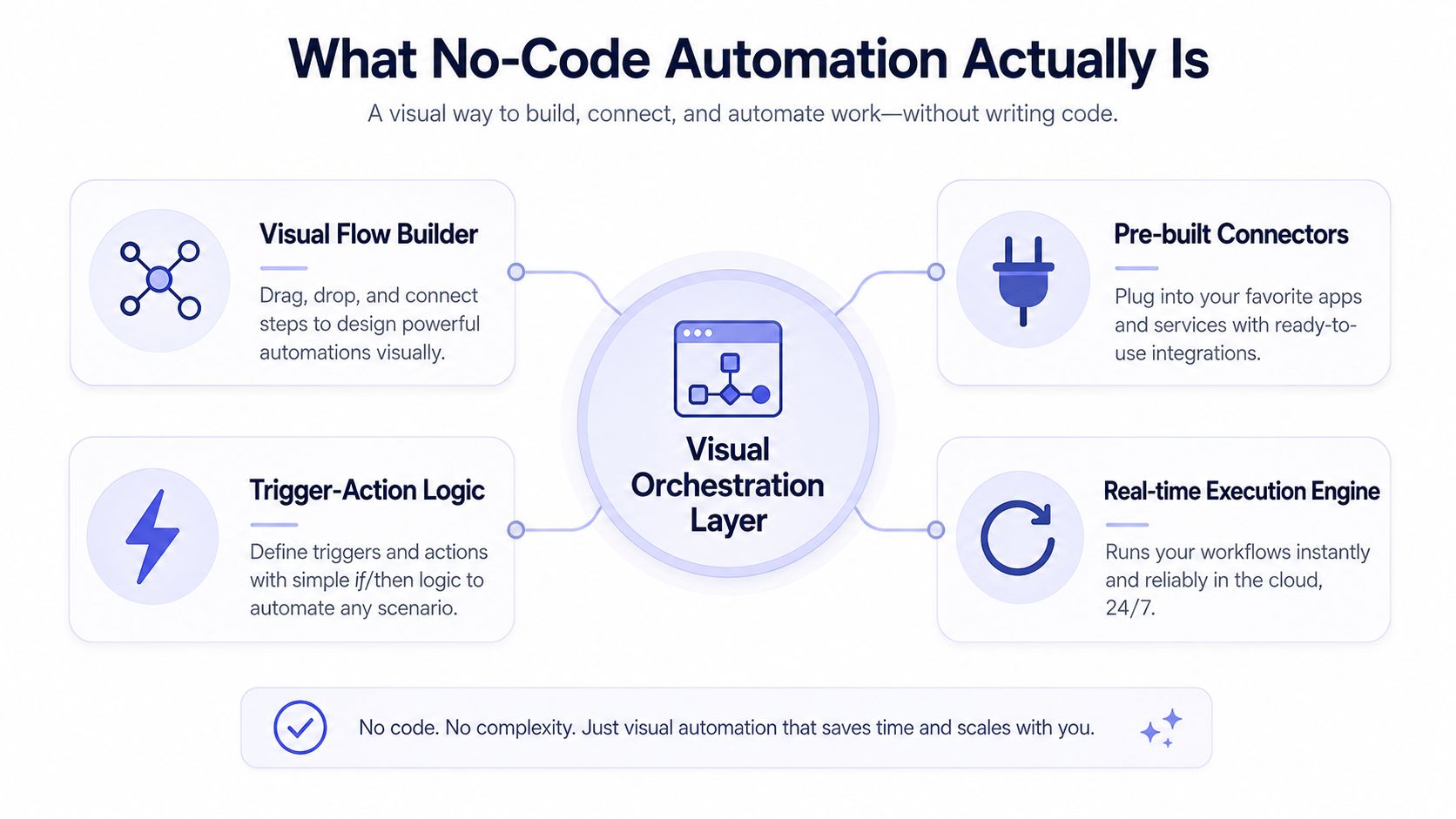 A diagram explaining the components of no-code automation, including visual builders, connectors, logic, and execution engines.
No-code automation is a visual orchestration layer. You assemble a workflow by arranging triggers, conditions, and actions in a drag-and-drop interface, and the platform runs that workflow without custom application code (Zoho Creator overview). The canvas is the part you edit. The integration engine is the part you depend on.
A simple case makes the structure clear. A form submission arrives, that is the trigger. A rule checks whether the amount is above $5,000, that is the condition. If it is, the workflow sends the request to a senior approver and posts a notification to a team channel, those are the actions (Seampoint workflow examples). The workflow reads like a sentence, which is the point. The platform turns business logic into execution steps without forcing the team to hand-wire each connection.
The same pattern shows up in ShortsNinja workflow automation insights, where the focus stays on how workflows are assembled and maintained in practice.
What the platform is doing for you
The visible workflow is only the front end. Underneath, the platform handles the awkward parts that usually fail first, including OAuth refresh, connector maintenance, API versioning, and retries. That matters because the system can keep a reusable workflow running while APIs, auth rules, and app interfaces change, instead of making your team patch point-to-point scripts over and over.
For a productized example of that same idea in publishing, the content automation platform overview shows how the abstraction gets packaged for a specific use case. PostPulse sits in that category of tooling choice. A content automation platform is useful when the repeated work is operational and the inputs stay structured.
Good mental model: no-code automation is not “no engineering.” It is engineering shifted into a reusable orchestration layer, with the hard parts hidden behind configuration.
That also explains why teams keep using it for internal tooling. Approval flows, notifications, and data entry workflows are usually structured enough to fit the trigger-condition-action model. When the process is stable, the canvas is enough. When the process is messy, the abstraction starts to bend.
No-Code vs Low-Code vs Traditional Code
The cleanest way to compare these approaches is by who needs to touch the underlying logic. No-code gives the workflow to business users and operators. Low-code gives developers a visual starting point plus room for custom logic. Traditional code gives you maximum control, but you own everything, including the glue and the maintenance burden.
Approach | Who builds it | Hand-written code | Time to ship | Best fit |
No-Code | Non-technical users, operations teams, or developers shipping fast | None or near none | Often 1 to 3 days for common workflow apps and internal tools (Kissflow statistics) | Structured workflows, approvals, notifications, internal tools |
Low-Code | Developers or technical analysts | Some custom logic or connectors | Faster than full custom development, but still depends on the edge case | Workflows that need a little custom behavior |
Traditional Code | Software engineers | Full implementation | Slowest upfront, highest control | Complex product surfaces, deep custom logic, unusual constraints |
No-code wins when the workflow is repetitive, the data shape is predictable, and the team wants to move ownership away from engineering. Low-code wins when the visual builder gets you 80% of the way there, but the last 20% needs a custom connector or a bit of logic. Traditional code wins when the workflow is part of a larger application surface area or the business rules are too irregular for a canvas to express cleanly.
Why the categories are blurring
The lines are softer than they look. Low-code tools keep adding more visual configuration, and code editors keep getting faster with AI assistance. The practical difference is less about ideology and more about how much of the workflow you want to own directly. If you need every branch, exception, and data transformation to be inspectable in source control, code is still the safer home. If the workflow is mostly orchestration, no-code can remove a lot of friction.
What you give up in no-code is usually explicitness. What you gain is speed and a smaller maintenance surface. That trade is only worth it when the workflow itself is stable enough to live inside a managed abstraction.
Real Benefits and Honest Trade-Offs
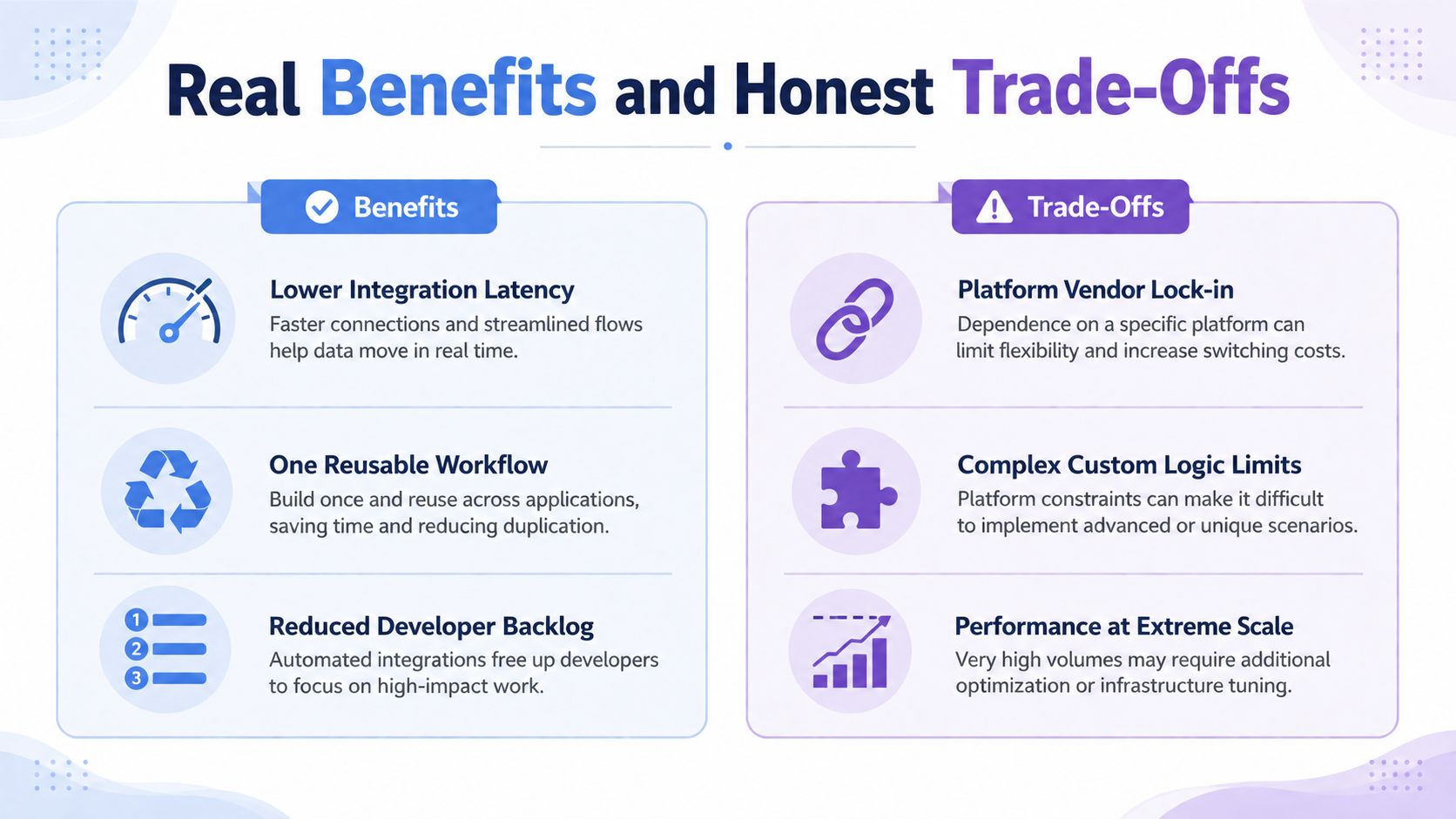 A comparison chart outlining the pros and cons of no-code automation platforms for enterprise software integration.
A useful no-code setup does more than replace a few manual steps. It gives teams a central place to define one workflow, then reuse it instead of maintaining a pile of point-to-point scripts. The platform handles pre-built connectors, conditional logic, and workflow execution, so small process changes do not require a developer to sit in the middle every time.
The core value sits under the surface. No-code platforms are doing connector maintenance, authentication handling, and a lot of the routine work around API changes that individual scripts would otherwise need to absorb. That is why operations, support, marketing, and internal tooling teams often reach for them first. They reduce the number of places where breakage can happen, and they make ownership a little easier to centralize.
The costs show up later
The trade-off is governance. As no-code spreads beyond IT, ownership can become unclear, especially when business teams build and ship automations on their own. IBM's topic summary notes that Gartner projected 80% of low-code/no-code tool users would come from outside IT by 2026, up from 60% in 2021 (IBM Think topic summary). That is good for throughput, but it also means central review can fall behind the pace of creation.
Operational reality: the first problem usually is not building the automation. It is remembering who owns it six months later.
Version drift is the other hidden cost. If many people build automations independently, each one can drift a little as connectors, APIs, and business rules change. Even managed connectors do not remove every edge case, especially when a platform changes how data is shaped or authenticated. At that point, no-code starts to look less like a tool choice and more like a governance program.
The trade-off is straightforward. No-code automation is strongest when you want speed, reuse, and centralized maintenance. It gets weaker when the organization wants decentralization without a clear ownership model. The platform can absorb a lot, but it cannot decide who is accountable when a connector fails on a Friday afternoon.
Where No-Code Automation Breaks Down
No-code automation works best when the workflow can be written as if X, then Y and the inputs and outputs are structured. That's the boundary most explainer posts gloss over. Once the workflow needs to read long documents, resolve exceptions, or combine context across multiple systems, the canvas starts to leak abstraction.
A support triage workflow is a good example. If a ticket arrives with a clean category field, a no-code rule can route it. If the decision depends on the full body of a customer email, prior account history, and a vague escalation path, the workflow stops being a simple trigger-action chain. The same problem shows up in marketing when copy has to adapt to the tone of different platforms, and in operations when records only partially match across two schemas.
The line that matters now
The rise of AI is pushing automation into context-heavy territory. That's why one major no-code vendor now explicitly distinguishes classic no-code automation from workflows that need reasoning over unstructured data (Glean's comparison of no-code tools). The shift is important because rules are great at repetition, but they're weak at interpretation.
If the workflow requires judgment, not just routing, no-code alone usually isn't enough.
That doesn't mean the platform is useless. It means you should stop expecting a drag-and-drop builder to solve problems that are really about language understanding, exception handling, or data reconciliation. Those jobs often need code, an LLM, or both. A practical team draws the line early, before the workflow accumulates enough edge cases to become unmaintainable.
The useful question is not “can no-code do it.” It's “can this process be expressed without needing human interpretation at every branch.” If the answer is no, the abstraction has already broken.
Concrete Stacks You Can Copy Today
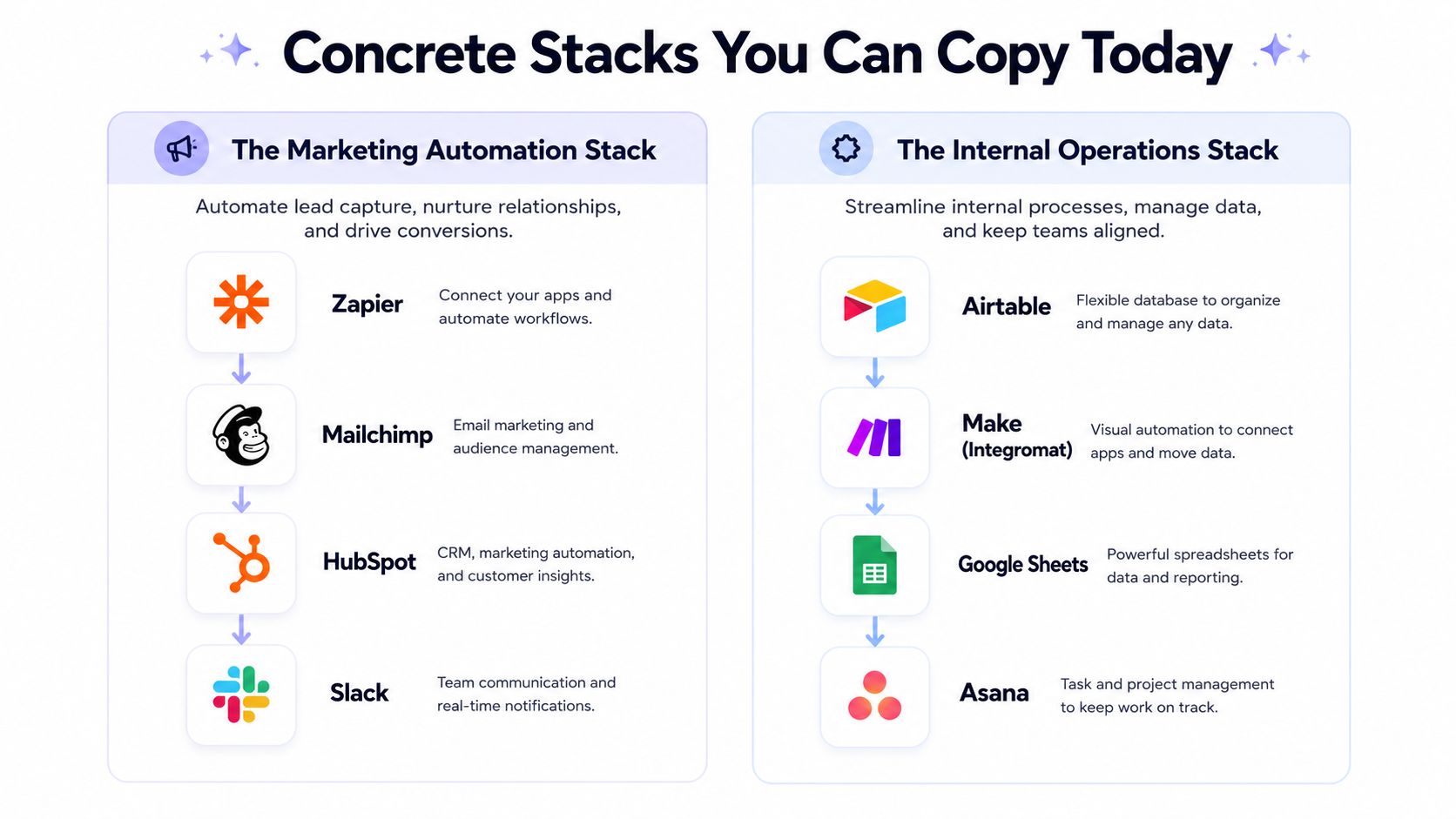 A diagram illustrating two popular no-code software stacks for marketing automation and internal operations.
A real no-code stack usually starts with a source of truth and ends with a destination that people use. For a publishing workflow, that might mean a new blog post enters from a form, CMS, or spreadsheet row, then a visual builder moves it through formatting, approval, and distribution. The value is not the diagram. The value is that nobody has to hand-maintain the route each time the upstream system changes.
On the no-code side, that often means a builder like n8n or Make.com handles the orchestration, and the publishing layer sits behind it. In one practical setup, the workflow starts with a form or database row, passes through the visual builder, and publishes through a social distribution tool with official automation connectors. A resource like social media automation tools is useful when you're comparing how these pieces fit together in the actual world.
On the code-first side, the same job can be handled with one REST call into a unified publishing API, or with an MCP server if an AI agent is driving the workflow. The point is not which stack is more elegant. It's which one matches your team's tolerance for maintenance and abstraction.
Two stack patterns that actually show up
Visual-first stack: n8n or Make.com handles the trigger, transformation, and branching. The output is sent through a publishing integration that owns auth, connector maintenance, and destination handling.
Code-first stack: your app or agent makes one API call, and the integration layer handles the platform-specific publishing work for you.
For teams building around automation and agents, PostPulse is one concrete example of that integration layer. It exposes publishing through a REST API, official n8n and Make.com nodes, and an MCP server, so the workflow can stay inside the system you already use while the platform-specific pieces stay centralized. It's the kind of component that makes no-code and code-first stacks look less different in practice than they do on a slide.
The important part is the ownership model. If your team wants to own the orchestration visually, use the no-code builder for the workflow and keep the integration surface stable. If your team wants to own the app and outsource the publishing plumbing, wire the API directly. Either way, the fragile custom script is the thing you're trying to retire.
A 7-Day Plan to Evaluate No-Code Automation
Start with the workflow that causes the most friction. A good test case has structured inputs, a clear owner, and enough repetition that you can tell whether the platform is helping or hiding work. If the flow depends on ad hoc judgment or hidden exceptions, you will learn that fast.
A week is enough to get a real answer if you stay disciplined. On day one, write the workflow in plain language and name every system it touches. On days two and three, rebuild it in two different no-code tools so you can compare how each one handles branching, connectors, and error paths. On days four and five, stress-test rate limits, retries, and failure handling. On day six, assign ownership for maintenance and connector changes. On day seven, decide whether the workflow belongs in no-code or needs custom code around it.
If you want another lens for evaluating workflow tools, the browse agent leadership use cases page is a useful reference for how the operating model changes once agents enter the picture. That matters when your team is trying to separate a clean demo from something people can run without babysitting.
A simple go or no-go test
Go if the workflow is structured, repeatable, and owned by a specific team.
Go if the platform can show how it handles auth refresh, retries, and connector failures.
No-go if the workflow depends on hidden judgment, ambiguous data, or exception handling nobody wants to document.
For teams mapping these ideas to publishing and workflow examples, the n8n workflow examples page gives a practical reference point for what a real build can look like.
The question is where the abstraction helps and where it leaks. No-code can hide OAuth refresh, API version changes, and connector maintenance behind a cleaner interface, which is a true operational win when the workflow stays structured. The trouble starts when context piles up, because every extra exception pushes more logic into the visual layer and makes the system harder to reason about. If your workflow survives a week of testing, that is a strong signal. If it starts wobbling the moment you push it past a structured demo, you learned something useful before rollout.
What Developers Actually Ask About No-Code
The first question is whether no-code automation kills the developer role. It doesn't. It shifts developers away from writing one-off integration glue and toward designing systems that absorb platform change, which is a better use of engineering time.
The second question is pricing at scale. No-code tools can look cheap until usage grows, especially when pricing is tied to tasks, subscriptions, or active accounts. For a concrete reference point, PostPulse's white-label model is $200 per month plus $1 per active social account, and an account only counts as active if it publishes at least one post that month. Idle connected accounts are free. That kind of structure matters because it separates active usage from dormant integrations.
What happens when APIs shift
The fear isn't the visual builder. It's whether the platform handles version drift, auth changes, and rate limits without turning every failure into a user-facing bug. Managed OAuth, centralized connector maintenance, and reused workflows are the answer here, which is why a good platform feels boring in production. Boring is good.
The last question is whether AI agents and MCP servers make no-code obsolete. They don't. They're another layer on top of the same orchestration problem, especially when the workflow still needs managed connectors, auth handling, and a stable integration surface. The shape changes, but the need for a reliable abstraction doesn't go away.
If you're deciding what to try first, start with one workflow that's already annoying you every week. Build it in a visual tool, compare it to a code-first path, and make the maintenance burden part of the decision. That's usually where the right answer becomes obvious.
If you're tired of wiring social publishing, auth handling, and connector maintenance by hand, PostPulse gives you one integration surface for API-based publishing, n8n, Make.com, and MCP-driven automation. It's a practical way to keep no-code workflows stable while still letting your team own the orchestration layer. Visit PostPulse and see whether it fits the workflow you're trying to retire.
About the Author

Founder of PostPulse — a social media scheduling platform for creators and teams. Software engineer with a passion for building developer tools and simplifying complex API integrations across social media platforms.