What Is TikTok Aspect Ratio and Why It Matters
Published on
Tags:
The video uploaded successfully. The API returned 200. Then you open the TikTok feed and discover that the logo is behind the action rail, the speaker's face is partly hidden, and the call to action has disappeared under the caption area.
That failure usually isn't caused by a bad export resolution. Developers often treat TikTok aspect ratio as one setting, typically 9:16, but production has three separate concerns: the upload ratio, the export resolution, and the content-safe area. A file can satisfy the first two and still render badly because the interface covers important pixels.
The reliable fix starts before encoding. Build the frame intentionally, validate the media against the API contract, and position every critical element for the viewport TikTok exposes.
Table of Contents
Why Your TikTok Upload Looks Wrong in the Feed
Your horizontal source is wrapped in a portrait canvas, exported at 1080 × 1920, and accepted by the upload endpoint. In the feed, the subject appears too small, the product label sits beneath the controls, and the crop cuts off the person speaking.
The file dimensions are correct. The composition is not.
TikTok aspect ratio describes the full canvas, not the entire area viewers can use safely. Captions, profile details, music information, and interaction controls sit over the video. Their position can vary with device dimensions, account context, captions, and delivery format, so one export size cannot guarantee that every pixel stays visible.
Practical rule: Treat aspect ratio as a layout contract, not merely an export setting.
Teams often troubleshoot this in the wrong order. They increase resolution, change bitrate, or switch from MOV to MP4 while the core problem is a subtitle burned into the lower edge. Encoding changes cannot restore content hidden by the interface.
Separate the three variables
Start with the upload ratio. TikTok's full-screen default is vertical 9:16, which suits most short-form creative. Square 1:1 and wide 16:9 assets can also be part of a publishing workflow, but they require deliberate framing rather than an automatic portrait conversion.
Then set the export resolution. A 1080 × 1920 canvas preserves 9:16 and provides a practical Full HD target for automated rendering. TikTok's documented dimensions and media requirements are described in this TikTok's documented 1080 × 1920 export specification.
Finally, define the content-safe area. Keep faces, logos, subtitles, prices, and calls to action away from the edges and likely overlay zones. In an automated pipeline, store those margins in the template and validate them before upload instead of relying on individual editors.
The working model is straightforward: ratio determines the shape, resolution determines the pixel grid, and safe area determines what viewers can read. Separating those checks makes a successful upload with a poor-looking feed render a diagnosable layout failure.
The 9:16 Geometry Behind TikTok Video
A TikTok renderer can accept a portrait file and still produce a poor feed result if the source geometry, crop, or placement rules are wrong. Aspect ratio is width divided by height, so the standard portrait frame follows a simple calculation:
9:16means 9 units wide for every 16 units high.1080 ÷ 1920 = 0.5625.9 ÷ 16 = 0.5625.
Therefore, 1080 × 1920 is exactly 9:16, not an approximation. TikTok's native viewing experience developed around vertical smartphone video, making this canvas a practical production target. For commercial creative requirements, consult this specs guide for TikTok Shop sellers.
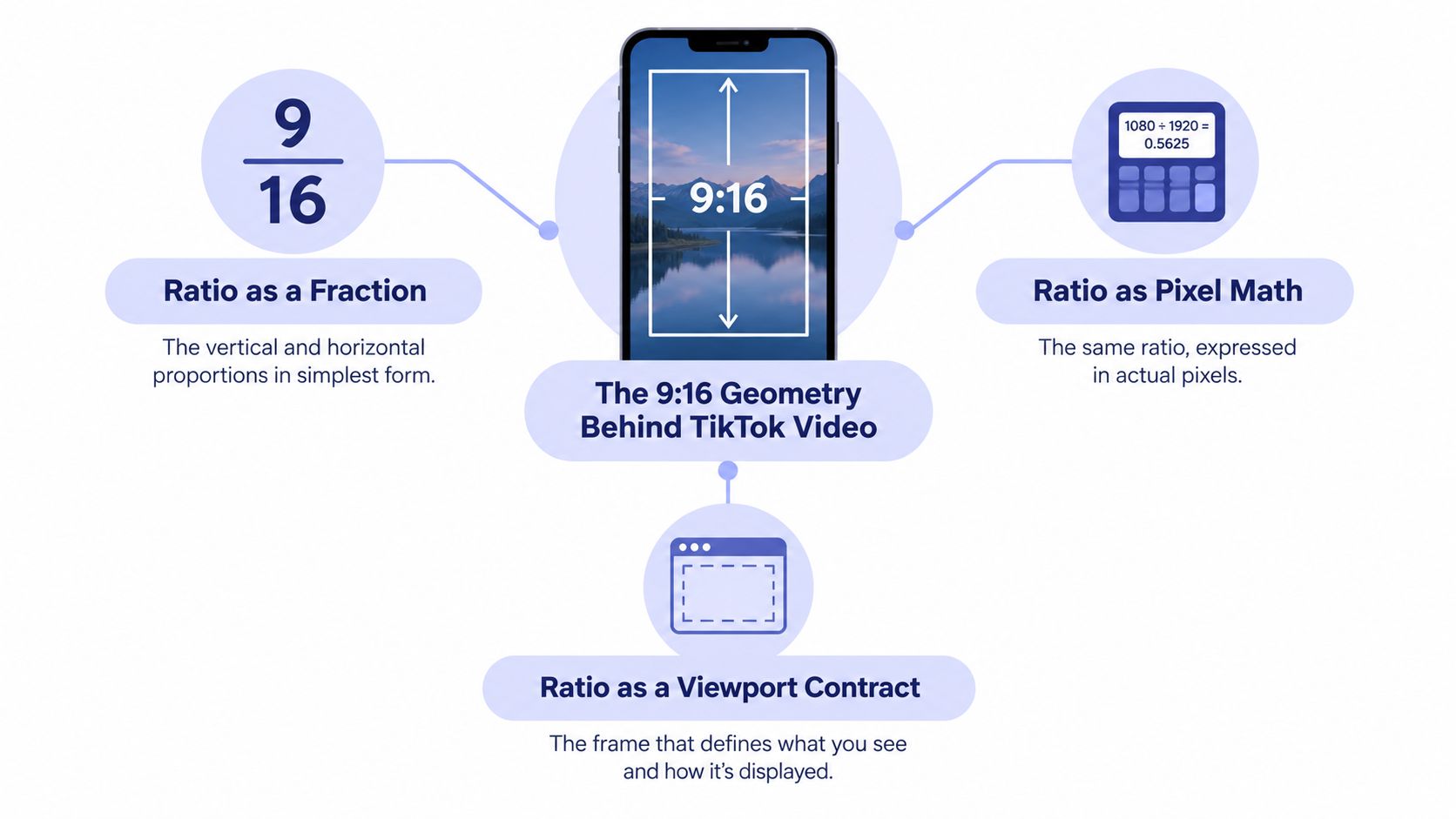 A diagram explaining the 9:16 aspect ratio used for TikTok videos through fractions, pixel math, and viewports.
Ratio as a pixel contract
A renderer that receives a true portrait source can preserve the full image without adding padding or removing side content. That makes 1080 × 1920 a convenient default for automated publishing. It also provides a predictable coordinate system for subtitles, logos, faces, and other visual anchors.
Resolution is a separate decision from geometry. TikTok's API accepts a range of dimensions within its documented bounds, so the width-to-height relationship must remain deliberate even when the pixel dimensions change. A smaller portrait file can preserve the same composition, while a larger file may add processing without improving the delivered result.
Source shape determines the transformation work. A horizontal or square asset can be cropped into portrait, but cropping removes material from the sides. It can also be fitted inside a portrait canvas with padding, which preserves the frame but leaves less space for meaningful video. Neither option is neutral, so the publishing pipeline should choose the treatment explicitly instead of letting every upload default to center-crop.
Why the phone viewport changes the answer
TikTok's product history helps explain the platform's portrait bias. Douyin launched in China in September 2016, international TikTok followed in 2017, and ByteDance combined TikTok with Musical.ly in August 2018. TikTok exceeded 1 billion combined App Store and Google Play installs by February 2019, with more than half of those installs occurring during 2018, according to this TikTok history overview.
Those milestones do not make 9:16 a ranking guarantee. They show why the discovery feed, creator tools, and viewing behavior were built around portrait smartphone use. Vertical composition fills the mobile viewport naturally, while square and wide sources need a deliberate crop, fit, or alternate rendition.
The implementation rule is practical: generate the portrait composition first, validate its dimensions and crop behavior, then send the approved rendition to the API.
9:16 matches the portrait viewport, and 1080 × 1920 gives a stable canvas for placing content before validation and upload.
The Three Ratios TikTok Actually Accepts
“Use 9:16” is good default advice, but it isn't the complete API-level picture. TikTok's official advertising documentation identifies 9:16, 1:1, and 16:9 as supported placement ratios. The correct choice depends on the destination, the source material, and whether preserving context matters more than filling a portrait screen.
TikTok's Intelligent Optimization tool also evaluates the source numerically. It divides width by height and maps the result to a target ratio:
Target ratio | Source ratio band (w/h) | Typical use |
9:16 | 0.3437–0.7813 | Native vertical, full-screen mobile creative |
1:1 | 0.7813–1.3889 | Square source material and feed-oriented assets |
16:9 | 1.3889–3.5556 | Landscape tutorials, interviews, and wide-screen material |
These bands come directly from TikTok's Intelligent Optimization documentation. They're useful when a media service accepts arbitrary source files and must decide which rendition to generate.
9:16 for native portrait creative
Use 9:16 when the content was composed for TikTok, when people are the main subject, or when the visual story relies on edge-to-edge mobile playback. It gives the editor the most vertical canvas and avoids a conversion step that can move the subject or remove side details.
This is the normal choice for short demonstrations, talking-head clips, product reveals, and vertically designed motion graphics. It's also the safest source format for repurposing into other portrait-first destinations.
1:1 when the square is meaningful
Square video can make sense when the source was deliberately designed as a square asset, when the same creative must remain reusable in square feeds, or when cropping a portrait composition would destroy its balance. It won't use TikTok's portrait viewport as efficiently, but preserving the complete graphic may be preferable to an aggressive crop.
Don't stretch a square file into 9:16. Stretching distorts people and products. Either preserve 1:1 or create a new portrait composition with intentional background treatment and repositioned elements.
16:9 when context lives at the sides
Horizontal orientation is defensible for a screen recording, an interview with multiple speakers, a tutorial whose interface spans the width, or footage where the side context carries the meaning. Center-cropping those assets can remove the very evidence the viewer needs.
That doesn't make 16:9 the general recommendation for TikTok. It means compatibility and composition are separate decisions. The platform supports the ratio, but your pipeline should preserve it only when conversion would make the content less understandable. A broader video aspect ratio guide is useful when the same master needs to serve several delivery contexts.
Safe Areas, Captions, and the Edges You Actually Lost
A 1080 × 1920 file gives you a full portrait canvas. It doesn't give your text, logo, or face unrestricted access to every pixel. TikTok renders interface elements on top of the video, so the practical design surface is smaller than the encoded frame.
Guidance commonly places the bottom obstruction zone around 270–320 pixels and the right-side obstruction near 100–120 pixels on a 1080 × 1920 frame, as described in this TikTok safe-area guide. These are working estimates, not a universal contract for every device or account state.
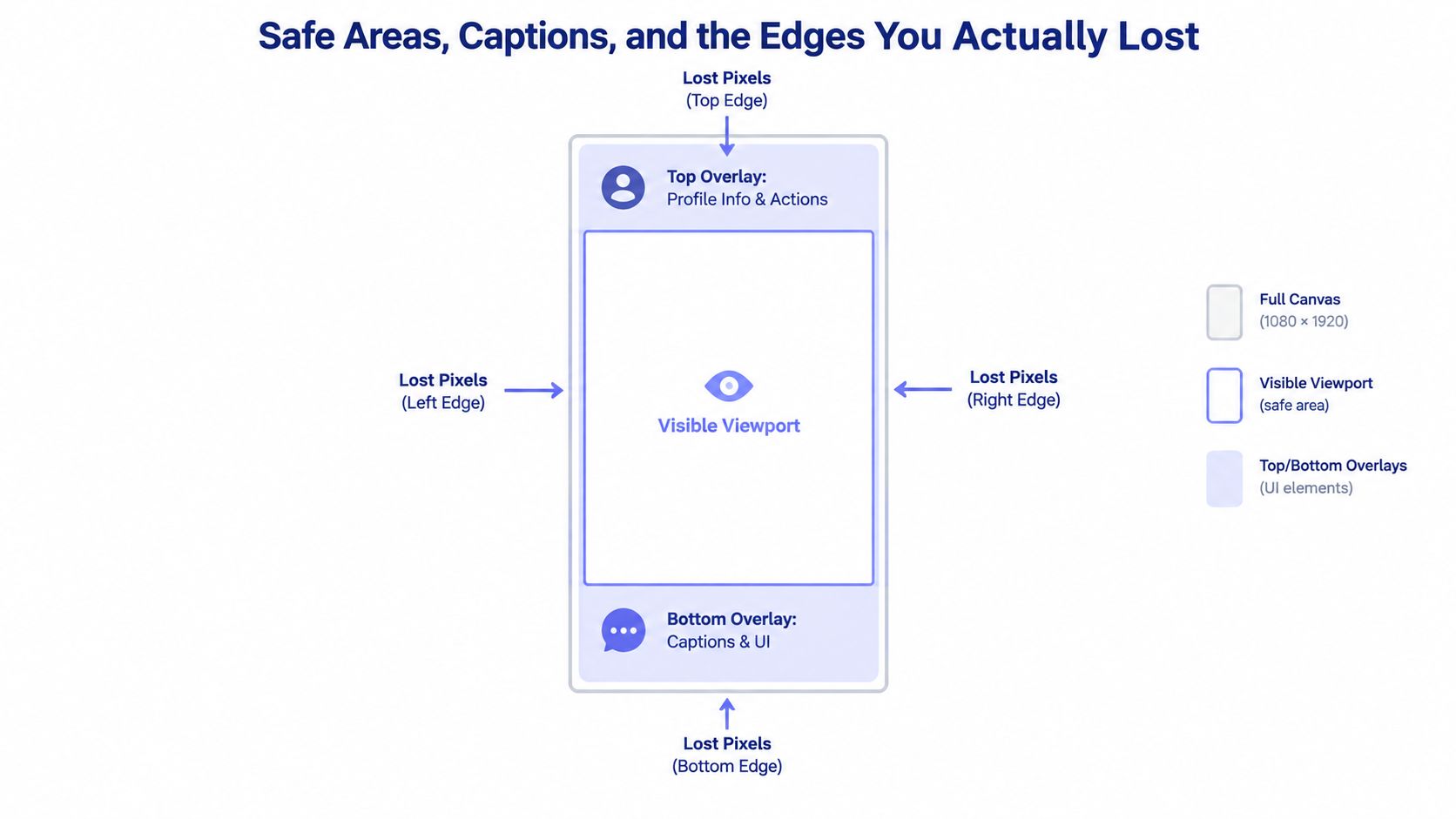 A diagram illustrating safe zones for mobile video, highlighting visible viewports and lost pixel edge areas.
Convert the safe area into layout rules
For a template system, think in coordinates rather than vague advice. Keep critical content away from the lower edge where captions and other controls appear. Reserve additional space on the right where interaction buttons can overlap the video.
A practical template should distinguish between decorative content and critical content:
Critical content: Keep faces, product names, subtitles, prices, logos, and calls to action inside the central visible area.
Decorative content: Background textures, lighting effects, and nonessential motion can extend closer to the edges.
Variable content: User-generated titles and captions need extra testing because their length changes the occupied area.
Don't hard-code one “safe rectangle” and assume it works everywhere. Interface placement can change with captions, device dimensions, and account or ad format. Render a preview in the intended TikTok surface, then inspect the actual placement.
Why correct exports still fail
Suppose the hook is a two-line subtitle positioned 40 pixels from the bottom. The video is 9:16, the dimensions are correct, and the codec is supported. The text can still become unreadable because TikTok's caption layer occupies the same region.
The same issue appears on the right. A product label placed near the edge may sit directly beneath the action controls. Moving it inward can look less dramatic in the editor, but it makes the message survive playback.
The vertical video dimensions guide is a useful companion when you're defining reusable templates across portrait-first platforms. The implementation principle is more important than any single margin: preview the final composition with overlays, not just the raw MP4.
Recording vs Editing vs API Uploads
A video can look correct in an editor and still fail during publishing. The production path determines which parts of the TikTok format you control: native recording handles framing inside the app, desktop editing controls composition and export settings, and API publishing makes validation your application's job.
Recording inside TikTok
Native recording is the simplest route for aspect-ratio handling because TikTok's capture interface is built around portrait video. It reduces setup work, but it also limits control over reusable templates, deterministic text placement, source versioning, and automated retries.
Manual creation fits a person recording and publishing one post at a time. An application generating hundreds of structured variants needs a different pipeline, with explicit media inspection before upload.
Exporting from an editor
Editors such as Adobe Premiere Pro, DaVinci Resolve, and CapCut let you define the delivery canvas before positioning the source. As covered in the geometry section above, the practical choice for a wide source is made during composition, not left to an implicit platform conversion.
In Resolve, set the timeline resolution to 1080 × 1920 before importing a 16:9 source. Position the subject once, check the title and subtitle placement, then save the setup as a preset if the same format will recur. In Premiere Pro or CapCut, apply the same principle: configure the target sequence first, then make the crop position, scaling, and background treatment explicit.
The editor should expose the values your pipeline needs to control, including canvas dimensions, crop position, safe margins, frame rate, codec, and export container. For teams comparing video editing tools for creators, those controls matter more than the brand name.
Uploading through the Content Posting API
API publishing needs a validation pass before media transfer. TikTok's documented boundaries include:
Dimensions: At least 360 pixels and no more than 4096 pixels in both height and width.
Containers: MP4, WebM, and MOV.
Codecs: H.264, H.265, VP8, and VP9.
Frame rate: Between 23 and 60 FPS, inclusive.
File size: Up to 4 GB.
TikTok lists these requirements in its Content Posting API media transfer guide. H.264 in an MP4 container is a practical baseline, and 1080 × 1920 suits a portrait delivery target, but neither is the only accepted combination.
Validate width, height, frame rate, codec, container, and file size as separate fields. A ratio check such as width / height == 9 / 16 cannot catch an unsupported frame rate or an oversized file.
The Direct Post endpoint is /v2/post/publish/video/init/ and requires the video.publish scope. The application initializes the operation, receives an upload_url, and transfers the media using the complete returned URL, including its query parameters. Run aspect-ratio and media checks before that transfer, so a bad asset fails locally rather than after processing begins.
For authentication and publishing steps, use this guide on how to post to TikTok.
Cross-Posting One Asset to 9 Platforms
A video can look correct in an editor and still arrive badly composed on one destination. TikTok, Instagram Reels, and YouTube Shorts generally suit portrait creative, while LinkedIn, X, Threads, Bluesky, Facebook, and Telegram may require different renditions for their post surfaces. Treat aspect ratio as a publishing-pipeline decision, not a single export setting.
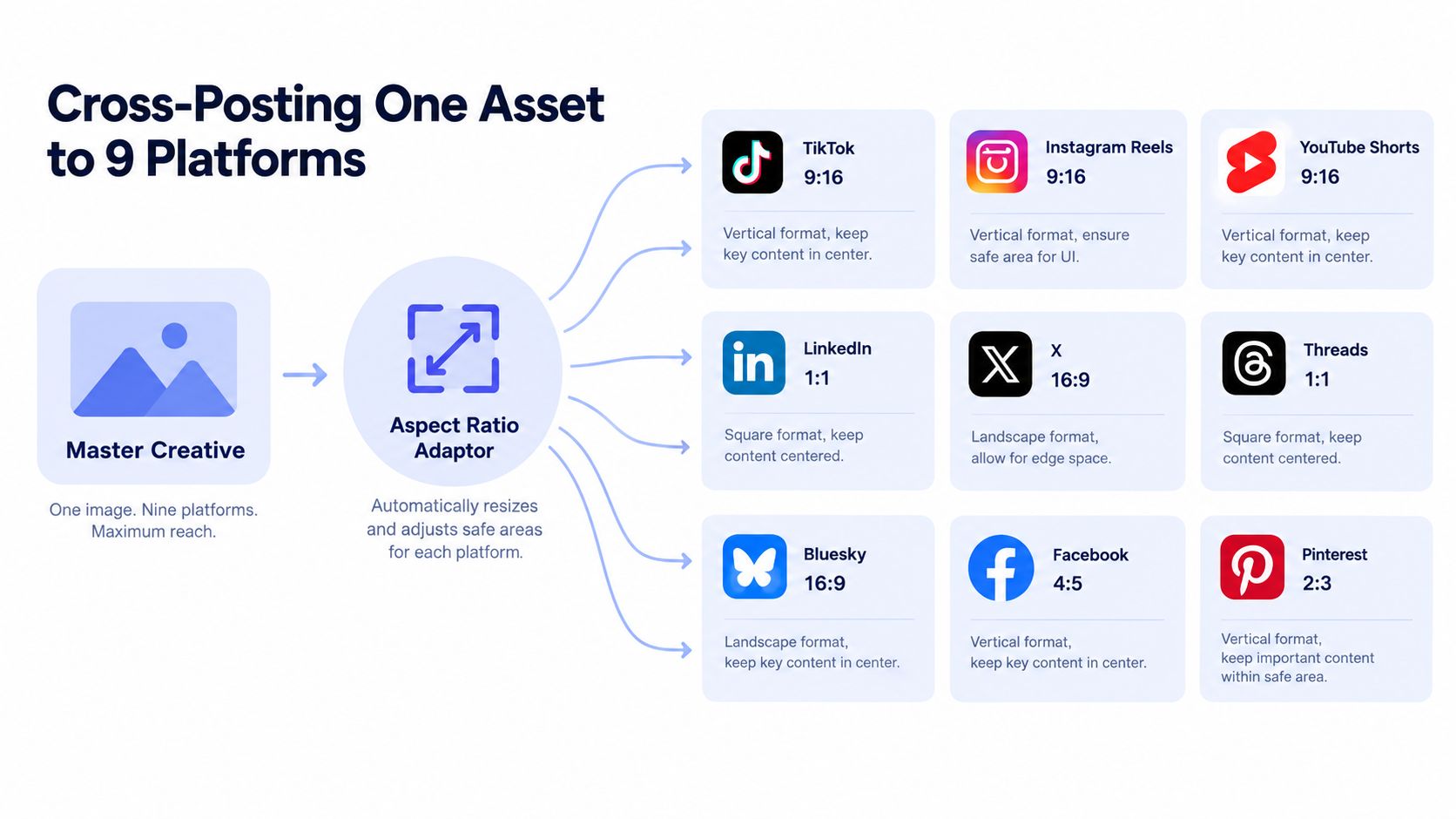 A diagram illustrating how one master creative asset is adapted into nine different aspect ratios for various social platforms.
Start with a high-quality master and keep its metadata attached. If TikTok is a primary destination, a 9:16 rendition is usually the practical default. Place the subject, title, and call to action within a conservative central region, then create platform-specific outputs only when the destination requires another shape.
A reliable multi-platform pipeline
Store the original master. Keep the highest-quality source with its width, height, frame rate, codec, and intended crop recorded.
Select the destination rendition. Use 9:16 for portrait surfaces. Retain 1:1 or 16:9 when the content depends on those dimensions.
Apply platform-specific safe-area rules. Captions, controls, and overlays occupy different positions across services.
Render a separate output. Avoid mutating the master during resizing, captioning, or encoding.
Validate every derivative. Check dimensions and encoding against the receiving platform's requirements before upload.
Publish through one orchestration layer. Keep credentials, retries, webhooks, and status handling outside the core content logic.
PostPulse publishes through one integration to 9 platforms using a REST API, official n8n and Make.com nodes, or an MCP server. It also supports white-labeling the flow under a developer's own brand, according to its platform overview. An orchestration layer can reduce duplicated publishing code, but it cannot decide whether a particular rendition preserves the intended composition.
The useful rule is one source of truth, not one file for every destination. The source of truth is the original creative plus its metadata. Files sent to platforms are validated derivatives with their own dimensions, encoding settings, and publication status.
For implementation details, see this guide on how to post a video through a publishing workflow. Keep the ratio decision in media preparation, before the upload request is created.
A Pre-Upload Checklist for Aspect Ratio
Before calling the upload endpoint, separate the problem into four checks:
Ratio: Is the output intentionally 9:16, 1:1, or 16:9 for the destination?
Resolution: Are width and height inside TikTok's documented API bounds?
Safe area: Can viewers read the face, logo, subtitle, and call to action without interface overlap?
Encoding: Does the container, codec, frame rate, and file size meet the API requirements?
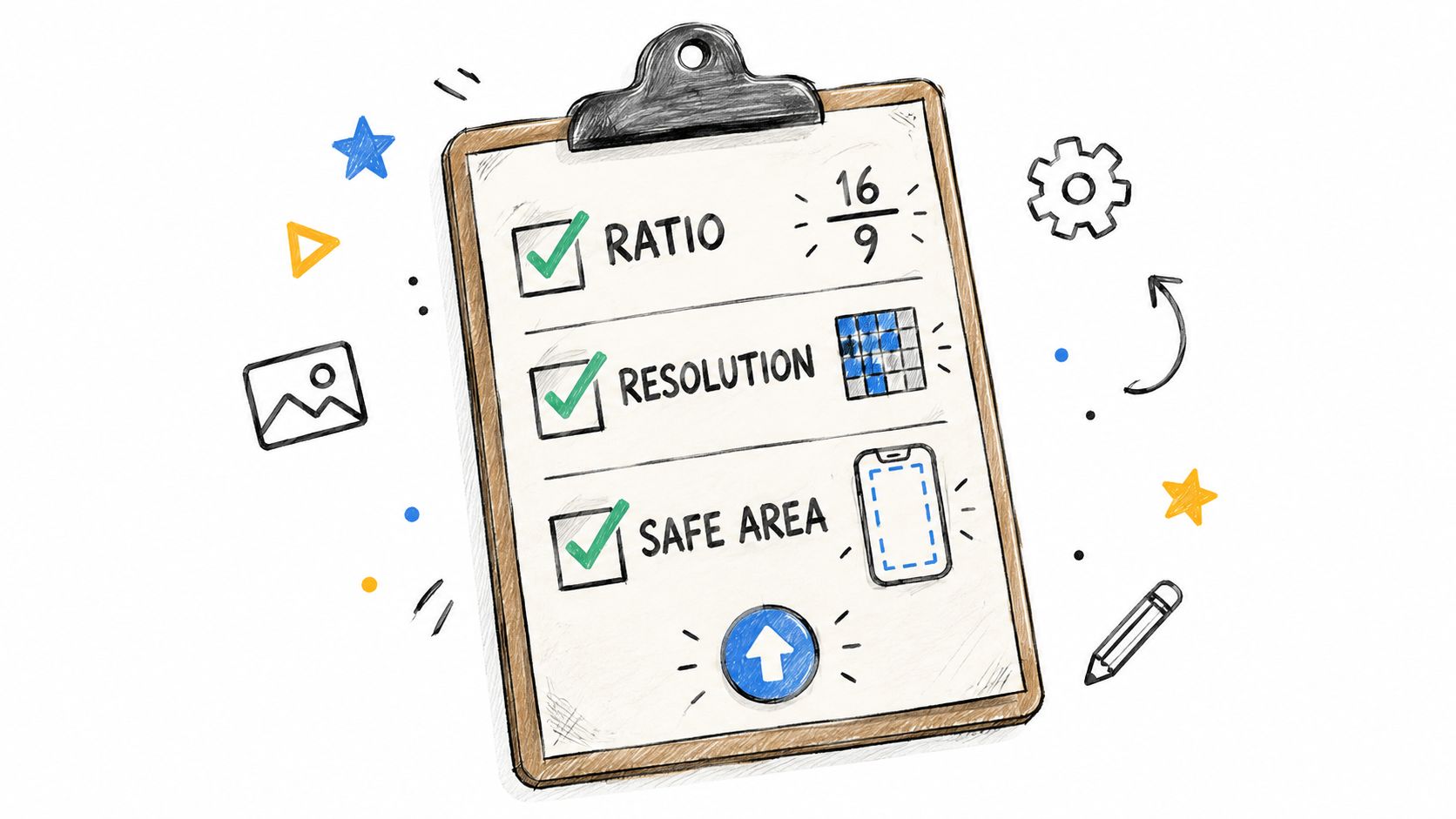 A clipboard illustration listing TikTok technical requirements including aspect ratio, resolution, and safe area for content creation.
A good preflight process rejects bad media before TikTok sees it. Calculate width / height, compare the result with the intended output, inspect the file metadata, and render a visual preview with the expected overlays. Keep the validation result beside the asset so a failed publication can be diagnosed without re-encoding blindly.
For most native TikTok creative, standardize on 9:16 at 1080 × 1920. Preserve a square or horizontal rendition when cropping would remove meaning, but make that an explicit content decision rather than an accidental consequence of a generic resizer.
The phrase “full-screen” causes the recurring mistake. Full-screen describes the canvas coverage, not universal pixel visibility. The safest TikTok file is the one whose important information survives both encoding and interface overlays.
PostPulse gives apps, automations, and AI agents one publishing integration for TikTok and eight other platforms through a REST API, n8n, Make.com, or MCP. If you're tired of rebuilding media validation, OAuth handling, and platform-specific publishing flows, visit PostPulse and evaluate it as the publishing layer behind your product.
About the Author

Founder of PostPulse — a social media scheduling platform for creators and teams. Software engineer with a passion for building developer tools and simplifying complex API integrations across social media platforms.