How to Post to TikTok: A Developer's Complete Guide
Published on · Updated on
Tags:
You upload a video, receive a success response, and expect to see it on TikTok. Instead, the token expires, the upload URL is buried in a response object, processing continues asynchronously, or the same file works on desktop but fails from a phone. Developers used to Meta or LinkedIn integrations often discover that how to post to TikTok involves two separate problems: producing a compatible video and managing a publishing workflow that doesn't behave like a single fire-and-forget request.
The reliable approach is to understand the native app and browser flows first, then choose between TikTok's Content Posting API, a workflow builder, or a unified publishing layer. TikTok has roughly 1.9 billion monthly active users globally, with some 2026 estimates placing the figure near 2.0 billion, so small implementation details can affect distribution across a very large audience. (TikTok usage estimates and market context)
Table of Contents
Why Posting to TikTok Feels Harder Than It Should
The first failed integration usually looks deceptively healthy. Your server authenticates, creates a post request, and receives a response. Then you discover that the platform expects an upload URL from a previous step, the media still needs to be transferred separately, and processing hasn't finished when your request returns. A retry may create duplicate state, while a delayed worker may use credentials that are no longer valid.
 A confused person looking at a smartphone with social media icons connected by a broken chain.
TikTok's official Content Posting API describes separate ingestion paths for a local file and a hosted video URL. The local route uses FILE_UPLOAD, while PULL_FROM_URL tells TikTok to retrieve media from a URL. The documented flow begins by invoking the upload endpoint, not by treating the final publication as one ordinary media POST. (TikTok Content Posting API upload guide)
The other surprise is that upload completion isn't publication completion. TikTok says video processing happens asynchronously, and its upload-then-publish instructions require developers to send the file with a PUT request to the extracted upload_url. That means your application needs state handling, retries, status visibility, and a policy for what happens when processing fails. (TikTok asynchronous upload documentation)
Practical rule: Treat authentication, media transfer, and processing as separate states. A successful response from one state doesn't prove the post is live.
Manual posting has its own trap. Mobile and web workflows have different practical file-size ceilings, and a video that exports cleanly for Creator Center may be too large for a phone upload. The platform's scale makes these quirks commercially relevant, especially when a team publishes repeatedly or supports customer accounts rather than one creator profile.
How to Post to TikTok Using the Mobile App
The mobile app remains the reference implementation for creators. Open TikTok, tap the create button, then choose whether to record a new clip or upload media from the device. After selecting the video, review the trim, sound, text, filters, and cover frame before moving to the publishing screen.
The publishing screen is where many automation requirements first become visible. Write the caption, add relevant hashtags, and check mentions rather than assuming the app interpreted them correctly. Then review visibility and engagement controls, including who can view the post, whether comments are allowed, and whether other users can use the video for Duet or Stitch.
Use this sequence before tapping publish:
Inspect the media: Confirm that the selected clip is the intended version and that the opening seconds work without relying on a caption to explain the context.
Edit the caption: Keep the text readable, add hashtags that describe the subject, and verify every mention.
Choose the audience: Check the visibility setting instead of accepting the current account default.
Set interaction permissions: Decide whether comments, Duet, and Stitch fit the content.
Review the cover: Select a frame that makes sense in the profile grid and communicates the subject quickly.
Publish or save: Publish immediately when the post is ready, or leave it in drafts if the media or metadata still needs review.
The important developer habit is to record the choices you make manually. Caption text, visibility, comments, Duet, and Stitch are not cosmetic details. They define the expected post state, so an automated workflow should represent them explicitly rather than falling back to defaults.
TikTok's current product direction also favors conversational, trust-building content and emotionally resonant storytelling, while its trend materials emphasize search-led topic selection and trend tracking. (TikTok's 2026 trend forecast) That doesn't replace good media handling, but it does change what you choose to publish. A technically valid upload can still be the wrong post.
How to Post to TikTok From a Desktop Browser
When a phone rejects a large export, desktop publishing is usually the faster workaround. Sign in to TikTok's browser-based creator tools, open the upload workflow, and select the video from your workstation. This path also fits editing pipelines where source files stay on a computer instead of moving through a mobile device.
Add the caption and hashtags in the composer, then inspect the thumbnail or cover. Confirm visibility and interaction settings before publishing. If scheduling is available on the account, set the intended date and time, then verify the final status in TikTok before closing the tab. A successful upload request does not always mean the post is ready.
Desktop publishing also exposes a file-size trap. Mobile and web uploads can accept different limits, so an export that works in a browser may fail when the same asset reaches a phone or mobile automation worker. One guide lists practical mobile limits of about 72 MB on Android and 287 MB on iPhone, with higher limits on the web. (TikTok video size guidance)
Keep the high-quality source master, then create a delivery copy for the narrowest channel your workflow supports. That approach avoids rebuilding an upload after a mobile rejection and makes automated publishing easier to test. For programmatic workflows, treat upload completion and post publication as separate states, because TikTok may process the media after the request returns.
Desktop isn't just a larger version of mobile. It can determine whether the same asset is accepted, so test browser and mobile delivery paths independently.
Video Specs, Formats, and What Uploads Cleanly
A dependable export starts with a 1080 × 1920 pixel canvas in a 9:16 vertical frame. Use MP4 or MOV, with H.264 video and AAC audio. For ordinary feed content, 30 fps is the safer default. Choose 60 fps for motion-heavy footage only when the extra detail justifies the greater compression pressure. (TikTok upload quality and format guidance)
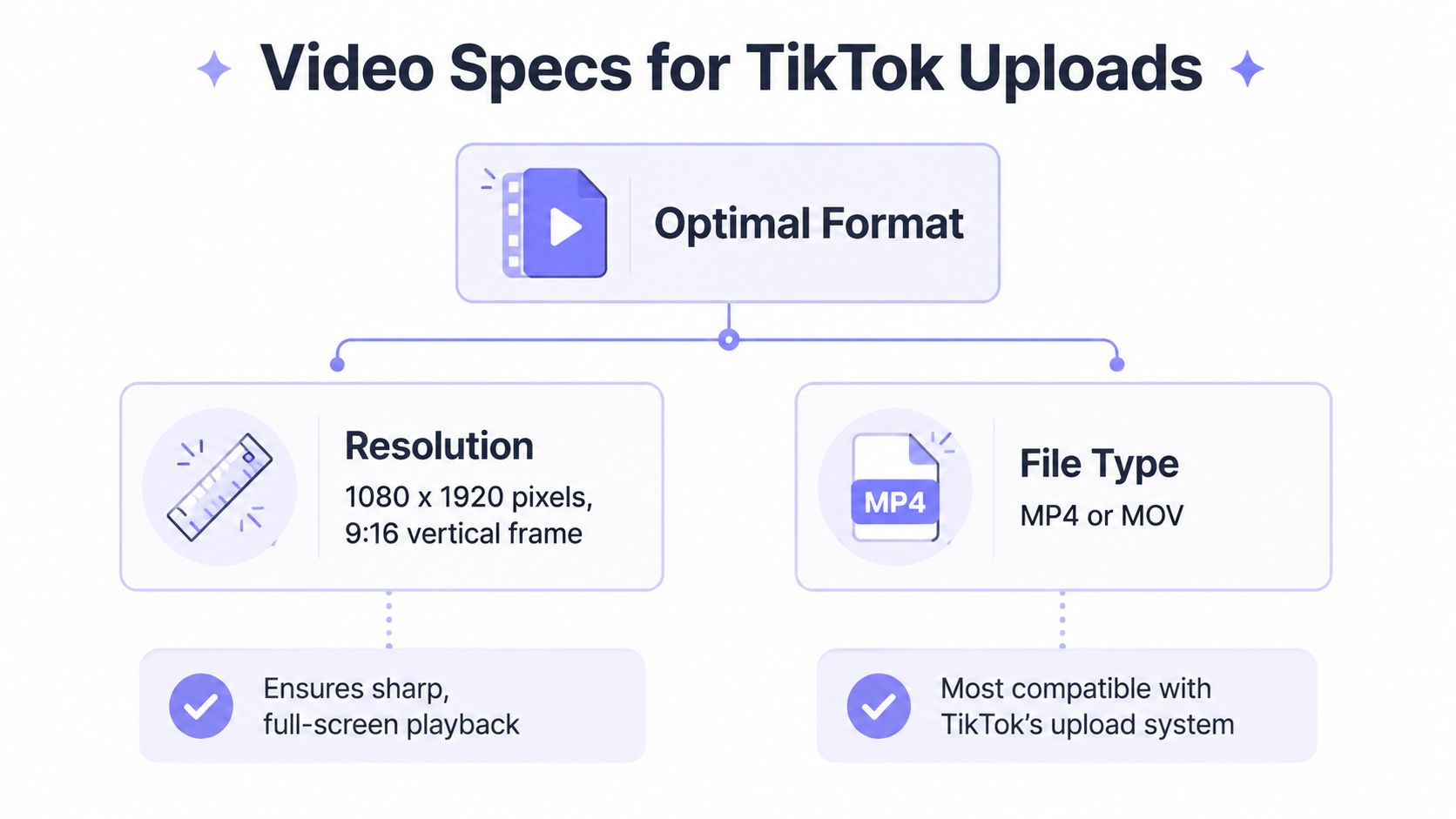 An infographic showing optimal video specs for TikTok uploads, including 1080x1920 resolution and MP4 or MOV file formats.
These settings do not prevent TikTok from re-encoding the video. They give its processing pipeline a clean source that matches the feed's intended geometry. Export at the target dimensions instead of uploading a wide file and relying on in-app cropping to preserve the subject, text, and safe areas. The vertical video dimensions guide provides a broader reference for portrait formats.
Three failure modes that waste debugging time
Aspect-ratio mismatch causes letterboxing, stretched subjects, and text placed too close to an edge. The defect usually starts in the export, not the API request. Validate width, height, orientation, and container metadata before passing the asset to a publishing worker.
Low bitrate leaves TikTok with less useful detail to preserve during processing. Already-soft footage becomes especially difficult to read around fine text, fast movement, and dark gradients. A larger file is not automatically better, but an under-specified export gives the platform less quality to work with.
Oversized mobile files create a separate delivery problem. Upload limits can vary by device and workflow, so a file accepted in a browser may fail on a phone or mobile automation worker. Keep the practical duration and size limits for the selected publishing path in your validation rules, rather than treating one successful upload as proof that every path accepts the same asset.
Validate near asset generation. Reject incorrect dimensions before upload, warn when a file may exceed the selected channel's cap, and store the original filename or asset ID in the job record. That metadata prevents retries from publishing an older render and gives automated workflows a reliable audit trail.
Automation Paths for Posting to TikTok at Scale
There are three sensible ways to automate TikTok publishing, and they solve different problems. The raw API gives you control. Workflow platforms reduce custom code. A unified publishing service can make sense when TikTok is only one destination among several.
The raw Content Posting API
TikTok documents a four-step direct-post sequence:
Query creator information so the application can populate its export interface.
Initialize the post request.
Export the video to TikTok's servers.
Use the returned
upload_urlexactly as provided, including its query parameters.
The API supports FILE_UPLOAD for a local file and PULL_FROM_URL for a hosted file. In the upload-then-publish path, TikTok instructs developers to extract the returned upload URL and send the file there with PUT. (Official TikTok video upload reference)
This approach is appropriate when TikTok is central to your product, you need custom validation or observability, and your team is prepared to maintain OAuth, job state, retries, permission changes, and platform-specific behavior. It isn't appropriate if you only need a small internal tool and don't want to own the integration surface.
Read the TikTok Content Publishing API implementation guide before writing the worker. The critical design choice is to model the process as a state machine, not as a synchronous function that returns after the first successful HTTP response.
n8n and Make.com
A dedicated TikTok node in n8n or a Make.com module moves orchestration into a visual workflow. A typical flow can receive an approved asset, validate metadata, select an account, publish, and route failures to a notification step without requiring every operator to understand the underlying request sequence.
The trade-off is visibility. A visual workflow is fast to assemble, but debugging becomes harder when a connector abstracts token refresh, upload status, or response mapping. Keep the original asset ID, account ID, request result, and failure message in the workflow so an operator can distinguish a bad file from an expired authorization.
For teams still producing the media manually, a focused Social Media Content Production resource can help organize the creative side before automation touches distribution. Automation can't rescue an unapproved cut, an incorrect aspect ratio, or a caption that was never reviewed.
PostPulse as a unified layer
PostPulse exposes a REST API, an official n8n node, a Make.com integration, and an MCP server for publishing across ten platforms from one integration. Its supported destinations include TikTok, Instagram, YouTube, LinkedIn, X, Threads, Bluesky, Facebook Pages, Telegram, and Pinterest. It handles the account-connection and publishing surface so a product team doesn't have to implement each platform separately.
The benefit is consolidation. The cost is another service boundary and less direct control than owning every TikTok request yourself. It fits an app that needs multi-platform publishing, a no-code workflow, or an AI agent that needs a controlled publishing interface. A TikTok-only product with unusual requirements may still be better served by the official API.
Path | Maintenance | Platform Coverage | Best For |
Raw TikTok API | High, you own authentication, upload state, retries, and changes | TikTok | Products requiring direct control |
n8n or Make.com | Moderate, connector behavior and workflow logic still need monitoring | Depends on configured modules | Internal automations and no-code teams |
PostPulse | Lower integration overhead, with an external service boundary | Ten platforms through one interface | Multi-platform apps, agents, and white-label workflows |
Putting It All Together Into a Reliable Posting Workflow
A shippable TikTok workflow starts before the API call. Render a vertical delivery asset at 1080 × 1920, keep standard uploads within the 10-minute baseline, validate the container and codec, and record the account and asset identifiers alongside the job.
Then separate the publishing states. Authenticate the account, query the creator information required by the export interface, initialize the post, transfer the file to the returned upload URL with the documented method, and wait for asynchronous processing rather than declaring success too early. Set caption, visibility, comment, Duet, and Stitch choices deliberately.
Use a repeatable testing rhythm instead of sporadic publishing. Benchmark guidance reports that accounts posting 2 to 5 times per week have achieved about 17% more views per post than accounts posting once weekly, and it reports that personal accounts average 1.5% more engagement per video than business accounts. (TikTok posting-frequency benchmarks) Treat those figures as directional benchmarks, not guarantees. Your own retention, comments, and distribution data should decide what to change next. A practical TikTok upload frequency guide can help structure that testing plan.
Stop custom-integrating when you need several platforms, multiple automation surfaces, or ongoing token and API-version maintenance. Keep the raw API when TikTok-specific control, custom compliance, or deep internal observability outweighs the maintenance cost. For broader workflow automation patterns, design the media validator and publishing state machine as reusable components rather than burying them in one campaign.
PostPulse gives developers and automation builders one publishing layer for TikTok and eight other platforms through REST, n8n, Make.com, and MCP interfaces. If you want to avoid maintaining separate OAuth, upload, and platform-change workflows, visit PostPulse and evaluate whether its unified publishing model fits your stack.
About the Author

Founder of PostPulse — a social media scheduling platform for creators and teams. Software engineer with a passion for building developer tools and simplifying complex API integrations across social media platforms.