Social Media Publishing Platform: The Developer's Guide
Published on · Updated on
Tags:
The deploy looked routine until the social publishing queue started filling with failures. An Instagram carousel stayed IN_PROGRESS, a token that had worked during testing suddenly returned an authentication error, TikTok rejected a request because required privacy fields were missing, and the YouTube upload worker resumed against a URI your system no longer trusted. None of those failures came from the same root cause, and that's exactly the problem.
A social media publishing platform isn't just a calendar with a “publish everywhere” button. For developers, it's an integration layer that has to absorb OAuth lifecycles, media-processing rules, container states, quotas, app reviews, retries, and increasingly autonomous publishing workflows. The audience makes that complexity hard to avoid. As of April 2026, social media represented 5.79 billion user identities, equal to 69.9% of the global population, while the typical user visited 6.5 social platforms each month and spent 18 hours and 36 minutes per week on social media, according to Forbes Advisor's social media statistics.
Table of Contents
The Developer Frustration That Started This Whole Category
At 2:14 a.m., a batch job can make every platform integration look like a separate production incident.
The Instagram worker may create media containers successfully, then leave some of them in IN_PROGRESS without giving your application a useful resumable upload session. Your token service may report that a long-lived credential exists, while the API responds as if the application is using a short-lived token. The TikTok request can fail because its publishing flow requires fields your generic media schema never modeled. Meanwhile, a LinkedIn or YouTube worker can hit a quota or upload-state problem that has nothing to do with the Instagram failures beside it.
The painful part isn't writing the first HTTP request. It's preserving the differences after the happy path ends.
Practical rule: Treat every network as a stateful integration, not as a destination URL.
Native integrations multiply that burden. Each provider has its own OAuth consent process, token behavior, media lifecycle, error envelope, quota model, and review requirements. A queue that only stores platform, caption, and media_url usually lacks the state needed to recover safely. You need provider-specific identifiers, retry history, idempotency keys, credential ownership, and enough response detail to distinguish a temporary failure from a permission that has been revoked.
That's why this category emerged. A unified publishing layer gives your application one operational surface while keeping the provider-specific work behind adapters, workers, and policy checks. The category overlaps with broader content automation platform workflows, but the engineering distinction matters. Automation describes what triggers the work. Publishing infrastructure determines whether the work reaches the network reliably.
The global market also makes one-network support less useful. Facebook remained the largest social platform in 2026, with 56.3% of internet users aged 16 and above reporting monthly use, while Statcounter's July 2026 social-media traffic data listed Facebook at 73.23%, YouTube at 9.48%, Instagram at 7.13%, and X at 5.24%. Those figures appear in the Digital 2026 mid-year global update, and they point to a practical reality: audiences concentrate unevenly, but publishing requirements remain distributed.
What a Social Media Publishing Platform Actually Does
A serious platform starts with translation. Your application sends a normalized request containing content, media, target accounts, and a publication time. The platform then converts that request into the API calls, upload steps, polling loops, and status transitions required by each selected network.
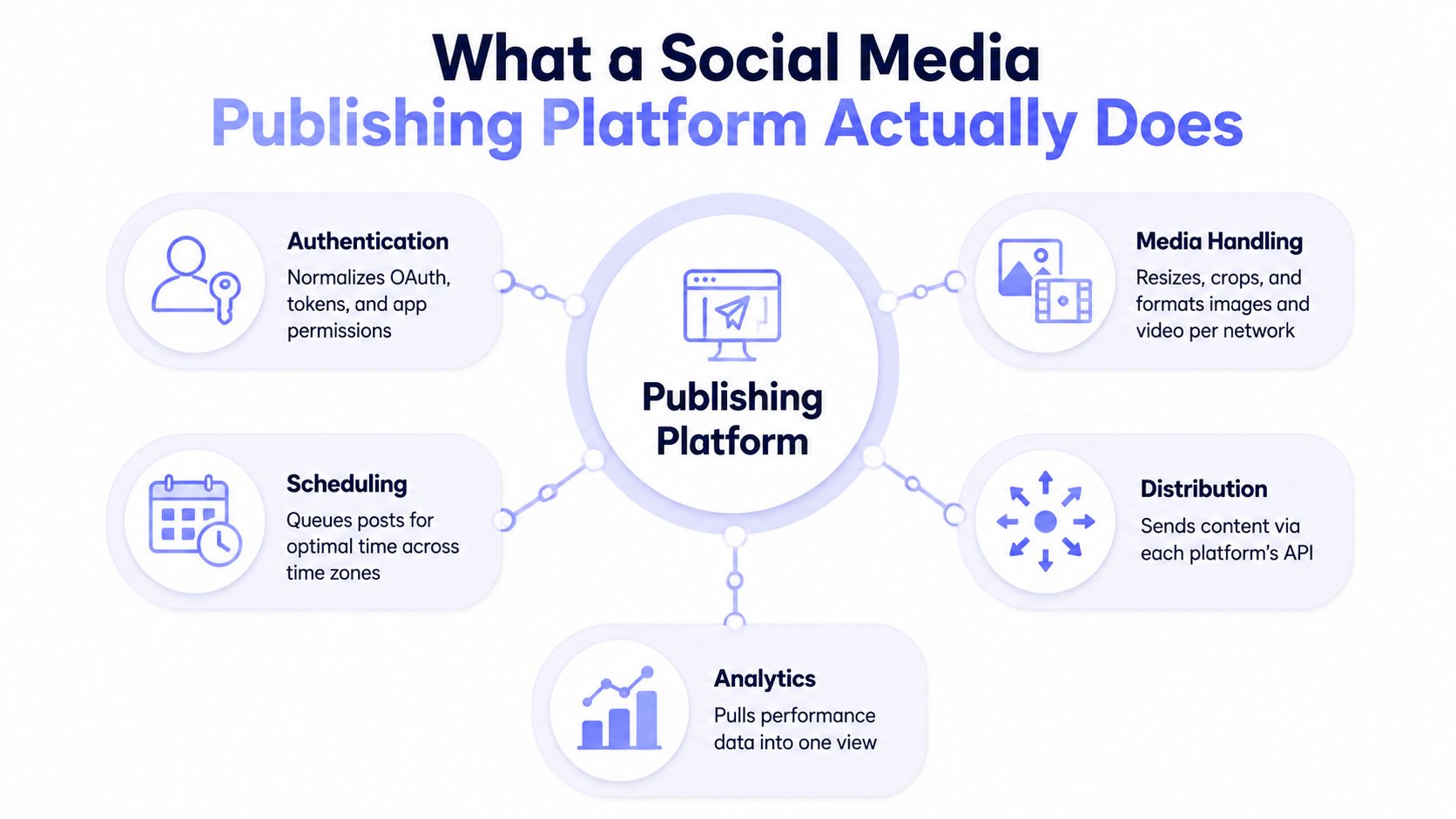 A diagram illustrating the core functionalities of a social media publishing platform including scheduling and analytics.
The adapter layer
The REST API is the obvious entry point, but the hard work happens behind it:
Authentication stores account connections, refreshes credentials where supported, isolates tenants, and reports reconnect requirements instead of returning an opaque failure.
Media handling validates files, prepares network-specific variants, uploads them through the correct protocol, and preserves provider IDs.
Scheduling turns a requested timestamp into a durable job, accounting for time zones, provider rules, retries, and duplicate prevention.
Distribution maps one normalized post to different endpoints and payload shapes.
Analytics pulls network responses into a consistent model while preserving the raw provider data for debugging.
Instagram's flow illustrates why a thin abstraction fails. The application may need to create a container, wait for processing, inspect its status, and publish only when the container is ready. A platform that reports only “submitted” leaves your product unable to tell users whether a post is queued, processing, rejected, or published.
YouTube creates a different class of problem. Its documentation distinguishes the videos.insert upload bucket from the general API pool. The documented default allocation is 100 upload calls per day, with 1 quota unit per upload in that bucket, while other endpoints use a separate 10,000-unit daily pool, as described in this technical guide to YouTube quota-aware publishing. A unified layer therefore needs separate workers and monitoring, not one shared counter.
For teams comparing orchestration products as well as API infrastructure, this overview of top social media automation platforms can help separate visual workflow tools from developer-facing publishing layers. They solve related problems, but they don't expose the same control over state, credentials, or retries.
Core Features That Separate a Real Platform From a Wrapper
A wrapper forwards your request. A real publishing platform owns the operational work between request and receipt.
The distinction becomes obvious when a post contains media. Instagram's official publishing documentation sets a hard limit of 50 API-published posts per account in a moving 24-hour window, and a carousel counts as one post. The same documentation says a carousel can contain up to 10 images, videos, or a mixture of both, according to Meta's Instagram content publishing documentation. Your scheduler must track that account-level state instead of resetting a counter at midnight.
YouTube adds file and protocol constraints. The videos.insert documentation permits uploads up to 256 GB and lists video/* and application/octet-stream as accepted MIME types, as specified in Google's endpoint reference. A production system still needs resumable uploads, persisted session state, retry classification, and cleanup for abandoned jobs.
LinkedIn is a different validation boundary. Its UGC Post API limits the text body to 3,000 characters, which means your normalized content model must validate per destination rather than assuming one universal caption limit, as documented by LinkedIn's UGC Post API reference.
Capability | Thin Wrapper | Publishing Platform |
Authentication | Forwards an access token | Manages connection state, refresh behavior, encryption, isolation, and reconnect flows |
Media | Sends the original URL or file | Validates, transforms, uploads, polls, and records provider state |
Quotas | Retries after failure | Tracks relevant windows and queues work before throttling |
Scheduling | Stores a timestamp | Executes durable jobs with idempotency, backoff, and status callbacks |
Errors | Returns provider-specific JSON | Preserves provider detail while exposing typed, actionable states |
Coverage | Supports a narrow endpoint set | Maintains feature parity across supported networks and post types |
The feature bar
OAuth handling should include encrypted secret storage and strict per-end-user isolation. It should also refresh credentials before they become unusable, rather than waiting for the first failed publish to trigger a reconnect screen.
Quota management needs the same discipline. Instagram's publishing limit is moving-window based, and independent technical guidance notes conflicting values across Meta documentation for different endpoints and pages. The safe design is to query the live content_publishing_limit response, pace at the account level, and treat a carousel as one published post. Those details are summarized in this Instagram Graph API publishing guide.
A vendor that only wraps an endpoint can still be useful for a prototype. It becomes expensive when your team has to build the queue, media workers, retry policy, audit trail, and provider-specific dashboards that make the endpoint dependable.
Integration Surfaces and Branding Models Explained
The same publishing infrastructure can serve different teams through different interfaces. Choosing the surface first prevents a common mistake, building an internal REST integration when users need a visual workflow or an agent-compatible tool definition.
Four ways to connect
REST API is the foundation for SaaS products and internal services. Your backend controls the data model, authorization, UI, and job lifecycle. Look for publish and schedule operations, webhooks, idempotency support, account management, and a way to retrieve provider-level receipts.
n8n suits teams that want a visual workflow but still need repeatable automation. A trigger can create a publishing job, route it through approval, and react to a webhook without maintaining a custom worker service. The trade-off is that complex branching and high-volume retry behavior can become harder to test than code.
Make.com is useful when business operations already live in visual scenarios. It's quick to connect forms, databases, storage, and notifications, but you should inspect how the integration exposes errors, retries, binary files, and execution history before treating it as a mission-critical queue.
MCP servers expose typed publishing tools to AI agents over the Model Context Protocol. An agent might call tools for drafting, scheduling, publishing, or retrieving analytics. That convenience raises the security bar because a tool invocation can become an external side effect.
White-label and private-label
White-label usually means your product embeds the vendor's interface through an iframe or SDK while applying your logo, colors, and customer-facing navigation. It works well for agencies or SaaS products whose users need a ready-made publishing workspace.
Private-label is a deeper rebrand. It aims to remove vendor identity from the consent experience, dashboard, billing communications, and API-facing surfaces. That model fits products where customers should interact only with your application.
Surface | Best for | White-label fit | Private-label fit |
REST API | SaaS backends and internal tools | Strong, if you build the interface | Strong |
n8n | Operations and no-code automation | Limited | Limited |
Make.com | Visual business workflows | Limited | Limited |
MCP server | AI agents and tool-driven systems | Depends on your agent UI | Strong for agent products |
The important distinction is ownership. A surface determines how your code or users invoke publishing. A branding model determines whose product experience customers believe they're using.
How Builders Actually Use One in Production
A white-label SaaS product, a no-code workflow, and an AI agent can all use the same publishing layer, but they stress different parts of it.
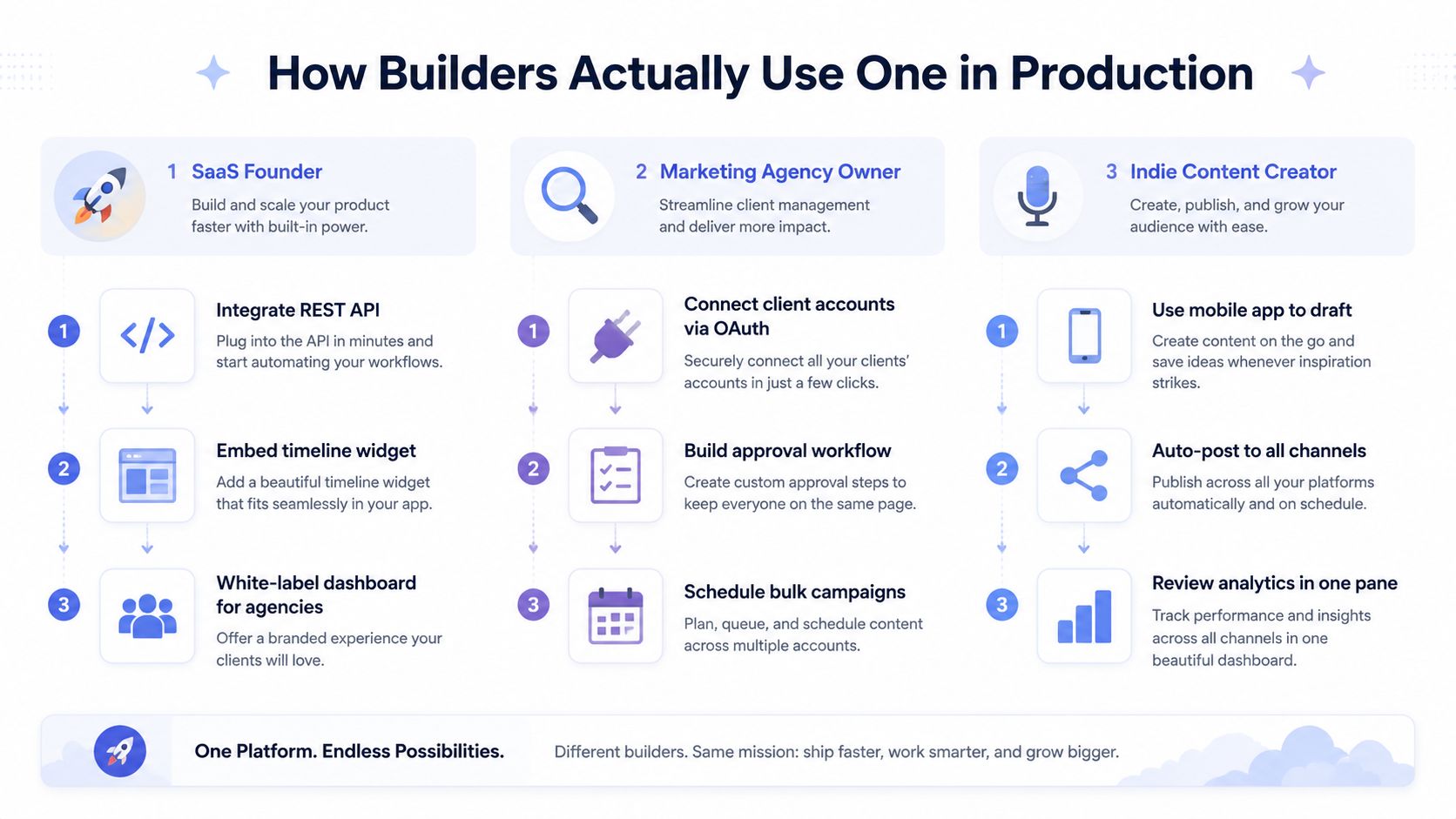 An infographic illustrating how SaaS founders, marketing agencies, and content creators use the One platform in production.
SaaS product for agencies
A SaaS founder might integrate the REST API, embed a dashboard, and let agencies connect client accounts from inside the product. The product owns tenant boundaries, billing, roles, and customer support, while the publishing layer handles provider-specific connections and delivery.
That setup only works if account ownership is explicit. A post created by one agency must never enter another agency's queue, and a reconnect action must identify the correct customer, workspace, account, and provider. The embedded interface also needs configurable branding and predictable webhook behavior.
No-code listing automation
A real estate agency can use n8n or Make.com to connect a listing database to a publishing workflow. A new record triggers media preparation, caption generation, an approval step, and a scheduled publish operation.
The no-code builder doesn't need to maintain a TypeScript SDK or understand every upload protocol. They do need visible execution history, retry controls, webhook handling, and a clear failure branch. If the image upload succeeds but the final publish fails, the workflow should preserve the uploaded asset and retry the publish step rather than starting the entire process again.
The publishing layer becomes the durable boundary between a quick visual workflow and unreliable external APIs. For broader implementation patterns, developers can use these social media integration guides as a reference point when mapping account connections and post states.
AI-agent publishing adds another concern: the agent must not have unrestricted authority merely because it can call a tool.
An agent should be able to propose content faster than a human, but it shouldn't be able to bypass the approval policy that protects the account.
A sound workflow treats content approval as a state machine with draft, pending review, approved, rejected, expired, and published states. Each transition needs an audit record, and the API must enforce the state rather than trusting the agent to behave correctly.
The practical split looks like this:
SaaS teams need tenant isolation, embedded UX, and stable webhooks.
No-code teams need reliable nodes, readable errors, and replayable executions.
Agent teams need typed tools, scoped credentials, approval gates, and publishing receipts.
The interface can change. The governance and delivery guarantees cannot.
A Practical Checklist for Evaluating Vendors
A demo can prove that a vendor publishes one image to one account. It can't prove that the system will survive a provider review, a quota window, a failed upload, or a customer reconnecting an account months later.
Start with network coverage, but test capability coverage too. Ask whether the vendor supports the networks you need, including the specific post types, account types, mentions, media formats, and analytics fields your product promises. A logo grid isn't enough.
Questions worth asking before integration
Coverage: Does the platform support your required networks and account types with the features you need, or does it only support basic text publishing?
OAuth: How are access and refresh credentials encrypted, isolated, refreshed, revoked, and reconnected? What happens when a provider removes an app's permission?
Quota handling: Does the platform expose quota state, queue before a limit, and return typed errors that your retry logic can understand?
Media reliability: Can it process network-specific media, poll asynchronous containers, resume interrupted uploads, and preserve provider IDs?
Workflow controls: Are approvals, roles, expiration, audit logs, and human review enforced at the API level?
Branding: Can you remove vendor identity from the interface and consent flow, or are you only changing colors in an embedded frame?
Pricing: Does the billing model match external accounts and publication volume, or does adding users and workspaces create unexpected seat costs?
Developer experience: Are typed SDKs, working examples, sandbox accounts, webhook documentation, and raw provider responses available?
Ask for a failure demonstration, not only a successful publish. Disconnect an account, submit content that violates a destination limit, interrupt an upload, and force a retry. The vendor's behavior under those conditions tells you more than a polished dashboard.
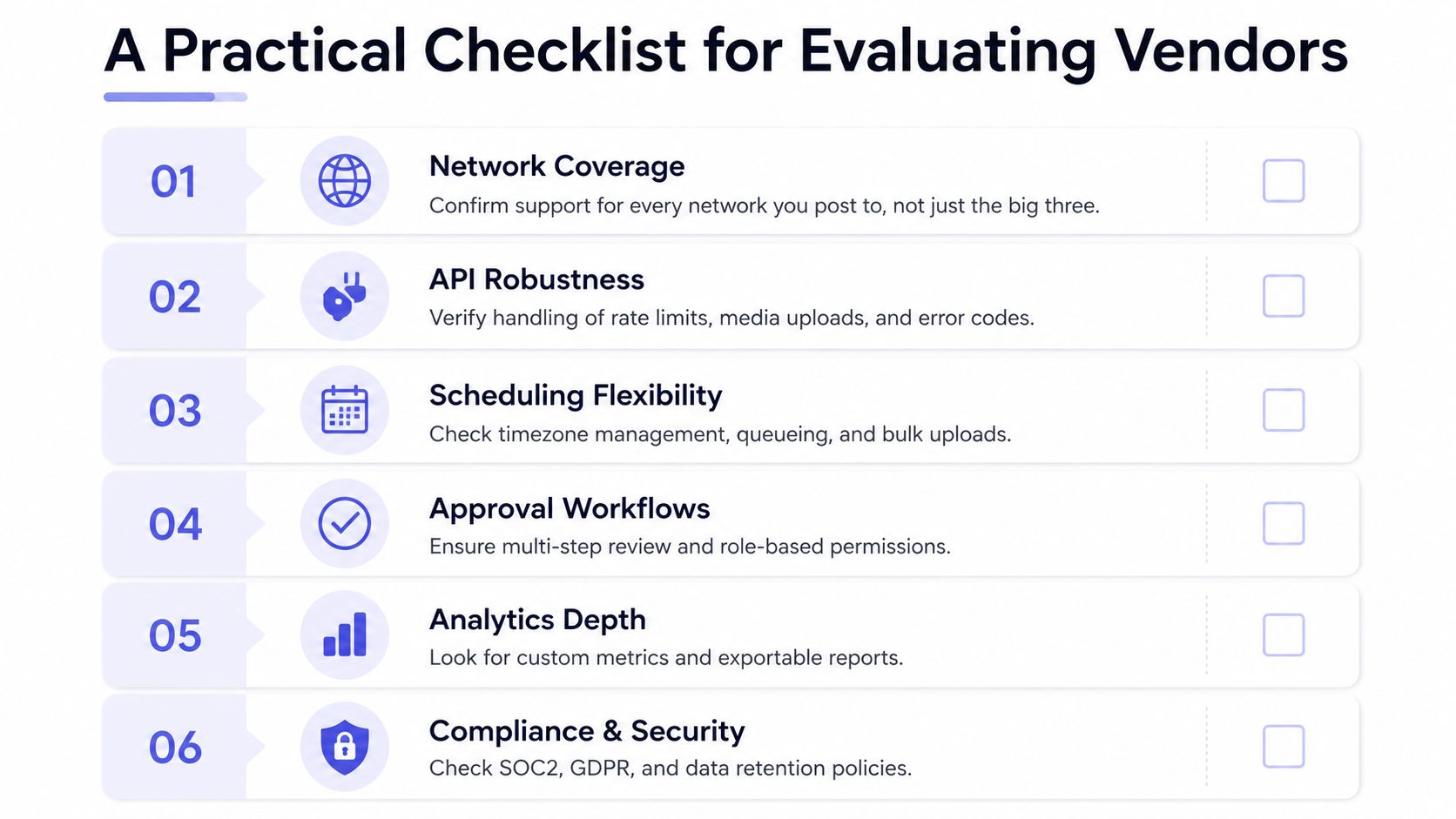 A checklist infographic titled A Practical Checklist for Evaluating Vendors featuring six criteria for social media platforms.
You should also verify who owns the provider application and review burden. Independent developer guidance notes that Meta permissions may require separate app-review submissions and screencasts, while TikTok can require an audit before publishing scopes become available. Production access can take weeks, so ask whether the vendor maintains verified applications and how customers are protected if a review changes, as explained in this developer guide to social media publishing API compliance.
Finally, read the exit terms. Exportable account mappings, post history, media references, webhook logs, and raw API responses reduce the damage if you need to replace the provider.
Trade-offs and Hidden Costs Nobody Mentions
The abstraction is valuable because it removes work. It also creates a dependency that needs its own risk model.
The first risk is vendor lock-in. Your application may depend on a third party's OAuth client, provider review status, normalized content schema, and interpretation of each network's roadmap. If that vendor loses access to a Meta permission, your customers may experience a publishing outage even though your code hasn't changed.
The second is operational dependency. You now rely on the publishing vendor's uptime, queue behavior, support process, and rate limits. Its internal quota may be stricter than the underlying network's quota, or it may batch work in ways that make your own scheduling assumptions inaccurate. Read the service-level terms and test webhook delivery before putting time-sensitive campaigns behind it.
AI introduces a different failure mode
AI agents can create and submit content quickly, but most platforms don't automatically provide the governance an agent needs. Look for per-agent audit trails, credential scopes, content-policy enforcement, approval checkpoints, and a verifiable receipt after publication.
Without those controls, a faulty agent can send unsuitable content to a large audience before a human notices. The solution isn't to disable automation. It's to separate content generation from authorization and require an explicit state transition before the publishing tool can create an external side effect. The API rate-limit guidance is useful here because retry behavior and governance belong in the same operational design.
Pricing can hide complexity too. A vendor may charge by seat, workspace, account, network, video operation, or quota tier. A plan that looks inexpensive during development can become difficult to model once customers connect multiple accounts and publish media at scale.
The platform removes nine integrations from your codebase, but you still need to evaluate the one dependency that replaced them.
Choosing the Right Path for Your Stack
Use your product shape to choose the integration surface.
If you're shipping a SaaS product, start with a mature REST API and verify network-level feature coverage before committing to an embedded dashboard. White-label support matters when customers need to manage accounts and schedules inside your interface, while private-label access is better when your application owns the complete experience.
If you're building no-code marketing automation, choose n8n or Make.com when their nodes expose the triggers, retries, binary media handling, and webhook behavior your workflow needs. A visual scenario is faster to launch than custom glue code, but it shouldn't become an unobservable production queue.
If you're developing AI agents, require an MCP server or an equivalent typed tool layer, scoped credentials, approval enforcement, audit logs, and receipts that the agent can verify. An agent should know whether a post was accepted, scheduled, rejected, or merely queued.
Keep direct integrations for features your abstraction layer doesn't expose. Prototype against the native API when you need a provider-specific capability, then adopt the unified layer when its maintenance savings outweigh the flexibility you lose. That decision is more reliable than choosing based on the number of networks shown on a vendor's homepage.
PostPulse provides one publishing integration across Instagram, TikTok, YouTube, LinkedIn, X, Threads, Bluesky, Facebook Pages, Telegram, and Pinterest through a REST API, official n8n and Make.com connections, or an MCP server for AI agents. If you're building a SaaS product, automation workflow, or agent that needs account connections, scheduling, and publishing without maintaining every provider adapter yourself, visit PostPulse and evaluate the API against your actual failure cases.
About the Author

Founder of PostPulse — a social media scheduling platform for creators and teams. Software engineer with a passion for building developer tools and simplifying complex API integrations across social media platforms.