API Rate Limit Strategies for Social Media Integrations
Published on
Tags:
You hit send on a publish job, watch the dashboard spin, and then one platform comes back clean while the next one throws a 429 Too Many Requests. The worst part isn't the error itself, it's that the same flow passed in staging, passed in your manual tests, and only breaks when real users start fanning out to multiple social APIs at once. That's the moment many realize an api rate limit isn't a footnote, it's a production constraint that can wreck posting flows, duplicate work, and leave users staring at half-published content.
Table of Contents
Why Your API Calls Keep Getting Rejected
The first time this happens in production, it feels random. Your code doesn't “break” in the traditional sense, it just starts getting refused by the platform, and the refusal is deliberate. Official platform docs make this plain, rate limits are hard operational thresholds, not polite suggestions. GitHub's REST API documents a 60 requests per hour primary limit for unauthenticated calls, a 5,000 requests per hour personal authenticated limit, and up to 15,000 requests per hour for certain GitHub Enterprise Cloud app or OAuth traffic, plus some REST activity capped at 900 points per minute, GraphQL at 2,000 points per minute, and concurrent requests at 100 (GitHub rate limits documentation).
What the platform is actually protecting
The point is control. APIs need to shield shared infrastructure from abuse, accidental overload, and runaway clients. When a service reaches its threshold, it doesn't hand out a warning and hope your retry logic behaves, it rejects the request and expects the client to respect the boundary.
That's why rate limiting shows up everywhere in social publishing systems. A single user action can generate writes, media uploads, validation calls, status checks, and retry attempts. If one of those calls loops or fans out too aggressively, the platform sees a burst, not your intent.
Practical rule: if a platform documents a limit, treat it like a contract. Don't design your client as if the limit is advisory, because the platform won't.
Ignoring that contract usually fails in two ways. First, the user sees partial publishing, stalled jobs, or “pending” states that never resolve. Second, your own system burns compute retrying the same request over and over, which only creates more pressure on the downstream API and makes the outage noisier.
For API authentication and token handling context, the mechanics behind those failures are closely tied to how you obtain and refresh access in the first place, so it's worth keeping your auth flow clean from day one. A good starting point is this overview of API authentication methods, because bad auth and bad throttling often show up together in production.
Why the failure hurts more in social publishing
Social workflows are especially brittle because users notice timing. If one network accepts a post and another rejects it, your product doesn't just look slow, it looks unreliable. If retries are naive, you can also create duplicates, which is worse than a single failure because users now have to clean up after your automation.
GitHub's docs also show that limits aren't always one number. They're layered across request count, points, and concurrency, which is a good reminder that the platform is protecting multiple bottlenecks at once (GitHub rate limits documentation). That's the right mental model for social integrations too, different endpoints fail for different reasons.
Understanding Rate Limit Dimensions and Metrics
Most developers start with a single mental model, “we get X requests per minute.” That model breaks quickly once you work across several APIs. Modern platforms expose limits in requests per second, requests per minute, and weighted measures like tokens per minute, because a request count alone doesn't describe how much work the server is doing. OpenAI documents limits across RPM, RPD, TPM, TPD, and IPM, and says a request is blocked as soon as any one dimension is exceeded (OpenAI rate limits).
Why the metric changes the system behavior
A high-QPS workload with tiny payloads can run into request-count ceilings before it becomes expensive in compute terms. A lower-QPS workflow with large payloads can do the opposite, staying under request limits while exhausting token-style capacity first. That's why TPM-style controls matter operationally, they bound the amount of work admitted, not just the number of HTTP calls.
GitHub gives a practical contrast. Unauthenticated REST calls get a 60 requests per hour primary limit, while authenticated personal access token requests count toward 5,000 requests per hour personal limits, and some enterprise app or OAuth traffic can go up to 15,000 requests per hour (GitHub rate limits documentation). The same platform also uses points and concurrency caps, which shows how one service can enforce several dimensions at once.
In production, I've seen teams tune for the wrong dimension because they only watch request volume. That works until a larger payload, a metadata-heavy endpoint, or an unusually chatty retry path changes the shape of traffic. Once that happens, the clean-looking request rate tells you almost nothing about where the bottleneck really is.
Practical rule: pick the metric that matches the expensive resource. If the server pays more for payload size or downstream compute, request count alone is a blunt instrument.
Rate Limit Dimensions Across Major Platforms
Platform | Primary Metric | Example Limit | Secondary Limits |
GitHub | Requests per hour | 60 requests per hour unauthenticated, 5,000 requests per hour authenticated (GitHub rate limits documentation) | 900 points per minute, 2,000 points per minute, 100 concurrent requests |
OpenAI | RPM and TPM | Limits vary by tier and request shape (OpenAI rate limits) | RPD, TPD, IPM |
Cloudflare | Request windows with quota headers | 200 requests/second per IP, 1200 requests per 5 minutes per user/account token (Cloudflare API limits) | Remaining quota and reset timing via headers |
That table is the part many guides skip. The question isn't “what's the limit,” it's “which limit will fail first for this workload.” If you don't answer that before launch, production will answer it for you.
Reading Rate Limit Headers and Implementing Backoff
A 429 without headers is a dead end. A 429 with the right headers is a roadmap. Cloudflare documents Ratelimit, Ratelimit-Policy, and retry-after, and says the headers can expose remaining quota and the reset time for the next window (Cloudflare API limits). That's the difference between blind retrying and a client that can recover.
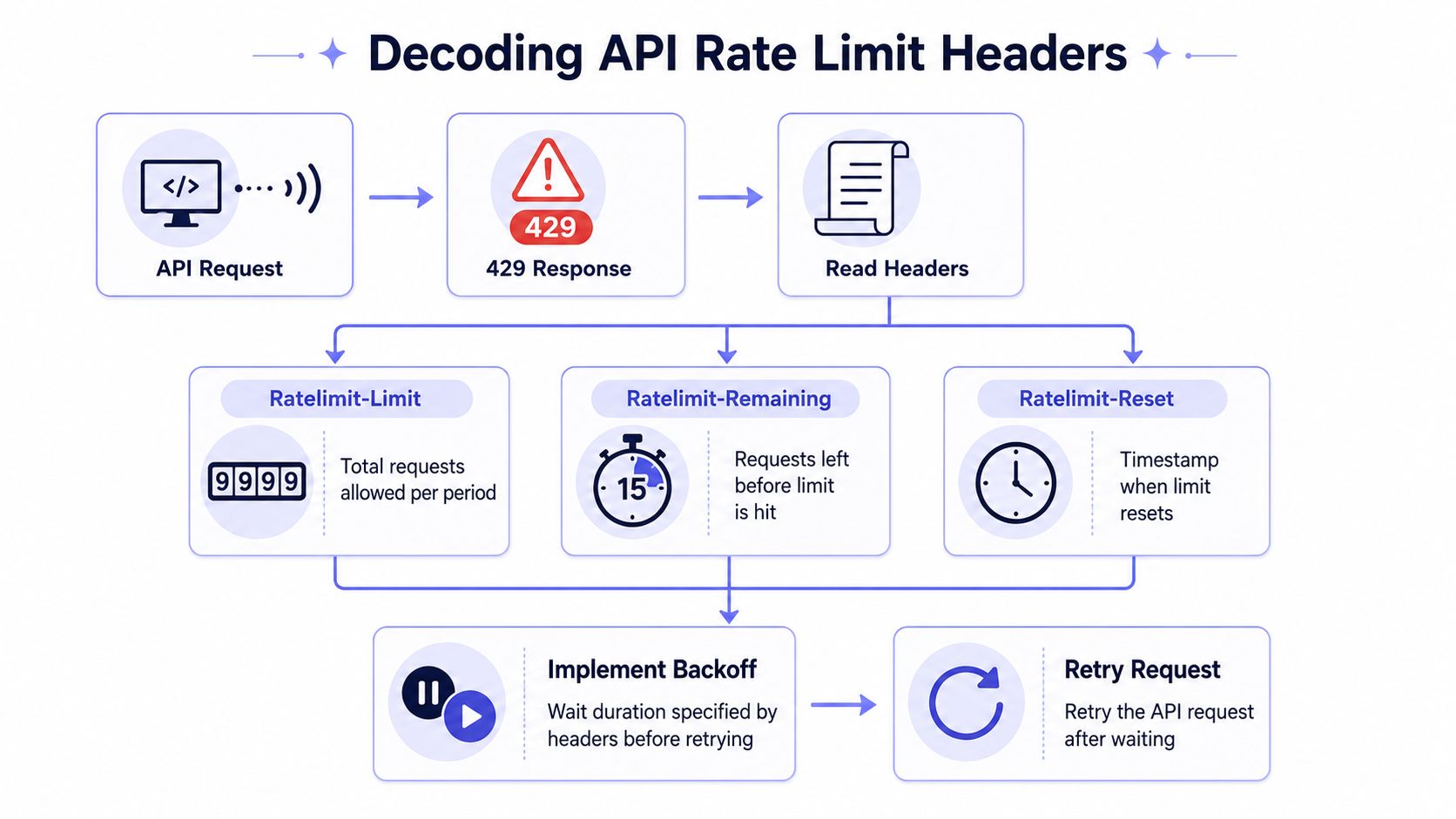 A flowchart explaining how to decode API rate limit headers after receiving a 429 error response.
What to read first
Start with the server's own timing signal. If retry-after is present, use it. If the response includes remaining quota and reset data, cache that state locally and stop treating every failure like a fresh mystery. Cloudflare's docs are a good example because they show both the quota model and the headers that let clients react intelligently (Cloudflare API limits).
The point of backoff isn't just politeness. It's to avoid a thundering herd, where every client retries at the same instant and immediately hits the ceiling again. Jitter matters because synchronized retries are how small outages turn into noisy ones.
Those snippets are intentionally simple. In a real client, you'd pair them with header parsing, per-platform state, and a cap that reflects the user experience you can tolerate.
A useful way to think about retries
Sendvo's resources page on API guidance is a decent companion reference if you're building client behavior around publication workflows, especially when your retry path needs to be understandable to the next engineer who inherits it. The important part is not the syntax, it's the discipline, read the headers, respect the reset, and avoid hammering the same endpoint with repeated guesses.
Don't retry because you can. Retry because the server told you when to come back.
That discipline is what turns a flaky integration into something you can operate at 2 AM without panicking.
The Multi-Platform Fan-Out Problem
Single-API advice stops being useful when one user click turns into five or more downstream requests. A publish action might create a text post, upload media, register metadata, query status, and confirm delivery across separate vendors, and each vendor can reject, delay, or rate limit independently. That's where the complexity lives, because the system's success depends on the slowest and strictest destination, not the first one that accepts the request.
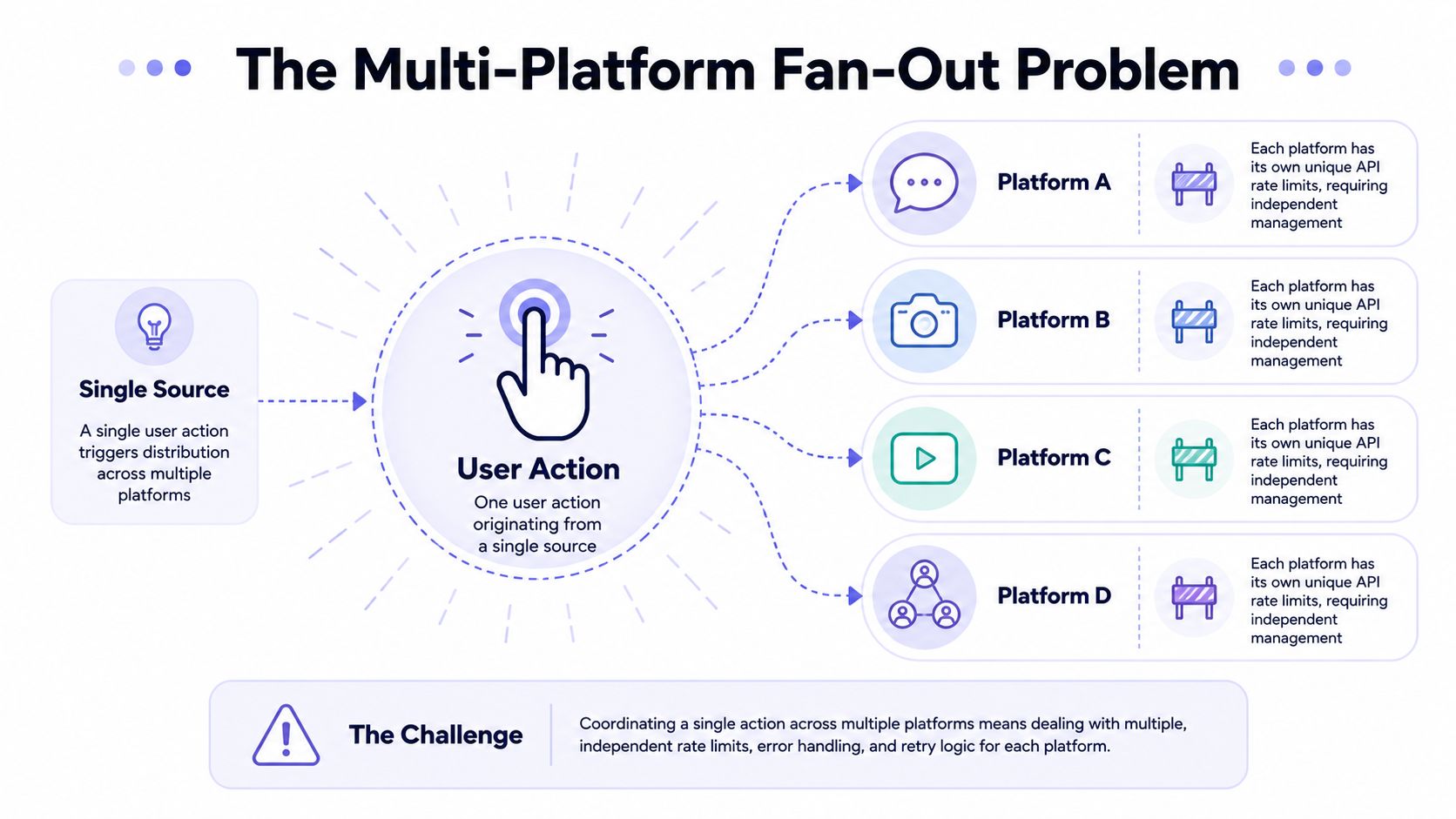 A diagram illustrating the technical challenges of managing multi-platform API rate limits for a single user action.
Why fan-out changes the failure mode
If three platforms accept the post and two reject it, you don't have a clean success or failure state. You have a reconciliation problem. The user expects one action, but your backend now has to track five independent outcomes, each with its own retry timing and header format.
That's also where duplicate posts happen. A retry that's safe for one endpoint can be dangerous for another, especially if the first attempt succeeded but the acknowledgement was lost. The safe design is to prioritize critical calls, treat non-essential work as optional, and keep enough state to tell the difference between “not sent,” “sent but unconfirmed,” and “confirmed.”
Practical rule: fan-out logic needs a scheduler, not just retries. If every downstream call is treated the same, the system will eventually over-prioritize the wrong platform.
Observability has to be platform-aware
The logs should tell you which vendor rejected the traffic, which header came back, and which retry window the client used. Without that, all you see is “publish failed,” which is basically useless when the traffic is distributed across several APIs. That's why dashboards for social publishing should slice by platform and by failure type, not just by endpoint.
For integration-heavy products, Donely's integration library is a useful reference point because the hard part is rarely “can I call an API,” it's “can I keep calling several APIs without letting one limit poison the others.” The scheduling problem is different from a single destination, and it deserves its own abstraction.
The takeaway is simple. Once one user action fans out to multiple APIs, rate limiting stops being a per-client concern and becomes a workflow orchestration problem. That's the point where naive retry loops usually fall apart.
Architectural Patterns for Rate Limit Resilience
There isn't one right answer here, only trade-offs. The right pattern depends on whether your traffic is bursty, whether users feel delays directly, and whether you can afford partial completion. If you've ever watched one platform succeed and another stall for minutes, you already know why the architecture matters.
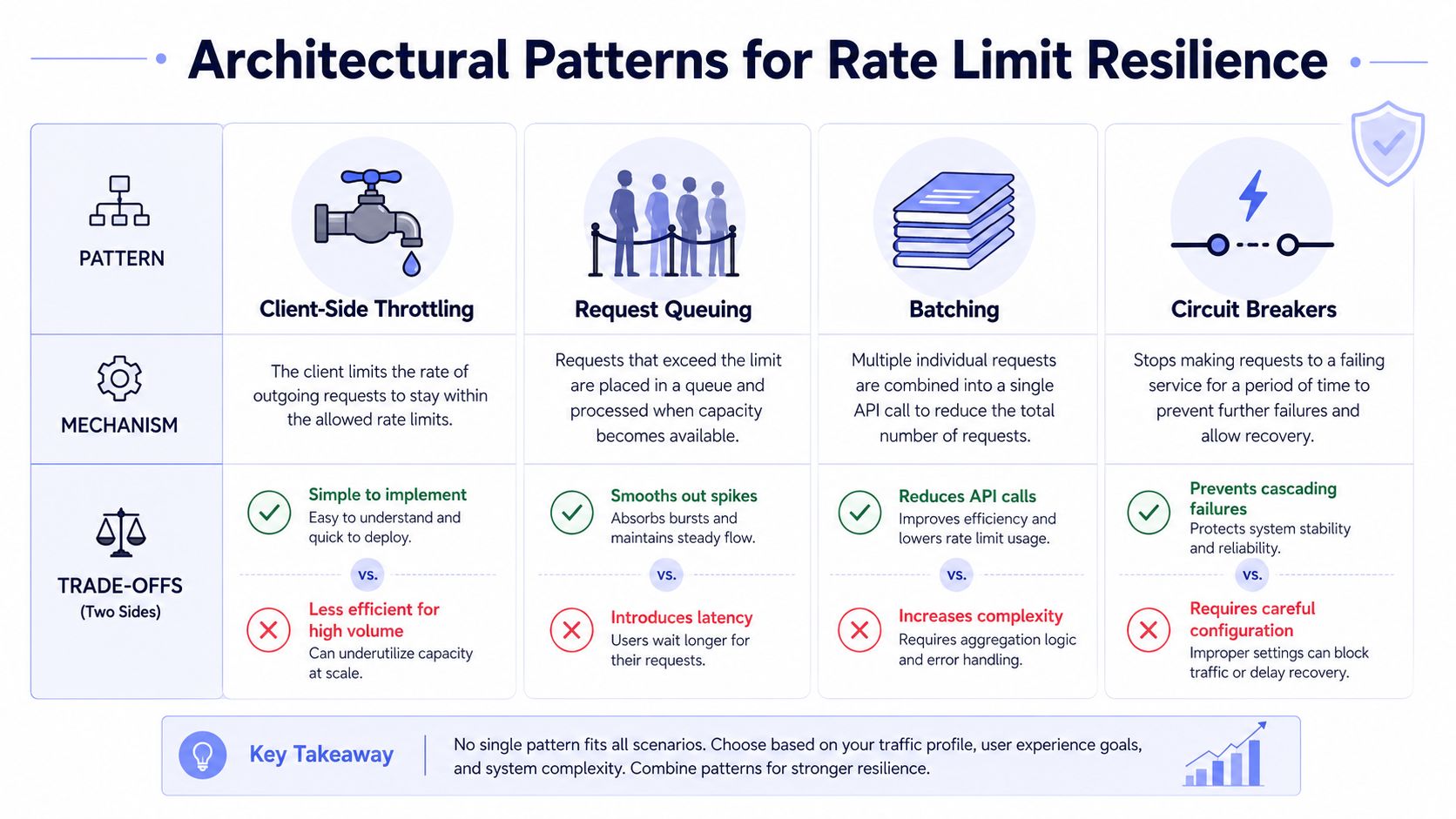 A diagram comparing four architectural patterns for rate limit resilience: client-side throttling, request queuing, batching, and circuit breakers.
The practical trade-offs
Client-side throttling is the simplest shape. You slow requests before they leave your service, which keeps you closer to the limit but can make users wait if your estimates are conservative. It's a good fit for steady workloads, and a bad fit when the user expects immediate fan-out.
Request queuing smooths spikes by absorbing bursts and draining them at a controlled pace. That reduces rejection pressure, but it also introduces latency and adds operational complexity because you now need queue visibility, dead-letter handling, and retry discipline. It works well when timing is flexible and correctness matters more than instant completion.
Batching reduces the number of calls, which is handy when the API rewards fewer round trips. The catch is error handling, because one bad item in the batch can force you to split work and reason about partial success. That's efficient, but it's rarely simple.
Circuit breakers stop cascading failures when a platform is clearly unhealthy or over quota. They're valuable because they keep bad upstream behavior from consuming your own resources, but they need careful tuning or they'll open too early and block traffic that could have succeeded.
A decision rule that holds up in production
If users are watching a live publish action, avoid designs that hide long delays behind a spinner. If the workflow is background automation, queueing and throttling are often worth the latency. If you're publishing to several vendors from one action, combine these patterns instead of betting on one.
For teams building a proxy or orchestration layer around third-party APIs, this API proxy service overview is relevant because the proxy boundary is often where throttling, retries, and failover should live. That boundary is also where you can keep platform-specific behavior from leaking into every caller.
The ugly truth is that many integrations fail because they use one pattern everywhere. Real traffic is mixed, so the architecture has to be mixed too.
How Rate Limiting Is Evolving Beyond Simple Rules
The old framing treated rate limiting as a fairness knob. Modern APIs are using it as a capacity and cost-control layer instead. That shift matters because the same service may need to enforce different behavior by endpoint, by customer tier, and by the amount of work a request triggers.
Static limits don't fit bursty automation
Recent best-practice guidance emphasizes dynamic limits, resource-based limits for expensive endpoints, caching, and live adjustment based on response times (Tyk rate limiting best practices). That lines up with what production systems already show, a limit is rarely just about fairness anymore. It's about preserving headroom where the backend is fragile and relaxing where the backend can absorb more.
That matters for social media tooling because usage is naturally spiky. A scheduled campaign, an AI-generated content sweep, or a user clicking “publish everywhere” can all create short bursts that look abusive if the system only understands fixed request windows. Adaptive controls give the platform room to distinguish between legitimate bursts and pathological load.
Practical rule: the more expensive the endpoint, the more the limit should reflect resource cost, not just request count.
Where this is headed
The most useful limiters now care about payload shape, endpoint cost, and load signals, not just the raw number of HTTP calls. That doesn't remove rate limits from the user's path, it makes them smarter. It also means your integration code has to become more context-aware, because a single retry strategy won't make sense for every platform or every endpoint.
The industry data supports the urgency too. A 2026 roundup found that 85% of APIs lack rate limiting, APIs face 166% higher DDoS rates than websites, the API rate limiting market is projected to grow from $1.34 billion in 2024 to $6.89 billion by 2033 at a 20.2% CAGR, 99% of organizations encountered API security issues in the prior 12 months, and only 10% have an advanced API security posture governance strategy (DreamFactory API rate limiting statistics). That doesn't mean every product needs the same controls, but it does mean rate limiting is now baseline infrastructure.
The practical takeaway is simple. Build for changing limit shapes, not just one fixed threshold. If your code assumes the rules will stay static, it'll age badly.
Delegating Rate Limit Management to PostPulse
At some point, the cost of owning every auth token, retry rule, limit header, and vendor quirk becomes the product tax. PostPulse is one way to avoid carrying that entire burden yourself, since it publishes to 9 social platforms through a single unified API, and it handles OAuth, refresh cycles, rate limits, and API version changes for you. It supports Instagram, TikTok, YouTube, LinkedIn, X, Threads, Bluesky, Facebook, and Telegram, which is exactly the kind of multi-platform surface where throttling logic gets messy fast.
When delegation makes sense
If you're adding social publishing to an app, building a no-code workflow, or running AI agents that need to publish autonomously, a unified layer saves you from writing separate throttling logic for every downstream API. It also keeps platform-specific failures from leaking into your product's core codebase, which is where a lot of teams get stuck for months. The trade-off is straightforward, you either maintain the orchestration yourself or pay for a managed surface.
PostPulse's pricing makes that trade-off concrete, with $0.20 per publication or $5 per account per month on the private-label side, depending on how you want to structure usage. If you're in the middle of shipping and don't want your team spending nights on rate-limit edge cases, that can be a cleaner path than building a mini integration platform from scratch.
When building in-house still makes sense
If your workload is narrow, your audience is small, and you need full control over every retry and queue decision, building your own layer can still be the right call. That's especially true when you're experimenting, or when the social publishing feature is tightly coupled to a broader internal system. But once you're coordinating several platforms at once, the operational overhead rises quickly.
 Screenshot from https://post-pulse.com
If you'd rather spend your time building product logic than reconciling platform quotas, token refreshes, and failure recovery, take a look at PostPulse. It gives you one publishing surface for multiple social destinations, which means less rate-limit plumbing and fewer late-night retries.
About the Author

Founder of PostPulse — a social media scheduling platform for creators and teams. Software engineer with a passion for building developer tools and simplifying complex API integrations across social media platforms.