PostPulse Integration Guides: API & White-Label Setup
Published on
Tags:
You know the feeling. A post is ready, the creative is approved, and then one social API decides your token's stale, another wants a different payload shape, and a third needs a separate app review before anything can ship. That's the part developers hate, not writing the post, but babysitting nine different publishing paths just to get one update live.
The reason good integration guides matter is that they turn that mess into a repeatable operating model. In official statistics, integration guidance has already matured into a governed discipline with privacy, validation, and access stages, not just a connect-the-data checklist, and enterprise software has followed the same path with ownership, monitoring, and lifecycle control baked in from the start. For teams shipping social publishing, that shift is the difference between a fragile one-off script and something you can support in production.
Table of Contents
Understanding PostPulse Integration Overview
If you've ever maintained nine separate social integrations, you already know the primary failure mode. It isn't just token expiry or bad JSON, it's the drift between platforms, because each one changes rules, scopes, payloads, and review steps at different times.
A stronger model is to integrate once through a single hub and treat the downstream platforms as delivery targets. That approach lines up with how modern integration guidance has evolved in official data systems, where the work now includes privacy impact assessment, source-data analysis, validation, access controls, and dissemination instead of only connection setup. The same mindset applies here. A useful guide doesn't stop at “how to connect,” it documents the whole lifecycle, from connecting and configuring through troubleshooting and disconnecting, so operators know what happens after the first successful post.
Why one hub beats nine separate stacks
When social publishing is built platform by platform, your team ends up re-solving the same problems. OAuth variations, media upload quirks, scheduling differences, and retry logic all get duplicated, then they age differently. That's why a single integration layer is practical for apps, automations, and AI agents, it reduces the number of moving parts that can break at once.
PostPulse fits that pattern by giving you one publishing surface for Instagram, TikTok, YouTube, LinkedIn, X, Threads, Bluesky, Facebook, and Telegram. Instead of wiring each destination separately, you build against one flow and let the platform handle the low-level handoffs. The operational value is less about elegance and more about not having to debug nine failure modes every time a publisher updates something upstream.
Practical rule: the best integration guide makes ownership and failure handling explicit before launch, because most integration breakages are operational, not technical.
The other thing a solid guide does is document what happens when things go wrong. If a platform rejects media, or a token falls out of date, the team needs a clear escalation path, not a ticket trail that starts after customers notice missing content. Good guides remove ambiguity from the handoff between engineering, support, and the people publishing.
Authenticating with PostPulse Across Platforms
Authentication is where most social integrations get annoying fast. One service wants a redirect, another wants an app key, and a third subtly alters how refresh behaves, so the whole pipeline starts failing even though the code didn't change.
A clean integration guide should always specify the hard mechanics, including authentication type, token endpoint, credential reference, token expiry, and refresh behavior. That level of detail matters because the team troubleshooting a failure needs to know exactly where the token came from, how long it lasts, and what the renewal path looks like when it's no longer valid.
The four auth paths you actually need to document
For a direct REST workflow, the cleanest pattern is a unified OAuth 2.0 authorization flow with explicit redirect URIs, scope handling, and refresh support. For no-code builders, the setup usually shifts to an API key exchange in tools like n8n and Make.com. For AI agents, JWT-based service access is the practical fit, because the agent needs a machine identity rather than a human login. For branded embeds, the integration usually relies on an embed token mechanism so the UI can be loaded under your own product surface.
The important thing is to keep each path separate in the guide. Don't mash OAuth, API keys, and embed tokens into one generic auth page, because the person implementing the flow needs to know which credential model applies to which surface. A developer wiring a backend service and a no-code builder configuring a node are solving different problems, even if they end up publishing to the same destination.
What to include for each method
Unified OAuth 2.0: document the consent screen, redirect URI, scopes, refresh strategy, and what should happen when a refresh attempt fails.
API key or token exchange: show where the key comes from, how it's stored, and how the integration should validate that the key still works before publishing.
JWT for MCP server access: spell out the service identity, token lifetime, and the claims the server expects to trust the request.
Embed token for white-label UI: define how the token is issued, how long it stays valid, and which account context it carries into the embedded session.
The screenshot-level detail matters here, because integration requirements documents are supposed to capture technical mechanics, not just a high-level promise that “auth works.” The more explicit you are about token source, refresh behavior, and environment-specific credentials, the less time your team spends guessing during rollout.
Implementing REST API with Examples
REST is where integration guides either become useful or stay decorative. If the examples are too abstract, nobody can ship from them. If they're concrete enough to paste, the guide starts paying rent.
The core shape should stay consistent across platforms. A single publish payload usually carries text, media references, and a scheduled timestamp, then the platform-specific pieces fill in things like visibility settings, thumbnails, or video metadata. That's the kind of structure developers want because it keeps the mental model stable even when the destination changes.
A good reference point is the documented API surface at PostPulse API docs. The practical value of a single REST layer is that you can keep one client library and only vary the fields that differ by platform.
Common payload shape
A simple text post usually starts with the text body and the target account context. If media is involved, the guide should say whether the upload is handled through a presigned URL or a public host URL, because that changes what the client has to prepare before the publish call goes out. That distinction saves a lot of “why did this fail on one platform but not another” debugging.
For richer formats, the payload should keep shared fields stable and only expand where the destination needs extra metadata. That's especially helpful for image, video, and carousel posts, because the developer shouldn't have to relearn the whole request schema each time they switch content type.
Common Post Payloads
Platform | Required Fields | Media Types |
text, media reference, account context | image, video, carousel | |
TikTok | text, media reference, account context, thumbnail where required | video |
YouTube | text, media reference, account context | video |
text, media reference, visibility setting | image, video | |
X | text, media reference | image, video |
Threads | text, media reference | image, video |
Bluesky | text, media reference | image |
text, media reference, page context | image, video | |
Telegram | text, media reference, channel or chat context | image, video, document where supported |
The value of a table like this is not completeness for its own sake. It keeps teams from shipping a generic client that works for one destination and inadvertently drops required metadata on another. That's a mistake that usually shows up only after content is already scheduled.
Example request pattern
The point of examples like these is not to promise one universal payload for every platform. The point is to show the shared core and make the platform-specific extension obvious before the first request leaves your codebase.
Automating Social Posts with n8n and Make.com
No-code integrations live or die on setup clarity. The actual workflow is often simple, but the configuration screens can still hide the one field that decides whether your post publishes or fails without an explicit error.
In n8n, the useful pattern is to trigger from a calendar event, Airtable record, or similar source, then hand the mapped values to the publishing node. In Make.com, the same idea holds, but the mapping step is usually even more important because scenarios encourage fast assembly and fast mistakes if the field bindings are not checked carefully. A good integration guide shows how to connect the trigger, map the content, test the publish step, and branch on failure without collapsing the whole scenario.
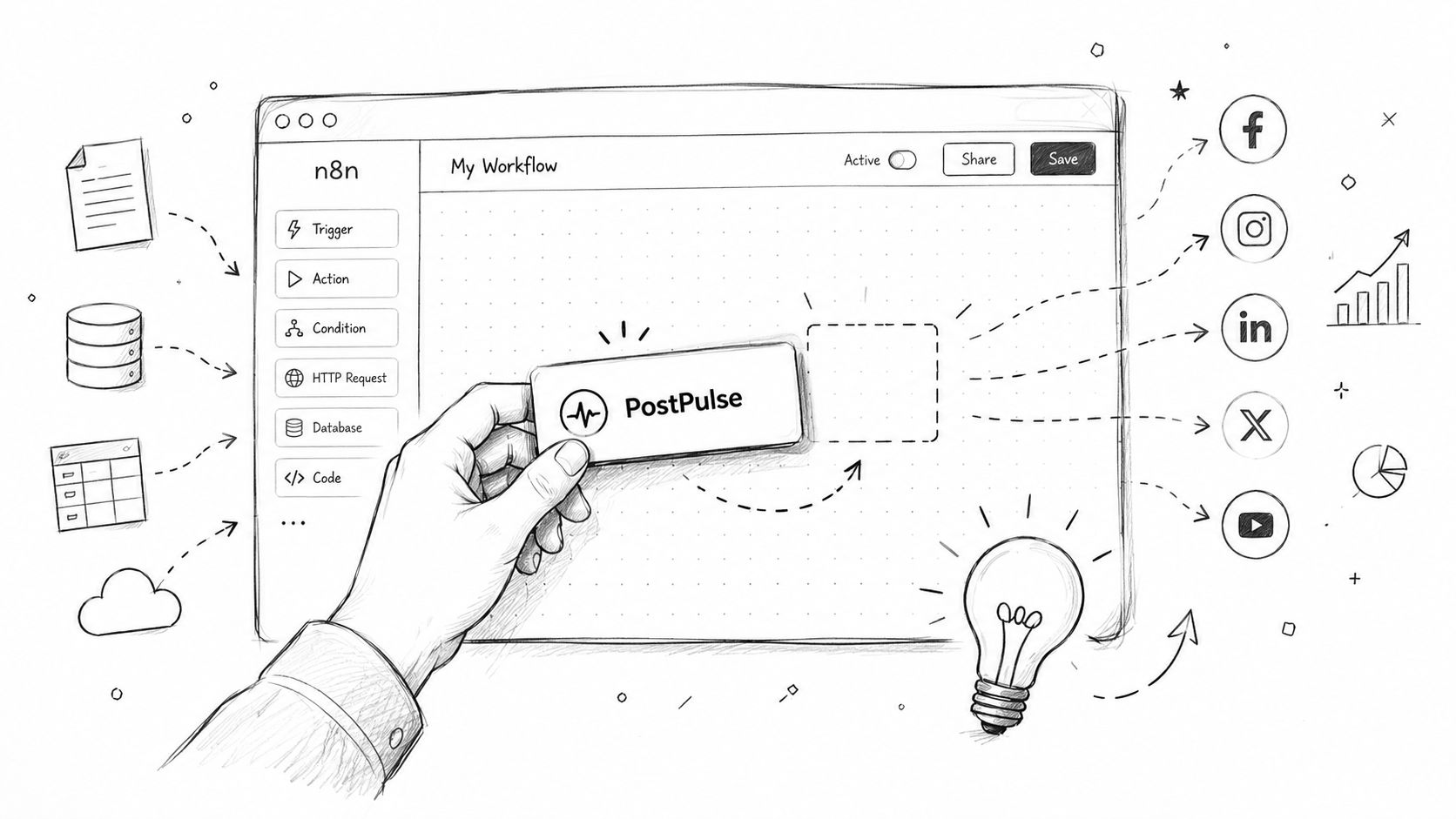 A hand placing a PostPulse integration block into an n8n workflow editor interface for automated social media posting.
Building the workflow without making it brittle
The practical setup usually starts with a content source that already has the post copy, media link, and publish time. Then the automation maps those fields into the publishing action and checks the response before marking the item as done. If one platform rejects the post, the workflow should be able to branch cleanly, so a partial success doesn't look like a total failure.
That's the part many builders skip. They wire the happy path, then discover later that a failed publish leaves no obvious record of what succeeded, what didn't, and whether the item should be retried or skipped. The better pattern is to store the response and failure state immediately, while the automation still has context.
Error handling should be part of the first draft, not a cleanup task after the scenario is already in production.
For builders using the official node or app, the workflow should keep credential setup separate from content mapping. That way, when a post fails, you know whether the problem is bad input, a stale key, or a platform-specific limitation. It sounds basic, but in practice it cuts a lot of time out of support triage.
The relevant setup details for the n8n path are documented at PostPulse n8n integration. The same logic applies in Make.com, even if the visual editor looks different. The automation is only as good as the fields you bind and the fallback path you define when one destination rejects the payload.
Publishing with the MCP Server for AI Agents
AI agents need a publishing path that doesn't wait for a human to click approve. If an agent has to ask for a fresh token every time, you've built a workflow with a person in the loop whether you meant to or not.
The MCP server is the cleaner fit for autonomous publishing because it gives the agent a controlled service surface instead of a UI-driven session. The practical setup is to install the server, provision service credentials, and let the agent call the publish endpoint with a structured payload that matches the current conversation or task context.
Service identity and request shape
The key design choice is identity. A human OAuth flow answers “who clicked connect,” while an MCP flow needs to answer “which agent or service is allowed to publish, and under what context.” That's why JWT-based service credentials are a better fit here, because the request should be tied to a machine identity that can be logged and audited.
Once the server is running, the agent should send a payload that includes the post body, destination context, and any media references needed for the publish action. If the publish is synchronous, the response can be recorded immediately. If it's webhook-driven, the server should notify your backend when the post transitions through the relevant status.
What an agent integration should log
Request identity: which agent or service initiated the publish.
Payload summary: the text, media references, and destination context.
Publish result: success, failure, or queued state.
Audit trail reference: enough metadata to trace the action later without scraping logs by hand.
That logging layer matters more than people expect. In practice, AI publishing failures are hard to debug unless you know what the agent asked for, what credentials it used, and what the server returned. Without that, every failure becomes a manual reconstruction exercise.
A solid guide also separates sandbox testing from production publishing. Agent behavior can look correct in a closed test, then break on a real destination because the context, permissions, or media inputs don't match the live setup. The MCP server works best when the guide makes that distinction explicit from the start.
Embedding PostPulse under Your Brand
White-label integrations are less about features and more about control over presentation. If your product includes social publishing, users should see your interface, your labels, and your workflow language, not a foreign tool bolted into the middle of the experience.
The practical embed setup starts with loading the UI component, passing in the account context securely, and mapping the branding hooks for colors, logos, and localized strings. For teams evaluating this path, the PostPulse white-label option is the relevant starting point. The embed should feel native in your app, which means the guide has to cover both visual customization and the backend data flow that keeps the UI in sync with the publishing state.
What the embed needs to do
The front end should render the component with the right theme settings and enough context to know which account is being managed. The backend should keep ownership of sensitive tokens and account references, rather than exposing them to the browser in a way that makes them hard to rotate or audit later. That separation is the difference between a branded surface and a security headache.
A minimal embed usually needs to answer three questions. What should the user see. Which account is being managed. How does the backend know when a publish finished or failed.
Keep the UI thin and the authority on the server side. The browser should display state, not invent it.
Webhooks are the clean way to keep your backend updated when post status changes. If the embedded flow stays in sync with those callbacks, your product can show published, pending, or failed states without polling excessively or guessing. That keeps the branded experience coherent even when the downstream platform takes its time.
The final guide should also cover content sanitization and CORS handling, because an embedded publishing flow often crosses more trust boundaries than a plain internal tool. If those details are buried, support teams end up rediscovering them under pressure after the first customer rollout.
Managing Rate Limits Errors and Troubleshooting
Most integration failures don't announce themselves neatly. A request times out, a media URL stops resolving, or an auth token expires at the wrong moment, and the team gets a vague error with just enough detail to be annoying.
The most useful troubleshooting docs are version-controlled and actively maintained, with a named engineering owner and periodic checks against third-party changes. That maintenance habit matters because integration behavior drifts over time, especially when upstream APIs, libraries, or platform rules change outside your deployment cycle. If nobody owns the guide, it turns into old advice with a nice title.
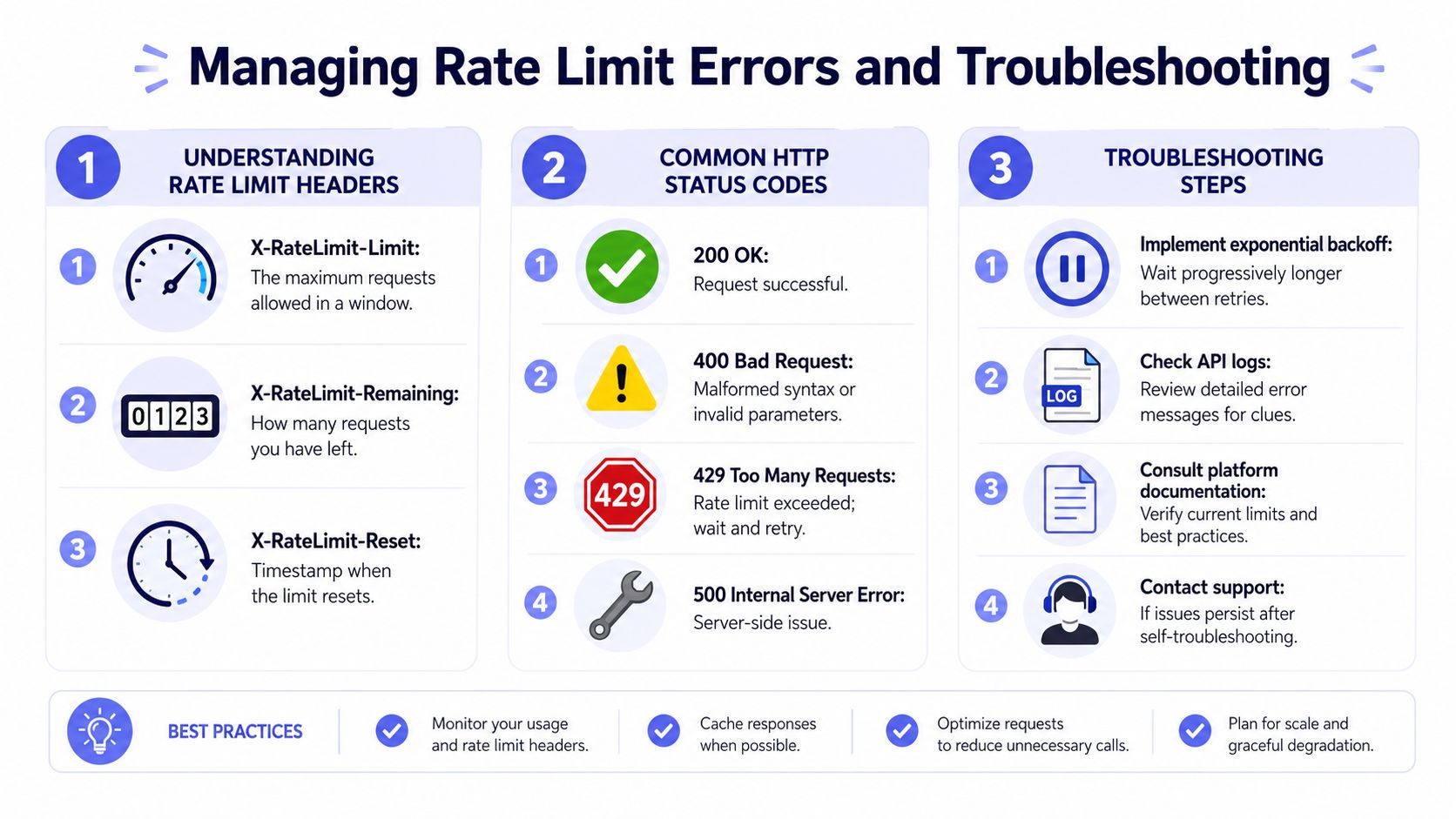 An infographic detailing how to manage rate limit errors, HTTP status codes, and API troubleshooting steps.
What to check first
Rate-limit handling should always be built around the headers the API returns, especially the limit, remaining quota, and reset timestamp. When the service says you're out of room, the correct response is to back off and retry later, not to hammer the endpoint harder. The guide should show the retry window logic clearly enough that the engineer implementing it doesn't need to infer anything.
The same principle applies to status codes. A 200 OK means the request succeeded. A 400 Bad Request means the payload is malformed or the parameters are wrong. A 429 Too Many Requests means the limit was exceeded and the client should wait. A 500 Internal Server Error usually points to a server-side problem, so the right next step is to check logs and retry policy rather than rewriting the request from scratch.
A practical troubleshooting checklist
Validate auth first: expired credentials and bad scopes create misleading downstream failures.
Check media references: public URLs and presigned URLs fail in different ways, so confirm which model the endpoint expects.
Inspect the payload shape: missing required fields often look like generic request failures at first glance.
Review retry behavior: if the client retries too aggressively, the integration can make a temporary issue worse.
Confirm environment config: staging credentials, production keys, and sandbox endpoints should never be mixed by accident.
A small retry helper keeps this manageable in code. Exponential backoff is the sane default because it respects the service while still giving transient failures a chance to clear. Add logging around each attempt so the support team can see whether the failure was a bad request, a transient platform issue, or a pure auth problem.
The strongest pattern is to treat the guide as a living document, not a launch artifact. Keep the canonical spec under version control, assign ownership, and check it whenever the upstream changelog changes in a way that could affect publishing. That's the difference between an integration that ages well and one that slowly rots in place.
If you're building social publishing into an app, automation stack, or agent workflow, start with the integration path that matches your operating model, then document auth, payload shape, failure handling, and ownership before you ship. If you want a single publishing layer for REST, no-code, MCP, or white-label delivery, try PostPulse and wire up one path end to end before expanding to the rest.
About the Author

Founder of PostPulse — a social media scheduling platform for creators and teams. Software engineer with a passion for building developer tools and simplifying complex API integrations across social media platforms.