Social Media Posting API: Limits, Workflow and Pitfalls
Published on
Tags:
Your publish request returns success, but the post never appears. A carousel stays in progress, your worker retries, and now you can't tell whether you're waiting on media processing or creating another copy of the same job.
That's the production problem a social media posting API needs to solve. Accepting content is straightforward. Knowing what each destination published, preserving enough state to recover, and giving the account owner an actionable error are the harder parts.
Table of Contents
Social Media Posting APIs at a Glance
A social media posting API gives your application a contract for submitting content, selecting connected accounts, and retrieving publication results. A unified API normalizes that contract, but the platforms underneath stay different. You still have to model account authorization, media preparation, quota availability, and final publication as separate states.
Design your response model so a successful submission means a recorded job rather than a guaranteed live post on every destination. When your frontend and your queue worker read the same response differently, retries turn into duplicates.
Publishing limits by platform
The following limits belong in your scheduler's capability configuration rather than scattered through request handlers.
Platform | Request or publish limit | Other limit | Publishing model |
Instagram professional accounts | Meta documents different publish limits by integration path; confirm the connected account's current value | Container creation is separately capped per rolling 24 hours | Create container, wait for readiness, then |
TikTok Content Posting API | 6 requests per minute per user access token; HTTP 429 when exceeded | Maximum 5 pending shares within a 24-hour period | Video transfer and publication are separate workflow concerns |
YouTube video uploads | Quota is allocated per project and shared across every channel that project uploads for | Check the project's current allocation before admitting uploads | Track upload completion separately from the requested publication outcome |
The TikTok figures are documented in its Content Posting API reference. Treat the request budget and the pending-share allowance as separate checks: permission to send another request doesn't establish capacity for another pending share.
Instagram needs an explicit verification step because the documented number depends on the integration path. Meta's content publishing documentation states 100 API-published posts and 400 media containers per rolling 24 hours, while Meta's Facebook Login publishing documentation states 50 published posts in the same window. Treat neither page as a permanent constant. Query the content-publishing-limit endpoint for the connected account and confirm which path applies before your scheduler encodes a number.
Scope the budget correctly
For account-scoped limits, store usage against the connected account rather than a shared counter for all your customers. Otherwise one busy customer can block unrelated accounts, or your scheduler can admit more work than a particular destination permits.
Project-scoped quota breaks that model. YouTube uploads draw down the same project allowance whether they target one channel or many, so track project consumption alongside account-level controls rather than reusing the same counter for both.
Reserve capacity when you admit scheduled jobs, then recheck before dispatch. A calendar slot isn't proof that the platform will still have capacity when the worker runs.
Choosing REST, n8n, Make.com or MCP
Choose your integration path by who owns decisions and recovery. Interface convenience comes second. A visual workflow can still demand careful failure handling, and an agent can call an API without being allowed to decide what gets published.
Integration paths compared
The column that matters is the first one. Every path needs retry behavior defined somewhere; what changes is where that definition lives.
Path | Who owns retry logic | Who decides the content | Best fit |
REST API | Your team | Your code, or an agent running an approved payload | Product teams that own publishing state and want white-label OAuth under their own brand |
n8n | Workflow author, through retry boundaries set in the workflow | Workflow author | Low-code builders using official nodes in a visual flow |
Make.com | Scenario author, through explicit error routes | Scenario author | No-code builders; the official app connects publishing to 2,000+ other tools |
MCP | Agent application owner | AI agent, within permissions you assign | Agents that decide what to publish autonomously |
All four paths sit on the same integration. One POST sends content to every connected account, PostPulse applies each platform's media rules, and your webhook gets called on success or failure. That callback is the record your system keeps, whatever interface triggered the post.
Callback design belongs in the decision too. The patterns in this guide to handling rate limits and webhooks apply to those publishing receipts directly: acknowledge quickly, process idempotently, and keep them distinct from any listening or inbound-event streams you also run.
Use these questions to choose:
Retry ownership: Who maintains recovery when a workflow stops halfway through?
Content authority: Does an agent select the message, or only execute an approved payload?
Connection ownership: How much account-connection work should your application expose?
Error visibility: Which failures must become structured records in your own database?
In a private-label setup, your users connect accounts inside PostPulse, and you publish through the API, n8n, Make.com, or MCP. Accounts connect through OAuth 2.0 PKCE. The white-label option, built for agencies and SaaS companies, runs that same authorization flow under your own brand.
Decide who can change what gets published, and who gets notified when publication fails. Pick the interface after you've answered those questions.
Connecting Accounts and Token Lifecycle
Why did your token expire when the account looked connected yesterday? Don't build around an assumed lifetime. Record the expiry information available for each connection, and implement the refresh mechanism documented for that destination.
Keep refresh credentials server-side. Where refresh is supported, schedule it before expiry and prevent competing workers from refreshing the same connection simultaneously. A failed refresh should trigger classification, not an endless loop: a temporary service failure and revoked authorization need different responses.
Model the connection separately from the post
Your connection record should identify the owner, destination, granted permissions, account type, and current authorization state. Your publication record should reference that connection without copying credentials into job payloads or logs.
Use a connection checklist:
Consent: Send the account owner through the platform's authorization screen rather than collecting their social password.
Permissions: Request what the workflow needs, and retain the granted scopes so you can detect missing authorization.
Eligibility: Verify the connected account supports the intended content type before offering it in your scheduler.
Recovery: Represent expired or revoked authorization as a destination-specific reconnect requirement.
For our implementation approach, the OAuth token management guide provides a useful place to start organizing connection maintenance.
Don't make a user discover a connection problem through an unexplained failed campaign. Show which account requires attention, preserve the pending job, and identify whether reconnecting can make that job eligible to run again.
A connection failure shouldn't erase the outcomes of other destinations. If an account owner revokes access to one network, your application should answer two concrete questions: which scheduled destinations are affected, and who needs to reconnect them?
How Multi-Step Publishing Works
Instagram publishing is a workflow you need to persist, not an upload function you can safely wrap in a single optimistic request. Meta's content-publishing documentation describes container creation through POST /{ig-user-id}/media, followed by publication through POST /{ig-user-id}/media_publish using the container's creation_id.
The important separation is preparation versus publication. Your worker needs evidence that preparation finished before it moves forward.
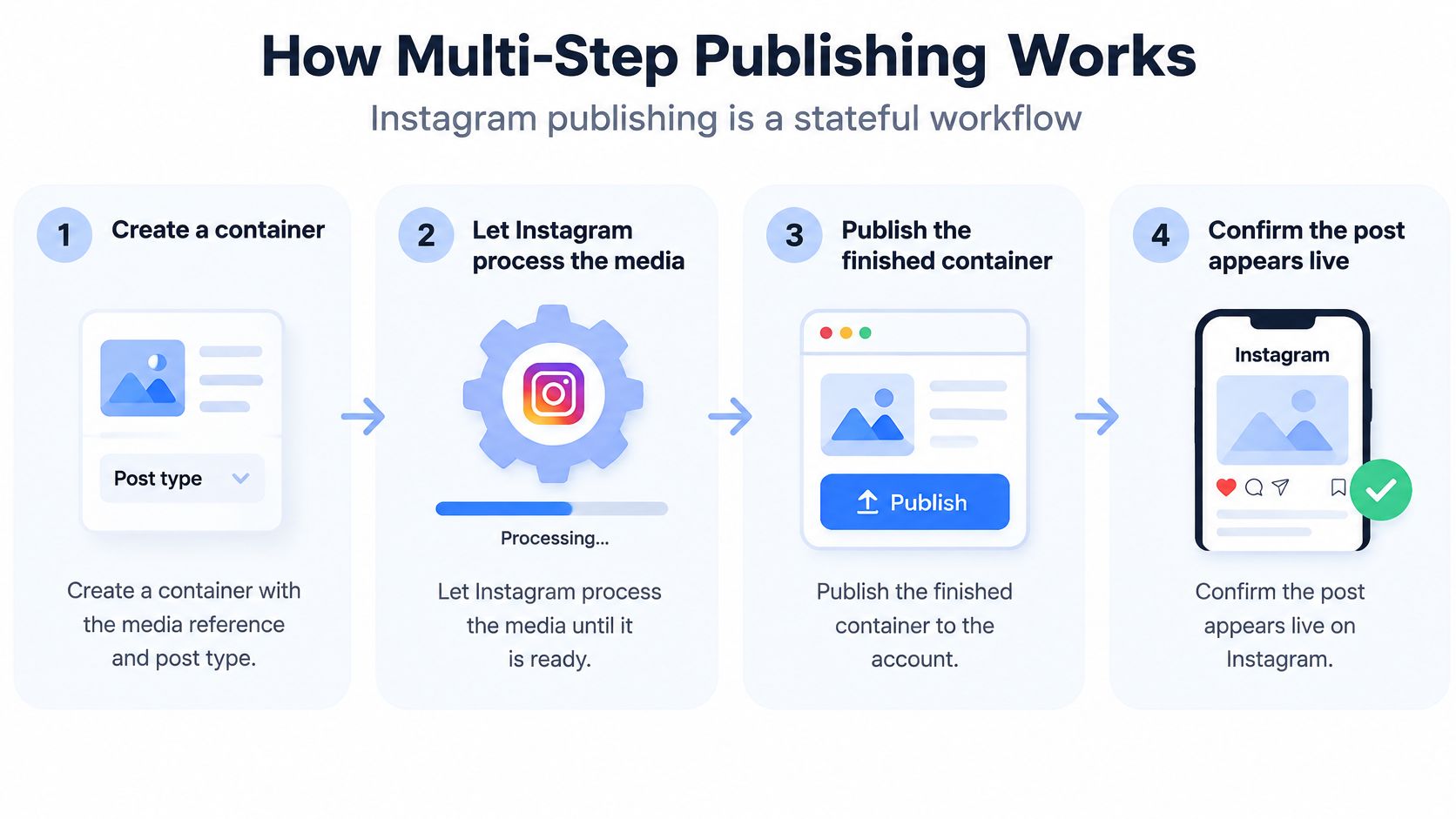 A four-step infographic illustrating the stateful workflow process for publishing content via the Instagram API.
The single-post path
Create the media container. Submit the media reference and appropriate post type, then persist the returned container ID. Associate it with the logical publication job before the worker proceeds.
Let Instagram fetch and process the media. Treat this interval as a recorded processing state, not as a reason to keep creating containers.
Inspect readiness. Poll the container status according to the documented workflow and stop on a terminal error. Only advance when the container is ready for publication.
Call
media_publishwith the stored creation ID. Save the resulting platform post ID, then reconcile the publication outcome rather than treating the request's arrival as proof of visibility.
The infographic includes confirmation as the final operational step. Your implementation still needs the readiness check before publication, even if your user interface compresses those stages into a simpler progress indicator.
A worker restart should load the last durable state. If it already has a container ID, it should inspect that container before deciding whether any new creation request is necessary.
The carousel branch
For a carousel, prepare each child item before creating the parent. Meta documents a maximum of 20 child media items, and specifies that carousel children must be image or video containers, not Reels containers, in the publishing documentation linked above.
The parent receives the child IDs in its children list. Persist that parent ID separately, inspect its readiness, and publish the parent rather than each child.
A useful internal record separates the pieces:
Logical publication: The user's intended carousel, target account, and scheduling information.
Child records: Media identity, container ID, last observed processing state, and diagnostic response.
Parent record: Ordered child references, parent container ID, and publication outcome.
Receipt: Platform post ID and any available public URL after successful publication.
If a carousel stays in progress, inspect the child states before blaming the final publish call. An implementation that assumes synchronous preparation can advance too early, but that isn't the only possible cause. Preserve the actual status and error response rather than labeling every stalled carousel as the same bug.
Recovery rule: Resume from the last confirmed platform state, not from the beginning of your function.
Healthy logs should let you reconstruct the sequence without guessing: child creation, child readiness, parent creation, parent readiness, publication attempt, and stored publication receipt. Include your job ID on every entry so concurrent carousels don't become an unreadable stream of unrelated container IDs.
Media Specs and Upload Limits
A unified request schema doesn't make the same file valid everywhere. Your gateway should validate each destination's media requirements before it starts a transfer, and report incompatibilities while the user can still change the asset.
Media and upload constraints
These are preflight checks, not targets you should automatically push every upload toward.
Item | Documented constraint |
TikTok video chunk size | Generally 5–64 MB per chunk |
TikTok final chunk | Up to 128 MB |
TikTok chunks per upload | Up to 1,000 |
TikTok total video size | Up to 4 GB |
Instagram carousel children | Up to 20 items, each an image or video container |
Instagram Reels as carousel item | Not allowed; use image or video containers |
The TikTok upload constraints come from its Content Posting documentation cited with the scheduler limits. The Instagram rows are validation rules from Meta's publishing workflow, not additional capacity for a different carousel format.
Check dimensions, codec, container, duration, and file size against the official requirements for the selected endpoint. Don't infer video support from the filename extension or assume that a file accepted by your storage service will be accepted by the destination.
Separate validation from transfer
Your preflight response should distinguish an invalid asset from an unavailable account budget. That lets an automation decide whether to change the file, choose a different destination, or defer the job.
For upload workflows, TikTok requires approval and authorization of the video.upload scope. Check authorization before allocating transfer work; discovering a missing permission after preparing a large asset wastes effort without improving the eventual result.
Use checkpointed transfers where the documented upload protocol supports continuation. Persist the upload session, completed ranges, and any expiry information returned by the platform. A checkpoint isn't a guarantee that an expired or rejected upload session can be resumed.
Keep separate internal request budgets for initialization, transfer operations, status checks, and publication. These are your scheduling controls, not a claim that the platform provides separate quota buckets for every stage. Their purpose is to prevent an aggressive polling loop from consuming the capacity your remaining work needs.
A useful preflight endpoint returns:
Media compatibility: Supported types and applicable size or format restrictions.
Authorization gaps: Missing scopes or account eligibility problems.
Capacity: Current account allowance and whether the proposed job can be admitted.
Processing expectations: A clearly labeled estimate when your service can provide one, not a guaranteed completion time.
Agents should receive a plan they can execute safely, not discover preventable incompatibilities after dispatch.
Instagram Publishing Limits That Catch Developers
Interactive Story stickers can't be added through Instagram's publishing API. A Story your user can assemble in the Instagram app isn't necessarily something your server can reproduce.
Meta's media reference explicitly identifies unsupported interactive sticker features, including link, poll, and location stickers, while allowing user mentions without a sticker.
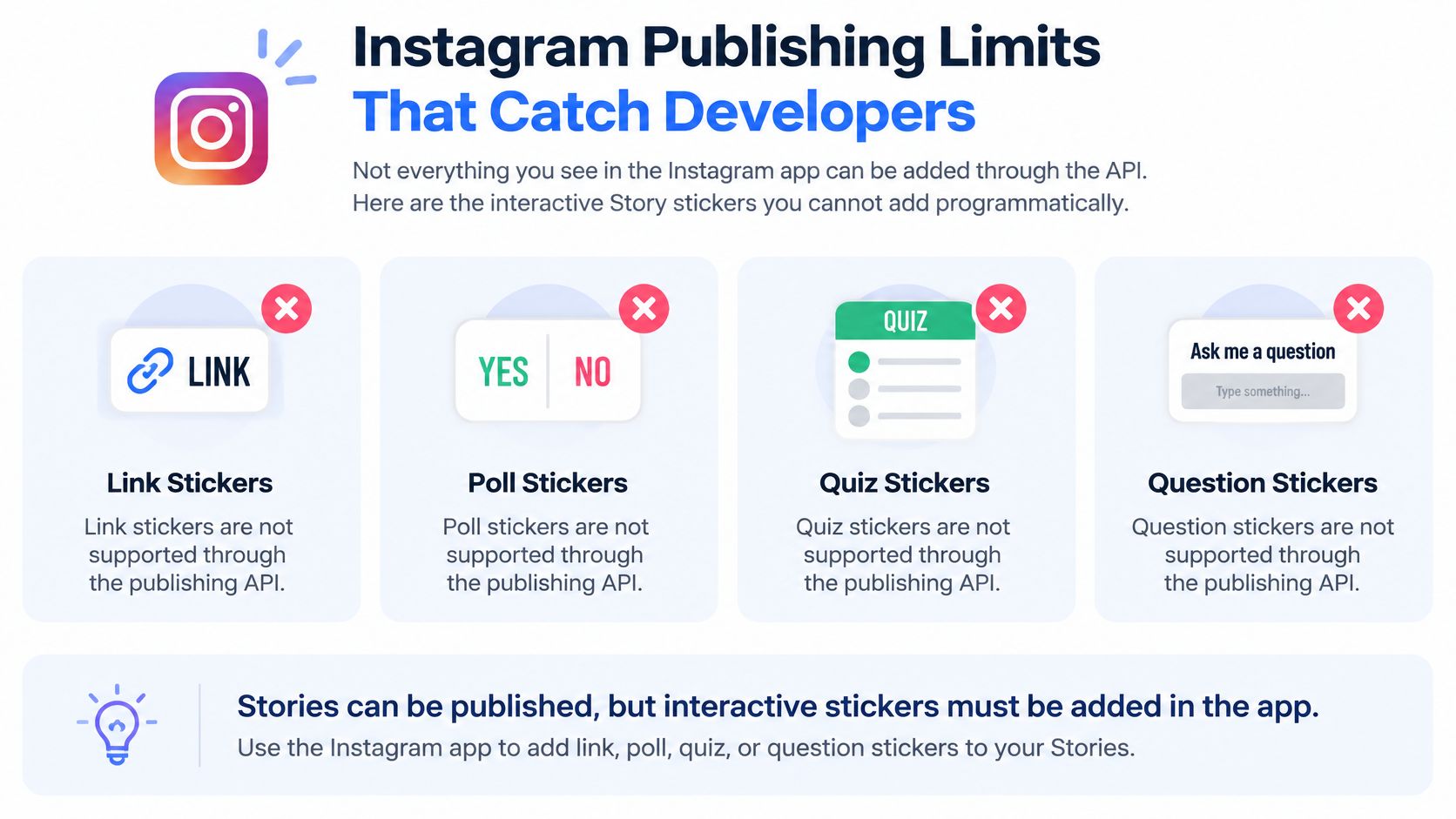 An infographic listing Instagram Story features like link, poll, quiz, and question stickers not supported by the API.
Make the missing layer visible
Use a capability checklist in your composer rather than waiting for a scheduled job to disappoint the account owner:
Link stickers: Don't promise them through the publishing endpoint.
Poll stickers: Don't treat them as another supported image annotation.
Location stickers: Distinguish these from supported user mentions without stickers.
Story eligibility: Verify the account type for the chosen login and publishing path. The Facebook Login documentation cited earlier restricts Story publishing to business accounts at its documented scope.
Image and video media: Supported Story media remains publishable; the interactive layer is the gap.
Don't flatten an interactive control into an image and call the result equivalent. A picture of a poll isn't a functioning poll, and a rendered link label isn't a tappable link sticker.
App handoff isn't server-side publication
Meta's separate Sharing to Instagram Stories flow hands content to the Instagram app's composer through Android intents or iOS custom URL schemes. The user finishes in the app. That's a different product experience from unattended server-side publishing.
Connection architecture also matters. According to Meta's Instagram Platform changelog, the Instagram API with Instagram Login launched on July 23, 2024, removing the previous requirement to link an Instagram professional account to a Facebook Page. Don't copy an older connection checklist into a newer login flow without checking its applicability.
If you're also evaluating read-side Instagram tooling, treat BeatAPI Instagram data endpoints as a separate integration evaluation. Read-side access doesn't establish permission or support for a publishing feature.
Keep rate-limit recovery separate from capability validation; our API rate-limit guide addresses the former. Waiting longer won't make an unsupported sticker publishable.
In our publishing interface, Instagram content can be designated FEED, REELS, or STORY, and can be labelled as AI-generated content. None of those selections should imply that the native app's entire editing surface is available. Tell users before scheduling when their Story will publish without an interactive sticker layer.
Handling Failures, Retries and Partial Success
Your request publishes to Instagram but fails on another destination. Returning one shared success value hides the only information the user needs: which post is live, which isn't, and what they should do next.
The useful abstraction is explicit, recoverable outcomes, not a promise that every network behaves identically. Coronium's developer discussion of agent publishing raises this cross-platform reliability problem, including quota and visibility differences. Treat its platform-specific observations as verification prompts, not replacements for official documentation.
Publish states and the next action for each
These are recommended states for your integration. They aren't a claim that every platform exposes these exact status names.
State | What it means | Next action |
| Accepted and waiting for capacity or scheduled time | Keep the job; check quota before dispatch |
| Media transfer is in progress | Resume from a valid checkpoint where supported |
| Platform is processing media | Inspect status; publish only when ready |
| Container or media can be published | Issue the publish call once |
| Publication is confirmed | Store the platform post ID and available link |
| Publication has restricted visibility | Verify visibility settings and applicable app approval requirements |
| Platform refused the content or account | Fix the cause before retrying |
| Request or publication capacity is exhausted | Defer, then retry with backoff and jitter |
| Processing or publishing encountered an error | Classify as transient or permanent |
| Outcome is unclear after a timeout | Reconcile with the platform before reposting |
Preserve evidence before translating errors
Platform messages can be uninformative or fail to match the documentation you implemented against. Preserve the raw response, endpoint, API version, request correlation identifiers, and a sanitized payload summary before converting it into a user-facing explanation.
Consider a hypothetical limit documented as 500 characters but apparently enforced as 500 bytes. Don't declare a platform-wide rule from that observation. Record the exact input, compare character and encoded-byte lengths, reproduce the failure, and isolate any compatibility workaround to the affected endpoint.
That distinction matters. Documentation defines the intended contract; your evidence establishes what happened to a particular request. Neither justifies inventing a universal limitation.
Use exponential backoff with jitter for retryable capacity failures, while respecting any documented retry guidance. For invalid media, missing authorization, or account conflicts, stop and request the change that makes another attempt meaningful.
Make retries safe at your boundary
Assign a stable idempotency key to the logical destination job and enforce deduplication in your own persistence layer. Don't assume that sending an arbitrary idempotency header makes a downstream platform deduplicate requests. After a timeout, inspect available publication evidence before sending another creation request.
Our account-connection policy provides a concrete permanent error: connecting a social account already used by another PostPulse user returns HTTP 402 with “Social media account has already been used previously”. Repeating the same connection request won't resolve that ownership conflict.
Deletion needs equally explicit semantics. Deleting a post from PostPulse doesn't remove an already published post from the social platform. Don't present removal from your dashboard as a compensating rollback of successful destinations.
A timeout tells you that your caller stopped waiting. It doesn't tell you that the platform stopped working.
For partial success, retain the successful receipts and recover only the unsuccessful destinations. Make any rollback a separate, deliberate operation with its own documented support and outcome.
Keeping Autonomous Agents Accountable
An agent can publish without a person clicking approve on every post and still be accountable. The missing piece isn't another prompt telling it to be careful. It's a durable record of who authorized its actions and which boundaries it operated within.
The Blotato social media automation review found that only 5 of 10 examined platforms allowed agent publication without a per-post choice by the account owner. The review also flags Meta approval considerations beyond developer or test accounts; verify the applicable official platform requirements before enabling production autonomy.
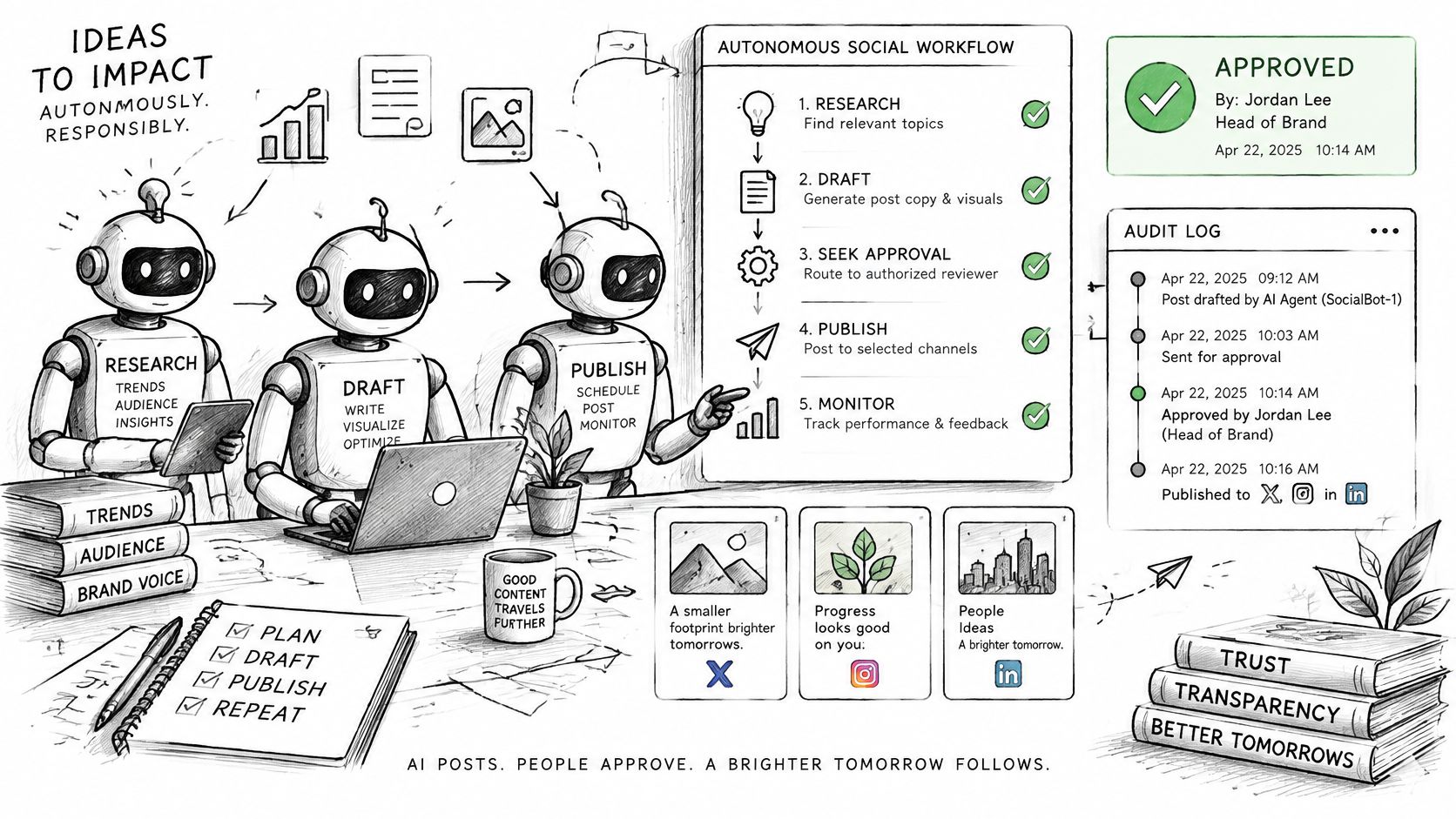 A hand-drawn illustration showing an autonomous social media workflow managed by robots with human approval.
Authorization isn't per-post approval
Account-owner authorization establishes which access the owner granted. Per-post approval is a separate product control governing a particular publication. Don't imply that possessing credentials automatically satisfies every platform rule or every customer's approval policy.
Design bounded autonomy with explicit controls:
Scoped credentials: Restrict access to the accounts and destinations the agent needs.
Set approval thresholds for sensitive content, unusual audiences, or changes outside the normal publishing plan.
Brand-policy checks: Evaluate the final caption and media before dispatch, not just the initial draft.
Apply AI-generated-content disclosure where the destination supports the appropriate label.
Rate and spend budgets: Give each account an operational ceiling and define who can raise it.
Preserve an immutable audit history of decisions, changes, and publication outcomes.
Emergency revocation: Make it possible to stop new dispatches and disable the agent's authority.
Your enforcement belongs outside the model. If the agent can override its own budget by changing its instructions, you haven't implemented a budget.
Audit the action, not just the draft
Say an agent prepares a product announcement for an approved account. Your audit record should identify the initiating user or service, the model identifier supplied by your application, the content revision, the policy checks that passed, and the authorization decision.
Attach the eventual platform receipt to that same record. Our webhooks send post status callbacks, so your event handler can record reported outcomes rather than treating the agent's intended action as proof of completion.
Keep the submitted content and later edits distinguishable. If a person changes the caption after a policy check, require a new check rather than leaving the earlier approval attached to a different payload.
Bounded autonomy means agents publish automatically inside explicit destinations, schedules, content rules, quotas, and escalation paths. When a job falls outside those boundaries, the correct autonomous action is to stop and escalate.
Run a Test Publish Before You Scale
Test the whole lifecycle before adding destinations or agent decisions. A request that authenticates successfully proves much less than a publication you can trace from submission to a final receipt.
Use our REST API integration testing guide to organize the checks, then run a deliberately small end-to-end test.
A practical test sequence
Create your credentials. Sign up for PostPulse and create an OAuth application in the PostPulse Developer Portal. Generate the API credentials needed for your selected integration path.
Authenticate using the documented credential flow. For the integration test flow, use your client ID and secret; don't assume those credentials and an API key are interchangeable.
Fetch connected accounts. Confirm the exact target account ID, destination, and owner. Connect the intended account before attempting publication.
Upload media if needed, then check it against the selected destination's media constraints. Keep the upload reference attached to your test record.
Schedule a test post to a single account. Choose recognizable, harmless content so you can distinguish it from ordinary posts.
Watch the status callback until the destination reaches a final state. Store the platform post ID and available public link, or preserve the reported error.
Test a failure deliberately. Submit an invalid asset or attempt a duplicate account connection, then confirm your application maps the response to the correct next action.
Social-platform access and refresh tokens are stored encrypted in our database. Keep your own application credentials out of source control and test logs; encrypted platform-token storage doesn't protect a client secret you've exposed elsewhere.
Your release gate
Destination coverage: The end-to-end test passes for each platform and content type you plan to ship.
Actionable errors: Every tested failure maps to a retry, correction, reconnect, or escalation.
Attribution: The audit record identifies who initiated the post and retains its final receipt.
Run this test with the same worker and callback handler you'll deploy. Once those checks pass, add volume gradually, then introduce multiple destinations and agent-driven publishing.
PostPulse gives you a single integration for publishing across social platforms, with account connections and post-status callbacks you can build into your recovery workflow. Visit PostPulse, connect a test account, and run a publication through to its final receipt before wiring it into your production app or agent.
About the Author

Founder of PostPulse — a social media scheduling platform for creators and teams. Software engineer with a passion for building developer tools and simplifying complex API integrations across social media platforms.