Social Media Management API: Platforms, Auth and Limits
Published on
Tags:
Which part of a social media integration breaks first? It isn't the request. A single POST that publishes to one network takes an afternoon and a half-decent tutorial. The break comes later, when the network renames a field, tightens a permission, or starts rejecting a container your code has created the same way for eight months, and your logs say nothing useful.
The audience on the other side of those APIs is enormous. 5.24 billion active social media user identities worldwide in 2025, equal to 63.9% of the global population, according to Kepios analysis published by DataReportal. Every one of those identities sits behind an API with its own auth model, media spec, quota window and deprecation calendar.
The usual framing of a social media management API is a single endpoint that removes per-platform integration work. That framing undersells the job. The endpoint is the easy half. The hard half is continuity: publishing correctly on the day the rules move underneath you, and telling your users which destination failed and why instead of handing back a 500.
What follows is the reference worth keeping open while you build: the limits from the official docs, the failure states worth modeling, and the design rules that stop one bad destination from taking down the other nine.
Table of Contents
Platform Capabilities and Publishing Limits at a Glance
Which constraint breaks your publisher first: the quota window, the media rule, or the review gate? Size queues, validators and job states from the rows below before you promise anything to a user. For the Meta rows, treat publishing caps as rolling limits and format duration rules as moving targets: confirm the current numbers in the official docs before launch rather than hard-coding a figure copied from an older guide.
Platform | Publishing formats | Constraint from official docs |
Instagram (Business or Creator) | FEED, REELS, STORY | Media publishes through a container flow; containers expire, and rolling API publishing limits apply |
Facebook (Pages) | FEED, REELS, STORY | Reels and Page Stories carry different duration rules; validate length per format, and expect rolling publishing limits |
TikTok | Direct Post video, photo posts | Partner access and an audit before access is granted |
X (Twitter) | Text posts, threads, images, video | Limits apply per endpoint, so queue sizing depends on which calls you make |
Threads | Text, images, video | Access runs through Meta app review; confirm current per-endpoint publishing limits before launch |
LinkedIn (personal profiles) | Text, images, video | Member posting scopes are granted per app, so confirm what your app actually holds before scheduling |
YouTube (Shorts and video) | Video uploads, Shorts | Upload quota is granted per Google Cloud project, so several accounts share one ceiling |
Bluesky | Text, images, video | Sessions are per account; app passwords or OAuth decide how you store credentials |
Pinterest (boards) | Pins with image or video | Access starts in a limited mode until the app passes review |
Telegram (channels and chats) | Text, media, albums | The bot must be an administrator with posting rights in the channel |
Platform support is not format support. A network can sit in the supported column while individual formats inside it carry separate rules, so read the constraint cell before you tell a customer that a Reel, a Story and a feed post are interchangeable jobs.
TikTok shows why the review column is not a formality. Its Content Posting API documentation states that partners must connect user accounts and pass an audit before access is granted, and that photo support arrived later than video. An integration can be technically complete and still blocked at the partner gate.
Copy the rows you need into your spec
Formats and media spec: the exact combinations you will allow, plus MIME type, dimensions, duration and codec for each one.
Quota window: whether the cap is rolling, per endpoint, or shared across a project, because each asks for different scheduling logic.
Failure states: the names the platform returns, so your job states map to theirs instead of collapsing into one generic error.
Preflight checks: what you can validate before dispatch, and what only the platform can tell you after it processes the file.
Review status: whether your app is approved, in trial, or waiting on an audit, since that changes what publishing even means.
X is the clearest argument for reading the constraint column first: limits are applied per endpoint, so a thread with media and a plain text post do not consume the same budget. The breakdown of X API rate limits is the reference to open before you size a worker pool or set retry backoff.
Recheck the rows whenever a platform changelog moves. A row you copied six months ago is a design assumption, and this table earns its keep only while it reflects the rules the platforms enforce today.
Why Platform APIs Change Under Your Integration
The code didn't change. The calls started failing anyway. That is the normal shape of this problem, and Meta's stack is the clearest public example of it. Meta's Graph API documentation describes the Graph API as the primary mechanism through which applications read and write to Facebook's social graph, with the other APIs and SDKs extending it.
Its published version history shows just how regular that migration cadence is. Graph API v19.0 launched on January 23, 2024, v20.0 on May 21, 2024, v21.0 on October 2, 2024, v22.0 on January 21, 2025, and v23.0 on May 29, 2025. That's five major versions in about sixteen months. Each one carries an expiration date: v20.0 was scheduled to expire on September 24, 2026, and v22.0 on May 20, 2027.
What a version bump actually costs
The release itself is the cheap part. The expense is everything downstream of it:
Endpoints and fields: request shapes shift, response fields get added or retired, and your parser starts dropping values it used to read.
Permissions: scopes get renamed or re-scoped, and an app that passed review last year may need it again.
OAuth and token behaviour: redirect rules, token lifetimes and refresh semantics are all fair game in a version change.
Silent breakage: the worst outcome is a call that still returns 200 while doing something different from what you meant.
Multiply that by every network you touch. Each platform runs its own release calendar, its own deprecation policy, its own media requirements and its own approval process, and none of them coordinate. A publisher that treats version tracking as someone else's problem is a publisher that goes down on a Tuesday because a field name moved.
The working habit: one named owner for platform versions, one test account per network, and a monthly read of each changelog against the capability matrix at the top of this guide.
That habit costs a few hours a month. Skipping it costs you a weekend of firefighting with no reproduction case, because the reproduction case is whatever the platform shipped while you were asleep.
Connecting Accounts with OAuth and Token Refresh
A short-lived access token is a lifecycle problem, not a retry problem. When every call starts returning authentication errors an hour after connect, nothing broke. The credential reached its normal expiry, and the integration either planned for that or it didn't.
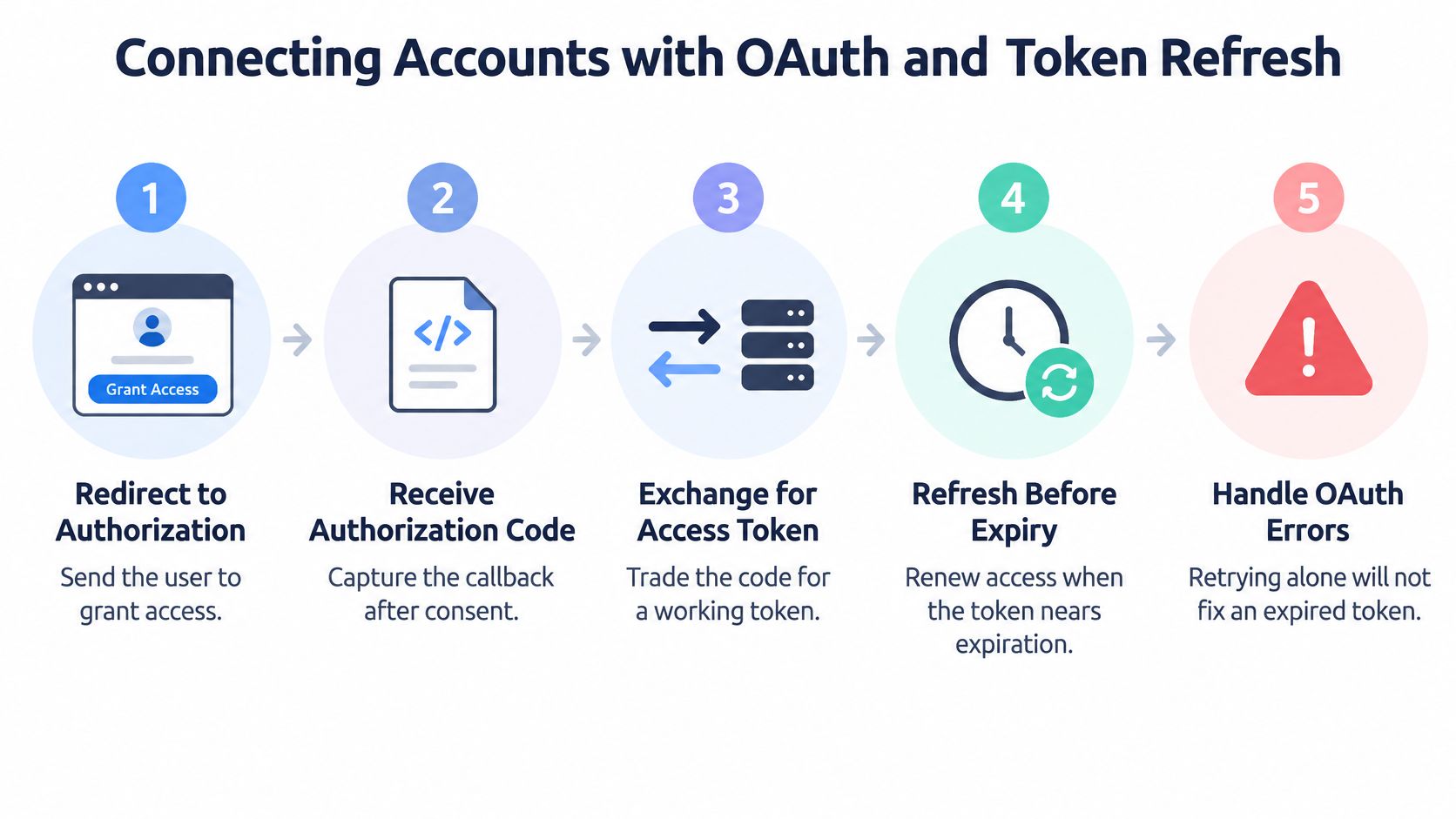 A five-step infographic illustrating the OAuth authorization and token refresh flow for connecting external accounts.
Treat token orchestration as a security subsystem. RFC 9700 requires public OAuth clients to use PKCE and recommends it for confidential clients, because it protects authorization codes against interception, injection and certain CSRF cases. The same document advises exact redirect-URI matching, discourages the implicit grant, and requires resource servers to treat access tokens as sensitive secrets rather than passing them around in plaintext.
The flow runs in four stages, and each stage carries a rule.
Redirect with a challenge. Send the user to the provider with a PKCE code challenge and a redirect URI that matches the registered value character for character. Loose matching is how codes leak. PostPulse connects accounts over OAuth 2.0 PKCE, and each connection keeps its own consent record, so a user linking three networks produces three auditable grants rather than one opaque bundle.
Capture the callback. Verify state, then take the code, not the token. Anything that skips this step is a redirect you can't audit.
Exchange and store. Trade the code for an access token and, where the provider issues one, a refresh token. Store the provider, granted scopes, expiration timestamps, refresh-token rotation behaviour, revocation state and consent metadata alongside the account. Access and refresh tokens belong in an encrypted database, which is where PostPulse keeps them, not in a job payload or a log line.
Refresh before execution, once. Renew just ahead of the call, with concurrency control so two workers don't rotate the same credential and invalidate each other. Refresh-token rotation is the classic race that produces a perfectly valid token nobody can use anymore. A single-flight lock per account kills it.
Scope inspection belongs in the same checklist. Meta issues app-scoped OAuth 2.0 credentials and gates publishing behind a dedicated permission, instagram_content_publish, so check the grant before you publish rather than after the request fails. The operational side of OAuth token management is worth reading once you're storing more than a handful of connections.
If you want the flow demonstrated end to end before writing it, this walkthrough covers the same stages in order.
Return durable states, not opaque failures
A connection is a state machine, and your API should say so. Four states cover almost everything: connected, reauthorization_required, revoked, and provider_action_required. Clients can then decide to prompt, pause or retry, instead of parsing an error string to guess whether the user needs to log in again. A call like GET /v1/accounts, which returns every account a user has connected, gives the client a readable source of truth for those states rather than a guess reconstructed from failed publishes.
One more case breaks naive onboarding screens. Connecting an account that another user already linked is rejected with HTTP 402 and the message "Social media account has already been used previously". Handle it with a specific explanation, because a generic failure at the connect step reads like a bug to the person on the other side of the screen.
The same storage rules apply to every auxiliary service in the pipeline. If your publisher generates carousel images alongside posting, you need to secure your carousel generation requests with the same discipline: credentials in an encrypted store, exact redirect and request validation, and nothing sensitive riding along in payloads or logs.
Instagram Container Lifecycle, Quotas and Preflight Checks
The container sits at IN_PROGRESS. Nothing has failed, nothing has published, and the job has been in that state for eleven minutes. Or media_publish returns an error saying the media isn't ready, on the same request that worked two hours ago.
Instagram publishes in two stages: you create a container that points at media, then you publish that container. Almost every failure you'll debug lives in the gap between those two calls, and the gap is bigger than it looks.
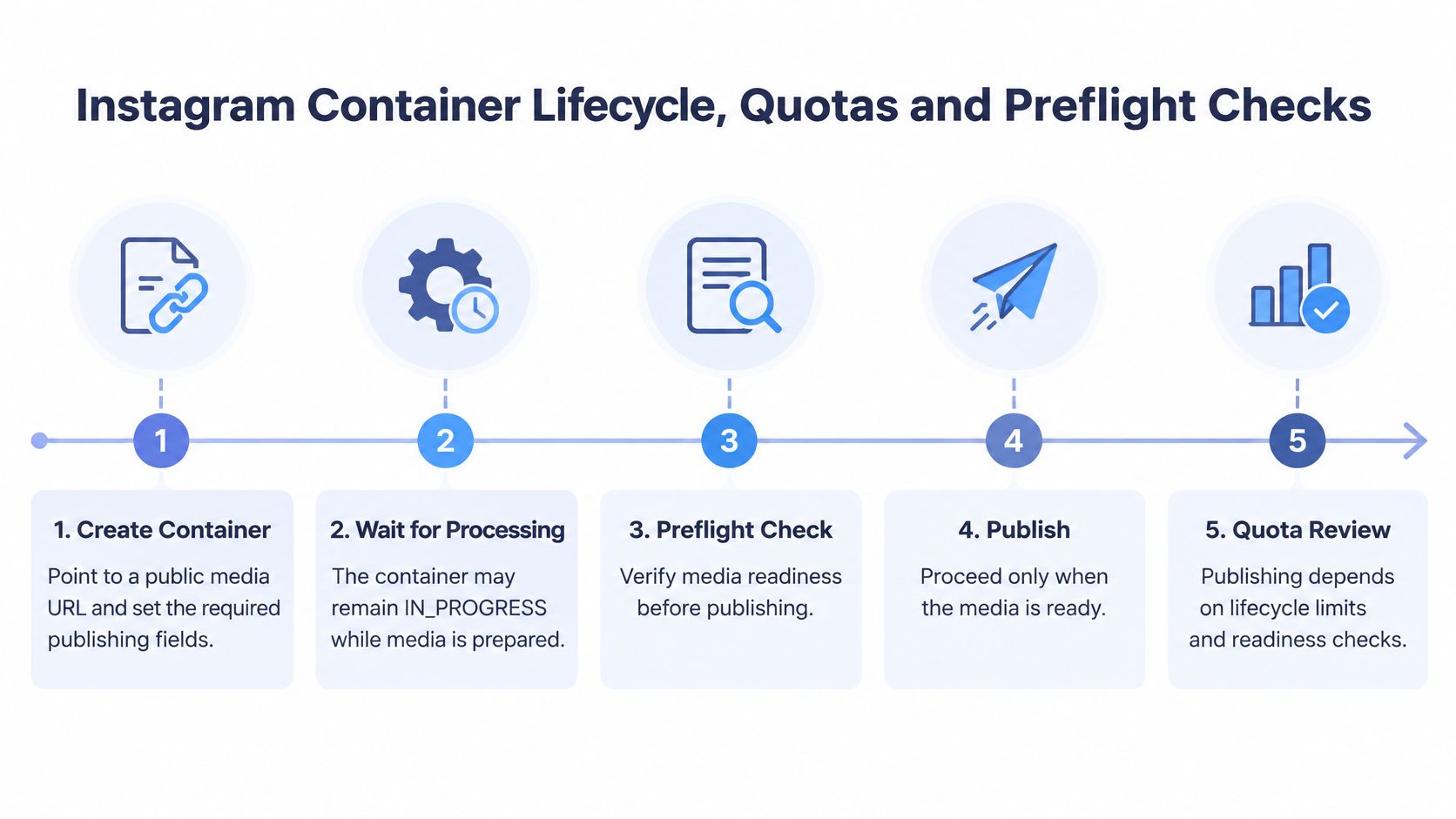 A five-step flowchart illustrating the Instagram container lifecycle, including container creation, processing, preflight checks, publishing, and quota review.
The flow in order
Create the container. Point it at a publicly reachable media URL and set the post type: FEED, REELS or STORY. A container created days ahead of its scheduled time is a container that expires before you use it.
Build carousels in two levels. One child container per item, then a parent container referencing them all. Publishing the parent is what makes the carousel a single post.
Poll
status_code. Meta recommends checking roughly once per minute for no more than five minutes, per the IG Container reference. Hammering the endpoint doesn't process the file faster; it just burns quota.Publish only when the status reads FINISHED. That is the only state where
media_publishis the right call.Treat anything else as terminal. If the status stays unsuitable after the polling window, create a new container or fail the job. A missing media ID is not a success signal.
Status | Meaning | What your code should do |
IN_PROGRESS | Instagram is still processing the media | Poll about once a minute, for no more than five minutes |
FINISHED | Container and media are ready to publish | Call |
PUBLISHED | The post has been published | Store the published media ID and do not publish again |
ERROR | Processing failed | Mark the job failed and surface the error to the user |
EXPIRED | Not published within 24 hours | Create a new container and restart processing |
The error text is not the diagnosis
"Media not ready" and "expired media" look similar in a stack trace but need opposite handling. Meta's error code documentation recommends checking the container's status_code and publishing only on FINISHED for the first case, and creating a new container for the second. The same page notes that a missing media object can come from a permission problem or an expired token.
That last detail matters more than it looks. It means three unrelated failures, asynchronous processing, expiration and authorization, can surface as the same symptom. Route them separately: poll briefly for readiness, regenerate expired containers, and send token or permission failures through reauthorization rather than retrying an identical request until your queue gives up.
A missing media ID is not proof of publication. It's proof that you don't know yet, and the difference decides whether your user sees a duplicate post tomorrow.
Rolling quotas are a scheduling problem
Because containers expire after 24 hours, a scheduler that creates them on Sunday for a Wednesday slot is building a guaranteed failure, per Meta's media publishing reference. Create the container close enough to the publication time to finish processing and call media_publish before the deadline. Meta also exposes content_publishing_limit so you can read current usage before accepting a job, and a carousel counts as a single post against the professional account's rolling allowance. Enforce your own guard on top: reject or reschedule anything that can't fit the window.
Facebook Reels add a second class of constraint that has nothing to do with authentication. The Reels publishing guide documents a rolling publication quota for a Page and a duration range of 3 to 90 seconds, with a tighter 60-second ceiling when a Reel is published as a Page Story. A file can upload perfectly and still be rejected at publication for being 94 seconds long.
Preflight checklist before dispatch
MIME type and container: validate the format the endpoint expects, not the format the user's phone produced.
Duration and dimensions: run the platform's own range against the file, per post type.
Rolling usage: read the limit endpoint and compare against the jobs already queued for that account today.
Token state: confirm the connection is live and holds the publishing scope, before you spend time uploading.
Schedule fit: refuse a job that can't process and publish inside its window, and say why in the response.
Retries, Idempotency and Partial Failures
The request timed out. That means it may have published, or it may not have. Retrying blindly is how a user ends up with two identical posts and a support ticket with your name on it.
HTTP gives you the vocabulary here. RFC 9110 distinguishes idempotent methods because clients can safely repeat them after a connection failure without changing the intended effect. Post creation isn't one of them. A social post creation call is commonly non-idempotent, so a unified layer has to add the safety itself: an explicit idempotency key, a stored request fingerprint, and a rule that returns the original publication result when the same key arrives again.
Split submission from execution
A synchronous publish endpoint that fans out to ten networks and waits is a timeout generator. Separate the two halves:
POST /publicationsvalidates media and account capability, creates a durable job, and returns a job identifier immediately.Workers run the platform-specific steps, record provider request IDs, and update per-destination states:
queued,uploading,published,failed,needs_reauth.
That's the difference between "your post failed" and "Threads published, Pinterest rejected the aspect ratio, and Instagram still needs a token refresh". Clients can act on the second one.
The retry policy as a decision list
Retry transient transport errors and rate limits with bounded exponential backoff plus jitter. Honour provider retry hints when the response includes them.
Don't retry permanent failures. Validation errors, missing permissions and media-format rejections fail identically on every attempt and just add load.
Cap concurrency per platform and per account. A retry storm against one account's quota takes down every job that account has queued, not just the one that failed.
If a retry can create a second post, it isn't a retry. It's a new publication wearing the same request body.
Fan-out needs per-destination truth
One logical publication ID, many destination outcomes, stored independently. Partial success has to be visible, and a single failed destination has to be replayable without republishing the nine that worked. That structure also gives you the metrics that predict incidents: success rate by platform, time to publish, retry count, token-refresh failures, rate-limit responses, and how often duplicate suppression fired.
REST, Workflow Tools and MCP Agents
Three routes lead to the same publishing layer, and picking the wrong one costs weeks of rework. A REST API suits a backend that needs full control over requests, responses and custom error handling. Workflow nodes suit a team already automating in n8n or Make.com, where a scenario should publish without new code. An MCP server suits an AI agent, letting Claude, Cursor or any LLM call publishing actions inside its own tool loop.
PostPulse exposes the same actions through all of these: the REST API, the n8n and Make.com nodes, and the MCP server. Whichever surface you call, a single POST fans content out to every connected account, applies each platform's media rules and hits your webhook on success or failure. That matters for continuity. When a platform ships an API version change or tightens rate limits, the provider absorbs it, and your code on every surface stays the same.
The same first integration on any surface
Create an account and generate API keys. No platform apps to register before you can test, and a first post goes out in minutes.
Authenticate with your client ID and secret, then fetch the connected accounts so you know which destinations exist.
Connect one test account through the hosted OAuth flow, so token handling is finished before you write publishing logic.
Schedule a test post with a destination list and media reference, then confirm the outcome through the webhook callback. Repeat with a file that should fail so you see the error shape before production.
If you are documenting or auditing an agent-facing endpoint of your own, published material such as these API details for agent integrations gives you something concrete to compare field names and error shapes against.
Direct integrations still require your own app review and partner audits, while a unified provider can hold approved apps on your behalf. Per-account quotas apply to every surface either way. The surface decides how you call. The platform decides whether the call succeeds, and the publishing layer decides how much of that platform's churn ever reaches your code.
Governing Autonomous Publishing from AI Agents
An MCP endpoint plus a no-code recipe gets an agent posting in an afternoon. That's the easy part, and it's the part everyone writes about. Governance decides whether the posts coming out are ones you'd approve.
Research on AI-driven marketing, based on a survey of 106 respondents and published in the Digital Age Scientific Collection journal, flags ethics, data-security and transparency as the open problems, which lines up with what fails in production: nobody agreed on who approved what, or where the record of it lives.
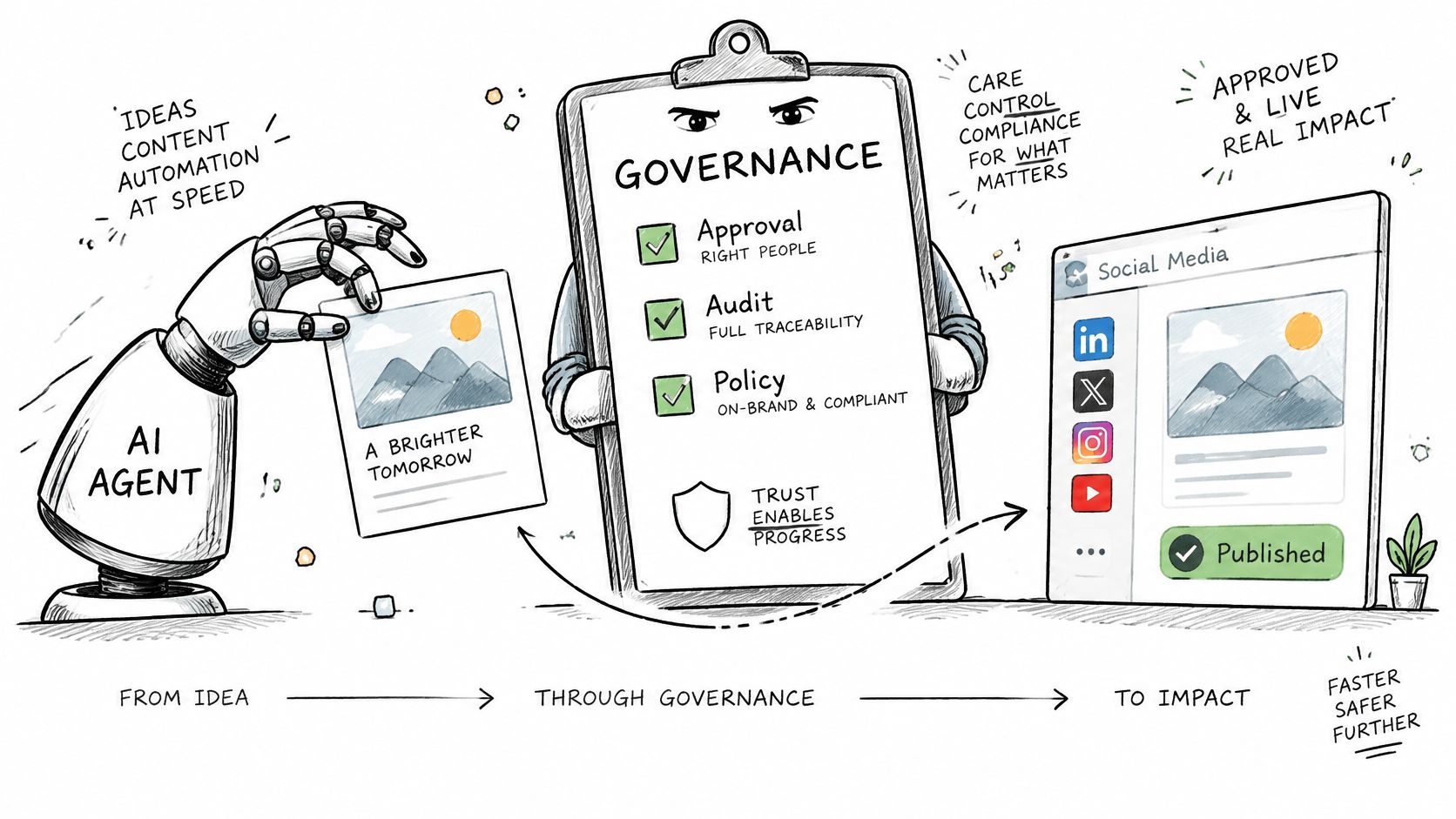 A diagram illustrating an AI agent creating content that passes through governance checks before social media publication.
The questions a governed setup answers before launch
Which actions require human approval? How are prompts, media, account identity and publication timestamps logged? What happens when an agent retries after an ambiguous timeout, and does the idempotency key stop a duplicate? How are regional privacy and retention requirements handled when a draft is generated in one jurisdiction and published in another? Platform access is tightening too, and audits are the norm rather than the exception, so an agent can't assume every account is available to it.
The controls that work, in rough order of payoff:
Scoped permissions per account, so an agent that drafts for one brand can't publish to another.
Dry runs that return the assembled payload and the preflight results without publishing anything.
Approval thresholds by risk, not by user seniority. A product update can auto-publish; a health claim can't.
Per-account budgets, so a loop that misfires runs out of allowance instead of out of reputation.
Idempotency keys on every agent call, because agents retry more than humans do.
Limits on edits and deletions after publication, since a rollback isn't free once a post is live.
User-facing audit logs that name the agent, the prompt, the account and the timestamp.
Say a team's agent drafts forty variants a week. Any variant containing a health claim routes to a human before it enters the queue; the rest publish on schedule. That single rule prevents the failure mode that ends agent publishing projects, which is one confident, wrong post at scale. The compliance picture around that routing belongs in your policy from day one, and these notes on social media compliance are a reasonable starting checklist.
Define the approval threshold before you enable autonomous mode. The alternative is defining it in the post-mortem.
Choose Your Integration Path Before You Build
Frame the decision around maintenance, not around the first successful post. Both paths publish. Only one of them keeps publishing when three platforms ship breaking changes in the same quarter.
Criterion | Direct per-platform integration | Unified management API |
Platform app review and audits | You complete each one, such as the TikTok partner audit | Check whether the provider holds approved apps for each network |
Version and breaking-change tracking | You monitor each platform's changelog and deprecation dates | Ask the provider for its change-handling and notice policy |
Retry and status semantics | You build per-platform logic for every state | Look for per-destination states and idempotency keys |
Maintenance effort | Engineering time for each platform, every year | Vendor fee plus far less integration work |
Control over requests and errors | Full control over requests and error handling | Limited to the provider's abstraction and error model |
The maintenance column isn't hypothetical. Industry tracking recorded 130 breaking changes across 10 social platforms between October 2024 and September 2026, with X and Instagram each accounting for seven, per Blotato's social media API research. The same analysis found that four of X's six dated breaking changes arrived with five days' notice or less, while Instagram's dated changes generally gave at least 90 days.
Read that again as an engineering constraint. A five-day window doesn't let you design, test and ship a fix across a large codebase. It lets you hotfix, if you already know which of your call sites touches the changed surface.
What to demand before you outsource the problem
A unified layer has to earn its place, and the questions are specific. Which platform apps does it hold approved, and for which formats? What notice does it give you before a breaking change lands? Do its job states include per-destination results, or does everything collapse into one status? Can it show you a capability matrix you can compare against your own targets, plus a fallback plan and a way to tell your users a feature is degraded?
If the answers are vague, you're buying the same maintenance with less visibility. Teams that mostly automate the output side rather than the API calls often get further with these post automation tips for small businesses, which cover the workflow layer sitting above publishing. The getting started guide for the PostPulse API and its n8n integration is a fair example of the shape those answers should take, and in private-label setups your users connect accounts inside the tool while you publish through the API, n8n, Make.com or MCP.
My rule of thumb: build direct for one or two platforms, with a named owner for OAuth and version watching, and evaluate a unified layer when you need many platforms or when agents start calling your publisher. Before committing either way, run one test with a real account. Publish a post to each target network, record every failure state you hit, and compare that list against the capability matrix you wrote in your spec.
PostPulse publishes to ten platforms from one REST endpoint, with OAuth, refresh tokens, rate limits and platform version changes maintained for you, plus official n8n and Make.com nodes and an MCP server for agents. If the failure states above are the ones you keep debugging, start with a test account at PostPulse, connect one network, and publish a real post to watch the per-destination states come back.
About the Author

Founder of PostPulse — a social media scheduling platform for creators and teams. Software engineer with a passion for building developer tools and simplifying complex API integrations across social media platforms.