Twitter API Rate Limits: Headers, 429s and Backoff
Published on
Tags:
It's 3:40 on a Tuesday and the publishing job that ran clean all morning starts throwing failures. Nothing deployed. The credentials are the ones that worked at 10 AM. One account in the workspace still posts fine, a second sits in a retry loop that makes the queue worse, and a third fails with a response that mentions rate limits even though that account published twice today.
That's the ordinary shape of this problem. The X API doesn't run one rate limit. It runs several budgets on different clocks, and the same HTTP 429 comes back when any of them runs dry. A user access token can be inside its request window while the developer application has already spent its shared posting allowance. The project can pass both of those checks and still be locked out because the monthly tier cap is used up or the prepaid credit balance is empty.
Track three dimensions and most surprises stop being surprising: per-user limits, per-app or project limits, and monthly access-tier quotas, plus a fourth budget that behaves like a quota, the credit balance. Multi-account systems feel the squeeze first, because one customer's heavy afternoon spends capacity every other tenant was counting on, and a request that returns 200 doesn't promise throughput. Everything below follows the official X developer documentation; where a behavior isn't documented, I'll say so and mark it as something to verify against a live response.
Table of Contents
Why Your Twitter API Calls Start Failing
The failure never looks like a budget problem at first. It looks like an outage, or a bad token, or a deploy that broke something invisible. So the natural reaction is to add a retry, which multiplies the load on a budget that was already empty.
The thing worth internalizing is that a 429 tells you almost nothing on its own. It says a counter is full. It doesn't say which one, and X's counters reset on completely different schedules: a request window refills in minutes, an action budget takes a full day, and a monthly tier cap doesn't refill until the billing cycle turns over. Backing off for the wrong clock is how a queue stalls for hours.
The first diagnostic is never the code. It's which budget ran out, and the answer decides whether you wait, reschedule, or stop and top up.
Multi-tenant publishing is where this gets sharp. Every connected account brings its own per-user allowance, but they all share the application's posting budget and the project's monthly consumption. One tenant scheduling a product launch across 40 accounts can consume the whole afternoon's headroom for the other thirty tenants who each wanted to publish once.
That's the whole complaint. And it's fixable, but only if you know how much each budget holds, how it resets and which header reports it.
Twitter API Rate Limits at a Glance
One number can't answer "what's the rate limit," so here's the full set by dimension. Read the Scope column before the value, because it tells you whether the number belongs to a single account, the application, or the whole project.
Limit dimension | Value | Scope |
Free access, posts | 500 posts per month | Per project |
Free access, reads | 100 reads per month | Per project |
Enterprise access, posts | up to 50,000,000 posts per month | Per project |
Posting, app-level | 300 combined posts and reposts per 3 hours | Shared across all authorized users |
Likes, app-level | 1,000 per 24 hours | Per app |
Follows, app-level | 1,000 per 24 hours | Per app |
Direct messages, app-level | 15,000 per 24 hours | Per app |
GET buckets (examples) | 15 and 180 requests per 15 minutes | Endpoint-dependent, user or app |
Pay-per-usage reads | monthly cap of 3 million Post reads | Plan-level, confirm on the billing page |
Start with the tier rows, because they're the ones running on a monthly clock. The official X API v2 documentation lists Free access at up to 500 posts and 100 reads per month for a project, and Enterprise access at up to 50,000,000 posts per month. Notice how the tier caps measure posts rather than requests. A month can look quiet on your request graphs while the project is close to its consumption ceiling.
The next row down is the one that bites publishers. The same documentation lists an app-level default of 300 combined posts and reposts per three-hour window, shared across every user authorized to the application, alongside 1,000 likes per 24 hours, 1,000 follows per 24 hours and 15,000 direct messages per 24 hours. Those 24-hour rows matter mostly if your product does engagement automation; they're irrelevant to a pure scheduler, right up until someone bolts a "thank followers" job onto the roadmap.
Then the request buckets. Allowances vary by endpoint, and two commonly cited examples, 15 and 180 requests per 15 minutes, show how far apart endpoints sit on the same clock. Neither number is universal. The endpoint's own reference page is the authority for the quota that applies today.
Finally the consumption rows, where the scope is a plan rather than a user or an app. Check those on the billing side of the console instead of the endpoint table, because they move when pricing moves.
How to read this table: the budget with the smallest remaining headroom is the one that stops your queue, and every row here resets on its own schedule.
Documented defaults drift, so confirm the likes, follows and DM figures against the current docs before you size a feature around them.
How 15-Minute Windows and Per-User Limits Work
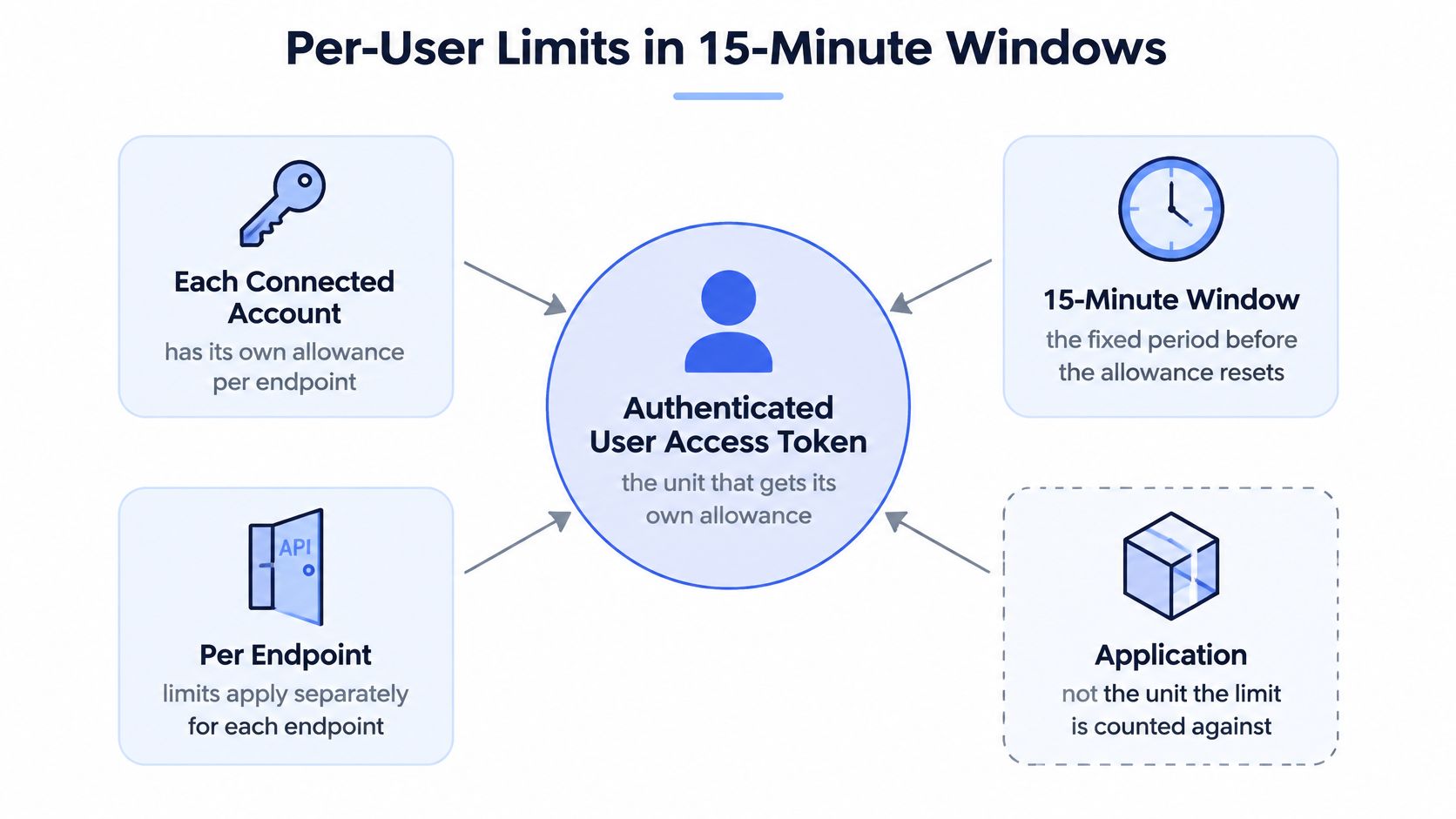
A publishing queue can have room in one budget and still stop at another. Per-user limits are counted against each authenticated user access token, while app-level budgets are counted separately against the developer application. Track both: spare capacity in one does not offset an exhausted limit in the other. X's rate limiting documentation describes the standard API model, where limits generally apply per user access token and the exact allowance depends on the endpoint.
The diagram shows how a user-token window can affect one account while other accounts remain available.
 A diagram explaining Twitter API rate limits based on user access tokens and 15-minute time windows.
What the window actually counts
Read and write operations can draw on different budgets. Reads may be limited by both the user and application dimensions, while writes are primarily limited at the user-account level. As a result, an application can have room for read requests even when one account's write allowance is exhausted.
Two example GET buckets show why the endpoint matters: 15 requests per 15 minutes and 180 requests per 15 minutes. These are examples, not universal allowances. A media upload, status lookup, and analytics pull may each have a different ceiling, even when called with the same credential.
When a request exceeds an endpoint's quota, the response carries HTTP error code 88 with the message "Rate limit exceeded." Treat that as a full window, not evidence that the credential is broken or the payload is invalid.
Practical rule: once a user-level window is exhausted, pause calls for that account and endpoint until the window resets. Repeated requests do not restore capacity; they keep failing while the allowance remains depleted.
Why the aggregate number misleads you
Publishing across multiple authenticated accounts increases the total available user-level capacity because each token has its own bucket for each endpoint. That does not erase the developer application's separate budget. Track the two scopes independently rather than treating the sum of user allowances as the application's available capacity.
A particular account remains blocked when its own window runs out, even if other tokens still have headroom. A queue that measures only aggregate capacity can therefore appear healthy while the account a user is waiting on cannot publish.
For each request, track three coordinates: per user, per endpoint, per window. Also check the application-level budget separately. A useful limit record identifies its scope and reset window, so the scheduler can distinguish which account or shared application budget has run out.
Reading x-rate-limit Headers and Reset Times
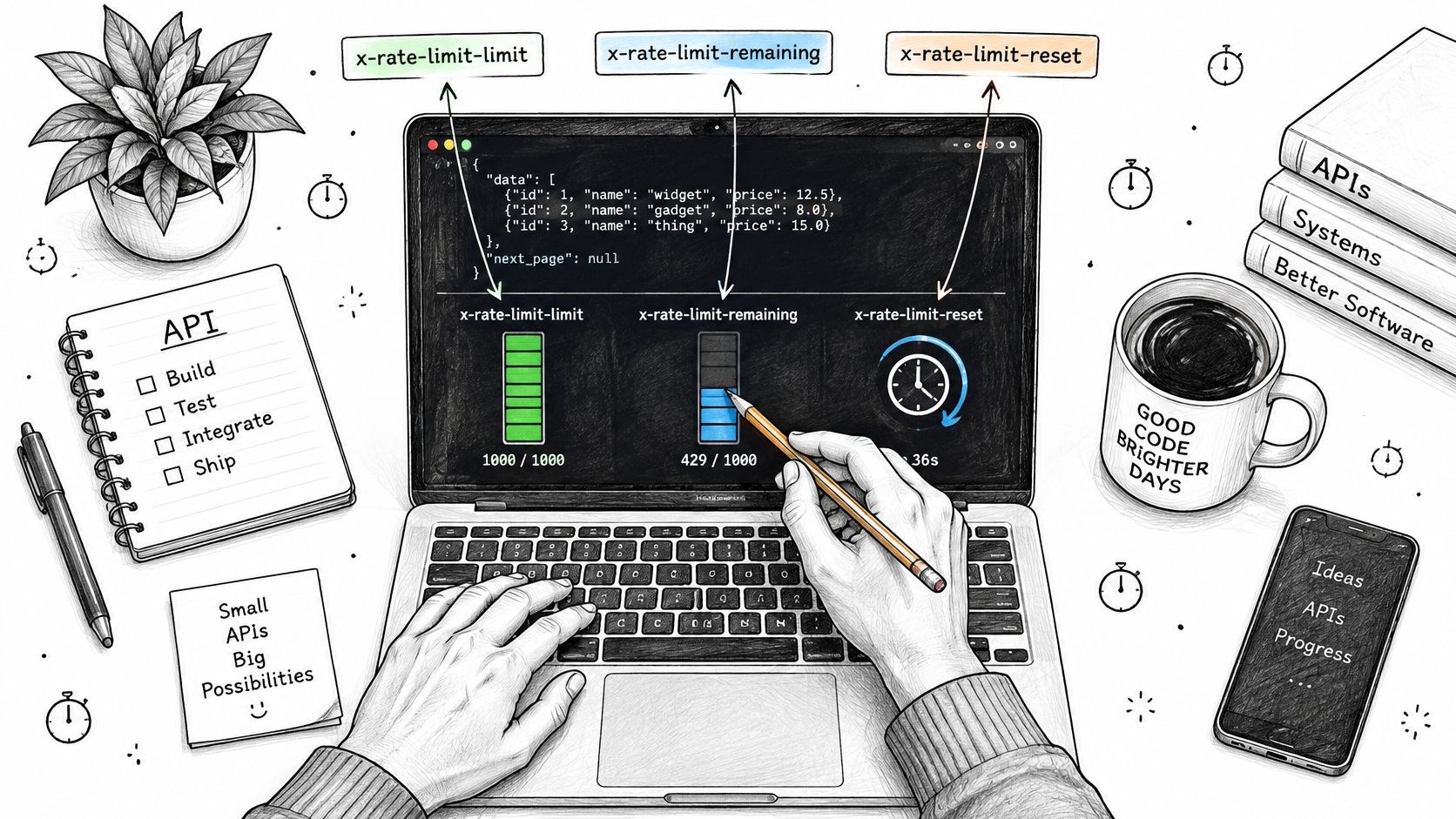
X exposes three headers on responses, and they're the only live signal you get about a window. x-rate-limit-limit is the ceiling for the current window on that endpoint. x-rate-limit-remaining is what's left in it. x-rate-limit-reset is a timestamp for when the window refills, in Unix seconds.
Header bookkeeping is unglamorous, and it's the difference between guessing and scheduling.
 A hand using a pencil to illustrate API rate limiting concepts on a laptop screen with code.
The three headers as decision inputs
Treat each header as a question you're answering before dispatch rather than a value you log after the fact.
x-rate-limit-limittells you the size of the bucket, so you can check whether your planned batch even fits this window instead of discovering the ceiling by hitting it.x-rate-limit-remainingis the one that drives pacing. When it hits zero, stop sending that endpoint for that credential until the reset time. When it's low, slow the queue rather than waiting for the failure to slow it for you.x-rate-limit-resetconverts waiting from a guess into a schedule. Work out the delay once and hold the job until then.
The trap is treating headers as one global value. They're per endpoint and per credential, and the X API rate limits reference is explicit that most windows are 15 minutes while user-token and app-only limits can differ, with each endpoint carrying its own quota. A single per-hour number for "the API" is fiction.
What headers don't tell you
They describe the request window and nothing else. A response can show generous headroom on x-rate-limit-remaining while the project is close to a monthly cap or the credit balance is nearly gone, because neither of those appears in a header. That gap is where the confusing failures live.
The pattern that works is a small budget object per (endpoint, credential) pair, seeded from the remaining value on every response and refilled at the timestamp in reset. Your dispatcher reads the budget instead of counting requests itself. When an endpoint has no fresh header, the budget expires and the next call refreshes it.
Store six things per call: endpoint, credential, limit, remaining, reset and the local timestamp of the response. Six fields is enough to reconstruct exactly why a queue stopped, and it takes one log line.
Publishing Budgets Across Users, Apps and Tenants
Request windows are only part of the ledger. X documents a shared app-level limit of 300 combined POST requests for creating Posts and Reposts per three-hour period, applied across all users authorized to the developer application, and the same X API posting overview states that user-level limits must be respected on top of it.
Two ledgers, one dispatcher. A publisher that only counts per-user windows will look fine right up until the shared app budget disappears mid-afternoon, and then every tenant fails at once with nothing wrong on their individual accounts.
What this means for a multi-tenant publisher
Enforce both budgets before dispatch: the per-user allowance for the credential taking the job, and the aggregate application budget across all of them. Then expose the aggregate in your operational metrics, because it's the number nobody watches until it's empty.
Retries deserve their own paragraph. Reserve retry capacity only when you have idempotency or duplicate detection, otherwise a retry can publish the same post twice, and you'll spend the rest of the week explaining it. A retry is only free if it can't duplicate work.
Keep transport throttling and product caps in separate buckets in your logs. A 429 from a window and a monthly access-tier failure need different responses, different alerts and different people looking at them. Collapsing them into "rate limited" is how a billing problem gets debugged as a scheduling bug for two days.
Design rule: one account's burst should slow that account, never the queue sitting behind it.
That's the fairness requirement in practice. Queue publishing jobs per tenant with round-robin dispatch rather than one global first-in-first-out line, so a large customer's backlog can't starve a small one. If you're designing that separation properly, the principles in this guide to multi-tenant architecture map directly onto publishing queues.
One rule overrides the design: X prohibits attempting to exceed or circumvent rate limits, and excessive or abusive request volume can lead to suspension or blocking. Distributing requests across credentials to dodge a limit is not an acceptable strategy, it's a way to lose the application.
Why Requests Fail Even Under the Rate Limit
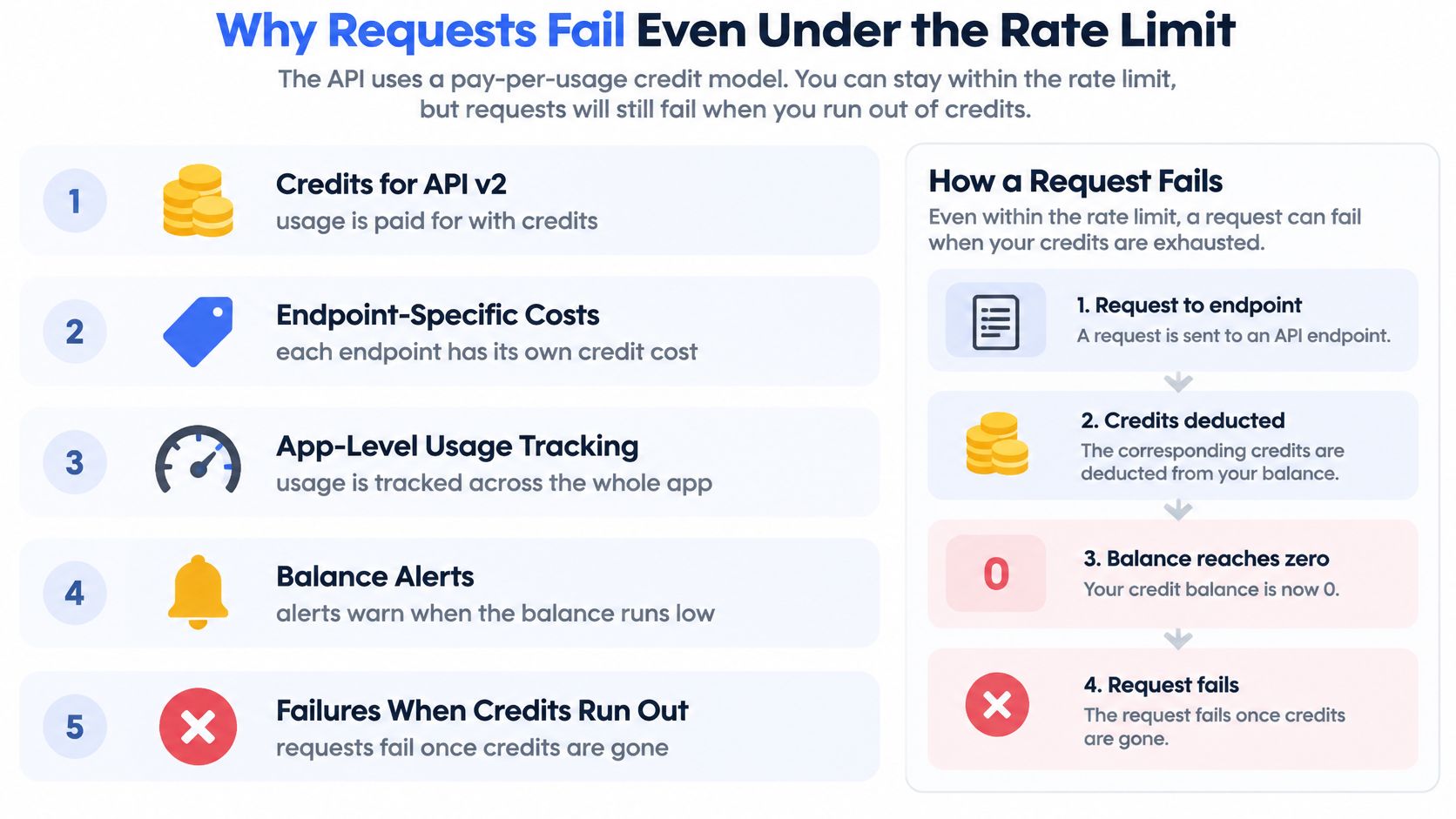
Here's the assumption worth challenging: that staying inside the request window means the call will succeed. It doesn't. X's API v2 uses pay-per-usage credits, with endpoint-specific costs, app-level usage tracking and balance alerts, and requests fail once credits run out, as described in the X API post cap documentation. The same page describes a monthly cap of 3 million Post reads for pay-per-usage plans.
That produces a failure mode most guides skip entirely. A request can be comfortably below its time-window quota and still fail because the application's paid balance is exhausted. The error looks like a rate issue. It isn't, and no amount of waiting fixes it.
The checklist below is the sequence to walk when a call fails and the window still shows headroom.
 An infographic explaining how API requests can fail due to credit exhaustion even under rate limits.
The reverse problem is just as expensive
Staying inside the request quota doesn't make cost predictable either. Read-heavy automation does lookups, verification calls and analytics around every publication, and each of those draws on the balance at its own endpoint rate. A workflow that publishes 200 posts a day but verifies each one four times is a read workload wearing a publishing costume.
Agents and no-code workflows make this worse because they retry and poll unattended. A human notices a polling loop within minutes. An agent happily runs it overnight.
Model two independent budgets: requests per window and credits per month. Then put rails on both, per-tenant credit ceilings, idempotency keys on every publish, a hard cap on polling attempts, and alerts that fire while there's still balance left rather than after it's gone.
Rate-limit-safe is not production-safe. Reliability means watching quota headers, reset timestamps, endpoint prices and remaining balance together, because any one of them can stop you.
How to Back Off and Retry Without Hammering the API
Retry logic is where a bad afternoon turns into a bad week. The sequence below is the one I'd ship, in order.
The flow below shows the same steps as a decision path.
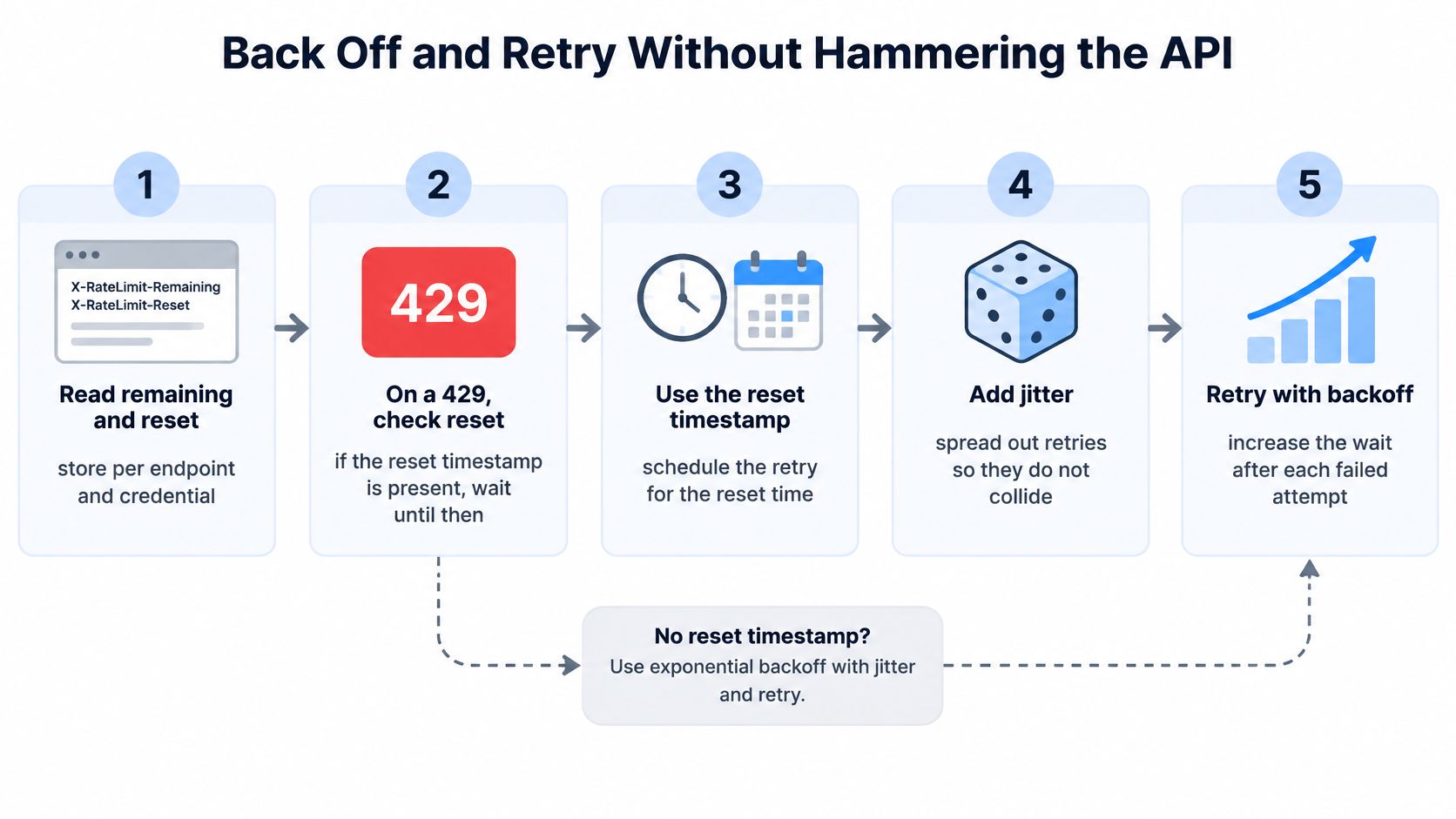 A five-step diagram explaining how to handle API rate limits using back off and retry strategies.
Read remaining and reset from every response and store them keyed by endpoint and credential. Every later decision depends on those two values, and reconstructing them after the fact isn't possible.
On a 429, look for the reset timestamp first. If it's present, hold that endpoint until that time and then resume. The window refills at that point, so retrying sooner spends attempts on a bucket that's still empty.
If no reset is available, back off exponentially from a short base delay, doubling on each failed attempt up to a capped maximum, and add jitter. Without jitter, every worker retries in the same second and you've rebuilt the spike that caused the failure.
Before retrying any publish, confirm idempotency or check whether the post already exists. A retry that can duplicate content is worse than a failed job, because a failed job can be replayed.
Cap the attempt count at a fixed number and log each attempt with endpoint, credential, outcome and the delay applied. Unbounded retries are how one stuck job consumes an entire window.
Separate window failures from credit and cap failures. Retry the first after the reset. Don't retry the second at all until the balance or the cap has been restored, because waiting changes nothing.
If you'd rather watch the mechanics than read them, this walkthrough covers the same handling in practice.
A healthy retry log looks boring. Attempts are spaced, each gap traces back to either a reset timestamp or a computed backoff delay, and every job reaches a clear end state: published, failed permanently, or handed back to the queue with a reason attached. A log where attempts cluster at the same second tells you the jitter is missing, and a log where one job has twenty entries tells you the attempt cap is missing.
Symptoms, Causes and Fixes for Failing Calls
The same status code can need a wait in one case and a billing check in another, so diagnose before you change code. Start with the most common symptom a multi-account publisher meets.
Symptom | Likely cause | Fix |
HTTP 429 with error code 88 | Endpoint window exhausted for the user or app | Wait until the reset time, then resume that endpoint |
Calls fail while remaining is above zero | Credit balance exhausted or monthly cap reached | Check billing balance and monthly cap, not the window |
One endpoint fails while others work | That endpoint has the smallest remaining budget | Throttle that endpoint in the queue |
Failures spike across many tenants | Shared app-level budget consumed | Apply tenant-aware fairness and queue jobs |
Retries pile up after a 429 | Immediate retries without reset timing | Use exponential backoff with jitter |
The second row is the one people miss. When calls fail while x-rate-limit-remaining still shows headroom, the window isn't your problem, and adjusting window logic wastes an afternoon. Check the credit balance and the monthly cap first.
When one endpoint fails and the rest are healthy, compare remaining values across the endpoints that credential touches. The lowest one is your bottleneck, and the fix is queue-level throttling on that single endpoint rather than a global slowdown that punishes everything else.
A spike across many tenants at once points at the shared budget. Find which tenant's burst consumed it before you touch fairness settings, because the answer changes whether you need stricter limits or a different dispatch order.
Retry storms have an obvious signature: retries per minute by endpoint, clustered at the same second. Exponential backoff with jitter and honored reset times fix it, and nothing else will.
Log this on every failure: endpoint, credential or tenant, all three rate-limit headers, the response body verbatim, and the timestamp.
That set gets you to a diagnosis in under five minutes. Rate limiting on our own API gateway returns HTTP 429 with a message field rather than an error field, so any parser you write has to handle both shapes defensively and log the body as it arrived. The same discipline helps when you meet related failures on other networks, like the cases covered in Exerta's TikTok DM limit guide, where the platform's error text is often the only clue about which limit you crossed.
Building a Scheduler That Stays Inside Your Limits
Everything above converges on one component: a dispatcher that checks every budget before a job leaves the queue.
Start with the queue layout. One queue per tenant, not a single global first-in-first-out line, so a busy account can't park itself in front of everyone else's work. Then three gates before dispatch: the remaining value for each endpoint the job will call under that credential, the aggregate application posting budget, and the credit balance.
Estimate the call cost per publication rather than assuming one post equals one request. A real publish touches a media upload, the create call and status checks, so the job's true cost is set by the endpoint with the least headroom in that chain.
A worked dispatch example
Say an application has 120 posts left in the current three-hour window and three tenants whose queues hold 40, 6 and 2 jobs. With a global FIFO queue, the two small tenants wait behind forty posts they had nothing to do with, and their users see a stalled product.
A round-robin dispatcher releasing two jobs per tenant per cycle changes the outcome. The tenant with six jobs clears in three cycles and the tenant with two clears in one, both inside the first window, while the large backlog drains at whatever rate the aggregate budget allows. Nobody is starved and the big customer still gets most of the throughput, which is the correct allocation.
Bound status polling to a fixed number of checks per publication so a stuck job can't eat the window. Pause dispatch for an endpoint the moment its remaining value reaches zero and resume at the reset time, not on a timer you invented. Then put four numbers on one dashboard: queue depth per tenant, 429 rate, remaining headroom per endpoint, and credit balance. Keeping those current across every platform is the unglamorous part, and it's the part PostPulse handles by tracking each platform's API changes, tokens and rate limits on your behalf.
Confirm Your Limits Before You Ship Publishing Features
Turn the guide into a pre-launch check. Each item has a concrete action and a done state that's a logged value rather than a belief.
Confirm your access tier and monthly cap. Record the exact figure and where you found it. Done means a number in your runbook, not a recollection.
List every endpoint the feature calls. Note its window and current quota per endpoint. Done means a table with one row per endpoint.
Record the per-user and app-level posting budgets next to that table. Done means both ledgers are visible in one place.
Verify the code logs all three
x-rate-limitheaders on every response, keyed by endpoint and credential. Done means a sample log line you can paste into a ticket.Implement backoff that honors reset times and adds jitter. Done means two logged retries showing different delays.
Split 429s from credit and cap failures into different alert paths. Done means each path has fired once in a test.
Set per-tenant credit ceilings and balance alerts. Done means the alert threshold is a configured value, not a hope.
Confirm idempotency or duplicate detection before enabling any publish retry. Done means a deliberate double-submit produced one post.
Run a low-volume dry run and inspect headers after each step. Compare observed remaining values against your expected call cost per publication. Done means the arithmetic matches reality.
If that last item is off by a wide margin, your cost model is wrong and the queue will drift out of budget under load. The mechanics of proving this before launch are covered in this walkthrough of REST API integration testing.
If you'd rather not maintain four independent budgets per platform, PostPulse publishes to X and eight other networks behind one REST API, handling OAuth, token refresh and rate limits on our side and reporting each post's status by webhook. You can run the checklist above against it before you commit a single line of production code. Start with one connected account at PostPulse and watch the headers on your first ten publishes.
About the Author

Founder of PostPulse — a social media scheduling platform for creators and teams. Software engineer with a passion for building developer tools and simplifying complex API integrations across social media platforms.