
API Authentication Methods: A Developer's Guide to Security
Published on
Tags:
You know the feeling. The login flow worked in staging, the token exchange succeeded, and then production starts returning 401 Unauthorized at the worst possible time. Or the API key that looked fine in local tests gets rejected once real traffic and stricter platform rules show up, and now you're digging through headers, scopes, and refresh logic instead of shipping.
That frustration is exactly why API authentication methods matter so much. The hard part isn't memorizing protocol names, it's picking the right trust model for the job, then implementing it without creating a mess you'll have to clean up later. Modern APIs don't just ask, “Can this client send a request?” They ask, “Can I trust this identity, this delegation, and this machine-to-machine relationship safely?” The answer changes depending on whether you're building an internal script, a public SaaS integration, or a system that needs to publish on behalf of users through platforms such as PostPulse.
Table of Contents
Why Your API Token Suddenly Stopped Working
A token that fails “for no reason” usually fails for a reason you did not build around. A short-lived access token expired, a secret was rotated automatically, or the platform changed what it accepts in production. Modern API auth is built around short-lived trust, not permanent secrets, which is why credentials are often generated in secure environments, stored in a secrets manager or hardware-backed storage, and renewed automatically with no human involvement.
The failure mode is usually a breakdown in trust, not a transport issue
A lot of developers start with Basic Authentication or an API key because they are easy to wire up. That can work for simple internal use, but production APIs increasingly rely on JWT and OAuth 2.0 because they handle identity and access more cleanly at scale, especially when a user is involved or a machine needs delegated access. Knowi's guide draws that line clearly, and the UK NCSC advises organizations to avoid weaker methods such as Basic Authentication and API keys in favor of stronger, replay-resistant approaches like signed JWTs or certificates. Knowi on REST API authentication methods
That is why a token can stop working even when your code did not change. The platform may now expect a different method, a different grant, tighter expiration handling, or a stronger proof of identity. If you are building for social platforms or any external API, the frustrating part is that authentication is no longer just a header value, it is a lifecycle.
Practical rule: if an auth flow depends on a secret living forever in a config file, it will eventually fail in the least convenient way possible.
The fix is to treat auth as a managed system, not a static setting. Know whether you are dealing with a password-like credential, a signed assertion, a delegated token, or a certificate-based trust channel. Once you know which part is failing, debugging stops feeling mystical and starts looking like normal systems work.
Understanding Authentication vs Authorization
People mix these up constantly because APIs often blur the line. Authentication answers who are you? Authorization answers what are you allowed to do? Microsoft defines authentication as verifying the identity of a user or app that accesses an API, while authorization determines whether that user or app has permission to access a particular API, and it notes that authorization is often implemented through token-based protocols such as OAuth 2.0. Microsoft on authentication and authorization
The confusion shows up fast in production. A login can succeed, the token can be valid, and a specific endpoint still returns a 403 because the caller does not have the right scope, role, or policy. That is the part many integrations miss, especially when they assume identity alone should open every door.
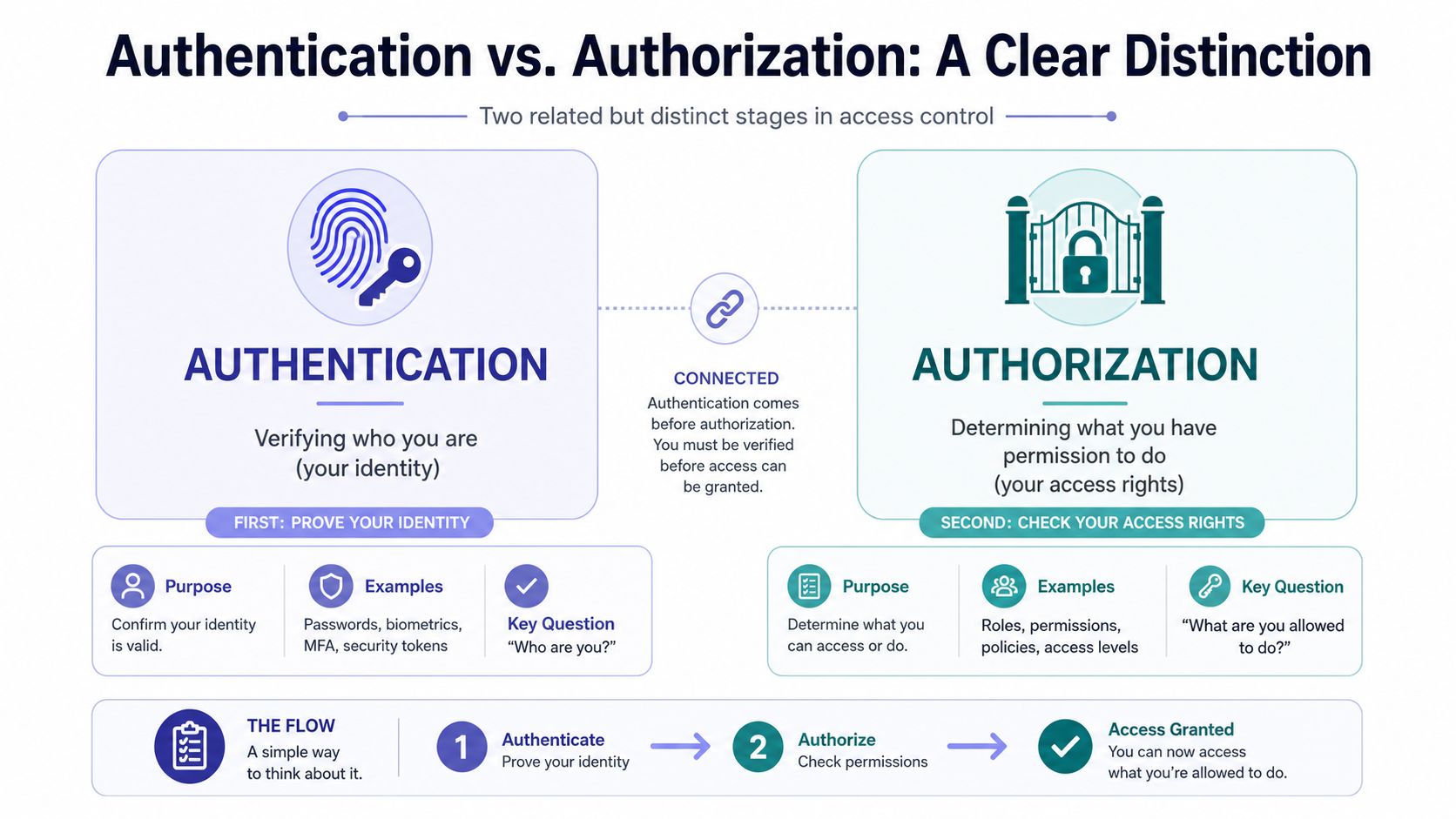 An infographic showing the difference between authentication and authorization in security and access control systems.
Why OAuth feels different from a password check
OAuth changes the flow because the app never handles the user's password. Instead, the user grants limited access through a consent flow that issues tokens tied to specific scopes, which keeps credentials out of the application and limits what the app can do if the token is misused. That difference matters in real integrations, especially where a third-party app only needs access to one resource, not full account control.
A practical rule helps here. If the app can prove who the caller is but cannot describe the permissions on the token, the next failure will show up at the endpoint, not at login.
OpenAPI Specification 3.1.0 reflects this separation in the contract itself, since it supports API Key, HTTP Authentication, OAuth 2.0, OpenID Connect, and Mutual TLS as different security scheme families. OpenAPI authentication support in 3.1.0
That range matters because APIs solve different problems. A trusted internal job runner does not need the same control model as a public app requesting access to a user's social account, and a PostPulse API key management setup has different failure modes than delegated user access. The right choice is the one that matches the risk, the trust boundary, and the amount of operational pain you are willing to accept.
Comparing Common API Authentication Methods
A lot of API auth pain starts with the wrong method in the wrong place. A team picks something simple, then spends months patching around expired tokens, brittle headers, or flows that never fit the trust boundary in the first place. The better way to evaluate API authentication methods is by the kind of trust they assume, how much operational work they create, and what breaks when a credential leaks or expires.
Basic Auth and API Keys are easy to wire up, which is why they show up in internal tools and older systems. JWT, HMAC, OAuth 2.0, OpenID Connect, and Mutual TLS are used when the request path needs stronger identity, tighter control, or less reliance on long-lived credentials. A primary trade-off is not just security strength, it is how much complexity your team can tolerate during rotation, validation, and incident response.
A practical comparison
Method | Security Level | Complexity | Best For |
Basic Authentication | Low | Low | Simple internal use, legacy systems |
API Keys | Low to moderate | Low | Internal services, quick identification |
HMAC | High | High | Signed requests, webhook integrity |
JWT | High | Medium | Stateless identity and access checks |
OAuth 2.0 | High | High | User-delegated access, third-party apps |
OpenID Connect | High | High | Identity on top of OAuth |
Mutual TLS | Very high | High | Sensitive machine-to-machine trust |
What each one is really good at
Basic Authentication sends Base64-encoded username and password credentials in the Authorization header. It is straightforward to implement and appears directly in OpenAPI 3.1.0, but the credential stays static and every request repeats it, which makes it a poor fit outside tightly controlled environments. OpenAPI authentication support in 3.1.0
API Keys identify the calling application, not the end user. They can be sent in the Authorization header or a custom header like X-API-Key, which makes them convenient for internal tooling and simple integrations, but they do not provide the delegated control most user-facing systems need. If you are managing keys across multiple services, use a deliberate rotation and revocation process, because ad hoc tracking becomes a failure point fast. PostPulse API key management
HMAC signs the request itself, so the server can verify both authenticity and integrity. That makes it a solid choice for webhooks and service-to-service calls where a tampered payload is a real concern.
JWT fits cases where the token needs to carry claims with it and the server wants to validate the token without a round trip to a central session store. That works well in distributed systems, but only if expiration, signature checks, and claim validation are handled consistently.
OAuth 2.0 is the standard choice for delegated access when a user grants an app permission to act on their behalf. For external integrations, it avoids collecting passwords and lets the platform issue scoped tokens instead of handing over account control.
OpenID Connect adds identity on top of OAuth, which is why it shows up when login and single sign-on are part of the problem, not just access to an API. The distinction matters, because identity and authorization solve different problems even though they are often implemented together.
Mutual TLS authenticates both sides with certificates, which gives strong machine-to-machine trust for sensitive paths. It also raises the operational burden, since certificate issuance, renewal, and revocation need to be managed carefully.
Rule of thumb: if a human is delegating access, start with OAuth. If two backend systems are talking and the message itself matters, look at HMAC or mTLS.
The OAuth 2.0 Grant Flow Demystified
OAuth gets messy fast because there are more moving parts than a simple header-based scheme, and the pain usually shows up later, when tokens expire, redirects fail, or a scope was wrong from the start. Once you separate the roles, the flow is straightforward. OAuth 2.0 is the standard choice for user-delegated access, while OAuth 2.1 tightens the model by deprecating weaker grant types. For machine-to-machine work, the Client Credentials grant is usually the right fit, and for AI agents the MCP authorization spec requires OAuth 2.1 with PKCE and Resource Indicators on remote MCP servers. Apideck on API auth methods and examples
The conversation between the app, the user, and the server
The flow starts when the user clicks something like “Connect Instagram” or “Log in with provider.” Your app redirects them to the authorization server with a client ID, requested scopes, and a redirect URI. The user approves access, the server sends back a temporary code, and your backend exchanges that code for an access token using the client secret.
That token is what your app uses to call the resource server. If a refresh token is issued, your backend can renew access later without forcing the user to re-authenticate every time. That is the part teams often underestimate, because the happy path is easy and the lifecycle is where production issues start. The recurring token handling problems described in Meta OAuth token lifecycle guidance are a good example of why refresh logic needs to be treated as application behavior, not an afterthought.
The key idea is simple. The user never hands your app their password. They give the platform a consent decision, and the platform gives your app a limited token.
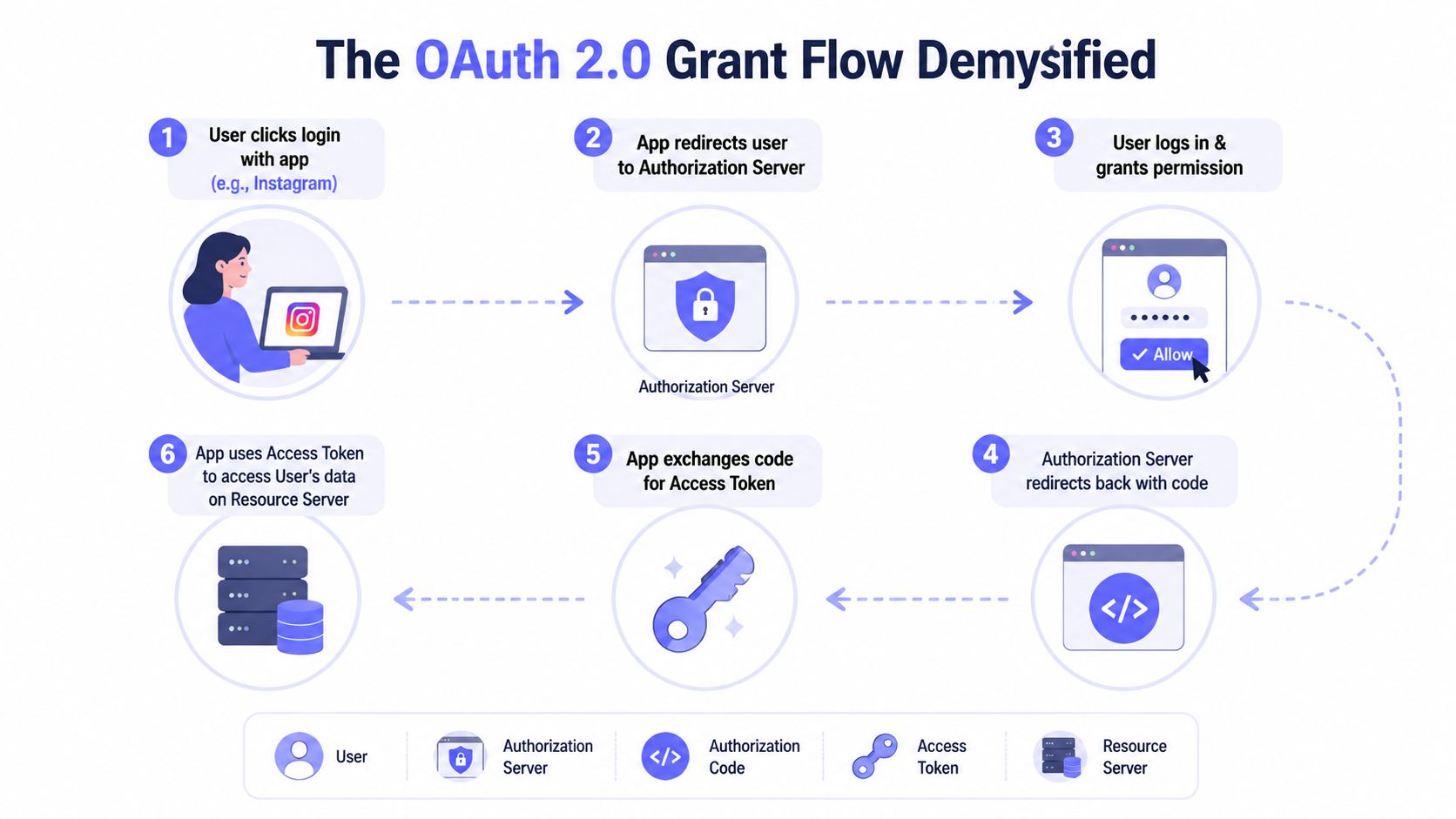 An infographic diagram illustrating the six-step OAuth 2.0 authorization code grant workflow for user authentication.
Where teams get burned
Most OAuth failures come from implementation details, not the protocol itself. Redirect URIs get mismatched, scopes get overbroad, refresh handling gets brittle, or token storage ends up in the wrong place. One bad assumption about where the token lives, and the flow turns fragile in production.
For app builders, that lifecycle management is often the hidden tax. Services like PostPulse wrap the OAuth/token lifecycle around social publishing so teams do not have to hand-roll every refresh edge case or track platform changes across multiple APIs.
Practical rule: if you need access on behalf of a user, OAuth is usually the cleanest answer, but only if you treat token refresh and redirect handling as core product logic.
A separate point matters for machine-to-machine flows. OAuth also fits the case where one service needs to access another securely without a human in the middle. Client credentials and scope discipline keep those integrations maintainable instead of turning each one into a special case, and the trade-off is clear, more setup up front in exchange for less credential sprawl later. For a tighter checklist around implementation details, the write-up on essential API security best practices is a useful companion.
Essential API Authentication Security Best Practices
Bad API auth usually fails in the boring places. A token sits in the wrong log, a secret stays valid too long, or a refresh flow breaks after a platform change. The fix is less about picking a clever scheme and more about controlling where credentials live, how long they work, and how quickly you notice misuse. For a tighter checklist on the surrounding controls, the guide to essential API security best practices is a useful companion.
The habits that actually reduce damage
Start with transport. HTTPS/TLS is required, because any auth method loses value if the channel can be observed or tampered with. After that, focus on storage, because a secret in client-side code, logs, or a loose config file is easy to copy and hard to contain.
Rate limiting matters too. It will not stop every attack, but it raises the cost of brute-force attempts, stuffing, and noisy abuse. Monitoring plays the same role, because you want to spot odd token use before a customer opens a ticket and tells you something is broken.
If your team is defining its own security playbook, keep a matching reference in internal docs, such as PostPulse's API security best practices. That gives engineers one place to check storage rules, rotation steps, and incident handling without hunting across tickets and chat threads.
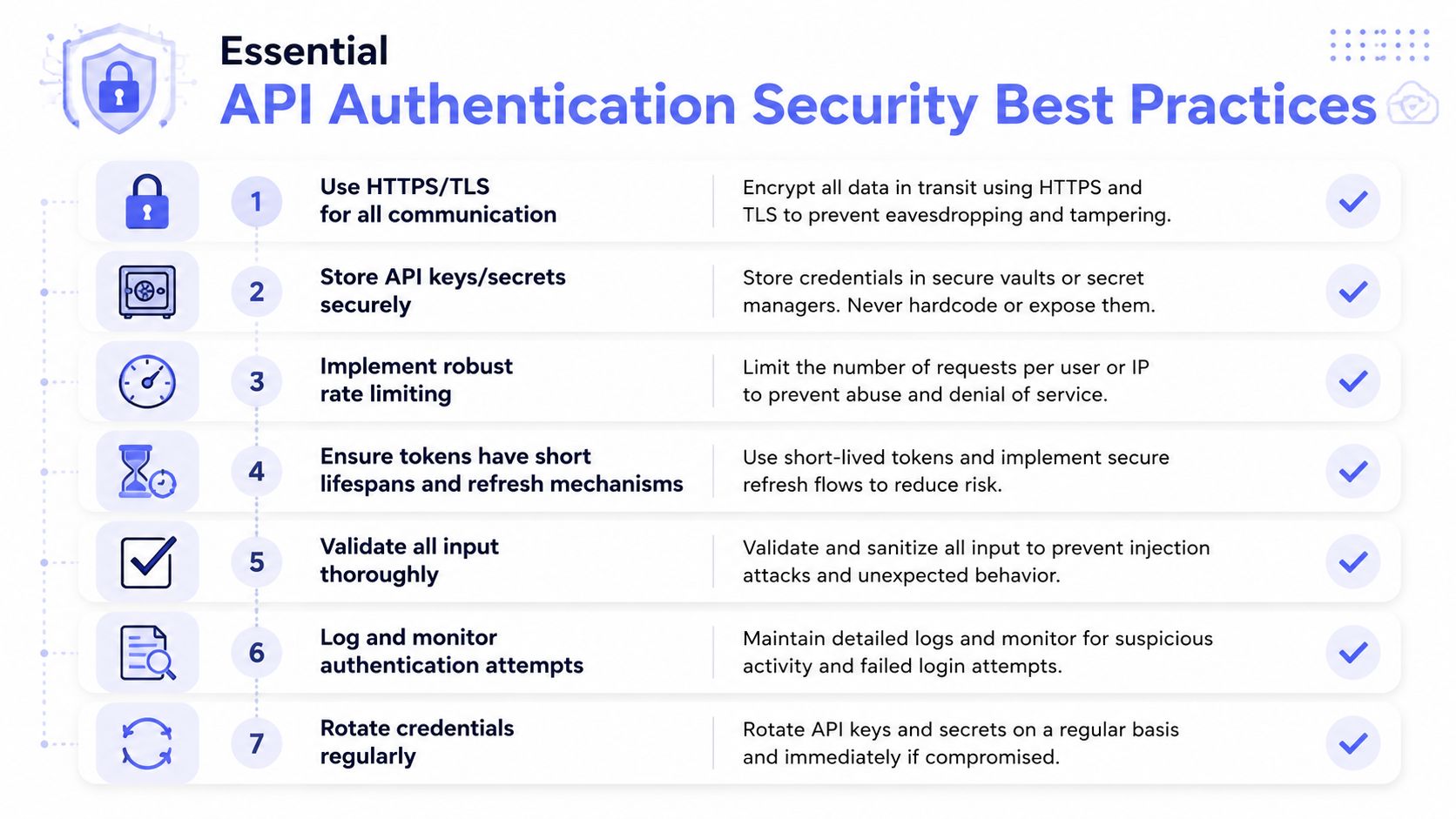 An infographic titled Essential API Authentication Security Best Practices outlining seven key steps for securing API credentials.
The controls that belong in production
Short-lived credentials shrink the blast radius if something leaks. That matters most once an API is handling real traffic, because a stolen token should stop being useful quickly instead of hanging around for days or weeks.
Automatic rotation is the other half of the story. If a token or key can sit unchanged for too long, the system depends on luck instead of process, and that usually ends badly during an incident review.
Logging and alerting belong in production from the start. You need a trail for authentication attempts, failed refreshes, and suspicious reuse, because those patterns are often the first sign that a secret is being abused.
Server-side storage is the safer default for secrets that matter. If a credential has to live in a browser or mobile client, assume it can be extracted and design around that reality, then limit what that token can do and how long it can do it.
How to Choose the Right Authentication Method
The hard part is rarely picking a name from a list. It is matching the auth method to the mess you have to support, expired tokens, rotating secrets, partner apps that break during onboarding, and service calls that should never be exposed to a browser. A simple internal integration can tolerate a simple credential. A delegated user flow needs something that can hand out scoped access and still survive token refresh. Service-to-service traffic usually needs stronger proof that the caller is really who it claims to be.
A simple way to narrow it down
Start with the trust boundary. If a human is approving access on behalf of an account, a delegated flow belongs there. If the caller is another backend you control, a shared secret, signed request, or client certificate can be enough. Then ask whether you need to identify the caller, limit permissions, or do both, because those choices change the shape of the implementation.
A leaked credential changes the answer too. If exposure would be a minor cleanup, a simpler scheme may be fine. If exposure would let an attacker act as a trusted system or read sensitive user data, choose a method that reduces replay risk, narrows scope, and expires quickly.
OpenAPI Specification 3.1.0 supports API Key, HTTP Authentication, OAuth 2.0, OpenID Connect, and Mutual TLS, which is a useful reminder that the contract should fit the deployment model instead of forcing every API into one pattern.
For teams shipping social publishing, the trade-off is usually build-versus-operate. Owning the full auth lifecycle means handling token refresh, platform review, secret storage, and API version changes yourself. Using an abstraction layer shifts that burden out of the product surface, which can reduce brittle integrations and keep your team focused on the user experience.
If your integration lives or dies on permission boundaries, choose the method that fails in the safest way under pressure. If the main pain is keeping many auth flows alive across platforms, use a layer that absorbs the churn instead of spreading it across your codebase.
About the Author

Founder of PostPulse — a social media scheduling platform for creators and teams. Software engineer with a passion for building developer tools and simplifying complex API integrations across social media platforms.