MCP vs Function Calling: What AI Agents Should Use
Published on
Tags:
Your publishing agent has been posting to Instagram and Facebook for months without a single page-out. You wrote one clean JSON schema for publish_post, wired up the dispatch code inside your backend, and moved on to real product work. Then a customer asks to run that same agent inside Claude Desktop, another team wants it in Cursor, and an operations lead wants to trigger it from n8n.
That's the exact moment the MCP vs function calling debate stops being academic. The short answer is that they don't compete at the same layer. Function calling decides which operation a model wants to run and generates typed arguments for it, while the Model Context Protocol (MCP) decides how an external server's operations are discovered and invoked across multiple hosts. Use function calling when one application owns a small, fixed set of tools; add an MCP server when the same publishing surface has to serve more than one host.
Table of Contents
Why the Second Agent Host Breaks Your Publishing Setup
The first host is always painless. You define one tool schema in your application code, point it at your publishing backend, and ship. Trouble starts the day a second host enters the picture.
Now that same publish_post definition has to live in three places. Your app speaks one provider's tool dialect, Claude Desktop expects an MCP server, and your automation flow in n8n expects its own connector format. When a social platform deprecates a parameter or renames a media field, you don't patch one integration. You chase every copy by hand and hope none of them drift out of sync.
Why Social Publishing Amplifies Tool Drift
A social media publish is rarely a single HTTP request. Behind a clean publish_post call sits a multi-step pipeline: creating a media container, polling the container's processing status until it clears, running media validation, respecting each network's caption and attachment rules, and firing the final publish request. Every step, error state, and token refresh rule lives in that platform's official API reference, and each platform changes those contracts on its own schedule.
Duplicating that plumbing across multiple agent hosts turns a small schema tweak into an incident. One host forgets to poll long enough for a video container to finish processing, another passes an outdated field name, and suddenly half your scheduled posts stall in limbo. Centralizing that publishing surface behind a single server boundary is why teams start looking at MCP server hosting once a second client appears.
Practical rule: If only one codebase calls your publishing functions, keep the schema inside that codebase. The minute a second host needs the same actions, stop copying schemas and move the tool catalog to a shared server.
To decide which architecture fits your stack, you need to compare both approaches across four areas that break in production: where the tool catalog lives, how a post travels end to end, what you pay in tokens and latency, and who is allowed to press publish.
MCP vs Function Calling at a Glance
Before unpacking the trade-offs, put both mechanisms side by side. Every row below marks a real engineering boundary you will have to own once the agent leaves localhost.
Criterion | Function calling | MCP |
What it is | A model API feature that emits a structured call for a developer-defined function | An open protocol between an MCP host or client and an MCP server |
Introduced | June 2023 by OpenAI; strict schema enforcement with Structured Outputs on August 6, 2024 | November 2024 |
Who defines the tool catalog | The application, in code, inside each model request | The server, advertised at runtime through |
Who executes the tool | Your application's own dispatch code | The MCP server |
Discovery | None; the tool list ships with the request | Dynamic; the client lists tools and injects them into model context |
Schema format | Provider-specific JSON Schema dialects inside a tools array |
|
Transport | Whatever the app already uses, such as HTTPS, a queue or an SDK | JSON-RPC over stdio or Streamable HTTP |
Auth boundary | Inside the app; credentials never leave it | Split between client and server; scopes and per-tool permissions must be designed |
Failure surface | Bad arguments, wrong tool choice, your own dispatch bugs | All of those plus server availability, descriptions steering the model, and multi-server trust |
Versioning | Redeploy the application | Server can add or change tools without shipping new client code |
Token overhead | Lower in published benchmarks | Higher, because discovery and descriptions ride along on each turn |
Best fit | One app, one model provider, a small stable tool set | Many hosts, vendors or customers sharing one capability |
Keep the timeline brief, because release dates won't pick your architecture. OpenAI introduced function calling in June 2023, added strict schema enforcement with OpenAI's Structured Outputs release on August 6, 2024 (where GPT-4o-2024-08-06 achieved 100% reliability in OpenAI's evaluations for matching developer-supplied JSON Schemas), and MCP originated in November 2024. Both mechanisms are mature enough to generate valid JSON arguments; the differences that hurt teams sit in the rows people misread.
Three Rows Engineers Routinely Misread
First, MCP is not a model feature. It's a wire protocol between a host or client and a server, defining transport over stdio or Streamable HTTP and a standard tool envelope. Hearing that a tool "supports MCP" tells you nothing about whether the underlying model chooses tools accurately or writes good captions.
Second, function calling is not a portable standard. Each model vendor ships its own JSON dialect, tool array wrapper, and response parsing rules. If you wire up direct function calling against one provider and later want your publishing tools inside another IDE, chat host, or automation platform, you rewrite the wrapper every time. You can see how quickly connector-first ecosystems lean on MCP to avoid that sprawl in DBotMaker's breakdown of Zapier MCP for AI agents, which looks at how hosted MCP bridges open up dozens of downstream actions to agent clients without bespoke host adapters.
Third, runtime discovery is the dividing line. In direct function calling, your application ships a static catalog on every request and redeploying the app is how you update it. In MCP, the client queries tools/list at runtime to pull each tool's name, description, and inputSchema from the server, so the server can evolve its operations without forcing every connected host to ship new code.
An MCP client still uses model tool calling internally to choose and parameterize an operation. You aren't picking a winner between two competing model features; you're deciding where the tool catalog lives and who owns execution.
How One Post Travels Through Each Approach
Abstract diagrams make both architectures look cleaner than they are. Trace a single social media post from user prompt to live publication to see where the code moves.
This workflow comparison maps the exact handoffs between a direct function-calling loop and an MCP client-server loop.
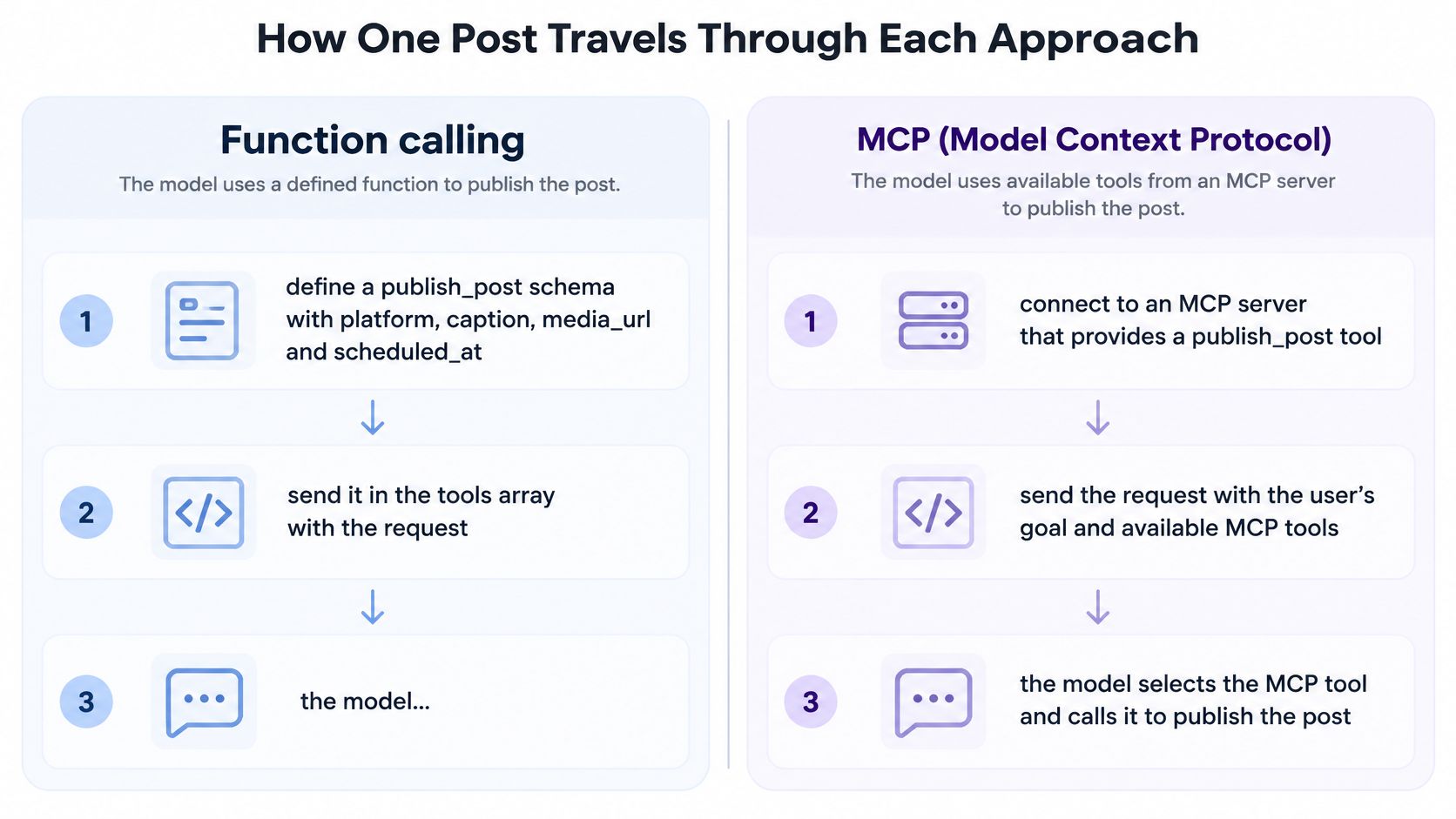 A comparison infographic showing the workflow steps between standard function calling and the Model Context Protocol.
The Direct Function Calling Flow
When your own backend owns the entire loop, publishing one post takes eight concrete steps:
Define a
publish_postJSON schema in your application code with fields likeplatform,caption,media_url, andscheduled_at.Send that schema inside the
toolsarray alongside the user's prompt in your model API request.The model emits a structured tool call containing the chosen function name and typed arguments.
Your application code validates those arguments, looks up the right account's OAuth token, and calls the target social platform's API.
For media uploads, the platform returns a container ID rather than publishing immediately.
Your code polls the container status endpoint defined in that platform's official API reference until processing finishes. For videos, the confirm step verifies that the video container is readable before the final publish call goes out.
Once the publish call succeeds, your backend returns a structured result string (such as the live post ID or an error payload) back to the model.
The model reads that tool result and writes the confirmation message to the user.
The MCP Client-Server Flow
Move the publishing surface onto an MCP server, and the lifecycle follows the discovery-and-execution sequence defined in the MCP Tools specification:
The MCP client initializes a session with your server and negotiates capabilities.
The client calls
tools/list, and the server returns every advertised tool's uniquename, human-readabledescription, and JSON SchemainputSchema.The host application injects those discovered tool definitions into the model's context window.
The model selects a tool and generates typed arguments.
The MCP client forwards that selection to the server through a
tools/callrequest.The MCP server validates the arguments, resolves credentials, runs the platform's container creation, status polling, video confirm check, and publish request, then returns a structured result.
The host feeds that result back into the model so it can respond to the user.
Look at step 3 in the first flow and step 4 in the second. They are the exact same operation. In both architectures, the model receives a list of JSON schemas and emits a structured function call. Nothing magical happens to the LLM's reasoning just because MCP is in the stack.
The video walkthrough below shows how this handoff works in a live agent loop when moving from hard-coded function dispatch to an external MCP server.
What changed is ownership. In function calling, your host application owns steps 1 through 6: tool definitions, credentials, container polling, and error handling. In MCP, your server owns the catalog and the messy platform plumbing, while the host only handles discovery and conversation state. If you are wiring that execution layer yourself across multiple networks, designing a clean social media posting API underneath either surface saves you from rewriting polling loops and confirm checks for every client.
What the Benchmarks Say About Tokens and Latency
Benchmarks on MCP and function calling are useful, but only if you separate the protocol label from the implementation behind it. MCP is a discovery and tool-connection layer. Function calling is the model-facing schema and call interface. Neither label tells you, by itself, how many tokens a publishing agent will spend or how long a post will take to execute.
A 2026 ClearPeaks practical comparison shows the gap clearly. In an eight-turn, 16-message travel-planning dialogue, the MCP setup consumed 151,837 total tokens, compared with 85,603 total tokens for non-MCP function calling. That puts MCP 77% higher in total token use for that dialogue. ClearPeaks did not report accuracy or latency for those runs, so those cells stay empty.
Setup compared | Accuracy | Execution time | Tokens |
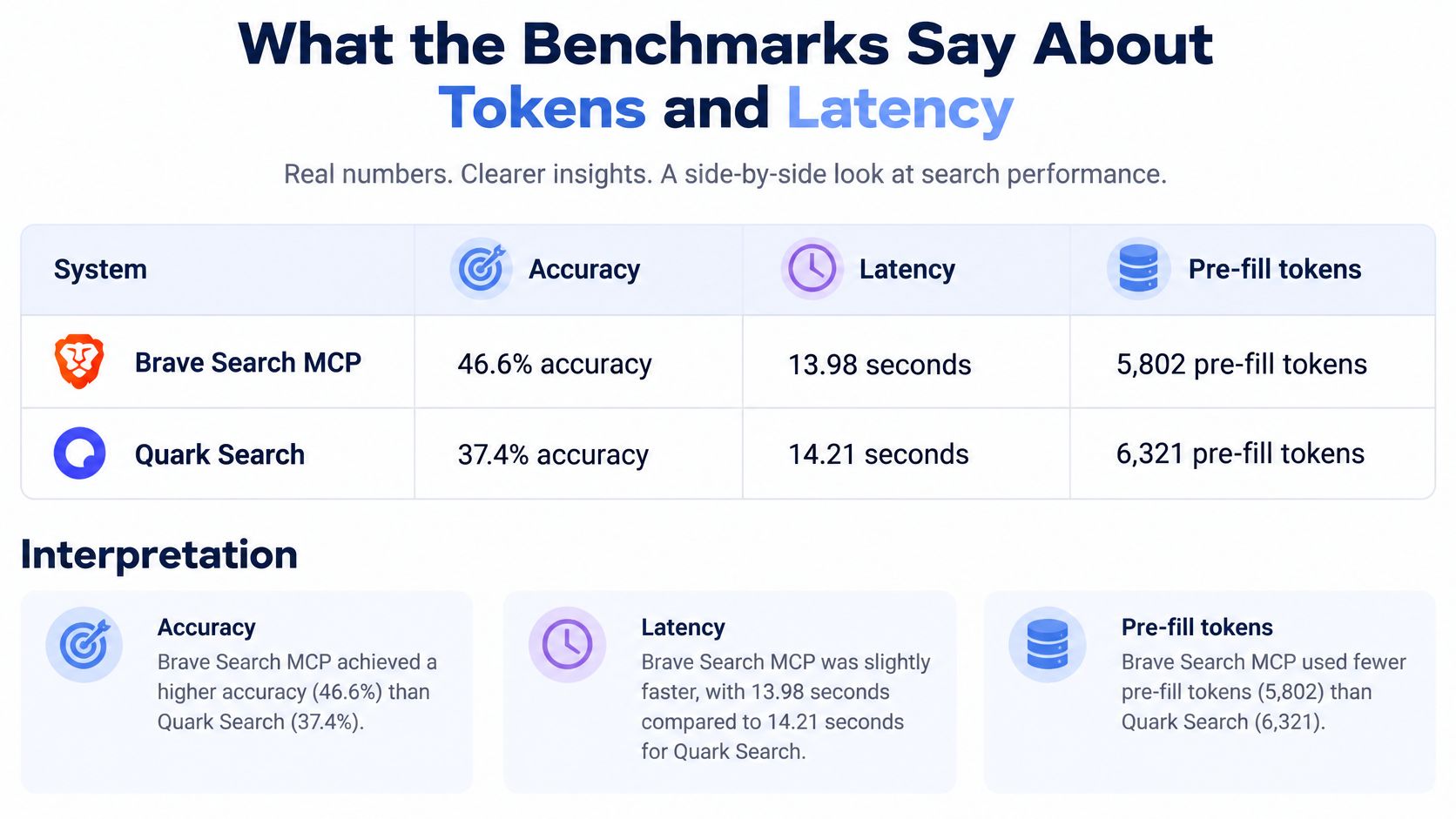
Brave Search via MCP | Similar to Quark Search via function calling | Faster than Quark Search in the reported comparison | Higher pre-fill token use than Quark Search |
Quark Search via function calling | Similar to Brave Search via MCP | Slower than Brave Search in the reported comparison | Lower pre-fill token use than Brave Search |
Travel-planning dialogue via MCP (8 turns, 16 messages) | Not reported | Not reported | 151,837 total tokens |
Travel-planning dialogue via function calling (same dialogue) | Not reported | Not reported | 85,603 total tokens |
The search comparison points the same way, though with a different trade-off. Accuracy was similar across the two setups. The MCP run reported less execution time but more pre-fill tokens than the function-calling run. That matters for publishing agents because token cost and wall-clock latency are different budgets. A long planning session with repeated tool catalogs can become expensive even when each call returns quickly. A short approval-and-publish flow can feel fast even when pre-fill cost is higher.
 A comparison table showcasing Brave Search MCP versus Quark Search performance in accuracy, latency, and pre-fill tokens.
For a publishing agent, the practical question is not which mechanism wins a general benchmark. It is which layer owns the work your agent repeats. Function calling keeps the tool catalog inside your application, so you control exactly what the model sees on every turn. MCP moves discovery into a server, which helps portability across Claude, Cursor, and other agents, but the discovered catalog still has to enter the model's context.
Why the Protocol Label Predicts Almost Nothing
The first useful measure is pre-fill cost. Every tool name, description, and JSON schema competes with the user request for context space. A publishing agent that exposes twenty granular endpoints pays for those definitions even when the user only wants to check one account or confirm one video. A smaller catalog of high-level tools, such as publish_post, get_account_status, and list_supported_platforms, keeps that cost lower.
The second measure is wall-clock time. The search comparison reported faster execution on the MCP setup and slower execution on the function-calling setup despite similar accuracy. That result does not establish a general speed advantage for MCP. It shows that implementation details matter more than the label. Backend service behavior, polling, validation, and transport each sit on the critical path.
The third measure is trust and approval work. A benchmark that measures a search query does not model a social publish. Publishing adds account selection, media validation, a confirm step, and a final user approval path. For videos, the confirm step verifies that the video container is readable. That work may dominate user experience even if the model call itself is cheap.
What Actually Drives Your Token Bill in Publishing
Token bloat comes from four specific choices:
Catalog size: Advertising twenty granular endpoints when your agent only needs four bloats every turn.
Description verbosity: Paragraph-long descriptions with sprawling examples get injected into the prompt even when the user asks a simple account question.
Per-turn re-injection: If the host resends the full discovered catalog on every turn of a long editing conversation, token costs compound quickly, as the travel dialogue showed.
Nested schema sprawl: Deep JSON objects with many optional platform flags inflate pre-fill tokens and make argument mistakes more likely.
For social publishing, I would start with three to five high-level tools, short descriptions, and a confirm step that stays explicit. Then measure ten real publishing sessions for pre-fill tokens, wall-clock time, and approval failures before changing the architecture. Benchmark the path your agent runs, including discovery, validation, confirmation, and publish, because that is where MCP and function calling stop being abstract labels and start showing their real cost.
Who Is Allowed to Press Publish
Most technical comparisons treat tool calling like a JSON formatting problem. Validate the schema, check the return code, ship to production. That mindset falls apart the first time an autonomous agent publishes an unapproved draft to a brand account with half a million followers.
The question isn't whether the model formatted caption as a string. It's who authorized the action once an agent discovered a tool and decided to call it.
How Each Mechanism Draws the Trust Boundary
With direct function calling, your tool catalog stays inside your application process. Your code owns the allowlist, maps each function to a specific user session, and checks per-function permissions right before calling the social platform's API. Nothing outside your repo can add a new callable action or rewrite a tool description at runtime.
Dynamic discovery in MCP trades that closed boundary for portability. According to the security guidance in the Model Context Protocol specification (2025-11-25), tools represent potentially arbitrary code-execution paths. The specification explicitly calls for servers to validate inputs, enforce access controls, rate-limit invocations, sanitize outputs, and maintain audit logs, while instructing clients to treat tool annotations as untrusted and require user confirmation for sensitive actions.
When you connect an agent to external or multi-server MCP setups, a wider set of failure modes opens up:
Tool poisoning: Malicious or sloppy text inside a tool's
descriptionfield can steer the model into leaking context or invoking unintended actions.Privilege persistence: Broad tokens held by an MCP server can outlive the specific user session or task that requested a post.
Command injection: Unsanitized arguments passed through a generic server wrapper can trigger unintended server-side behavior.
Implicit trust propagation: When one agent connects to three different MCP servers, output from an untrusted server can persuade the model to trigger
publish_poston a trusted one.
If your team connects coding or desktop agents directly to production tools, reviewing real-world failure patterns like AY Automate's analysis of Claude Code security risks is a sobering reminder of how fast local agent permissions can bleed into external systems.
Ecosystem Maturity Is Not Uniform
Portability also comes with an operational maturity tax. A 2025 measurement study of the MCP ecosystem found that as of August 2025, only 95 of 341 surveyed MCP clients supported the officially recommended Streamable HTTP transport, and more than 50% of MCP projects were classified as low-value or abandoned.
Notice the exact scope of that first number: 95 of 341 measures client support for Streamable HTTP transport, not server reliability. Still, the operational takeaway is blunt. Seeing "supports MCP" on a vendor page is a compatibility claim you have to test end to end, not proof that auth, retries, transport negotiation, and versioning will behave cleanly in production.
Separate Intent From Execution
For consequential actions like social publishing, don't let the transport protocol decide authorization. Split the workflow in two. Let the agent draft copy, suggest schedules, and pick media through either function calling or MCP, but enforce authorization inside the execution layer that talks to the social networks.
Design check: Treat the model's publish_post call as a draft request until your execution layer verifies account scopes, rate limits, idempotency keys, and an explicit approval policy.
That execution layer needs per-account scopes, platform policy checks, idempotency keys (so a retried tool call doesn't double-post), and either a human approval gate or a narrowly scoped auto-publish rule. Structuring role-based access cleanly across workspaces is why dedicated permission management belongs on the server side rather than inside prompt instructions. On our platform, a subscription costs $8/month per seat and enables connecting additional social media accounts, keeping team seats and connected social channels cleanly bounded instead of sharing one master token across every agent.
Choose the Right Setup Before You Ship
Developers aren't abandoning REST APIs or custom function definitions to rewrite everything as MCP. In a 2025 Zuplo survey of technical professionals, 58% of MCP builders reported wrapping existing APIs rather than building integrations from scratch, while only 23% were creating new APIs specifically for MCP. In that same community-oriented sample, 72% expected their MCP usage to increase over the next 12 months, 54% believed MCP would persist or become an industry standard, and 40% expected MCP to represent 25% to 50% of their AI tool usage within a year.
Those numbers confirm what most engineering teams learn the hard way: MCP works best as a thin interoperability layer sitting in front of a solid REST API, not a replacement for your core backend.
Match Your Agent Setup to the Right Mechanism
Use this lookup table to map your product shape to the setup that minimizes maintenance overhead.
Agent setup | Better fit | Why |
One product, one model provider, five to ten stable operations | Function calling | No discovery needed; the catalog lives in your code |
Same publishing tools in Claude Desktop, Cursor and your own app | MCP | One server serves every MCP-capable host without new schemas |
No-code build in n8n or Make.com | Platform integration or MCP | Avoid hand-wiring schemas where a prebuilt connector exists |
White-label SaaS where each customer connects their own accounts | MCP server in front of your REST API | Standard discovery plus per-account auth scopes you control |
High-volume scheduled publishing with no model in the loop | REST or function calling | Discovery adds per-turn cost with no benefit |
Agent drafts but a human approves each post | Either | The approval gate belongs in the execution layer, not the transport |
Multi-vendor platform consuming third-party servers | MCP with strict allowlists | Reuse is the point; trust boundaries need explicit control |
A Five-Step Decision Procedure
Walk through these five checks in order before writing your first schema or spinning up a server.
Count the hosts that must call your publishing tools. If your own web app is the only caller, stop here and use direct function calling. Once you need the same tools inside Claude Desktop, Cursor, and a customer-facing agent, duplicating schemas costs more than running an MCP server.
Count your platforms and operations. Publishing to one network with three stable operations favors a hand-written JSON schema you can write in an afternoon. Supporting nine social networks with account lookup, media upload, scheduling, editing, and status checks justifies a shared server surface.
Decide where credentials must live. If OAuth tokens cannot leave your core application boundary and every call runs under one internal account, function calling keeps the trust perimeter small. If external clients act on behalf of different customers or workspaces, build server-side auth with per-account scopes so no client ever touches raw platform tokens.
Design idempotency and approval before picking transport. Decide how duplicate
publish_postretries are deduplicated and which accounts require human sign-off first. Neither function calling nor MCP solves double-posting or rogue drafts out of the box.Commit to the narrowest surface that fits today. Ship direct function calling for a single-host internal agent, and expose an MCP server over your existing REST endpoints the moment a second host joins the roadmap. That lets you wrap your proven execution logic instead of rebuilding it.
Pre-Flight Checklist Before Going Live
Whether you wire up direct function calling or stand up an MCP server, verify every item below before letting an agent touch a live social account:
Container polling and video confirmation: Confirm your execution layer polls async media containers to completion and verifies video containers are readable before calling publish.
Automated token refresh: Test expired OAuth tokens under load so a 60-minute or 60-day token rotation doesn't stall a scheduled batch at 2 a.m.
Per-platform media validation and limits: Catch unsupported aspect ratios, broken media URLs, and oversized files before hitting upstream platform rate limits.
Idempotency keys on every publish call: Require a unique request key per intended post so network timeouts and model retries never create duplicate posts.
Explicit approval and webhook observability: Route high-risk accounts through a draft-and-approve path, and log every publish outcome via webhooks or audit trails so you know what went live.
If you'd rather not build and maintain that entire publishing layer yourself, PostPulse is one option to evaluate against that checklist. Our platform provides four integrations: REST API, n8n, Make.com, and an MCP Server, alongside Webhooks and Media validation built into the publishing pipeline. That MCP server lets Claude, Cursor, and any LLM or agent publish to social media inside their tool loop without you maintaining per-platform OAuth flows, container polling, or separate host schemas.
If you want to skip hand-rolling container polling, OAuth token refresh, and per-host tool schemas across nine social networks, PostPulse gives you one publishing backend exposed over a REST API, official n8n and Make.com integrations, and a ready-to-connect MCP server. Every account starts with 10 free credits and no card is required, so you can benchmark both direct API calls and MCP tool loops against your own workflow in minutes. Explore the docs and start testing at PostPulse.
About the Author

Founder of PostPulse — a social media scheduling platform for creators and teams. Software engineer with a passion for building developer tools and simplifying complex API integrations across social media platforms.