MCP Server Development: Build a PostPulse Publishing Tool
Published on
Tags:
You've written a publishing integration for an AI client, and the next client wants a different plugin. Meanwhile, an upload request succeeds, the post still isn't live, and the agent decides the sensible response is to publish again.
That's the frustrating part of MCP server development: making an API callable is straightforward; making it safe for an agent to call requires significant effort. Build the server as an authorization and failure-handling layer, not a thin wrapper that forwards whatever the model generates.
Table of Contents
Prerequisites and the MCP Model in Plain Terms
Say you're building an assistant that prepares a caption, selects a connected account, and publishes approved media. You want to connect it to different AI applications without rewriting the publishing integration for each application's plugin system.
Keep the responsibilities separate. The host is the AI application. The client runs inside that host and discovers what your server offers. The server is the service you build, exposing tools, resources, and prompts through the protocol's JSON-RPC communication model.
Sketch the request path
For this design, the agent never calls the publishing platform directly:
Agent → host → MCP client → your MCP server → publishing platform
Draw that path before writing code. Mark where the user signs in, where permission is checked, where credentials are retrieved, and where a provider response becomes an agent-readable result.
The model proposes an action. Your server decides whether the authenticated actor can perform it, then executes the permitted operation. Don't turn a model-generated account identifier into proof of ownership.
Gather the prerequisites
A supported runtime. Use a current LTS Node.js release or a maintained Python runtime.
An official MCP SDK. Choose the SDK for your language and pin the dependency.
Publishing API access. For a PostPulse-backed implementation, have an account and API credentials available.
A disposable social account. Keep development publishing away from your production profile.
An MCP-capable host. Choose one that supports your intended transport and authentication setup.
For the host configuration side, UberLLM's MCP setup for AI coding agents is a useful companion when connecting a development client. Keep client setup separate from the permissions your own server enforces.
Start with a small publishing surface, deploy it, and connect it to a real agent. Avoid adding scheduling, bulk operations, and account administration before you've established predictable behavior for a basic publishing request.
Every later decision attaches to that request path: tool shape determines what the agent can ask for, consent determines what the user approves, and retry handling determines what happens after an uncertain result.
Design the Publishing Tools Before You Write Code
Suggested publishing tool surface
Tool | Access type | Required inputs | Returns |
| Read-only | Optional platform filter | Connected accounts with IDs and platforms |
| Read-only | Source mode (file or URL), media type, size | Pass or fail with the reason |
| Mutating | Account ID, caption, media reference, idempotency key | Draft ID |
| Mutating | Draft ID, visibility, idempotency key | Publication ID and provider response |
| Read-only | Publication ID | Current status and any platform error |
The MCP tools specification describes the tool contract: declare the tools capability, answer tools/list with uniquely named tools and input schemas, and accept invocations through tools/call; it also describes InputRequiredResult for execution that needs additional information. Check that the SDK and protocol revision you target support the behavior you expose rather than assuming all clients implement every documented feature.
Make each row a bounded operation
Treat these inputs as your proposed application contract, not a claim about an existing provider endpoint. Adapt them to the provider's documented fields, and implement any draft abstraction in your own application if the provider doesn't supply one.
Keep validate_media read-only by making it inspect an existing media reference or supplied metadata. If it uploads or persists an asset, it isn't read-only anymore and needs a different permission classification.
Every mutating tool should accept a client-supplied idempotency key. Draft creation can duplicate records too, so don't reserve retry protection for the final publish call.
A broad publish_everything tool is tempting because it looks convenient. It also bundles account selection, validation, persistence, and publication into an operation whose partial failures are difficult for an agent to interpret.
Design rule: A tool should have a result the agent can explain without guessing which side effects already happened.
Keep the protocol separate from the provider
The protocol launch announcement introduced MCP publicly on November 25, 2024, with an open specification, Python and TypeScript SDKs, desktop support, and reference servers. The useful architectural distinction is the reusable interface: clients discover capabilities rather than requiring a bespoke publishing plugin.
For the provider-facing boundary, use a social media API integration guide to identify which operations belong in adapters and which belong in your application.
Descriptions should explain intent and consequences. Describe create_draft as saving content without publishing it, and describe publish_post as requesting publication of an approved draft. Those are application guarantees you must implement and test, not promises a description can enforce.
How to Build the Server Step by Step
Choose a transport before scaffolding. I'd use a host-supported remote HTTP transport for a deployed service, then record the exact SDK and protocol revision in the project's compatibility notes.
Use the process overview to organize the work, but make each boundary independently testable.
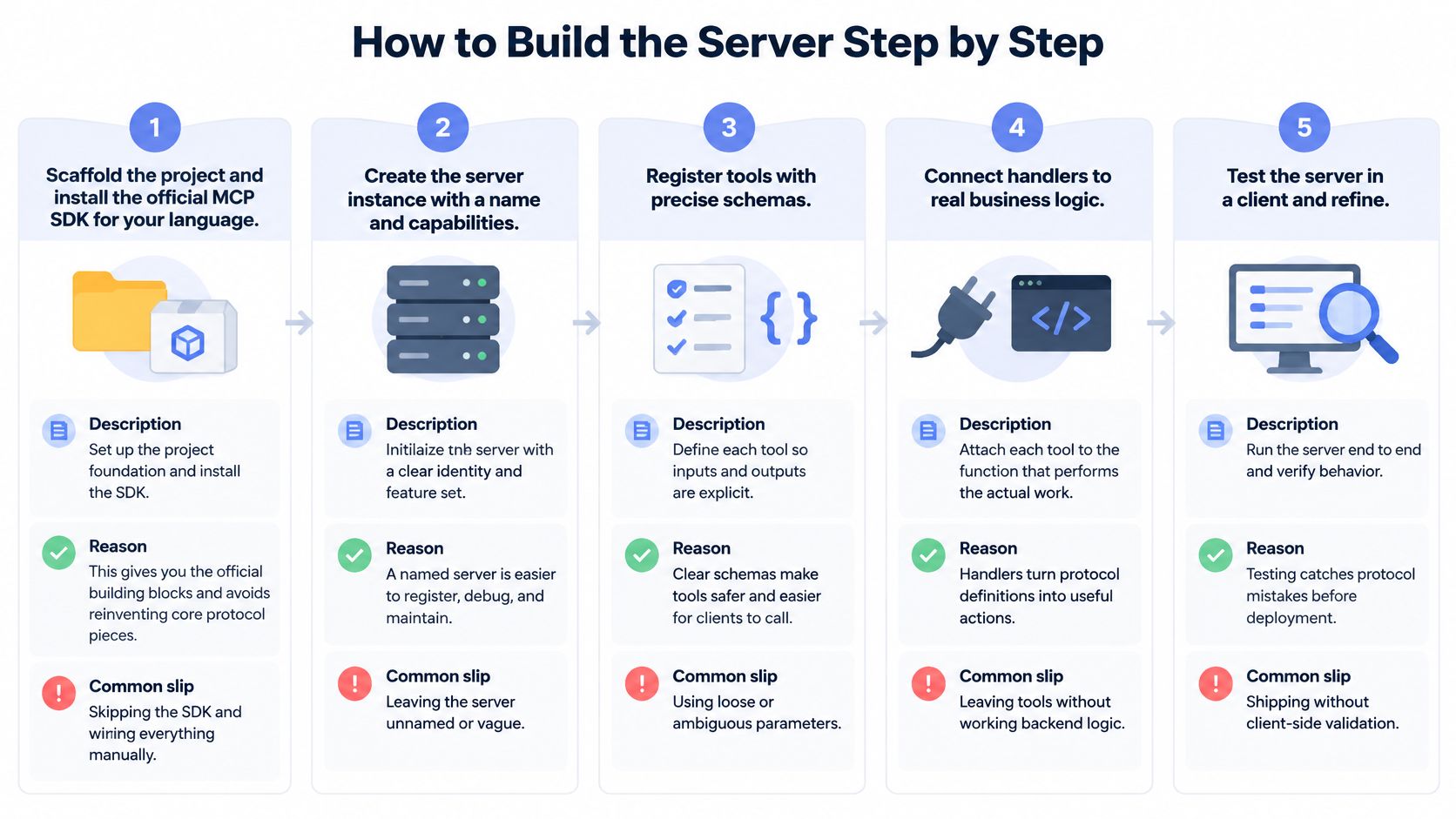 A five-step infographic showing the process for building an MCP server, from project scaffolding to final testing.
Build the protocol boundary
The MCP architecture documentation describes a stateless request-processing model and capability discovery. Design your application handlers so each receives the authenticated context and validated arguments it needs, while keeping revision-specific protocol lifecycle behavior in the transport layer.
Scaffold the project and install the official SDK. Pin its version and use examples matching that release. Manually reconstructing protocol plumbing makes it harder to distinguish your application bugs from compatibility bugs.
Create the server instance with a name and version. Use a recognizable application identity and your actual build version. A vague identity makes host configuration and diagnostic logs harder to interpret.
Declare the tools capability. Configure the SDK so the client can discover your publishing tools. Don't assume defining a business function automatically makes it discoverable.
Register precise tool definitions. Give every tool a unique name, a plain-language description, and a strict input schema. Loose fields such as
payloadoroptionsleave the agent guessing what belongs inside them.
For example, this is an application-owned registration descriptor, not a drop-in SDK call:
Pass that definition through the registration API supported by your pinned SDK. Keep provider-specific caption and media constraints in documented adapter validation rather than inventing universal limits.
Route each call to a selected adapter. Resolve the adapter from the authorized account record, not from a URL supplied by the model. Return normalized application errors instead of raw provider exceptions.
A handler can follow this application-level shape:
Here, validate, authorizeAccount, idempotency, and normalizeProviderError are functions you implement. The normalizer should produce a named result such as rate_limited only when the provider response supports that classification, and the protocol layer should serialize it into the SDK's supported tool-result format.
Make failure behavior testable
Validate before any provider call. Reject malformed identifiers, unsupported fields, and ambiguous media sources at the boundary. Schema validation doesn't replace checking that referenced records exist and belong to the actor.
Implement durable idempotency. Store the key with the tenant, operation, request fingerprint, and outcome. A key alone prevents nothing; use persistent coordination and provider-supported idempotency where available, and reconcile uncertain outcomes before resubmitting.
Separate the modules. Keep transport, authorization, publishing logic, and adapters apart. Otherwise, a provider error-format change can force edits to unrelated protocol handlers.
Run handler and contract tests. Call each handler directly before connecting an agent, then test initialization where applicable, discovery, malformed inputs, timeouts, retries, and provider failures. Include an outcome where the provider accepted a request but your server didn't receive the response.
A passing host test shows the complete proposed tool surface through tools/list, with the expected schemas. A passing failure test shows no provider invocation after rejected authorization and no blind republish after an uncertain outcome.
For a companion walkthrough of the implementation process, use the video below.
Securing Tools Before They Touch Your Accounts
OAuth alone doesn't secure a publishing server. MCP security is mostly an authorization and governance problem: an agent can hold a valid capability and still use it against the wrong account or publish content the user never approved.
The MCP specification says tool descriptions and annotations should be treated as untrusted unless obtained from a trusted server, and hosts should obtain explicit consent before invoking tools. A description that says a tool is safe doesn't replace checks inside its handler.
Use the security checklist to review both tool exposure and execution policy.
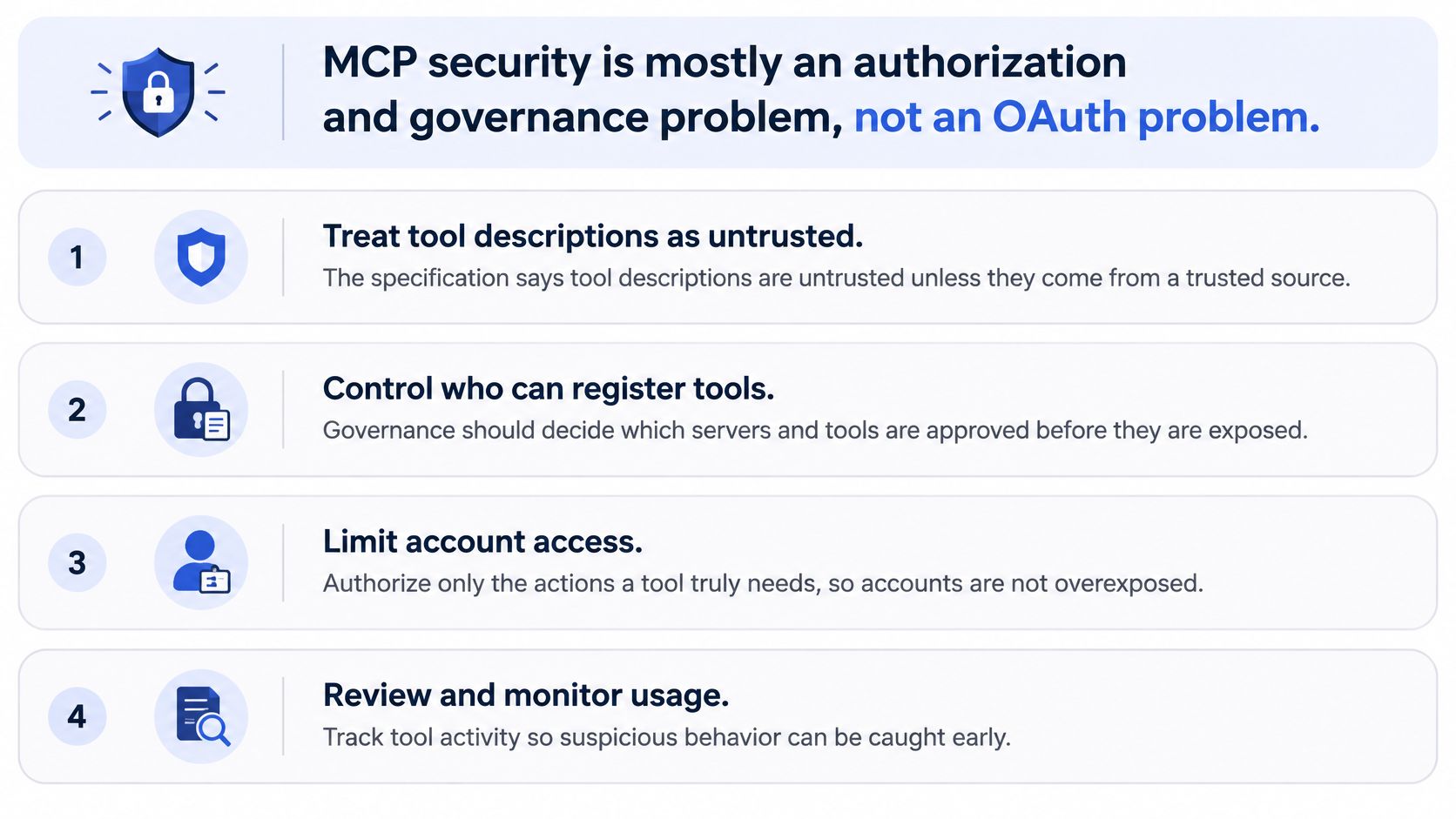 A list of four key security recommendations for developers managing MCP servers, emphasizing authorization and governance.
Attach policy to the tool class
Tool class | Example | Recommended enforcement |
Read-only | Account discovery and status lookup | Tenant-scoped results, account ownership checks, redacted output |
Externally mutating | Draft creation and publication | User approval, action-specific permission, request-bound consent, audit event |
Credential-sensitive | Connection or token administration | Separate administrative access, restricted output, credential redaction |
Read-only doesn't mean unrestricted. Returning another tenant's connected accounts is still a security failure, even if the handler never changes external state.
For mutating operations, I'd bind approval to the actual account, media, caption, and visibility. If the agent changes the destination after approval, require a new approval rather than treating consent as permission to publish anything.
Record an immutable audit event containing the actor, tool, target account, request hash, result, and sanitized provider error. Don't put access tokens, refresh tokens, or unnecessary personal information into the event.
Check identity and business permission separately
Microsoft's MCP security guidance covers production authentication controls including token validation, exact redirect URIs, PKCE, least privilege, and per-client consent. For OAuth 2.1-based flows, validate issuer, audience, expiry, and intended resource binding rather than accepting a token merely because it parses.
Use an OAuth token management checklist when designing credential storage and renewal. Keep credential handling out of model-visible arguments and sanitize errors before returning them.
The failures worth testing are concrete:
Foreign account IDs. Reject a valid identifier owned by another tenant.
Destination substitution. Reject prompt text that attempts to redirect an approved publication.
Credential leakage. Remove OAuth material from provider errors and logs.
Unsafe retries. Prevent an agent from treating an unknown publication outcome as permission to send again.
Unapproved tools. Restrict which servers and tool definitions your host exposes.
A valid token proves neither ownership of the requested account nor approval of the requested publication.
Write a negative test for every control. The test should assert not just that the caller receives an error, but that the adapter wasn't called.
Media Sources, Rate Limits and Platform Errors
A media reference isn't enough unless the server knows how the provider will receive the bytes. TikTok's Content Posting API getting-started documentation distinguishes FILE_UPLOAD from PULL_FROM_URL and describes the authorization requirements for initiating an upload.
Model that distinction explicitly. Your application schema can use file and url as normalized source modes, with the adapter translating them to the provider's documented values.
Reject ambiguous media requests
For a file workflow, require an authorized reference to the file your upload service will read. For a URL workflow, require a URL that passes your security checks and the destination platform's documented requirements.
Don't accept both and choose one. Don't interpret a path on the agent's machine as a file the remote server can automatically access.
Keep mediaRef in a draft as a reference to a validated application record. That record can preserve the selected source mode, ownership, and relevant metadata without forcing the agent to repeat transport details during publication.
Turn platform responses into useful decisions
TikTok's upload-video reference states a limit of 6 requests per minute per user access token for the documented endpoint. Use token-scoped pacing for that workflow, and don't generalize the quota to unrelated endpoints or platforms.
The following are proposed server result codes, not TikTok's native error names.
Platform signals, causes and what the server returns
Platform signal | Cause | Error code to return |
More than the documented request allowance | Per-user-token request limit on the Content Posting API endpoint |
|
Post visible only to the creator | Unaudited client restricts posts to |
|
Unaudited client user allowance exhausted | Unaudited client user cap |
|
Creator's daily posting allowance exhausted | Creator posting cap shared across Direct Post clients |
|
Upload accepted but publication not confirmed | Platform response indicates processing remains pending |
|
TikTok's content-sharing guidelines restrict unaudited clients to up to 5 users in a 24-hour window and SELF_ONLY visibility, and describe a per-creator posting cap typically around 15 posts per day, shared across Direct Post clients. Treat these as distinct policy outcomes, not interchangeable transient errors.
An audit restriction concerns the API client. Don't label the creator's account unaudited when the restriction belongs to the application.
Give the agent a next action
Return the account identifier, normalized code, sanitized provider response, and next action. Include a retry window when it comes from a documented provider signal or your own queue calculation; otherwise return no automatic retry time and explain why.
An opaque token identifier is useful for operations, but it must never contain the token itself. For queue design, the API rate-limit guide provides additional context for separating request pacing from publication state.
Retry boundary: An accepted upload isn't proof of a live post, and a missing response isn't proof that nothing happened.
Use the status tool to report the provider's actual state. If the response doesn't establish why publication is incomplete, return an unresolved outcome rather than inventing a cause.
Deploy the Server and Connect Your First Agent
Choose a container or a serverless host that supports your selected transport. Keep application state in durable storage so instance replacement doesn't erase idempotency records, publication tracking, or queued work.
Stateless handlers don't automatically make a deployment free of session requirements. Confirm the lifecycle behavior of your pinned protocol revision and hosting integration before assuming you can scale without sticky sessions.
Pin compatibility deliberately
The protocol roadmap describes the 2026-07-28 revision as removing protocol-level sessions and the initialization handshake and adding server/discover; treat that migration as planned until release notes for your target implementation confirm support. Don't mix a newer discovery lifecycle with older client expectations just because both use MCP.
Store publishing credentials and provider secrets in the host's secret store. Pass references through your application context, and keep secret values out of source control, tool results, and routine logs.
Test against different client implementations. Maintain a compatibility record covering transport, authentication, discovery, tool invocation, and error rendering, because a successful connection doesn't prove the client handles your failure results correctly.
Verify the deployed path in order
Add the deployed server endpoint to your host's MCP configuration using that host's documented format. Then run a controlled publishing check:
Discover the tools. Call
tools/listand confirm that every proposed handler appears with its intended schema.Validate a test asset. Call
validate_mediawith a file reference and confirm that rejected inputs never reach the publishing adapter.Create a draft. Use the test account and verify the returned draft against your stored application record.
Publish privately. Where the platform and account support private visibility, request it explicitly and verify the resulting platform state before attempting public publication.
If private visibility isn't supported for the destination, don't substitute public visibility. Use a documented sandbox or another controlled test destination instead.
Exercise the deployed failure path too. Disconnect a test credential, submit a forbidden account identifier, and interrupt a provider response in a controlled test so you can inspect what the agent tells the user.
Decide what you want to maintain
Owning the adapters means owning their documented authorization flows, token renewal, request pacing, media handling, and API compatibility. A managed publishing service changes where that maintenance sits, but it doesn't remove your responsibility for user consent and application permissions.
Compare managed options against their current documentation, including supported actions, visibility controls, error details, and credential ownership. Don't choose based solely on how quickly the first successful post appears.
Run the deployed tools/list check today and log the result. It's a small, concrete starting point for proving that the agent can discover the interface you intend to expose.
PostPulse offers social publishing through a REST API, automation integrations, and an MCP server. If you'd rather use a managed publishing integration behind your agent's authorization and approval controls, visit PostPulse and compare its documented capabilities with the tool contract you need.
About the Author

Founder of PostPulse — a social media scheduling platform for creators and teams. Software engineer with a passion for building developer tools and simplifying complex API integrations across social media platforms.