Social Media API Integration Guide for Developers
Published on · Updated on
Tags:
You get the token, test a few calls, and then the next morning the post is stuck, the media container never leaves processing, or the platform outright rejects the file you swore was valid. That's the true shape of a social media API integration, not the clean demo most guides show. The hard part isn't making one request succeed, it's keeping publishing, analytics, and account access reliable when every platform has its own auth rules, media workflow, and rate limits.
The commercial reason this space keeps growing is simple. Social media APIs became the machine-readable layer for software that needs to publish, measure, and report across platforms, and one industry guide estimated the social media management market at $36 billion by 2026 (API7 learning center on social media APIs). That scale explains why so many teams try to unify the mess instead of stitching together five or six brittle connectors.
What catches most developers off guard is that the API isn't just a transport layer. It becomes infrastructure, with authentication lifecycles, background jobs, validation checks, and platform-specific policy gates all sitting between your app and a live post.
Table of Contents
Why Social Media APIs Are Harder Than They Look
The failure usually looks embarrassingly small. A developer gets OAuth working, publishes a test post, and everything seems fine until a token expires, a media object stays in progress, or a platform rejects a format that looked valid in local testing. That's when the illusion breaks, because the API is not a neat POST endpoint, it's a chain of platform rules that you inherit the moment you automate social publishing.
The API is the workflow, not just the request
At the simplest level, a social media API lets software publish content, read analytics, and manage account actions on platforms like Instagram, TikTok, YouTube, LinkedIn, and X. The catch is that the workflow often starts before your content is even publishable, because the platform wants you to create a container, transfer media, wait for server-side processing, and then issue the publish call. That's a very different model from uploading a file to object storage.
That's also why platform APIs feel deceptively similar in documentation but behave very differently in production. Some expose short-lived tokens, some require app review, some lock advanced data behind creator consent, and some split publishing into multiple asynchronous stages. The result is that the engineering work lives in the gaps between nominally simple endpoints.
Practical rule: if the platform talks about containers, approvals, or long-lived access, assume your “publish” flow will need background jobs and retries, not a single synchronous request.
The broader shift matters too. APIs turned social from a dashboard-only workflow into a machine-readable layer, which is why teams now expect analytics, scheduling, and reporting to flow through the same integration surface. Once you're building against that layer, the question stops being “can I make a post?” and becomes “can I automate this without babysitting every account?”
Native Platform APIs vs a Unified API Approach
The first architectural choice is brutal in its simplicity. You either integrate with each native platform yourself, or you use a unified layer that normalizes those platforms behind one surface. Both work. Only one keeps the maintenance burden from swallowing the roadmap.
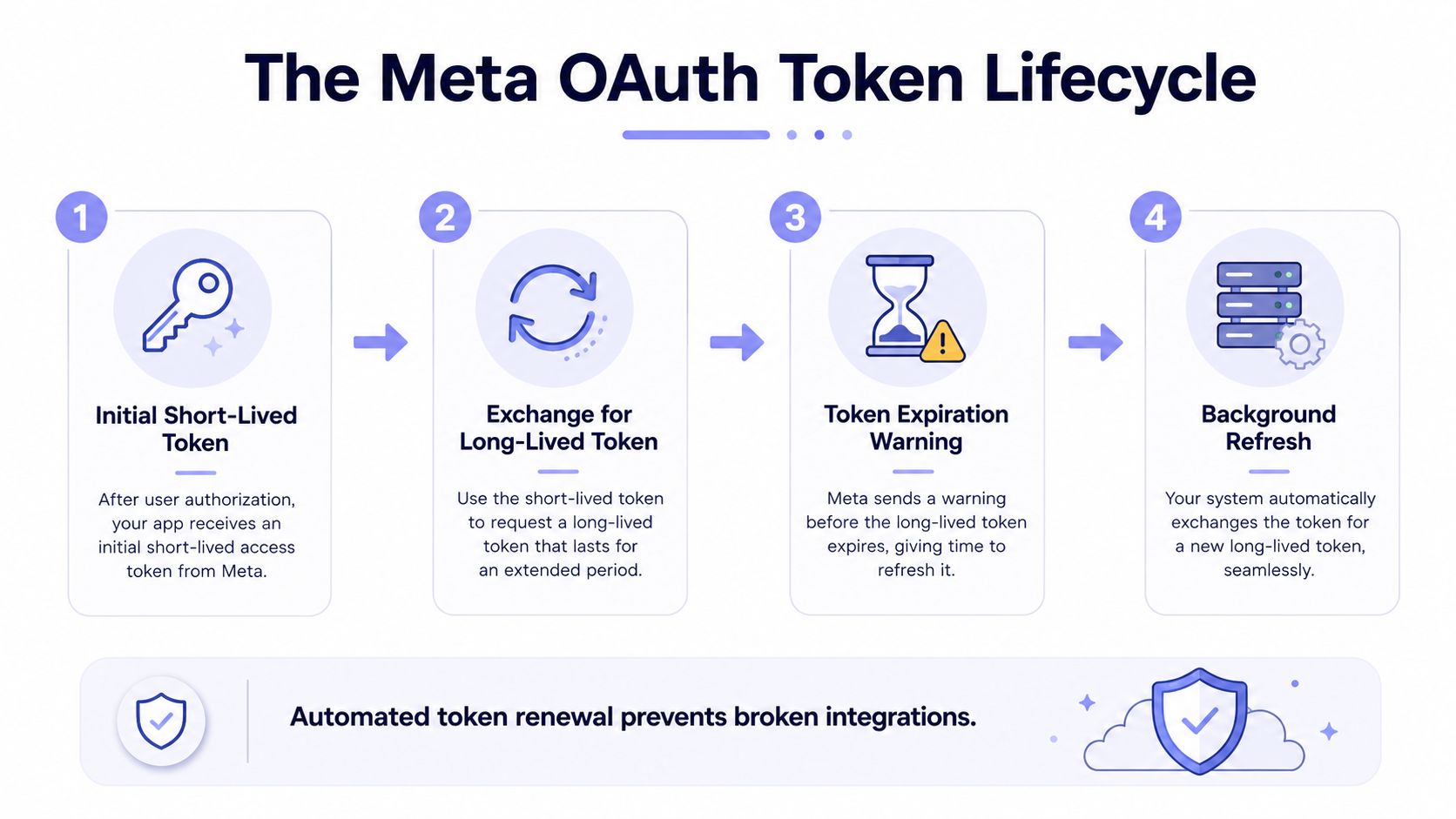 A four-step infographic explaining the Meta OAuth token lifecycle process for managing social media API access.
Native connectors buy control, unified APIs buy time
If you go native, you own the exact OAuth flow, media format, rate-limit behavior, and edge-case handling for each platform. That can be worthwhile for one-platform products or for teams that need deep platform-specific features like specialized interaction primitives. It's also the path that gives you the most control, because you decide how the product reacts when a platform changes behavior.
A unified API changes the economics. Instead of five auth systems, five media formats, and five publishing quirks, you get one integration surface and one normalization layer. The trade-off is that you're buying abstraction, so you need to accept that some deep native features may sit outside the unified layer.
Factor | Native Platform APIs | Unified API |
Time to first publish | Slower, because each platform needs separate setup | Faster, because one integration can cover multiple platforms |
Maintenance burden | High, every platform change lands on your team | Lower, the provider absorbs platform changes |
App review timelines | Each platform can have its own review and approval path | Often reduced, because the provider handles its own verified apps |
Cost at scale | Can become uneven and expensive across several platforms | Usually easier to predict, especially with one contract or one pricing surface |
Edge-case flexibility | Highest, because you talk to native endpoints directly | Good for standard workflows, weaker for niche platform features |
The internal link many need when they're comparing these paths is a practical one, all social media in one app, because the decision isn't “native or unified” in the abstract. It's whether your team wants to spend its time on product features or platform plumbing.
Authentication and Token Lifecycle Pitfalls
Tokens break more integrations than bad code does. The failure pattern is predictable: a user connects an account, the token works, and then the app starts failing because nobody built the refresh path, the scope check, or the permission recovery flow.
What breaks in production
Meta's documentation is the clearest example of why this matters. Instagram Graph API publishing is limited to Business or Creator accounts connected to a Facebook Page, and the publishing flow requires specific creation steps for media containers before you can publish (JHU guide to Instagram Graph API publishing). If your app assumes every Instagram account behaves the same, it will fail the moment a personal account lands in your onboarding funnel.
The earlier token lifecycle infographic matters here because short-lived access is only the starting point. The work is exchanging for longer-lived access where the platform supports it, warning before expiry, and refreshing in the background before the user notices a failure. On platforms that do not expose a simple refresh story, your app needs a different recovery path, usually a reconnect flow.
Practical rule: treat token refresh like a background maintenance job, not a user-facing event. Users should reconnect only when they have to.
The structural limitation around creator data is just as important. Audience demographics and creator earnings generally aren't exposed natively unless the creator authenticates and authorizes sharing, which means passive lookup will not get you the full profile across platforms (Phyllo's analysis of Instagram, TikTok, and LinkedIn APIs). That surprises app builders who expect a unified API to fill every analytics gap. A unified layer can remove a lot of token handling and permission edge cases, but only for the data and workflows it normalizes.
Build for scopes, revocations, and consent drift
The safe pattern is boring but effective. Store token state with the scopes granted, check permissions before each sensitive action, and build a path for revocation that does not corrupt the rest of the account record. If a user withdraws access, your system should degrade cleanly instead of leaving orphaned jobs in the queue.
For auth implementation details, the useful reference is API authentication methods, because the core mistake is not choosing OAuth itself. It is assuming the happy path will survive account changes, permissions updates, expired credentials, and provider review delays without extra logic.
Container-Based Publishing and Rate Limit Realities
Most developers expect publishing to behave like a file upload. Major social platforms don't work that way, and Instagram is the clearest example of the mismatch.
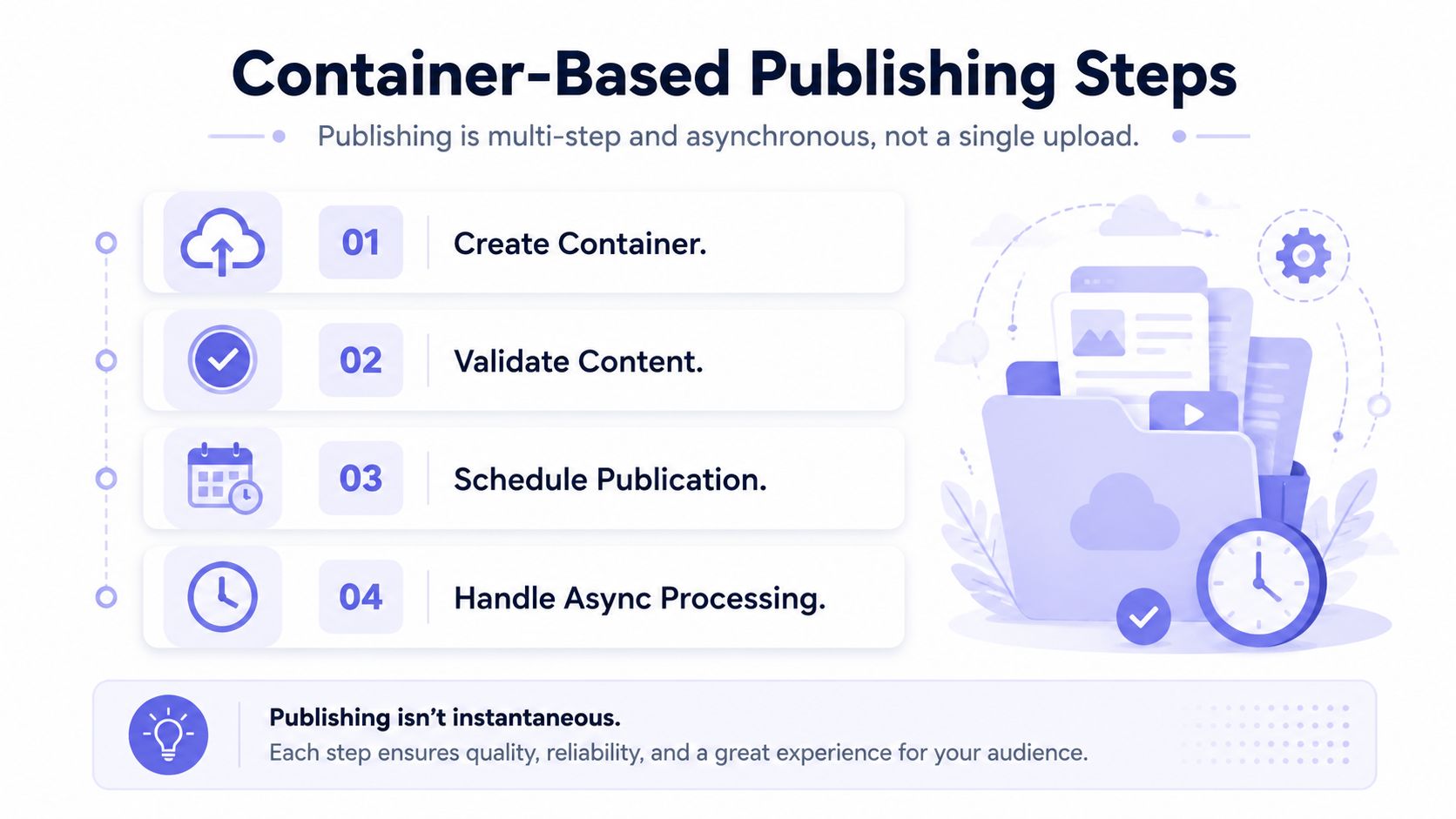 A diagram outlining the four steps for container-based publishing, emphasizing an asynchronous workflow process.
Publishing is asynchronous by design
The official mechanics are container-first. You create a media container, let the platform download and process the content, check readiness, and only then publish. That asynchronous design is why a request can return successfully while the post still never goes live. For carousels, the flow gets even more nested, because you need child containers first, then a parent container that references them.
That's not a bug in your client. It's the workflow. The platform wants to validate media, process the asset, and reject mismatches hard if the file format or media type doesn't fit the allowed shape. A graceful fallback isn't guaranteed.
The developer guide at Instagram container-based publishing is useful because it forces the right mental model. You're not sending one object to a queue-less endpoint. You're orchestrating a multi-step state machine with polling, timeouts, and failure recovery.
Rate limits shape the architecture
The other half of the problem is throughput. In 2026, one developer guide reported that the X API free tier is posting-only with 500 tweets per month, the Basic tier costs $200 per month and includes 10,000 tweets plus 7-day search history, and Pro access costs $5,000 per month for full archive search (API Scout's best social media APIs guide). That's not a small-footprint hobby model, it's a tiered system that forces product teams to think about usage and cost before they build.
The practical response is queue-based publishing with retry logic, not inline fan-out from a web request. If you're posting across several accounts, put the request into a job queue, poll for status, and back off when the platform starts rejecting bursts. For analytics, keep historical reads out of the hot path and rely on stored snapshots where the platform permits it.
Integration Patterns for Modern Social Publishing
There are three patterns I trust in practice, and they map cleanly to different team shapes. REST still does the heavy lifting, webhooks reduce pointless polling, and MCP is the new answer for agent-native publishing workflows.
REST, webhooks, and MCP each solve a different pain
A traditional REST API is still the default for creating posts, fetching analytics, and managing objects. That's the pattern most developers understand first, and it's fine as long as you pair it with proper retries and background processing. Webhooks fit status updates, like when a container finishes processing or a comment arrives and you don't want to poll every minute.
MCP changes the shape of the caller. The 2026 trend is clear, with Buffer, Upload-Post, Zernio, and Genviral shipping MCP servers by May 2026, which shows that agent-native publishing is moving from novelty to real product demand (Buffer's best social media APIs guide). The important point is that agents do not erase platform limits. They still hit rate limits, and they still need background jobs, cached state, and careful approval rules.
The best integration isn't the one with the most endpoints, it's the one your caller can use safely under platform constraints.
No-code and hybrid workflows are practical, not toy examples
I've seen solid production flows built in n8n and Make.com where a scheduler pulls copy from Airtable, hands it to an image generator, and sends the final post into a social endpoint. That works because the no-code tool handles timing and branching, while the API handles publishing. The challenge is governance, not capability, because someone still has to control approvals and retries.
For teams that care about smarter X automation options, smarter X automation options is a useful side reference because it illustrates how automation builders think about account handling and workflow design. It's especially relevant when the publishing logic needs to stay reliable without forcing every operator to touch raw HTTP.
Real Use Cases from Apps to AI Agents
Three common builds cover most of the market. A SaaS product adds social publishing as a feature, a no-code creator assembles a recurring workflow, and an AI agent publishes autonomously with constraints.
SaaS, no-code, and agent workflows look different at the edge
In a SaaS app, the core job is account connection and white-label publishing. Users authorize their own accounts, your app stores the token state, and your backend schedules publish jobs on their behalf. The hard part is not the UI, it's making sure the product survives platform quirks without exposing those quirks to the customer.
In a no-code stack, the main value is orchestration. Airtable holds the content calendar, an AI tool generates variations or visuals, and the automation engine calls the publishing endpoint. The developer work shifts from app code to reliable branching, error handling, and visibility into job failures.
For AI agents, the target is autonomy with guardrails. The agent can draft, queue, and publish content through an MCP server, but it still needs policy checks, rate-limit awareness, and a fallback when the account lacks permission. If you're exploring adjacent tooling for agent workflows, web scraping for AI agents is a helpful complement because content planning and content publishing often live in the same automation loop.
One platform is not the same as one abstraction
The biggest mistake in agent projects is assuming the agent can “post” the same way a human would. It can't, not safely, unless the integration enforces auth, limits, and approval boundaries underneath it. That's why unified surfaces matter more as autonomy increases.
A platform like PostPulse sits in that middle ground when teams want one integration that can publish to several networks without hand-building each connector. I'd treat it as a practical option when the product needs app-side publishing, automation nodes, or MCP-driven actions without rebuilding the platform layer yourself.
Evaluation Criteria and Best Practices
A good choice starts with operational questions, not marketing copy. If the API does not cover the platforms your users need, handle auth without constant manual repairs, survive rate limits, and fit your integration model, it will cost more to maintain than it saves on day one.
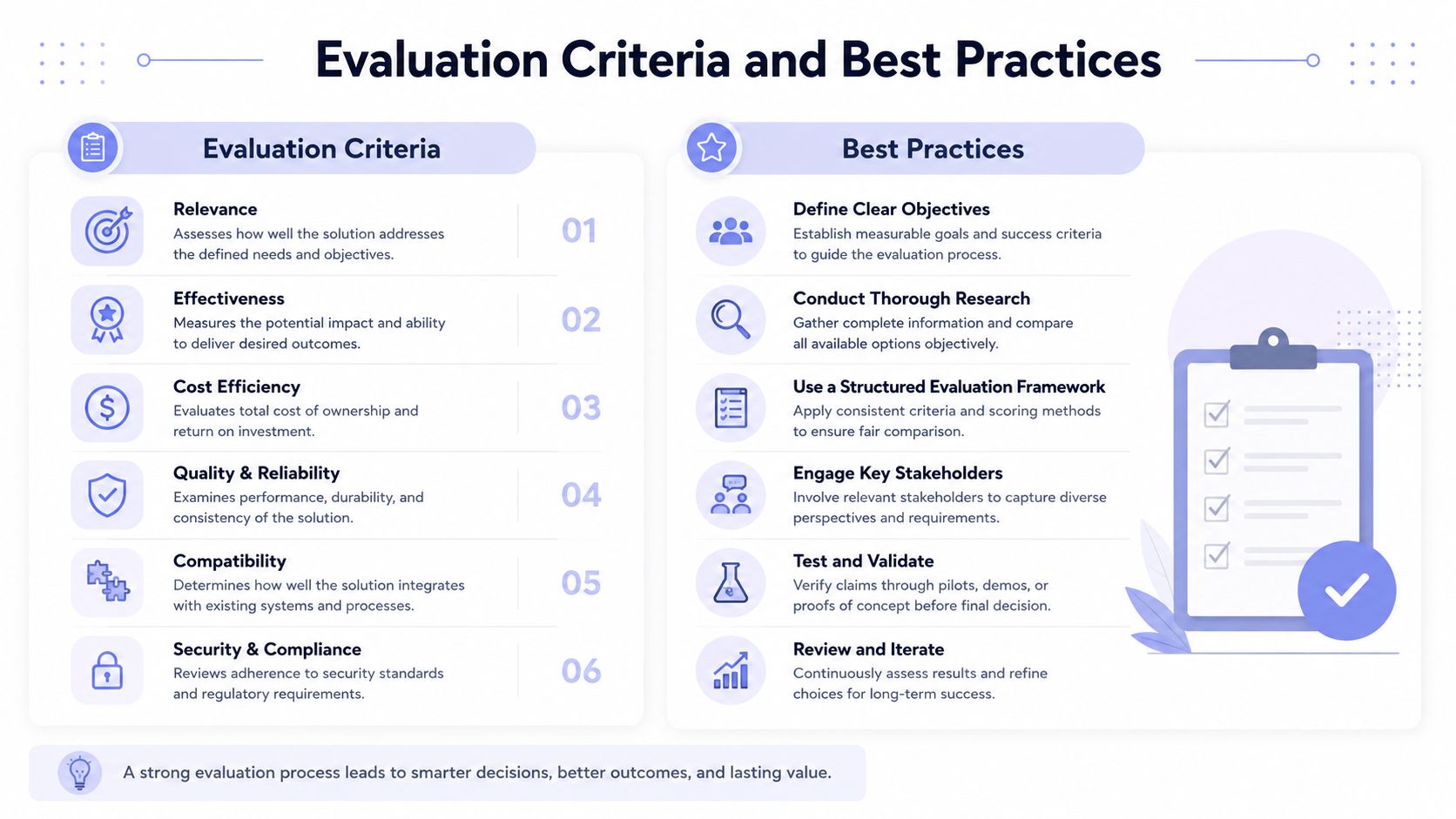 A professional infographic outlining six key evaluation criteria and six best practices for effective decision making.
What to check before you commit
The evaluation fields are simple, but the trade-offs are not. Check platform coverage, auth handling, rate-limit behavior, app review requirements, pricing model, and support for REST, webhooks, MCP, or no-code. If the provider cannot answer those clearly, you are buying uncertainty.
The hidden cost usually shows up after launch. Native platform APIs often look fine in a demo, then token refresh cycles start failing, container-based publishing jobs sit in a pending state longer than your product can tolerate, and app review delays slow every new integration change. That is the maintenance tax teams underestimate.
The teams that keep publishing stable do the unglamorous work every time. They refresh tokens before expiry, queue publishing jobs with retries, enforce timeouts on container status checks, cache analytics instead of hitting live endpoints for every dashboard refresh, and test against platform sandboxes before launch.
If you want a practical comparison point, video generation API for creators offers a useful reference for how video-focused platforms handle similar integration challenges. PostPulse is another option that maps directly to those pain points with one integration for 10 platforms, handled OAuth and token refresh, and support for a REST API, official n8n and Make.com nodes, plus an MCP server. That does not remove product decisions, but it does remove a lot of the repetitive platform maintenance that eats engineering time.
Bottom line: choose the integration surface that matches your operating model, not the one with the flashiest feature list.
If you are building social publishing into a product, automating it for clients, or wiring it into an AI agent, use PostPulse as the starting point for a single publishing layer across multiple platforms. It handles the token and platform churn that usually slows these projects down, and it gives you a cleaner path from prototype to production without redoing the same integration work over and over.
About the Author

Founder of PostPulse — a social media scheduling platform for creators and teams. Software engineer with a passion for building developer tools and simplifying complex API integrations across social media platforms.