Make.com Workflow Automation: A Practical Developer Guide
Published on
Tags:
You can wire nine social platforms together and still end up with the same 2 a.m. problem, a token expired, a retry got dropped, and the post that was supposed to go out never left the queue. That is the part most Make.com workflow automation tutorials skip, because the toy demo works and the production stack does not. The job is less “connect app A to app B” and more “build something that survives OAuth drift, burst traffic, duplicate payloads, and the day someone edits the scenario without telling you.”
Make has grown into the kind of platform teams can rely on at scale. Its own 2024 Automation Wrap-Up points to a larger user base, heavier scenario volume, and a platform that is being pushed far beyond simple one-off automations. That matters because once automation becomes part of the operating stack, the weak points show up fast, especially in broad app catalogs and in scenarios that run often enough to expose edge cases.
That is the practical version of the story. No toy RSS-to-Slack flow, no fake simplicity. Just the decisions that keep a real workflow alive when you are publishing content, moving records, or fanning one event out across a messy stack.
Table of Contents
Choosing Triggers and Modules Before You Open the Scenario Builder
Handling Rate Limits, Pagination, and Errors Without Losing Data
The Moment Your Automation Stack Starts Costing You Sleep
The failure usually doesn't arrive with drama. A post stalls halfway through publishing, a webhook retries too quickly, or one app's token expires while the rest of the chain keeps moving. By the time someone notices, the automation that was supposed to remove work has created a support ticket, a manual fix, and a Slack thread nobody wanted.
Make.com workflow automation only pays off when you treat it like production software, not a visual shortcut. The best teams write the workflow spec before they touch the canvas. That spec should name the trigger, routes, external systems, inputs and outputs, error policy, and change notes, then add canonical keys, deduplication rules, and scenario-level rate limits so the workflow does not double-write or fail under bursts. The Make automation strategy guide makes that tradeoff explicit, and it matches what holds up in real deployments.
Why the canvas alone is not a strategy
A lot of teams start with a module chain and stop there. That holds only until the workflow crosses into more than one app and someone assumes the visual path is the whole system. It is not.
Practical rule: define one authoritative system of record per object before the first module lands on the canvas.
That single decision prevents a lot of the mess that shows up later, especially when data gets normalized in one module and reinterpreted in another. Make's guidance on workflow strategy is direct about the tradeoff, a canvas without controls increases loop risk, duplicate writes, and hard-to-diagnose integration errors as the workflow grows. The same warning applies whether you are syncing leads, publishing content, or routing support tasks.
For social publishing, unified surfaces like PostPulse matter because they collapse the “nine apps, nine token lifetimes” problem into one integration point. That does not remove the need for good design, but it does remove a lot of repetitive surface area. If a workflow is mostly about shipping content, not custom per-platform logic, that simplification pays off immediately.
Choosing Triggers and Modules Before You Open the Scenario Builder
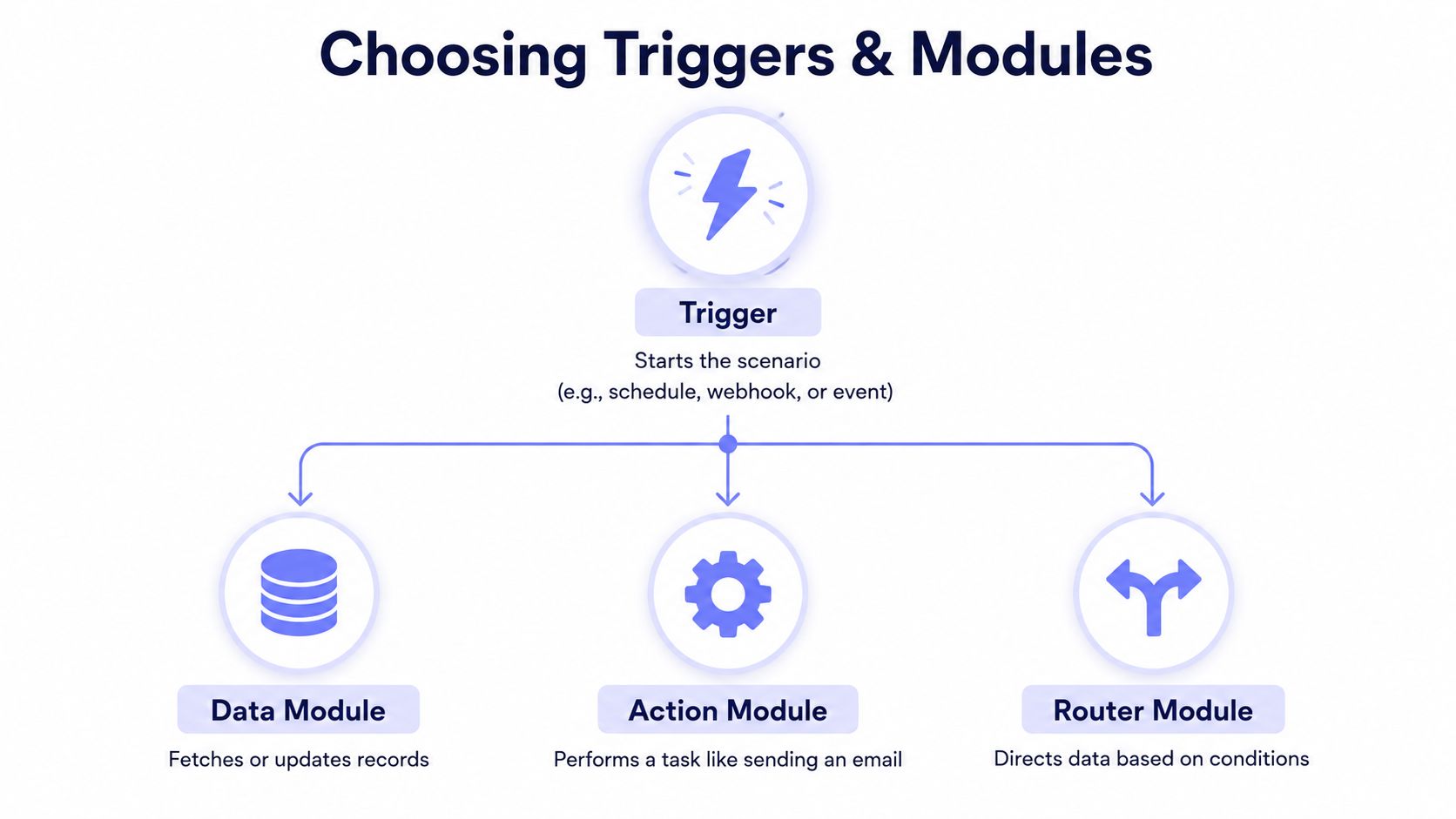 A diagram illustrating how automation scenarios work using a Trigger, Data Module, Action Module, and Router Module.
The first decision that shapes a Make.com workflow is the trigger. It sets the pace of the whole scenario, and it defines what happens when volume rises or a source system gets noisy. For a webhook-driven build, the question is simple. Do you need the scenario to react immediately, or can it wait for a scheduled run without hurting the business process?
Choose webhooks for event-driven work, choose schedules when a delay is acceptable, and use polling only when the source system leaves you no better option. That choice is not cosmetic. It changes how much traffic your scenario can absorb, how quickly failures surface, and how much cleanup you have to do after a burst.
Trigger choice changes the whole failure mode
A webhook can be the cleanest option until traffic spikes. Make documents a webhook limit of 30 incoming requests per second, and requests beyond that return HTTP 429 Too Many Requests Make webhooks. If the webhook is configured to run immediately, the default rate limit is 100 runs per minute. After that, requests are queued and processed gradually, and if the webhook includes a response module and the limit is exceeded, the caller gets HTTP 429 Too Many Requests Make scenario scheduling.
The trade-off is visibility. An immediate webhook fails fast, which is useful when the caller can retry. A queued webhook hides pressure for a while, which is safer when you care more about eventual processing than an instant response. In production, that difference decides whether a failure is obvious or buried in a growing backlog.
Pick modules that reduce branching
Start with the native Make app whenever the target system already has a maintained integration. If the app is missing, or the API needs a shape the native module cannot provide, the HTTP module is the fallback. For social publishing, a unified surface such as PostPulse can replace a long chain of platform-specific calls when the job is to publish the same content across multiple networks.
 Screenshot from https://post-pulse.com
The best planning output is a one-page spec, not a rough sketch. Write down the trigger, the modules, the input fields, the output fields, the error policy, and the system of record for each object. If that spec keeps sprawling, the workflow is probably trying to do too much in one pass. That usually shows up later as brittle field mapping, unclear ownership, and hard-to-read scenario runs.
For teams that also need adjacent automations, automate customer support with AI is a useful reference for keeping the workflow shape clear without overbuilding the integration layer.
Building the Scenario Step by Step in Scenario Builder
A real scenario starts to make sense when you stop thinking in apps and start thinking in bundles. A daily content workflow usually begins with a record in Airtable or another database, then moves through generation, formatting, and publication. The build is less about dragging modules into place and more about making each handoff explicit so you can see where data changes shape.
First, the trigger pulls a content idea from the source of record. Then an HTTP module can call an image model, another step can draft the caption, and a final publishing module can send the post outward. If the post needs to go to multiple platforms, PostPulse can handle that fan-out through one Make module instead of nine separate API calls.
The key design choice is where you branch. Use a Router when the same source item needs different treatment based on conditions. Use an Iterator when one bundle has to become many smaller bundles, because iterators split a large bundle and pass the pieces downstream one by one, and Make requires iterators to sit in the middle of the scenario Make workflow controls. That distinction saves a lot of confusion later, especially when a single record has multiple destinations.
If the workflow's purpose is publication, don't over-model the publishing layer. Keep the content logic separate from the delivery surface.
That separation matters when the same post has to reach Instagram, LinkedIn, X, Threads, Facebook, YouTube, TikTok, Bluesky, and Telegram. A single integration surface is easier to maintain than a chain of platform-specific modules, especially once scheduling and retries enter the picture.
A practical issue shows up fast with container-style publishing, the media URL has to be publicly accessible before the platform can process it cleanly. If you are publishing image or video assets through a container pipeline, that detail is often the difference between a clean run and a hard-to-read failure. For a concrete walkthrough on turning long-form video into short-form content, this guide on How to turn YouTube video into YouTube Shorts in Make is a useful companion.
The PostPulse side of the build is straightforward. One module handles cross-platform publication, which is exactly what you want when the scenario's job is delivery, not platform trivia. The result is a scenario blueprint that stays readable even after a few revisions.
Later in the pipeline, if the workflow is part of a broader operations system, automate customer support with AI is a useful reference for how teams think about content once the publishing step stops being manual. content automation for real growth is another reference point for keeping the workflow shape clear without overbuilding the integration layer.
Handling Rate Limits, Pagination, and Errors Without Losing Data
Production workflows fail in predictable ways. They hit a rate limit, they mis-handle a paginated response, or they drop an exception that should have gone to a quarantine branch instead of disappearing into run history. After a few shipped scenarios, those failures stop looking like edge cases and start looking like the work.
Rate limits are a design input, not a surprise
Make's webhook guidance is clear, a webhook can handle up to 30 incoming requests per second, and requests beyond that return HTTP 429 Too Many Requests Make webhooks. For webhook scenarios that run immediately, the default ceiling is 100 runs per minute, after which Make queues later requests and processes them gradually Make scenario scheduling.
That shapes the build from the start. If spikes are likely, use a queueing pattern or schedule the scenario so the system absorbs the load instead of rejecting it. If a response module sits in the chain, the caller may see the 429 instead of a clean retry, so upstream code has to be written for that behavior.
Iterators solve pagination only when you place them correctly
Pagination looks simple until one API response hides dozens or hundreds of records. In Make, an Iterator splits one bundle into smaller bundles and sends them one by one to downstream modules, which is the right move when a response page contains multiple objects Make workflow controls. The wrong move is using a router for this problem, because routers branch data, they do not expand it.
Long runs need discipline as much as module choice. Treat empty pages as a clean stop condition, and do not assume every endpoint behaves the same way. When the API returns nothing, stop the loop cleanly instead of forcing another pass that fills the logs with noise.
Practical rule: if the module is supposed to fan out records, the scenario should say so clearly in the mapping and the naming.
Error handling needs a branch, not a hope
Make's own workflow guidance recommends retries, quarantine or escalation paths, logging, alerts, and runbooks so failures are visible and recoverable Make automation strategy guide. That is the difference between a failed run and a lost record. The first is manageable, the second is expensive.
If the workflow includes container-style publishing, do not mark the post as done until the publish container has left IN_PROGRESS. That usually means a polling step or a delay module, not a fire-and-forget assumption. For a practical look at how teams think about API limits as part of the integration contract, this API rate limit guide is a useful reference.
Scheduling, Testing, and Watching the First Production Week
The first production week reveals problems the test run will miss. Make's workflow automation guidance favors a multi-app, rule-based process that runs at least weekly, with the trigger and actions mapped first, the scenario built in Scenario Builder with Filters or Routers, then tested on three to five real records before activation, followed by close attention to execution logs during the first week Make workflow automation guide.
That approach is cautious for a reason. Live data exposes the awkward cases quickly, especially when the source system sends odd characters, missing fields, or duplicate entries. A clean demo rarely shows those failure modes.
Test like the system is already live
For more complex builds, an external Make playbook recommends 10 to 30 test executions with real data in staging before production cutover. Make workflow automation guide The goal is not a perfect score. It is to surface the failures that only show up after repeated runs, because a single test record can hide a lot.
Once the scenario is live, watch execution history closely. Use it to inspect bundles, replay a failed run, and pin a known-good blueprint before a risky change. For customer-facing workflows, alerts on critical flows should be in place from the start.
If the process includes content automation for real growth, the first week is where you learn whether your schedule, payload shape, and retries survive production traffic. The safest teams treat that week as active monitoring, not passive observation.
Decide early whether the workflow deserves a split
A scenario that starts clean can become awkward as new branches are added. Split it once the canvas begins hiding too much logic. One smaller scenario with a clear system of record is usually easier to support than one sprawling build that tries to do everything.
When the process crosses enough services that the branch logic starts to resemble a tree, separate publication from enrichment or alerting from routing. That keeps the first production week from turning into a scramble when one branch misfires and the others keep running.
For teams building social distribution flows, automated posting on Instagram is a useful companion read because it keeps the publishing layer grounded in platform reality instead of wishful thinking.
Reusable Templates You Can Clone Today
The easiest way to make Make.com workflow automation useful is to start with a template that already matches the job. A blank canvas invites overengineering, while a purpose-built pattern gives you a shape to adapt instead of a problem to invent. Three templates show up again and again in production work.
Daily AI-generated social post
This template starts with a record from Airtable or another content queue. The scenario calls an image model through HTTP, drafts the caption with a chat model, and sends the final publication through PostPulse so the same content reaches multiple platforms from one module. The important design choice is to keep the content source separate from the delivery surface, because that makes the workflow easier to revise when the tone or artwork changes.
Lead-to-social amplification
A CRM trigger watches for a high-value lead, then the scenario formats a short announcement for LinkedIn and X. This is the kind of flow that works well when the message is narrow and the trigger is clear. The main tradeoff is governance, since not every lead should become a public post, so the scenario needs a hard rule before it publishes anything.
Webhook-to-multi-platform publish
This is the cleanest fan-out pattern when another app, an AI agent, or an internal tool needs to submit one payload and publish it broadly. The webhook receives the input, the scenario normalizes the fields, and the publishing module handles distribution across the supported channels. The survivability trick is to define deduplication up front so the same payload doesn't get published twice if the caller retries.
If you're publishing from a social queue, the earlier section on iterators and routes is the part to reuse. The logic stays simple when the scenario only has one job, accept, normalize, publish.
Optimization Habits and When Make.com Is the Wrong Tool
The workflows that keep working are the ones surrounded by boring discipline. Give scenarios names that humans can search. Back up blueprints before meaningful changes. Keep environments separate, keep one system of record per object, and keep alerts on the few flows that affect revenue or customer experience. Those habits do not make the workflow flashy, but they make it survivable when something breaks at 2 a.m.
Make's own ecosystem growth shows why that discipline matters. The platform keeps adding apps and bringing in more users, which makes it easier to connect unusual stacks without custom glue, but it also increases the number of places a messy scenario can hide. Breadth only helps if the team keeps scenarios tidy enough to operate and audit.
Know where the platform fits
Make works best when the cost of custom code is higher than the cost of maintaining a scenario. That usually holds when the process is rule-based, spans several apps, and needs to stay visible to non-developers without turning brittle. Once the workflow starts asking for bespoke state handling, complex branching, or logic that changes every time a product manager updates a spec, code often belongs in the middle instead.
For social publishing, PostPulse fits when the main problem is one integration surface publishing to many destinations, with OAuth, refresh, and platform changes handled in one maintained layer. For teams comparing broader automation and data flow patterns, the automated data processing 2026 guide is a useful companion because it forces the same question, whether automation is a fit or the system needs a custom build.
The right tool is the one you can still explain six months later when the original engineer is on vacation.
A practical habit pays off fast. Back up the blueprint before each meaningful edit, write down the system of record, and stop adding branches the minute the scenario starts looking like a dumping ground. If the workflow is really a publishing surface, keep it narrow and let a unified integration do the repetitive work.
About the Author

Founder of PostPulse — a social media scheduling platform for creators and teams. Software engineer with a passion for building developer tools and simplifying complex API integrations across social media platforms.