Automated Posting on Instagram: A Developer's Playbook
Published on
Tags:
Your Instagram queue looks simple until you wire it up. The token dies, the media container sits in IN_PROGRESS, the carousel never finishes, and your scheduler keeps firing like nothing's wrong. That's usually the moment developers realize automated posting on Instagram isn't a single API call, it's a workflow with state, retries, and a few platform rules you can't bluff past.
A structural element often overlooked is the distinction between APIs. Instagram's sanctioned publishing path for professional accounts is built around the Graph API, while the older Basic Display API was read-only and didn't support publishing, which pushed automation from brittle workarounds into officially supported workflows for Business and Creator accounts ManyChat's overview of Instagram automation. Once you accept that the publish step is container-based, the rest of the system starts to make sense.
Table of Contents
Why Instagram Automation Breaks for Most Developers
The first failure usually looks boring. A token that was fine this morning expires by lunch, the container never leaves IN_PROGRESS, or a carousel post hangs because the child media wasn't checked properly. Nothing screams “bug” like a workflow that succeeds at every step except the one that publishes the post.
The mental model most integrations need
Instagram publishing behaves like a state machine, not a plain POST. The official flow is to create a media container, wait for processing, then publish that container. For scheduled posts, the container is created with published=false and a scheduled_publish_time value, which means the system queues the post without publishing it immediately Graph API automation walkthrough. That's why naive code that treats publishing as one request tends to fail in production.
Practical rule: if your automation can't tell the difference between “container created” and “container ready,” it's not done yet.
The structural mismatch is what hurts. Teams used to Facebook Pages, LinkedIn, or X often expect a simple content upload and a publish call. Instagram's official path is more opinionated, because the platform wants professional accounts to use sanctioned publishing only, and most modern guidance follows that boundary instead of trying to force consumer-account style automation into a publishing workflow ManyChat on supported automation boundaries.
What actually fails in the real world
The pain points repeat because the pipeline repeats. Media can be accepted but not processed. Carousels can be partially built but not eligible for publish. Polling can be too aggressive and waste requests. Human review can be skipped and let a bad caption hit production. A working system treats each of those as a separate failure mode, not one generic “Instagram issue.”
That's also why the strongest automation setups include a review gate before the final publish call. A developer guide recommends an AI draft → human approve/edit/reject → scheduler → API publish → performance review pipeline, because the human check catches caption errors, asset mismatches, and policy-risk content before the last API call Post Pulse on automated posting pipelines. The same pattern shows up whether the workflow runs in code, n8n, Make.com, or an AI agent.
The teams that ship reliable Instagram automation don't optimize for fewer steps, they optimize for fewer surprises.
Official API Prerequisites and the Container-Based Publishing Flow
Instagram doesn't let every account publish through the API. Official publishing is available only to Business and Creator accounts, and the official Graph API docs require apps to use access tokens tied to eligible professional accounts Instagram post automation requirements. That eligibility boundary matters because personal accounts can't use approved API-based auto-posting.
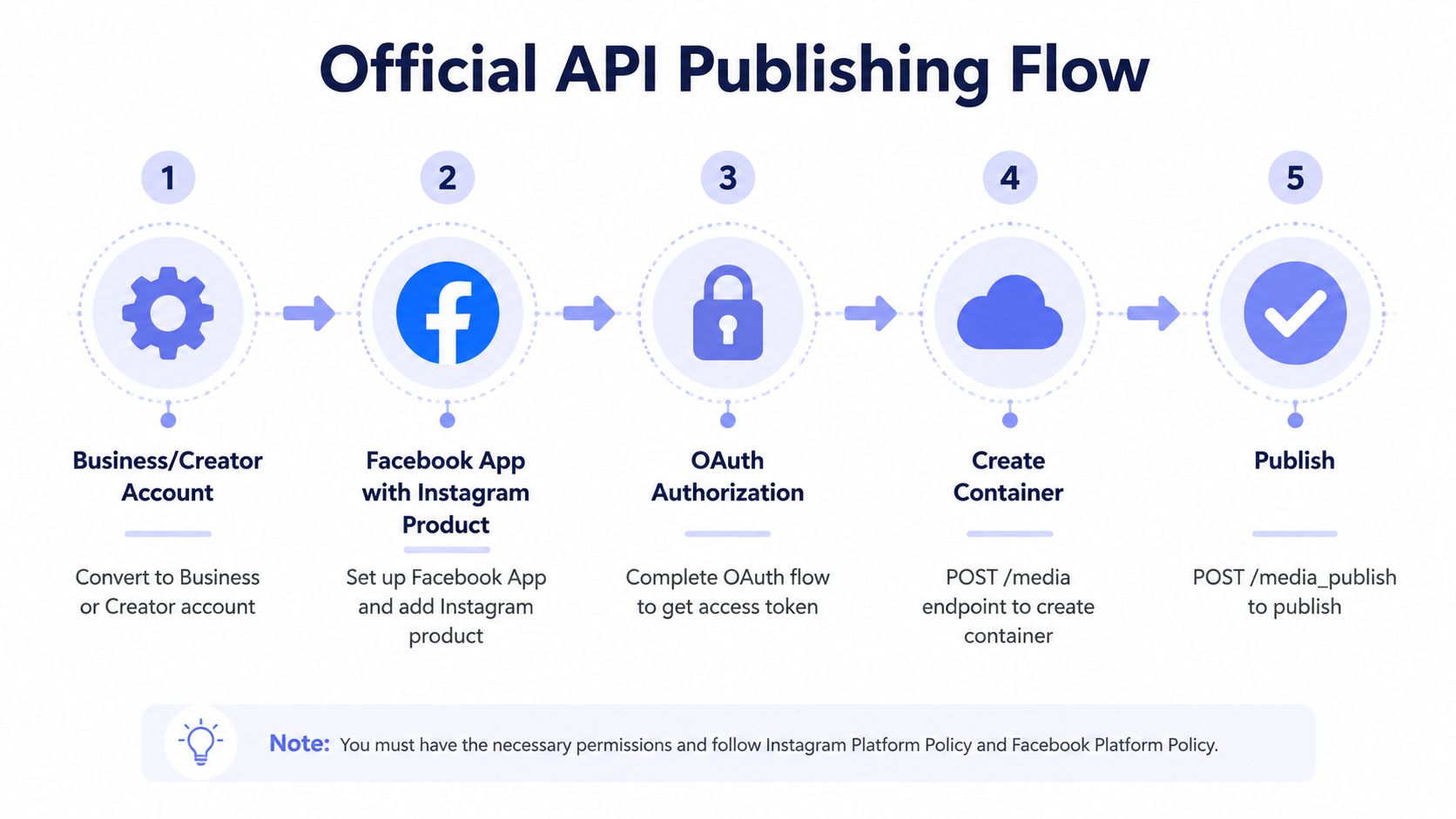 A five-step flowchart illustrating the official Instagram API process for automated posting and media publishing.
The publishing contract Instagram expects
The implementation shape is consistent. First, create a media container with the media URL and caption. Then poll the container until it leaves IN_PROGRESS, because the platform still needs to process the asset. Only after that do you call the publish endpoint Graph API container flow details. If you skip the wait, you're asking the API to publish work it hasn't finished validating.
Carousels add another wrinkle. The platform-partner restriction docs say carousels count as a single post in a daily quota, which changes how you think about batching and scheduling Plann's Instagram auto-post restrictions. That's useful not because it sounds neat, but because it changes how you model publishing capacity when a feed mixes single images and multi-item posts.
What belongs in the happy path
A clean flow needs a few essentials:
Eligible account: Business or Creator, not personal Instagram post automation requirements.
Public media URL: the container needs to fetch the asset.
Human review gate: catch errors before the final publish call Post Pulse automated posting pipeline.
Container polling: don't publish until processing is complete.
Final publish call: the last step only happens after the container is ready.
That architecture is why internal tooling often feels like a small queueing system instead of a webhook toy. The internal link that matches this model is Instagram container-based publishing, because the container is the backbone, not an implementation detail.
Why this matters for integrations
If you're building a SaaS feature or a backend automation, the important shift is mental. You're not “sending a post.” You're orchestrating creation, processing, validation, and delivery. That's the part that makes the system durable when assets, captions, and schedules vary across customers.
Meta OAuth, Token Lifetimes, and Rate Limits
Most broken Instagram automations don't fail because of content logic. They fail because someone wired up the first token they got back from Meta and never handled the rest of the lifecycle. The result is predictable, the workflow works briefly, then disappears when the short-lived token expires.
Follow the token lifecycle all the way through
The proper OAuth sequence matters. The initial Facebook Login returns a short-lived token valid for about 1 to 2 hours, then a second exchange upgrades it to a long-lived token valid for 60 days, and a third refresh call renews that long-lived token before it expires Meta OAuth token lifecycle guide. In practice, that means token refresh should run as a scheduled backend task, not as a rescue path after the first 401.
Security hygiene belongs in the same workflow, not in a separate policy doc. Store tokens securely, refresh on a cron schedule, and never log raw secrets. If you're emitting debug logs for every container poll, redact the access token before it lands in your log system.
Operational rule: if the token lifecycle isn't automated, the rest of the publishing pipeline is on borrowed time.
Rate limits shape the workflow design
The big throughput number that matters here is the documented 25 API-published posts per 24-hour period, with carousels counting as a single post Plann's auto-post restriction documentation. That's enough headroom for real publishing workflows, but not enough for sloppy loops or “just keep retrying” code.
You also want to avoid hammering status checks. Polling a processing container too aggressively burns quota without adding value, and that's where many homegrown tools become noisy for no reason. The better pattern is measured polling with backoff, then a clean handoff to publish once the container is ready.
Token and quota discipline in practice
A stable Instagram integration usually does three things well:
Refreshes long-lived tokens before expiry.
Separates publish attempts from status polling.
Treats daily quota as a scheduling constraint, not a suggestion.
That mix keeps the automation predictable. It also makes support easier, because when something stops posting, the failure surface is smaller and easier to inspect. The earlier section covered the container flow, and the same discipline applies here, because the token only matters if the container can survive long enough to be published.
REST API, n8n, Make.com, and MCP Automation Flows
Once the publishing contract is clear, the tooling choice becomes a trade-off between control and convenience. Some teams want raw REST because they need to own every request. Others want n8n or Make.com because they'd rather wire triggers and approvals visually. AI agent teams may want MCP so a model can decide what gets posted and when.
Pattern | Best fit | Code vs visual | Agent-friendly |
REST API | Backend teams that want total control | Mostly code | High, if you build the orchestration |
n8n | Visual workflows with human approval | Mostly visual | Medium |
Make.com | Teams already standardized on it | Visual | Medium |
MCP server | AI agents that publish autonomously | Mixed | High |
How the four paths differ
REST is the cleanest ground truth. It gives you the exact request shape for container creation, polling, and publish, but it also means you own retries, state, and token refresh. n8n fits well when you want a visual flow that mixes triggers, AI generation, and approval logic, because the steps map cleanly to nodes rather than code blocks. Make.com works when the team already uses it for other automations and wants the Instagram flow to live in the same mental model.
MCP is the newest shape in this group. It's useful when the agent, not the human, picks the content to publish, because the model can reason over inputs and fire the publish action through a server abstraction. That doesn't remove the Instagram constraints, it just moves decision-making higher in the stack.
For a broader workflow-market scan, a useful starting point is find n8n automation tools, especially if you're comparing node-based patterns instead of building every flow from scratch.
Picking the right one
Choose REST when you need the narrowest, most debuggable path.
Choose n8n when approval gates and AI generation live in the same workflow.
Choose Make.com when your team already lives there and wants minimal setup friction.
Choose MCP when an agent should draft and schedule content without a human driving every action.
A platform like PostPulse fits in this same decision tree as a publishing surface for teams that don't want to rebuild the Meta plumbing themselves. It exposes publishing through a unified layer, so the workflow can stay focused on content and approvals instead of account setup and token handling.
White-Label Integration Approaches for SaaS and AI Products
For a product team, the core question isn't just whether posting works. It's whether your users can publish from inside your app without seeing a separate social dashboard, a Meta setup maze, or a half-finished integration state. That's where the white-label decision starts to matter.
Private-label versus white-label
With Private-Label, your users connect their accounts inside PostPulse, then your code calls the unified publishing API. That keeps the heavy lifting behind a single integration layer while still letting your product control the experience. With White-Label, the whole publishing flow is embedded under your brand, so users never see PostPulse at all.
The pricing model makes the trade-off easier to see. Private-Label is $0.20 per publication with no subscription, or $5 per account per month and $48 per year per account with unlimited posts. White-Label is $200 per month plus $1 per active social account, where active means the account published at least one post that month PostPulse pricing.
When the model changes
If you're building an internal tool or a lean SaaS feature, Private-Label usually maps well to early demand because it avoids a heavy platform fee. If you're shipping a branded publishing experience to customers, White-Label becomes the cleaner fit because the product surface stays yours.
That “active account” definition matters more than it looks. Idle accounts don't add cost under the White-Label model unless they publish that month, which keeps dormant user bases from turning into unnecessary overhead PostPulse pricing. There's also a startup support program, with fees waived until launch, which is useful when the product is still in beta.
The practical developer test
A good rule is simple. If your users should think, “I publish from inside this app,” white-label is the right conversation. If your team just needs a reliable publishing backend and doesn't care whether users know the vendor behind it, Private-Label is easier to justify.
The reason this matters in Instagram integrations is consistency. Once the container flow, OAuth lifecycle, and scheduling rules are abstracted away, your product can focus on the user experience instead of babysitting API edge cases.
A Practical n8n Pipeline with Human Review
A reliable n8n setup for Instagram usually starts with content intake, not with the publish node. The most workable pattern is a queue of approved ideas, a generation step for the creative asset, a caption step, and then a human checkpoint before anything goes live.
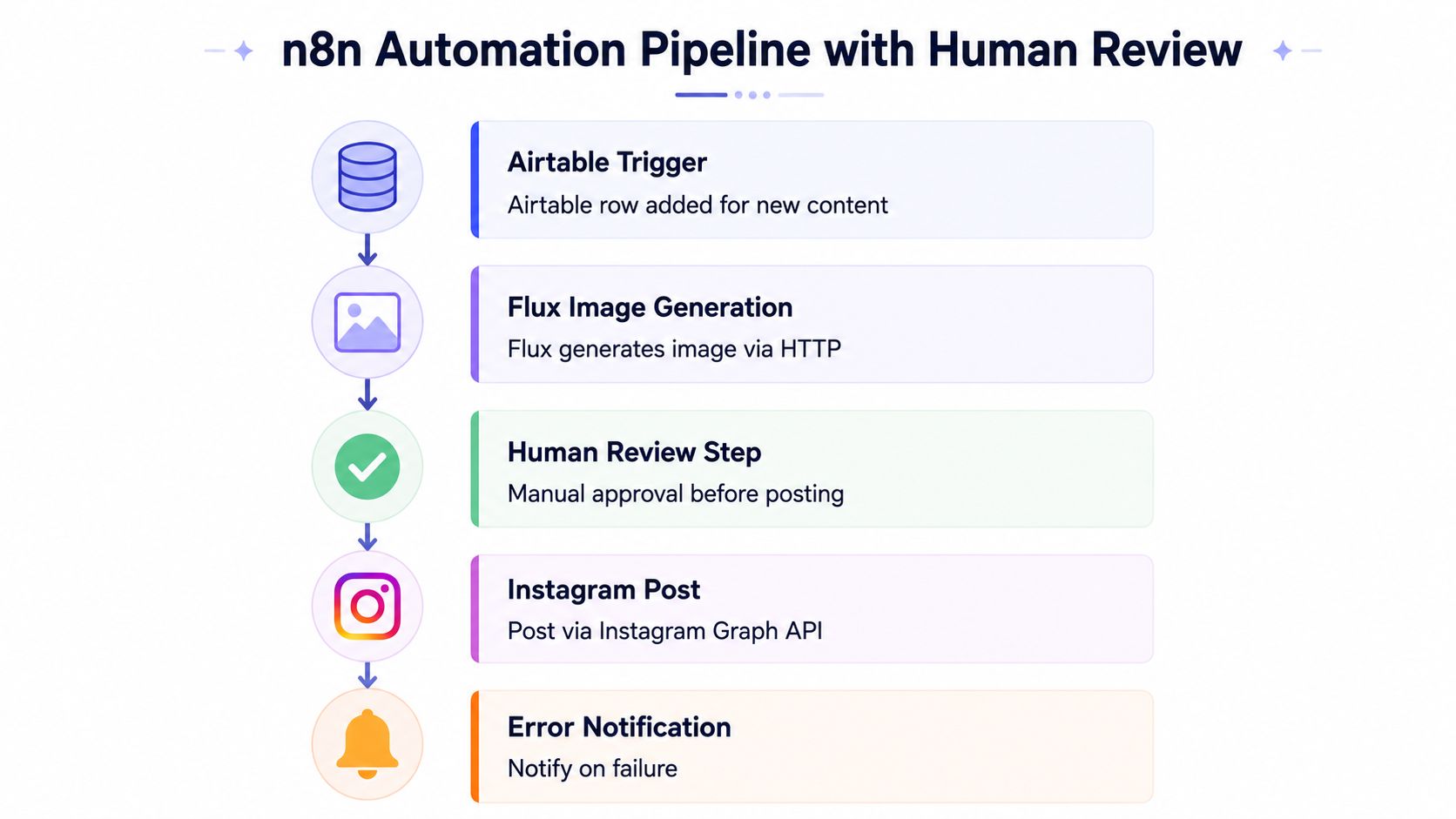 A diagram illustrating an n8n automation pipeline with Airtable, Flux image generation, human review, and Instagram posting.
A workflow that survives real use
A practical layout looks like this:
Airtable trigger. A new row appears for content ideas or scheduled campaigns.
Flux image generation. An HTTP node produces the visual asset.
Caption generation. A chat model drafts the copy.
Human review step. Someone checks tone, asset fit, and policy risk.
Instagram publish. The final node sends the post through the publishing API.
Error notification. Failures trigger an alert instead of failing unnoticed.
The human gate is the part teams skip and later regret. It catches obvious problems, like captions that drift off-brand or image and copy pairs that don't match. It also gives you a place to stop posts that feel risky before the API ever sees them Post Pulse's workflow examples.
What makes this flow useful
The pattern scales because it separates generation from approval. That means AI can do the drafting work, but a person still owns the final call before publish. The same structure works if you swap n8n for Make.com or a custom backend, because the underlying sequence stays the same.
The embedded walkthrough video below is handy if you want to see the shape of the pipeline rather than just read about it.
Useful pattern: automate the boring part, review the irreversible part.
The strongest n8n flows don't try to remove humans from the loop. They move humans to the exact point where judgment matters, which keeps the automation useful instead of reckless.
Compliance, Safety, and What to Never Automate
The safe line on Instagram is narrower than a lot of automation vendors admit. Publishing and scheduling through the official Graph API is the approved path for professional accounts. Automating likes, follows, comment spam, DMs, or scraping is where policy risk starts showing up fast Mixpost's safe automation guide.
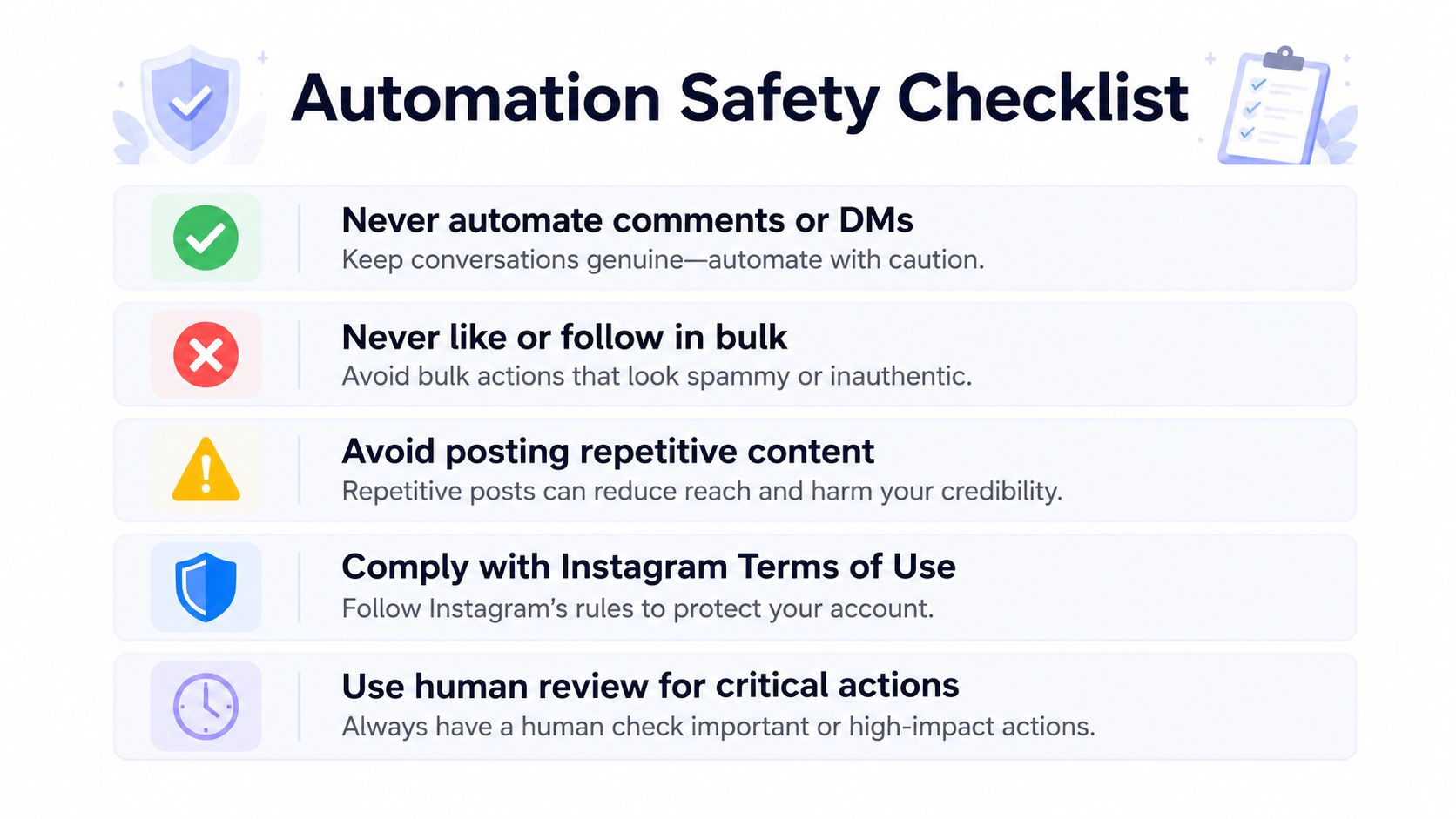 A safety checklist infographic with five best practices for secure and authentic Instagram automation and account management.
Safe automation is disciplined automation
The operational guidance that comes up again and again is consistent. Many automation guides recommend 3 to 5 posts per week for most brands, while also noting a practical range of 1 to 3 posts per day and at least 3-hour gaps between automated posts, with posting times varied by at least 15 minutes EvergreenFeed's automation guide. Those numbers are about preserving a natural schedule, not about pushing the platform harder.
That's also why repetitive content gets dangerous. When the same format, timing, and behavior repeats too neatly, the workflow stops looking like normal publishing and starts looking like a bot. Safe automation keeps the cadence predictable for humans, but not robotic.
What never belongs in the flow
Never automate comments or DMs. That crosses from publishing into engagement automation.
Never like or follow in bulk. That's classic policy-risk behavior.
Avoid repetitive content patterns. Repetition makes the account look synthetic.
Use human review for critical actions. The final publish decision deserves a person.
Comply with Instagram's terms. Approved publishing is not the same as unauthorized automation Mixpost safe automation guide.
A developer building this for real users should design the system to fail closed. If the review step is skipped, the post should wait. If the token can't refresh, the system should pause. If the post would exceed the intended schedule, the queue should hold it.
PostPulse gives teams a publishing layer for Instagram and other platforms through REST, n8n, Make.com, or MCP, which is useful when the core problem is orchestration, not just posting. If you're building automated posting on Instagram into a product or workflow, visit PostPulse and look at the unified publishing model, then decide whether Private-Label or White-Label fits your stack.
About the Author

Founder of PostPulse — a social media scheduling platform for creators and teams. Software engineer with a passion for building developer tools and simplifying complex API integrations across social media platforms.