Low Code Automation: A Practical Guide for Developers
Published on · Updated on
Tags:
Your workflow fails before the post is published. A LinkedIn token has expired, an X queue is returning rate-limit errors, and a markdown field has been truncated without an obvious warning. Meanwhile, TikTok expects a different media shape, Instagram adds its own publishing rules, and YouTube Shorts introduces another upload path to monitor.
That recurring friction is why low code automation deserves to be treated as an architecture decision, not just a faster way for business users to connect apps. The visual canvas can remove repetitive integration work, but the resulting system still needs clear boundaries, retries, credentials, observability, and an owner who understands production failure.
Table of Contents
The Daily Grind of Juggling Nine Social APIs
A campaign that looks simple in the content calendar becomes a distributed system the moment it reaches production. You may need to publish to Instagram, TikTok, YouTube, LinkedIn, X, Threads, Bluesky, Facebook, Telegram, and Pinterest, with YouTube also covering Shorts and video workflows. Each platform brings a different authentication flow, token lifecycle, content model, media requirement, response format, and operational edge case.
Tuesday morning usually exposes the problem. The LinkedIn credential fails during a refresh. The X publishing queue backs up after a burst of requests. A post that passed your internal validation arrives with formatting removed because the destination accepts a narrower field than your source model. The workflow may report partial success, leaving someone to determine which networks published, which ones failed, and whether retrying will create duplicates.
Why the abstraction keeps breaking
The hard part isn't sending an HTTP request. It's maintaining the assumptions around that request.
One API may return a publication identifier immediately, while another makes you poll for processing. One platform may accept a video upload in a single operation, while another requires media preparation before the final post. Webhooks can arrive late, twice, or out of order. OAuth credentials can remain stored in a workflow long after the person who created them has changed roles.
A useful distribution automation guide helps frame the broader problem: publishing isn't one action, it's a chain of transformations and delivery decisions. Developers who model it as a single “publish” function usually end up hiding platform-specific state inside scattered conditionals.
Practical rule: Treat every social destination as an unreliable external dependency, even when the happy path looks identical.
Low code automation exists in this space because teams don't want to maintain nine separate versions of the same campaign logic. The opportunity is to centralize orchestration while keeping platform-specific behavior behind a controlled integration boundary. The risk is assuming that a visual workflow removes the engineering responsibility. It doesn't. It changes where that responsibility lives.
What Low Code Automation Actually Means
Low-code automation is a workflow system that combines visual orchestration with an escape hatch for code. You connect triggers, data mappings, branches, and external services on a canvas, then add scripted transformations or custom requests when the built-in modules can't express the rule.
That definition matters because low-code sits between two approaches that are often confused with it.
Traditional code gives you repositories, bespoke SDK integrations, automated tests, CI/CD pipelines, deployment controls, and complete freedom over runtime behavior. It also makes you responsible for every integration detail, from OAuth refresh handling to schema changes and operational tooling.
No-code hides nearly every implementation detail behind a graphical interface. That can work well for linear tasks, but the platform usually determines how you handle branching, retries, data structures, and exceptional cases. If the canvas has no extension point, a rule that doesn't fit becomes a workaround or a separate service.
Low-code keeps the visual model but preserves developer control. Tools such as Zapier, Make, n8n, Workato, and Power Automate occupy different positions on the spectrum, yet they share the same basic promise: compose reusable building blocks quickly, then drop into code or advanced configuration where the workflow needs more precision.
A practical comparison
Dimension | Traditional Code | No-Code | Low-Code Automation |
Workflow design | Repository and application code | Visual configuration | Visual flow with scripted extensions |
Integration model | Bespoke SDKs and API clients | Fixed connectors | Reusable connectors plus custom requests |
Logic depth | Full programming control | Platform-defined conditions | Branches, transforms, and code escape hatches |
Testing | Developer-managed test suites and CI/CD | Limited platform testing | Platform tests plus external validation where needed |
Ownership | Engineering team | Business or operations team | Shared ownership with engineering governance |
Best fit | Critical, complex, or performance-sensitive systems | Simple repeatable tasks | Multi-step workflows with changing integrations |
The useful question isn't whether a tool is “low-code” by marketing language. Ask whether the platform lets you inspect data between steps, handle failures explicitly, control credentials, version changes, and test the workflow outside a single manual run.
Low code is effective when the workflow's complexity comes from coordination, not from a demanding algorithm. It saves time by removing repetitive plumbing. It doesn't make business rules, security policy, or external API behavior disappear.
The Core Building Blocks of a Low Code Stack
A production automation stack usually has more structure than its canvas suggests. Whether the workflow runs in n8n, Make, Workato, Power Automate, or an internal platform, five layers deserve separate design decisions.
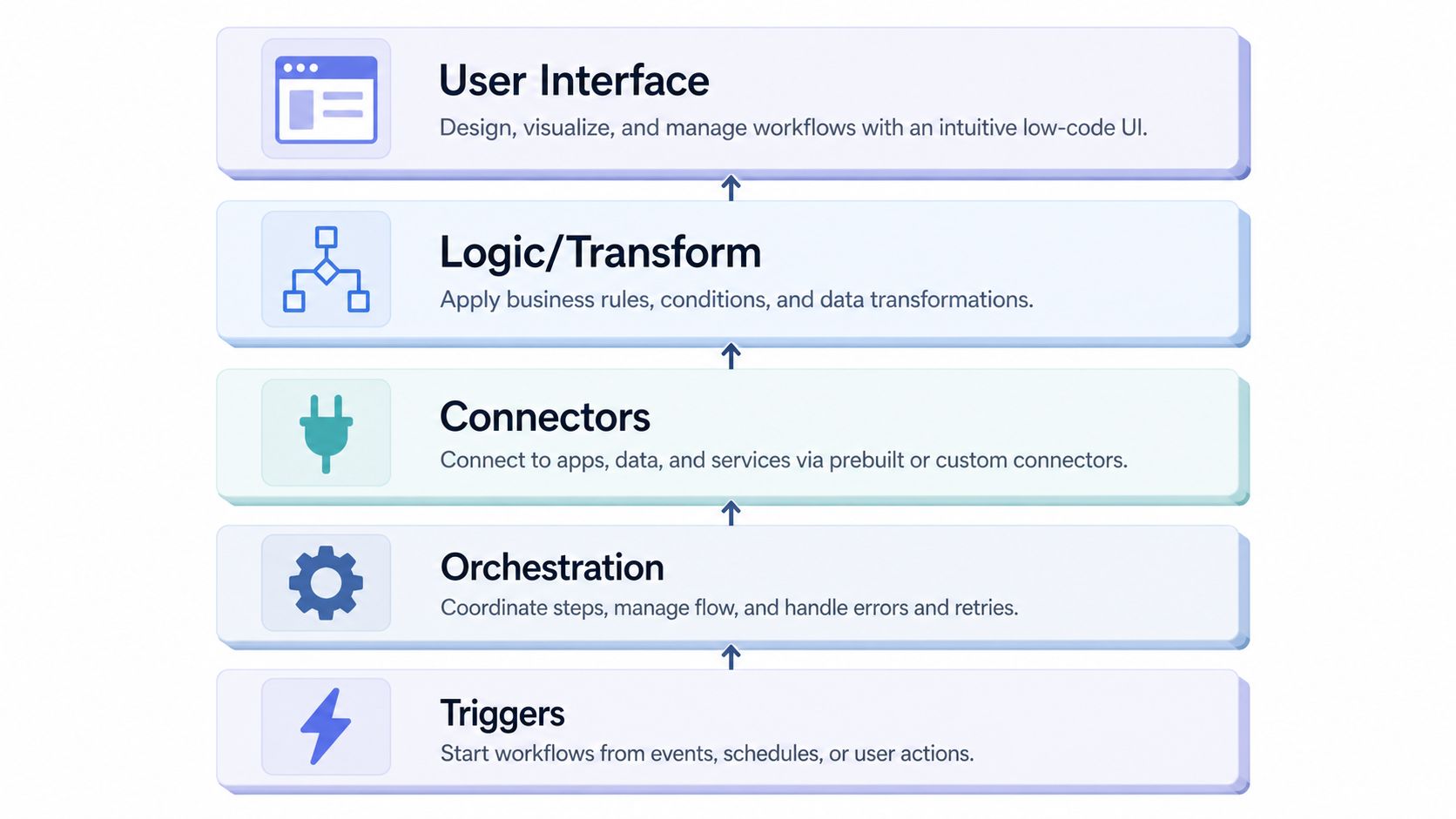 A diagram illustrating the architectural components of a low-code automation system, moving from triggers to user interface.
Triggers establish what counts as an event
A trigger starts the run. It may be a schedule, webhook, database change, inbound email, form submission, or message from another workflow. The important design question is whether the trigger represents a durable event or merely a periodic check.
A scheduled trigger is easy to reason about, but it can miss intermediate state unless the workflow records a cursor or last-processed value. A webhook can reduce latency, but it requires replay protection, signature verification where supported, and a plan for events that arrive out of order.
Orchestration owns movement and recovery
The orchestration layer passes data between steps, manages branches, controls retries, and determines whether a failure stops the run or routes it elsewhere. This is also where idempotency belongs. If the same event is delivered twice, the workflow should recognize the event key and avoid creating a duplicate publication or record.
Don't bury retry behavior inside every connector. Define which failures are transient, which are permanent, and which require a human decision. A retry without a stable operation key can turn a temporary timeout into duplicate side effects.
Connectors contain external-system knowledge
Connectors wrap authentication, request construction, schema mapping, response parsing, and quota behavior. Keeping that knowledge at the boundary prevents the rest of the workflow from becoming a collection of platform-specific exceptions.
Teams evaluating cloud-hosted workflow systems may also benefit from this practical guide to cloud-based apps, particularly when deciding which responsibilities belong in the platform and which belong in a separate service.
Logic, transformation, and interface complete the stack
Decision logic applies filters, routing, normalization, and validation. AI agents can classify, summarize, or rewrite content, but they shouldn't control irreversible actions without constraints. Give model output a schema, validate it, and separate the agent's decision from the orchestration that executes it.
The user interface may be a workflow canvas, an approval screen, a dashboard, or an internal form. It makes the system operable, but it doesn't replace observability. Logs should capture correlation identifiers, input and output status, connector responses, retry counts, and meaningful cost or usage signals.
Engineering boundary: Keep decision logic separate from orchestration. You should be able to change a classification rule without rewriting delivery, retry, and audit behavior.
Common Patterns and Where Each One Fits
The right workflow pattern depends on how the event arrives, how quickly the system must react, where judgment is required, and what happens when execution fails. Scheduled jobs, webhooks, AI loops, and approvals can all automate the same broad business process, but they carry different operational obligations.
Pattern | Trigger | Latency | Best For | Main Risk |
Scheduled workflow | Time-based schedule | Delayed until the next run | Reports, planned publishing, reconciliation | Blind spots between runs |
Event-driven automation | Webhook or system event | Near-immediate | Notifications, state changes, intake routing | Replay and ordering errors |
AI agent loop | Task request or workflow state | Variable | Classification, drafting, research, transformation | Unbounded behavior and invalid output |
Human-in-the-loop flow | Approval request | Queue-dependent | Sensitive publishing, exceptions, compliance review | Stale or abandoned approvals |
Scheduled workflows favor predictability
A schedule works when time is the business rule. A daily reconciliation, planned content release, or periodic cleanup doesn't need a webhook. The trade-off is that the workflow may not see a state change until the next execution, and a missed run can remain unnoticed unless monitoring checks for it.
Event-driven workflows favor responsiveness
Webhooks are a strong fit when a source can reliably tell you that something changed. They reduce polling and make downstream action faster, but you must store event identifiers, handle duplicates, and decide what to do when events arrive out of sequence. Event-driven design is not “instant automation” unless the receiving system can recover from delivery ambiguity.
AI loops need a narrow decision boundary
An agent can rewrite a brief for different audiences or classify incoming requests. It shouldn't receive unrestricted permission to publish, delete, or alter durable records. Put validation and approval between model output and irreversible side effects.
Human review is the safer choice for brand-sensitive or legally consequential content. It also introduces a queue, so the workflow needs expiration, reminders, reassignment, and a defined outcome when nobody approves.
A useful decision rule is simple: choose scheduled for time-based work, event-driven for reliable state changes, AI-assisted for bounded transformations, and human-in-the-loop when judgment matters more than latency. Teams building reusable scenarios can also compare this architecture with a Make.com workflow automation approach.
Building a Real Workflow From Trigger to Publish
A durable content workflow separates intake, transformation, judgment, delivery, and measurement. The tools can vary, but the boundaries should remain explicit.
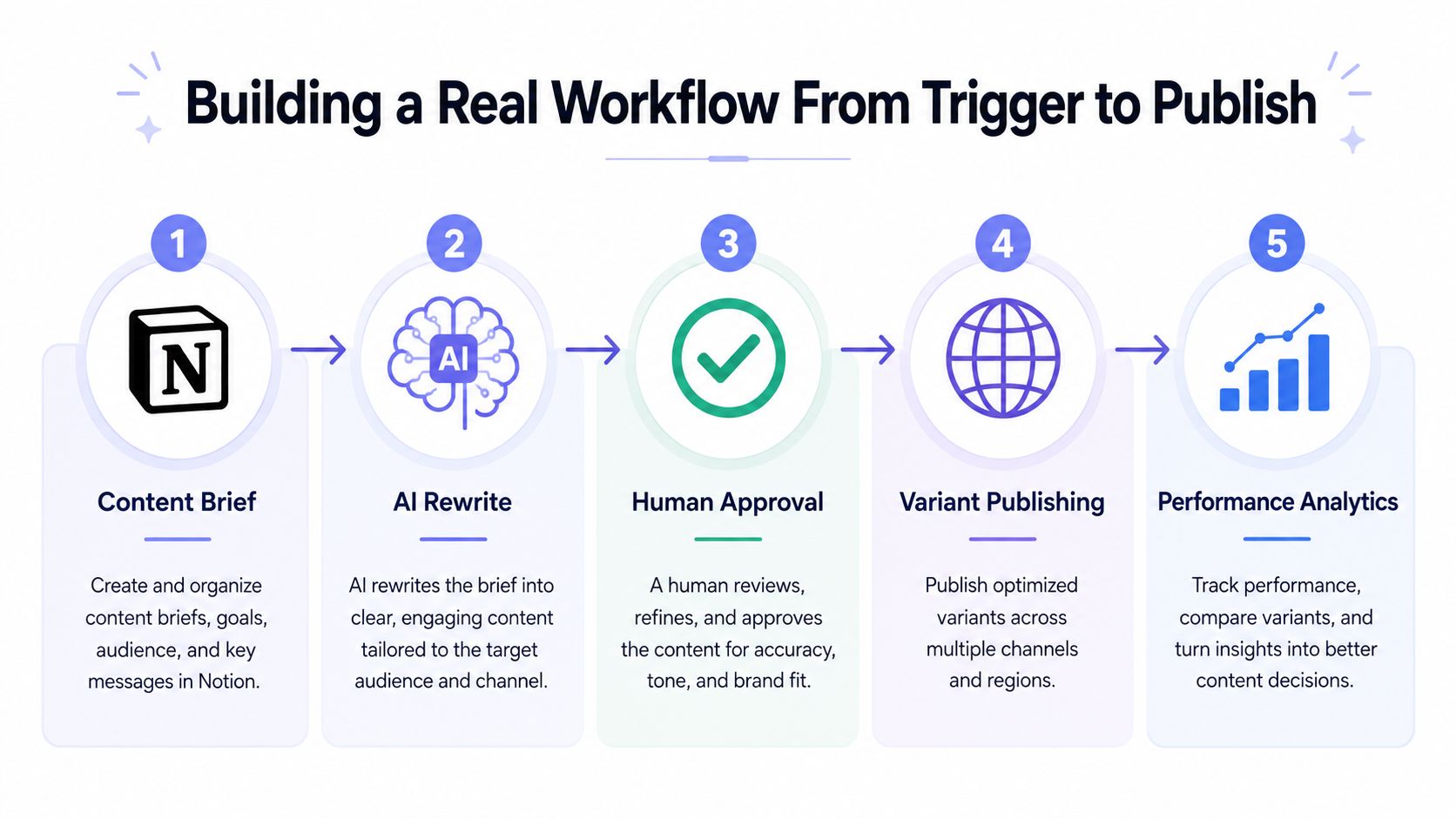 A five-step workflow diagram illustrating the content creation process from Notion brief to performance analytics tracking.
Capture the brief in Notion. Create a database record with the campaign identifier, source text, intended networks, media references, preferred publishing window, and approval status. The record becomes the workflow's durable input, rather than relying on a transient message or manually copied prompt.
Trigger the automation. Use a database event or schedule to find records marked ready for processing. Before starting, write a run identifier and check whether that campaign has already been transformed. This is the point where low-code orchestration handles routing and state management.
Ask the AI agent to produce variants. Pass a constrained input and require structured output for each destination. The agent can adapt length, tone, calls to action, and formatting, but it shouldn't invent missing media or claim that a post was published. Validate the response before sending it onward.
Create an approval task. Store the generated variants beside the original brief and set the record to awaiting review. The approval action should be explicit, authenticated, and time-bounded. If approval is skipped, the workflow should leave the content unpublished and notify an owner rather than assuming consent.
Publish through the social delivery boundary. A unified publisher such as PostPulse can sit between the workflow and the social networks, handling the network-specific publishing surface while the low-code flow retains campaign state and approval logic. The relevant pattern is described in this guide to social media automation across networks.
Record the outcome. Save the external publication identifiers, destination, status, error details, and timestamp back to the campaign record. Analytics should reference those identifiers instead of guessing from text matching. This gives operators a trace from brief to variant to destination result.
Error handling decides whether the workflow survives
Malformed agent output should fail validation before it reaches a connector. Route the record to an exception state with the raw response, validation error, and run identifier available for review.
A skipped approval should expire cleanly. It shouldn't remain in an ambiguous “ready” state that a later schedule can publish accidentally. A platform response with HTTP 429 means the workflow must respect the destination's throttling behavior, pause or retry according to a bounded policy, and avoid treating the request as permanently failed without inspection.
TikTok's v2 documentation describes a one-minute sliding rate window and a default limit of 600 requests for endpoints including /v2/user/info/, /v2/video/query/, and /v2/video/list/; exceeding the threshold can produce HTTP 429 with rate_limit_exceeded (TikTok API v2 rate limits). TikTok for Business also documents application tiers, including Basic at 10 QPS, 600 QPM, and 864,000 QPD, and Ultimate at 50 QPS, 3,000 QPM, and 4,320,000 QPD (TikTok API for Business rate limits).
For rollout mechanics, teams can use proven rollout strategies as a useful reference for staged change, monitoring, and rollback thinking. The publishing workflow still needs its own destination-level tests because media and authorization behavior varies by network.
Trade-offs, Governance, and Hidden Failure Modes
A demo can succeed while the production architecture accumulates debt. Low-code platforms make it easy to add another connector, branch, or credential. They don't automatically make those additions discoverable, testable, or owned.
Token expiry becomes an operational incident
With several connectors, credentials expire on different schedules and expose different errors. TikTok's Research API FAQ says access tokens expire every two hours, the daily request limit is 1,000, quotas reset at 12 AM UTC, and the Video and Comments API can return 100 records per request (TikTok Research API FAQ). That combination affects refresh jobs, batch design, and alerting.
The developer problem is correlation. An operator sees “publishing failed,” while the engineer must identify whether the token, scope, endpoint, media state, or quota caused it.
Rate limits hide until concurrency changes
A workflow that works in a test account can hit a production ceiling when many campaigns execute together. YouTube documents a default daily allocation of 100 search.list calls, 100 videos.insert calls, and 10,000 units for other endpoints combined, while videos.insert costs 1 unit in the Video Uploads quota bucket (YouTube API quota documentation). Treat quotas as capacity planning inputs, not implementation trivia.
Visual changes can create logic drift
When multiple people can edit a flow, a small mapping change can alter routing without a code review. Over time, nobody knows which branch is authoritative, why a workaround exists, or whether a connector still receives the expected schema.
Governance research from KPMG found that only 54% of surveyed companies had control frameworks, while 53% had defined security requirements and 53% conducted regular audits (KPMG low-code platforms report). The figures show why ownership, least-privilege access, version-specific policies, and continuous monitoring need explicit budget.
Low-code debt resembles technical debt. It isn't a reason to avoid the tools. It is a reason to assign ownership, document intent, test changes, monitor failures, and schedule cleanup before the canvas becomes an undocumented production system.
A Short Checklist Before You Ship Your Next Automation
Before merging a workflow, verify the following commitments. Each one addresses a failure that otherwise appears only after an external system, model, or human behaves differently from the happy path.
Choose a clear trigger: Identify the authoritative event source and define what happens when the source repeats, delays, or disappears.
Add an idempotency key: Use a stable campaign, record, or event identifier so retries don't create duplicate side effects.
Route errors intentionally: Separate transient failures, invalid input, expired credentials, quota responses, and human exceptions.
Scope credentials narrowly: Give each connector only the permissions it needs, then document who owns renewal and revocation.
Budget rate limits: Model burst behavior and concurrent runs against the documented quota for every external API.
Add observability hooks: Record run identifiers, step status, connector responses, retry decisions, and final external IDs.
Prepare rollback paths: Define how to stop future runs, retract or correct an output where supported, and restore the prior workflow version.
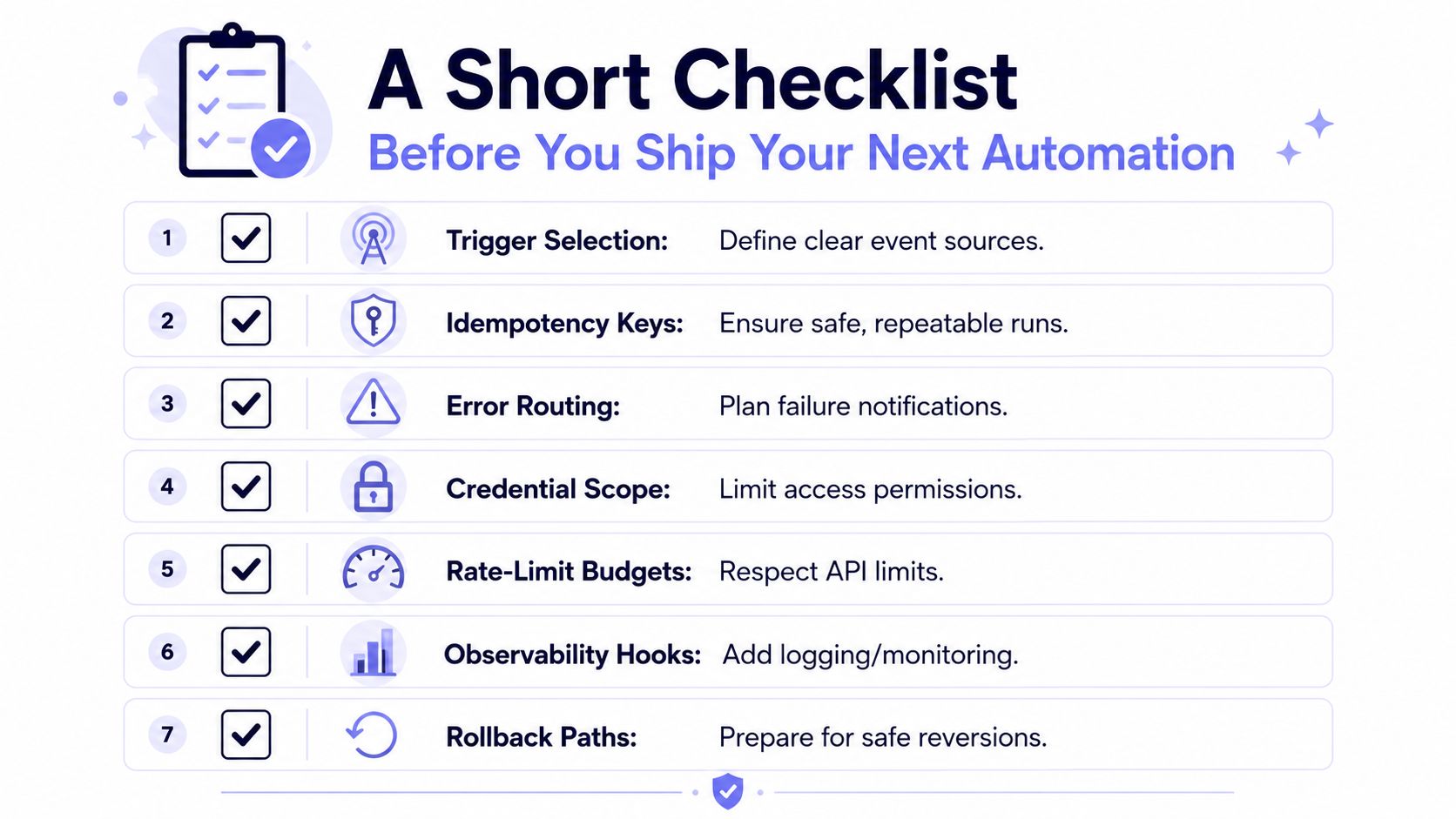 A checklist infographic outlining seven key considerations for shipping successful and reliable automation software projects.
AI agents and third-party connectors raise the bar. Validate every model response against a schema, cap the actions an agent can request, and require approval before sensitive publication. For connectors, treat the response contract as unstable until you have tested authentication failure, throttling, malformed media, partial completion, and retry behavior.
The architecture becomes easier to audit when one publishing node owns the social-specific boundary. In the content example, the rest of the pipeline can focus on Notion state, transformation, approval, and reporting, while the publishing component handles the network differences. You still need to monitor that boundary, but you don't need to scatter nine authentication and media implementations across the workflow.
A final review should answer one question for every step: who can change it, how do we know it failed, and what happens if we run it twice? If the answer is unclear, the workflow isn't ready for unattended execution.
PostPulse provides a unified publishing layer for apps, low-code workflows, and AI agents through a REST API, official n8n and Make.com integrations, and an MCP server, with support for ten social platforms. Visit PostPulse to evaluate whether centralizing the publishing boundary can make your next low-code automation easier to govern and operate.
About the Author

Founder of PostPulse — a social media scheduling platform for creators and teams. Software engineer with a passion for building developer tools and simplifying complex API integrations across social media platforms.