TikTok Content Publishing API: Videos, Photo Carousels & the Async Publishing Dance
Published on · Updated on
Tags:
You'd think posting a video to TikTok via API would be straightforward — upload a file, set a caption, done. Instead, you initialize a publish, TikTok pulls the video from your server, and you poll for status. Oh, and if you want to post photos? No PNGs allowed.
The Problem
TikTok's Content Publishing API is fully asynchronous. There's no "upload and get a post ID back" flow. Instead:
Initialize a publish request — telling TikTok where to find your media
TikTok pulls the media from your URL (yes, your file must be publicly accessible)
Poll for status — the video goes through download, upload processing, and finally publishing
If it fails, you check the failure reason — some are retryable, some aren't
This is different from platforms like Twitter or LinkedIn where you push media directly. TikTok pulls it. That means your media hosting needs to serve files publicly, and you need to handle a state machine of publish statuses.
And then there are the surprises: TikTok doesn't accept PNG images (seriously), privacy levels must match what the creator allows, and the endpoints for video vs. photo posts are completely different.
Let's walk through all of it.
Prerequisites
A TikTok Developer App registered at developers.tiktok.com
A valid access token obtained via TikTok's OAuth 2.0 flow (authorization code + PKCE)
Required scopes:
video.publish,video.uploadMedia files hosted at a publicly accessible URL — TikTok will download them from your server
Videos must be MP4. Images must be JPEG or WEBP (not PNG — TikTok will reject them)
TikTok OAuth: Getting Your Access Token
Before you can publish, you need an access token. TikTok uses a standard OAuth 2.0 authorization code flow with PKCE.
Step 1 — Build the Authorization URL
Direct the user to TikTok's authorization page:
https://www.tiktok.com/v2/auth/authorize/
  ?client_key={your_client_key}
  &response_type=code
  &scope=user.info.basic,video.publish,video.upload
  &redirect_uri={your_redirect_uri}
  &state={random_state}
  &code_challenge={code_challenge}
  &code_challenge_method=S256
After the user approves, TikTok redirects to your redirect_uri with a code parameter.
Step 2 — Exchange the Code for Tokens
POST https://open.tiktokapis.com/v2/oauth/token/
Content-Type: application/x-www-form-urlencoded

client_key={your_client_key}
&client_secret={your_client_secret}
&code={authorization_code}
&grant_type=authorization_code
&redirect_uri={your_redirect_uri}
&code_verifier={code_verifier}
The access token lasts about 1 day (86,400 seconds). The refresh token is valid for 365 days.
Step 3 — Refresh When Expired
POST https://open.tiktokapis.com/v2/oauth/token/
Content-Type: application/x-www-form-urlencoded

client_key={your_client_key}
&client_secret={your_client_secret}
&grant_type=refresh_token
&refresh_token={refresh_token}
Heads up: Each refresh response includes a new refresh token. Always store the latest one — the old one gets invalidated.
Step-by-Step: Publishing a Video
Video publishing uses the PULL_FROM_URL source type — you provide a URL and TikTok downloads the video from your server.
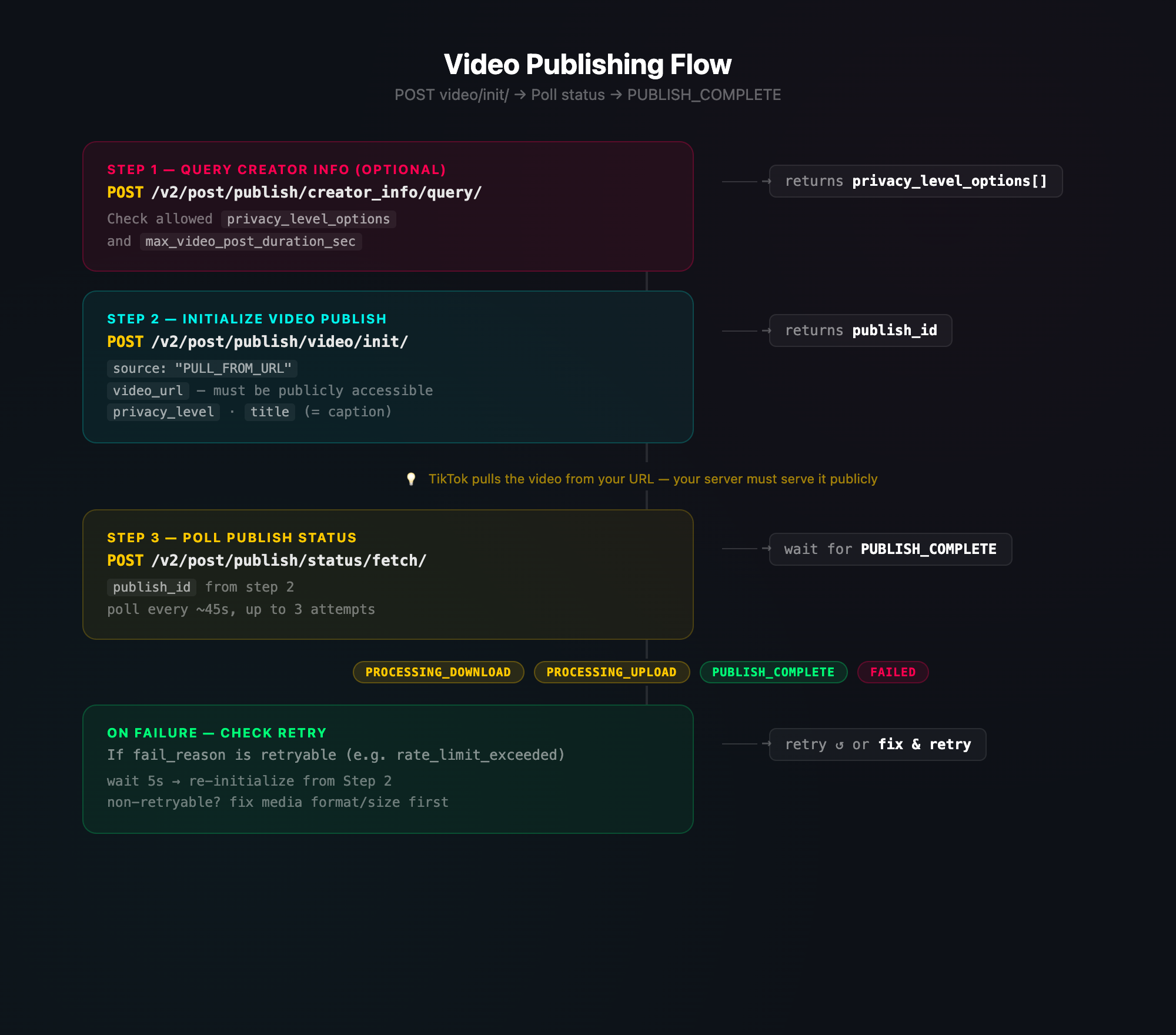
Step 1 — Query Creator Info (Optional but Recommended)
Before publishing, check what privacy levels and features the creator has access to:
POST https://open.tiktokapis.com/v2/post/publish/creator_info/query/
Authorization: Bearer {access_token}
Content-Type: application/json
The privacy_level_options array tells you which values you're allowed to use when publishing. If you pick a value that isn't in this list, TikTok will reject the publish request.
Step 2 — Initialize the Video Publish
POST https://open.tiktokapis.com/v2/post/publish/video/init/
Authorization: Bearer {access_token}
Content-Type: application/json; charset=UTF-8

{
  "post_info": {
    "title": "Check out this awesome video!",
    "privacy_level": "PUBLIC_TO_EVERYONE",
    "disable_duet": false,
    "disable_comment": false,
    "disable_stitch": false,
    "video_cover_timestamp_ms": 1
  },
  "source_info": {
    "source": "PULL_FROM_URL",
    "video_url": "https://your-cdn.com/video.mp4"
  }
}
Response returns a publish_id you'll use for status polling.
Important: The video_url must be publicly accessible. TikTok's servers will make an HTTP request to download the file. If it's behind auth or returns a redirect chain that TikTok can't follow, the publish will fail silently during processing.
Step 3 — Poll for Publish Status
Publishing is async. After initialization, you need to poll until TikTok finishes processing:
POST https://open.tiktokapis.com/v2/post/publish/status/fetch/
Authorization: Bearer {access_token}
Content-Type: application/json

{
  "publish_id": "v_pub_xxxxxxxxxxxx"
}
The status progresses through these states:
PROCESSING_DOWNLOAD— TikTok is downloading your mediaPROCESSING_UPLOAD— Media is being processed/transcodedSEND_TO_USER_INBOX— Video sent to creator's inbox for reviewPUBLISH_COMPLETE— Published successfullyFAILED— Something went wrong — checkfail_reason
Polling strategy: Wait about 45 seconds between polls. Video processing can take a while depending on file size and TikTok's current load. Plan for up to 3 polling attempts before treating it as a timeout.
Step-by-Step: Publishing Photos
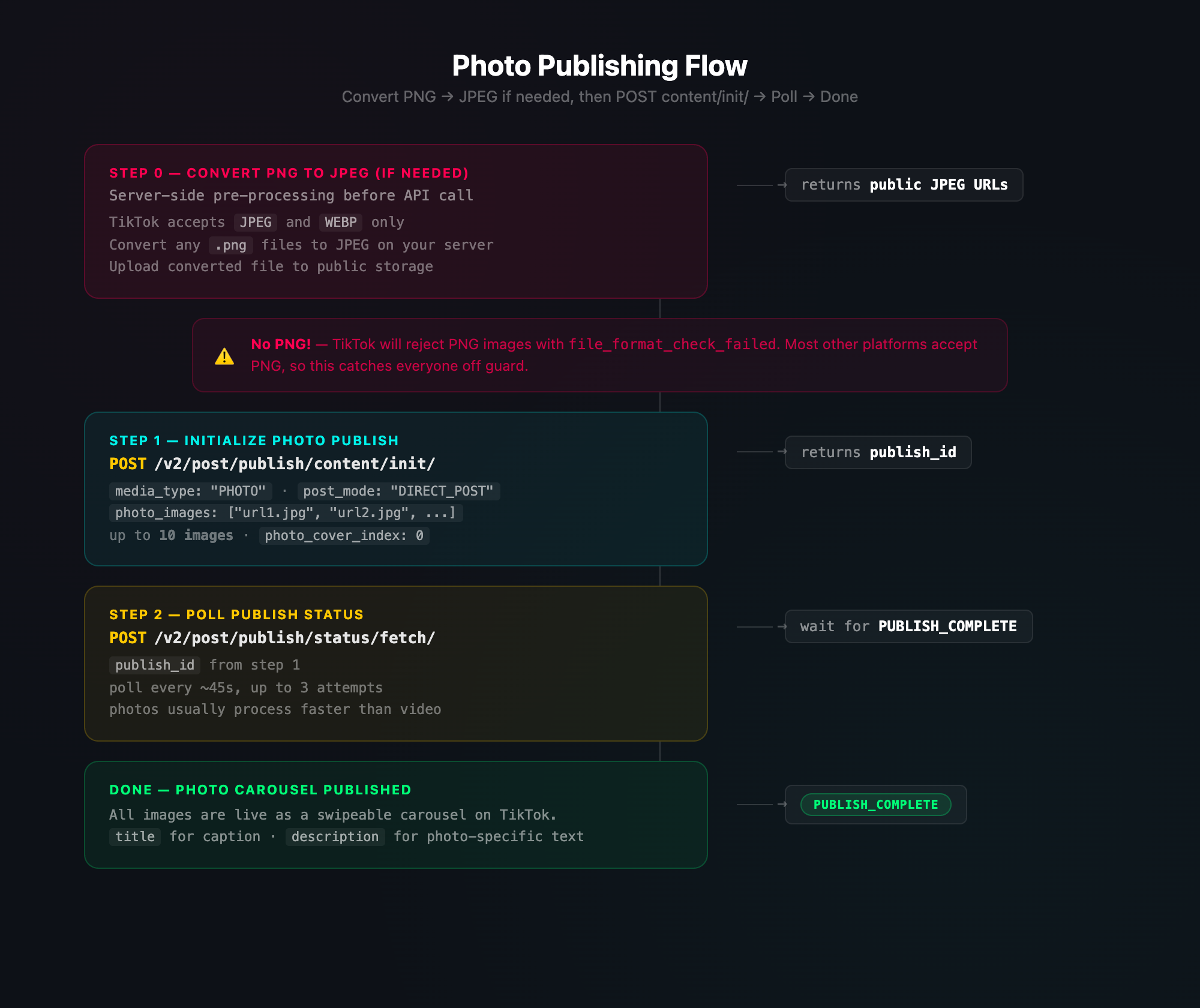
Photo posts use a different endpoint than videos and support carousels of up to 10 images.
Step 1 — Initialize the Photo Publish
POST https://open.tiktokapis.com/v2/post/publish/content/init/
Authorization: Bearer {access_token}
Content-Type: application/json; charset=UTF-8

{
  "post_info": {
    "title": "Photo carousel post",
    "description": "Check out these shots from my trip!",
    "privacy_level": "PUBLIC_TO_EVERYONE",
    "disable_comment": false
  },
  "source_info": {
    "source": "PULL_FROM_URL",
    "photo_cover_index": 0,
    "photo_images": [
      "https://your-cdn.com/photo1.jpg",
      "https://your-cdn.com/photo2.jpg",
      "https://your-cdn.com/photo3.jpg"
    ]
  },
  "post_mode": "DIRECT_POST",
  "media_type": "PHOTO"
}
Step 2 — Poll for Status
Same polling flow as video — use /post/publish/status/fetch/ with the publish_id.
The PNG trap: TikTok accepts JPEG and WEBP for photos but rejects PNG. If your users upload PNGs, you need to convert them to JPEG before publishing. This is easy to miss because most other platforms accept PNG without issues.
The Public URL Requirement
Unlike platforms where you push binary data directly, TikTok uses a pull model — you give TikTok a URL and their servers fetch the file. This means:
Your media must be at a publicly accessible URL — no auth headers, no short-lived pre-signed URLs that expire in seconds
The URL must resolve quickly — TikTok won't wait long for slow servers
No redirects that TikTok can't follow — keep the URL direct
If you're using S3-compatible storage (like Tigris, AWS S3, etc.), you'll need to either make the file public before publishing, or use a CDN domain alias so the URL looks clean.
Handling Failures & Retries
Not all failures are permanent. TikTok's fail_reason values fall into two categories:
Retryable failures (try again):
rate_limit_exceeded— you're making too many requests, back off and retry
Non-retryable failures (fix the issue first):
file_format_check_failed— wrong file type (e.g., PNG instead of JPEG)duration_check_failed— video too long or too shortframe_rate_check_failed— video frame rate out of rangepicture_size_check_failed— image dimensions out of rangespam_risk_too_many_pending_share— too many pending publishesVarious banned/restricted user errors
When you get a retryable failure, wait a few seconds and re-initialize the publish. For non-retryable failures, fix the underlying issue (convert the file format, resize, etc.) before trying again.
Common Pitfalls
PNG images are rejected — TikTok only accepts JPEG and WEBP for photo posts. Convert PNGs to JPEG on your server before publishing
Videos use a different endpoint than photos —
/post/publish/video/init/vs/post/publish/content/init/. Don't mix them upPrivacy level must match creator's options — always query
/creator_info/query/first and use a value from theprivacy_level_optionsarrayMedia URLs must be truly public — pre-signed URLs that expire quickly will fail. TikTok needs time to download the file
titleis the video caption,descriptionis for photos — the naming is confusing butpost_info.titleis what appears as the post text for videosPhoto posts support up to 10 images — but you can't mix photos and videos in one post
Polling takes patience — video processing can take minutes. Don't poll too aggressively or you'll hit rate limits
Access tokens expire daily — unlike Meta's 60-day tokens, TikTok tokens last only ~24 hours. Make sure your refresh logic runs frequently
TL;DR — The Full Flow (Diagram)
Video Publishing
 TikTok Video Publishing Flow
Photo Publishing
 TikTok Photo Publishing Flow
About PostPulse
PostPulse handles all of this for you — video and photo publishing, PNG-to-JPEG conversion, public URL hosting, status polling with retry logic, and token refresh — across TikTok and 8 other platforms. Focus on creating content, not wrestling with APIs.
About the Author

Founder of PostPulse — a social media scheduling platform for creators and teams. Software engineer with a passion for building developer tools and simplifying complex API integrations across social media platforms.