Automated Twitter Posts That Actually Work in 2026
Published on
Tags:
You open your monitoring dashboard at 11 p.m. on Friday and find that your Node script has sent a burst of requests to X. Every queued post returned 401. The access token expired, the refresh callback never ran, and the webhook that should have renewed the credential dropped the account state somewhere between your queue and your worker. Your weekend is gone.
That failure usually gets blamed on “the X API.” In production, the API is only one part of the problem. OAuth refresh logic, account-level posting caps, and engagement-based ranking create the failures that basic scheduling tutorials leave out. The code can successfully call POST /2/tweets and still publish nothing useful, or publish content that disappears from the feed.
Automated Twitter posts work when the publishing system treats authentication, pacing, content quality, and recovery as one pipeline. This guide focuses on those constraints, including the trade-offs between writing the integration yourself, using a publishing platform, and orchestrating the workflow with n8n or Make.com. For a useful overview of the main approaches, 4 methods for auto-posting is a practical starting point, but implementation details decide whether the system survives beyond its first successful test.
Table of Contents
Why Automated Twitter Posts Fail in Production
A test post succeeds, then the production queue stalls. The access token expires, a worker retries the same request, and no durable record shows whether a refresh occurred. The failure is rarely visible until several posts are waiting, which turns a missing OAuth refresh path into an incident rather than a setup bug.
Posting limits create a second failure mode. X can restrict individual endpoints, while the account may also face broader activity limits that include actions from other clients. According to Sorsa's account-level posting limits analysis, a 2026 analysis of account-level posting limits, unverified accounts may face a daily cap of 50 original posts and 200 replies, with API and manual activity counted together. The report is not official endpoint documentation, so verify the applicable limits for the account before treating those figures as a design constant. A team can otherwise exhaust the account allowance while the application still appears within quota.
The strategic failure is quieter. A workflow can publish every queued item and still lose distribution when its output is repetitive, heavily promotional, or dominated by outbound links. X permits some automated publishing, but its rules prohibit abusive API use, rate-limit circumvention, engagement automation, and spammy behavior. Review the official X automation policy before deployment and include it in ongoing content checks.
Production rule: A successful HTTP response proves only that X accepted the post. It does not prove that the token will remain valid, that the account can keep publishing, or that the post will reach an audience.
Historical evidence also explains why link-heavy automation deserves scrutiny. Pew Research Center examined 1.2 million tweeted links collected in summer 2017 and found that 66% of links to popular websites came from accounts showing characteristics common among bots. The same 66% applied to popular news and current-event sites, while aggregation sites reached 89% suspected-bot sharing. The Pew Research Center analysis is historical context, not current-state measurement. It still captures the distribution problem: automated accounts have long been prominent in large-scale link sharing. Design the system to vary formats, add human review where judgment matters, and measure engagement quality rather than treating successful delivery as success. A practical overview of implementation choices is 4 methods for auto-posting, but the plumbing and content rules determine whether the workflow holds up.
Picking Your Automation Stack
There are three sensible ways to build automated Twitter posts. None is universally correct. The right choice depends on whether your team wants to own infrastructure, how much custom branching the workflow needs, and whether X is one network among several.
Approach | Best for | Main risk | Ownership |
Native X API v2 with a custom script | Teams with backend experience and one focused integration | OAuth refresh, retries, quota handling, and outages become your responsibility | You own the entire integration |
PostPulse as a publishing platform | Teams that need one publishing surface across networks | Custom platform-specific logic may not fit the abstraction | The platform maintains publishing infrastructure |
n8n or Make.com orchestration | Trigger-driven workflows from RSS, CRM, Notion, or spreadsheets | Long executions, retries, and branching can hit workflow-platform limits | You own the workflow design and operational logic |
A custom X API v2 script is the cheapest path in direct infrastructure terms. X documents post creation through POST /2/tweets, described in the Manage Posts API documentation. You control the queue, payload, logging, and fallback behavior. You also own token encryption, refresh-token rotation, rate-limit interpretation, media handling, alerting, and every outage response. Custom code tends to break first at OAuth refresh, because the happy path is easy and the long-lived credential path is not.
A unified publishing platform trades direct API ownership for a maintained integration surface. PostPulse is one option in this category. Its stated product scope includes publishing to X and other networks through a REST API, official n8n and Make.com integrations, or an MCP server. That approach makes sense when the team needs cross-network publishing or wants non-engineers to manage schedules, but it becomes restrictive when the workflow requires platform-specific branching that the abstraction doesn't expose.
n8n and Make.com sit between those choices. They're useful when a post starts as an RSS item, a CRM event, a Notion row, or an approval state. n8n gives technical teams more control over self-hosting and code nodes, while Make.com offers a visual scenario model with iterators and error handlers. Both can become fragile when a run waits too long on retries, media processing, or a slow upstream service.
For teams evaluating data collection or monitoring alongside publishing, a social media scraper benchmark can help clarify what should remain a separate research pipeline. Scraping, content generation, and authenticated publishing have different reliability and policy requirements. Combining them into one undifferentiated workflow makes failures harder to diagnose.
OAuth and Token Handling Without the Headaches
Treat OAuth as a renewable credential system, not a one-time login screen. For X API v2, the setup needs a registered Project and App, a callback URL that matches the configured redirect host exactly, and a PKCE flow whose verifier survives the round trip between authorization and callback.
Start with a durable authorization record
Create the application in the developer portal and keep the Client ID, Client Secret, callback URL, scopes, access token, refresh token, token expiry, and account identifier in one encrypted record. Don't commit secrets to .env files in a repository, and don't log complete authorization responses in workflow history.
Request the scopes required by the endpoints you call. If the application needs to act while the user is offline, request the appropriate offline access scope and persist the refresh token securely. The X API authentication reference is useful when comparing authorization methods, but your implementation still needs to follow the scopes and callback settings configured for the application.
The most common hour-one failures are mundane:
Redirect mismatch: The callback URL differs by scheme, host, path, or trailing slash. Compare the registered value and the actual callback character by character.
Invalid scope: The authorization request asks for a permission the app configuration or endpoint doesn't support. Reduce the request to the permissions the workflow needs.
Missing PKCE verifier: The callback handler can't retrieve the verifier created before authorization. Store it against a short-lived state value, not in a process-local variable that can disappear during a restart.
Refresh before the queue is under pressure
Don't wait for a 401 from a publishing worker to discover that a token is unusable. Run a proactive refresh job on a regular cadence, update the stored access and refresh tokens atomically, and make the publisher read the current credential immediately before dispatch. A reactive 401 handler is still useful, but it should acquire a lock, refresh once, update the record, and replay only the failed operation.
Day-sixty failures look different from hour-one failures. Token rotation can invalidate a previously stored refresh token if the new value isn't persisted. A suspended application, revoked user consent, or a silent refresh failure can leave the queue retrying forever unless the system moves the account into a reauthorization state.
Error or symptom | Likely cause | First action |
| Expired, malformed, or wrong-account access token | Inspect token expiry and account ID, then perform one controlled refresh |
Authorization callback rejected | Redirect URI mismatch | Compare the portal callback and request callback exactly |
Scope error during consent | Unsupported or insufficient scope | Review the endpoint permissions and request only required scopes |
Refresh succeeds but later refresh fails | Rotated refresh token wasn't saved | Check atomic persistence and token versioning |
Repeated | Revoked consent or suspended app | Stop retries and require reauthorization or app review |
Queue stalls after a burst | Account or endpoint limit reached | Read response metadata, pause the account, and schedule a later retry |
Keep refresh and publishing separate. The refresh worker updates credentials. The publishing worker consumes them. That separation prevents a slow or failing authorization request from holding a queue lock and turning one expired token into a backlog-wide outage.
Building a Scheduling Workflow in n8n or Make.com
A dependable workflow starts with a source of truth, not with a timer. Use a Google Sheet or Notion database containing the post text, media reference, scheduled time, status, attempt count, and last error. The workflow should be able to explain why a row was published, skipped, retried, or permanently failed.
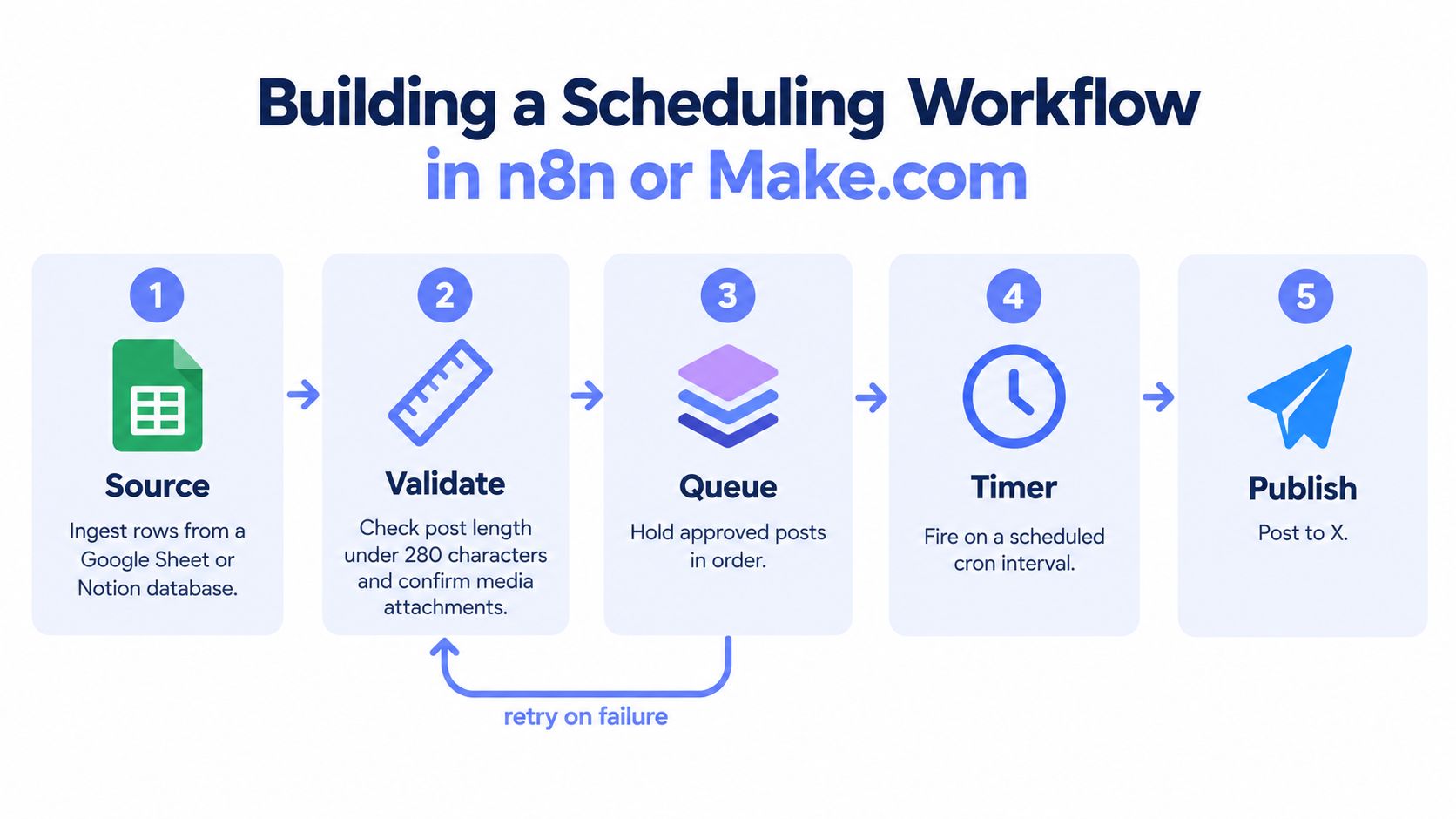 A five-step flowchart illustrating a workflow for scheduling and publishing automated social media posts to X.
Make the queue explicit
Use a Cron or Schedule trigger to start the run. The next node batch-reads rows whose status is approved and whose scheduled time is due. Validate the text, media references, destination account, and idempotency key before the workflow sends anything to X. The API's Post object and field behavior are documented in the X API data dictionary, so request only the fields and expansions your follow-up logic needs.
The HTTP node then sends the authenticated request to POST /2/tweets. Store the returned post ID and update the source row in the same logical operation. If the response is a rate-limit error or a temporary server failure, pass the item to a retry branch. Use exponential backoff capped at 5 minutes, with 200 to 800 milliseconds of random jitter, so multiple workers don't wake at the same instant and create another burst.
The OAuth bearer token should be fetched from a secure credential store and cached for the short lifetime of a workflow run. The refresh token belongs in the credential store, not in the queue row. A dedicated refresh step renews the access token when its expiry is approaching, writes the rotated values atomically, and makes the new access token available to subsequent HTTP nodes.
Make failures observable
The failure branch should write the HTTP status, response code, timestamp, attempt number, and a concise error category back to the source row. Separate permanent errors, such as invalid content or revoked authorization, from transient errors, such as a 429 response. Permanent errors need human review. Transient errors need a delayed queue state.
In Make.com, the same design maps to a Schedule trigger, a search module for the source rows, an Iterator for individual posts, an HTTP module for the X request, and an error handler for retry or failure persistence. Keep the iterator's scope small enough that one problematic item doesn't obscure the result for every other row. The n8n social media automation guide provides another reference point for mapping these pieces into a visual workflow.
Before the HTTP node, add a duplicate check. Search recent published records using a normalized content hash and destination account, and refuse to post if the same item was published within the last one hour. A duplicate should be marked as skipped, not retried. X's automation rules prohibit spammy behavior, and a queue that repeatedly republishes the same text is difficult to defend as useful automation.
Rate Limits and the Math That Stops Your Pipeline
A scheduler can fail before its queue looks busy. X applies limits by endpoint and time window, so an account may have capacity for one request type while another is already blocked. The official rate-limit documentation describes 15-minute and 24-hour windows, 429 responses, and reset and remaining values that clients should read before retrying.
Published figures for the v2 write endpoint include 100 posts per 15 minutes per user and 10,000 posts per 24 hours per app. Treat those numbers as reported operating context, not a guarantee for every account or application. Account state, endpoint access, and policy enforcement can change the usable budget.
Tier | Tweets / 24h | Tweets / 15min | Media Uploads / 24h | Reset Header |
Reported v2 endpoint context | 10,000 per app | 100 per user | Verify separately | Read response reset metadata |
Account-level context | 50 original posts for unverified accounts, per independent report | Verify account conditions | Verify account conditions | Use account state and response metadata |
Standard v1.1 posting context | 300 Tweets or Retweets per three hours, shared app limit | Applies to the three-hour window | Verify separately | Use documented response headers |
The standard v1.1 constraint covers POST statuses/update and POST statuses/retweet/:id. X's documentation states that an app can post 300 Tweets or Retweets during three hours. Keep that limit separate from v2 budgets because the endpoint families and accounting rules differ. The X API rate-limit guide for automated posting offers a practical way to map those limits to a queue design.
Media creates another boundary. Text-only tests do not prove that image or video publishing can sustain the same throughput. Track media requests separately, including the upload phase, final post request, status code, and response headers. Apply the same logging to failed uploads, since a partial media workflow can consume requests without producing a published post.
Read x-rate-limit-remaining and x-rate-limit-reset when present. A fixed sleep is a fallback, not a rate-limit strategy.
A worker should pause dispatch for an account when its remaining budget is low and resume at the reported reset time. Maintain a separate per-account pacing budget even when the application still has capacity. Account-level enforcement can restrict activity before a documented quota is exhausted, so retain response-code logs, expose an account pause switch, and make the queue state visible to operators.
Why Over-Automation Hurts Reach in 2026
Scheduling every post weeks in advance feels efficient, but it removes the part of publishing that depends on context. A better operating model is to queue 60–80% of planned output and reserve 20–40% for live replies, timely threads, and reactions. Those figures come from a 2026 scheduling recommendation in AutoTweet's hybrid publishing guide, not from official X ranking documentation, so use them as a starting hypothesis rather than a platform guarantee.
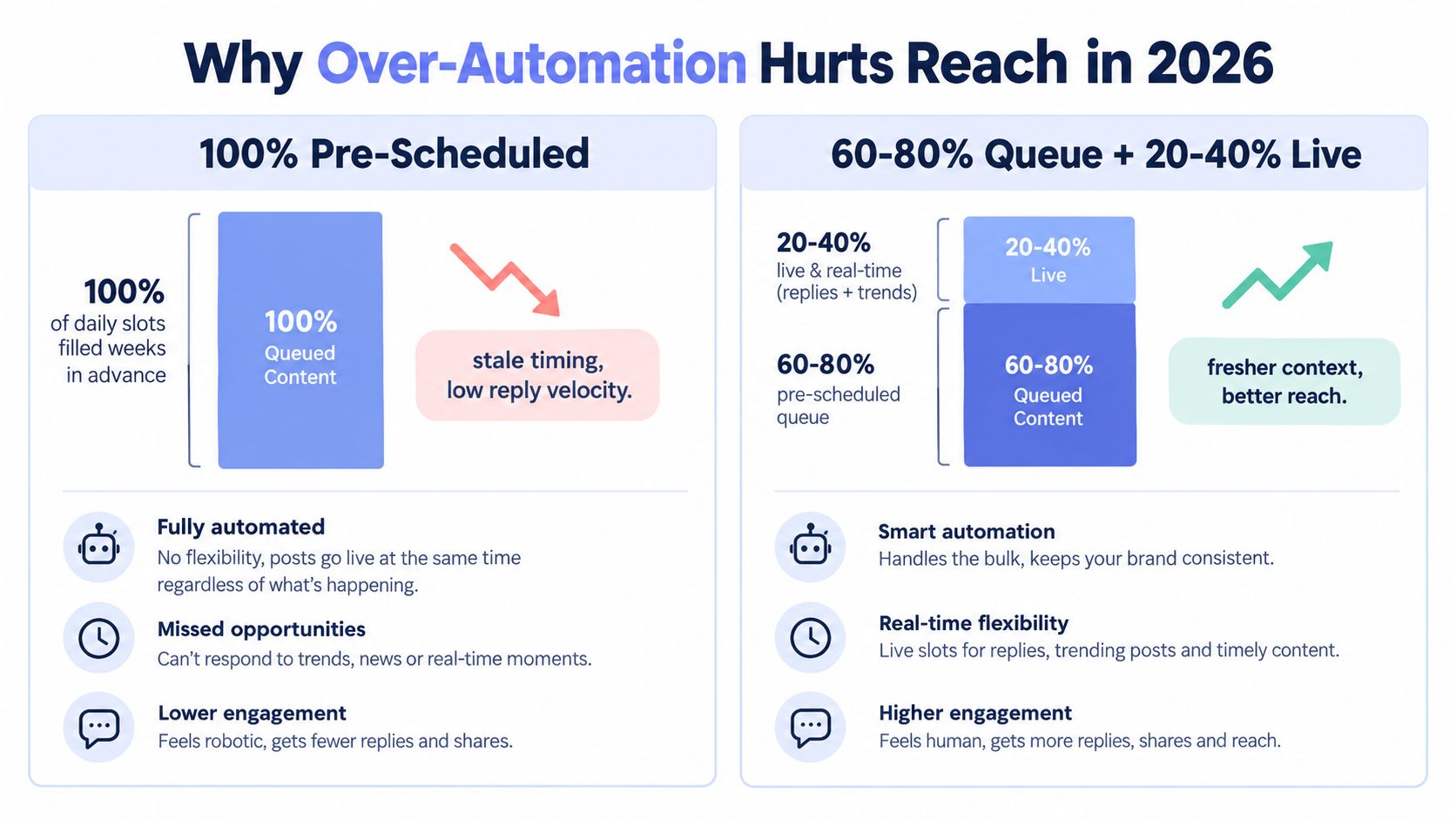 A comparison chart showing how mixing live content with automated social media posts improves engagement in 2026.
The reason is practical. A queued promotional post can be technically perfect and still arrive without the conversation around it. A human reply to a live thread can carry immediate context, invite responses, and give the account a reason to participate rather than merely distribute links. X's automation rules also distinguish permitted informational or novelty automation from engagement automation and spam, so a scheduler should support publishing, not pretend to be a human conversation engine.
Link-heavy output deserves special attention. Recent coverage argues that X meters API writes and treats URL-containing posts as materially more expensive to publish, while engagement-based ranking makes generic promotional patterns less attractive. The XAutopilot analysis of AI social media marketing frames the practical gap well: original commentary, threads, and low-link posts need to sit alongside promotional updates.
Use a weekly test structure that keeps the comparison clean:
Brand account: Queue evergreen product education, customer questions, and selected announcements. Reserve live slots for replies and relevant industry conversations.
Developer account: Queue technical explanations and release notes. Keep room for troubleshooting threads, code discussions, and responses to current platform changes.
Creator account: Queue durable ideas and edited threads. Leave live capacity for reactions, audience questions, and timely commentary.
Hold one slot per day open for a manual post and compare the queue-heavy period with the hybrid period over four weeks. Track reach, replies, dwell indicators available to your account, link clicks, and the share of posts that receive meaningful conversation. Don't change copy style, posting windows, and link frequency at the same time, or you won't know what caused the difference.
Pre-Launch Checklist for Automated Twitter Posts
The first launch should be boring. Use a throwaway account to verify authorization, queue transitions, media handling, duplicate detection, retries, and failure writes before connecting a valuable profile. Then shadow-run the workflow on your live account for 48 hours, with publishing disabled or manually approved while logs accumulate.
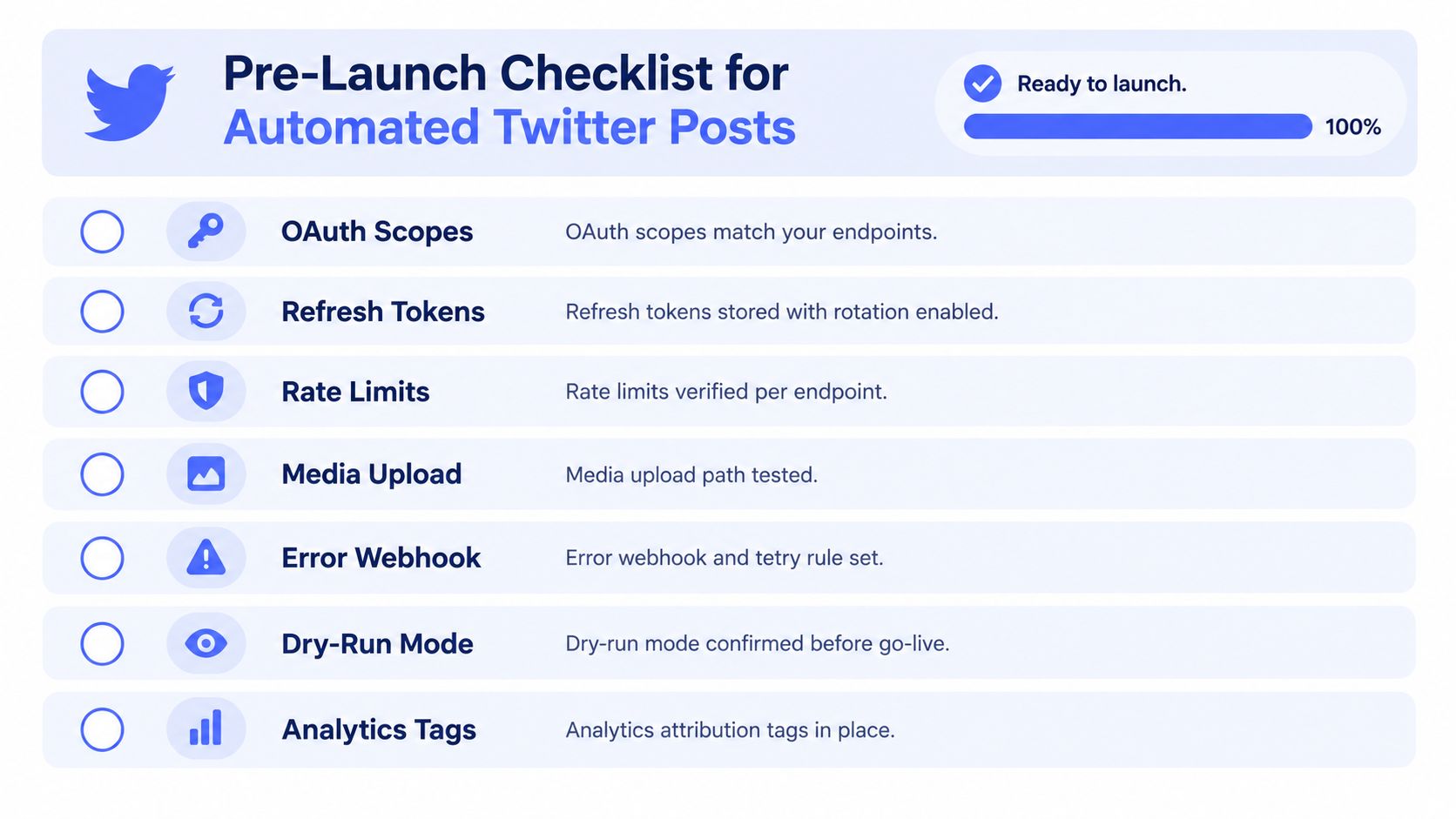 A pre-launch checklist for automated Twitter posts featuring seven key steps for successful implementation and launch.
Before enabling live publishing, check the following:
OAuth scopes: Match every requested scope to the endpoints the workflow calls.
Refresh storage: Encrypt refresh tokens, persist rotated values, and verify that a refresh failure pauses the account.
Endpoint limits: Confirm the limits that apply to your application, user, media path, and API version.
Media path: Test upload and final post creation separately, including failed and slow uploads.
Error handling: Record response codes and timestamps, apply bounded retries, and alert on repeated authorization failures.
Kill switch: Pause the entire queue if the error rate exceeds 5% during the rollout.
Runbook: Document token expiry dates, webhook URLs, workflow names, account owners, and reauthorization steps.
The cadence check matters as much as the code check. Make sure the calendar contains live capacity rather than only scheduled drops, and mix link posts with native text, commentary, and media. Review the current X automation rules again before deployment because policy wording and enforcement conditions can change.
A runbook should let someone outside the original implementation team stop the queue, identify the failing account, rotate credentials, and replay a single failed item safely. If the only person who understands the n8n workflow or Make.com scenario is on vacation, the integration isn't production-ready.
PostPulse provides a publishing surface for apps, automations, and AI agents, with X publishing available through its REST API, official n8n and Make.com integrations, and MCP server. If you'd rather avoid maintaining OAuth refresh, rate-limit handling, and separate network integrations yourself, visit PostPulse and evaluate it against the custom workflow you'd otherwise have to operate.
About the Author

Founder of PostPulse — a social media scheduling platform for creators and teams. Software engineer with a passion for building developer tools and simplifying complex API integrations across social media platforms.