Automated Social Media Posting for Developers
Published on
Tags:
You've probably seen the same failure pattern more than once. An OAuth token works during development, then your first production post succeeds and the next request fails because the token expired. An Instagram carousel container remains IN_PROGRESS while your worker keeps polling it. A YouTube workflow consumes its daily quota before lunch, leaving every later publication blocked.
None of this means your HTTP client is broken. Automated social media posting is an integration problem, and every platform exposes a different version of it. Token lifecycles, asynchronous media processing, quota accounting, API version changes, and inconsistent error responses all sit underneath the simple requirement to “publish this post.”
The practical solution is to treat social publishing as distributed infrastructure, not as a scheduled button. You need durable account connections, platform-aware queues, idempotent retries, observable failure states, and an abstraction that preserves each network's quirks instead of hiding them until production.
Table of Contents
Why Your Social Media Integration Keeps Breaking
A production post can fail after the code worked perfectly in development. The access token expires, the refresh path was never implemented, and the scheduler reports authentication errors that seem disconnected from the original login. Each platform also hides different rules behind its authorization flow, so storing a token is not the same as maintaining a usable connection.
Publishing itself may be asynchronous. Instagram's Graph API first creates a media container, then runs a separate publish action. Carousels and videos can remain in processing states before they become publishable. A worker that treats the container response as a completed post may publish too early or record success before the platform accepts the media.
YouTube introduces quota accounting. Its Data API assigns quota units to requests within a Google Cloud project, and write operations can consume a substantial share of the available budget. If a workflow retries expensive methods without tracking that budget, it can exhaust the allowance while the application still appears healthy. Review Google's YouTube Data API quota documentation before designing retry behavior.
Practical rule: A post request is one state transition in a longer workflow. Model authentication, upload, processing, publication, retry, and confirmation separately.
Rate limits add another failure mode. Instagram uses a rolling 24-hour cap, while LinkedIn, YouTube, Bluesky, and X apply different quota, point, or request-cost models. The social media API integration guide recommends tracking budgets by platform, account, and endpoint, reconciling rate-limit headers, and backing off after 429 responses. A containerized worker should persist that state instead of resetting it whenever the process restarts.
API version changes create maintenance work even when application logic stays the same. Permissions, response fields, media rules, and review requirements can change while your product continues promising one publishing experience. The rate-limit handling patterns for social APIs are useful before adding another integration, because each adapter needs explicit limits, token checks, and failure states.
The recurring problem is architectural. Every platform has its own publishing lifecycle, and documentation rarely presents that lifecycle in one place. Code that works for one network can still mishandle another's tokens, queues, or confirmation response.
What Automated Social Media Posting Actually Means
A cron job that wakes up at a scheduled time and sends the same payload to several endpoints is basic scheduling, not full cross-platform automation. It can trigger a task, but it doesn't automatically solve media compatibility, approval state, account authorization, platform-specific copy, retries, or reporting.
Modern automated social media posting is closer to an orchestration layer. A content record enters a queue, a worker selects the connected accounts, a formatter adapts the asset for each destination, and a platform adapter performs the required publishing sequence. The system then records the external post identifier, captures errors, and collects analytics on a schedule.
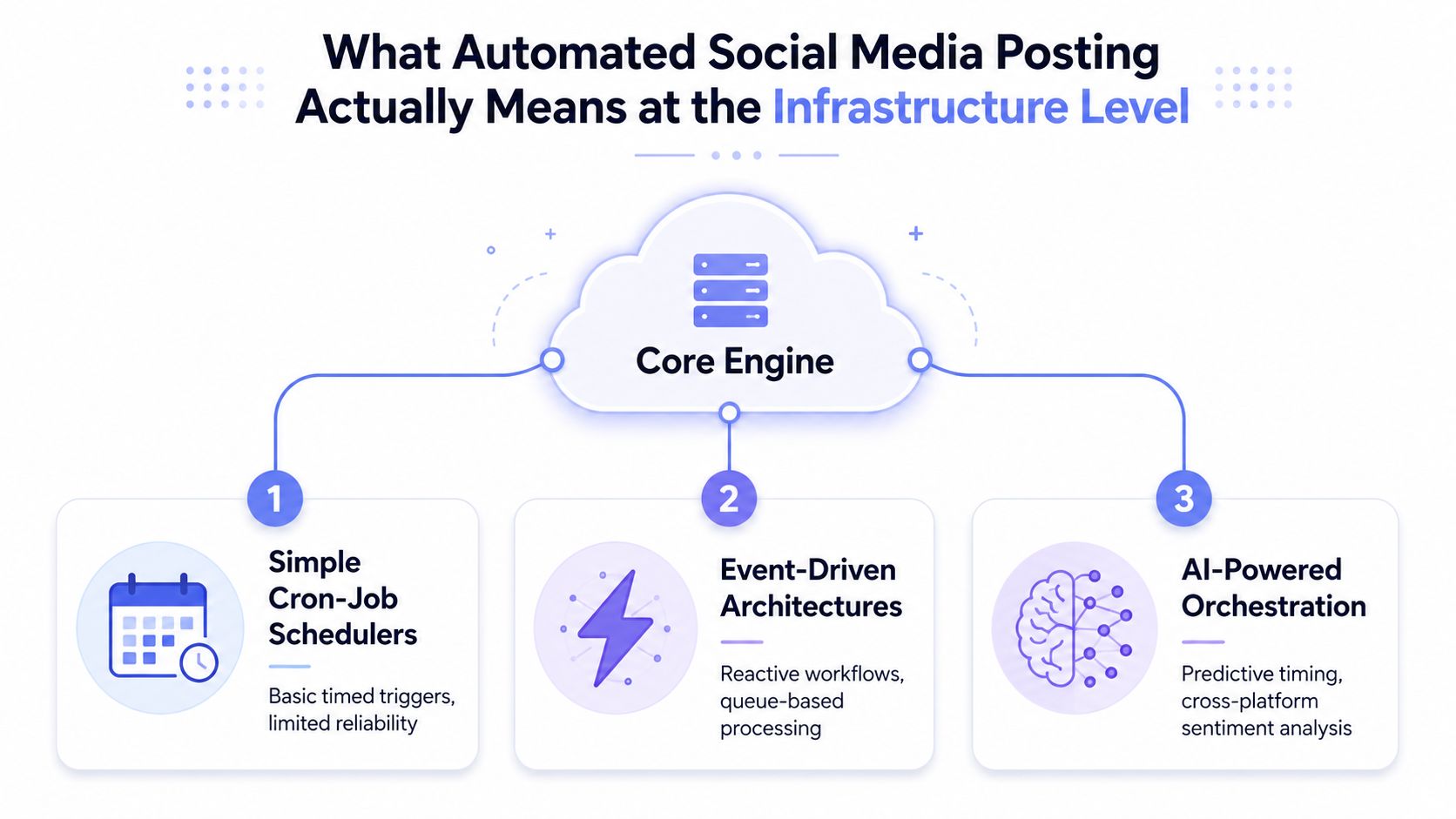 A diagram illustrating three levels of automated social media posting infrastructure including cron-job schedulers, event-driven architectures, and AI-powered orchestration.
A useful definition is software that handles repetitive work such as scheduling, approval workflows, reporting, queue management, and platform formatting without requiring a person to intervene for every publication. The social media automation guide from Mixpost describes modern systems as capable of queuing posts, distributing content throughout the week, and handling platform-specific image sizing, character limits, and formatting.
The difference between scheduling and orchestration
Single-platform scheduling usually has one destination, one token model, and one response pattern. A multi-platform system must coordinate several independent jobs. Even if your product exposes one publish button, the backend still needs to create separate platform tasks, preserve each account's credentials, and report partial success accurately.
A post might publish to LinkedIn while the Instagram container is still processing and the YouTube upload is waiting for quota approval. Returning a single Boolean called success loses information your support team and users need. Use a per-destination status model instead:
Queued: The content passed validation and awaits a worker.
Processing: The platform accepted the request but hasn't completed media work.
Published: The platform returned a durable identifier.
Retryable: The request failed temporarily and can be attempted again.
Blocked: Credentials, permissions, quota, or content validation require intervention.
The operational case for this layer is substantial. A 2025 industry compilation reported that 83% of marketing departments automate their social media posting process, while 49% of marketing decision-makers said they had automated social media in 2024. The same compilation reported average engagement lifts of 20-30% per post and about a 30% reduction in content-creation time among teams using automation, though those figures describe reported averages rather than a guarantee for every workflow. (Industry compilation and methodology)
Analytics preservation is part of publishing
Analytics collection shouldn't be an afterthought. Some platform APIs provide only 90 days of historical data, so a daily collection job can preserve a complete internal record even when the platform no longer returns older results. That turns automation into a continuity mechanism for reporting, experimentation, and compliance, not merely a timed publishing service.
Teams that need a deeper workflow automation model should think in events and durable state. “Content approved” can enqueue platform jobs, “container ready” can trigger publication, and “post published” can start analytics collection.
Three Integration Architectures for Every Builder Type
The right architecture depends on where you want the social logic to live. An app developer needs product-level control. A workflow builder values fast composition. An AI agent builder needs tools it can call during a reasoning loop, with guardrails that prevent accidental publication.
Unified REST API for product developers
A REST layer fits a SaaS product that wants social publishing under its own interface. Your application collects account authorization, stores a tenant and account relationship, submits a normalized content object, and receives per-platform job results.
A typical flow looks like this:
A user connects a social account through your branded interface.
Your backend stores the connection reference, token metadata, scopes, and expiration state.
Your content service sends text, media, destination accounts, and scheduling data to one publishing endpoint.
Workers create platform-specific jobs and update each job independently.
Your UI displays publication status without exposing the underlying platform implementation.
This approach offers the most control over tenancy, permissions, audit logs, and user experience. It also creates a maintenance obligation if you build every adapter yourself. A unified provider such as PostPulse can keep the platform-facing work behind one REST surface while your product owns the customer experience.
n8n or Make.com for workflow automators
No-code and low-code builders can connect an Airtable record, an AI content generator, an approval step, and a publishing node without maintaining OAuth handlers or platform SDKs. The workflow might begin when an Airtable row changes to Approved, pass the draft to a content transformation step, then call an official n8n node or Make.com app for publication.
This is fast to ship and easy for marketing teams to inspect. The trade-off is observability. Complex branching, retries, idempotency, and account-level quota logic can become difficult to reason about when they are spread across visual nodes.
Use explicit fields for content_id, destination, attempt_count, external_post_id, and last_error. Avoid allowing a workflow retry to create a duplicate post unless the provider or your own datastore can prove that the earlier attempt never succeeded.
MCP servers for AI agents
The Model Context Protocol approach gives an AI agent publishing tools it can call as part of a controlled workflow. An agent might retrieve approved content, select an account based on a user instruction, request a preview, and submit a publication only after a policy check.
The important distinction is permission design. An MCP server should expose narrow operations such as list_connected_accounts, preview_post, schedule_post, and get_publication_status, rather than one unrestricted command that lets an agent publish arbitrary content everywhere.
An AI agent should be able to reason about a publication without automatically being authorized to execute it.
A practical agent pipeline stores an approval requirement in metadata. The agent can draft and validate content, but a human or a separate policy service must release the final publish action for sensitive accounts. This preserves the speed of automation without turning an ambiguous model output into an irreversible external action.
For teams comparing a broader social publishing platform, the key questions are not only how many destinations it supports. Ask where tokens are stored, how partial failures are represented, whether retries are idempotent, and whether your logs contain enough information to reproduce a failed publication.
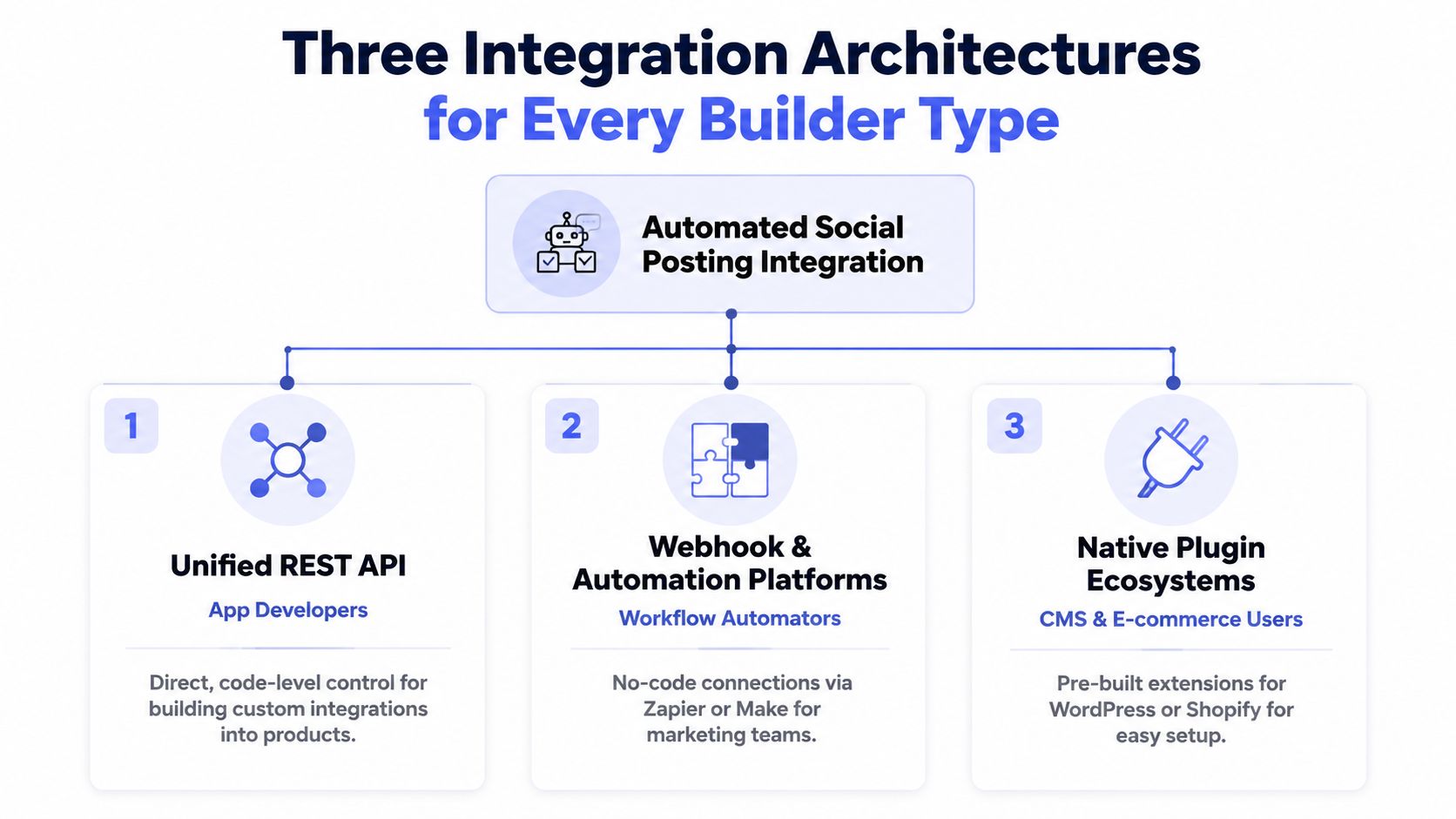 A diagram illustrating three different integration architectures for automated social media posting: REST APIs, automation platforms, and plugins.
Platform-Specific Publishing Quirks You Must Handle
A shared publishing interface helps only if it preserves platform differences. Reducing every destination to publish(text, media) makes a demo easy and production failures difficult to diagnose. Each adapter should expose its own validation, processing state, quota cost, and retry rules behind a common job model.
Instagram's Graph API flow creates a media container, waits for processing, and then publishes that container. The container expires after 24 hours if it is not published, according to this Instagram publishing flow reference. A worker needs status polling, a deadline, and a terminal failure state. Container-based publishing also means a crash between processing and publication must be recoverable without creating an accidental duplicate.
LinkedIn's organic publishing flow uses the UGC Posts API. The documented create operation is POST https://api.linkedin.com/v2/ugcPosts, while retrieval uses the encoded UGC post URN or share URN with an author view context. See the LinkedIn UGC Posts API reference for the operation details.
YouTube uses project quota units rather than a simple request counter. A Google Cloud project receives a default daily allowance of 10,000 units, so a scheduler must estimate method cost before accepting upload-heavy work and account for the daily reset. The YouTube Data API quota documentation lists the relevant quota model.
Platform | Publishing Model | Rate Limit Type | Token Lifecycle |
Media container, processing, then publish | Rolling 24-hour cap | OAuth credentials with expiration and refresh handling | |
UGC Posts API for organic posts | Platform quota and request limits | OAuth credentials with scope and expiration handling | |
YouTube | Upload and metadata operations through Data API | Project quota units | Google OAuth credentials with refresh handling |
X | Platform-specific post requests | Per-request or endpoint cost model | OAuth credentials with expiration handling |
Bluesky | API operations with platform-specific request costs | Request or endpoint budgets | Session or credential lifecycle managed per integration |
Use a budget function such as canSpend(platform, account, cost) before dispatching work. It should check the account's remaining budget, endpoint cost, and local reservations. After the response, reconcile returned headers when available, then release or consume the reservation accurately.
A 429 response should not start a tight retry loop. Apply exponential backoff with jitter, cap the retry window, and retain the job for later processing. Keep authentication failures separate from quota failures, because refreshing a token will not restore depleted capacity.
Media generation creates another boundary. A specialized resource such as ShortGenius automated ad generation can provide short-form creative assets upstream of the publishing queue. Store generation, approval, and distribution as separate states, so a slow render is not recorded as a failed platform post.
Where Automation Helps and Where It Hurts
Automation works best when the task is repetitive, observable, and reversible. Scheduling a previously approved post, adapting media metadata, collecting analytics, and retrying a temporary network error fit that description. Deciding what a brand should say during a crisis does not.
The current adoption gap supports that distinction. Recent industry data reports that 93% of marketers use automation for administrative tasks such as scheduling, while only 47% use it to make marketing processes more efficient overall, and 80% use AI for content creation. (Industry analysis of social media automation tools) Those figures suggest that teams are comfortable automating administration, but broader process automation still raises questions about judgment, ownership, and quality.
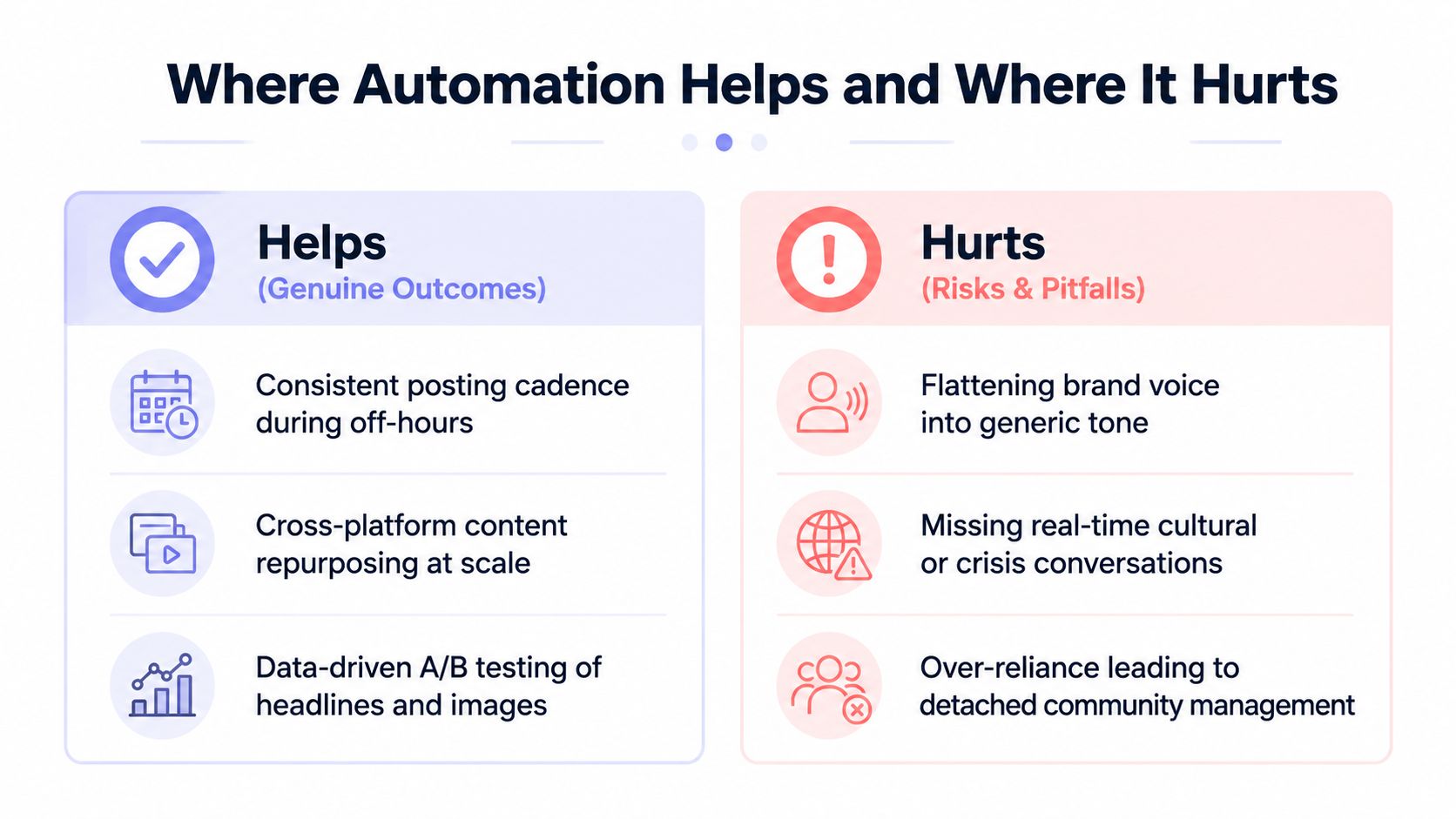 A comparison chart showing how social media automation helps with consistency and hurts with generic branding.
Keep the machine on the predictable side
Use automation for work that benefits from consistency:
Scheduling: Release approved content at selected time windows without waking a person for every job.
Cross-platform adaptation: Resize media, map fields, and apply network-specific formatting rules.
Queue management: Reserve quota, retry transient failures, and prevent duplicate submissions.
Analytics collection: Pull results on a regular cadence and preserve your own history.
Manual judgment belongs around strategy, community response, sensitive topics, and final brand voice. A scheduler can publish a reply, but it can't reliably understand whether a customer is joking, escalating, or reporting a serious problem.
Social platforms also differ in intent. Independent industry coverage reports that 17% of all online sales occurred through social platforms in 2025, while Facebook and YouTube remained top consumer platforms. (Industry coverage of AI-assisted social media automation) That context makes blind reposting a poor default. A product tutorial may work on YouTube, a concise professional insight may fit LinkedIn, and a visual demonstration may belong on Instagram, but the same asset shouldn't automatically receive identical copy and calls to action everywhere.
Human review belongs at the decision boundary, not inside every repetitive API call.
AI-generated copy needs the same treatment. Use it to produce variants, summarize source material, or propose platform-specific drafts. Have a person check claims, tone, accessibility, and audience fit before publication. Teams refining executive content can also consult this practical guide on how to humanize LinkedIn posts, but the final editorial decision should remain explicit in your workflow.
Building Your First Automated Publishing Workflow
Start with identity, not scheduling. The first production incident usually appears after the initial token works, because the application never exchanged a short-lived credential for a longer-lived one or never implemented refresh handling. Store tokens server-side, encrypt them, record their expiration metadata, and refresh before a worker attempts publication.
Build the pipeline in stages
First, connect accounts through a verified application path. If you integrate each platform directly, you'll need to manage app configuration, permissions, reviews, and version changes independently. A unified provider that maintains verified Meta, TikTok, and Google applications can remove that operational work, but you still need to model account ownership and consent clearly.
Second, create a canonical content record. Keep the original text and media separate from destination-specific variants. Add approval status, scheduled time, target accounts, idempotency key, and publication status. Don't let a worker infer approval from the presence of a caption.
Third, enqueue one job per destination. A single campaign can produce independent Instagram, LinkedIn, YouTube, X, Bluesky, and other jobs. This lets one successful publication remain successful even when another destination is delayed or blocked.
Fourth, implement failure-specific recovery. Poll Instagram containers until they reach a terminal state or the publication deadline approaches. Back off after 429 responses. Track YouTube quota reservations before expensive operations. Notify operators when credentials, permissions, media validation, or quota require action.
Fifth, record evidence. Store request correlation IDs, provider responses, external post IDs, timestamps, and final status. Without these fields, support staff can't tell whether the platform rejected a request, accepted it but delayed processing, or published successfully while your callback failed.
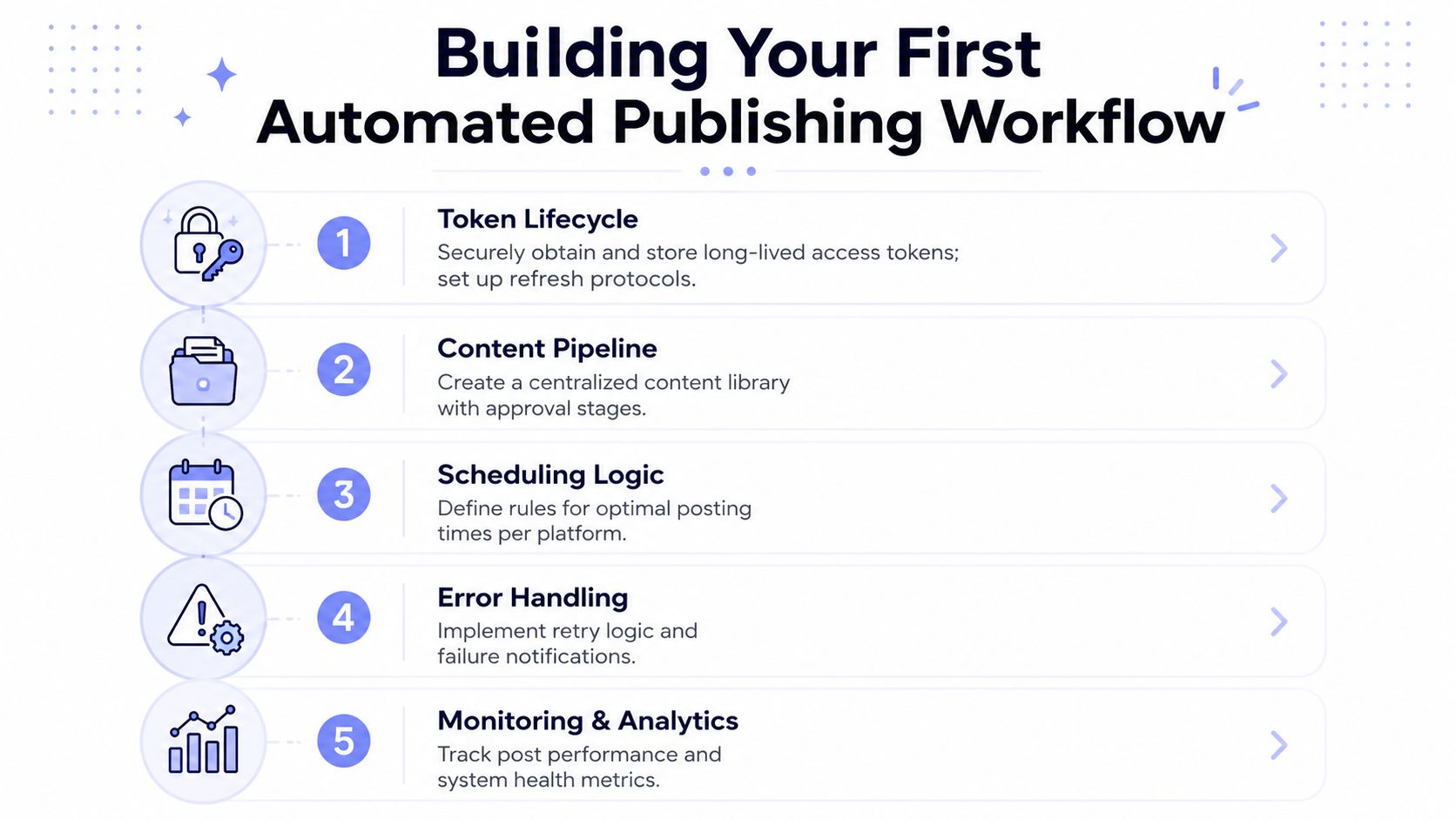 A five-step infographic titled Building Your First Automated Publishing Workflow explaining key stages of automation.
Content quality still controls the outcome. An AI drafting tool can help transform a source document into platform-specific variants, while your approval layer checks accuracy and voice. For teams building that upstream process, Master your AI content workflow provides a useful starting point for connecting generation with review rather than sending raw model output directly to a publisher.
Pricing also changes the implementation decision. A pay-as-you-go model at $0.20 per publication can suit an early workflow with uncertain volume, while a subscription at $5 per account per month can make budgeting easier when connected accounts publish regularly. Treat those as operating-model choices, not substitutes for token security, queue design, and monitoring.
Choosing the Right Approach for Your Use Case
Choose based on the boundary you need to own.
A SaaS developer embedding social publishing into a customer product usually needs a white-label REST architecture. The customer should connect accounts inside your interface, while your backend controls tenancy, permissions, retries, audit history, and presentation. A white-label arrangement can use a $200 monthly platform fee plus $1 per active social account, where an account is active only when it publishes during that month. (PostPulse publisher information)
For a no-code operation, start with n8n or Make.com. An Airtable approval can trigger content generation, route the result through a review step, and call a publishing node. Keep the workflow small until you understand its failure behavior. Add notifications and a dead-letter path before adding more destinations.
An AI agent builder should use MCP when publishing is part of a broader reasoning loop. Expose preview, account discovery, scheduling, and status tools separately. Require explicit approval for sensitive destinations, and log the agent's inputs and selected account so an operator can reconstruct why a publication happened.
Indie hackers and internal-tool developers often need less surface area. A private-label REST API can keep the application focused on its core job while an external publishing layer handles OAuth, token refresh, platform quotas, and API changes. For teams still in beta, a startup support program may waive fees until launch, with terms discussed individually.
A practical first-week checklist is short:
Connect one account per target platform.
Publish a controlled test asset.
Verify token refresh before the first credential expires.
Force a retryable error in a non-production path.
Inspect per-destination status and external IDs.
Compare actual quota consumption with your reservations.
Review the published copy manually for platform fit.
Move from pay-as-you-go to a subscription when your account activity is regular enough that predictable monthly billing matters. Stay with usage-based billing when connected accounts are mostly idle or publication volume is still changing.
PostPulse provides one publishing layer for apps, automations, and AI agents, with REST API access, official n8n and Make.com integrations, and an MCP server for autonomous workflows. If you want to avoid maintaining nine separate token, quota, and API-version integrations, visit PostPulse and evaluate the private-label or white-label path against your architecture.
About the Author

Founder of PostPulse — a social media scheduling platform for creators and teams. Software engineer with a passion for building developer tools and simplifying complex API integrations across social media platforms.