
AI Content Creation for Social Media: A Developer's Guide
Published on
Tags:
Your publishing job returned a successful response, but the post isn't visible. Another draft is waiting on a media container, and the assistant has slipped an unsupported product promise into tomorrow's caption. The scheduler looks healthy. The content operation isn't.
AI content creation for social media needs two kinds of control: editorial approval and publishing-state tracking. Generating a convincing caption is only the beginning. You also need to know who approved its claims, which account received it, and whether the platform published it.
Table of Contents
Why AI Social Posts Still Break in Production
Say you're building a product-update workflow. An assistant reads release notes, drafts a caption, generates a carousel, and hands everything to a publishing queue. Each component works in isolation, so you connect them and let the workflow run unattended.
Then the awkward cases arrive. The generated caption describes a planned feature as available, the carousel needs more processing, and the queue records a completed request rather than a completed publication. Your dashboard shows progress while the customer sees either nothing or the wrong message.
This isn't an argument against using AI. Among marketers, freelancers, creators, and other social-media professionals surveyed between Q1 2023 and Q1 2025, 96% used AI somewhere in their social workflow and 72.5% used it daily, according to Metricool's global study.
Separate content decisions from delivery decisions
The useful engineering question isn't whether the model can write a post. It's what authority you give the surrounding workflow.
Unattended work: Which transformations preserve an already approved message?
Editorial decisions: Which outputs introduce claims, representations, or personal expression?
Publishing authority: What evidence must exist before an agent can submit a post?
Completion criteria: What platform state lets your application tell a user that publication succeeded?
A successful generation isn't an approval, and a successful request isn't necessarily a live post.
Keep those distinctions in your application's records, not just in a prompt. A reviewer should be able to reject an invented claim without debugging an API call. A developer should be able to investigate a failed publication without guessing which draft was approved.
The Four Stages of an AI Social Content Pipeline
Treat the workflow like a newsroom. AI is the reporter who drafts quickly, but an editor still chooses the story and a fact-checker still checks the claims. Giving the reporter access to the publishing system doesn't remove either responsibility.
The production stages are ideation and drafting, captioning and platform adaptation, visuals, and scheduling and publishing. Editorial review and fact-checking sit across those stages rather than belonging only at the end.
The newsroom view makes that ownership visible.
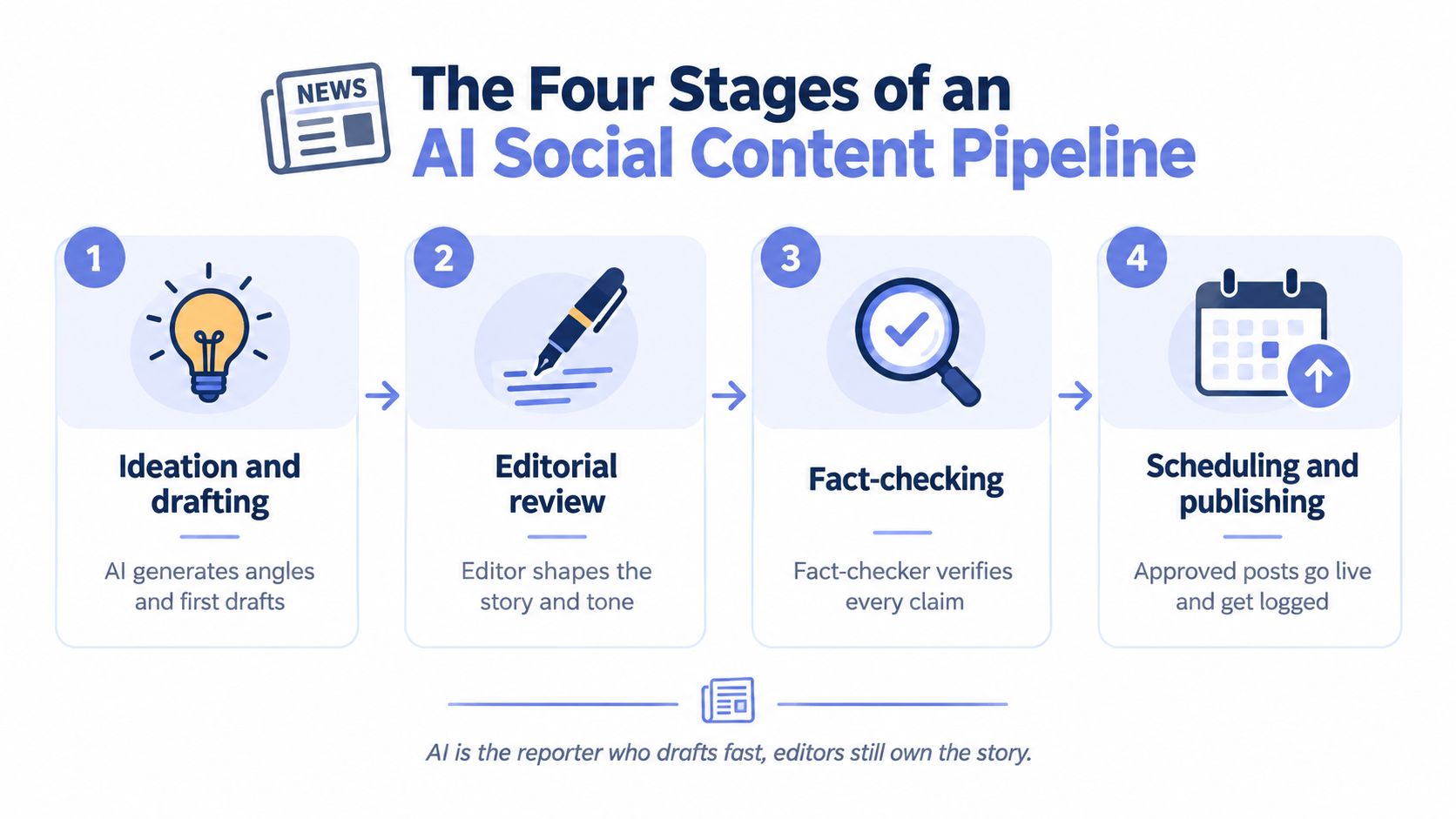 A four-stage workflow diagram illustrating the process of creating social media content using artificial intelligence.
Who does what in each stage of the pipeline
Stage | AI handles | Human owns | Typical failure |
Ideation and drafting | Angles and first drafts from a brief | Choosing angles, setting claim rules, final voice | Generic copy that sounds like every other brand |
Captioning and adaptation | Length, tone and hashtag variants per network | Checking claims and tone in each variant | One caption pasted everywhere, too long or too short for a network |
Visuals | Image or video generation, draft alt text | Checking synthetic people, brand fit and usage rights | Visuals that imply product features that don't exist |
Scheduling and publishing | Queue slots, API calls, status polling | Setting approval thresholds, reviewing failures | Silent failures and duplicate posts |
During drafting, ask for angles grounded in approved material. A useful output explains the customer problem and the proposed message, rather than merely producing polished sentences. Reject an angle that requires evidence you don't have.
Adaptation should preserve the message while changing its presentation. A shorter caption mustn't remove the qualification that makes a claim accurate. A translated variant mustn't turn an optional feature into a default capability.
Visual review needs its own attention. A generated product image can imply size, packaging, accessories, or functionality without saying anything explicitly. Draft alt text also needs review against the actual finished asset, not the original generation prompt.
At delivery, the owner changes from editorial judgement to operational accountability. Someone must decide what happens when a job remains unresolved, requires creator action, or returns an error.
AI can participate in every stage, but every stage needs a named human owner for what it ships. Ownership means having authority to stop publication, not merely receiving a notification afterward.
Selective Autonomy and the Approval Rules to Set
Use a simple split: automate transformations; review representations.
Formatting an approved caption or assigning an approved publishing slot changes presentation or timing. Adding a product comparison, generating a customer's likeness, or answering a complaint changes what the business represents to its audience. Those tasks deserve different permissions.
Audience response provides a reason to keep that distinction. In online experiments involving 325 and 371 participants, researchers reported estimated behavioral-engagement reductions of 6.54 percentage points for AI-enhanced content and 14.22 points for AI-generated content in one study, with the strongest effects on emotional content, according to the Electronic Markets article. These are experimental findings, not a forecast for your accounts.
Product accuracy deserves an equally firm boundary: 64% of consumers in a 2026 survey said they would trust a brand or creator less when AI misrepresents a product, according to Clutch's AI social-media report.
Routing rules by content type
Content type | Automate | Approval rule |
Caption reformatting for a new network | Yes | Spot-check the first batch per platform |
Scheduling into approved time slots | Yes | None, unless the slots change |
Translation of approved copy | Yes | Native-speaker review for key markets |
Product claims, pricing and comparisons | Draft only | Required, with a source for each claim |
Health, finance, politics and safety | Draft only | Required sign-off by a named reviewer |
Personal stories and testimonials | Ideas only | Human-written and human-approved |
Synthetic people in visuals | No | Required disclosure check and usage-rights check |
Replies to comments and messages | Draft only | Required for complaints and sensitive customers |
“Yes” means permission within an approved boundary, not permission to invent a new message. For translations, the native-speaker check remains part of that boundary for key markets. For scheduling, an approved slot doesn't authorize substituting an unapproved asset.
“Draft only” means the output enters a reviewer's queue. Record the reviewer, the exact version approved, and the decision. The content approval process should make that handoff explicit rather than relying on a chat message that says the copy looks fine.
Make approval attach to the actual output
Approve the caption, media, target accounts, and disclosure choice together. If someone replaces a product image after approval, send the changed package back for review.
For emotional content, preserve the human contribution rather than asking a model to simulate sincerity. An assistant can suggest interview questions or organize notes, but it shouldn't invent a founder's struggle or a customer's gratitude.
New content types should require approval by default. Loosen the rule only after a reviewed sample demonstrates that the output stays within its intended boundaries.
How to Build a Generate-to-Publish Workflow
Turn an approved brief into a logged publication through explicit handoffs, with a record that follows the content throughout.
This is the production path to implement.
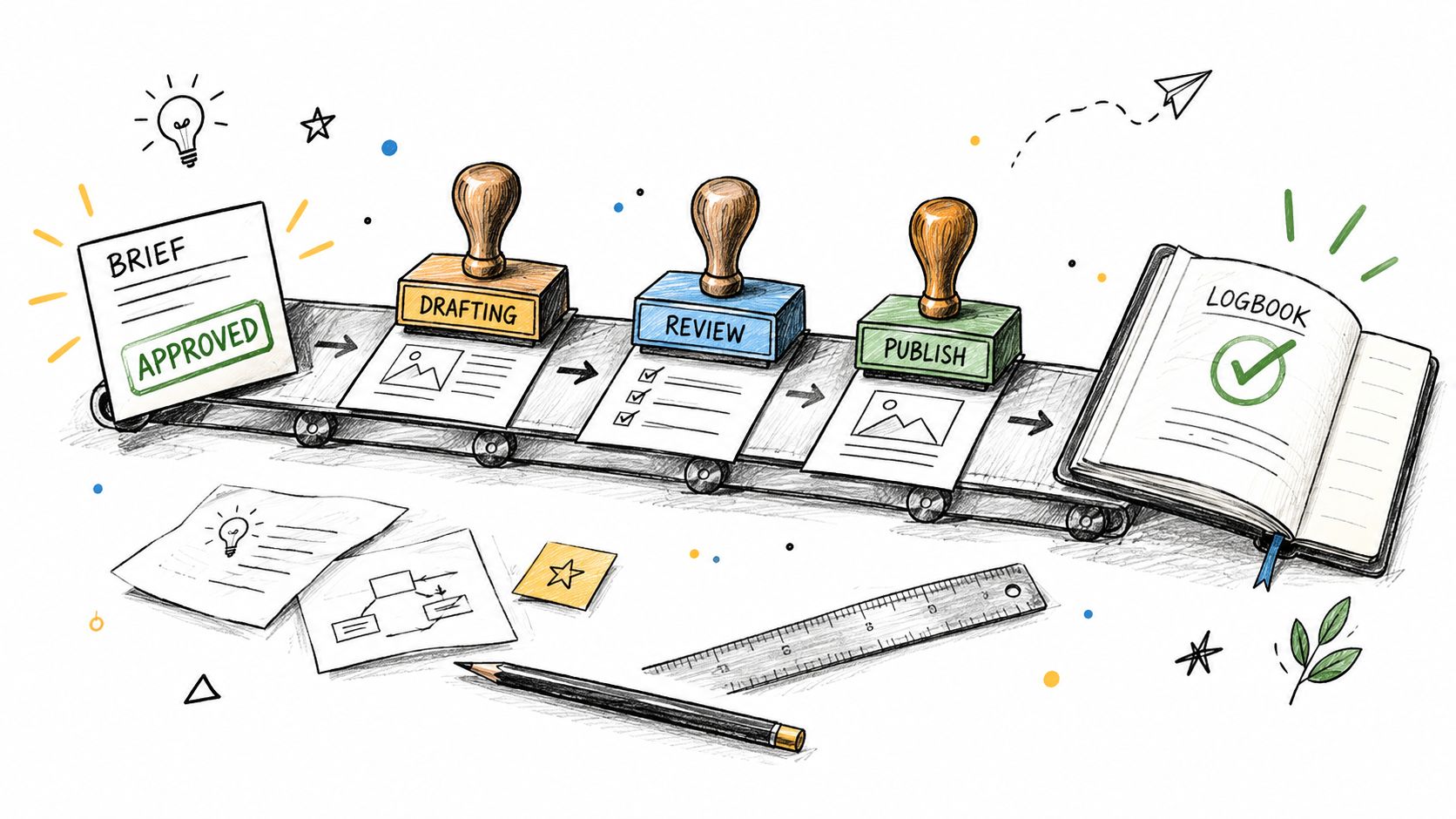 A hand-drawn illustration showing a content workflow on a conveyor belt with stages: brief, drafting, review, publish.
Prepare the content package
Write the brief. Include audience, goal, tone, destination links, approved claims, and banned claims. For a product update, distinguish released functionality from roadmap material. This prevents a generic prompt from becoming the only specification.
Generate ideas from approved sources. Give the assistant release notes, product documentation, or approved campaign material. Require each proposed factual statement to identify its supporting material. Reject unsupported statements rather than asking for a more confident rewrite.
Approve a core message before deriving variants. Write network-specific versions from that message, not from separate blank prompts. Compare the variants for qualifiers, availability language, and calls to action. This prevents claim drift between destinations.
Prepare visuals and provenance. Store the prompt, generator name, model version when available, generation date, and source assets alongside the finished media. Keep the actual output too. A prompt alone isn't a reliable way to recover an identical asset.
Authorize and deliver
Apply the routing rules. Assemble the caption, visuals, sources, target accounts, and disclosure decision into a reviewable package. Block submission while required approvals are missing. This prevents a completed draft from being mistaken for an authorized publication.
Connect the publishing adapter. For a PostPulse implementation, check its current documentation before choosing the REST API, official n8n or Make.com integration, or MCP interface. Confirm the available operation, input schema, authentication requirements, and returned identifiers rather than guessing endpoint or node names. Store the identifiers the documented operation actually returns.
Track the outcome. Keep delivery pending until the destination's documented completion condition is satisfied. Retry only when the platform's documented error handling supports it, and investigate unresolved submissions before creating another post. This prevents fire-and-forget scheduling from hiding failures.
For teams deciding how to divide orchestration work, AY Automate's AI marketing automation service is a resource to evaluate alongside building the workflow internally. Keep ownership of approval policy separate from whoever implements the automation.
A carousel run as an application record
Say the brief is a release-note carousel. Use internal states such as brief_approved, draft_ready, review_pending, approved, scheduled, submitted, and published.
These are your application's labels, not platform status values. Attach each transition to evidence: a signed brief, reviewed assets, a submission response, or a confirmed publication result.
If a reviewer rejects a slide, return the package to drafting. If publication fails, preserve the approved package and record the delivery failure separately. Don't rewrite approved content just because its transport failed.
Wiring an AI Agent to PostPulse Through MCP
Think of Model Context Protocol, or MCP, as the standard-plug idea applied to agent tools. The analogy is useful, but it isn't a compatibility guarantee: the client and server still need matching capabilities, authentication, and schemas.
Use this connection model when planning the integration.
 A pencil sketch of a laptop, smartphone, and robot connecting to a central server via cables.
Establish the contract before granting authority
In your architecture, distinguish the host application running the agent, the client connecting to the server, and the server exposing tools. Verify those implementation details against the protocol and server documentation before deployment.
Exact tool names and parameter schemas must come from PostPulse's current MCP documentation. Don't infer them from another provider's tools, and don't assume an operation exists because the agent can describe it. No tool names or schemas are specified here because they haven't been verified against that documentation.
The same caution applies when comparing implementations. The iHatePosting page for its MCP connector for social media is a useful comparison point, but its interface isn't a substitute for another server's contract.
Walk an approved request through the adapter
Build the agent's task around a fixed, approved package:
Receive authorization: Load the approved content version and intended target accounts from your queue.
Resolve destinations: If the documented toolset supports listing connected accounts, use it to confirm the required account identifiers.
Submit the package: Map the caption, publicly accessible media URL, destinations, and scheduled time only to fields the server documents.
Record evidence: Store the returned identifiers and use the documented status mechanism before reporting completion.
If the toolset doesn't expose a required capability, keep that responsibility in your application. Don't let the agent invent a status-check operation or interpret a submission receipt as confirmation.
Use the accompanying walkthrough as an orientation aid, then validate implementation details against the current documentation.
Keep credentials outside editorial judgement
Grant publishing authority only to jobs that have passed review. Where documented controls permit it, restrict the integration to the accounts it needs and schedule ahead so a human can intervene.
Log requests, responses, and the approved content version without recording secrets. Keep rejected drafts away from the publishing path.
Before going live, confirm who owns OAuth handling, token refresh, rate-limit handling, and API-version changes in the current documentation and service agreement. Don't assume a unified interface eliminates destination-specific responsibilities, or that an agent can reason its way around missing permissions.
Platform Gotchas That Turn a Successful Call into a Silent Failure
TikTok can return a publish_id while the post still isn't live. Its official Content Posting API status documentation separates media transfer from publication and directs integrations to query status or subscribe to Content Posting webhooks.
The documented states include PROCESSING_UPLOAD for local files, PROCESSING_DOWNLOAD for URL retrieval, SEND_TO_USER_INBOX when the creator must finish posting inside TikTok, PUBLISH_COMPLETE, and FAILED. Public posts also pass moderation, and the final post_id isn't available until that process finishes.
That documentation gives approximate transfer times of under 30 seconds for 512 MB, about a minute for 1 GB, and over two minutes for 4 GB. Transfer time isn't a promise about public availability.
Container readiness and quota consumption
For Instagram, Meta's media-container documentation describes creating child containers, then a parent with media_type=CAROUSEL and references in children, followed by publishing. Its container-status example uses status_code=FINISHED, so container creation alone isn't your completion signal.
YouTube's quota-cost documentation specifies a 10,000-unit default daily project quota, with videos.insert costing 1,600 units and videos.list costing 1 unit; invalid requests also consume quota. On that stated unit budget, only six complete video-insert calls fit before another insertion would exceed the remaining units.
Platform publishing symptoms, causes and fixes
Platform | Symptom | Documented cause | Fix |
TikTok | Upload returns a | Transfer, moderation and publication are separate states; | Poll status or subscribe to Content Posting webhooks; track |
Instagram carousel | Carousel stays unpublished or fails | Child containers must precede a parent | Create children, create the parent, poll readiness, then publish |
YouTube | Quota errors after only a few uploads | Video insertion consumes a substantial share of the default daily unit budget | Budget daily units, queue insertions, and review documented quota-request options |
Use cross-platform testing to exercise these intermediate states, not just the happy path. Test what your application displays when creator action is required, processing remains pending, or quota prevents submission.
Store the publication state and its evidence, not just the first successful response.
Treat publishing as asynchronous in your application design. Before retrying a failure, check the destination's documented error type and recovery instructions. An unresolved submission and a rejected submission shouldn't trigger the same response.
Disclosure, Misinformation and Audit Trails
An AI label doesn't make an inaccurate post acceptable. Disclosure tells the audience something about production; it doesn't verify the product claim or establish that a depicted customer exists.
More than 60% of marketing, PR, sales, and customer-service professionals believed labeling could improve social-media performance, but only 30% consistently labeled AI-generated content, according to Statista's social-media and AI overview. The same overview reports that 60% of U.S. respondents in a March 2025 survey worried about misleading AI video and audio deepfakes, while 67% of UK adults said AI-generated content contributed to online misinformation.
Keep disclosure decisions and factual verification visible together.
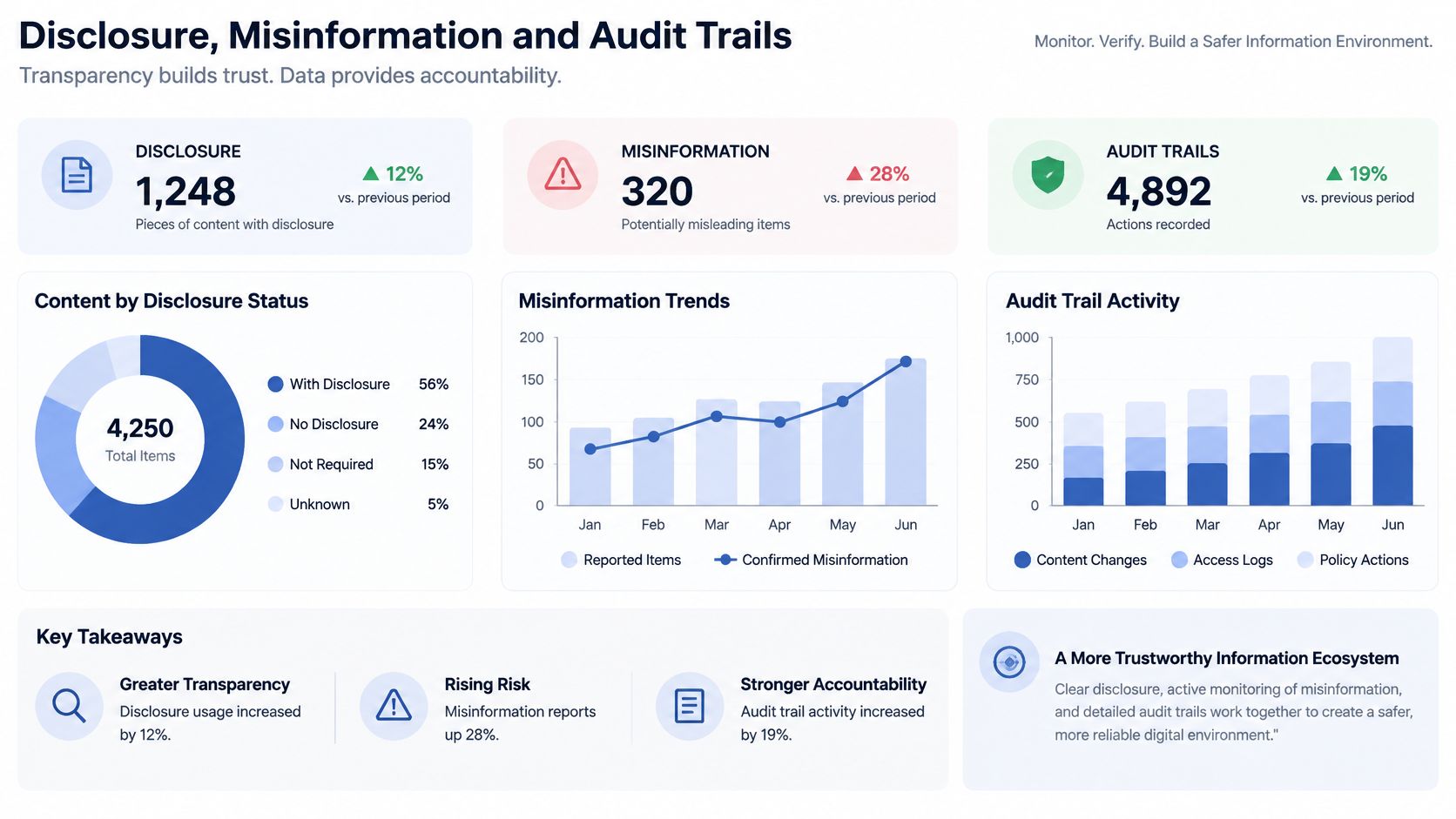 Dashboard displaying statistical data on content disclosure, misinformation trends, and audit trail activity for digital transparency.
Record the assistance type, not just a checkbox
Among more than 16,000 creators across eight countries in Adobe's 2026 survey, 85% said disclosure expectations were increasing or staying steady, 49% always or often disclosed AI use, and 18% rarely or never did.
Set disclosure policy by assistance type. Caption editing, generated scenery, synthetic voices, and synthetic people shouldn't automatically receive an identical internal classification. Check the destination's current requirements rather than treating your internal policy as proof of compliance.
Humantext.pro's discussion of verification tools for AI transparency compliance can help frame evaluation questions. Use official platform policies and applicable rules to make the final decision within your social-media compliance process.
Audit record fields for every post
Field | Purpose |
Approver | Identifies the human who signed off |
Model and version | Identifies the generator used for each asset |
Prompt | Records what was requested and supports investigation |
Sources | Grounds each factual claim |
Disclosure choice | Records the label and assistance type |
Platform post IDs | Connects internal records to destination posts |
Corrections | Logs edits or recalls after publishing |
Keep the generated assets too. A stored prompt supports investigation, but it doesn't guarantee identical regeneration.
An analysis of misleading posts flagged through X's Community Notes found AI-generated misleading posts received 10.32% more impressions on average than non-AI-generated misleading posts within a sample of 91,452 flagged posts. The sample concerns flagged misinformation, and the causal mechanism isn't established.
Track correction rate, flagged-content rate, and unsupported-claim frequency alongside engagement. Preserve the relationship between a core claim and its published variants so an editor can identify every destination requiring a correction.
Pick One Workflow and Start Small
Start with a recurring product update on a single platform and assign a named owner. Choose a format whose claims can be checked against a stable source, rather than beginning with personal stories or sensitive customer replies.
Before connecting publishing credentials, have that owner approve the brief and routing rule. Make the review gate and audit record usable first. Otherwise, the first working integration becomes the default policy just because it exists.
Test the content decision, not just the connector
Run a two-week pilot as a practical starting window, not as a promise of statistical certainty. Compare human-only and AI-assisted versions of comparable material in similar posting slots, keeping topic, audience, format, and account history as consistent as practical.
For a fuller experiment, include human-created, AI-assisted, and AI-generated variants crossed with early versus late disclosure. If publishing volume is too low to support those comparisons meaningfully, simplify the test instead of drawing conclusions from sparse results.
Audience outcomes: Record comments, saves, shares, and qualified conversions.
Editorial effort: Record what reviewers changed and why.
Reliability: Separate content rejections from delivery failures.
Safety: Track corrections and unsupported statements.
Use the reviewed output to decide whether a particular routing rule can loosen. Don't promote an entire agent to autonomous publishing because one caption format worked.
Expand permission by content type, not by enthusiasm for the demo.
Skip full autonomy for claim-heavy content, agent-initiated immediate publishing, and additional platforms until the first workflow's correction rate is steady and its unresolved deliveries are understood. The useful milestone is an approved message reaching the intended account with evidence you can inspect.
PostPulse offers a shared publishing interface for apps, automations, and AI agents, giving you a delivery layer to evaluate alongside your approval workflow. Visit PostPulse to review the integration options and current documentation, then connect one approved content type before expanding its publishing authority.
About the Author

Founder of PostPulse — a social media scheduling platform for creators and teams. Software engineer with a passion for building developer tools and simplifying complex API integrations across social media platforms.