Content Approval Process: A Developer's Guide 2026
Published on
Tags:
You push a draft into Google Docs. Design comments in Figma. Brand replies in Slack. Legal sends edits by email. Someone pastes “final-final-v3” into a Jira ticket. Then a stakeholder who wasn't in the loop asks, after publication, who approved the post that just went live with the wrong claim.
That isn't a people problem first. It's a systems problem. Your content approval process is running like an event-driven app with no schema, no ownership model, and no audit trail.
Developers usually get pulled into this when the pain becomes operational. Missed launch windows. Endless revisions. Last-minute changes that invalidate staging screenshots. Manual handoffs between content and publishing. If you're the person wiring together Jira, Notion, Slack, a CMS, and publishing APIs, you already know the core issue. Approval is still happening in side channels.
Table of Contents
Why Your Content Is Always Late and Full of Revisions
The failure mode is usually obvious in hindsight. A draft starts clean, then feedback fans out across five channels. Nobody knows which comments are required, which are optional, and which came from someone with actual approval authority. By the time the team merges edits, the asset has changed enough that another round becomes “necessary.”
 A stressed woman overwhelmed by endless work notifications, emails, and project revision requests at her desk.
That chaos has a measurable cost. A 2020 HubSpot report indicated that the average approval process for content in many organizations took eight days, which is especially damaging when a team needs to publish quickly and can't afford to miss a timing window, as summarized by Agility PR's breakdown of content approval workflow delays.
The usual failure pattern
Here's what broken approval usually looks like in practice:
Feedback is fragmented: comments live in Docs, Slack, email, and meetings.
Version control is fake: people say “latest version” while reviewing different artifacts.
Approval authority is unclear: anyone can request changes, but nobody owns the final decision.
Publishing is a separate handoff: approved content still waits for someone to manually queue it.
A lot of teams try to compensate by planning further ahead. That helps, but it doesn't fix a bad workflow. Even if you use a strong scheduling rhythm, like the kind discussed in this guide to planning a week of social media in 30 minutes, a messy approval layer will still blow up your timeline.
When people ask why content is late, the answer is rarely “writing took too long.” It's usually “review had no boundaries.”
Why email-based approval keeps failing
Email is fine for notifications. It's terrible as a workflow engine.
An email thread can't reliably answer basic operational questions. Which version got approved? Which changes were requested before sign-off? Was legal reviewing the current draft or yesterday's export? After a bad publish, “who approved this?” becomes a forensic exercise.
This is the technical debt here. Your team is using communication tools as state management. That works for a while. Then volume increases, stakeholder count grows, and every content item turns into a manual merge conflict.
Define Who Does What and Why
If ownership is fuzzy, your automation will only make the mess faster. The first fix is role clarity.
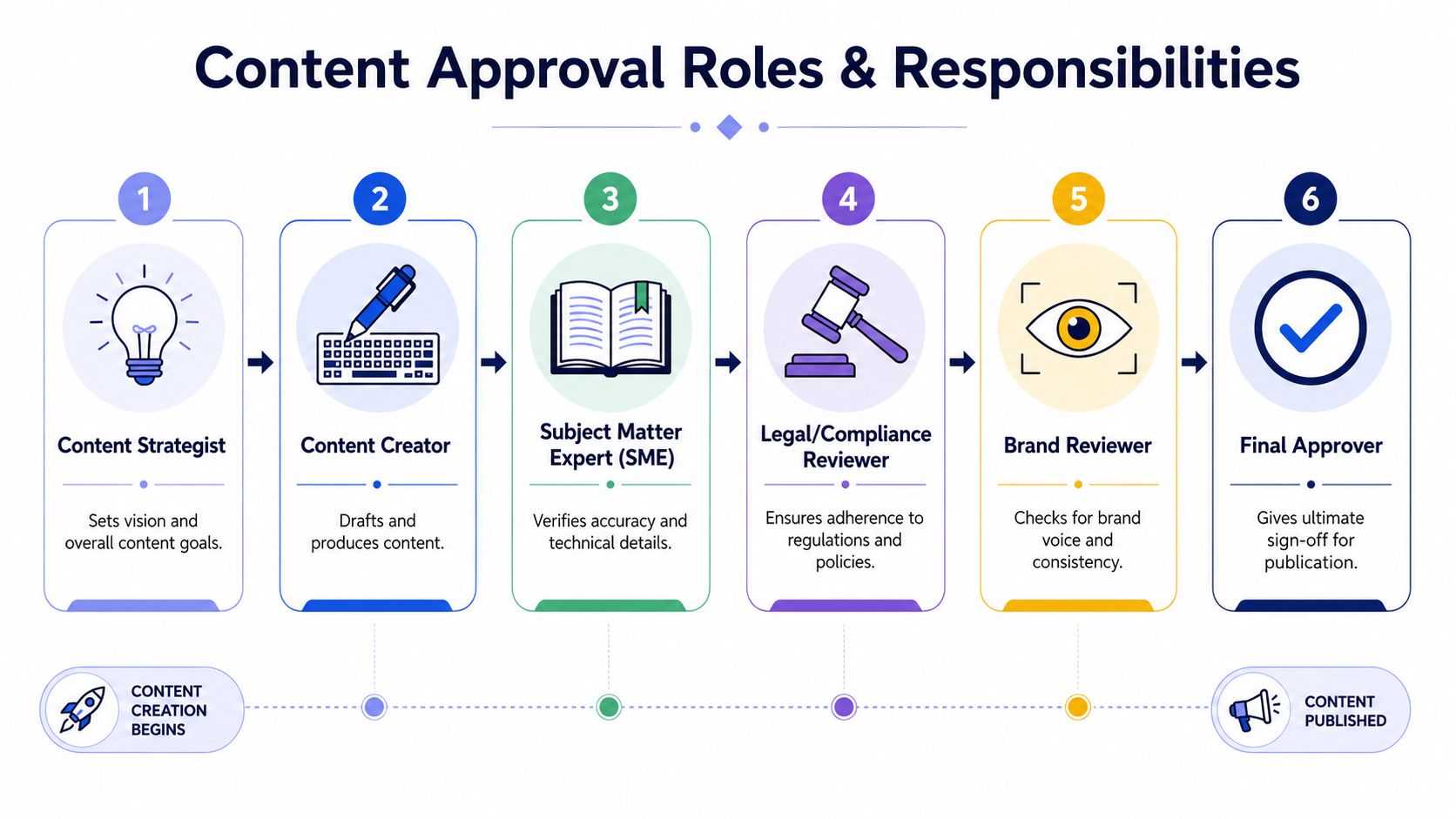 A six-step infographic detailing the content approval process roles and responsibilities from strategy to final publication.
Workflows often break down due to unclear ownership and when stakeholder volume outpaces reviewers, and teams still struggle to justify limiting approvers because the exact cost per added stakeholder usually isn't quantified, as noted in Marq's analysis of marketing approval workflow breakdowns.
Reviewer is not approver
This distinction sounds basic, but teams skip it constantly.
A reviewer gives feedback inside a bounded scope. An SME checks technical accuracy. Brand checks voice and consistency. Legal checks risk. They don't all own the go/no-go decision.
An approver is the person with authority to say the content can move forward. If you blur those roles, every reviewer becomes a veto point. That's how a straightforward post gets trapped in recursive edits.
Practical rule: feedback can come from several people, but approval should resolve to one named decision-maker at each stage.
Build a lightweight responsibility model
You don't need a giant governance deck. A one-page matrix is enough if it's enforced. For each content type, define:
Role | What they do | What they don't do |
Content creator | Produces the draft from the brief | Doesn't self-approve |
SME | Checks factual or technical accuracy | Doesn't rewrite for brand style unless asked |
Legal or compliance | Flags policy and regulatory issues | Doesn't reopen settled editorial choices |
Brand reviewer | Checks tone, style, and visual consistency | Doesn't own technical validation |
Final approver | Gives sign-off | Doesn't relitigate every earlier comment |
That structure also maps cleanly to permissions. If you're implementing this in an internal platform, you need role-aware access controls so people can comment, request changes, or approve without accidentally gaining powers they shouldn't have. MeshBase has a useful guide on handling project access permissions that's relevant when you're translating workflow roles into actual system permissions.
What works and what doesn't
What works:
Named owners: every stage has one accountable approver.
Scoped review: SMEs review facts, brand reviews voice, legal reviews compliance.
Visible authority: the system shows who can comment and who can sign off.
What doesn't:
Approval by committee
“Everyone should take a quick look”
Executive drive-bys after the asset has already cleared review
The hard part isn't documenting roles. It's enforcing them when someone senior wants to jump the queue. That's not a tooling issue. It's a design rule. If you let exceptions rewrite the system every week, you don't have a process. You have a superstition.
Mapping Your Approval States and SLAs
Once roles are clear, define the workflow like you'd define application states. If status labels are vague, people interpret them differently and automation becomes brittle.
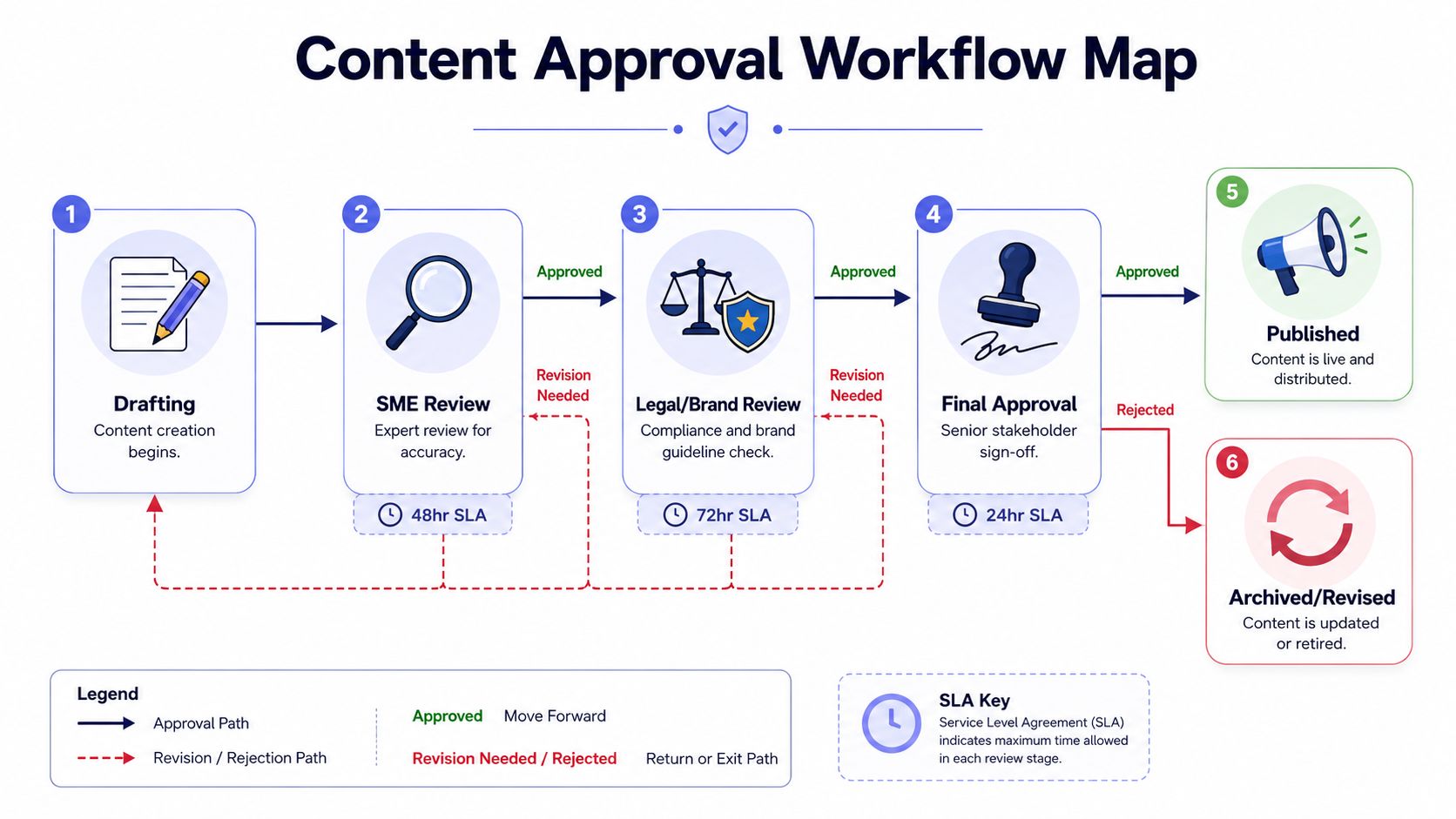 A diagram illustrating the six-step content approval workflow process from initial drafting to final publishing or archiving.
Use explicit states instead of fuzzy status labels
“Needs work” isn't a state. “In review” is barely a state unless you know who has the item and what outcome is expected.
A workable content approval process usually includes explicit transitions such as:
Draft
Ready for review
SME review
Legal or brand review
Revisions requested
Final approval
Approved for scheduling
Published
Archived or reopened
Each state should answer three questions. Who owns it. What input is required. What event moves it forward.
For teams that haven't mapped workflows formally before, it helps to look at practical business process mapping examples and then simplify them down to the smallest set of states your team needs.
Write SLAs into the workflow
A status without a deadline is just a waiting room.
A well-defined workflow defines stages with firm deadlines, often 24–48 hours for most content, limits revision cycles to no more than two per stage, and distinguishes reviewers from approvers, according to Ybug's practical guide to content approval workflows. The same source notes that unclear briefs drive the majority of revision cycles, which is why teams that obsess over editing quality but ignore briefing keep seeing the same delays.
A simple SLA model might look like this:
SME review: short turnaround, focused on factual correctness
Brand or legal review: longer window where needed
Final approval: fast decision, not a new review round
No response rule: after the deadline, escalate or advance according to policy
This walkthrough is worth watching because it helps translate the abstract workflow into something teams can operationalize:
Your brief is part of the system
Developers often treat the brief like business fluff. That's a mistake. The brief is upstream validation.
If the content brief doesn't define target audience, key messages, tone, and success criteria, reviewers will try to reconstruct intent during review. That's where random edits come from. People aren't just fixing wording. They're compensating for missing requirements.
Good approval systems catch ambiguity before drafting. Bad ones discover it during the third round of edits.
A one-page workflow doc should sit next to a standardized brief template. The workflow handles state transitions. The brief reduces avoidable transitions in the first place.
Build Your Toolchain and Automations
A solid process doesn't require a giant platform migration on day one. Start by making state visible, ownership explicit, and transitions consistent inside tools the team already uses.
Start with boring tooling
If your team lives in Jira, Asana, Notion, or Trello, begin there. Add required fields for content type, owner, review scope, due date, and approval state. Use templates so each content item starts with the same shape instead of becoming a custom snowflake.
You can also steal ideas from adjacent approval-heavy workflows. TimeTackle's examples around time card approval processes are useful because they show the same underlying mechanics: clear submission state, named approver, deadline, escalation path, and auditability. Different domain, same systems thinking.
Automate transitions, not opinions
The most effective automations aren't flashy. They remove handoffs that humans keep forgetting.
Good automations include:
State-driven notifications: when a draft enters SME review, the assigned reviewer gets notified automatically.
Deadline reminders: the system pings owners before and after SLA breach.
Approval gating: publishing actions stay locked until required stages are complete.
Artifact sync: the approved asset version is attached to the record automatically.
What you shouldn't automate is judgment. Don't build a system that interprets vague comments and guesses whether something is approved. Approval should be an explicit action with a clear actor and timestamp.
If you want patterns for wiring this up in automation platforms, these n8n workflow examples are a useful reference point for event-based routing and task orchestration.
Treat auth and publish steps like real integration work
A lot of teams fix review but leave publishing as a manual afterthought. That's where approved content stalls.
If your system hands off to external APIs, build that leg like you would any other production integration. OAuth 2.0 access tokens are typically short-lived and expire, so your app needs to check expiration or use a refresh token to obtain a new access token automatically, as documented in Postman's OAuth 2.0 authorization reference. When you need to request a token directly, the client performs a POST to the token endpoint with client credentials and the authorization code, as shown in Outreach's OAuth documentation. Some systems also let you define token validity explicitly during app registration through an Access Token Lifetime value in seconds, as described in D2L Valence's OAuth2 documentation.
That matters because “approved for scheduling” should trigger a reliable machine step. If token refresh is brittle, the final publish state becomes another manual rescue job. Then your content approval process is only half automated.
How to Know If Your New Process Is Working
New workflows are often launched and judged by vibes. Don't do that. Treat it like an internal product release.
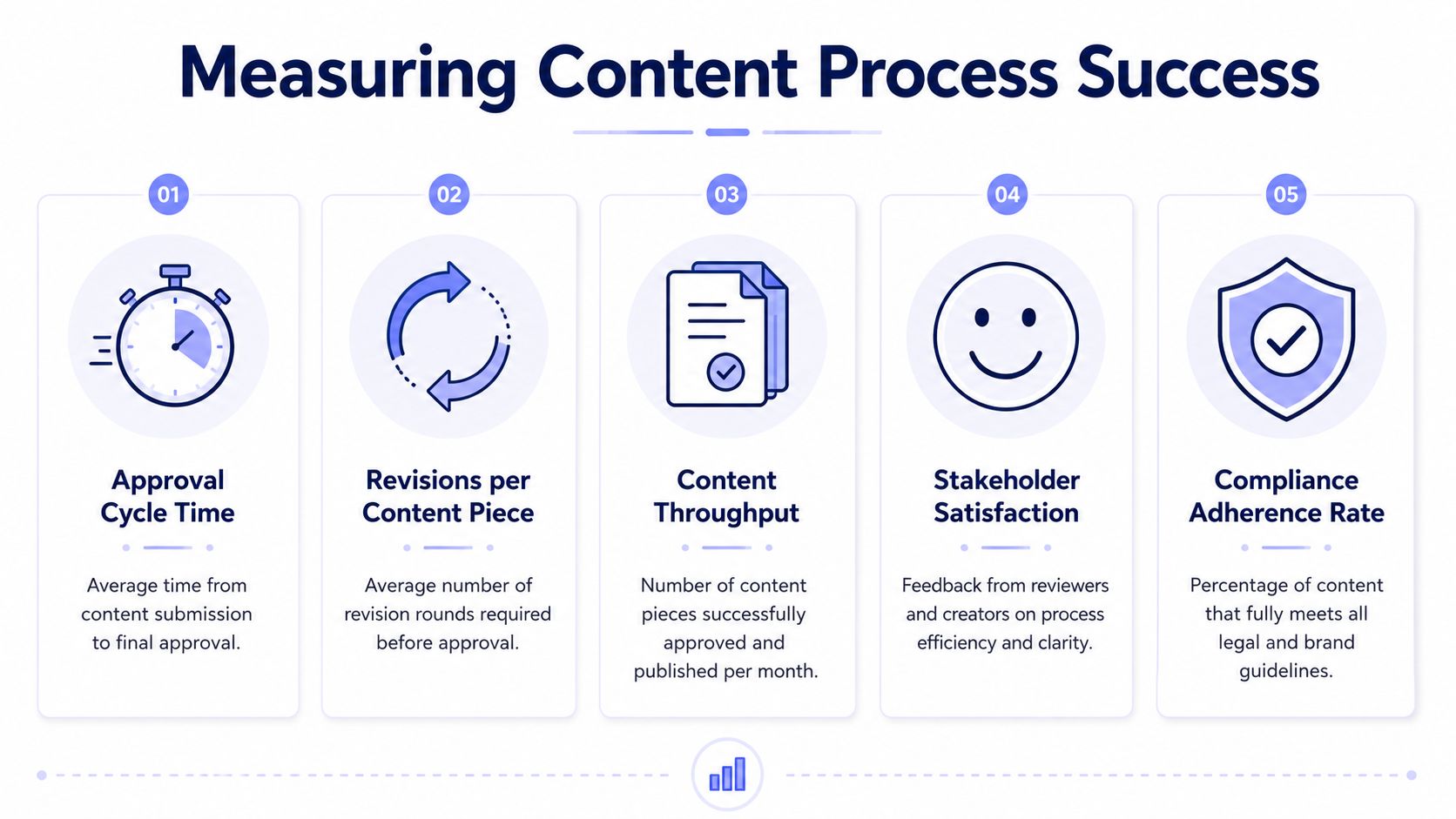 A diagram illustrating five key metrics for measuring the success of a content approval process.
Dry-run before broad rollout
Pick one content type and one cooperative team. Run the new process end to end for a small batch of work. Watch where people hesitate.
You're looking for operational friction like:
reviewers commenting in Slack instead of inside the system
approvers reopening earlier stages for out-of-scope changes
content creators bypassing required fields because the form is annoying
publishing steps failing because the approved asset isn't the one attached to the record
Those failures are useful. They tell you whether the process is clear in real behavior, not just on a flowchart.
Track process metrics that expose friction
The benchmark you want to beat is straightforward. Research shows manual content approval routing has a median cycle of 4.7 days, and optimized workflows with automated triggers can compress that timeline so posts queue automatically upon sign-off, according to this analysis of agency approval workflow delays and automation gains.
That doesn't mean every team should chase the same exact number. It means you need a baseline and a directional goal.
Track metrics such as:
Metric | Why it matters | What a bad signal looks like |
Approval cycle time | Shows end-to-end delay | Content sits in review for long periods |
Revisions per content piece | Exposes poor briefs or unclear scope | The same asset loops repeatedly |
On-time publishing rate | Shows whether approval supports delivery | Approved assets still miss launch windows |
Stage breach count | Reveals SLA failures | One review stage routinely blocks the queue |
Reopen rate after approval | Shows weak gatekeeping | Approved items keep getting changed |
If cycle time drops but reopen rate climbs, you didn't improve the process. You just approved faster and sloppier.
Use qualitative feedback too. Ask creators whether feedback is clearer. Ask reviewers whether they know exactly what they're responsible for. Ask approvers whether they trust the state of the asset when it reaches them. Those answers often surface problems before dashboards do.
Keeping the Process Clean Through Governance
A good workflow degrades unless someone owns it. People will drift back to side channels because side channels feel faster in the moment.
One path for normal work, one path for exceptions
The standard workflow has to be the default path for every normal content item. If people can bypass the system by sending a Slack message to the right person, they will.
Exceptions still happen. Breaking news, legal escalations, executive edits. That's fine. But exceptions need their own explicit path with logging, ownership, and after-the-fact review. Otherwise the exception becomes the actual workflow.
A useful parallel here is API lifecycle management. Teams that never define compatibility rules end up with version sprawl and surprise breakage. The same discipline applies internally, which is why this piece on API versioning best practices is a good mental model for managing process changes without chaos.
Review the workflow like product infrastructure
Governance doesn't mean adding bureaucracy. It means running recurring maintenance.
A quarterly review is usually enough in many situations. Look at your metrics, inspect where items stalled, and check whether any role has become overloaded or ambiguous. If people keep skipping a stage, either the stage is unnecessary or the system around it is too painful.
Use a short review checklist:
Check ownership: does every state still have one clear accountable person?
Inspect exceptions: were urgent bypasses legitimate, or just convenience?
Audit approvals: can you see who changed what and when?
Update templates: does the brief still match current content types?
Retire friction: remove steps that don't protect quality or compliance
The goal isn't rigidity. The goal is a process that stays trustworthy under pressure.
If you're building a content system that needs to move from approval to publication without turning into a pile of custom platform integrations, PostPulse is worth a look. It gives developers one API surface for publishing across multiple social platforms, which is useful when you want your internal workflow to end in a reliable publish step instead of another manual handoff.
About the Author

Founder of PostPulse — a social media scheduling platform for creators and teams. Software engineer with a passion for building developer tools and simplifying complex API integrations across social media platforms.