What Is Platform Integration and Why It Matters in 2026
Published on
Tags:
Platform integration is the connective layer that lets separate software systems exchange data and trigger workflows automatically through APIs, middleware, or an iPaaS, so teams stop moving information by hand. In practice, that's the difference between a token expiring, a scheduled post stalling, or a webhook arriving late, and a system that keeps moving data when nobody's watching.
84% of businesses say integrations are very important or a key requirement for customers, and 74.2% of buyers rate integration capability as very or extremely important when they evaluate partner technology. That's why platform integration isn't a niche implementation detail anymore, it's part of the product surface itself, with real commercial impact on close rates, churn, and long-term retention integration statistics.
Table of Contents
The Day a Token Expired and Everything Stopped
A broken integration usually doesn't fail politely. It's the kind of afternoon where a short-lived token ages out, a carousel container sits in progress forever, and a scheduled blast runs into a rate limit right when the queue is full. The app still looks healthy from the outside, but the workflow underneath has stopped moving.
That's the part people miss when they ask what is platform integration. The answer isn't just “connecting apps.” It's the plumbing that keeps auth, retries, payloads, and downstream updates coordinated so a single failure doesn't leave you staring at a blank dashboard and a support queue.
The useful mental model is simple. A direct API call is just one pipe. Platform integration is the broader system around that pipe, the retry policy, the token lifecycle, the schema translation, the monitoring, and the handoff between apps when something changes upstream.
A clean integration isn't the one that works in a demo. It's the one that survives token rotation, version drift, and messy webhooks without waking you up.
That's why a plain definition never feels enough once you've been paged for the second time. The rest of this topic only makes sense when you treat integration as production infrastructure, not a convenience feature.
What Platform Integration Means
A broken workflow usually starts small. App A sends an API request to App B, App B accepts the payload, and something changes on the other side. That is a single call, not a platform integration.
The difference shows up as soon as the handoff has to survive real conditions. You need authentication, because App B should only trust valid traffic. You need error handling, because requests fail for different reasons. You need retries, because some failures clear on their own. You also need schema translation, because each product names fields differently and stores data in its own shape.
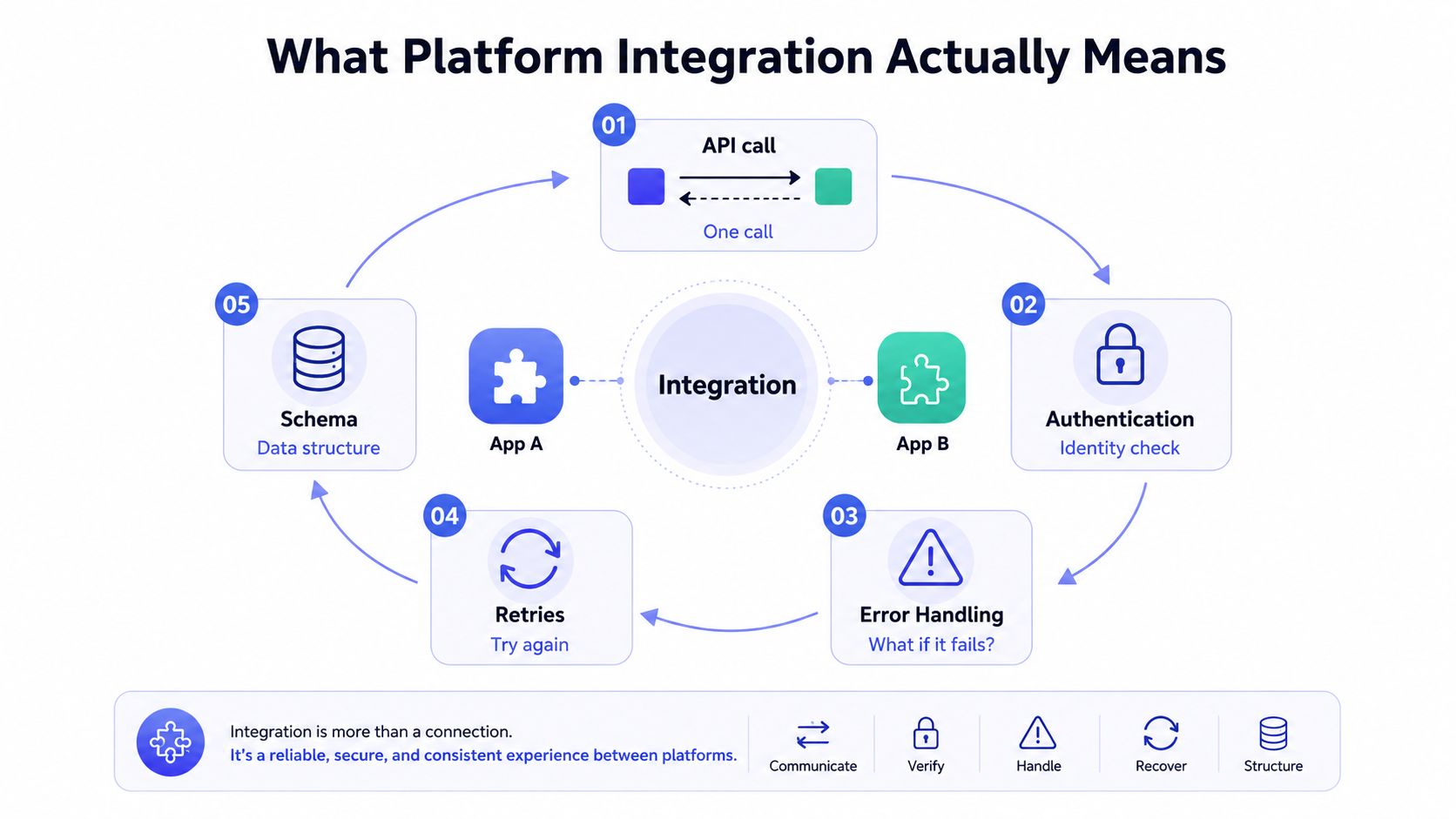 A circular diagram illustrating the key components of platform integration including API calls, authentication, error handling, retries, and data schema.
A platform integration sits between applications and moves data with rules attached. It carries the business event, checks credentials, handles failed requests, and keeps state aligned when one side changes before the other. That is the part that matters in production, because the work is not sending one payload, it is keeping the exchange reliable after tokens expire, webhooks arrive out of order, or an API starts returning rate-limit errors.
The depth of integration is a spectrum. At one end, a team wires a direct API call for a narrow task and stops there. Further along, the integration layer manages OAuth token refresh, backoff after 429 responses, webhook verification, replay handling, and mapping between different schemas. At the far end, the layer becomes shared infrastructure for the company, the place where cross-system rules live instead of being copied into every service.
A useful comparison is a postal network between applications. The application that sends the letter is one side of the system, the transport, confirmation, and exception handling are the other. A direct call only covers the handoff. A platform integration covers the handoff plus the machinery that keeps it dependable when an address changes, a token expires, or the receiver needs the message in a different format.
That shared layer also explains why integration work grows quickly. Once a company has a few tools that need to exchange data, the questions stop being abstract and become mechanical. Who owns OAuth scopes, how are refresh tokens stored, what happens when a webhook is retried, which system is the source of truth, and how do you keep field mappings from drifting over time? That is the same pattern behind many GTM stack examples. The vendors differ, but the integration problem is the same, a single event at the edge becomes coordination across multiple systems.
The Main Types of Platform Integration Approaches
Teams usually choose among four approaches, even if they don't name them that way. The right answer depends on how much control they want to own, how fast they need to ship, and how much connector maintenance they can tolerate.
Approach | What it's good at | What it costs you |
Direct API-based integrations | Cheap to start, flexible for one-off features | Connector sprawl, repeated auth work, constant upkeep |
Custom middleware | Control over routing, data shape, and business rules | Engineering time, operational burden, more code to maintain |
iPaaS | Faster delivery, shared tooling, less plumbing work | Less flexibility, platform constraints, vendor dependence |
White-label integration layers | Branded user experience, hidden complexity | Less direct control, dependency on the integration surface |
Direct API work is the fastest first mile
If a SaaS team just needs to publish a post or pull a record from one system into another, direct API work can be the fastest route. You write the call, wire the auth, transform the payload, and move on. It's cheap per connector, until the third, fourth, and fifth connector all need the same logic.
Middleware gives control, not free time
Custom middleware is what teams reach for when they need custom routing, platform-specific logic, or a central translation layer. It keeps the business rules inside your stack, which is useful, but every API change now becomes your problem. That tradeoff is worth it when the workflow is core to the product, and painful when the integration is just table stakes.
iPaaS trades flexibility for speed
An iPaaS compresses a lot of implementation work into a shared service. AWS describes iPaaS as a cloud-based model for integrating data from multiple applications into one solution, and it explicitly says nontechnical users can integrate SaaS and on-premises data without complex software development or extra middleware AWS iPaaS definition. That speed is valuable when shipping matters more than building every connector yourself.
White-label layers hide the plumbing
A white-label integration layer is for teams that want the integration inside their own product surface, not in a vendor-branded UI. That's usually the right move when the customer should feel like the workflow is native, even if the underlying connector graph is managed elsewhere.
Under the Hood of a Working Integration
The part that breaks in production usually is not the API call itself. It is the glue around it, auth rotation, rate limits, webhook delivery, and field mapping. Once real users depend on the connection, a “simple” integration turns into a system with state, retries, and failure modes that need real handling.
Authentication is a lifecycle, not a one-time setup
OAuth looks clean the first time you wire it up, then the token expires and requests start coming back with 401s. Meta's token flow shows why auth cannot be treated like a setup task, because short-lived tokens, long-lived tokens, and refresh behavior all decide whether an integration keeps working after the first day Meta OAuth token lifecycle. If you do not plan for refresh, token revocation, and version drift, the integration will age badly.
Rate limits punish naive retry loops
Every platform sets boundaries somewhere, and the mistake is assuming a failed request should just be retried right away. That is how teams end up hammering an endpoint, backing up their own queue, and making the outage worse. The practical pattern is backoff, jitter, and endpoint-aware throttling, with different treatment for 429s, transient network errors, and permanent failures.
Webhooks need idempotency and ordering discipline
A webhook only helps if the handler can survive duplicates, out-of-order delivery, and delayed events. A bad handler can double-charge a customer, reschedule an action twice, or overwrite newer data with stale state. The safe pattern is to verify the signature, store an event ID, and make the handler idempotent before you trust it with money or state changes. The implementation details are laid out clearly in the integration guides, especially where webhook handling and sync logic overlap.
Schema mapping is where “same data” becomes different data
A creator handle, a product SKU, or an order status often means slightly different things across systems. One integration might need to normalize those fields into a shared internal shape before the downstream app can use them cleanly. If you skip that work, the connector looks fine in testing and turns brittle the moment another platform changes its payload.
For a broader implementation reference, the mobile app integrations guide from RapidNative is useful because it shows how auth, sync, and transformation patterns repeat even when the surface area changes.
Real Use Cases You Have Probably Already Seen
The same mechanics show up in very different products. HR teams use event-driven integrations so a termination event can flow into benefits, COBRA, and payroll systems immediately after the source record changes. eCommerce teams rely on order, inventory, and tracking sync so the storefront and logistics provider don't drift apart.
Those examples matter because they show that platform integration is not tied to one category of software. The event changes, but the job stays the same, move data, preserve meaning, and keep every downstream system in sync without manual exports.
AI agents and social publishing use the same pattern
AI agents that publish to social platforms through an MCP server still have to deal with auth, payload shape, and endpoint-specific rules. A SaaS product that white-labels social publishing faces the same issues, except the end user shouldn't see any of the connector complexity at all. That's why a unified surface can matter more than the individual APIs underneath it.
The cleaner the user experience looks, the more integration work usually sits behind it.
If you need a quality-control step before publishing data into a customer-facing workflow, the Email Validation API is a good reminder that integrations often need a verification layer, not just a transport layer. The mechanics differ, but the pattern is the same, validate before you propagate bad data downstream.
How Much Integration Is Enough
Integration sits on a spectrum, and the right depth depends on what you need from the workflow. A shallow connection may be enough when speed matters and the integration is only supporting the product. A deeper one makes sense when the integration itself is part of the value the customer pays for, but it also brings more auth handling, more version tracking, and more upkeep. Academic work on platform integration research describes this as how much a developer uses a platform's boundary resources, which is a useful way to avoid assuming every connector should be built the same way.
Shallow integration is enough for many jobs
A shallow integration publishes a post, records the response, and moves on. That fits features that are helpful but not central to the product's core value. The implementation stays small, the blast radius stays contained, and you avoid building a workflow that probably does not need custom retry logic, token refresh handling, or a state machine tied to every upstream event.
Deep integration pays off only when the workflow is central
A deep integration is bidirectional, version-aware, and often tied to custom workflows or embedded UI. It gives a stronger product experience, but it also shifts more maintenance onto your team. OAuth scopes change, webhooks arrive with payloads you need to normalize, and rate limits can force backoff logic or queueing that shallow integrations never need. Once the integration is this deep, upstream platform changes can break more of your product at once.
Decision lens | Ask yourself | What usually wins |
Speed to ship | Do we need this live quickly? | Shallower integration or managed surface |
Control | Do we need custom routing or product-specific rules? | Middleware or deep integration |
Long-term upkeep | Can we own connector changes for years? | A narrower surface or unified layer |
The practical mistake is treating depth as a trophy. Integration depth should match the job, the failure modes you can tolerate, and the amount of connector work your team is willing to own. If the workflow needs a middle layer before data reaches the rest of your stack, an API proxy service is often a cleaner fit than wiring each platform directly into product code.
When a Unified Integration Layer Beats Rolling Your Own
A unified layer makes sense when the team needs to ship in days, not months, and doesn't want to carry the maintenance cost of many platform-specific connectors. It also helps when the product has to look native under your own brand, because the customer shouldn't feel like they've left your app to use somebody else's.
That's where a managed surface like PostPulse fits naturally. It exposes a single REST API, official n8n and Make.com nodes, an MCP server for AI agents, and a white-label option for SaaS products, which means one integration can sit in front of multiple social platforms without every team rebuilding auth, token refresh, and version handling from scratch.
The tradeoff is straightforward. You give up some direct control over the connector internals, but you also absorb less audit work, less token maintenance, and less version-drift work. If your product's value is in the workflow, not in owning every last integration detail, a unified layer can be the better engineering decision.
For a closer look at the connector-surface pattern, the API proxy service article is useful because it frames the same problem from the infrastructure side instead of the feature side.
A Practical Checklist Before You Integrate Anything
Before writing the first connector, confirm the OAuth scopes match the features you plan to ship. Scope creep is easier to prevent at design time than to unwind after users rely on permissions you didn't need in the first place.
Build token refresh and version drift into the budget as ongoing work, not as a one-time launch task. Decide how you'll handle rate limits before the first request leaves your codebase, because retry policy is part of the integration contract, not an afterthought.
Verify webhook behavior: Make handlers idempotent, signature-verified, and safe if events arrive twice.
Map schemas on paper first: Define the internal shape before writing transformers, so you don't encode platform quirks everywhere.
Decide on depth early: Choose whether the integration is shallow, managed, or embedded, then align the maintenance plan to that choice.
Plan observability: Track failures, latency, and retry counts so you can tell the difference between a bad deploy and a bad upstream platform change.
Document the touchpoints: Record which systems own auth, retries, dead-letter handling, and customer support when things break.
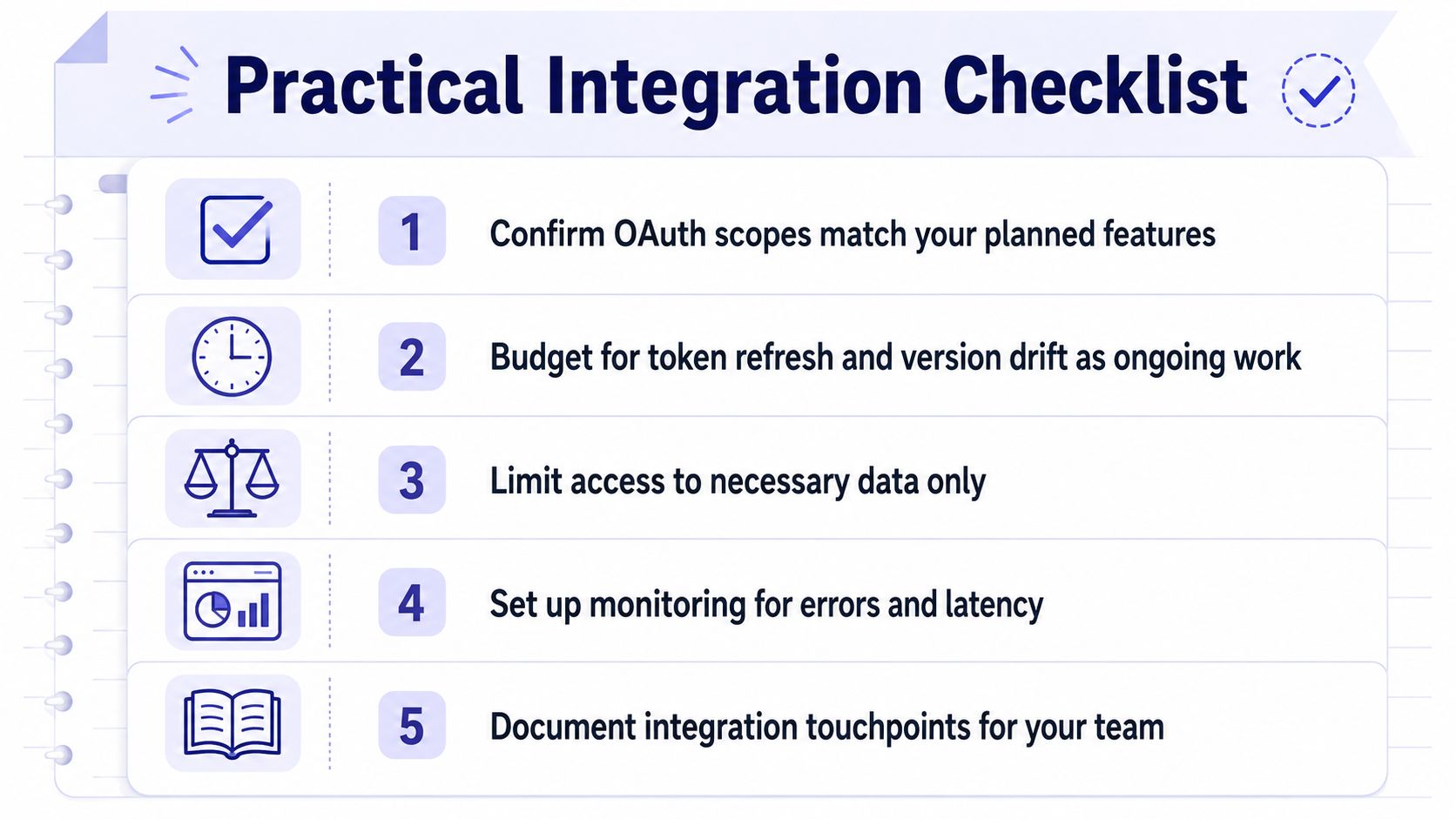 A five-point checklist for successful software platform integration, illustrated with icons on a notepad background.
If you can answer those questions cleanly, the integration has a chance of surviving real traffic. If you can't, the bug report is probably already waiting for you.
If you're building social publishing, automations, or an AI workflow that has to survive token expiry, rate limits, and version drift, take a look at PostPulse. It gives you a unified integration surface for publishing across multiple platforms, so you can spend less time rebuilding connectors and more time shipping the product around them.
About the Author

Founder of PostPulse — a social media scheduling platform for creators and teams. Software engineer with a passion for building developer tools and simplifying complex API integrations across social media platforms.