8 Twitter Account Names Ideas for Every Brand
Published on · Updated on
Tags:
Why is finding a Twitter handle that explains your account's purpose harder than writing the first month of content?
The obvious name is taken. The clever variation is hard to spell. The version that fits X no longer matches Instagram, LinkedIn, or your domain. Then the account evolves, and a handle chosen for one narrow feature starts working against the brand.
Good twitter account names ideas solve a practical identity problem. They tell people what the account is for, remain readable when shared aloud, and leave enough room for the account to change direction. X usernames must be between 4 and 15 characters, use only letters, numbers, and underscores, and cannot contain spaces or symbols, according to X's official username rules. Display names are separate and can be longer, which gives you room to explain the account without overloading the handle.
The patterns below cover branded, personal, developer, AI, news, reporting, and insight-led accounts. Each one includes ways to adapt the name for a niche, test availability, and connect naming decisions to automated publishing workflows. PostPulse can help distribute consistent content across supported channels, but it can't rescue a vague or misleading handle. The identity still has to work first.
For a compact set of additional naming principles, see these 10 Twitter handle tips.
Table of Contents
1. @YourBrandPulse
@YourBrandPulse works when the company remains the main identity and the account acts as a live stream of activity around it. The pattern fits agencies, SaaS companies, and product teams that publish product news, customer education, or industry observations without creating a separate editorial brand.
Examples include @HubSpotPulse for marketing automation insights, @SlackPulse for team updates, and @NotionPulse for product tips. These examples make the account's relationship to the parent brand obvious, while “Pulse” suggests an ongoing signal rather than a static company profile.
The trade-off is length. The brand name plus “Pulse” may exceed X's 15-character username limit, so test the actual handle before committing. X checks availability when you save a username, and an available-looking idea still has to pass the platform's format and uniqueness checks, as explained in X's handle-change guidance.
 A hand-drawn illustration showing a brand connecting to social media platforms like X, LinkedIn, and Instagram.
Make the suffix earn its place
Use “Pulse” when the account publishes a recurring stream of information. It's a poor fit for a dormant corporate profile or a support account that only responds to tickets.
Try these variations:
Brand plus pulse:
@AcmePulseBrand plus updates:
@AcmeUpdatesBrand plus AI:
@AcmeAI, only when automation is centralReadable separator:
@Acme_Pulse, if the clean form is unavailable
Keep the bio explicit. “Automated updates from Acme. Powered by PostPulse.” tells API-conscious audiences what they're seeing and avoids implying that every post was written manually. You can also review broader principles for profile names for Facebook when aligning the same identity across channels.
A unified publishing workflow can distribute the same brand system across supported networks, but reserve each handle through the platforms themselves. A publishing tool can help you manage connected accounts and content, yet no tool can bypass X's ownership rules or claim a username held by someone else.
2. @BuildWithYourName
@BuildWithYourName gives a creator account a clear job: show how something gets made. It suits indie hackers, AI-agent builders, and no-code specialists who want to teach through implementations rather than present themselves as a generic industry commentator.
The pattern becomes more useful when the content includes shipped work. @BuildWithAI can document autonomous systems, @BuildWithNoCode can focus on Make.com and n8n workflows, and @BuildWithLLMs can cover language-model integrations. A developer who publishes code, diagrams, deployment notes, and postmortems has a stronger reason to use “BuildWith” than someone who only shares promotional announcements.
Keep the identity personal enough
The main weakness is that the pattern can sound broad. “BuildWith” needs a distinctive second element, preferably a name, product, or narrow technical concept. If the handle is unavailable, @BuildingWithName, @BuildByName, or @NameBuilds preserves the same positioning while changing the construction.
Pair the account with a technical home base:
Repository: Link the relevant GitHub project.
Build log: Publish implementation notes and release changes.
Demonstration: Show the working product, not only the concept.
Publishing flow: Trigger a shipping update after a real deployment.
PostPulse's REST API or MCP server can support automated “shipped” updates, but automation should follow a deployment event or an approved content queue. It shouldn't turn every commit into noise. On X, developer communities and hashtags such as #BuildInPublic and #100DaysOfCode can help people discover the work, but the handle itself should remain understandable without relying on hashtags.
A good test is simple. Say the name aloud, then ask whether a listener could type it correctly. Research on pronounceable brand names found that pronunciation fluency can improve preference and memory in situations requiring recall or comparison, as described in this CIS research report on brand-name fluency. That makes clean spelling a practical engineering constraint, not a decorative preference.
3. @[YourName]Updates
@[YourName]Updates is the utility pattern. It tells followers that the account exists to publish announcements, releases, maintenance notices, or other changes. Product teams, creators with frequent launches, and companies that need a broadcast channel can use it without inventing an editorial personality.
Examples include @OpenAIUpdates, @NotionUpdates, @TwitchUpdates, and @PostPulseUpdates. A name like this sets expectations immediately. Someone who follows it expects product changes, not a founder's personal opinions or a general stream of industry news.
The suffix also creates a useful content boundary. Your bio can state: “Product launches, feature releases, maintenance windows.” That small taxonomy helps users decide whether the account is relevant and gives your publishing system clear categories.
Design the account like a change log
An updates account needs a source of truth. Link an official status page, release notes page, or public change log in the bio. If the account posts information that isn't documented elsewhere, establish an approval step before publishing.
A practical content model might include:
Release: What changed and who benefits.
Maintenance: What users should expect and where to get status.
Incident: What's affected, what's known, and where updates will appear.
Follow-up: Whether the issue is resolved or the feature is fully available.
PostPulse can distribute approved updates through its REST API, official n8n and Make.com nodes, or MCP server. Its supported destinations include Instagram, TikTok, YouTube, LinkedIn, X, Threads, Bluesky, Facebook Pages, Telegram, and Pinterest, so teams can adapt one source update for each channel rather than manually recreating it.
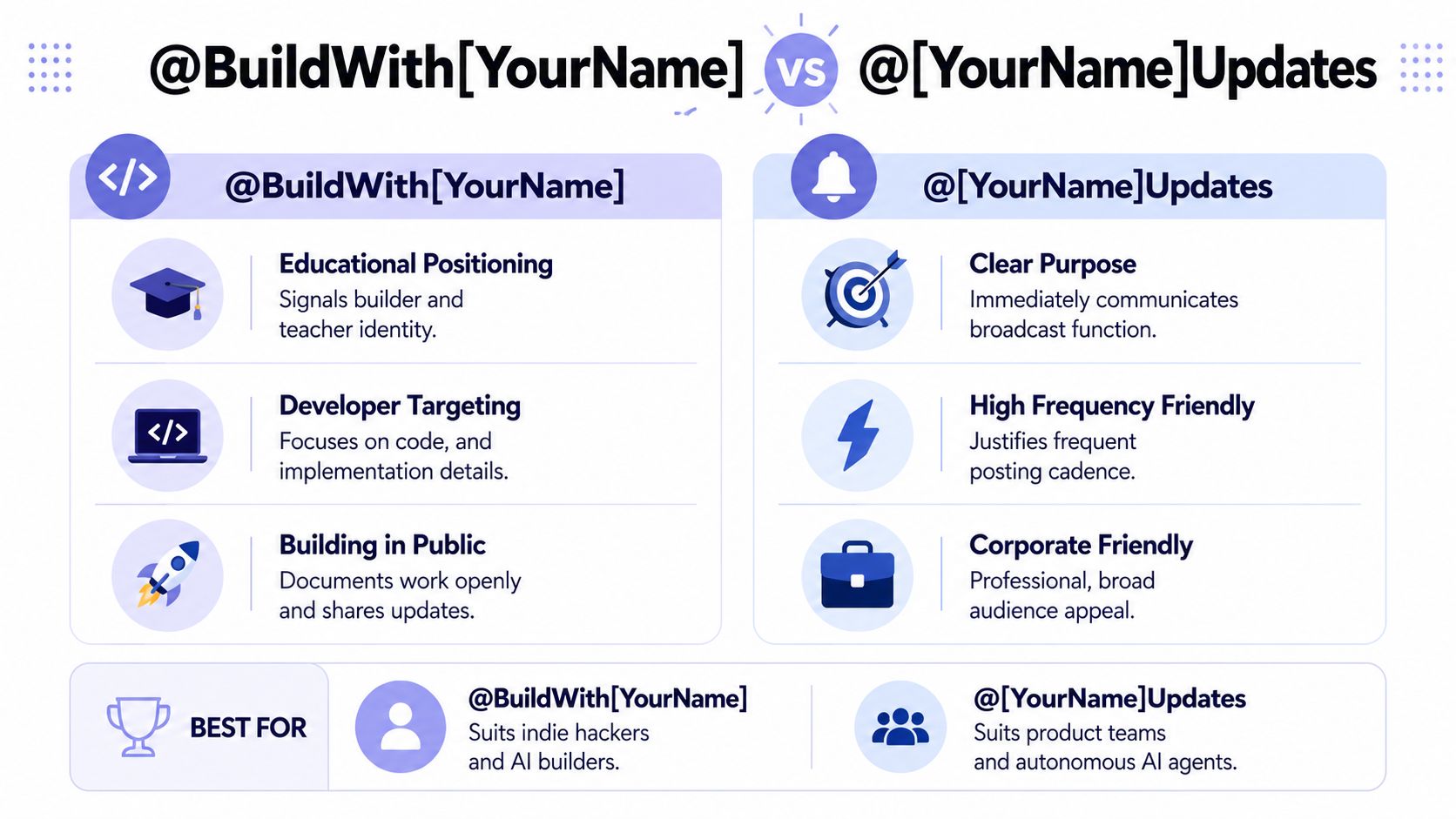 A comparison infographic showing how to choose between @BuildWithYourName and @YourNameUpdates for social media handles.
Don't use “Updates” for a personality-led account that rarely announces changes. The name promises operational usefulness, so the publishing cadence and content should support that promise.
4. @The[YourCategory]Report
@The[YourCategory]Report positions an account as a curated source of analysis. “Report” sounds more deliberate than “News,” which makes it suitable for weekly roundups, technical briefings, market commentary, or structured industry research.
Examples include @TheAPIReport, @TheAIReport, @TheMarketingAutomationReport, and @TheSocialReport. An API-focused account might cover breaking changes, deprecations, and developer-impacting announcements. An AI account could compare agent capabilities, model releases, and implementation patterns. The name gives you room to interpret information instead of merely repeating it.
The cost is character pressure. This pattern often needs shortening, such as @APIReport, @AIReport, or @TechReport. Don't force every word into the handle if the result becomes difficult to read. X permits only letters, numbers, and underscores in usernames, so the display name and bio should carry the fuller editorial description.
 A hand-drawn sketch of a business report folder, calendar, and magnifying glass representing data analysis and reporting.
Build a repeatable report format
A report account becomes maintainable when every edition follows a recognizable structure. Use a fixed sequence such as headline, source, impact, interpretation, and recommended action. That format reduces editorial friction and makes repurposing easier across channels.
Link longer research to a blog, Substack, Medium publication, or documentation site. Social posts can summarize the finding, while the long-form page carries context and source material. The account's bio should explain whether you publish original analysis, curation, or both.
For teams automating distribution, PostPulse's MCP server can connect an AI workflow to publishing, while scheduling can keep a report series consistent across supported platforms. The system should still preserve human review for claims, sources, and interpretation. A clean pipeline can publish a bad conclusion just as efficiently as a good one.
Use social media reporting guidance to think beyond publishing volume. The useful question isn't how many channels receive a report. It's whether each channel receives a version that readers can understand and verify.
5. @[YourName]Dev
@[YourName]Dev makes a direct promise to technical readers. It signals API documentation, SDK changes, code examples, integration notes, and developer-facing product announcements. The pattern fits platform teams and products with an active integration community.
Examples include @PostPulseDev, @SlackDev, @TwitchDev, and @Stripedev. A developer account should lead users toward practical implementation resources, not merely repeat the main brand's marketing posts. Link API documentation, SDK repositories, examples, and issue trackers where appropriate.
Optimize for technical discovery
Use the account as a funnel into shipped engineering material. A post about a webhook change should point to the relevant documentation. A post about an SDK release should identify the package, migration path, and repository. Readers should be able to move from the handle to a working implementation without guessing.
Standardize your publishing formats:
Code examples: Keep snippets short and move full examples to documentation.
Version changes: State what changed and whether existing integrations need action.
Deprecations: Link the migration guide and explain the replacement.
Integrations: Show the input, output, and expected operational behavior.
PostPulse can publish adapted versions across its supported channels using its REST API, n8n node, Make.com app, or MCP server. That doesn't mean a full code block belongs on every platform. X might carry a compact example, LinkedIn might explain the implementation decision, and Telegram might deliver a release notice with the documentation link.
Technical audiences notice vague claims quickly. Publish what changed, what users must do, and where the evidence lives. A Dev suffix earns trust only when the account consistently behaves like a developer resource.
6. @[YourName]AI
Does @[YourName]AI describe the account's actual operating model, or only its subject area? The pattern fits accounts that publish AI-generated material, document autonomous agents, or explain intelligent automation. Examples include @PostPulseAI, @NewsAI, @ContentAI, and @AnalyticsAI, but each implies a different role. @NewsAI suggests automated aggregation, while @AnalyticsAI points to machine-assisted interpretation. State the human review process in the bio and pinned post so the suffix does not overpromise.
 A sketched illustration of a friendly AI robot sending social media icons via a paper airplane.
Match the handle to the workflow
Use a narrower prefix when the account serves a specific niche, such as @FinanceAI, @SupportAI, or @ResearchAI. Check the exact handle's availability before committing, then test the name in profile links, automation settings, and publishing templates. Keep the pattern readable if the brand name is long. The handle should identify the system's job, not a future project.
Document four decisions in the profile or linked operating notes: what the system collects, what the model produces, where a person reviews output, and how publication occurs. A statement that posts are autonomously published via PostPulse MCP and a named agent gives readers a concrete basis for evaluation.
PostPulse's MCP server supports AI-agent publishing. Make.com and n8n can connect automation steps to a controlled publication flow. Set safeguards before unattended distribution:
Source validation: Reject content without an approved source.
Duplicate detection: Prevent repeated items.
Review thresholds: Send sensitive topics to a person.
Audit records: Store the prompt, source, output, and publication result.
The video below demonstrates an AI-agent publishing workflow that an @[YourName]AI account could represent, from automated generation through controlled distribution.
For a practical starting point, see how to create social media posts with AI. Choose this handle only if the account's publishing behavior can support the AI label consistently.
7. @[YourName]Insights
@[YourName]Insights suits accounts that interpret information and connect evidence to decisions. The pattern works for consultants, analysts, researchers, and creators whose posts add context beyond a headline or raw metric.
Examples include @MarketingInsights, @TechInsights, @SocialInsights, and @AIInsights. A marketing account might compare campaign patterns. A technology account could explain API economics, platform changes, or infrastructure decisions. An AI account might translate model capabilities into practical product implications.
Choose “Insights” when the account needs room to cover several related angles. Report signals a recurring publication format, while “Insights” permits shorter observations, explanations, and recommendations. That flexibility also sets a quality standard. Generic opinions will make the handle feel disconnected from the account's stated purpose.
Make the analysis repeatable
Give every post a clear reasoning path: observation, evidence, interpretation, limitation, and recommended action. This structure helps readers assess the conclusion and gives multiple contributors a shared editorial method.
Adapt the pattern to the niche by naming the decision the account supports. @APIInsights can explain integration costs and platform changes. @MarketingInsights can focus on campaign choices. A narrower subject makes the handle easier to remember and helps automated workflows select relevant source material.
Build supporting assets around the account's purpose:
Long-form analysis: Explain the context behind a short post.
Notebook or repository: Show reproducible technical work where suitable.
Report archive: Let readers find earlier conclusions.
Method note: Define terms and state what the analysis does not cover.
Check availability across the intended channels, then test the handle beside the profile name and bio. Avoid unnecessary punctuation or wording that makes automated account matching harder. Before scheduling publication, require an approval state, attach the supporting evidence, and record the final post. PostPulse's n8n and Make.com integrations can trigger publication after approval, preserving editorial control while reducing manual handoffs.
A delayed, well-supported interpretation is more useful than a rushed post that confuses correlation with cause.
8. @[YourName]News
Need a handle for fast, sourced updates in one field? @[YourName]News states that purpose immediately. It fits accounts that monitor feeds, APIs, webhooks, release pages, or trusted publications, then distribute relevant information quickly.
Examples include @APInews, @TechNews, @APINews, and @AutomationNews. An API feed can cover deprecations and developer-impacting changes. An automation feed can report new nodes, integrations, and workflow-platform releases. A narrow subject makes inclusion rules easier to write and gives automated publishing workflows a clear filter.
The name also creates an editorial obligation. Put a sourcing policy in the bio or link to one. Label original reporting, direct announcements, and summaries separately. If the account republishes information, identify the source instead of presenting it as firsthand reporting.
Build the feed around freshness and traceability
Treat speed as a pipeline property. The workflow should capture the source, normalize the item, detect prior coverage, create copy for each platform, and apply approval or automatic publication rules.
A workable implementation has five stages:
Monitoring: Watch approved RSS feeds, APIs, or webhooks.
Verification: Confirm the source and publication time.
Deduplication: Check whether the item has already been posted.
Formatting: Adapt the message for each destination.
Audit trail: Store the source, timestamp, and final post.
PostPulse can handle the publication layer through its REST API, official n8n and Make.com nodes, or MCP server. Add a timestamp when recency affects interpretation, such as “Breaking: API change, time posted.” Use broad tags carefully on X and more vertical-specific tags on LinkedIn. Tags may aid discovery, but they do not replace a clear source.
Check the handle beside the profile name, bio, and intended niche before adopting it. Verify availability directly rather than planning around a name held by another account. X prohibits username squatting, and attempts to buy, sell, or solicit payment for usernames can lead to permanent suspension under X's username-squatting policy. For an unavailable name, follow X's common username issue guidance and choose an available variation instead of assuming the handle can be transferred.
Top 8 Twitter Handle Ideas Comparison
Handle | 🔄 Implementation complexity | ⚡ Resource requirements | 📊 Expected outcomes | 💡 Ideal use cases | ⭐ Key advantages |
@YourBrandPulse | Low–Medium, unified handle & branding setup | Moderate, branding, scheduling, PostPulse setup | Consistent brand presence across platforms | SaaS, agencies, white‑label platforms | Brand recognition; scalable cross‑platform distribution |
@BuildWith[YourName] | Medium, regular technical publishing workflow | High, code demos, repos, frequent content shipping | Strong community engagement and trust among builders | Indie devs, AI agent builders, no‑code creators | Educational positioning; attracts early adopters |
@[YourName]Updates | Low, simple broadcast/accountation pattern | Low–Moderate, scheduling/automation for frequent posts | Clear expectations; reliable update delivery | Product teams, autonomous agents, enterprise comms | Highest clarity; algorithm‑friendly broadcast channel |
@The[YourCategory]Report | High, research, templates, editorial cadence | High, recurring analysis, editorial resources | Authority, subscriber funnels, niche loyalty | Thought leaders, analysts, newsletter writers | Credibility; repeatable reporting and depth |
@[YourName]Dev | Medium, technical content pipeline and examples | Moderate, developer time, docs, code snippets | High‑signal developer audience and integrations | API/platform companies, SDK maintainers | Technical credibility; attracts integrators and contributors |
@[YourName]Ai | Medium, requires genuine AI/autonomous pipeline | High, models, automation, monitoring, transparency | Rapid attention if authentic; partnership interest | AI agent builders, no‑code automation teams | Strong AI positioning; high growth potential |
@[YourName]Insights | High, rigorous analysis and reproducible methods | High, data sources, analysis time, long‑form content | Perceived high value; deeper engagement | Consultants, analysts, strategic creators | Actionable intelligence; builds authority quickly |
@[YourName]News | High, real‑time monitoring and verification processes | High, monitoring systems, verification, rapid ops | Frequent checks; high engagement on breaking items | News aggregators, autonomous monitors, developer alerts | Timeliness; ideal for automated, real‑time publishing |
Choose the Pattern Your Content Can Actually Support
Start with the audience, not the suffix. A developer audience may respond to Dev or BuildWith. A product audience may need Updates. A research audience may understand Report or Insights. A real-time aggregation account may justify News, while an automation-led account can use AI only when the system's role is visible and genuine.
Next, match the name to the account's publishing role. @YourBrandPulse supports a branded stream. @[YourName]Updates supports operational announcements. @The[YourCategory]Report supports recurring analysis. These patterns overlap, but they don't make the same promise. Choose the one your team can maintain for the long term.
X usernames have a narrow format. Official guidance says they must be 4 to 15 characters, contain letters, numbers, or underscores, and avoid spaces and symbols. X also reserves usernames containing “Admin” for official X accounts. That makes early filtering useful. Remove invalid candidates before spending time on logos, bios, or automation flows.
Test variations without making them ugly
Create a short list of readable candidates, then test each one against the same criteria:
Spelling: Can someone type it after hearing it once?
Memorability: Does it use a compact, distinctive word combination?
Cross-platform consistency: Can the same identity work on X, Instagram, LinkedIn, and other relevant channels?
Brand clarity: Does the name identify the company, person, niche, or publishing role?
Promise match: Will the account consistently deliver what “News,” “Dev,” “AI,” or “Updates” implies?
Future flexibility: Will the handle still work if the product, niche, or content mix expands?
Research on brand naming found that shorter names, including one-syllable names, were recalled and recognized more effectively in the studied contexts. The same research also discusses spelling cues and memory, which supports avoiding confusing orthography where possible. Read the brand-name recall research for the underlying discussion.
Don't overfit the name to a temporary feature. A handle such as @YourProductAPI can become awkward if the company expands into integrations, analytics, or workflow automation. A broader name such as @YourProductDev may preserve room for that growth while still setting a clear audience expectation.
Check availability and continuity
Availability isn't only an initial setup issue. An arXiv study, @I to @Me, reported that around 10% of monitored Twitter users changed their usernames, with possible motivations including gaining space, gaining followers, or promoting the username itself. The practical lesson is that naming decisions can change over time, so choose a handle people won't abandon when the account evolves.
Check the handle directly in X's account settings, then review the same name across your priority platforms, domain, repository, and newsletter. Don't add a random number as the first fallback. Try a meaningful modifier such as Updates, Dev, AI, Report, or HQ, provided the result remains readable and accurate.
Finally, connect publishing only after the identity is stable. PostPulse lets teams distribute content through one REST API, official n8n and Make.com nodes, or an MCP server. That can support product updates, developer releases, reports, and AI-agent workflows across supported channels. It doesn't decide whether @YourNameNews is truthful or whether @YourBrandPulse is memorable. Those are naming and editorial decisions, and they're the foundation of the account.
For the operational side of social media workflows, keep troubleshooting resources close too, including this guide to troubleshoot Twitter GIF uploads. A maintainable system handles both identity and delivery.
PostPulse gives app developers, no-code builders, and AI-agent teams one publishing integration for Instagram, TikTok, YouTube, LinkedIn, X, Threads, Bluesky, Facebook Pages, Telegram, and Pinterest. Connect your chosen handle strategy to the REST API, official n8n or Make.com nodes, or MCP server, then visit PostPulse to build a consistent, branded publishing workflow around it.
About the Author

Founder of PostPulse — a social media scheduling platform for creators and teams. Software engineer with a passion for building developer tools and simplifying complex API integrations across social media platforms.