Create Social Media Posts with AI: A Developer's Workflow
Published on
Tags:
You ask an AI to write a post about your new launch. It gives you a clean caption, a few hashtags, and a CTA that sounds like every other CTA on the internet. It isn't wrong. It just isn't publishable.
That gap is where many teams get stuck when they try to create social media posts with AI. The model can generate words fast. The hard part is getting output that respects brand voice, survives review, fits the target platform, and moves through a publishing workflow without turning into a copy-paste mess.
I see the same failure pattern over and over. Teams obsess over the prompt, then improvise everything after generation. Review is ad hoc. Formatting happens at the last minute. Publishing lives in a spreadsheet, a chat thread, or someone's browser tabs. The result is predictable: fast drafts, slow operations.
Table of Contents
The Unmet Promise of AI Social Media Content
Monday, 8:30 a.m. The content calendar says five posts need to go live this week. Someone opens ChatGPT, drops in a quick prompt, and gets copy back in ten seconds. By 9:00, the team is still editing line by line because the draft sounds like nobody on the team, misses the product nuance, and needs a different version for every channel anyway.
That gap between demo speed and production reality is why many teams stall out with AI social content. The model can produce words fast. It cannot infer your approval rules, campaign context, brand tolerances, or publishing requirements unless you supply them.
Social distribution is too large for low-quality generation to stay harmless. Billions of people use social platforms, so weak copy does not just waste time. It creates more review work, more off-brand posts, and more variation than a team can realistically police by hand.
The visual side shows the same pattern. According to AMRA & Elma AI-generated content statistics, industry reporting projects that by 2026, AI-generated images will account for 79% of visual content posted on major platforms such as Instagram, TikTok, and Pinterest. The same roundup says tools like Midjourney v7 and Adobe Firefly 3.0 process more than 4.2 billion image-generation requests per month. Treat those numbers as directional, not perfect ground truth. The operational takeaway still stands. AI output is already flooding the queue.
Here is the mistake I see over and over. Teams treat generation as the finish line.
Practical rule: If your workflow ends at "generate post," you don't have a workflow. You have a draft machine.
A usable system has to carry an idea all the way through selection, drafting, review, formatting, approval, and scheduling. Otherwise the model just shifts effort downstream. You save ten minutes on drafting and lose forty in revisions, Slack threads, and last-minute fixes in the scheduler.
That is why I care less about the magic prompt and more about the pipeline around it. A repeatable system starts with structured inputs, stores brand rules in a form the model can use, and adds checks before anything reaches a publishing tool. If your team also plans around recurring campaigns, an AI-assisted event calendar workflow for social planning helps reduce random prompt-by-prompt creation.
If you're still earlier in that process, this resource on Simplify social media content creation is a solid primer on using AI as part of a broader production workflow.
Why the output feels soulless
The problem usually is not that the model is bad at writing. The problem is that the operating context is missing.
Three failure modes show up first:
Missing context: The model does not know the audience segment, offer, campaign goal, or the level of specificity your brand expects.
Weak constraints: Without rules for tone, structure, emoji use, hashtag count, compliance language, and banned claims, the model fills in the gaps with generic platform clichés.
No downstream path: A decent draft still fails if nobody has defined how it gets reviewed, adapted per platform, approved, and handed off for publishing.
The third issue is where one-off prompting breaks in real teams. More generated drafts sound like productivity until an editor, marketer, or founder has to clean up every post manually. At that point, AI is not reducing workload. It is increasing draft volume without reducing operational friction.
Building Your Content Engine Beyond a Single Prompt
Treat the model like an engine, not an oracle. Engines need inputs, stages, checks, and maintenance. That's the difference between occasional lucky output and something you can run every week without cringing.
Why one-shot prompting breaks down
A single prompt tries to do too much at once. It has to understand the audience, infer the brand voice, choose a format, write a hook, land a CTA, and sometimes pair the text with a visual direction. Models can do all of that in one pass. They just don't do it reliably.
The stronger pattern is multi-stage prompting. According to Hashmeta's guidance on advanced AI social media post generator techniques, an effective workflow starts by setting audience, objective, and brand constraints, then follows with refinement prompts for hooks, CTA strength, and visual-text alignment. The same guidance recommends few-shot examples, typically 3–5 post samples, plus explicit constraint encoding for character limits, emoji rules, hashtag counts, and link placement.
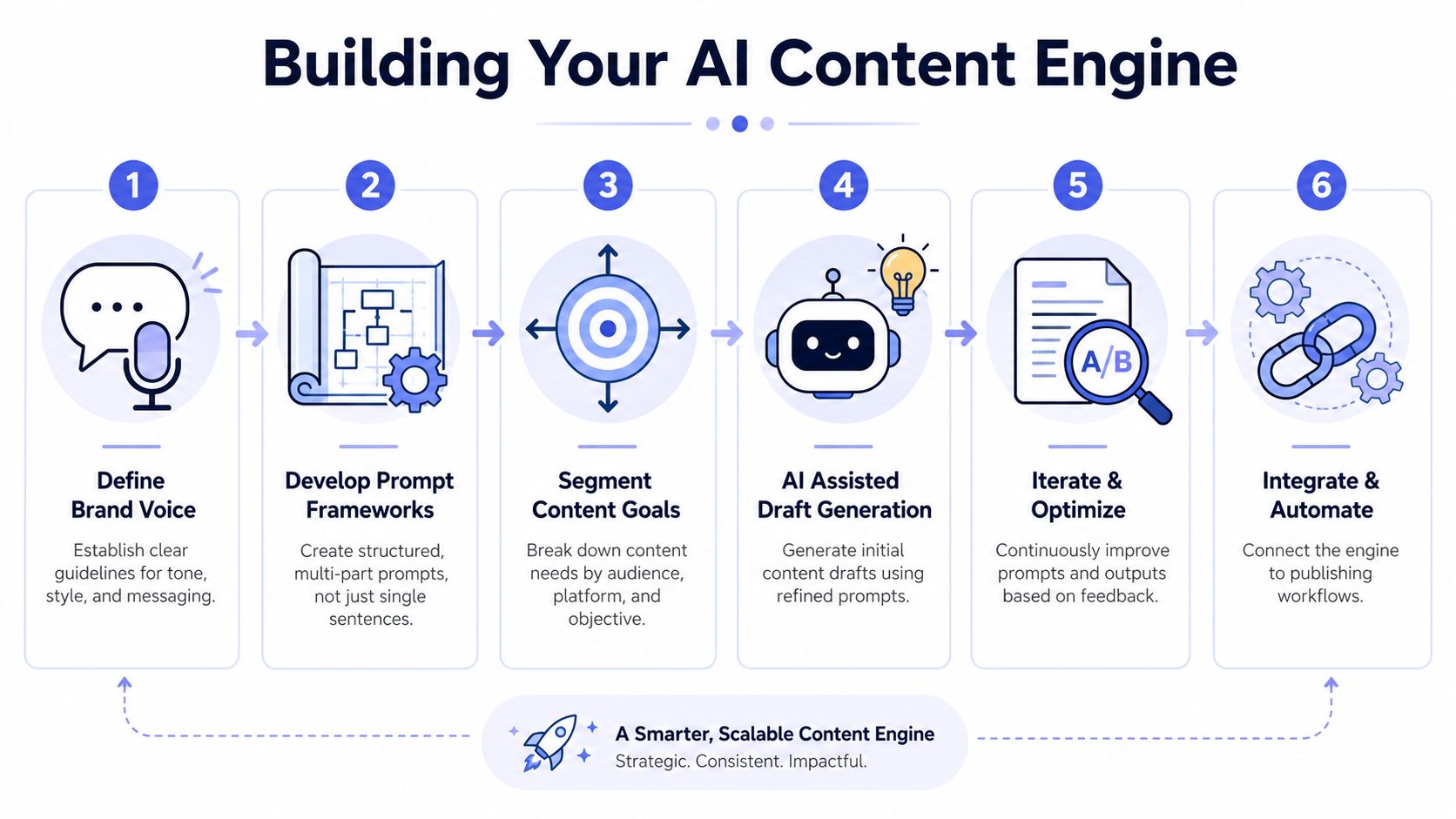 A six-step infographic illustrating a strategic workflow for building an AI-powered content creation engine.
That matches what works in practice. The first prompt shouldn't ask for the final post. It should define the job.
A better generation architecture
A workable pipeline usually looks like this:
Context passFeed the model the audience, offer, channel, campaign objective, disallowed claims, and brand constraints.
Idea passAsk for angle options. Not polished captions. Just directions worth evaluating.
Hook passTake one angle and generate several openings with distinct styles.
Draft passProduce the main caption using the selected hook and encoded formatting rules.
Refinement passAsk for stronger CTA language, cleaner structure, or tighter alignment with the visual.
Packaging passReturn structured fields such as headline, body, CTA, hashtags, alt text, and creative notes.
The biggest improvement usually comes from splitting ideation from drafting. Once you do that, the model stops trying to be clever and starts becoming useful.
What the prompt should actually contain
Don't write prompts like a casual user chatting with a bot. Write them like config.
A solid generation payload usually includes:
Audience definition: Who it's for, what they care about, what they already know.
Channel intent: Awareness, launch, education, community, conversion, or retention.
Voice constraints: Short sentences, low hype, no slang, no forced urgency, or whatever fits your brand.
Formatting rules: Character limits, hashtag count, emoji policy, and link placement.
Reference examples: A small set of your best posts, not random samples.
If you're assembling a broader AI stack around this, a curated guide to AI tools for working smarter can help you think through where generation, editing, planning, and automation each belong.
A good mental model is the same one you'd use for any repeatable content system. Define the schema first, then let AI fill it. That pattern is similar to how structured calendar generation works in AI event calendar workflows. The format comes before the content.
Implementing the Human-in-the-Loop Review
The most expensive AI mistake in social isn't a typo. It's publishing something that technically reads fine but weakens trust.
Raw model output is a draft. It stays a draft even when it's fluent. Industry guidance summarized by Social Media Examiner on using AI to create engaging social posts says the main failure mode is over-reliance on raw output. The recommendation is straightforward: treat AI as a first draft, then apply human review for brand voice, factual accuracy, and channel fit. The same guidance points to practical habits that improve consistency, including a brand-voice checklist, uploading top-performing posts as exemplars, and feeding performance insights back into the next generation cycle.
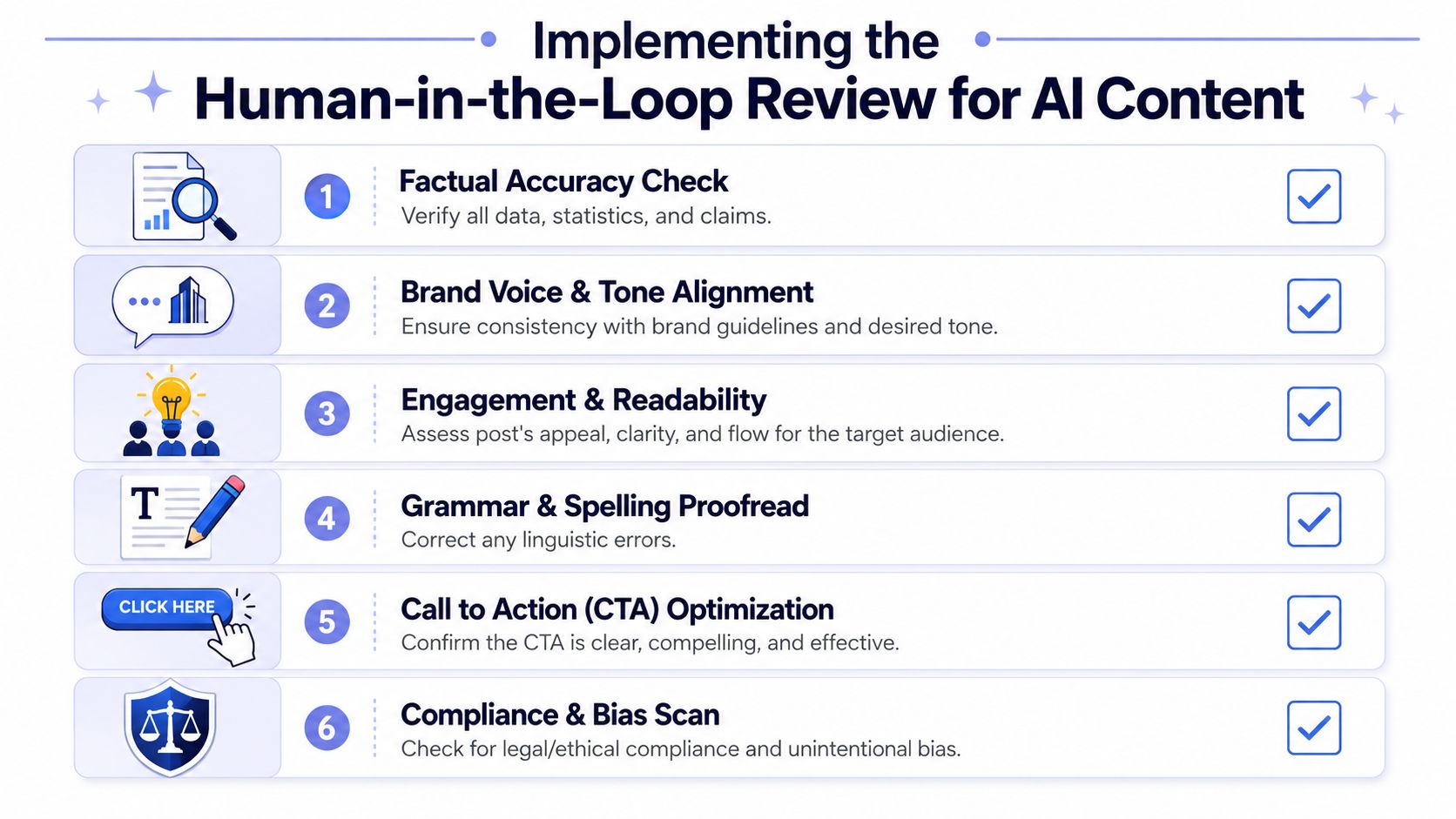 An infographic showing six steps for implementing a human-in-the-loop review process for AI-generated marketing content.
What review should catch
A lightweight review process beats a heroic editor cleaning up chaos at the end.
Use a checklist that forces a reviewer to inspect the things models commonly miss:
Facts and claims: Is every product statement true and supportable?
Voice: Does it sound like your company, or like generic AI marketing copy?
Channel fit: Would this feel natural on the specific platform where it will appear?
CTA logic: Does the ask match the maturity of the audience and the goal of the post?
Risk: Any phrasing that creates legal, compliance, or reputation issues?
A lot of teams overcomplicate this. They build a giant approval tree and then bypass it when deadlines hit. Keep it small. One reviewer can be enough if the checklist is clear.
Review area | What to look for | Common AI miss |
Accuracy | Product truth, dates, feature claims | Confident but sloppy wording |
Brand voice | Tone, phrasing, level of formality | Generic enthusiasm |
Platform fit | Structure and readability per channel | Same copy everywhere |
CTA | Clear next step | Vague or pushy asks |
Human review isn't there because the model is bad. It's there because accountability belongs to your team, not the model.
How to turn review into a feedback loop
The review step shouldn't end with approve or reject. It should leave behind training material.
Capture edits in a way the next generation cycle can use:
Save accepted posts as exemplars: These become your few-shot library.
Track recurring fixes: If reviewers always remove a certain phrase pattern, encode that as a constraint.
Label failures: Off-brand, too long, weak hook, bad CTA, unsupported claim.
Feed performance back in: If a certain opening style consistently works, update the prompt framework.
This creates a compounding system. Over time, the model produces better first drafts because the workflow gets smarter, not because the model magically learns your brand through vibes.
Prepping for Launch with Platform-Specific Formatting
A post can clear review and still ship broken.
The usual failure is boring. The copy looks fine in the editor, then the line breaks collapse on LinkedIn, the CTA gets buried on Instagram, the image crop cuts off the headline, and someone rewrites the caption in the scheduler to make it fit. At that point, the approved draft is no longer the published draft. That gap is where quality slips.
Platform formatting needs its own layer in the pipeline. Earlier, I covered human review as the accountability step. After approval, the job changes. Now the system has to convert a canonical content object into channel-ready output without changing the message.
Treat the post as structured content
Teams get better results when they store one approved source version, then render variants from it. That sounds obvious, but a lot of AI workflows still generate "an Instagram post" and "a LinkedIn post" as separate one-off outputs. That approach creates drift fast. Small edits pile up, and nobody can tell which version is the master.
A cleaner setup uses fields that survive across channels.
Content field | Internal meaning | Platform-specific adaptation |
Caption body | Core message | Tightened, expanded, or split by channel |
CTA | Desired action | Comment prompt, profile visit, link click |
Media asset | Source creative | Cropped, resized, or swapped |
Metadata | Tags, campaign, approval state | Used for routing, validation, and scheduling |
This is the difference between prompt output and production content. The model generates ingredients. Your formatting layer assembles the final payload.
Put formatting rules into code and prompts
Formatting should not depend on whoever happens to schedule the post.
Set the rules upstream so the system can check them every time:
Character limits: Generate close to the target range, then validate the final length before publish.
Line breaks: Preserve spacing intentionally. Some platforms reward short scannable blocks, others can handle denser text.
Hashtag policy: Decide per channel whether hashtags are required, capped, or excluded.
Link placement: Define where links are allowed instead of letting the model guess.
Media compatibility: Validate aspect ratio, safe text areas, and caption-to-asset fit together.
Preview rendering: Show the assembled post in a channel-like preview before it leaves the queue.
I also recommend keeping formatting rules separate from voice rules. Brand voice changes slowly. Platform constraints change all the time. If you mix them together in one giant prompt, maintenance gets messy.
For Instagram publishing workflows, the Instagram Graph API integration guide is a good reference for why this needs explicit handling in the pipeline instead of last-minute manual edits.
AI should draft the message, not guess the final container
Many teams waste time by asking the model to produce final copy for every platform in one pass, then spending the next hour repairing the output. I have had better results generating a canonical draft first, then applying deterministic transforms for each destination.
That split gives you better control over brand safety too. The model handles wording. Your system handles limits, formatting, asset rules, and publish requirements. If you want a practical overview of that broader workflow, Automating content creation covers the operational side well.
A post that reads well in a text box can still fail in the feed. Formatting decides whether approved content survives contact with the platform.
Automating the Last Mile from Draft to Publication
Teams often lose time after the content is already "done."
The draft is approved. The asset is ready. Then somebody starts copying text between tools, checking account access, reformatting line breaks, and manually scheduling across several platforms. That's the part nobody includes in the AI demo.
A lot of current advice still stops too early. As Magnific's write-up on creating social media content using AI points out, a major underserved angle is brand-safe, workflow-ready posting rather than just generating a post. That's exactly right. The value isn't the raw output. The value is getting from approved draft to publish-ready execution with governance, consistency, and minimal manual friction.
A unified publishing layer changes the shape of the problem.
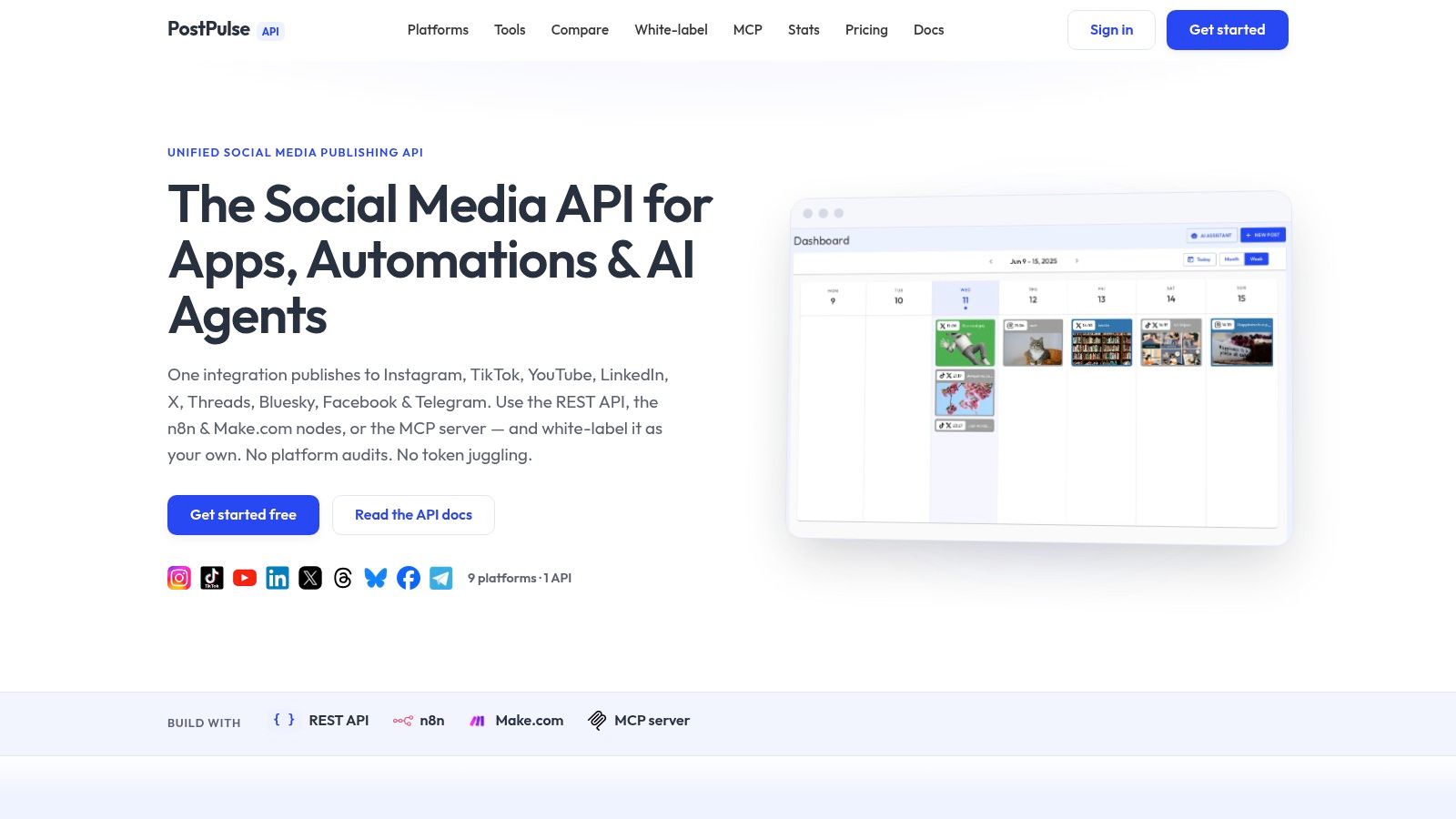 Screenshot from https://post-pulse.com
Where manual workflows fall apart
The failure points are boring, which is why they hurt so much:
Status drift: One tool says approved, another says scheduled, a third has the latest caption.
Formatting regressions: A reviewer approved one version, but a publisher tweaks it manually.
Account fragmentation: Different platforms live behind different auth flows and different UIs.
No audit trail: When something goes wrong, nobody knows which version shipped.
This is why Automating content creation is a useful framing. Automation isn't just about saving clicks. It's about preserving state and reducing handoff errors.
What a production-ready handoff looks like
In a reliable system, generation and publishing are connected by explicit data, not screenshots and chat messages.
A clean handoff usually includes:
Structured content output from the modelCaption, CTA, hashtags, media references, and platform notes.
Approval stateDraft, in review, approved, scheduled, published.
Publishing payload generationEach channel gets its own final representation.
Scheduling or immediate publish callTriggered by workflow logic, not a human copying text.
If you want a concrete automation pattern, this AI content automation tutorial with n8n, Claude, Flux, and PostPulse shows how these pieces can be wired together in an actual flow.
Later in the pipeline, video can be useful for showing the orchestration piece more clearly than prose can.
Where agents and automations fit
This is one place where AI agents make sense. Not as autonomous brand strategists. As operators inside a bounded system.
A practical agent can:
read from an approved content queue
assemble a platform payload
send it to a publishing API
update status fields
notify a human if validation fails
That's a good use of autonomy because the task is constrained. The agent isn't inventing strategy. It's moving approved content through a deterministic path.
If you're serious about scale, AI should write drafts and software should move payloads.
That distinction matters. When teams blur creation and operations into one magical AI step, they usually get neither. When they separate them, the system becomes much easier to reason about, debug, and trust.
Conclusion Building Your Repeatable AI Content System
Most advice about how to create social media posts with AI still treats the prompt as the product. That's the wrong abstraction.
This system starts earlier and ends later. It starts with structured context, not a vague request in a chat box. It includes staged generation, not one-shot drafting. It requires review, because accountability doesn't disappear when a model writes the first version. It respects formatting as an engineering concern, not a cosmetic edit. And it finishes with automation that can publish consistently without turning every launch into manual busywork.
The useful reframing is simple. AI is one component in a content operations system. It's a strong component. It can speed up ideation, variation, and drafting. But it shouldn't own truth, judgment, or release management.
That also makes the workflow easier to improve. You can tighten prompts without touching approvals. You can improve review without rebuilding generation. You can change channel formatting rules without retraining anything. Each part gets clearer boundaries.
If your current setup is one person prompting a model and another person cleaning up the result in a scheduler, don't throw it away. Formalize it. Save the good examples. Write down the review checklist. Store outputs in a structured format. Add validation before publish. Then automate the last mile.
That's when AI stops feeling like a toy. That's when it becomes infrastructure.
If you're tired of stitching together generation, approvals, and social publishing by hand, PostPulse is worth a look. It gives developers, automation builders, and AI agents a single way to publish across multiple platforms through an API, official n8n and Make.com nodes, or an MCP server, so you can spend less time fighting platform fragmentation and more time shipping a workflow that holds up in production.
About the Author

Founder of PostPulse — a social media scheduling platform for creators and teams. Software engineer with a passion for building developer tools and simplifying complex API integrations across social media platforms.