Social Media Scheduler API: Build Reliable Publishing
Published on
Tags:
Your scheduler accepted the post at 9 a.m., returned success, and your UI showed SCHEDULED. At 6 p.m., the publish time, nothing went live. The media was not ready, the quota was gone, or the account had lost a permission. That gap between accepted and published is where a social media scheduler API either earns trust or creates support tickets you cannot reproduce.
Table of Contents
Why One API Call Hides Many Publishing Models
Say a customer schedules one campaign to Instagram, TikTok, and a Facebook Page for tomorrow morning. Your API returns one success response, so the customer reasonably assumes three posts now exist somewhere safe. They don't. You've stored an intent to publish, and each platform will judge that intent later under its own rules.
Instagram does not treat publishing as one synchronous request. You create a container, wait while the platform processes it, and then publish it. TikTok applies request ceilings per user access token, so a burst that looks harmless in your queue can fail at dispatch. Facebook Page publishing follows yet another model, with its own required fields and immediate versus unpublished states.
Three layers usually break first in production:
Asynchronous processing: Media may still be processing when the scheduled time arrives, so accepted cannot mean ready.
Quotas with different units: One limit counts posts, another counts requests, and another counts users or creators. A single global counter will mismanage all three.
Changing account access: Tokens expire, scopes change, and account types change after connection. Your dashboard can show connected while publishing is already impossible.
That is the essential work behind a reliable social media scheduler API. You need a limits table before you write workers, a state machine for every job, quota enforcement before dispatch, and a reauthorization path that ordinary users can complete. Webhooks then replace constant polling so you learn about state changes without spending request budget asking for them.
I would ground every platform claim in official documentation and name the gaps where documentation doesn't give a number. Guessing a limit is worse than admitting you must read it at runtime or test it in staging.
The question to carry through your design is simple: what does your scheduler do when the platform says no hours after your API already said yes?
Build for that answer first. The happy path is the easy part.
Platform Limits and Publishing Models at a Glance
Check the unit before you check the number. Per post, per request, per token, and per rolling window require different counters, even when two limits share a platform.
Documented Publishing Limits by Platform
Platform or Endpoint | Publishing Model | Documented Limit | Source |
Instagram container publishing | Create container, check status, then media_publish | 100 API-published posts in a rolling 24 hours; carousel counts as one post | Meta content_publishing_limit |
Instagram product-tagged containers | Container publish with product tags | 25 tagged media containers per moving 24 hours per app user | Meta product-tagging docs |
TikTok Content Posting API | Post request per user access token | 6 requests per minute; HTTP 429 with rate_limit_exceeded | TikTok Content Posting docs |
TikTok creator information queries | Separate endpoint class | 20 requests per minute | TikTok Content Posting docs |
TikTok unaudited clients | Direct post | 5 users posting in 24 hours; private or self-only visibility | TikTok Content Posting docs |
TikTok Direct Post creator cap | Direct post | About 15 posts per day per creator; can vary | TikTok Content Posting docs |
Facebook Pages | Page feed with publish set to 1 or 0 | No publishing quota stated in the Page feed reference used here; a link or message is required | Meta Page feed docs |
Instagram has two different rolling limits, and conflating them causes subtle bugs. The Meta product-tagging documentation states that an app may publish up to 25 tagged media containers on behalf of an app user during a moving 24-hour period. That is not a calendar-day allowance, and it is narrower than general container publishing.
Facebook Pages surprise developers for a different reason. The Meta Page Feed API documentation says publish can be 1 for immediate publication or 0 to create an unpublished post for later publication, and the request must supply either a link or a message. Your connector should reject an empty payload before it reaches Meta, rather than queueing a job that is invalid by construction.
How to Read Each Row
Post quotas: Count successful publications against a rolling window. Reserve capacity before dispatch and release it only under rules you can explain.
Request limits: Count attempts, including retries and status checks, in endpoint-specific buckets. A creator lookup must not consume the same bucket as a post request.
Client or creator caps: Validate eligibility and visibility before accepting the job. Retrying an ineligible Direct Post does not make it eligible.
Undocumented cells: Do not invent a quota. Store the publishing model, enforce the documented field rules, and monitor live errors.
The table also exposes a design constraint. A unified request can normalize text, media references, target accounts, and scheduled time, but it cannot truthfully normalize every limit into one number. Keep the platform limit attached to the account, endpoint class, and content type that created it.
That separation is what makes enforcement possible later. If your data model only stores posts today, it cannot represent a moving window, a per-minute token bucket, or an unaudited-client user cap.
Designing for Asynchronous Publishing
Publishing isn't an HTTP request with a delayed timestamp. It's a job that moves through states, sometimes pauses for platform processing, and only becomes published when the destination confirms it. If you model it as a synchronous POST, every timeout becomes an ambiguity and every retry risks a duplicate.
Instagram makes the pattern visible. The client creates a media container, waits for processing when needed, and then calls the publish endpoint. The Meta content_publishing_limit documentation also shows why you should read live quota state, because its documented example shows 50 publications over 86,400 seconds while current Meta guidance states 100 API-published posts in a rolling 24-hour period, with carousels counted as one post.
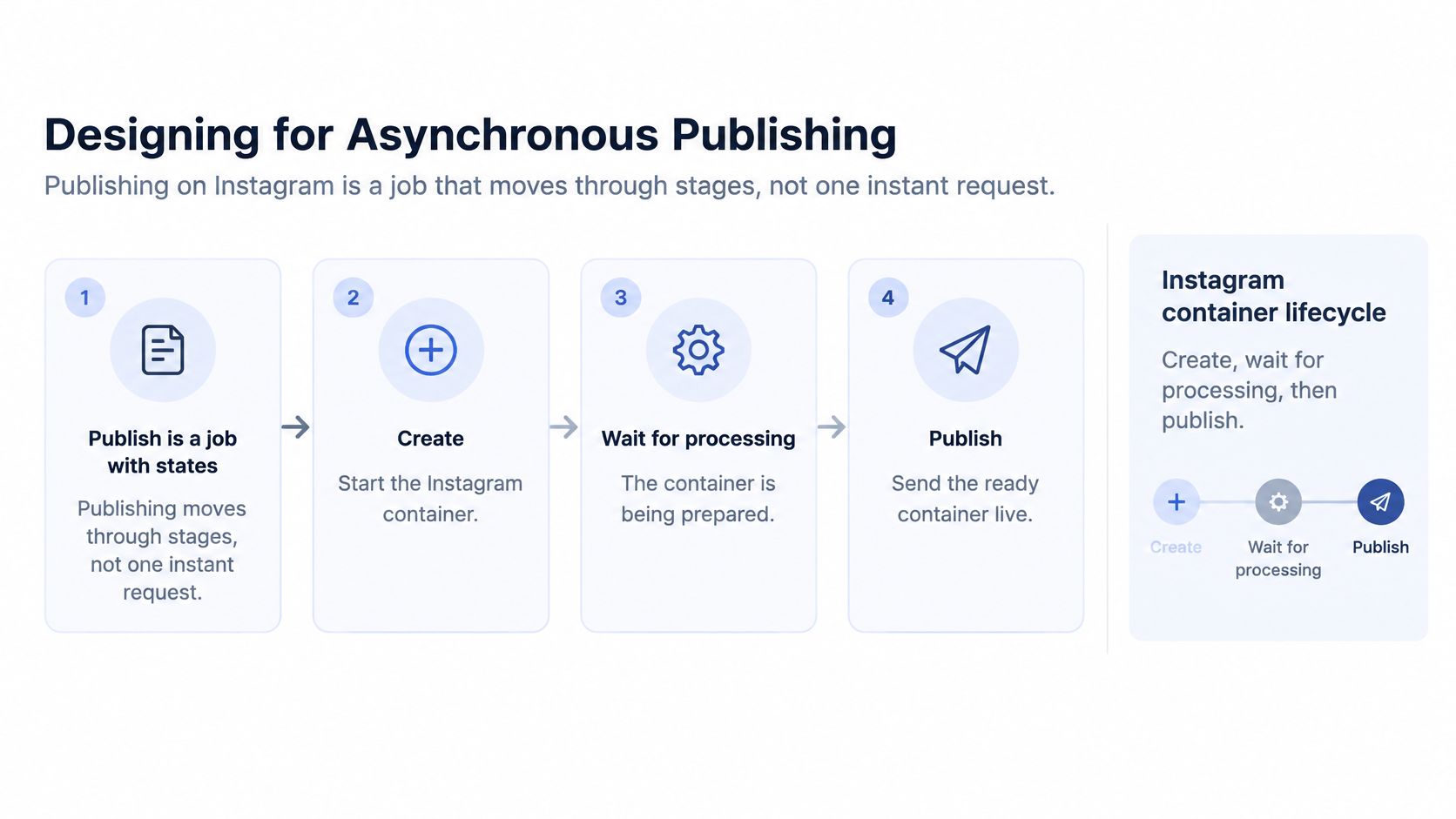 A diagram illustrating the four-stage asynchronous workflow for publishing content through the Instagram container API lifecycle.
Store Durable Job States
Persist every transition so a worker restart doesn't erase the difference between uploaded media and a published post. A practical minimum is queued, uploading, processing, published, and failed. Add substates only when an operator or customer needs to act on them.
Queued: The job passed initial validation and is waiting for its scheduled time or a worker.
Uploading: Media transfer or import is in progress, so publishing would be premature.
Processing: The platform has accepted an intermediate object but has not confirmed it is ready.
Published: The platform returned and you stored its post ID.
Failed: The job stopped with a normalized error code that explains whether retry, reauthorization, or user editing is next.
Store the platform post ID, the platform error, your normalized error code, attempt count, and the idempotency key on the job. When a publish call times out, check those fields and the platform state before trying again. A retry that cannot recognize an earlier success will eventually publish the same content twice.
Validate Twice, Not Once
Future scheduling creates a long gap between acceptance and execution. Validate media, account state, content requirements, and estimated quota when you accept the job. Validate again immediately before dispatch, because the account and remaining quota may have changed during that gap.
Reserve quota before dispatch and reconcile usage after each publish. Use exponential backoff for transient failures, and stop retrying errors that require a new token, different media, or a changed privacy setting. Backoff fixes timing problems, not permission problems.
Scheduled times for posts are stored in UTC in PostPulse, which is the right default for your own scheduler too. Convert for display at the edge, but keep one unambiguous stored instant. Teams working through adjacent scheduling problems may also find these ways to time web push notifications useful, because broadcast timing has the same trap: local display time must not become the stored execution time.
Meta recommends webhooks for state changes where available because they reduce polling calls and lower rate-limit risk. Treat webhook delivery as another state transition, not as an optional notification layered over polling.
Practical rule: A job is not published because your worker finished. It is published because the platform confirmed it and you recorded that confirmation.
For every post in your queue, you should be able to answer two questions without reading logs line by line. What state is it in right now, and what evidence would prove it failed?
How to Publish an Instagram Container Step by Step
Run the quota check before step 1. Creating containers you cannot publish wastes requests and leaves orphaned objects that make retries harder to reason about. Then follow the container lifecycle in order and persist each identifier as soon as you receive it.
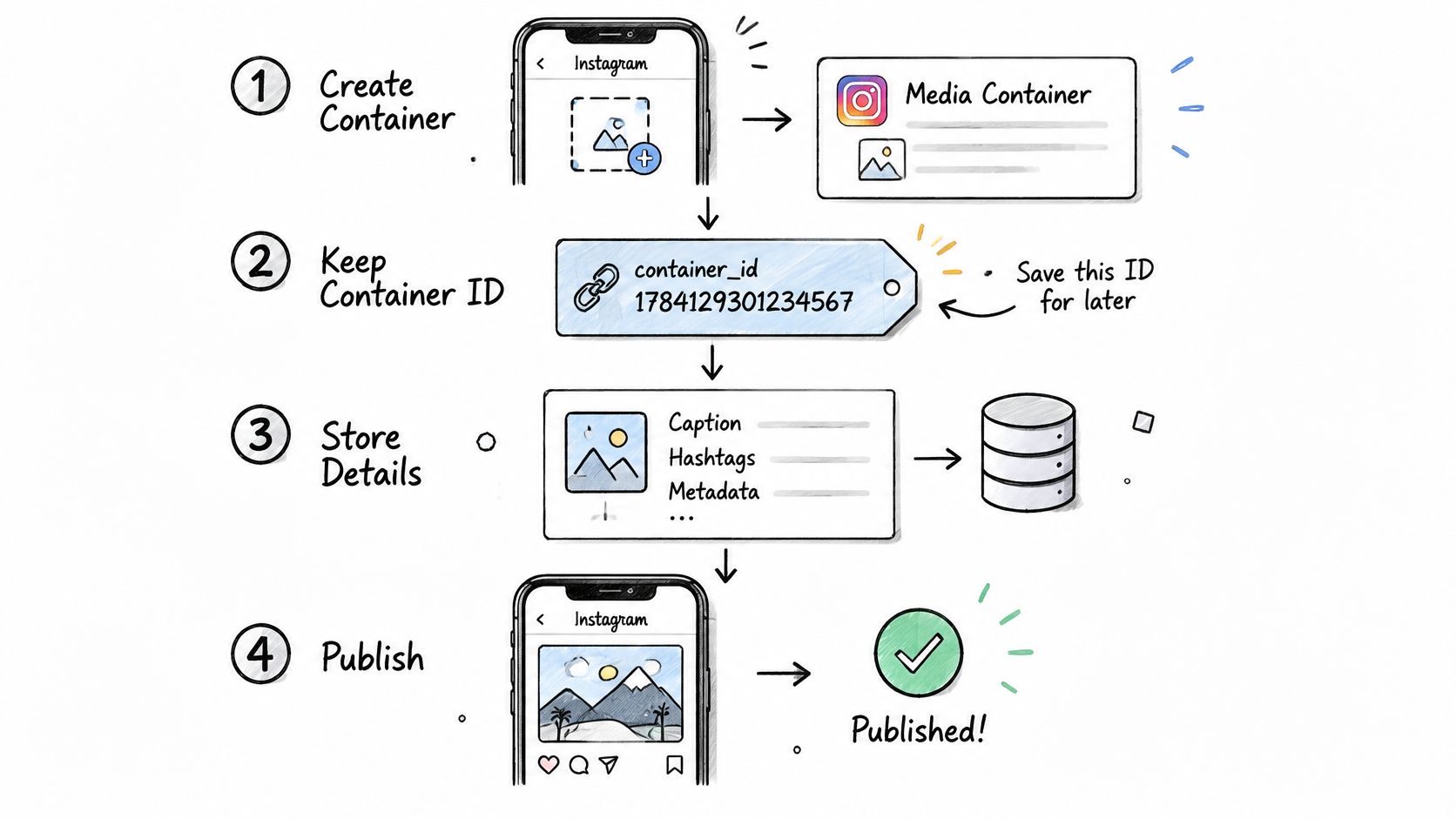 A step-by-step diagram illustrating the process of creating, storing, and publishing Instagram posts using a media container.
The Container Workflow
Create the media container. Send the media reference and the post type your content needs, then keep the returned container ID. The common slip is treating container creation as publication, when it only starts the workflow.
Store the container with its owner and token context. Save the container ID, Instagram user ID, and the token identity used to create it as one record. Mixing tokens across accounts turns a valid container into a confusing authorization failure.
Check container status before publishing. The Meta IG Container documentation shows retrieving
status_codewith a GET request, and the response can include FINISHED. Don't publish while processing is still underway, and don't assume a successful create response means the media is ready.Publish the finished container. The Meta media_publish documentation describes a POST to
/{ig-user-id}/media_publishwith the container'screation_idand an app user access token. This endpoint publishes an IG Container on an Instagram Business account, so the stored user, container, and token must belong together.Save the returned post ID before changing state. Mark the job published only after that response is stored. If your worker crashes between the platform response and your database write, your recovery path needs enough information to reconcile rather than blindly republish.
Read the error before retrying. Retry transient failures with backoff under the same idempotency key. Don't create a second container for the same post until you've checked the first container and confirmed it cannot complete.
Where Developers Lose the Thread
The recurring failure is impatience. A container sits in progress, a worker times out, and the retry logic creates a fresh container because the first ID was only held in memory. Now you have two possible publications, two statuses to reconcile, and no clean answer when the customer asks why a post appeared twice or not at all.
Token mixups produce a quieter version of the same problem. The container exists, the scheduled job exists, and the code looks correct, but publishing uses a token tied to another account or tenant. Bind those identifiers at creation time and refuse to publish when they do not match.
Media import needs the same discipline. In PostPulse, a public URL can be passed directly as an entry in attachmentPaths when creating a post, and the platform creates the import job and sets the post to SCHEDULED once the file is ready. That handoff matters because downstream platform steps should start from ready media, not from a URL you hope will still work at publish time.
A healthy run leaves a boring log trail. Container created, status FINISHED, publish returned an ID, job state published, and no second container hiding in the retry history.
Quotas, Throttling and Retry Logic
A rate limit and a publishing quota solve different platform problems. Rate limits cap how often you may call an endpoint. Publishing quotas cap how much content an account may emit in a window. If you enforce only one, the other will stop production traffic.
TikTok shows why endpoint classes need separate buckets. The TikTok Content Posting API documentation limits each user access token to six requests per minute and returns HTTP 429 with rate_limit_exceeded beyond that ceiling, while creator-information queries have a separate 20-requests-per-minute token limit. The same documentation context also covers unaudited clients limited to five users posting in a 24-hour period with possible private or self-only visibility, plus a Direct Post creator cap that typically approximates 15 posts per day per creator and can vary.
Build Counters That Match the Limit
Use per-account rolling-window counters for publishing quotas. A calendar-day reset lets a queue publish a full allowance late at night and another full allowance just after midnight, even though the platform window may still include the first batch. That is how a scheduler passes local checks and fails at the platform.
Per endpoint class: Keep posting, creator lookup, status, and media operations in separate token buckets where the platform documents separate ceilings.
Per account: Key publishing counters by connected account, not by your customer or API key alone.
Per content type: Keep narrower allowances, such as tagged containers, separate from general publishing.
Per tenant: Stop one customer's burst from consuming operational headroom you need to diagnose another customer's jobs.
Reserve quota immediately before dispatch, then reconcile after the platform responds. If the quota is exhausted, defer the job to the next valid window or reject it with a clear reason. Repeatedly retrying an exhausted rolling quota only adds requests and noise.
Handle 429 Responses Narrowly
When you receive a 429, read the error, pause only the affected bucket, and back off exponentially with jitter. Don't halt unrelated accounts or endpoint classes unless the error scope says you must. Our deeper notes on API rate limit handling cover the operational side, but the core rule is local containment.
Preflight every job before accepting it. Check account eligibility, approved scopes, media type, privacy mode, and estimated quota impact. For an unaudited TikTok client, a public-visibility job should fail preflight in your UI, not fail mysteriously after scheduling.
Refresh the account list before queueing batches. In PostPulse, GET /v1/accounts returns a list of all social media accounts connected by the user, so your worker can avoid scheduling to an account that is no longer connected. That one check prevents a class of failures that retry logic cannot repair.
Don't hardcode every quota as a constant. Where a platform exposes live usage, read it and reconcile your counter against the platform response. Constants go stale, and stale constants become confident wrong answers.
Test the behavior before launch. Simulate a 429 in staging and confirm the job waits, the correct bucket pauses, and no duplicate publication appears when traffic resumes.
Connecting Accounts and Keeping Tokens Valid
A connected account is not a permanent publishing capability. It's a token record, a set of granted scopes, an account type, and a platform approval state that can drift independently. When publishing stops after launch with no code change, this drift is usually where I'd look first.
Social media accounts are connected to PostPulse via OAuth 2.0 PKCE, and users can connect one or more accounts through OAuth authorization flows. For a multi-tenant product, store each customer's token against that customer's tenant identity and the specific social account it can act on. Never let a token lookup fall back to another tenant's connection because the platform names match.
Protect the Token Lifecycle
Store access and refresh tokens encrypted, rotate credentials under a defined process, and log token use without logging token values. Access and refresh tokens for social media platforms are stored encrypted in the PostPulse database. Your own implementation needs the same separation between operational visibility and secret material.
OAuth 2.0 security guidance leaves refresh-token issuance to the authorization server based on client risk assessment. Design for re-consent instead of assuming refresh will always succeed. Our practical notes on OAuth token management go deeper, but the product requirement is simple: a user must have a clear reconnect path when silent renewal fails.
Record granted scopes: Save what the user approved, not what your integration requested.
Record account type: Detect personal, business, and creator distinctions during connection and check again before scheduling where the platform path depends on it.
Record token health: Track expiry, refresh failure, revocation, and last successful publish separately.
Record tenant ownership: Bind the social account, customer, and token so support can identify conflicts without exposing another customer's details.
Handle Partial Authorization and Conflicts
Partial authorization is the awkward middle state. The account remains connected, but one required publishing permission is missing or the account type changed. Compare stored scopes with what each job needs at preflight and again before dispatch, then show the customer exactly which connection needs attention.
Duplicate ownership needs an equally explicit message. On PostPulse, connecting a social media account already used by another PostPulse user is rejected with HTTP 402 and the error 'Social media account has already been used previously'. Your UI should present that as an account conflict, not as a generic connection failure that sends the user through the same flow again.
A green connected badge should mean the account can still publish the content your product promises, not merely that OAuth succeeded once.
Use a deliberate reauthorization journey. Detect the failure, mark the account needs attention, pause affected jobs without deleting them, send the customer to reconnect, and resume only after the new token and scopes pass validation. That sequence protects queued work while making the human action unmistakable.
Handling Webhook Events Without Polling
Polling every job asks the same question thousands of times: has anything changed? Webhooks invert that cost by sending the change when it happens. Meta explicitly recommends them for state changes because they reduce polling calls and lower rate-limit risk.
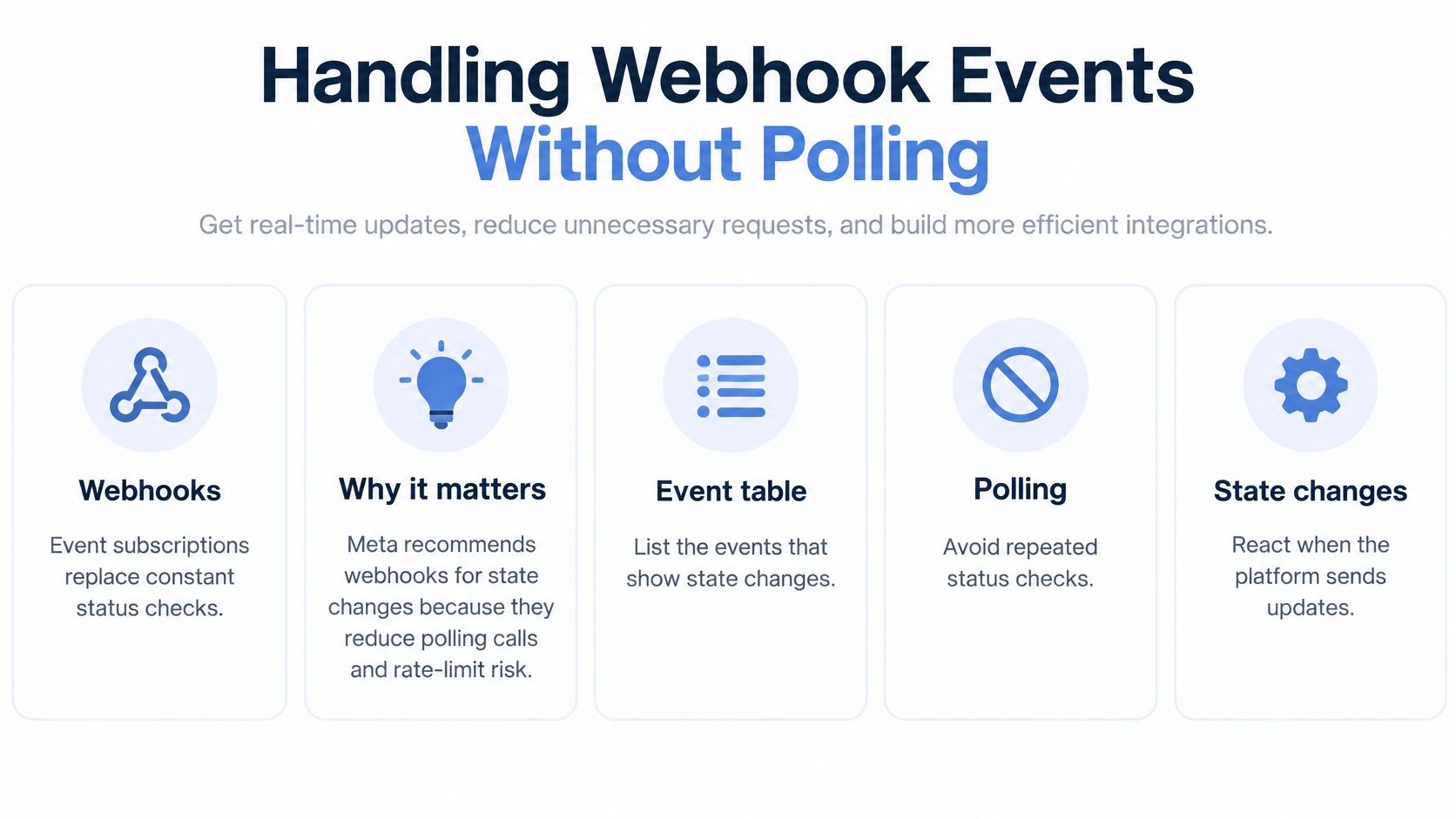 An infographic titled Handling Webhook Events Without Polling, explaining why webhooks are better for status updates.
Webhook subscribers receive events such as media.import.ready when an import completes, and media.deleted, publication.deleted, and schedule.deleted when files or posts are deleted. Map each one to a job-state action instead of treating it as a notification for a human inbox.
Webhook Events and the Action Each Needs
Event | Fires When | Your Action |
| A media import completes | Mark the media ready and move the linked post forward |
| Media is deleted | Stop scheduling against that media and reconcile dependent posts |
| A publication is deleted | Remove the matching item from your local queue |
| A schedule is deleted | Cancel the matching job and record the cancellation |
Process Events Defensively
Verify the request, record the event ID, store the payload, and return success only after that record is durable. Process idempotently, because the same event can arrive more than once. If the second delivery finds the state already applied, it should finish without deleting or advancing the job again.
Don't assume arrival order matches event order. Compare each event with the stored job state and timestamps before acting, especially when a deletion and a readiness event race. Testing those branches is part of learning to validate API responses and error handling, because a syntactically valid webhook can still be stale for the job in front of you.
Keep a narrow reconciliation fallback for jobs stuck too long in processing. That's different from polling everything on a timer. Our explainer on how webhooks work covers the subscription model, while your scheduler still needs an alert when no expected event arrives.
Log unknown events and alert on them rather than guessing. A new event type may carry a state transition your customers need, and discarding it hides that product gap.
Build, Buy or Combine Your Integration Path
A single publish request can hide a long maintenance list: platform limits, OAuth flows, app reviews, quota counters, webhook formats, and reauthorization when access changes. Building a connector gives your team control, but also makes your team responsible for keeping it working. That trade makes more sense when one platform needs custom behavior than when social publishing is one feature inside a larger product.
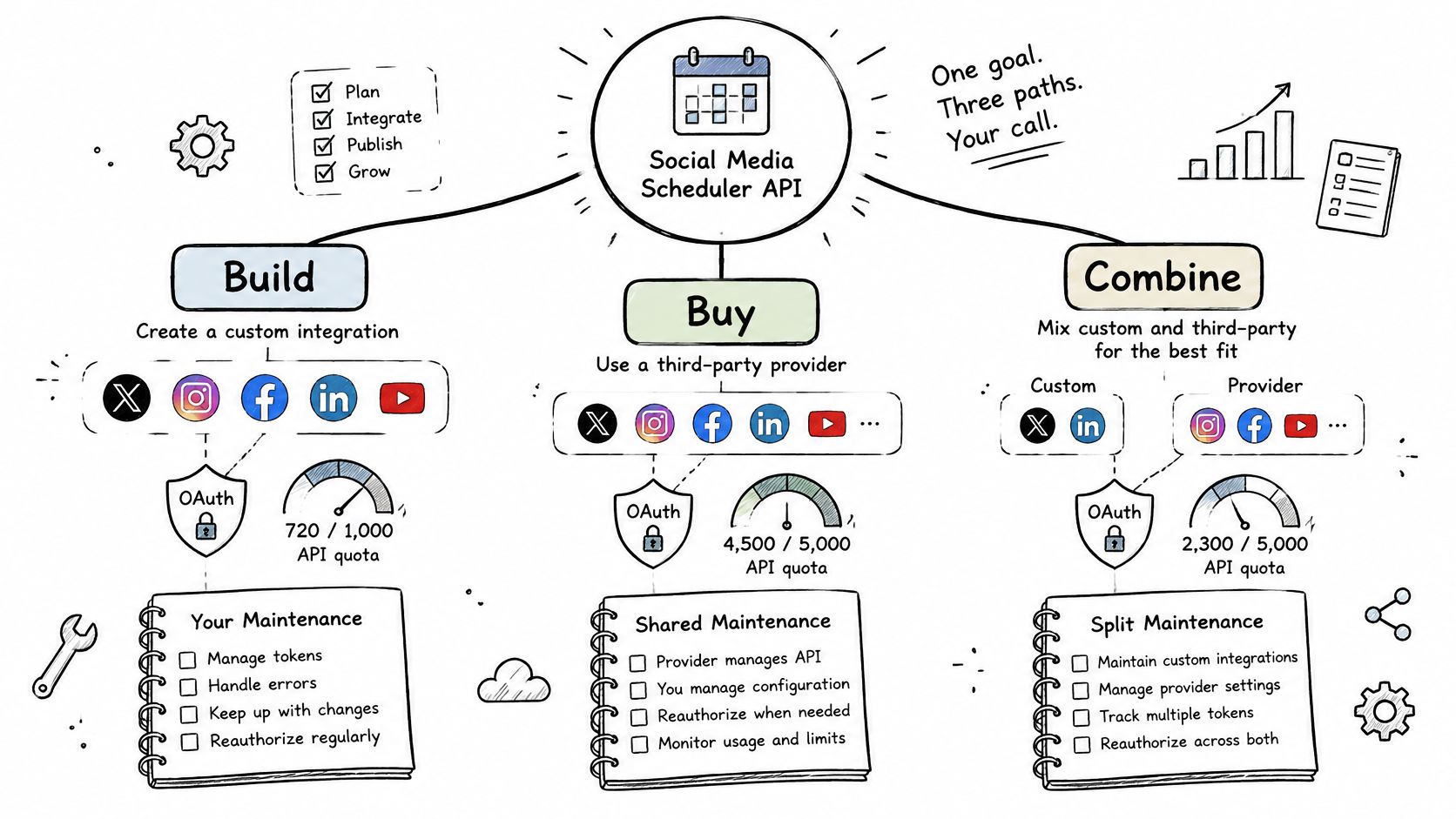 A diagram illustrating three strategies for implementing a social media scheduler API: building, buying, or combining.
Compare the Three Paths
Build each connector: Choose this when one platform needs behavior a unified service does not provide and your team can maintain the integration through API and permission changes.
Use a unified social media scheduler API: Choose this when publishing to several destinations matters more than owning each connector. PostPulse publishes to 10 platforms from one integration through its REST API, n8n and Make.com nodes, or MCP server.
Combine both: Keep a direct connector for the platform that needs unusual control, and use a unified API for the rest.
Compare the options by platform coverage, team capacity, time to first publish, and how much connector maintenance you want to own. If you're choosing an end-user management suite rather than developer infrastructure, Sprout Social vs Hootsuite addresses a different buying decision. It won't resolve questions about your API tokens, quotas, or job states.
The integration choice also affects account lifecycle work. Users connect accounts through OAuth authorization flows, and permissions or tokens can later become invalid. Your publishing workflow needs to expose failures clearly and support reauthorization, rather than treating every scheduled post as guaranteed delivery.
PostPulse offers a REST API, official n8n and Make.com nodes, an MCP server for AI agents, and white-label OAuth for agencies and SaaS companies. New users can create an account, generate API keys, and publish a first post in minutes. Test the route your product will use, including account connection and failure handling.
To test an integration, authenticate with your client ID and secret, fetch connected accounts, upload media if needed, and schedule a test post. Confirm the resulting status and webhook delivery, then decide how your application handles a failed publication, a duplicate retry, or an account that needs reauthorization. Start with one platform and make those states explicit before adding destinations.
Connect an account, generate API keys, and schedule a real test post through PostPulse. That gives you a practical way to assess the publishing flow before committing to building platform connectors yourself.
About the Author

Founder of PostPulse — a social media scheduling platform for creators and teams. Software engineer with a passion for building developer tools and simplifying complex API integrations across social media platforms.