Social Media API Aggregator: Key Benefits and Use Cases
Published on
Tags:
Why does your token expire right when you're trying to ship, why is that carousel still stuck in processing, and why does every platform seem to hide one more sharp edge that wasn't in the tutorial? If you've ever wired Instagram, TikTok, LinkedIn, and X into the same product, you already know the problem isn't “pulling social data.” It's keeping authentication, media handling, publishing state, and rate limits from turning into a permanent maintenance job.
A social media API aggregator exists because those cracks never stay small. Platforms expose different shapes of data, different permissions, different refresh rules, and different error states, so a single normalized interface becomes an architecture decision, not a convenience. If you're still comparing tools, find the right scraping API can help frame the read-side decision, while a write-side product like the one in this overview of social media APIs shows why publishing usually deserves its own layer.
Table of Contents
Why Social Media APIs Are Harder Than They Look
The first failure is usually boring. A token that was fine last night is dead in the morning, a media URL has already expired, or a post that should have published cleanly is sitting in an intermediate state with no useful clue about what to do next. That's when developers stop blaming their code and start blaming the platform, which is fair because each network makes a different set of trade-offs behind the same “API” label.
The hard part is not fetching one feed
The easiest mistake is to treat Instagram, TikTok, LinkedIn, and X as if they all speak the same language. They don't. One platform wants one kind of OAuth flow, another hides media behind extra lookup calls, another adds versioned headers, and another returns engagement data in a shape that doesn't line up with the rest of your model.
The integration pain isn't the endpoint, it's everything around the endpoint.
That's why a practical social media API aggregator matters. It absorbs the differences before they spill into your application, so the rest of your stack can work against one contract instead of a pile of platform-specific exceptions. The same logic shows up in the write side too, where publishing, scheduling, and account state need to live behind a single interface instead of being duplicated across every network.
The maintenance burden is the real tax
Many teams can get something working once. The failure happens later, when a platform tweaks a field name, changes permission requirements, or revises a rate policy and suddenly your “done” integration needs a patch. The project stops being a feature and turns into a standing obligation.
That's the part people underestimate. Social networks don't just differ at the API layer, they change at different speeds, and your engineering team ends up carrying the gap. If you've ever had to keep a post pipeline alive while debugging one connector after another, you already know why a unified layer is attractive.
A good mental model is simple, if brutal, every direct integration you add becomes another surface area for auth drift, schema drift, and operational drift. The aggregator's job is to make those drifts someone else's problem, or at least centralize them enough that your product doesn't feel every small change in production.
What a Social Media API Aggregator Does
A social media API aggregator works like a universal translator. Each platform speaks its own dialect, and the aggregator listens, converts, and outputs one normalized structure your application can use. That is the point, one internal contract instead of a pile of platform-specific exceptions.
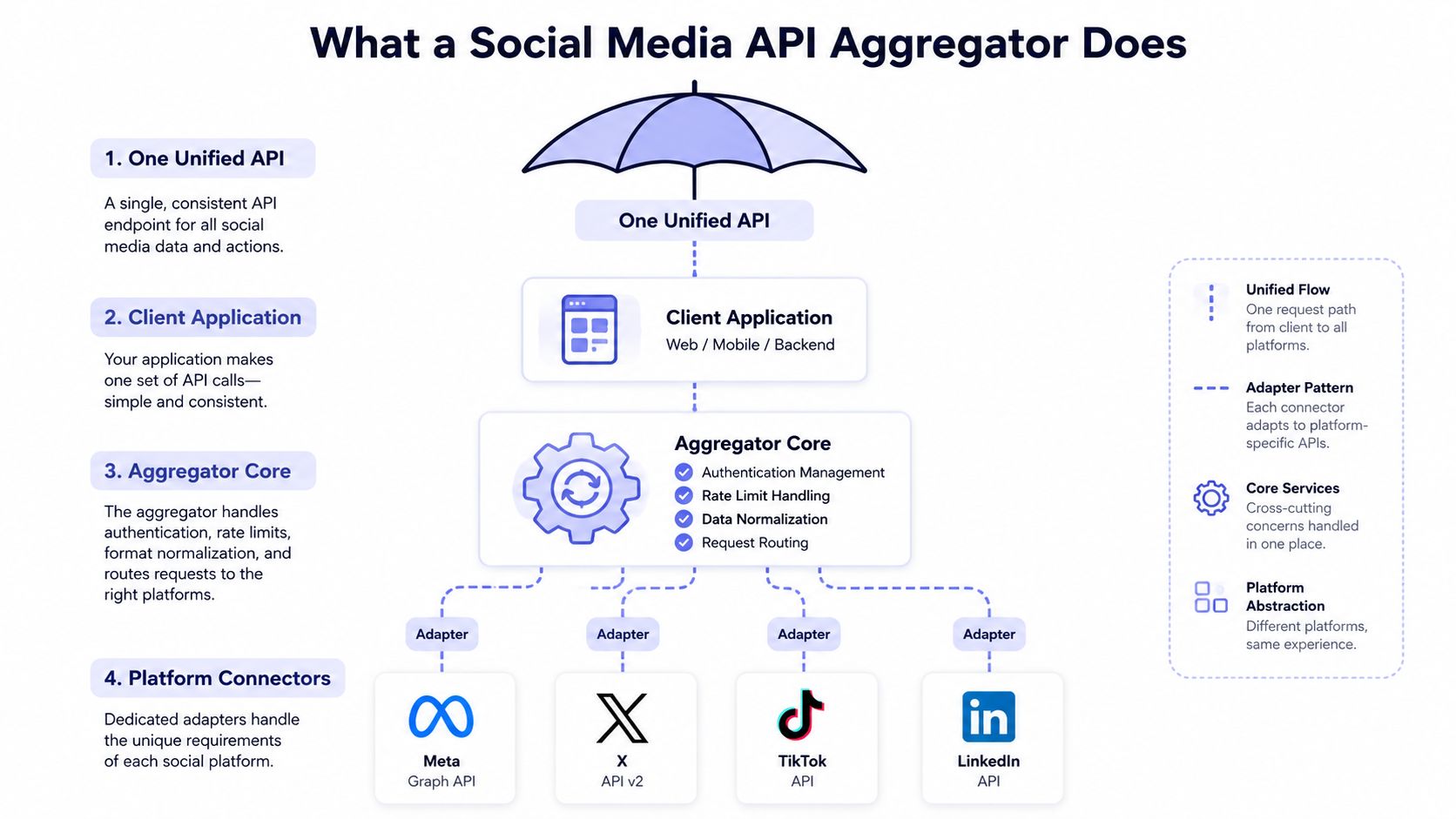 A diagram illustrating how a social media API aggregator centralizes and standardizes requests to multiple platforms.
The layered adapter pattern is the part that holds up
The cleanest implementation is a layered adapter + normalization architecture. Each connector handles its own OAuth flow, pagination rules, and rate-limit behavior, then maps platform-specific payloads into a canonical schema before anything else in the app sees them. That keeps platform quirks out of your business logic and lets the rest of the codebase stay reusable.
A source from the academic side describes the same shape as a central API with adaptors and a normalization stage, which is the right mental model for production systems (adapter-based API design). That structure also explains why teams that only think in terms of frontend feeds get stuck. Once normalization is done properly, the same backend can support dashboards, analytics, scheduling, and moderation without rewriting each surface.
Read side and write side are different problems. Read-side aggregation collects posts into one feed. Write-side publishing handles scheduling, cross-posting, replying, and account state. Product discussions often flatten those into one bucket, but real systems rarely get to treat them that way.
The schema has to hide platform differences, not expose them
A useful aggregator does not hand your app ten versions of “post.” It gives you one post shape with common fields like author, content, media, and engagement, then keeps platform-specific details available for the cases where they matter. That is what makes cross-network analytics and publishing reusable instead of brittle.
Practical rule: if platform-specific quirks reach your app layer, you have not built an aggregator yet, you have built a thin wrapper around four APIs.
The same design also makes it easier to add more platforms later. Without it, every new source brings another custom branch, another auth flow, another pagination style, and another set of edge cases in UI code. With it, the application treats the aggregator as the source of truth, and everything downstream stays calmer.
Technical and Business Benefits of Aggregation
The biggest technical benefit is not breadth, it's control. A single aggregation layer lets you manage tokens, normalize schema, and handle errors in one place instead of carrying that burden through every feature. That matters because the app breaks in fewer places when the platform changes.
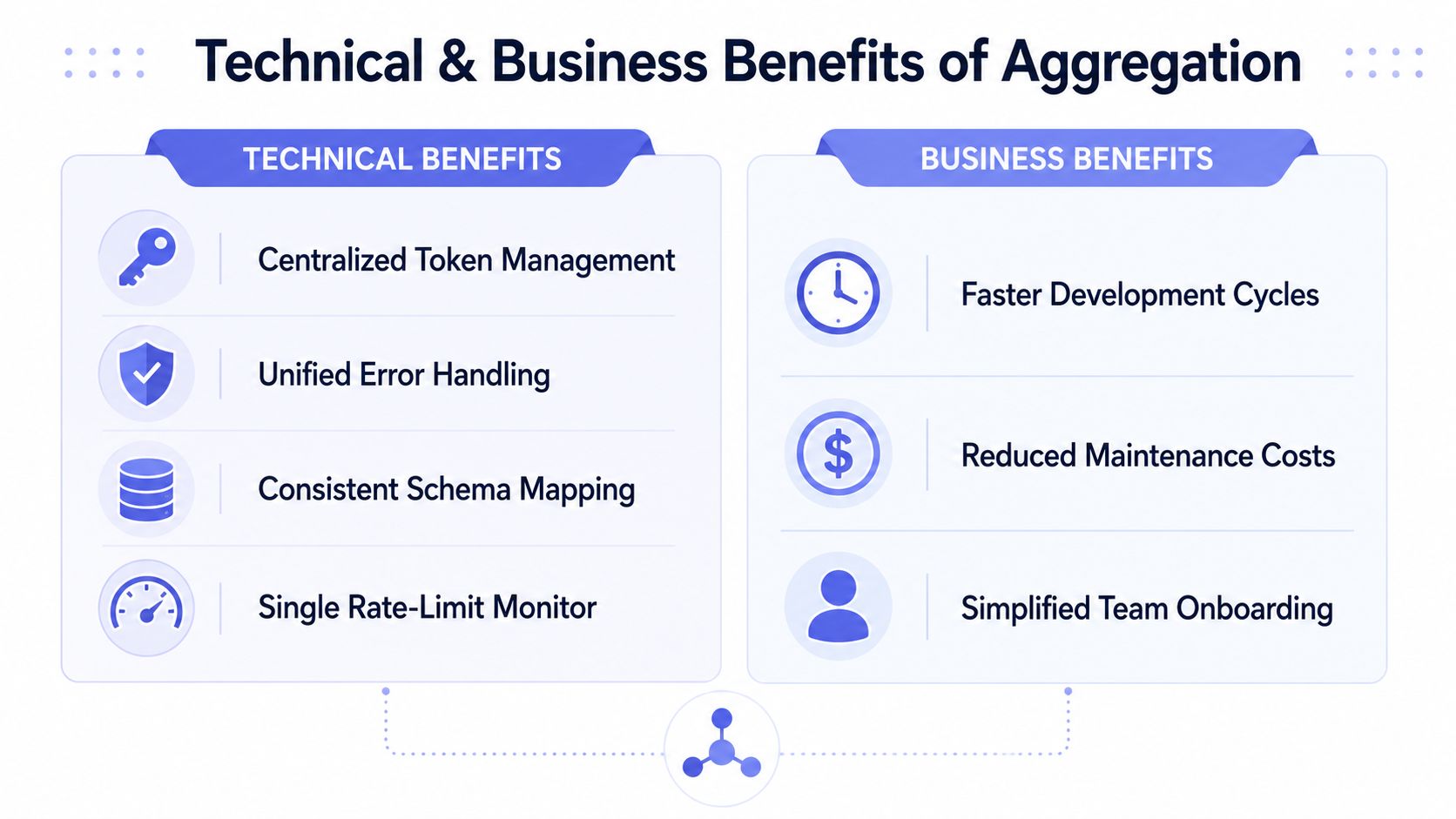 A diagram illustrating the technical and business benefits of API aggregation, featuring icons and descriptive text labels.
Technical gains show up in the places users never see
Centralized token handling means you're not scattering refresh logic across services. Unified error handling means one platform failing doesn't have to collapse the whole workflow. Schema normalization means your application doesn't care whether a platform calls something a post, a share, a video, or a thread, because the aggregator has already mapped it into one internal contract.
That same model also insulates you from version churn. Instead of updating UI code, workflow code, and analytics code every time a platform changes its payload, you update the connector. The blast radius is smaller, and the app keeps using the same shape. In production, that's the difference between a controlled rollout and a week of emergency patches.
The business case is mostly about time and attention
The business benefit is simpler. Aggregation shortens the path to launch because you don't build and maintain every connector yourself, and it lowers the ongoing cost of staying compatible as APIs change. It also makes it easier to support new platforms without redesigning your application logic every time a new network matters to your users.
If you've ever juggled separate approval paths for Meta, TikTok, and LinkedIn, you know the hidden cost isn't just engineering effort. It's the drag on roadmap planning, support, and QA. A single integration point reduces that drag because the team spends less time chasing platform differences and more time shipping product behavior.
A helpful way to frame it is this, aggregation trades connector sprawl for connector discipline. You still need to validate outputs, monitor failures, and design for change, but you're doing it once instead of repeatedly across the stack.
Security, Rate Limiting, and Token Lifecycle Management
A social media API aggregator earns its keep when authentication stops behaving like a one-time setup and starts acting like an operational system. Tokens expire, refresh rules vary, scope changes can revoke access, and each platform defines “valid” a little differently. One builder guide notes that Meta uses a $0.20 per post with a URL pay-per-use model on the write side, while other platforms add their own approval and review friction, which is why token lifecycle work rarely stays contained to one auth flow (builder guide on publishing friction). For a practical security checklist, GitDocAI's API security recommendations are worth reading before you ship your own auth layer.
Token refresh is a lifecycle, not a checkbox
The hard part is not getting a token once. It is keeping it alive without waking up a human every time it expires. Meta's short-lived tokens must be exchanged for long-lived tokens, and those need refreshing before they age out, so the system needs a background process that tracks state, failure, and retry. For a deeper look at how token lifecycles work in practice, see our guide on the Meta OAuth token lifecycle.
A good aggregator handles that behind the scenes. It stores credentials securely, refreshes them automatically, and keeps platform-specific auth behavior out of business logic. That keeps the user experience stable even when the underlying platform has a strict or awkward lifecycle.
The same principle applies to permissions. If a platform changes the scope or approval state required for a feature, the aggregator should surface that clearly instead of breaking in the middle of a publish flow. Homegrown integrations tend to fail here, because the first symptom is often “nothing happened” until support starts digging.
Rate limits need orchestration, not hope
The right way to deal with platform limits is to queue work, throttle requests, and back off when the platform says slow down. Event-driven ingestion helps because the app can absorb bursts, normalize records asynchronously, and keep the user-facing path responsive. Sources that focus on scalable aggregation recommend token-bucket throttling, exponential backoff, and queued asynchronous fetches for exactly that reason (scalable aggregation patterns).
That same design also helps with asynchronous publishing states, including container-based workflows where a post is not ready the moment you send it. If the system knows how to wait, refresh, and resume, you do not need special cases scattered through the app. You consume a finished result when the platform eventually finishes its side of the job.
Rate limits are a queueing problem in disguise. If you try to solve them with retries alone, you just create louder failures.
DIY Integration Versus Using an Aggregator
A DIY stack makes sense when the scope is small and the team is already deep in platform APIs. If you only need one or two networks and you have engineers who can live inside auth flows, webhook handling, and version changes, building your own layer can be justified. The moment you want broader coverage or faster release cycles, the trade-off gets harder to defend.
Factor | DIY Integration | API Aggregator |
Initial development time | High, because each platform needs its own auth, data mapping, and error handling | Lower, because the connector work is already centralized |
Ongoing maintenance burden | High, especially when tokens, versions, and permissions change | Lower, because changes are absorbed in one layer |
Platform coverage breadth | Narrow unless you keep adding more connectors | Broader by design |
Operational resilience under API changes | Fragile if platform changes reach app code | Better, because the adapter layer isolates churn |
Total cost of ownership | Can grow fast as support and maintenance pile up | Often easier to predict once the integration is stable |
The hidden costs show up after launch
Meta app review, LinkedIn approval friction, TikTok partner gating, and ongoing API version changes don't stop after the first release. They keep showing up in support tickets, QA cycles, and engineering interrupts. That's why teams with tight deadlines often regret treating social publishing as a side quest.
For no-code and integration-heavy teams, the article on no-code platform integration strategy is a useful lens, because the same decision rule applies, use the fewest custom surfaces you can get away with. A dedicated proxy layer like this API proxy pattern can also help if you're trying to hide connector complexity behind one stable interface.
The blunt version is this, build when the scope is small, buy when reliability matters. If your product depends on staying current across multiple platforms, maintaining every edge case yourself can become the feature that never stops costing money.
Real-World Use Cases for Apps, No-Code, and AI Agents
A SaaS team usually starts with one request from a customer, then ends up owning a publishing system they never planned to build. The pattern repeats in no-code workflows and agentic automation too. Once content has to move across platforms reliably, the integration shape starts to matter more than the interface people used to trigger it.
App developers ship white-label publishing
For product teams, the common move is embedding social publishing inside an existing app so customers can connect accounts and publish without leaving the product. The clean pattern is a white-labeled flow with branded OAuth screens, scoped account access, and a normalized publish API on the backend.
The trap is treating every platform as a separate feature. That leads to brittle UI, duplicated account state, and a support burden that grows with each additional network. A unified publishing layer keeps the app focused on its own workflow while the connector layer handles the ugly parts in the background.
No-code builders wire social into automations
People using n8n or Make.com usually want a content pipeline, not an API project. They're chaining AI copy generation, approval steps, media uploads, and scheduled publishing into one automation, and they need a node that doesn't break when a platform changes a field or token rule.
That's where official aggregator nodes are useful. They turn platform publishing into a step in a workflow, so creators can prototype without code and still keep the state machine sane. The common failure here is over-automation, where teams publish too quickly without a review step and then spend more time cleaning up bad posts than they saved in setup.
AI agents need one tool call, not a platform tour
Agentic systems are a different beast. An AI agent shouldn't need separate instructions for every platform if the goal is to publish content, because the agent's job is to decide and act, not to memorize API differences. MCP servers are a natural fit here, because they let an agent call one publishing tool and hand off the platform mapping to the service behind it.
That matters for autonomous content systems. You can keep the agent focused on content generation and scheduling logic while the publishing layer handles auth, retries, and per-platform delivery state. When the agent and the connector both do their jobs, the whole workflow feels simpler than it really is.
How PostPulse Solves Common Integration Pain Points
PostPulse fits this problem set as a practical publishing layer for apps, automations, and agents. It exposes one REST API for 9 platforms. Instagram, TikTok, YouTube, LinkedIn, X, Threads, Bluesky, Facebook, and Telegram, and it also ships official n8n and Make.com nodes plus an MCP server for agent-based publishing.
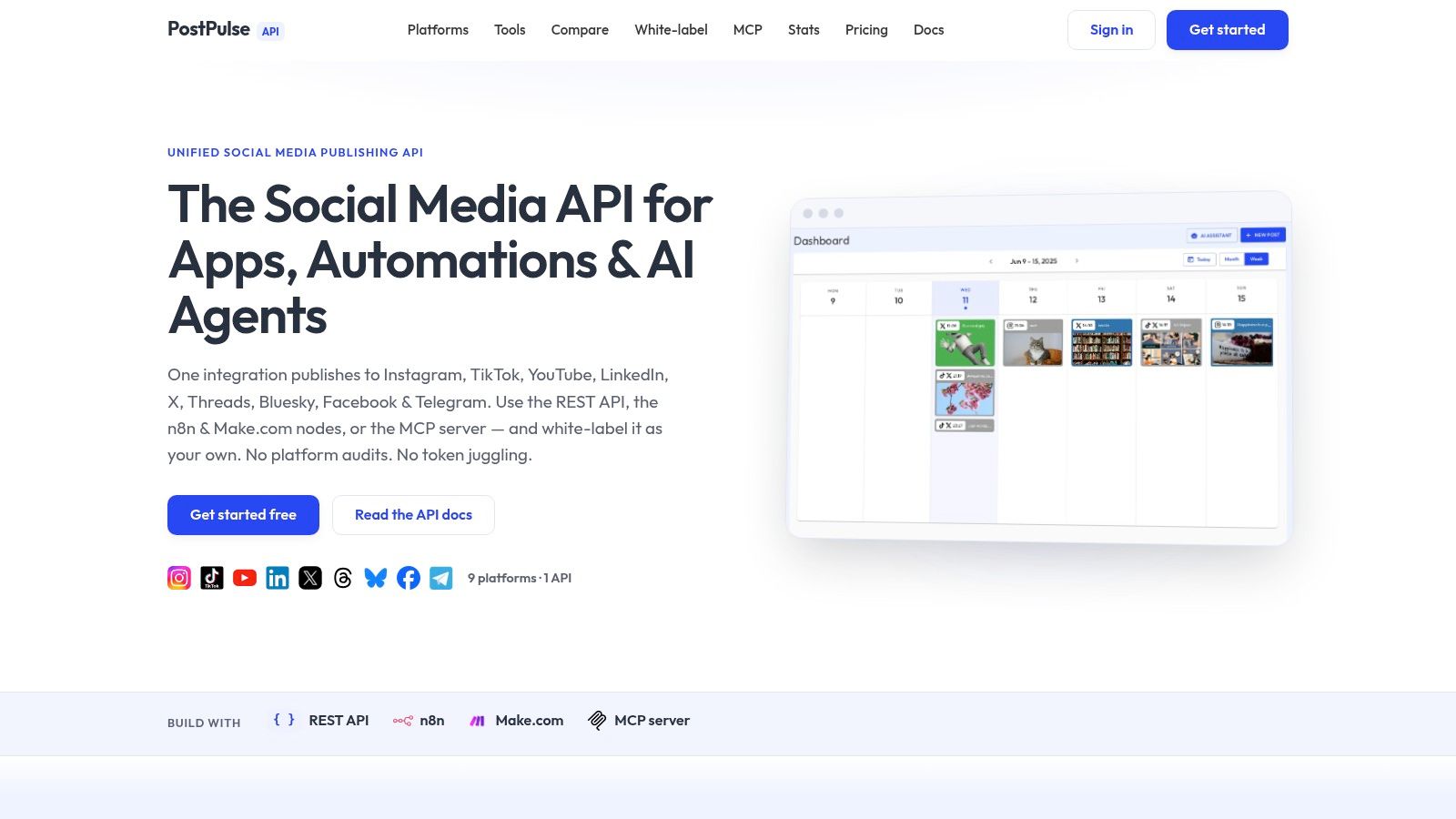 Screenshot from https://post-pulse.com
The useful part is what it removes from your stack
The product's main appeal is architectural, not cosmetic. It provides verified Meta, TikTok, and Google apps, which means teams don't have to build through the slowest approval paths themselves, and it handles OAuth, token refresh, rate limits, and API-version churn behind one integration point. For teams that are already tired of platform maintenance, that's the part that matters.
There are two common ways to use it. Private-Label is for products where users connect their own accounts inside PostPulse, with pay-as-you-go publishing at $0.20 per publication or a subscription at $5 per account per month. White-Label is for fully branded experiences where users never see PostPulse, priced at $200 per month plus $1 per active social account, with inactive connected accounts left free.
It also offers a startup support program for teams still building or in beta, which can be useful when you're validating the workflow instead of scaling it. If your real problem is publishing across multiple platforms without becoming a platform-maintenance team, that's the kind of layer worth evaluating.
If you're building a product, automation, or agent that needs social publishing without the usual auth and review headaches, take a close look at PostPulse. It gives you one publishing surface for multiple platforms, plus the workflow options that make the integration behave like part of your product instead of a never-ending side project.
About the Author

Founder of PostPulse — a social media scheduling platform for creators and teams. Software engineer with a passion for building developer tools and simplifying complex API integrations across social media platforms.