Multi Account Management: A Developer's Playbook for 2026
Published on · Updated on
Tags:
You've got one social login working, then product asks for nine platforms, support asks why tokens keep dying, and engineering gets stuck babysitting OAuth callbacks instead of shipping. That's the multi account management problem, not “how do we stay organized,” but “how do we keep accounts isolated, publish safely, and avoid building a brittle mess that wakes somebody up at 2 a.m.” If you need a reference point on the outbound side, the guide to scaling outbound on X is useful context, but the deeper issue is architectural.
Table of Contents
The Multi Account Problem Nobody Warned You About
You start with one platform because the demo has to work. Then sales asks for LinkedIn, marketing wants Instagram, a customer success team needs X, and suddenly your “simple social integration” has become nine developer portals, nine OAuth flows, and nine slightly different ways to break on Friday night.
The hidden cost is not the login button
The ugly part isn't the connect button. It's the operational tail after connect. Each platform gets its own callback handling, token storage, refresh cadence, permission edge cases, and support ticket queue. Meta alone can hand you a short-lived token, then require a second exchange for a 60-day long-lived token and another refresh before expiry, which means your backend can't treat “connected” as a permanent state (Meta OAuth token lifecycle).
That's why raw account totals are a weak metric. In customer success, Tom Tunguz notes that CSMs can manage between $2 million and $5 million in ARR and typically oversee somewhere between 10 and 500 accounts, which tells you the load depends on segment and service motion, not just headcount (Tom Tunguz on CSM account load). The same logic applies here. A team with ten enterprise social accounts may carry more operational weight than a team with fifty low-touch ones.
What a unified system replaces
A sane architecture replaces one-off links with an account registry, platform adapters, a token vault, and a publish queue. The user should see one connected account object, not a tangle of provider IDs, expired access tokens, and manual reauth reminders.
Practical rule: if your team is copying provider-specific logic into business code, you're already paying the tax twice, once in features and once in debugging.
This is the point where platforms like PostPulse exist as an abstraction layer, but the important thing is the shape of the system. You want one integration surface that hides the platform churn and keeps the rest of the product focused on workflow, not OAuth archaeology.
Designing the Account Linking Flow
A good linking flow is boring in the best possible way. The user clicks connect, the provider authorizes scopes, your backend stores the minimum useful metadata, and the account shows up as ready without a support rep touching it.
Capture the right objects during OAuth
At callback time, store the internal user ID, the platform name, the provider account ID, the granted scopes, the token pair or equivalent credential bundle, the expiry timestamp if the provider gives one, and the account display name. Also store the connection state, because “authorized but not yet mapped” is a real state, not a corner case.
The mapping matters because internal IDs and provider-side IDs are not interchangeable. If your app supports multiple workspaces or brands, attach the linked account to both the owning user and the workspace so publishing later doesn't require another lookup hop.
Private-label and white-label flows are not the same UI problem
In a private-label flow, the user sees your product connect to the underlying platform and understands that they're authorizing a publishing bridge. In a white-label flow, the visible brand stays yours and the platform relationship is mostly hidden, so your UI has to carry the whole state machine cleanly. That means separate screens for connect, pending authorization, failed scope, and active mapping.
If you're checking a concrete platform implementation, HubSpot's multi-account setup requires an Enterprise Marketing Hub account, then organization creation under Organization Management → Multi-Account, then account connections and verification with passkeys or two-factor authentication before the organization is complete (HubSpot multi-account setup). The lesson isn't “copy HubSpot.” The lesson is that mature multi-account systems need explicit lifecycle steps, not loose account links.
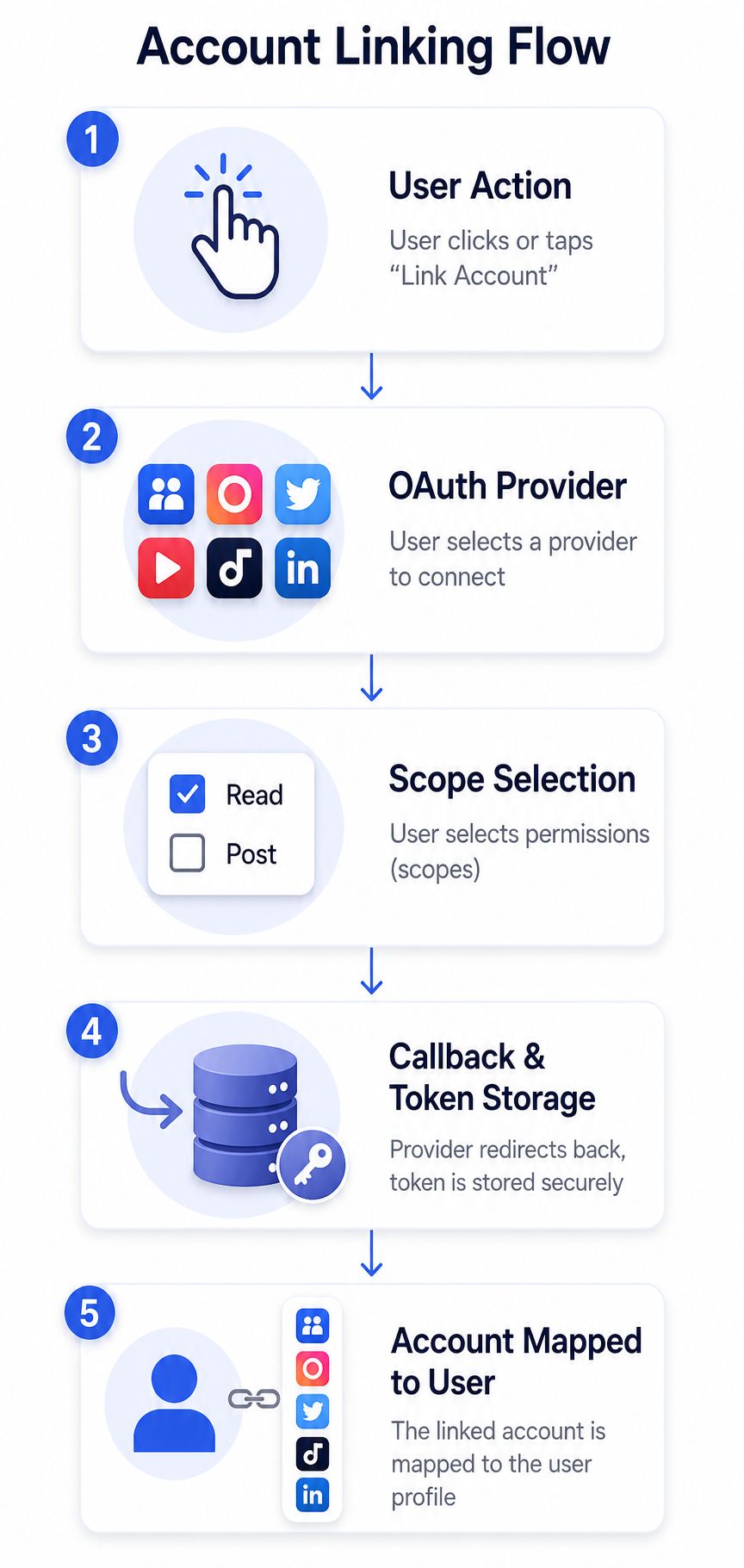 A five-step flowchart illustrating the standard OAuth account linking process for connecting social media platforms to user profiles.
A linking checklist that prevents rework
Provider account ID: use it as the durable foreign key for later publish calls.
Granted scopes: persist the exact permissions granted, because reauth can change what's allowed without notice.
Expiry metadata: track anything time-bound so refresh jobs can run before the user notices failure.
Backup contact path: store a recovery channel for support escalation.
Connection status: distinguish active, pending, revoked, and error states so the UI doesn't lie.
If you skip any of those, you'll end up round-tripping users through reconnect flows during the first production incident.
Token Lifecycles and Refresh Strategies
A multi account management system usually falls apart at the token layer first. Accounts look linked in the UI, then tokens expire at different times, refresh jobs collide, and half the publish queue starts failing at once. The fix is a token layer that treats expiry as normal behavior and refreshes before users ever see a broken connection.
Build around the shortest-lived credential
Meta is the clearest example of why this matters. It issues short-lived tokens valid for roughly 1 to 2 hours, then requires a second exchange for a 60-day long-lived token, with a third step to refresh before expiry. If you only refresh after an API call fails, the job is already late. A detailed Meta token lifecycle reference is useful here because the flow is easy to get wrong the first time.
A central token vault should own refresh scheduling, credential rotation, and revocation state. App code should ask for a valid credential, not decide how to repair one. That separation keeps publish workers simple and lets you change provider-specific behavior without rewriting the queue or spreading token logic across services.
The failure modes are predictable
Refresh storms happen when every worker sees the same near-expiry token and tries to refresh it at once. Scope mismatches show up after users reconnect and grant a narrower or different set of permissions. Silent revocation is the ugly one because the platform does not always give much warning before calls start failing.
If a token is close to expiry, refresh it before the next publish job uses it. Waiting for failure is the most expensive option, because the retry path now includes user-facing errors, job replays, and support tickets that should never have existed.
Platform token lifetimes at a glance
Platform | Access token TTL | Refresh mechanism | Notes |
Meta | Roughly 1 to 2 hours for short-lived tokens, then 60-day long-lived token flow | Second exchange, then refresh before expiry | Strong example of why refresh logic should be centralized |
Other providers in your stack | Varies by platform | Provider-specific refresh or reauth flow | Treat each provider as a policy, not a one-off hack |
The architecture move is to make token health observable. A worker should log the account ID, provider, current token state, and the next refresh deadline every time it publishes. That gives you a short path from “post failed” to “token expired three minutes ago,” which is the difference between a fix and a mystery.
Publishing Through One Unified API
Once the accounts are linked and the tokens stay alive, publishing still has to deal with platform-specific nonsense. The cleanest pattern is one publish request in your app, then an adapter layer that handles each provider's upload and publish choreography.
Instagram is the hard example for a reason
Instagram uses a container-based publishing model where media is created as a container, processed asynchronously, then published in a separate step. Carousels need child containers attached to a parent container, which means your backend has to wait for processing before it can finish the job (Instagram container publishing model). If you treat that like a synchronous REST write, you'll end up with stuck jobs and duplicate retries.
The useful pattern is simple. Submit the unified request, store a publish job record, dispatch to the platform adapter, and let the adapter return state updates such as queued, processing, published, or error. Don't poll the platform from the client if a webhook can tell you when the state changes.
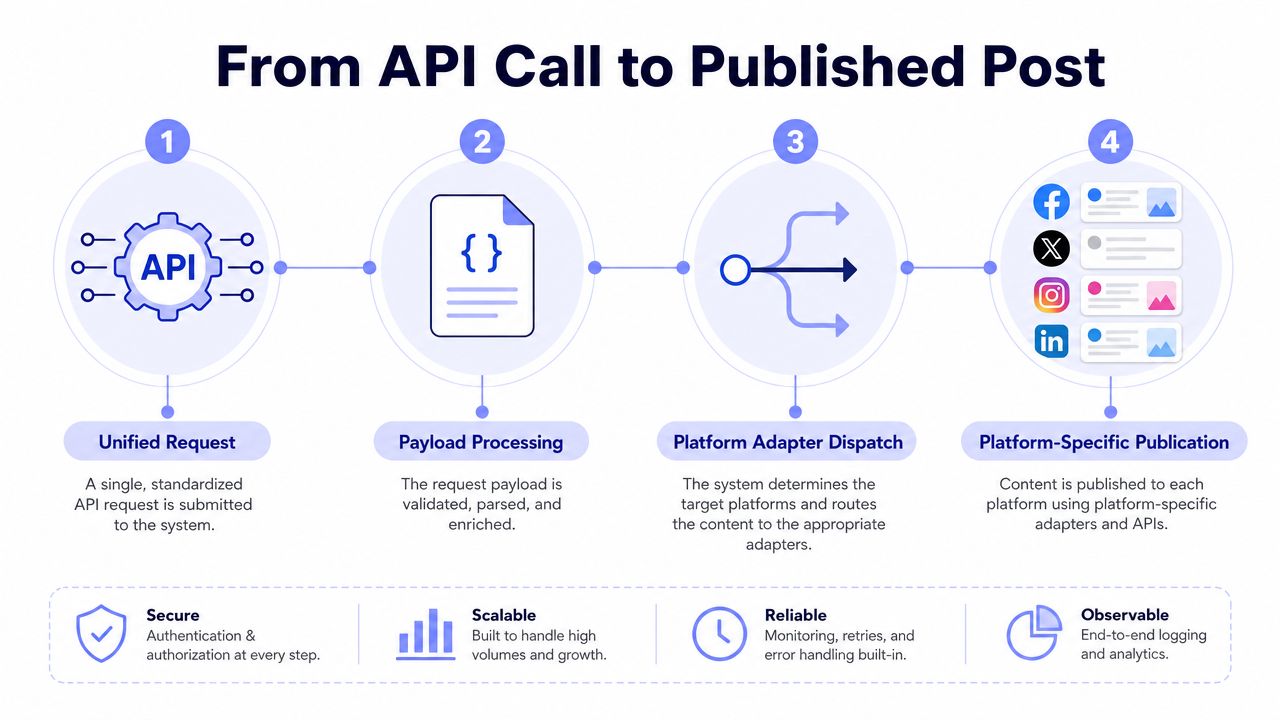 A diagram illustrating the workflow from a unified API request to multi-platform social media content publication.
The request shape should stay platform-agnostic
Your payload should describe the content, target account, media references, schedule, and correlation ID. The adapter can translate that into the platform's native format, whether that means a container publish, a resumable video upload, or a plain text post.
The point is not to force every provider into the same behavior. The point is to give your app one contract and let the adapter absorb the ugly parts. PostPulse is one example of that kind of surface, and it also exposes the same publishing surface through a unified API and all-social-media-in-one-app style workflow for teams that want fewer moving parts.
Retry the right things, not everything
Retry IN_PROGRESS states: these are expected on async platforms.
Retry transient upload errors: network failures and timeouts are worth another attempt.
Do not blindly retry publish errors: permission or scope problems usually need reauth, not a loop.
Use idempotency keys: that keeps duplicate posts from landing when the worker retries after a timeout.
Choosing Between REST, n8n, Make.com, and MCP
The right integration surface depends on who owns the logic. If your app team is embedding publishing into product UX, REST is the cleanest fit. If the workflow lives in a no-code stack, n8n or Make.com will get you there faster. If an AI agent is making the decision and calling tools directly, MCP makes more sense.
Pick the surface that matches the operator
A typical AI content automation pipeline can start in Airtable, generate images with Flux, write captions with Claude, and then fan out to multiple platforms in one publish step (AI content automation pipeline). That kind of flow is why no-code and agentic tooling matter. The operator may never touch your frontend.
Use this rubric:
REST: best when your SaaS owns the user experience and the backend already speaks JSON.
n8n or Make.com: best when non-engineers need to orchestrate triggers, approvals, and scheduled posts.
MCP: best when an AI agent needs a tool boundary instead of a custom plugin.
White-label or private-label layers: best when you want the integration to disappear behind your own brand.
The trade-off is control versus convenience
REST gives you the most control, but you own the edge cases. n8n and Make.com reduce implementation time, but you accept their visual workflow model. MCP is powerful for tool-using agents, but you need to be disciplined about permissions and action scope.
For teams that want a narrower setup path, PostPulse also exposes an official n8n node, a Make.com app, and an MCP server, which is useful when you want one backend while keeping the front door flexible. If you want deeper implementation patterns, the integration guides are the right place to compare those surfaces against your own stack.
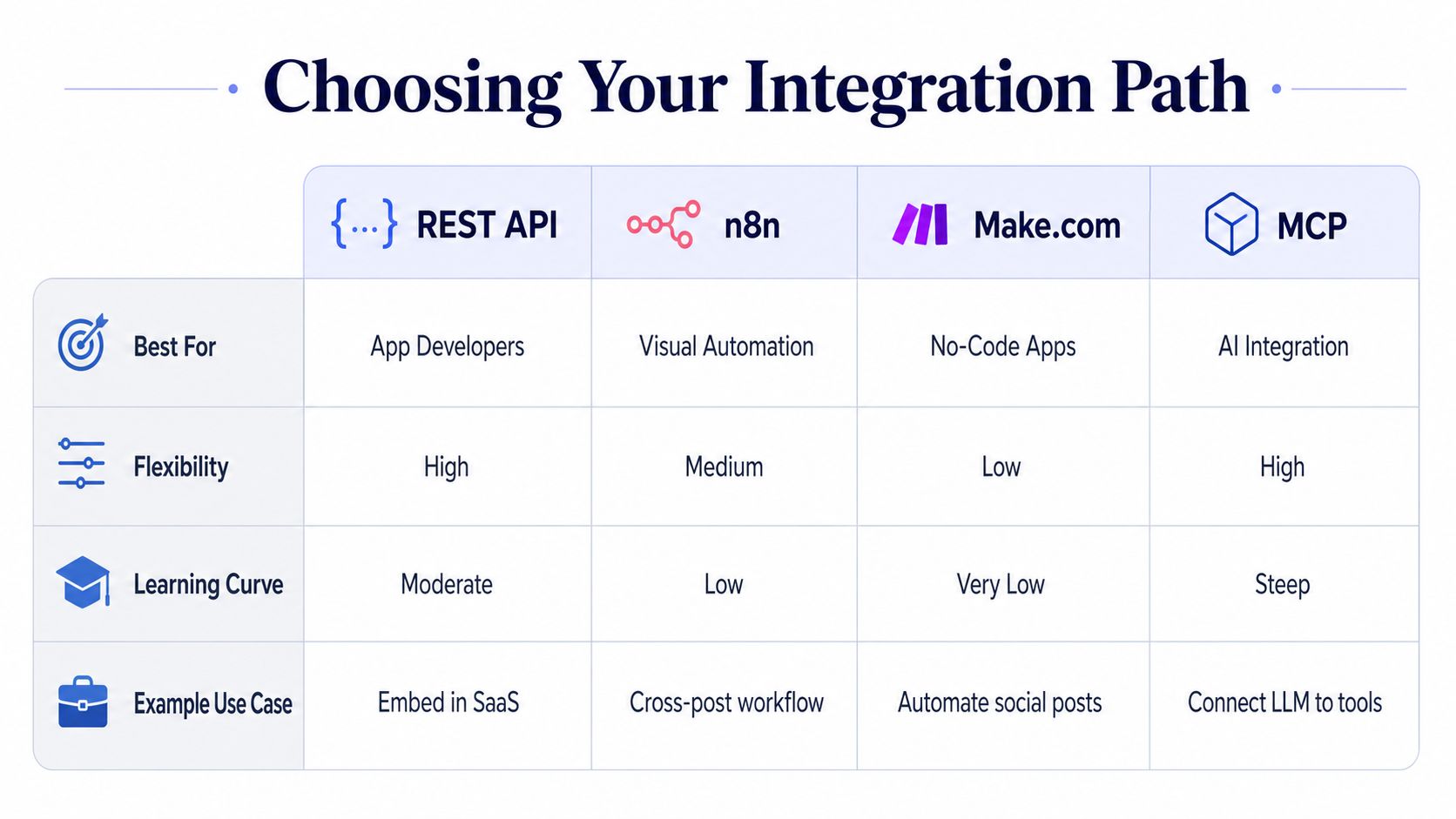 A comparison table titled Choosing Your Integration Path for REST API, n8n, Make.com, and MCP integration methods.
Rate Limits, Webhooks, and What Scale Actually Looks Like
Scale is not just “more accounts.” It's more parallel jobs, more webhook callbacks, more retry traffic, and more chances to trip the same failure twice. The trick is to treat multi account management as a capacity problem, then smooth the spikes before they hit the provider.
Queue design beats brute force
Distribute publishing across accounts when the platform allows it, but don't confuse distribution with unlimited throughput. A queue should pace jobs, isolate failures per account, and back off when a provider starts pushing back. That keeps one noisy account from starving the rest.
Webhook verification belongs in the first layer of your receive path. If the signature fails, drop the event. If the event is valid but already processed, use the idempotency key or job ID to ignore the duplicate.
The isolation pattern matters too. In mature systems, the strongest benchmark is one account mapping to one identity environment, one device context, and one stable proxy to prevent cross-account linkage (DesignRush guidance on multi-account isolation). That same idea applies to operational separation, even when you're not trying to evade detection.
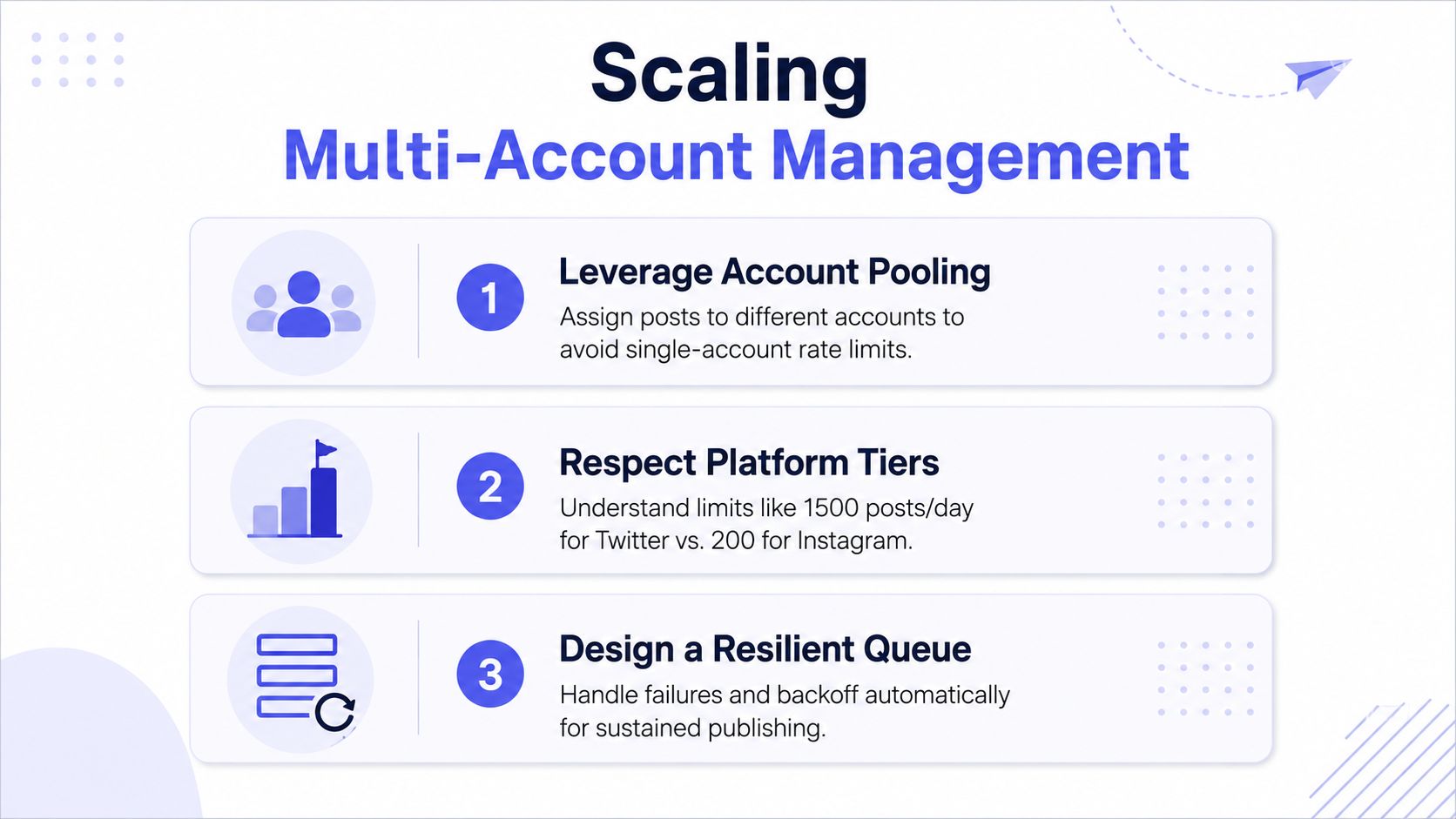 A graphic titled Scaling Multi-Account Management featuring three key strategies for handling social media publishing at scale.
What to monitor from day one
Publish latency: tells you whether queue pressure is building.
Token refresh failures: catches expiry before the next user-visible outage.
Webhook verification errors: spots signature drift or broken secrets.
Duplicate job attempts: shows when retries are getting too aggressive.
Per-account error rates: helps you find one bad integration without blaming the whole system.
Operational rule: don't wait for a platform outage to find out your retry policy is too optimistic.
That's the answer to “what does scale look like.” It's not a bigger server. It's cleaner queues, sharper isolation, and logs that let you answer one question quickly. Which account failed, why did it fail, and can the system recover without inventing a duplicate post?
Pricing Math and the White-Label Decision
The business question is simpler than it looks. If you're shipping a product where users should see your brand, white-label makes sense. If you're wiring social publishing into an internal tool, a private-label setup is usually enough.
Model the cost against the work you avoid
PostPulse's pricing is straightforward. Private-label pay-as-you-go is $0.20 per publication, with no subscription and unlimited connected accounts. Private-label subscription is $5 per account per month with unlimited posts. White-label is $200 per month plus $1 per active social account, and an account only counts as active if it publishes at least one post that month.
That active-account rule matters because connected-but-idle accounts are free on the white-label plan, so the cost curve doesn't behave like a simple “more logins, more bill” model. It's a better fit when many accounts are provisioned but only a subset publishes regularly.
Choose by surface, not by optimism
Pick private-label when your users can see the underlying publishing relationship and you want the fastest path to production.
Pick white-label when the publishing experience has to look native to your app or agency.
Stay in-house only if your team is prepared to own platform reviews, token maintenance, and version churn for every provider you support.
The hidden cost of building this yourself is not the first integration. It's the second and third refresh policy, the fourth API change, the support docs, and the long tail of platform audits that keep coming back. If you want a practical way to compare those trade-offs against your own roadmap, start with the brand question first. Who does the user think is operating the publishing layer?
A CTA for PostPulse.
About the Author

Founder of PostPulse — a social media scheduling platform for creators and teams. Software engineer with a passion for building developer tools and simplifying complex API integrations across social media platforms.