Instagram and Tik Tok Publishing Guide for Developers
Published on
Tags:
You ship a cross-posting feature on Friday. Instagram accepts the upload, then the post never appears. TikTok worked in staging, then starts rejecting requests because the token is no longer valid. You retry, add logging, queue the job again, and now you're debugging two systems that look similar in the product UI but behave nothing alike once you're inside their APIs.
That's the problem with Instagram and TikTok for developers. The hard part usually isn't media encoding or OAuth in the abstract. It's the mismatch between platform behavior, publishing workflow, auth lifetime, and content format expectations. A lot of cross-posting bugs happen because teams assume both platforms are just “video destinations” with different branding.
They aren't. Instagram behaves like a Meta publishing pipeline with containers, explicit publish steps, and account-level constraints. TikTok feels simpler at the content level, but integrations still break if you don't treat token validity and upload flow as first-class concerns. If you build one generic “publishVideo()” path and hope adapters smooth it out later, you usually end up with stuck jobs, silent failures, and support tickets you can't reproduce.
Table of Contents
Why Publishing to Instagram and TikTok Breaks So Often
A cross-posting system can look stable for days, then fall apart on the first scheduled batch.
The usual pattern is painfully ordinary. A creator connects both accounts, publishes a test clip, and everything passes. Then a scheduled post runs hours later and one side fails for reasons your UI never exposed. Instagram often fails because the credentials or publish state are no longer where your app assumed they would be. TikTok often fails because auth validity only becomes visible at execution time, not when the account is connected.
Instagram punishes shallow workflow modeling. Meta documents that a short-lived Instagram User Access Token expires in one hour, and that developers can exchange it for a long-lived token that expires in 60 days. The same reference also notes refresh timing rules. The token must be at least 24 hours old and still valid before it can be refreshed for another 60 days (Meta Instagram access token reference).
That detail breaks a lot of scheduler logic.
If the only test case is "connect account and post right away," the integration looks healthy. Production traffic adds delays, retries, expired sessions, and jobs that run long after the original OAuth flow. That is where weak state handling shows up.
The APIs break on different edges
Instagram publishing is a multi-step pipeline, and teams get into trouble when they flatten it into a single job state. You create a media container first. Publishing happens later, after your app explicitly calls the publish endpoint. If your database marks the post as done after upload, support will see a "published" record while the user sees nothing in Instagram.
TikTok's failure mode is different. The common issue is not container state. It is auth and eligibility surfacing late in the flow. TikTok's developer docs explicitly document 401 access_token_invalid for cases where the access token is invalid or expired (TikTok creator info API reference). That sounds straightforward, but the operational consequence matters. An expired token should trigger re-auth or account recovery logic. A processing delay should stay in the queue. Treat both as a generic publish failure and the retry system starts doing the wrong thing.
One rule saves a lot of cleanup later.
Never map "request accepted" to "post published."
The product UI hides the mechanical differences
Instagram and TikTok look similar from the creator side, especially if your app starts from a single vertical-video editor. That visual similarity causes backend shortcuts, and those shortcuts are what break.
Common examples show up fast:
Auth gets modeled as a boolean: "connected" is too coarse. Your system needs to know whether the token is valid now, refreshable now, or likely to expire before a scheduled publish window.
Job states are too generic: Instagram needs states for container creation, processing, publish attempt, and final verification. Without them, failed posts turn into vague support tickets.
Retries become unsafe: retrying an expired-auth error, a media-processing delay, and a rejected publish request with the same policy creates duplicate work and noisy failures.
Cross-post adapters stay too thin: one shared
publishVideo()interface is fine at the API boundary, but each platform still needs its own state machine, validation rules, and recovery path.
I have seen teams spend more time debugging the abstraction than the platform. The fix is usually less abstraction, not more. Keep the editor shared if that helps the product. Split the execution model early, store platform-specific states, and let the queue behave differently for Instagram and TikTok. That is how cross-posting tools stop failing in ways nobody can reproduce.
Instagram and TikTok at a Glance for Publishers
A scheduler can send the same vertical video to both platforms at 9:00 AM and get two very different operational outcomes by 9:05. Instagram usually behaves like part of a larger business publishing stack. TikTok behaves more like a discovery engine that happens to expose publishing endpoints. That distinction matters more than headline user counts if you are building cross-posting software.
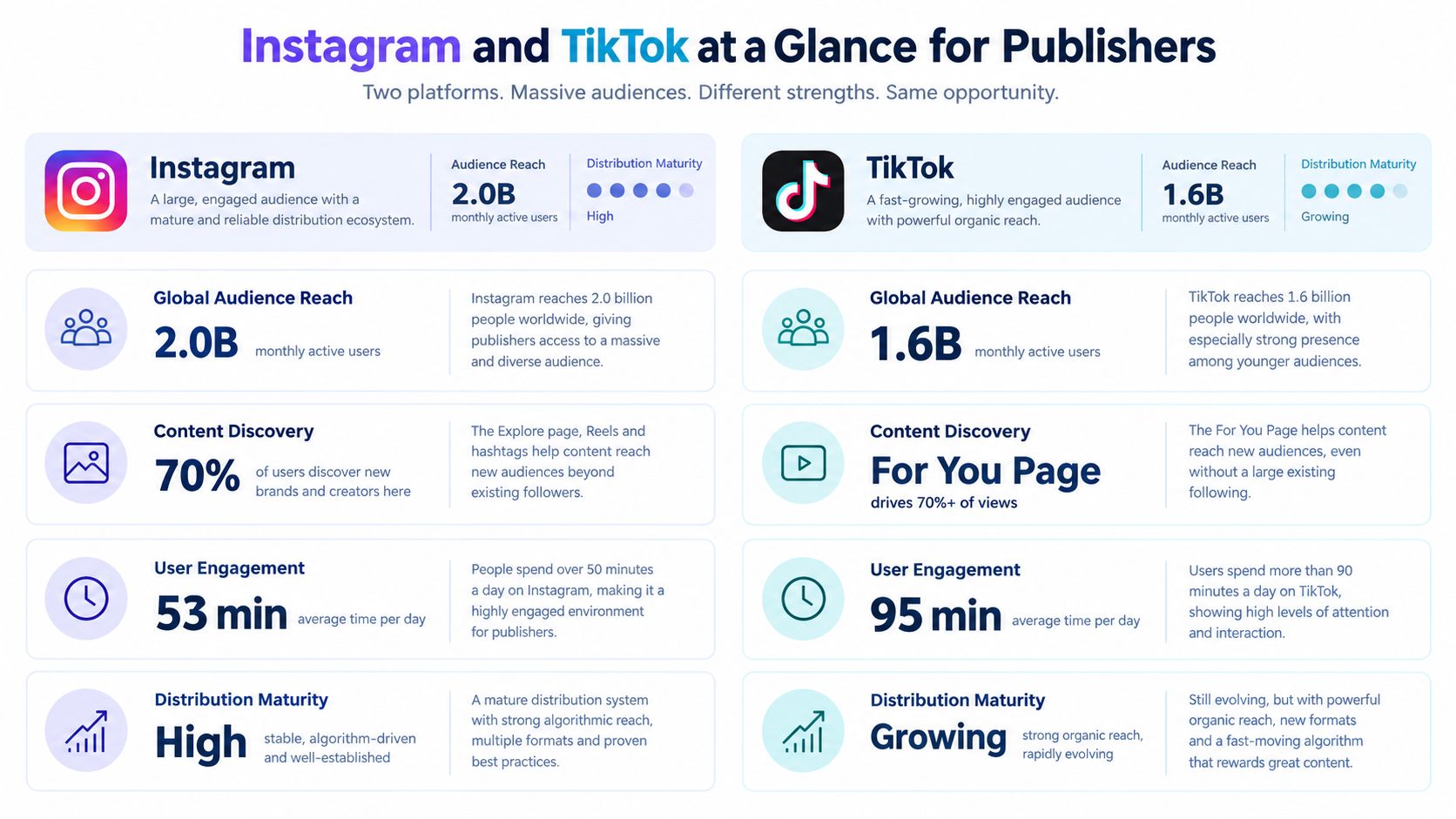 A comparative infographic displaying audience and engagement statistics for publishers on the Instagram and TikTok platforms.
Platform | Scale and maturity | Publishing implication |
Large, mature distribution channel inside Meta's ecosystem | Better fit when you need established business tooling, account structure, and multiple post surfaces | |
TikTok | Short-form platform shaped by fast growth and discovery behavior | Better fit when video discovery is the core use case and adaptation for native presentation matters more |
Instagram and TikTok together | Similar from a creator UI standpoint, very different in backend behavior | Cross-posting tools need separate workflow logic even if the editor is shared |
Instagram is mature in ways publishers feel immediately
Instagram has been part of Meta for years, and that shows up in the product shape as much as the audience size. DataReportal's Instagram overview ties that maturity to Meta's broader reach and reports Instagram among the largest global social platforms (DataReportal Instagram stats).
For publishers, the practical effect is straightforward. Instagram supports more than one meaningful destination inside the same platform family. Feed, Reels, Stories, and business-oriented account structures create more routing decisions, but they also make Instagram easier to fit into marketing and content operations that already depend on approvals, scheduling windows, and brand controls.
That does not mean easier engineering. It means the constraints are familiar.
TikTok still pushes everything toward native short-form behavior
TikTok's rise was faster and structurally different. Its growth came through a short-form video product that trained both creators and viewers to expect content that feels native to the feed. GlobalWebIndex's social platform summary highlights TikTok as a major monthly platform among internet users, which supports that publisher reality even without telling you how to build for it (GWI social media usage summary).
From a tooling perspective, TikTok is less forgiving of content that looks batch-produced for multiple destinations. A post may upload successfully and still underperform because the edit, caption style, or pacing reads like an Instagram export. That is not an API error, but users will experience it as a product failure if your cross-posted output consistently looks out of place.
A separate market snapshot from Statista also places TikTok among the largest social platforms by audience scale, reinforcing that publishers are not dealing with a niche destination (Statista social network user rankings).
Instagram rewards teams that need structured publishing options across a mature platform. TikTok rewards teams that can make one video feel native to a fast-moving recommendation feed.
That is the high-level split for developers. Instagram usually asks for stronger workflow control. TikTok usually asks for stronger creative adaptation. If a cross-posting tool treats those as the same problem, quality drops before the support tickets start.
Content Formats Compared Without the Fluff
A cross-posting pipeline usually fails here first. The encoder exports one clean 9:16 file, QA signs off on the preview, then support tickets show up because the same asset is too long for one Instagram path, awkwardly cropped in another, and technically valid but structurally wrong for how TikTok posts are consumed.
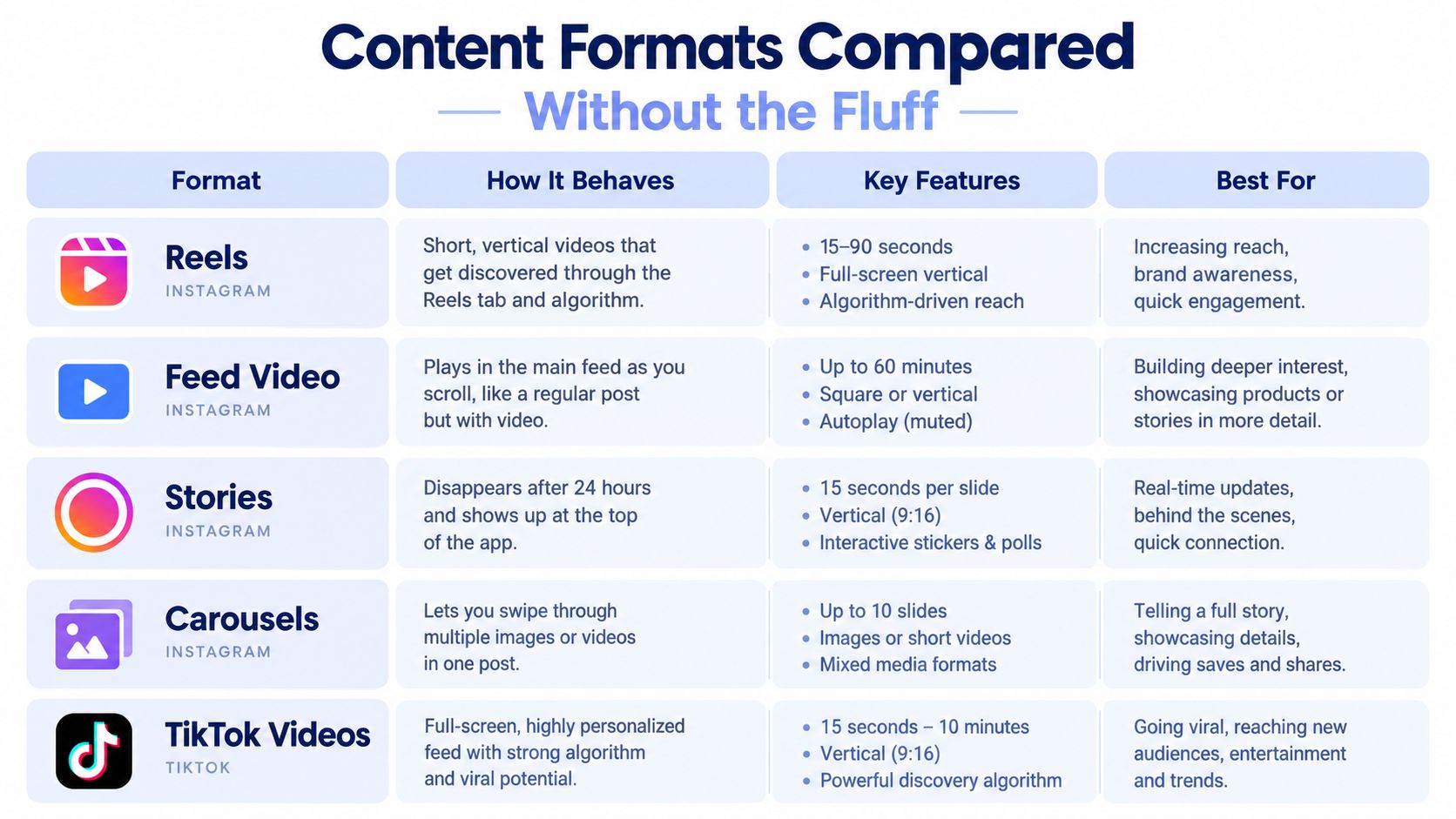 A comparison table outlining key features, behaviors, and best uses for Instagram and TikTok content formats.
At the file level, the overlap is real. Both platforms handle vertical video well, and 9:16 at 1080×1920 is still the safe default for short-form exports, as noted earlier. That shared baseline fools product teams into treating Instagram and TikTok as the same format target. They are not.
The practical split is duration, placement, and how many publishing branches your tool needs to support.
Instagram vs TikTok Format Ceilings
Format | Instagram Limit | TikTok Limit |
Short-form in-app creation | Reels up to 3 minutes | Videos up to 10 minutes |
Uploaded short-form from existing media | Reels up to 20 minutes for camera-roll uploads | Desktop uploads up to 60 minutes |
Longer feed-style video | Feed video up to 60 minutes | Also supports up to 60 minutes on desktop uploads |
Those ceilings matter less as marketing trivia and more as routing rules. If a user drops a 12-minute vertical video into your app, TikTok may still be a valid destination while one Instagram Reel path is not. If your validator only checks aspect ratio and file size, you catch the wrong problems too late.
I usually model format handling around destination intent, not around a generic “video post” type. That avoids a common mistake: one asset enters the system, then every downstream service has to guess whether it should become a Reel, feed video, Story cut, or TikTok upload. Guessing turns into edge-case code fast.
A better setup uses explicit branches:
Short vertical clip for Reels and TikTok: optimized for 9:16, cover extraction, caption variants, and strict duration checks.
Longer edited asset from camera roll or desktop workflow: useful for teams publishing finished media from outside the app, where TikTok and some Instagram surfaces allow more room.
Multi-placement Instagram packaging: separate handling for Reels, feed, Stories, and carousels, even if they start from the same source media.
That last point is where Instagram creates more work. TikTok is mostly a video destination. Instagram is a set of placements with different visual tolerances. A crop that looks fine in a Reel preview can cut off text in Stories or produce an unusable feed cover. Teams that have shipped these flows usually end up storing safe-area metadata and alternate crops, not just one canonical frame. If you need a sizing reference before locking your export presets, keep this guide to vertical video dimensions for social publishing next to your media pipeline docs.
The other recurring failure is assuming “passes upload” means “fits the format.” It does not. A 45-second clip with burned-in captions near the bottom may clear validation on both platforms and still perform badly because UI overlays cover the text differently. The publishing tool did its job. The post still shipped broken.
Here's a solid visual walkthrough of how creators think about the two platforms in practice:
What works better than one-size-fits-all assets
Store one master asset. Render destination-specific variants at publish time.
Don't optimize for one file that passes validation everywhere. Optimize for one source that can be rendered natively per destination.
That usually means keeping these fields separate in your content model:
Core media asset
Platform caption variants
Cover or thumbnail variants
Duration-aware publish eligibility
Per-platform crop and safe-area metadata
Without that structure, cross-posting degrades into conditional patches. Every new format exception ends up buried in validators, thumbnail jobs, or last-minute UI warnings that users only see after they have already scheduled the post.
How Publishing Actually Works Behind the APIs
A post can look ready in your scheduler and still fail three minutes later for reasons the user never sees. That usually happens because Instagram and TikTok expose different publishing mechanics, and a shared "publish now" button hides too much of that complexity.
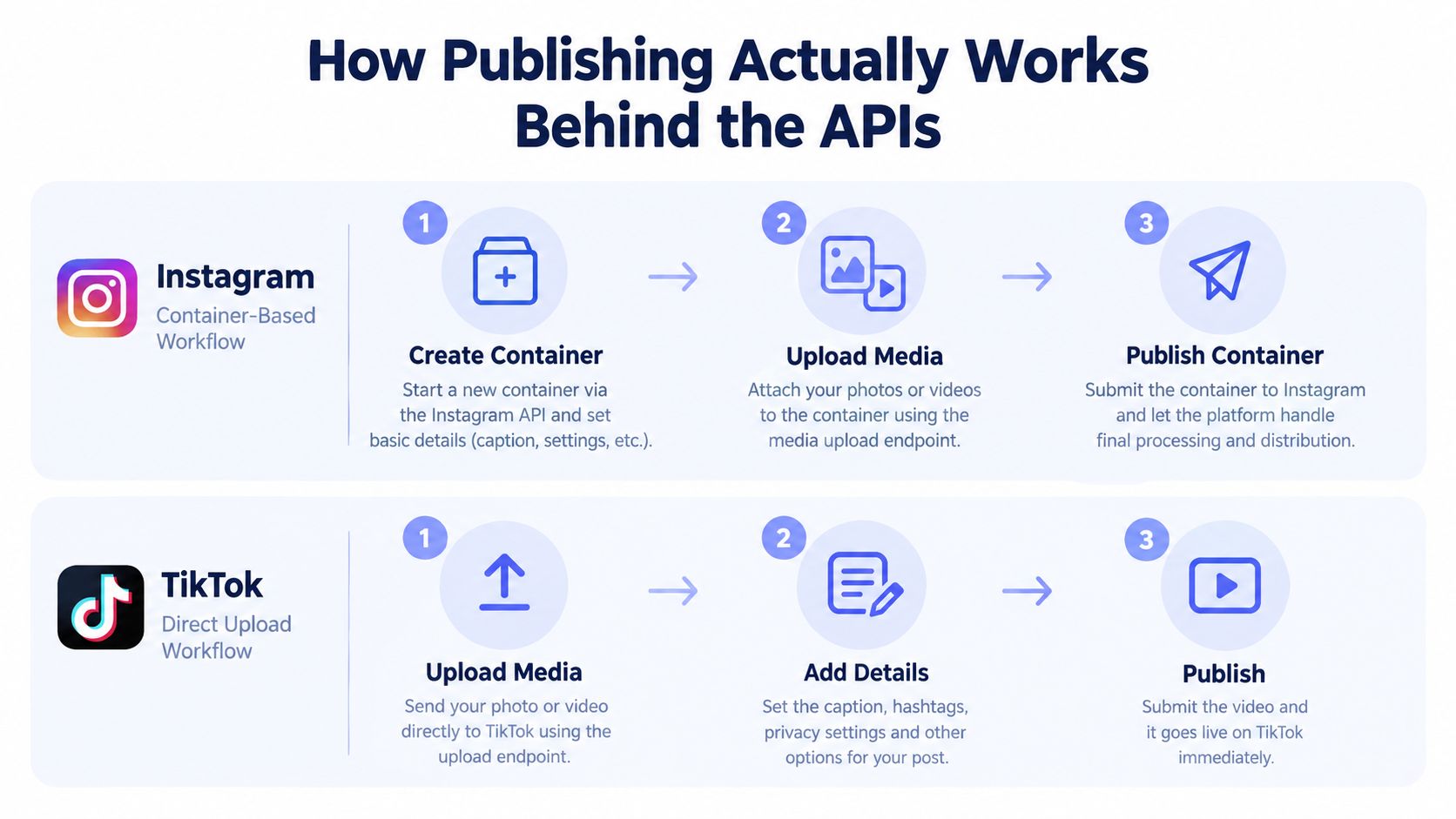 A diagram comparing Instagram and TikTok publishing API workflows showing container-based versus direct upload methods for social media.
Instagram fails like a workflow engine. TikTok fails like an auth and upload pipeline. If you model both as the same job type, you lose the exact state that would tell you what broke.
Instagram is a container workflow
Instagram publishing is not a single request. Your app creates a media container first, waits for that media to become publishable, then sends a separate publish call. That difference matters in production because "upload succeeded" does not mean "post is ready."
Your internal job model should reflect the actual stages:
Media prepared
Container created
Processing or waiting
Ready to publish
Published or failed
Skipping those states creates blind spots. Support sees "failed." Engineering sees "uploaded." Neither can tell whether the issue was media processing, quota pressure, or a publish call sent too early.
Instagram also needs account-level throttling in the scheduler, not just request-level retry logic. If you let automation enqueue aggressively, one active account can hit publishing limits and block later posts that looked valid at schedule time.
TikTok breaks earlier, at auth boundaries
TikTok usually goes wrong before the actual post is live. The common operational mistake is treating token problems like transient upload failures.
A 401 with access_token_invalid is not a signal to retry the same job ten times. It is a signal to stop the expensive path, mark the account as needing refresh or reconnect, and show that state clearly in the product. Teams testing only immediately after login often miss this because the happy path works fine for a short session, then scheduled jobs fail later when the token is stale.
The practical fixes are boring, but they save hours:
Separate auth retries from upload retries: invalid credentials and transport failures need different queues.
Store token context with each job: support should see expiry timing, refresh status, and the last auth error without pulling raw logs.
Run a cheap capability check before heavy work: do not render variants or start uploads for an account that cannot publish.
Expose reconnect states in plain language: "Reconnect TikTok account" gets resolved. "Publishing failed" becomes a ticket.
If you need a broader product view of how these mechanics fit into schedulers, queues, and approval flows, this guide to social media publishing workflows is a useful reference.
Build observability around platform states, not generic failures
Cross-posting systems get more reliable when the backend records what each platform does. Instagram needs state transitions around container creation and readiness. TikTok needs clear separation between credential validity, upload progress, and final publish status.
That leads to a safer checklist:
For Instagram, wait for the container lifecycle to finish: publish only after your system has confirmed the media is ready.
For Instagram, apply account-aware scheduling rules: quotas should shape queue behavior before posts are due.
For TikTok, classify auth errors immediately: route invalid tokens into refresh or reconnect flows, not generic retry.
For both platforms, log stage-specific outcomes: "container processing," "auth invalid," and "publish rejected" are actionable. "Failed" is not.
Your backend should know exactly where a post died. If support has to reproduce it manually, the job model is too vague.
That is the split between Instagram and TikTok for developers. The interesting difference is not audience size or trend velocity. It is whether your system can survive container timing on one side and auth decay on the other.
Audience and Engagement Realities in 2026
A post can publish cleanly to both platforms, pass every validation check, and still underperform because it was packaged for the wrong feed. That is the audience problem in 2026. Distribution on Instagram and TikTok depends less on who follows the account and more on whether the format matches how each platform recommends content.
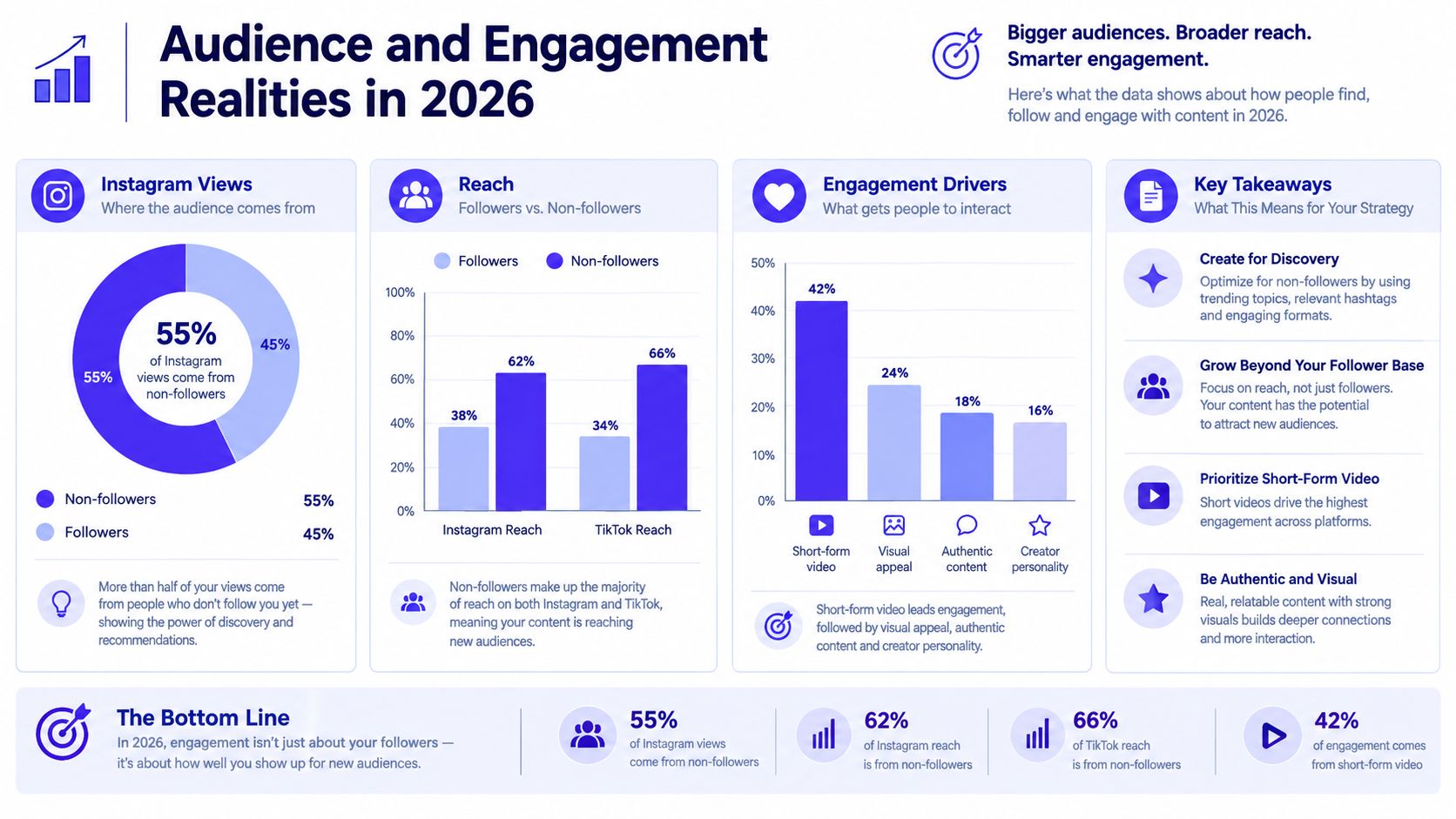 An infographic showing that 2026 social media engagement is driven by reaching non-followers on Instagram and TikTok.
Analysts at Metricool found that 55% of Instagram views come from non-followers, and TikTok traffic remains heavily driven by recommendation surfaces rather than follower graphs (Metricool Instagram study 2026). For teams building schedulers and cross-posting tools, that changes the job. The product is not just shipping media to two endpoints. It is helping users publish assets that fit two different ranking systems.
Format choice carries more weight than many publishing dashboards show.
One 2026 benchmark reports Instagram at around 0.48% average engagement in 2025 and describes TikTok as roughly 7× higher. A separate benchmark puts TikTok median engagement at 5.52% versus Instagram at 2.34% (engagement benchmark report 2026). Those numbers are directional, not universal. Engagement varies by niche, account size, and posting style. But they line up with what product teams usually see in practice. TikTok is still the stronger default for short-form video interaction.
Instagram is less straightforward. As noted earlier from the Metricool study, Reels did not lead every Instagram format. Carousels outperformed Reels on engagement in that dataset. That matters if your tool treats video as the default answer for every destination.
I have seen this mistake in cross-posting pipelines. A team builds one "short video" path, maps it to TikTok and Instagram Reels, and calls the job done. The publish success rate looks fine, but Instagram results stay soft because the content would have performed better as a carousel, a denser captioned post, or a mixed format sequence. The API layer says success. The audience layer says wrong container.
Smaller accounts run into that mismatch faster. A 2026 creator economy report found that 46.2% of Instagram creators and 76% of TikTok creators received fewer than 1,000 views per post, while also noting that TikTok engagement stayed more stable across creator sizes (2026 creator economy report coverage). That does not mean TikTok is easier in every case. It means small accounts often get broader initial distribution there if the video fits the feed.
For product design, the practical defaults are clearer than the marketing takes:
Give Instagram carousels equal status with Reels. Do not bury them behind a "secondary format" UI.
Treat TikTok as a video-first destination. If the asset is static or text-heavy, prompt for adaptation instead of blind reposting.
Store per-platform metadata. One asset can work in both places, but title, caption density, cover frame, and pacing should not be shared by default.
Report performance by format, not just by platform. "Instagram underperformed" is less useful than "carousels beat Reels for this account over the last 20 posts."
The useful comparison in 2026 is not Instagram versus TikTok as brands. It is recommendation environment versus recommendation environment, with different format winners, different ceilings for small accounts, and different failure modes after a technically successful publish.
Cross Posting That Looks Native on Both Platforms
Cross-posting usually fails long before the API call. It fails in the content model.
Teams reuse the same caption, same cover frame, same audio assumptions, and same pacing. The post goes live on both platforms, but it looks transplanted instead of native. Users notice that fast, especially on short-form surfaces.
Keep the asset. Adapt the wrapper.
The strongest cross-posting setups keep one core media asset and swap the presentation layer per platform.
Caption handling: Instagram can support a denser caption style than many TikTok posts. If your tool stores one caption string for all destinations, give users an override path.
Cover selection: a frame that reads well in TikTok's feed won't always preview cleanly in Instagram surfaces.
Sound assumptions: if the creative depends on platform-native audio behavior, treat that as metadata, not as an afterthought.
Scheduling behavior: delayed publishing means token state matters at execution time, not just at connect time.
Failure visibility: don't let one successful platform mask one failed platform in your UI.
For teams that generate creative at volume, a practical companion skill is creating platform-ready visuals fast. It's useful when your bottleneck isn't publishing code anymore, but producing enough variants that still look intentional on each platform.
Native feel needs workflow support
If you're publishing to both platforms regularly, your stack should support per-destination customization without duplicating the entire post object. That's the sweet spot. Shared source, platform-specific output.
This is also the point where using a unified layer can make sense. Tools vary, but the useful pattern is one integration surface that handles OAuth, refresh behavior, and version churn while still exposing platform-specific options. For example, posting to multiple social networks is much easier when your app keeps one editorial workflow but separate destination rules. PostPulse is one option in that category. It provides a unified publishing API for multiple networks, including Instagram and TikTok, so teams don't have to maintain separate Meta and TikTok app plumbing for every product.
What doesn't work is fake uniformity. If your product hides every platform difference from users, they lose the controls that make cross-posted content feel native.
Choosing the Right Platform for Your Next Project
If your product is built around short-form video as the main object, start with TikTok. The format expectations are clearer, and the engagement picture still favors TikTok for video interaction efficiency, especially when the content is designed for that environment.
If your product needs multiple publishing surfaces and more flexibility in how content is packaged, Instagram is often the better first integration. That's especially true when carousel-style storytelling matters as much as video.
A simple decision filter
If your project needs | Start here |
Video-first creation and discovery | TikTok |
Mixed media publishing paths | |
Native cross-posting with platform-specific variants | Both |
Automation with scheduled multi-network output | Both, with a unified publishing layer |
For app developers, the question is backend complexity tolerance. If you can afford platform-specific state machines and support workflows, direct integrations can make sense. If you want shipping speed and fewer moving parts, a unified publishing service is usually more practical.
For no-code builders, the decision is mostly about operational overhead. Managing auth, retries, and platform differences inside automations gets messy quickly.
For AI agents, publish safety matters more than raw reach. The agent needs clear eligibility rules, token health checks, and platform-aware output shaping before it can post autonomously without creating cleanup work.
The wrong decision is treating Instagram and TikTok as the same destination with different logos. The right decision is choosing based on content format, workflow complexity, and how much platform-specific behavior your stack can absorb.
If you're building this for real, PostPulse gives you one publishing surface for Instagram, TikTok, and the rest of your social stack through a REST API, official n8n and Make.com nodes, or an MCP server for AI agents. It's useful when you want cross-posting without owning every token refresh edge case, app review delay, and platform version change yourself.
About the Author

Founder of PostPulse — a social media scheduling platform for creators and teams. Software engineer with a passion for building developer tools and simplifying complex API integrations across social media platforms.