How to Post on Instagram and Facebook the Developer Way
Published on
Tags:
You've probably seen the failure already. The Instagram publish request returns successfully, but the post is still missing. A token that worked during testing expires after an hour. A carousel container sits in IN_PROGRESS, and a scheduled job marks the operation as complete before Meta has finished processing the media.
The root problem is usually architectural. Instagram and Facebook aren't one publishing API with two destinations. They're separate publishing systems that share parts of Meta's authentication layer but differ in account requirements, permissions, media workflows, and failure handling. If you're learning how to post on Instagram and Facebook from an application, treat the two pipelines separately from the first line of code.
Instagram launched on October 6, 2010, reached 1 million registered users by December 2010, and later grew beyond 2 billion monthly active users, according to Instagram's product evolution history. That scale explains why a reliable publishing workflow needs more than a button that says “share everywhere.”
Table of Contents
Why Posting to Instagram and Facebook Is Two Different Problems
A developer starts with a reasonable assumption: accept one caption and one media file, send one request, and let Meta publish to both feeds. That assumption breaks as soon as the application reaches the API layer.
Instagram professional publishing uses a media container workflow. Your application creates a container first, waits for Meta to process it, checks the container status, and only then publishes it. The Instagram Content Publishing documentation describes separate requests for creating media, checking container status, and publishing the completed container through media_publish (official Instagram publishing documentation).
Facebook Pages publishing is a different shape. A Page post is sent to the Page feed through the Pages API, rather than through Instagram's container-and-publish sequence. The credential and permission model also differs. Facebook Pages publishing requires the pages_manage_posts permission and the relevant Page task, as described in Meta's Pages API getting started guide.
That difference affects your data model. An Instagram publish record needs container IDs, processing status, and a second publish operation. A Facebook Page record needs the Page ID, a Page access token, and the result of the feed request. One shared “social post status” field usually hides too much information to support useful retries.
Practical rule: Share a content object, not a publishing implementation. Let each platform adapter decide how that object becomes a post.
Instagram Graph API vs Facebook Pages API at a Glance
Dimension | Instagram Graph API | Facebook Pages API |
Destination | Instagram professional account | Facebook Page |
Publishing model | Create a media container, check its status, then publish | Post directly to a Page feed or relevant media endpoint |
Authentication | Meta OAuth with Instagram-related permissions | Meta OAuth with Page-related permissions |
Processing | The container may remain unavailable while media is processed | The request result represents the Page publishing operation |
Application design | Store container IDs and processing states | Store Page IDs, Page tokens, and post results |
Main engineering risk | Publishing before the container reaches a completed state | Posting with the wrong Page credential or permission |
The practical lesson is simple. A cross-posting feature can share scheduling, captions, asset storage, and observability, but it shouldn't pretend that Instagram and Facebook have identical APIs.
OAuth and Token Lifecycle for Meta APIs
A publish job can fail before it reaches either API if the connection stores the wrong token or lets it expire. Instagram and Facebook Page publishing share Meta's authorization layer, but they do not use identical credentials after account discovery.
Register the application in Meta's developer environment, configure a valid redirect URI, and request only the permissions the workflow needs. A workflow that discovers Pages, publishes to Instagram, and publishes to Facebook Pages may require instagram_basic, instagram_content_publish, pages_show_list, and pages_manage_posts, subject to Meta's review and account requirements.
With Instagram Login, the initial short-lived user access token is valid for 1 hour. Meta documents exchanging it for a long-lived token that expires in 60 days. In the documented flow, refreshing that long-lived token gives it another 60 days from the refresh date. See Meta's long-lived access token documentation.
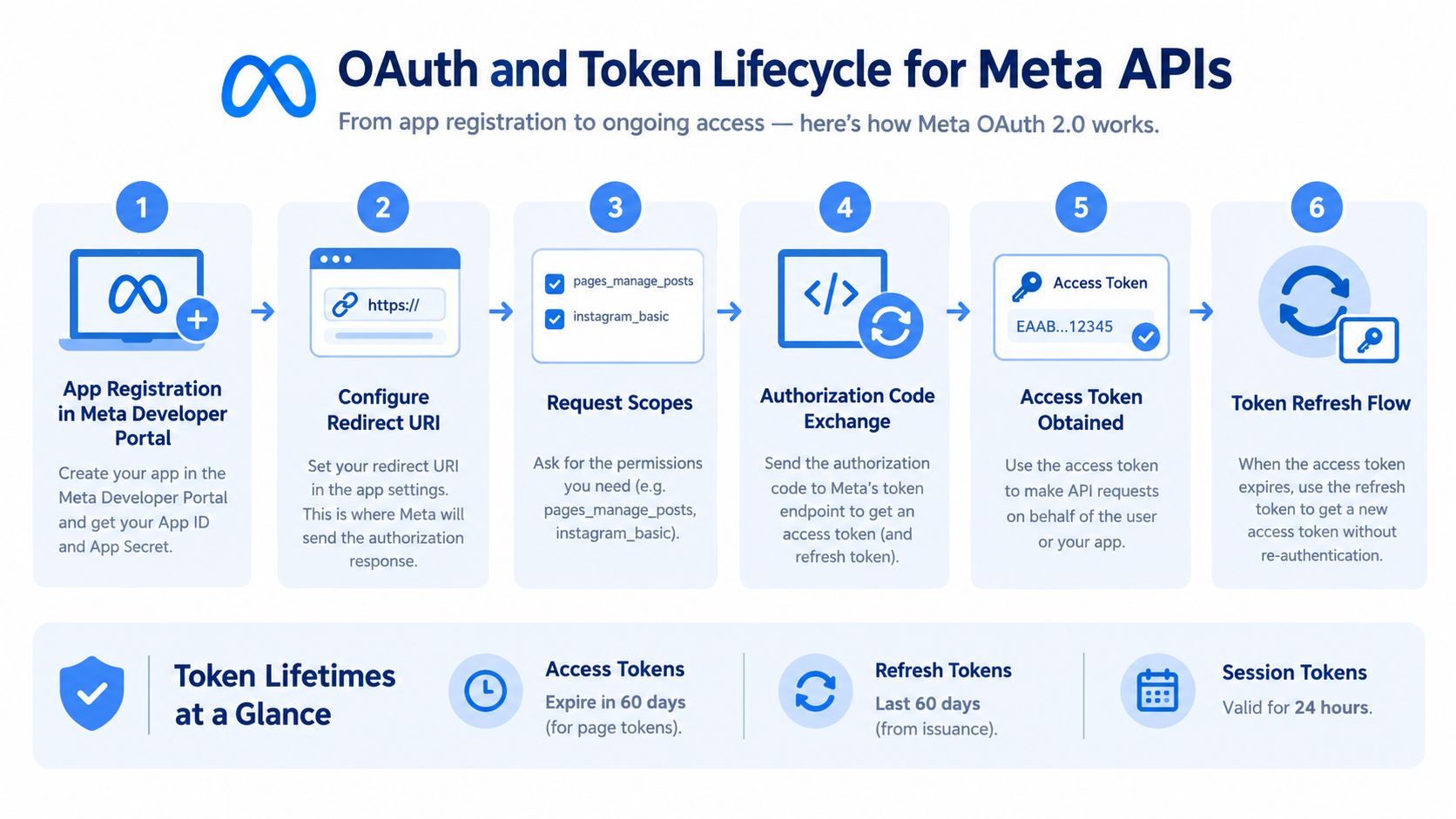 A diagram illustrating the six-step OAuth and token lifecycle process for integrating with Meta APIs.
A complete server-side flow is:
Receive the authorization code at the configured redirect URI.
Exchange the code for the initial user access token.
Exchange the short-lived token through Meta's access-token endpoint for a long-lived token.
Discover the connected Page and Instagram account using the granted permissions.
Store the account identifiers and publishing credentials in encrypted server-side storage.
Refresh before expiry, then publish only after the replacement token is valid.
The Page token needs separate handling. The user token supports account discovery and related operations, while Facebook Page publishing uses a Page access token. Store the long-lived user token and Page access token as separate records, each with its own expiry metadata. Both are bearer tokens, but substituting one for the other produces confusing authorization failures.
Add the refresh job to your integration runbook with the exact expiry fields your database stores, so a new engineer inherits the refresh schedule instead of rediscovering it after an incident. The Meta OAuth token lifecycle guide for developers provides a practical checklist for the handoff from authorization to ongoing publishing.
Publishing to Instagram Step by Step
Instagram publishing becomes predictable once you stop treating it as a single request. Your application prepares media, creates a container, waits for processing, and then publishes the container.
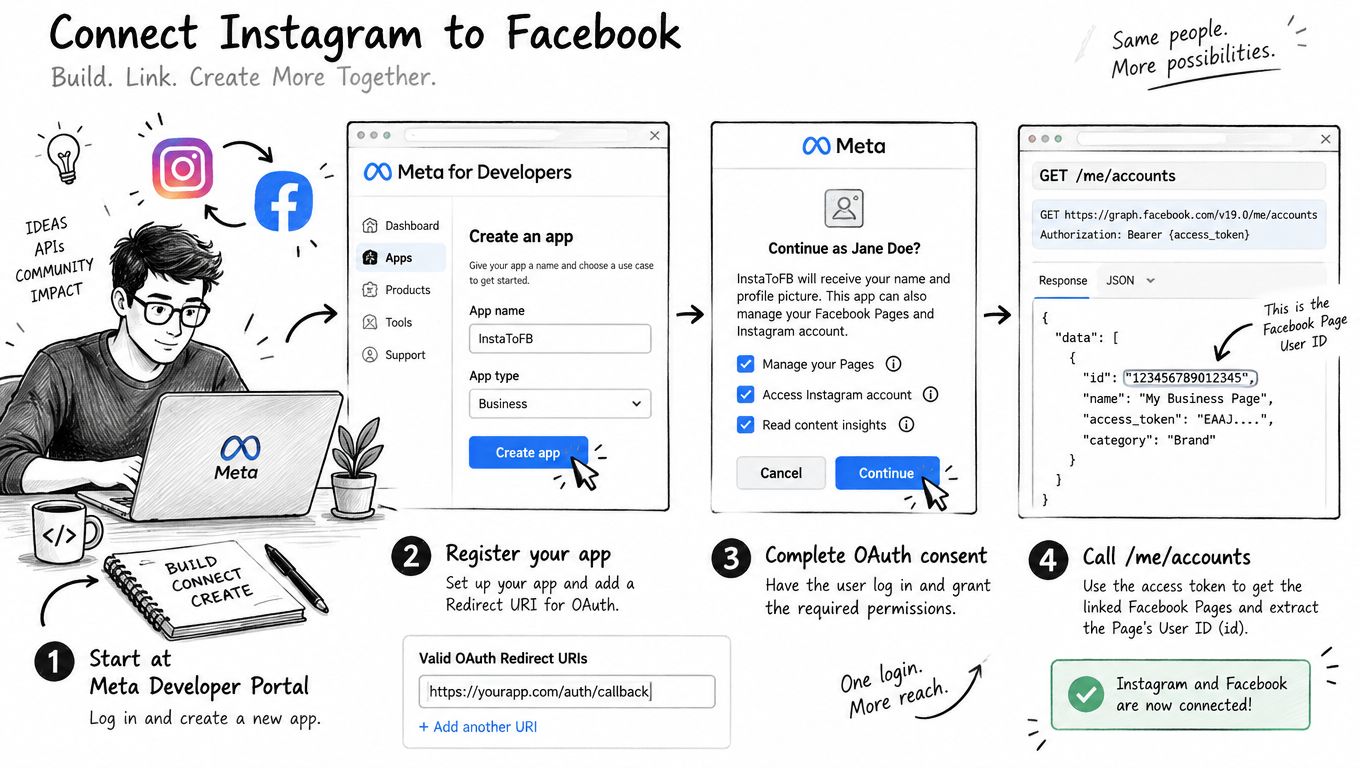
A typical implementation starts by resolving the Instagram professional account associated with the connected Page. The documented discovery sequence uses /me/accounts and then requests the Page's instagram_business_account field. Store the resulting Instagram user ID with the connection. Don't ask the publishing job to rediscover it for every post.
The media asset also needs to be available to Meta through a URL that Meta's servers can reach. A private object-storage URL, a local development address, or a URL that requires your application's session cookie won't work as a fetch target. Generate a properly accessible asset URL, create the container with POST /{ig-user-id}/media, and retain the returned container ID.
 Screenshot from https://developers.facebook.com/docs/instagram-api/reference/ig-user/media_publish
For a normal image or video, your application creates one container. A carousel requires a pre-pass. Create the child containers first, mark them as carousel items, then create the parent carousel container with the child IDs. The parent should not be published until its children are ready.
Reels use the Instagram media publishing flow with the relevant media type and upload process. Keep the upload state separate from the publish state. An upload can finish while the container still needs processing, so a successful upload response isn't the same thing as a published Reel.
The part that breaks naïve cron jobs is status polling. After creating a container, call GET /{ig-container-id}?fields=status_code and wait for FINISHED. A response that reports IN_PROGRESS means the publish step is premature. Use a bounded retry policy with increasing delays, persist the last status, and make the final publish operation idempotent in your own database.
The core sequence can be represented without hiding the important state transitions:
create container → save creation_id → poll status_code → require FINISHED → POST media_publish → save published result
Meta's Instagram Graph API publishing reference should remain open while you implement this adapter. The exact request fields vary by media type, so avoid building one oversized request builder that sends every possible field for every format.
Publishing to a Facebook Page Step by Step
Facebook Pages publishing is more direct, but that doesn't make it interchangeable with Instagram. The first check is authorization. Your application needs the pages_manage_posts permission, and the Page connection needs the publishing-related Page task documented by Meta. A user access token that can list Pages isn't automatically the credential you should use to publish a Page post.
Once you have the Page ID and Page access token, a plain text or link post uses the Page feed endpoint, POST /{page-id}/feed. Keep the request builder narrow. A text post needs different fields from a link post, and neither should inherit Instagram-specific media fields.
Text and link posts
Store the Page ID with the connection and send the post content to the feed endpoint using the Page access token. Record the returned post identifier and the request metadata. That gives operators something concrete to investigate if a downstream workflow reports a failure after the API request has already succeeded.
Don't use the Instagram user ID in this request. It may belong to the same business, but it identifies a different publishing destination. The Page ID is the routing key for Facebook Page content.
Image and carousel publishing
Image publishing has a different shape from a plain feed post. Your application sends the image to the Page's photos endpoint, handles the returned media identifier, and then uses the relevant attachment relationship when assembling a published story. For multiple images, keep the upload identifiers grouped under one internal post ID so a partial upload doesn't look like a complete carousel.
The same operational discipline applies here as with Instagram. Persist each returned ID, don't rely on an in-memory request chain, and make retries aware of which phase has already completed. If the image upload succeeded but the final story request failed, blindly uploading the image again can create duplicates.
Video and scheduling
For Page video publishing, Meta's Pages API supports the Page videos endpoint and a file_url parameter. Your service should make that URL available for Meta to fetch, then track the video request separately from ordinary feed posts.
Scheduling adds another branch to the state machine. An immediate post and a scheduled post aren't the same operation with a different timestamp. Validate the scheduling fields before calling the API, store the intended publish time in your own database, and distinguish “accepted for scheduling” from “published.”
Page-level throttling also needs its own monitoring. Don't respond to a user with “published” merely because the application queued a request. Return a status that reflects the API result, and expose retry information when Meta rejects a request temporarily.
The three practical ways to reach both destinations from one trigger have different costs:
Approach | How it works | Format support | Failure handling | Best for |
Native cross-posting | Instagram shares eligible content with a connected Facebook Page | Convenient for supported formats, less control over platform-specific presentation | Limited application visibility into the second publication | Small workflows where convenience matters more than observability |
Manual orchestration | Your service completes the Instagram flow, then calls the Facebook Page endpoint | Highest control, because each adapter can transform the content | Your service owns retries, token rotation, duplicate prevention, and partial failures | Products that need detailed status and custom formatting |
PostPulse | A unified publishing surface accepts one payload and handles platform-specific operations server-side | Depends on the supported destination and payload | The integration surface is unified, while platform handling remains behind it | Apps, automations, and agents that don't want separate Meta adapters |
Native sharing is the cheapest engineering path, but it's rigid. Manual orchestration gives you control, but every token, retry, and platform change becomes your maintenance responsibility. PostPulse exposes a REST API, official n8n and Make.com integrations, and an MCP tool, so the same publishing intent can originate in an application, a no-code workflow, or an agent.
For a deeper look at the Page-side request model, see the Facebook API publishing guide. The important design decision is to make the choice explicit. Cross-posting shouldn't be a hidden side effect of an Instagram publish unless the product intends for Instagram to control the Facebook result.
Format, Frequency, and Reach Trade-offs
Identical content at identical times doesn't guarantee identical distribution. Instagram and Facebook reward different content contexts, and the same asset can need a different caption, crop, or call to action on each platform.
Benchmark summaries report stronger average reach for Instagram than Facebook, with an average reach rate of 3.50% for Instagram versus 1.65% for Facebook, and average Instagram engagement of about 0.48% per post (the benchmark summary). Those figures are directional benchmarks, not promises for a specific account. Use native analytics to compare your own reach, comments, shares, and saves instead of treating likes as the complete signal.
Instagram also tends to favor visual formats such as Reels and carousels, while Facebook Pages can benefit from traffic-oriented and conversational text content. Broader benchmark coverage describes video as gaining share on both platforms, while Facebook remains useful for traffic and discussion-oriented posts (Rival IQ's industry benchmark report).
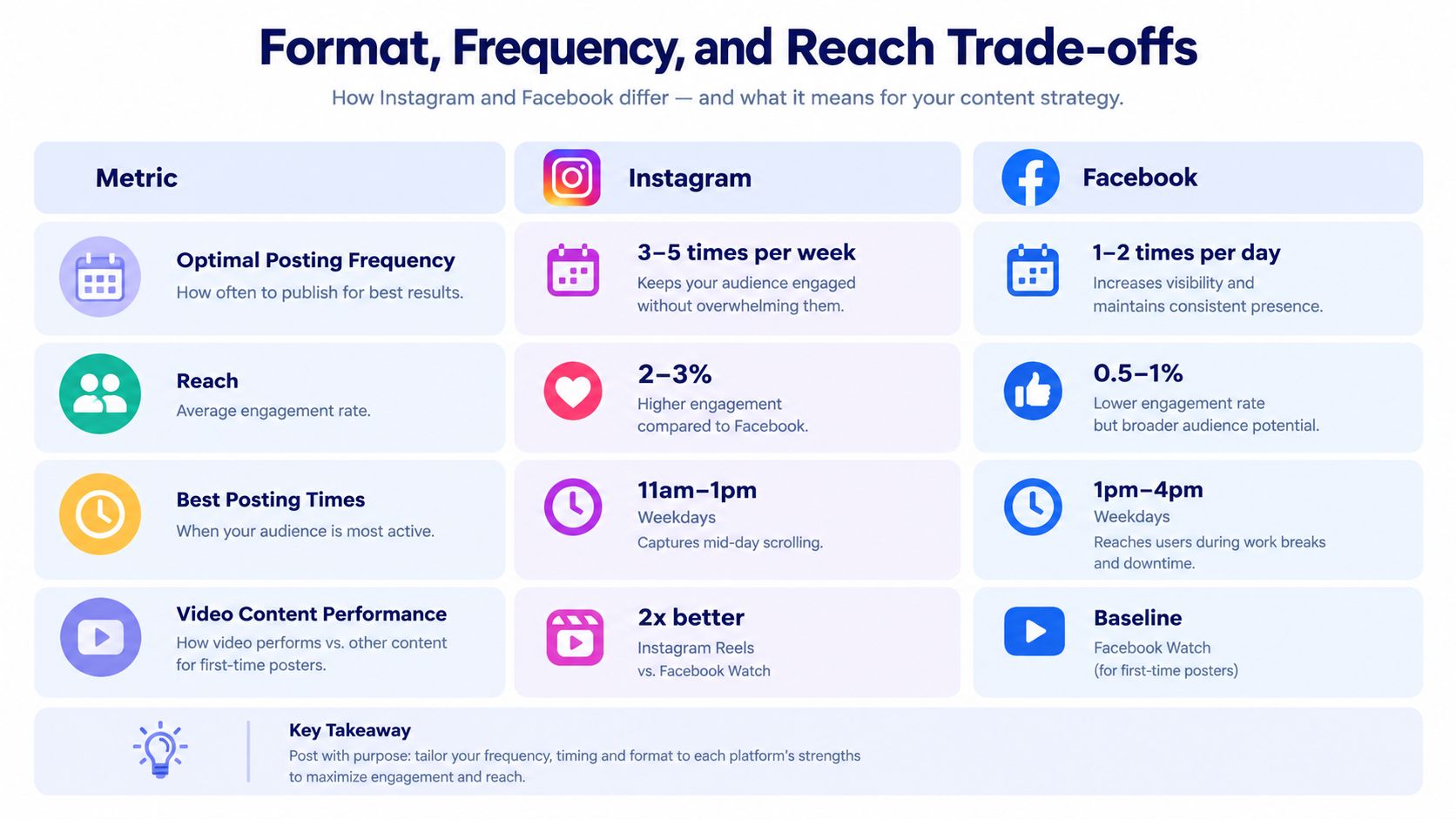 A comparison chart showing optimal posting frequencies, engagement rates, and best times for Instagram versus Facebook marketing.
Cadence should be tested rather than guessed. Benchmark research commonly places brand Instagram activity around 11 to 20 posts per month, while another benchmark reports an average of 17 Instagram posts per month. Buffer's frequency analysis reports that posting 3 to 5 times per week can improve reach per post by about 12%, but those figures describe benchmark behavior, not a rule that overrides your audience data (the social publishing analysis).
For timing, test two or three fixed windows for at least two weeks and compare reach, engagement rate, comments, shares, and saves. Buffer's summary identifies recurring strong windows such as Thursday at 9 a.m. for Instagram and Facebook, while also highlighting early mornings, lunch periods, and evening browsing windows (the posting-time benchmark).
If your team needs a repeatable operating queue rather than ad hoc scheduling, a guide on how to schedule and queue social posts can help you design the workflow. The engineering rule remains the same: optimize each platform first, then decide whether a shared post is honest to the content.
Common Errors and How to Fix Them
A failed Meta request rarely explains the whole problem. The response may identify a rejected operation while the underlying issue sits in the account mapping, permission record, or token store. Log the endpoint, platform, account ID, permission set, token type, and request correlation ID. Never log the token itself.
Permission errors usually come from a missing scope, a declined grant, or a role that changed after connection. Correct the permission, reauthorize the account, and verify the Page task before retrying. Instagram publishing and Facebook Page publishing use different permission requirements, so do not treat one successful authorization as proof that both APIs are ready.
Instagram adds a destination check before the media payload matters. Confirm that the account is a supported professional account and that the expected linked assets are present. A reachable image URL will not fix an invalid publishing connection.
IN_PROGRESS means the Instagram container is still processing. Store its ID, poll status_code with exponential backoff, and stop after a defined deadline. Send the record to a retry queue when processing exceeds that deadline. Creating another container during the wait can produce duplicate work or conflicting outcomes.
Asset retrieval fails at the host as often as it fails in the request. Meta must fetch the supplied media URL without your application session. Private buckets and authenticated URLs therefore need a public, time-limited delivery URL that remains valid through processing.
Token errors need their own recovery workflow. Use Meta's token documentation to verify the token exchange and validity rules, then store the credential state separately from the publish job. If a scheduled job finds an expired token, route the record to a credential-repair queue and alert the owner. Do not refresh inside the publish retry path, because concurrent jobs can race while holding different copies of the credential. Rate-limit responses need queueing, backoff, and fewer duplicate calls.
Error pattern | Likely cause | Single fix |
Permission denied | Missing scope or account task | Reauthorize with the required permission and verify the account role |
Media container rejected | Unsupported account or invalid publishing connection | Validate the professional account and linked Page relationship |
Container remains | Processing has not completed | Poll status and publish only after |
Media URL fetch failure | Meta cannot reach the supplied asset | Provide a reachable URL and test it without an application session |
Token invalid or expired | Stored credential is no longer usable | Repair authorization through a controlled credential workflow |
Rate limit response | Too many requests in Meta's limit window | Queue work, apply exponential backoff, and remove duplicate calls |
Wrapping Up the Developer Mental Model
The reliable mental model is small enough to keep on a whiteboard.
Instagram is a container pipeline. Resolve the professional account, create the media container, wait for processing, check the status, and publish the completed container. Facebook Pages is a Page publishing pipeline. Resolve the Page credential, send the appropriate request to the Page endpoint, and record the result.
The authentication layer overlaps, but the lifecycle doesn't. Design token storage with explicit token types and expiry dates. A short-lived token is useful during authorization, while the long-lived flow supports ongoing publishing. Production systems also need a clear path for reauthorization and, where appropriate, service-oriented credentials supported by Meta's current access model. Refreshing a token after every failure is not enough. By then, a scheduled publish may already have missed its window.
Your application should also represent partial success. Instagram may finish while Facebook fails. A Facebook post may publish while a later status update times out. Store platform-specific IDs and statuses so a retry can resume the correct phase instead of creating a duplicate.
Three rules carry into almost every Meta publishing integration:
Choose the publishing model per platform. Don't force a Page feed request into an Instagram abstraction.
Design token rotation from the first migration. Expiry handling belongs in the connection layer, not inside a one-off publish script.
Treat cross-posting as an explicit product choice. Adapt format, caption, timing, and failure handling when the audience or destination calls for it.
The next useful areas are the Insights API for measurement, webhooks for asynchronous events, and Reels containers for richer video workflows. Each extends the same principle: persist platform state, make asynchronous work visible, and keep the Instagram and Facebook adapters independent even when the user sees one composer.
PostPulse gives apps, automations, and AI agents one publishing surface for Instagram and Facebook, with a REST API, official n8n and Make.com integrations, and an MCP tool that handles the platform-specific plumbing behind the request. If you'd rather avoid maintaining separate token, retry, and API-version workflows, visit PostPulse and connect your publishing flow there.
About the Author

Founder of PostPulse — a social media scheduling platform for creators and teams. Software engineer with a passion for building developer tools and simplifying complex API integrations across social media platforms.