Instagram Automated Posting: Developer's API Guide
Published on
Tags:
You're probably here because Instagram posting looked simple until you tried to automate it. A photo post turned into a container workflow. A Reel script that looked fine on paper stalled in practice. App Review asked for more setup than the publishing feature itself. Then you hit the usual developer questions: why does one account publish and another fail, why does a media container sit in IN_PROGRESS, and why does every “easy” tutorial skip the parts that break.
That gap is why Instagram automated posting frustrates experienced developers more than beginners. The beginner assumes the platform is magic. The experienced developer expects a documented publish API, predictable auth, and clear error states. Instagram gives you a container-based flow, account-type constraints, permission review, and format-specific wrinkles that most guides flatten into “connect account, schedule post.”
Table of Contents
Why Is Instagram Automation So Painful
The hardest part isn't sending the API request. It's discovering that “publish a post” is not one request, and not even one stable path across formats.
A lot of developers start with a feed image, get it working, and assume the rest is parameter changes. Then the first video behaves differently. Then a carousel needs child containers before a parent container. Then an account that looked connected turns out not to have the right business setup, so the auth flow completes but publishing doesn't.
Instagram automation feels hard because the happy path is narrow, and the failure paths look similar from the outside.
The API model also pushes complexity into your app. You need to manage media accessibility, create containers, poll state, publish only when the container is ready, and handle retries without accidentally duplicating work. If you're building this inside a SaaS feature, that means background jobs, idempotency, and account-level diagnostics. If you're doing it in a script, that means living with more brittle runtime behavior than most “schedule a post” docs admit.
Developers also run into a documentation mismatch. Official docs tell you what the platform accepts. They don't always help much with the workflow choices that keep a real system reliable over time. That's where much time is often wasted.
A few pain points show up again and again:
Auth succeeds but publishing fails: the account type, page link, or approved permission set isn't complete.
Media never finishes processing: the file itself is reachable, but something about the media or container state is off.
Feed logic doesn't transfer to Reels: the video-first path has technical restrictions that many schedulers and tutorials gloss over.
Automation becomes too rigid: the system posts on time, but the account behavior starts looking machine-generated.
That last issue matters more now that AI-generated content is common. The challenge is no longer just “can I automate publishing.” It's “can I automate safely without making the account look synthetic.”
The Ground Rules Account and API Permissions
The fastest way to waste a day is to debug code before verifying the account and app prerequisites. Instagram's publish flow is strict about who can publish and under which app permissions.
The setup that must exist before code matters
The target account needs to be an Instagram Business or Creator account connected to a Facebook Page. If that chain isn't in place, you can still spend hours getting tokens and testing endpoints, but the result won't be a reliable publishing setup.
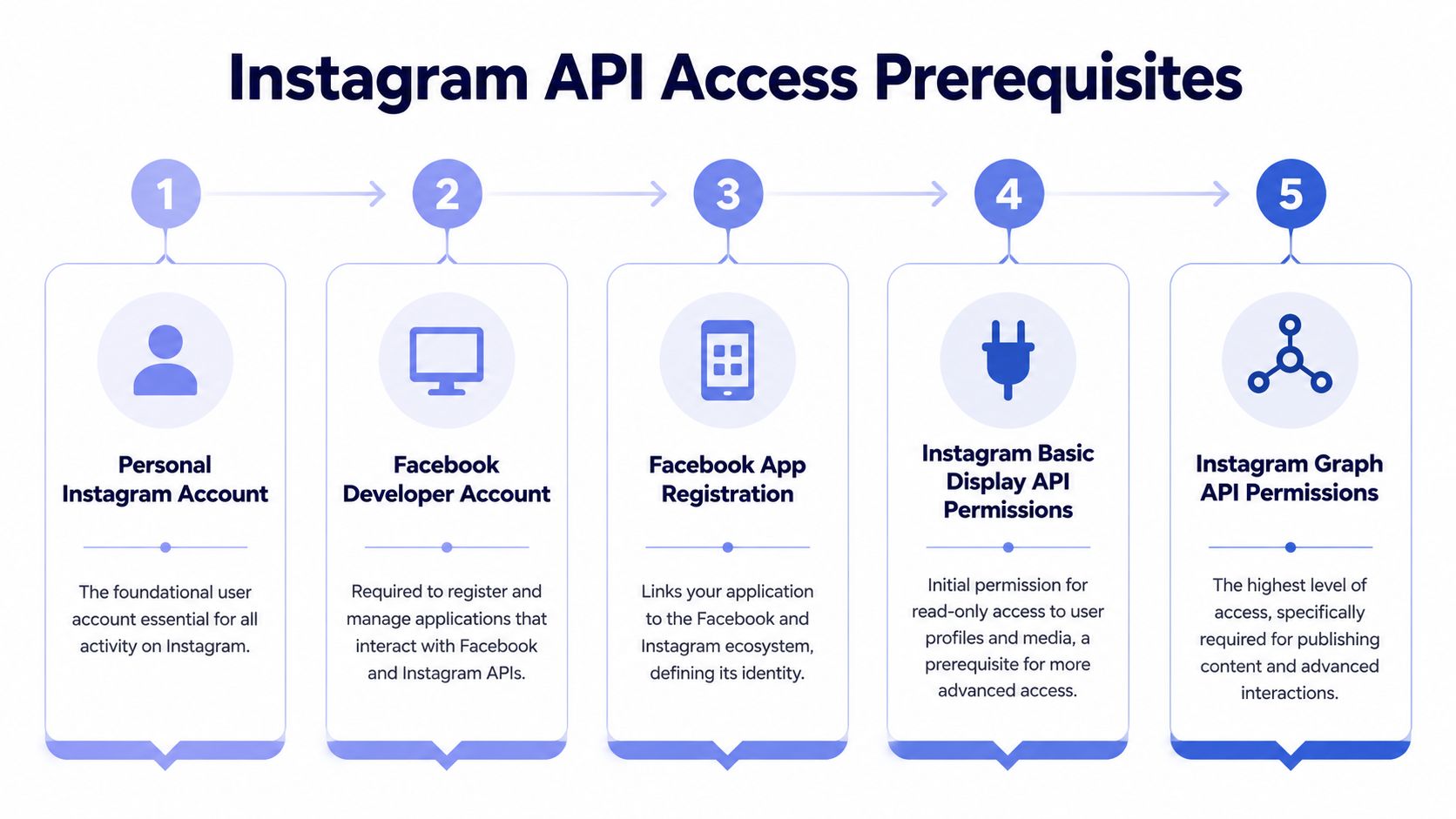 A five-step flowchart illustrating the required prerequisites for gaining access to the Instagram API for developers.
In practice, the prerequisite stack looks like this:
Instagram account exists: obvious, but it's the root identity.
Facebook Developer account exists: you need it to register and manage the app.
Facebook app is registered: this is the app Meta reviews and authorizes.
Basic profile access is in place: enough to identify and read the connected Instagram profile.
Graph publishing permissions are approved: required for content creation and publishing.
If you also work on analytics or enrichment around creator accounts, this guide to Instagram data extractors is worth reading because it helps separate approved API usage from scraping-heavy approaches that create a very different risk profile.
For a cleaner explanation of the official publishing surface itself, PostPulse has a solid write-up on the Instagram Graph API.
Permissions that block publishing
The key permissions are the part most tutorials underplay. To publish via Instagram's official API, two permissions must be approved through Meta App Review: instagram_basic for profile access and instagram_content_publish to create media containers and publish them. Both require business verification and a screencast walkthrough, and Standard Access is granted automatically for users with app roles while Advanced Access requires full Meta App Review approval, as documented in this Instagram API publishing guide.
That review requirement changes the architecture decision. If you're building for your own internal accounts, App Review may be tolerable. If you're building a product for customer accounts, the review queue and maintenance burden become part of your roadmap whether you like it or not.
Practical rule: Don't treat permissions as a checklist item after development. Treat them as a gating dependency before development.
A few setup mistakes tend to masquerade as code bugs:
Check | What usually goes wrong | What it looks like |
Account type | Personal account instead of Business or Creator | Token works, publish flow doesn't |
Facebook Page link | Instagram not connected to a Page | Account discovery works inconsistently |
Permission scope | Basic access without publish access | Container creation or publish call fails |
App Review state | App tested only with role-based users | Works in dev, breaks for real users |
If your app only works for people listed in app roles, that's not a publishing implementation. It's a sandbox.
Four Architectures for Automated Posting
Once permissions are solved, the main decision starts. There isn't one sane way to implement Instagram automated posting. There are several, and each shifts the pain around.
Near the top of the choice tree is this operational rule: in 2026, compliant Instagram automation is defined by the 80/20 rule, where 80% of posting activity is automated and 20% of time stays reserved for real human engagement, according to SocialRails' automation guide. The architecture you choose needs to support that balance, not fight it.
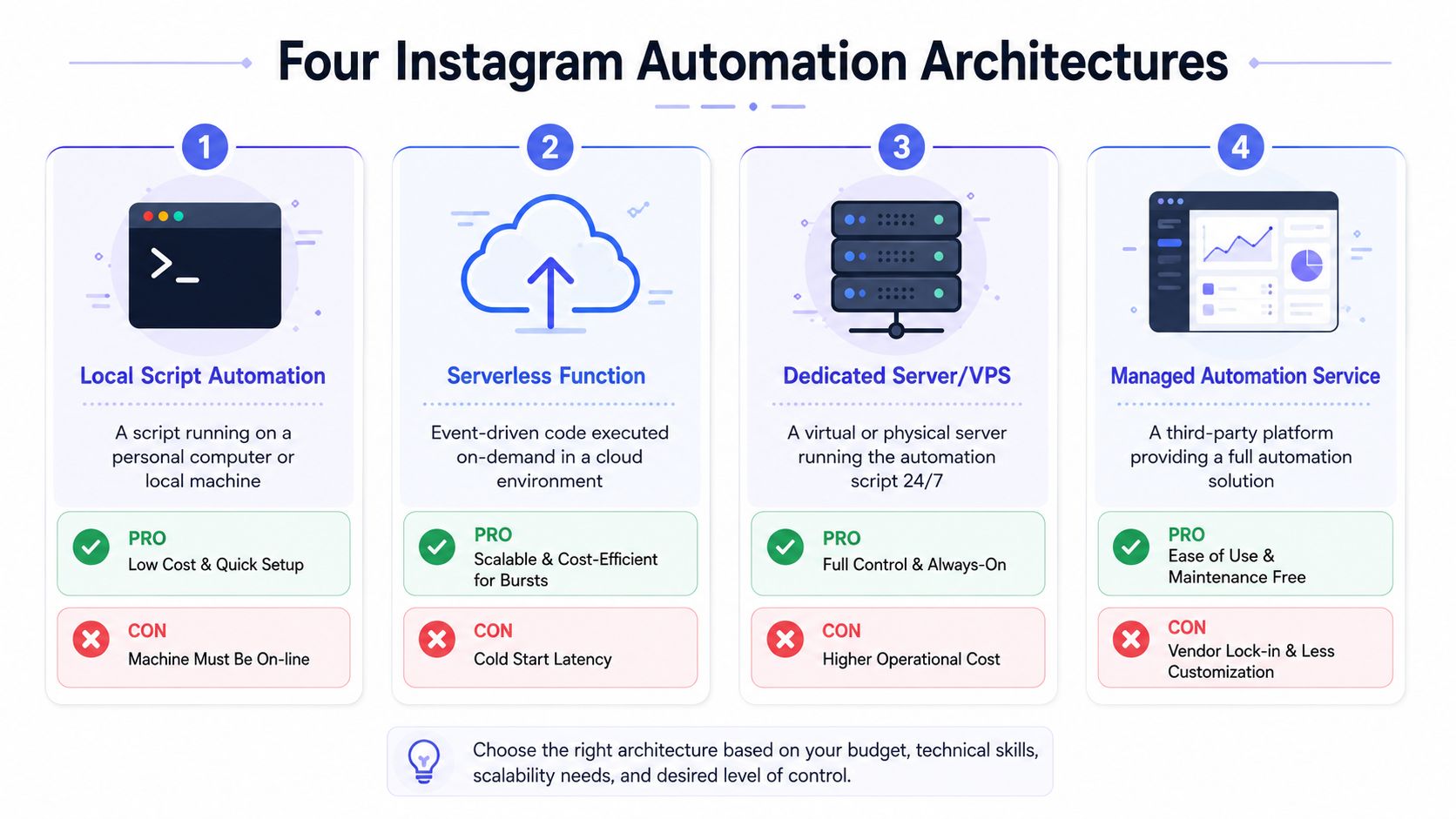 An infographic showing four common technical architectures for managing and automating Instagram accounts and services.
Direct Meta integration
This is the purist route. Your app talks straight to the Graph API, manages OAuth, creates media containers, polls container status, and calls publish when the state is ready.
You get the most control here. You also inherit every maintenance problem.
Good fit: product teams that need deep customization and are comfortable owning long-term API change management.
Bad fit: teams that think publishing is a “small feature” they'll finish in a sprint.
Common trade-offs:
You control retries and idempotency: useful for reliability.
You own token refresh and account support cases: less fun after launch.
You can model each format precisely: necessary if Instagram is core to the product.
You absorb version churn: every API change becomes your issue.
There's a helpful technical breakdown of the underlying publish flow in this container-based publishing guide.
A lot of teams underestimate support overhead here. The code path is only part of the work. Users will connect partial setups, upload media that nearly conforms, and expect the app to explain why one Reel failed when a photo published fine.
A quick visual summary helps when you're comparing build styles before implementation.
Unified publishing API
This is the pragmatic route. Instead of speaking directly to each social platform, your app calls a unified API that handles platform-specific publishing steps behind the scenes.
That can remove a lot of surface area: token handling, platform quirks, and the container dance. PostPulse fits here. It exposes one publishing layer for multiple platforms through a REST API, official n8n and Make.com nodes, or an MCP server, which is useful if your product needs Instagram but doesn't want to own every Meta integration detail.
The trade-off is obvious. You give up some control over the raw platform edge cases in exchange for less implementation and maintenance work.
No-code and low-code builders
This route works well for internal tools, agency operations, and workflow-heavy teams that live in builders like n8n or Make.com.
The upside is speed. You can build a draft-review-publish pipeline quickly, inspect failed runs visually, and let non-developers participate in the process. The downside is that complex recovery logic gets awkward. Once you need nuanced retry policies, format-specific fallbacks, or cross-account diagnostics, no-code can start to feel cramped.
This approach is strongest when the workflow matters more than the SDK.
MCP for agent workflows
This is the most interesting path if you're building AI systems. Instead of wiring a model directly to raw platform endpoints, an MCP server gives the agent a constrained tool surface. The model can ask to queue a draft, schedule a post, or publish approved content, and the MCP layer enforces the workflow.
If an AI agent can publish, it also needs guardrails. Otherwise you've built a faster way to make account-level mistakes.
MCP works well when you want a human approval step, clear action boundaries, and fewer chances for a model to improvise around platform restrictions. It's less about Instagram alone and more about giving agents a sane operating environment.
Here's a compact comparison:
Architecture | Best use case | Main strength | Main cost |
Direct Graph API | Product teams with platform expertise | Full control | Highest maintenance |
Unified API | SaaS products shipping fast | Lower integration overhead | Less low-level control |
n8n or Make.com | Ops workflows and internal tooling | Fast iteration | Harder advanced error handling |
MCP server | AI agent publishing | Safer autonomous actions | More workflow design upfront |
Implementing Post Formats Feed Reels and Carousels
The biggest misconception in Instagram automated posting is that a “post” maps to one publish call. It doesn't. The platform expects a staged workflow, and each format adds its own variation.
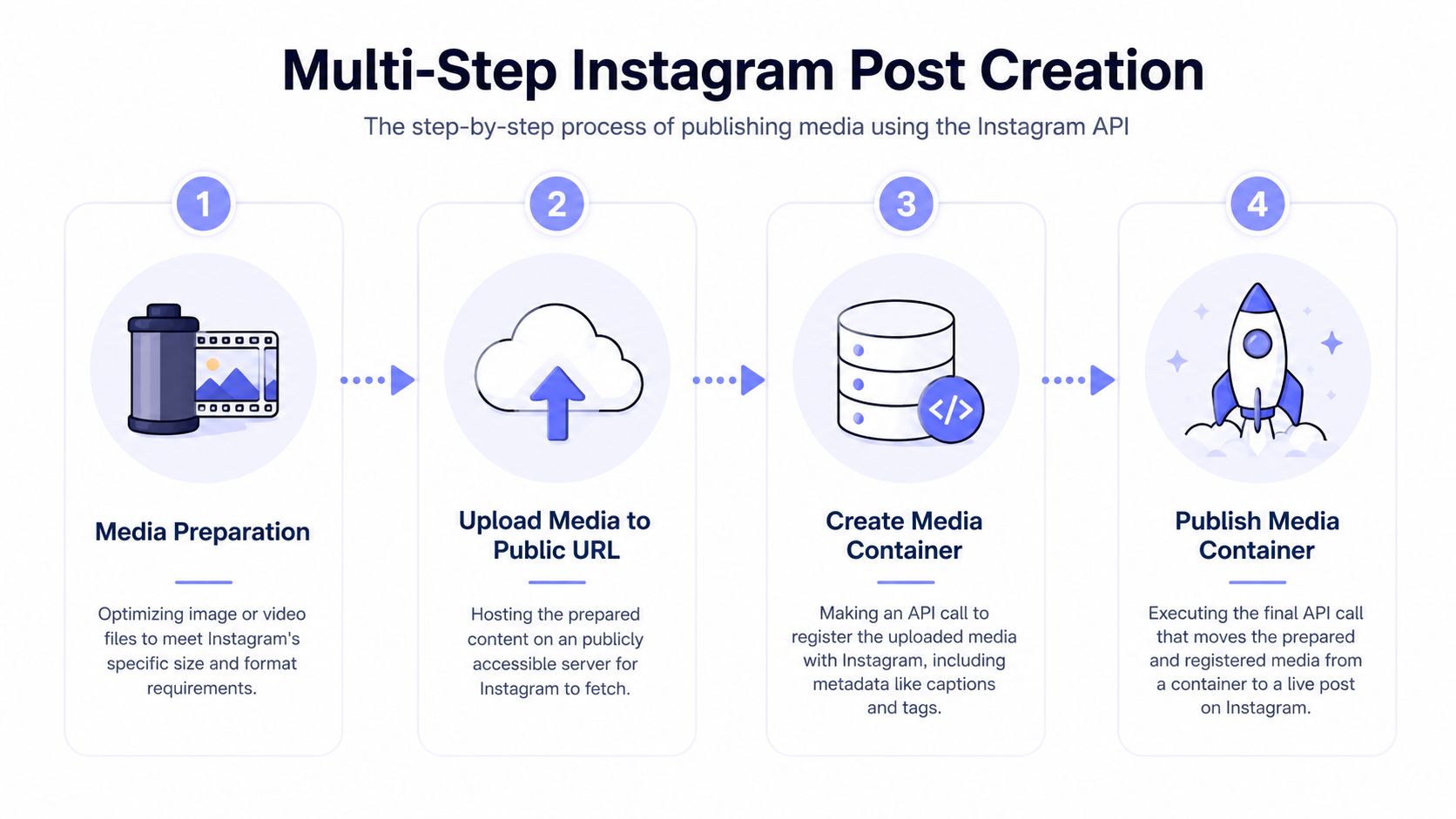 A four-step infographic illustrating the process of publishing media to Instagram using the Instagram API.
Feed posts follow the cleanest path
A standard feed image is the least painful format. The usual flow is:
prepare media in a compliant format
host it at a publicly accessible URL
create a media container with caption and metadata
publish the container after it's ready
Pseudo-flow:
Then your app polls the container state and publishes only after processing completes. The implementation detail that catches people is that media accessibility matters at the moment Instagram fetches it, not when your app generated the URL.
Carousels add another layer of state
Carousels are where background job design starts to matter. You don't just upload a batch and press publish. You create child media containers first, then a parent carousel container that references those children, then poll the parent container, then publish.
That means your app needs to track multiple intermediate IDs and partial failure states. If one child container has a problem, the whole carousel is blocked.
Developers building this themselves usually need:
A child-container registry: keep every media container ID and its state.
A parent publish job: only runs when all children are ready.
Failure cleanup logic: mark the carousel failed without leaving the queue ambiguous.
If you're implementing carousel support in a product, this Instagram carousel API overview is a useful reference point for the shape of the workflow.
Reels are where guides get vague
This is the technical gap most articles avoid. Existing content overwhelmingly explains feed photos, but doesn't really explain the restrictions around Reels. Many schedulers either support them unevenly or hide the limitations behind vague UI language. Gainsty calls this out directly in its discussion of auto-posting, noting that Reel automation often requires different API endpoints or remains unsupported in many schedulers, which leaves developers without a clear path for video-first automation in AI and no-code workflows, as described in this Reel automation analysis.
That matches what developers see in practice. Feed image logic is usually stable first. Reels are where support fragments.
A few implementation realities matter:
Video pipelines need stronger validation: codec, dimensions, duration, and fetchability all matter more than they do for images.
Tool support is inconsistent: a scheduler may claim Instagram support while in practice meaning feed-first support.
Debugging is harder: when a Reel path fails, the error messaging often tells you less than you need.
If your content pipeline includes generated short-form video, this guide on how to create AI music videos for Instagram is useful for the media-prep side. It won't solve the publish API, but it does help reduce avoidable asset problems before the request ever hits Instagram.
Reels aren't hard because video is new. They're hard because developers assume they're just feed posts with motion.
Scheduling Patterns and Rate Limit Strategies
A scheduler shouldn't just decide when to post. It should decide when not to post.
Instagram's official API enforces a hard cap of 25 published posts per 24-hour period per account via the Graph API, and Buffer's analysis of 9.6 million Instagram posts found that evening hours from 6 p.m. to 11 p.m. and Wednesdays and Thursdays produced the highest engagement, which is why those 25 slots need to be used deliberately according to this combined discussion of the Graph API cap and posting-time research.
Use the posting window intentionally
The useful lesson from the timing data isn't “always post at one exact time.” It's that precision matters more than random consistency. A scheduler should treat high-value windows as scarce inventory.
Good systems usually do three things:
Prioritize strong candidates: not every draft deserves a prime-time slot.
Respect audience-specific variation: general timing guidance is a starting point, not the final rule.
Avoid robotic cadence: exact repetition creates an unnatural publishing pattern.
That last point matters operationally. A queue that fires at the same minute every day may be easy to reason about, but it's not a good imitation of normal account behavior.
Design for hard caps and softer behavioral limits
The hard post cap is documented. Other penalties show up more like account behavior problems than neat API errors.
A practical scheduler should include:
Scheduler behavior | Why it matters |
Rolling 24-hour accounting | Prevents accidental cap violations |
Queue prioritization | Saves high-value slots for better content |
Retry with backoff | Handles temporary processing failures cleanly |
Jittered scheduling | Avoids rigid minute-by-minute patterns |
Duplicate-caption checks | Reduces repetitive output from templates or AI |
A safe queue also needs to think beyond publishing. If the account is posting automatically, someone still has to handle early comments, current-event sensitivity, and creative quality control. Automation that ignores those human tasks doesn't usually fail at the API layer first. It fails at the account layer.
Advanced Automation The Human-in-the-Loop Workflow
The old dream was fully hands-off social posting. For AI-generated content, that's a bad default.
Most guides still frame automation as “generate, schedule, publish.” The missing piece is review. Accounts posting AI content without a human review buffer see a 30% higher chance of reduced reach due to spam-behavior flags, according to this analysis of AI posting risk and review buffers. That risk exists even when the publishing path itself uses official APIs.
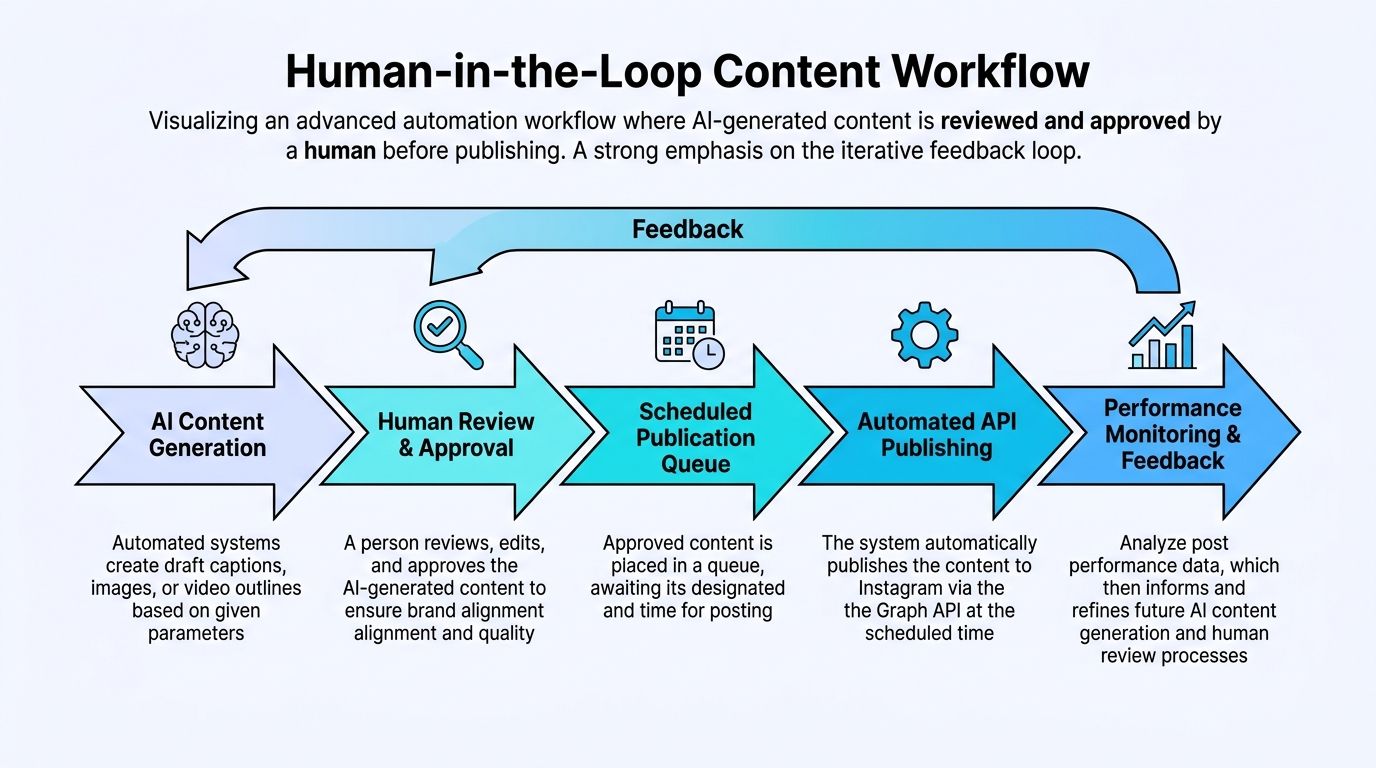 A diagram illustrating a human-in-the-loop content workflow for automated Instagram publishing and performance analysis.
Why hands-off AI posting is a bad default
AI systems are good at producing volume. They're also good at producing subtle sameness. That's the problem.
If captions reuse structure too tightly, if posting cadence is too rigid, or if generated content misses a brand boundary, the account starts sending machine-like signals. The API call may succeed and the publishing queue may look healthy, but the content operation is still fragile.
The safest automation stack treats AI as a draft engine, not an unsupervised publisher.
That doesn't mean humans need to rewrite everything. It means a human needs the chance to reject, edit, or delay content before it becomes public.
A practical approval pipeline
The workflow that holds up best is simple:
AI generates a draft with caption, asset references, and target platform metadata.
A human reviews it in a queue and either approves, edits, or rejects it.
Approved posts enter the scheduler with a chosen publish window.
The automation layer publishes through the official API.
Performance review informs future prompts and guardrails.
This model works in custom apps, in n8n, in Make.com, and in agent systems with MCP. The details change, but the safety property is the same. Drafts are cheap. Public mistakes aren't.
A review queue should expose at least these controls:
Caption edit: catch repetitive phrasing and tone issues.
Asset preview: verify formatting before the API fetches the media.
Publish override: delay or skip content that's wrong for the moment.
Audit trail: know who approved what when something goes sideways.
When publishing fails what to inspect first
When a post won't publish, teams often start with the endpoint. That's usually too late in the chain.
Check these first:
Permission scope: the account may authenticate correctly but still lack publish approval.
Media accessibility: Instagram has to fetch the asset from a public URL.
Format mismatch: a Reel or carousel may be following the wrong path.
Queue logic: publishing may be firing before processing is complete.
Account configuration: Business or Creator setup and Facebook Page linkage still trip up production systems.
If your automation stack is growing beyond a script and into a real product, using a layer that already manages platform auth, publishing workflows, and cross-platform abstractions can save a lot of support churn.
If you're building instagram automated posting into a product or agent workflow, PostPulse is one practical way to avoid owning every platform-specific integration path yourself. It gives developers a unified publishing layer across multiple platforms through API, no-code nodes, and MCP, which is useful when the actual requirement isn't “call Instagram once,” but “ship reliable publishing without turning social APIs into your full-time maintenance job.”
About the Author

Founder of PostPulse — a social media scheduling platform for creators and teams. Software engineer with a passion for building developer tools and simplifying complex API integrations across social media platforms.