Instagram Business API: A Developer's Complete Guide
Published on
Tags:
You hit the first wall fast. The OAuth token works, the container gets created, and then your batch job comes back to an IN_PROGRESS status that never seems to move, or your app dies right after hour one because the token you were handed was only meant to live briefly. Add App Review, a linked Facebook Page, account-type restrictions, and quota rules on top, and the Instagram Business API stops feeling like an endpoint and starts feeling like a governed platform with rules at every layer.
That's the part most tutorials skip. They show the happy path, one request at a time, and leave out the part where Meta decides whether your app can publish at all, which login flow you need, what happens when a container stalls, and why a perfectly valid-looking request still fails in production. If you've been untangling that mess, the useful mental model is simple, but it takes a few passes to hold it all in your head.
Table of Contents
Why Integrating Instagram Feels Harder Than It Should
The moment most developers get it is not when the first request succeeds. It's when the second or third one breaks for a reason that has nothing to do with HTTP syntax. You can create a media container, but the publish step waits on asynchronous processing, and your scheduler keeps checking status until it learns that IN_PROGRESS is not the same thing as failure.
That pattern shows up everywhere in Instagram integrations. A token expires while a batch is still running, App Review rejects the permission because the use case doesn't match the screenshot, or a personal account never appears in the supported API surface because it isn't eligible in the first place. Those aren't random bugs, they're signs that you're dealing with an access-controlled system, not a public REST API.
The first surprise is account eligibility
The official stack only serves professional accounts, not personal consumer accounts, and that rule didn't appear out of nowhere. Instagram announced business profiles, analytics, and promoted posts in 2016, along with a tighter access model that moved the platform away from broad third-party integration and toward approved business use cases, analytics, publishing, and advertising. Meta's current docs still reflect that direction, with support centered on Instagram professional accounts and governed login paths. Instagram's 2016 business tooling announcement and Meta's current platform docs make that split explicit.
Practical rule: if the account is personal, stop debugging OAuth. The account type itself is the blocker.
The rest of the pain flows from that design choice. Once you accept that Instagram publishing is gated by account type, review status, and permission scope, the failures become easier to diagnose. You stop asking, “Why won't the API just post?” and start asking, “Which part of the governed path am I missing?”
What the Instagram Business API Actually Is in 2026
Think of the Instagram Business API as a capability inside Meta's broader Graph ecosystem, not as a standalone product. The surface is built for Instagram professional accounts, and Meta now splits access by login path, permission scope, and account relationship. That means your app doesn't just need the right endpoint, it needs the right identity model before the endpoint will do anything useful. Meta's platform docs lay out both Instagram API with Instagram Login and Instagram API with Facebook Login for Business, along with Standard Access and Advanced Access as separate access levels. Meta's Instagram platform documentation is the canonical place for that structure.
A connected Facebook Page still matters in the Facebook Login for Business path, because Meta uses the Page-to-Instagram relationship to resolve the business account. The flow is not “call one endpoint and you're done.” It's authenticate, resolve the page relationship, check permissions, and only then get to publishing or messaging.
The clean mental model
Here's the easiest way to think about it.
Building Block | What It Means |
Professional account | The Instagram account type the official stack supports |
Facebook Page connection | The link Meta uses for the Facebook Login for Business path |
Instagram Login | The IG-native auth path for Instagram professional-account surfaces |
Facebook Login for Business | The page-linked auth path used in business workflows |
Standard Access | Basic access for owned or test scenarios |
Advanced Access | Required when your app serves professional accounts it doesn't own or manage |
App Review and Business Verification | The gate for production use beyond basic development |
The important part is that every API call inherits those constraints. If you're building for your own account, the experience can be relatively simple. If you're building a product for other people, the platform asks harder questions about ownership, permissions, and how you handle user data. That's why teams often underestimate Instagram integrations, they focus on request syntax and ignore the identity model underneath it.
Engineering shorthand: if a tutorial starts with POST /media before it explains account type and access level, it's skipping the part that usually breaks production.
Instagram Login vs Facebook Login for Business
The two login paths solve different problems, and choosing the wrong one usually creates avoidable churn later. Instagram Login is the newer, IG-native path. Facebook Login for Business is still the right fit when your workflow depends on a connected Page and business-managed publishing. Meta's docs now separate those paths rather than treating “Instagram API” as one interchangeable thing. Meta's Instagram platform documentation is the place to verify current scopes and account behavior.
The side-by-side decision
Dimension | Instagram Login | Facebook Login for Business |
Account eligibility | Instagram professional accounts | Facebook business workflows tied to Pages |
Best fit | IG-native surfaces, including messaging and professional-account-specific endpoints | Page-bound publishing and business-managed integrations |
Typical scopes |
|
|
Token shape | Instagram user access token flows | Page and business-authenticated flow |
Publishing path | Professional-account publishing surfaces | Page-linked publishing at scale |
The practical choice is simpler than the naming makes it look. If your product needs IG-native behavior, start with Instagram Login. If your app is organizing business publishing through Pages, Facebook Login for Business is still the path Meta expects. One path isn't universally “better,” it just maps to a different part of the platform.
What trips teams up is trying to make one auth flow do every job. Publishing, DMs, insights, and account discovery don't all live in the same place anymore, and the permission model reflects that. If you choose the wrong path on day one, you'll usually discover it only after your app review submission starts asking for a permission that your current login flow can't satisfy.
Publishing Posts with the Container Workflow
Meta's publishing model is deliberately asynchronous. You don't publish a post directly in one step, you create a container, wait for it to finish processing, and only then publish it. That design matters because production systems need to poll status, retry safely, and avoid assuming that “request accepted” means “post live.” Meta's content publishing docs describe the two core calls, POST /{ig-user-id}/media and POST /{ig-user-id}/media_publish, plus the status check against the container ID. Meta's content publishing documentation is the source to keep open while you implement it.
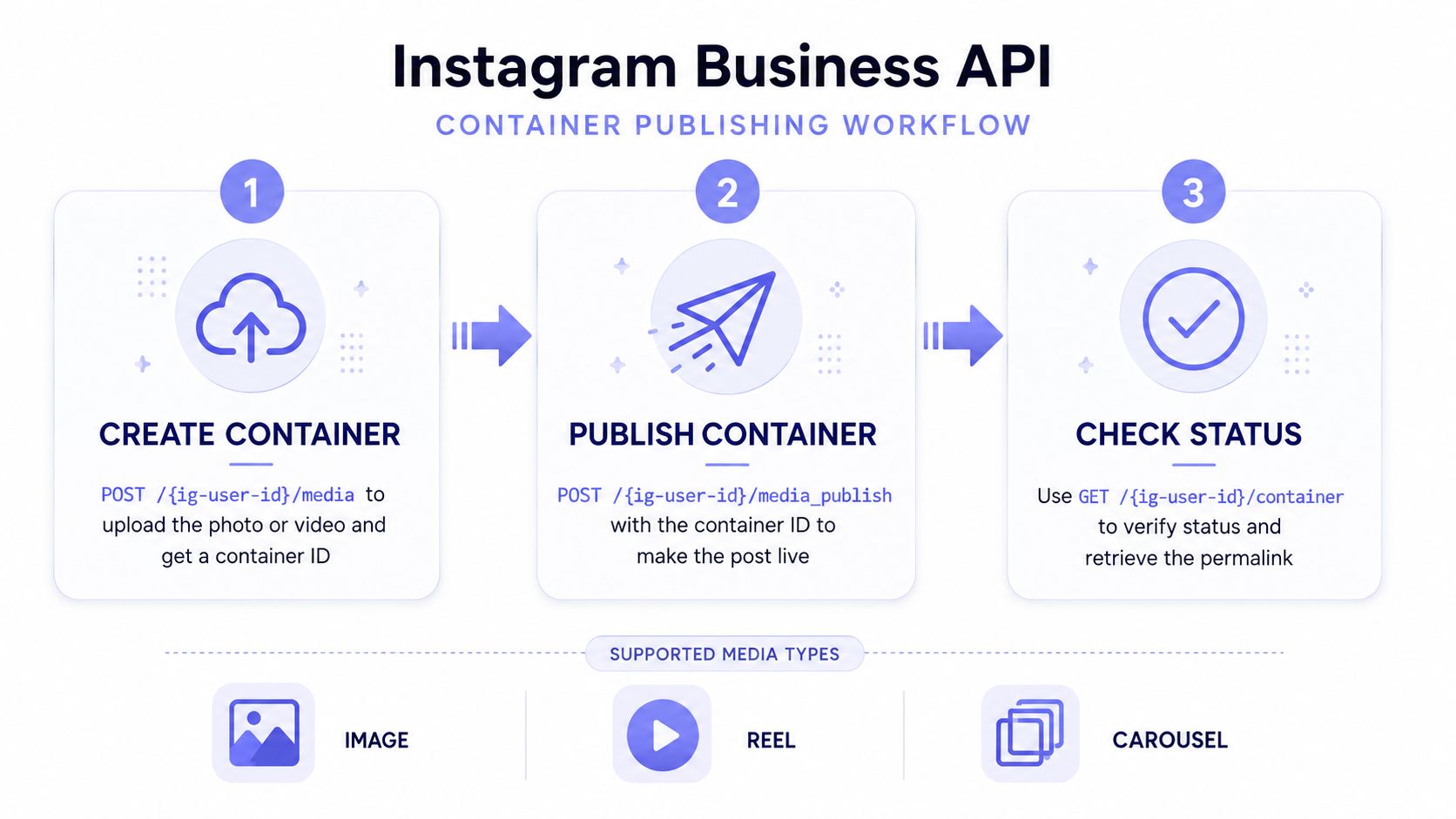 A diagram outlining the three-step Instagram Business API container publishing workflow: create, publish, and check status.
The basic flow is straightforward once you stop expecting it to behave like a synchronous API. You create the media container, poll until status changes away from IN_PROGRESS, then publish with the creation ID. For videos and richer media types, that waiting period is the whole game.
What the workflow looks like in practice
Create the container. Send the media URL and the relevant fields, such as
image_url,video_url,media_type,is_carousel_item, andcaption.Poll the container. Check
GET /{ig-container-id}?fields=status_codeuntil the status is finished, not still processing.Publish the container. Call
POST /{ig-user-id}/media_publishwith thecreation_id.
That sequence becomes especially important for Reels, Stories, and carousels. Carousels need child items uploaded first, videos can take time to process, and Stories can involve extra capability requirements. If you skip the status check and immediately publish, you'll end up retrying blind and reusing container IDs that have already gone stale.
Practical rule: don't publish on a timer alone. Publish after the container reaches a finished state.
Quota checks belong in the same pipeline. Meta's content_publishing_limit endpoint is machine-readable, so your app can check capacity before it starts queueing jobs. The docs also state that Instagram Business accounts can publish up to 50 API-published posts within a 24-hour moving period through the official publishing path, so a scheduler should always read quota first and not after the queue is full. Meta's content publishing limit documentation shows the endpoint directly.
The sharp edges here are usually boring ones, which is why they're easy to miss. Caption encoding, the wrong media_type for Reels, and stale container IDs after ERROR all look like “temporary failures” until they become the reason your whole batch stops.
Here's a useful reference if you're comparing container-based implementations with a higher-level abstraction: Instagram container-based publishing patterns.
Token Lifecycles and Why Your Calls Die After an Hour
A customer schedules a post, then your API call fails before the job runs. The culprit is often the token's lifecycle rather than the publishing code. Meta distinguishes short-lived tokens used in the initial exchange from long-lived tokens used for continued access. Instagram access tokens from the Business Login flow are valid for 1 hour, while long-lived tokens are valid for 60 days. Meta also documents the exchange that converts a short-lived Instagram User access token into a long-lived token with that same 60-day lifetime. Verify the current flow in Meta's access token reference.
Refresh before expiry, not after a failed request. A production integration should rotate long-lived tokens ahead of their deadline, record expiry times, and treat revoked access as a supported state. Waiting for a customer report turns token maintenance into an incident.
What token handling looks like
Token Type | Lifespan | How Obtained | Typical Use |
Short-lived user token | 1 hour | Immediate OAuth response | Initial exchange only |
Long-lived user token | 60 days | Exchange the short-lived token | Ongoing API access |
Page token from | 60 days | Facebook Login for Business flow | Page-linked publishing |
System-generated long-lived page token | Persistent for the app-owned page relationship | App-owned system flow | Pages your app owns |
The table is a map of separate login paths, not a universal token ladder. A token issued for one account relationship cannot automatically substitute for another. Store the token type, account relationship, scopes, issued time, and expiry together so a failed call can be diagnosed without guessing.
Revocation is another normal operating condition. A user can remove permissions, change a password, or deauthorize the app through Meta's privacy controls. Your service should mark the connection invalid, stop retrying the same token, and ask for authorization again.
Operational habit: refresh the long-lived token before the customer's support inbox tells you it expired.
For teams that want this maintenance out of their application, PostPulse handles OAuth, refreshes, and API version changes behind one publishing surface. For a closer examination of the process, see our guide to the Meta OAuth token lifecycle. Teams maintaining their own integration still need the same design: build refresh and re-authentication paths before shipping the publishing feature.
Rate Limits, Quotas, and Surviving App Review
Instagram throttling shows up in two different forms, and both matter. One is the platform's request pacing, where Meta surfaces usage through headers like x-business-use-case-usage. The other is the business rule layer, which includes publishing limits such as the 50-posts-per-24-hours cap for an Instagram account. Those are not the same thing, and treating them as one bucket is how schedulers get blindsided. Meta's v22 API update notes and the content publishing docs give you the official side of that model.
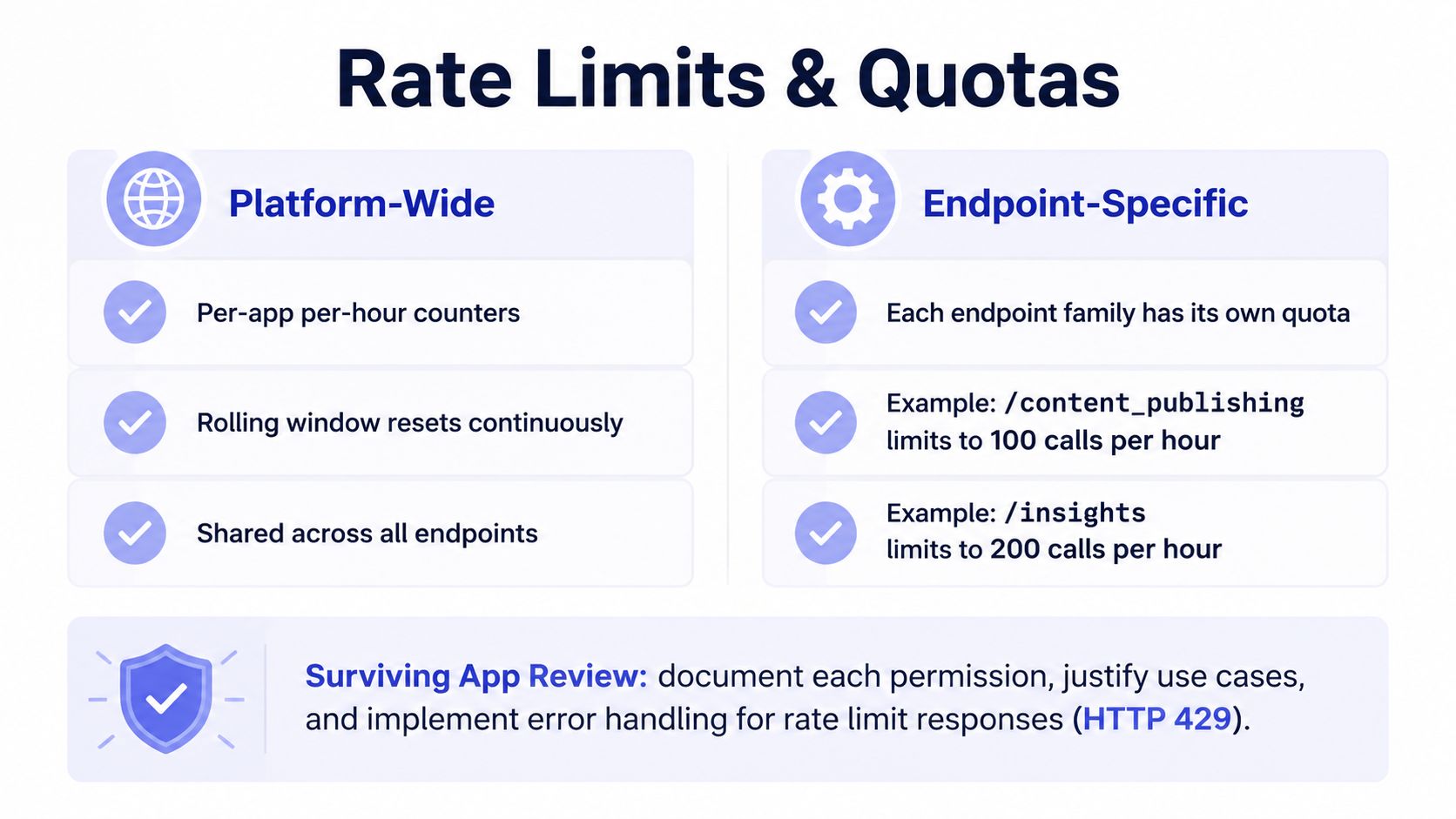 An infographic explaining the rate limits and quotas for Instagram Business API including platform-wide and endpoint-specific rules.
App Review is the other half of the gate. Standard Access lets you work with your own accounts during development, but Advanced Access is required when your app serves professional accounts it doesn't own or manage, and that adds Business Verification plus permission review. Meta's current docs make that distinction clear, and the 2025 platform updates also note newer insight permissions and deprecations that affect analytics-heavy apps. Meta's Instagram platform documentation and Meta's v22 update notes are the two references worth bookmarking.
A quota-aware scheduler pattern
Check capacity first. Read
content_publishing_limitbefore you enqueue a batch, so your scheduler knows whether the account has room.Back off on usage headers. Persist
x-business-use-case-usageand slow down before a 4xx storm starts.Respect the moving window. Don't treat a 24-hour quota like a daily midnight reset.
Treat review as a release dependency. If Advanced Access isn't approved, don't plan around production publishing for non-owned accounts.
The key mistake is assuming the app review problem ends when the permission is approved. It doesn't. The permission is only one layer, then you still have runtime constraints, quota ceilings, and endpoint-specific throttles. The teams that survive Instagram at scale are the ones that design their scheduler around those limits instead of hoping the API will be generous by default.
For a broader reference on pacing and backoff patterns, I'd also keep this resource nearby: API rate limit handling patterns.
Common Integration Scenarios and Where They Break
A SaaS feature that schedules customer posts looks like a queueing problem until each tenant brings a separate access model. The application must store and refresh tokens, recognise eligible professional accounts, and recover when a dormant customer returns with stale authorisation. Bulk scheduling creates a different failure: one user fills the account's publishing allowance before the queue finishes, so the worker appears unreliable while the platform is enforcing an account-level cap.
A no-code workflow has its own sharp edges. An n8n or Make webhook can deliver a caption and asset URL correctly, then fail because the Instagram account is personal or the required Facebook Page relationship was never configured. Production access can fail later if the app's approved scopes do not match the requested action. Permission approval and account eligibility are separate checks.
Three scenarios, three failure points
Scenario | Stack | Typical Break Point |
SaaS scheduling feature | Multi-tenant web app, queue worker, OAuth store | Dormant tokens expire, quota caps hit during bulk scheduling |
n8n or Make automation | CMS webhook, no-code flow, Instagram connection | Personal accounts can't publish, Page linkage is missing |
AI agent via MCP server | Agent, MCP server, publish action | Retries ignore |
The AI-agent scenario adds a timing problem. Publishing is a container workflow, so a model may request the same action again while a video is still processing. Without explicit handling for IN_PROGRESS, retries can produce repeated attempts rather than progress. Business Verification and Advanced Access add another gate. The surrounding code may be valid, yet the request can still be rejected because the app is not approved for the account or operation.
Testing should separate those assumptions from live customer data. A practical guide to Platform integration testing using temporary numbers offers a useful general principle: verification flows belong in disposable environments before they touch production accounts. The platform here is not SMS-based, but the testing boundary remains relevant. Prove account eligibility, login path, scopes, container status handling, and retry behaviour independently.
The recurring failure is rarely an outage. It is usually one unvalidated layer, token state, account type, quota, container status, or review tier. Treat the API as a governed platform with interacting gates, rather than as a single publishing endpoint, and each scenario becomes easier to diagnose.
Quickstart Checklist and When to Skip the Plumbing
Before writing your first request, make the platform constraints explicit. Confirm the Instagram account is Professional and linked to a Facebook Page, create the Meta app, choose the login path that matches your publishing model, request the right scopes at the right access level, and complete Business Verification if you're serving other people's accounts. Then build the boring parts, token refresh before day 60, status polling for container publishing, and a quota check before every batch.
That's the complete integration. It isn't just API syntax, it's ownership, review, and operational discipline.
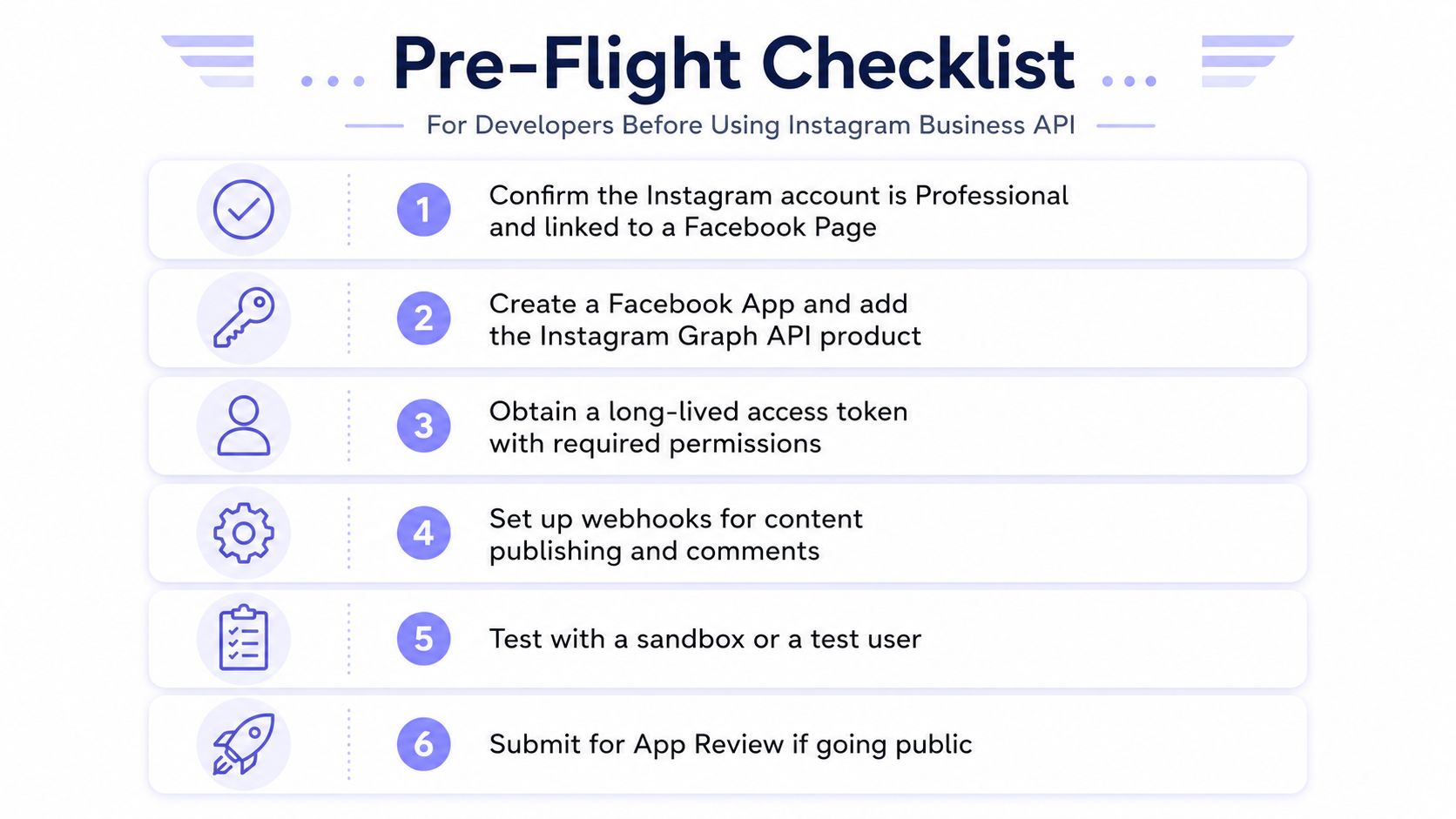 A six-step checklist infographic for developers to prepare before using the Instagram Business API.
The pre-flight list
Confirm account eligibility. The account needs to be professional and linked to a Facebook Page.
Create the Meta app. Add the Instagram product and choose the login path up front.
Request the right scopes. Match permissions to the exact surfaces you need.
Set up review-ready flows. Business Verification and App Review belong in the launch plan.
Store and rotate tokens. Don't wait for hour-one or day-60 failures.
Respect publishing limits. Check quotas before you queue anything.
The trade-off is real engineering work. Multiple tenants, video transcoding, token rotation, and review cycles all add maintenance cost, and a lot of teams only notice that after launch day. If you don't want to own the whole stack, PostPulse collapses the publish flow into one API surface, so you can avoid managing the Meta app, dual login paths, container polling, quota checks, and refresh jobs yourself.
If you're ready to ship Instagram publishing without spending the next few weeks inside Meta docs, visit PostPulse and compare the REST API, n8n, Make.com, and MCP options against your current workflow.
About the Author

Founder of PostPulse — a social media scheduling platform for creators and teams. Software engineer with a passion for building developer tools and simplifying complex API integrations across social media platforms.