How to Share from Facebook to Instagram: A Developer's Guide
Published on
Tags:
You publish a post on Facebook, confirm that the Page is connected, and wait. The post appears on Facebook, but Instagram stays empty. Or the Instagram option vanishes from the composer, even though both accounts seem linked. For developers, the frustration gets worse because the same failure can surface as a permission problem in the interface, a missing account relationship in the API, or a publishing container that remains in processing.
The practical answer to how to share from Facebook to Instagram depends on which Meta workflow you're using. Accounts Center handles connected-account sharing, Meta Business Suite provides a Page-based publishing surface, and the Instagram Graph API uses a professional-account publishing architecture. Treating those as one universal “share” button is how teams end up debugging the wrong layer.
Table of Contents
The Missing Post Problem
A marketing manager creates a Facebook Page post, enables Instagram sharing, and publishes. Facebook accepts it. Instagram receives nothing. Reconnecting the accounts changes nothing, which makes the failure look random.
The failure usually sits in the handoff between connected accounts and authorized publishing identities. Accounts Center lets a user choose a source profile, select a destination profile, and enable automatic sharing for eligible Facebook or Instagram posts and stories. Business publishing follows a narrower path: a Facebook Page must connect to an Instagram professional account within Meta's business environment.
An account appearing in Accounts Center does not prove that every Page user can publish to it. One person may see the relationship while lacking the Page access or role required to complete the Instagram leg. Check the token and authorization state as well, because a stale or revoked credential can leave the interface looking connected while the publishing request fails. The PostPulse OAuth token lifecycle guide provides a useful reference for that check.
Practical rule: Debug the identity and permission chain before debugging the content.
Start with these questions:
Which Facebook identity is publishing? Confirm whether the source is a personal profile or a Facebook Page.
Which Instagram identity is connected? Business workflows use an Instagram Business or Creator account linked to the relevant Facebook Page. Meta's Instagram API documentation describes this professional-account publishing model.
Where was the connection created? Accounts Center and Meta Business Suite expose related controls, but they do not represent the same publishing operation. An interface connection can exist without granting the API identity the permissions needed to publish.
Does the content qualify? Cross-posting is limited by format and surface. Some story types cannot be shared to Instagram, and Meta documents mobile-only availability for that feature.
The result is a ghost share. Facebook completes its own publish operation, while Instagram rejects the separate destination step because the account, role, authorization, or format fails an eligibility check. Developers see the same split in API logs: the Facebook request succeeds, then the Instagram publishing container is rejected or remains in processing. A successful source post therefore does not confirm that the destination publish has completed.
Account Linking and Setup Flows
A Facebook post can publish successfully while its Instagram copy never appears. That usually points to an account relationship or permission failure, not a problem with the Share button. Check the identity chain first, then inspect the content and publishing request.
Meta's unified sharing controls let users choose a source profile, select a destination profile, and enable automatic sharing for supported Facebook and Instagram content. Business publishing follows a narrower path. The destination must be connected to the correct Facebook Page and to an Instagram Business or Creator account. Adding both accounts under one login does not establish that relationship.
Personal profile sharing
For a personal workflow, open Accounts Center in the Facebook or Instagram app settings. Add or confirm the profiles in the same Accounts Center, select the source profile, choose the destination profile, and enable the available automatic sharing controls for posts or stories.
Those controls can resemble a general publishing bridge, but personal profile sharing does not provide the same asset and permission model as Page-based business publishing. Meta's documented business flow uses a Facebook Page paired with a professional Instagram account, and supported Page content rather than treating personal profiles as equivalent business assets.
Page and professional Instagram setup
For a Page workflow, use a person with the required Page access and connect the assets in Meta's business environment.
Select the Facebook Page. Access to a personal Facebook profile does not confirm access to the brand's Page.
Connect the Instagram account. Use an Instagram Business or Creator account linked to that Page.
Verify the relationship in Accounts Center or Business Suite. Confirm that the displayed pairing is the intended Page and Instagram account, not merely two accounts available through one login.
Enable automatic sharing or choose Instagram during publishing. The option may apply globally to eligible content or only to a specific post.
Run a low-risk test. Publish a simple supported post before testing a campaign asset with more variables.
 Screenshot from https://post-pulse.com
Similar switches can hide different permission checks. If Instagram is linked to the wrong Page, the Page user lacks access, or the Instagram account is not professional, reconnecting the same assets will not repair the relationship. Remove the incorrect connection, confirm the intended Page identity, then authorize the correct account again.
API integrations add another failure point. A token may be unexpired while representing the wrong user or lacking permission for the target Page. Record which user, Page, and Instagram professional account each token should operate, and keep authentication diagnostics separate from content validation. The Meta OAuth token lifecycle guide helps trace expiry, refresh, and ownership issues before they appear as a failed Instagram publishing request.
Content Types and Compatibility Constraints
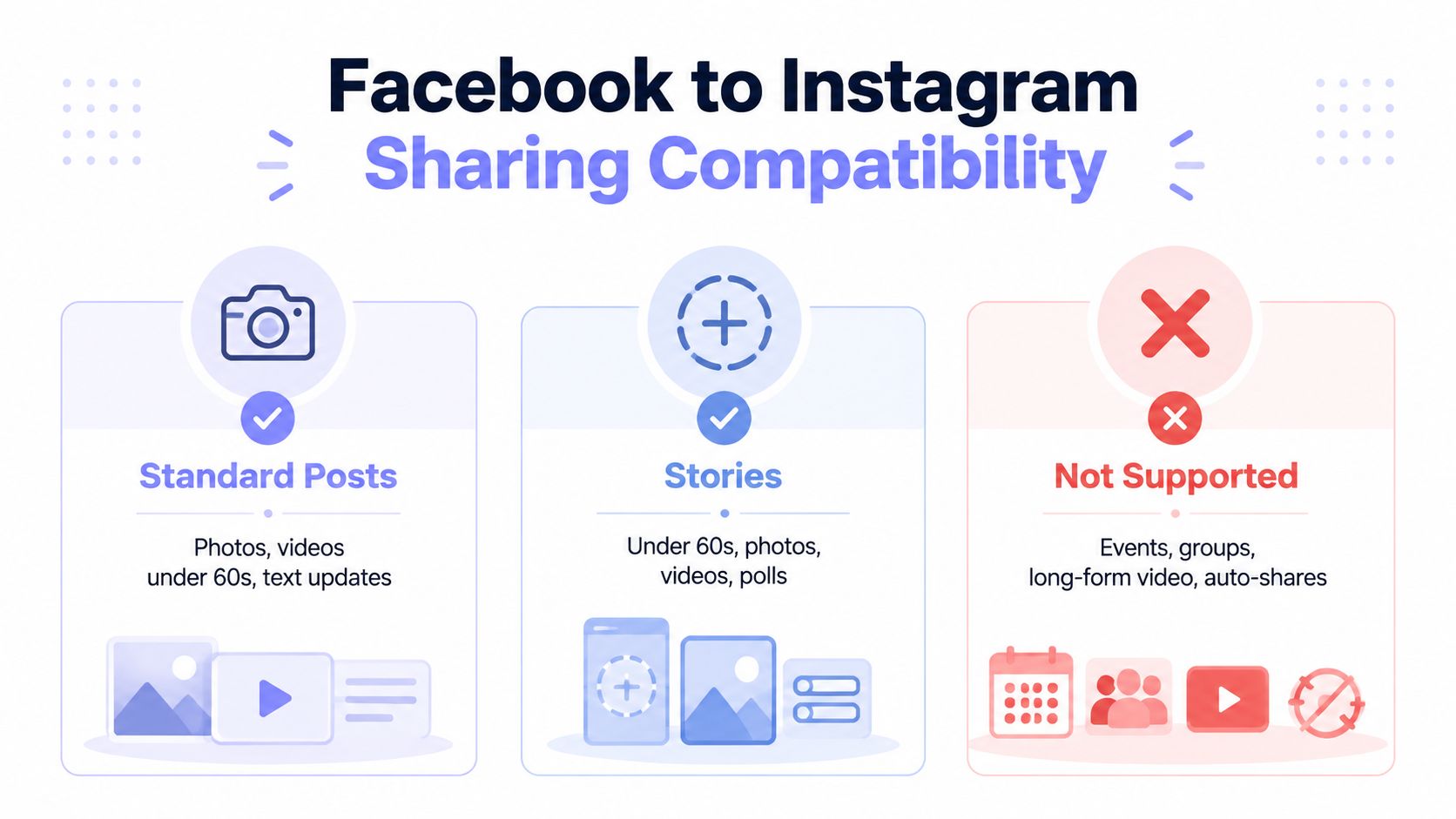
A post can publish on Facebook while the Instagram destination stays unavailable. That mismatch is frustrating because the visible Share button confirms only that Facebook accepts the interaction, not that the selected Instagram account accepts the object. Facebook's help documentation states that not every story type can be shared to Instagram and that this feature is mobile-only. Test the same content in the supported mobile publishing surface before treating a missing toggle as a broken connection.
Classify the asset before publishing. A Page post, story, Reel, and other specialized format can follow different eligibility rules, so a successful test with one format does not prove that another will cross-post.
 An infographic illustrating sharing compatibility between Facebook and Instagram for posts, stories, and unsupported content types.
What usually causes a silent failure
Standard Page posts are generally the clearest business case when the intended Page and Instagram professional account are connected correctly. Facebook posts and stories are documented cross-posting options, but eligibility still depends on the specific content and publishing surface.
Stories require a separate check. Some story types cannot be shared to Instagram, and the mobile-only restriction matters. A team member testing from a computer may conclude that the integration is broken while testing an unsupported surface.
Reels and other specialized formats should be tested in the exact composer used for production. Do not infer support from a different tool or from an earlier successful post. The account relationship, publishing role, device, and content type can all affect the result.
The missing Instagram toggle often sends teams back to account linking, even though the asset or permission is the actual blocker. Facebook's Page-sharing guidance says that people need Facebook access with full control to share Page posts to Instagram. That permission requirement matters in agencies and multi-user businesses, where the person viewing the Page may not be the person authorized to publish. Facebook's Page-sharing access guidance explains the access condition more precisely than telling a user to link the accounts.
The destination toggle is an eligibility signal, not a guarantee that the underlying publish operation will succeed.
Teams producing many video assets can use a Facebook video automation tool to standardize the Facebook-side creation workflow. Automation does not bypass Meta's account, role, device, or destination rules. Validate the generated asset through the intended Instagram workflow before assuming it can cross-post.
For API-driven publishing, perform format validation before creating a media container. The Instagram container-based publishing guide shows why media preparation belongs to an explicit pipeline stage. A valid request can still fail later if the container is created from unsupported media or submitted before processing finishes.
Native App vs. Business Suite vs. Automation
A creator can tap Share, see the Facebook post succeed, and still find no Instagram post. The right publishing method determines how much of that failure you can see and how much of the workflow you must operate yourself.
The native mobile app flow is the fastest option for an individual creator or small team publishing immediately. Accounts Center stores the connected profiles, and the publisher can turn on sharing while creating eligible content. That speed comes with limited diagnostics. If the toggle disappears, the app may not identify whether the problem is the content, device, account type, or permission state.
Meta Business Suite suits Page-based teams that need one publishing workspace. It supports cross-posting between a Facebook Page and Instagram after the accounts are connected. Business Suite is more practical than a personal mobile workflow when several people manage a brand Page, but it does not repair an incorrect Page-to-Instagram relationship. A shared interface does not remove the underlying eligibility checks.
API automation fits a product, internal system, or agent that needs repeatable publishing instead of a person clicking a toggle. Meta's Instagram Graph API path is limited to Instagram Business and Creator accounts linked to a Facebook Page. That relationship belongs in your data model and validation checks from the beginning. Meta's Instagram API product documentation places the capability within Meta's broader Graph API ecosystem.
Cross-Posting Methods Comparison
Method | Best For | Complexity | Automation Level |
Native mobile app | Individual creators and immediate publishing | Low | Manual or setting-based |
Meta Business Suite | Page teams and professional content management | Moderate | Scheduled and workflow-based |
API automation | Developers, SaaS products, and publishing services | High | Programmatic |
The trade-off is diagnostic control versus setup effort. The native app requires the least engineering, yet exposes the fewest reasons for a failed share. Business Suite centralizes Page work and scheduling without requiring your team to build an integration. An API pipeline can add validation, retries, logs, and product-level control, but your system must handle authentication, asset preparation, status checks, permissions, and delayed container processing.
Scheduling tools make the same distinction visible outside Meta's own interfaces. StreamGen's guide to social media scheduling for Twitch streamers applies the operational lesson broadly: a scheduled job is not proof of publication. The scheduler still needs a valid destination identity, acceptable media, and an execution path the platform accepts.
For a multi-platform product, PostPulse provides one available abstraction. It offers a unified publishing surface for supported social platforms through a REST API, n8n and Make.com integrations, and an MCP server. Account authorization and platform-specific publishing details still sit behind that integration. Evaluate whether the tool exposes enough status and error information to separate a bad account relationship from a delayed publish, rather than assuming the abstraction removes Meta's constraints.
Troubleshooting and API Architecture
When sharing fails, avoid changing several variables at once. Keep the source Page, destination Instagram account, publishing user, device, and content format fixed while checking each layer.
Start with permissions
The most common team failure is access, not connection. Facebook's official help states that only people with Facebook access with full control can share Page posts to Instagram. If an agency user, contractor, or scheduler can create Facebook content but lacks that access level, the Instagram control may be missing or the share may fail after submission. Verify the publishing user's Page access before removing and recreating the account connection.
Next, confirm that the Instagram account is professional and linked to the intended Facebook Page. Meta's Instagram API documentation limits the API path to Business and Creator accounts connected to a Page. A valid login to Instagram doesn't establish that relationship.
 A frustrated man looking at his laptop screen experiencing issues connecting Facebook and Instagram accounts due to errors.
Treat API publishing as a state machine
Developers often expect one request to upload media and publish it immediately. Meta's documented Instagram publishing flow doesn't work that way. You create a media container at /{ig-user-id}/media, check its status with /{ig-container-id}?fields=status_code, and publish only after the container is eligible through /{ig-user-id}/media_publish. Meta describes this as a container-based sequence, so direct single-request posting is impossible. The official content-publishing documentation explains the required order.
The final request requires the container's creation_id:
POST /{ig-user-id}/media_publish?creation_id={creation-id}&access_token={access-token}
That dependency changes how you design retries. Don't retry the final publish call while the container is still processing. Store the container identifier, poll its status according to your application's retry policy, and only submit media_publish after Meta reports that the container is eligible. The official media_publish reference documents the request shape and the requirement for a previously created Instagram container.
A practical failure checklist
Instagram option missing: Check the device and content type first, then confirm the Page user has full control.
Facebook succeeds, Instagram fails: Compare the destination account and Page relationship with the account expected by the publishing workflow.
Container appears stuck: Treat processing as an intermediate state, not an immediate publish failure. Keep the container ID and inspect its status before retrying.
Token-related errors: Verify that the token represents the intended publishing identity and still carries the required access. Don't assume a successful login means successful Page or Instagram publishing.
Repeated failures after reconnecting: Stop cycling the connection. Capture the exact Page, Instagram account, user role, content type, and API response, then isolate the failing layer.
For a deeper treatment of the account and endpoint model, the Instagram Graph API implementation guide can help you map the user, Page, media container, and publish stages without collapsing them into one opaque “post” operation.
Reliable cross-posting comes from observability. Log which account initiated the job, which Page and Instagram user were selected, which content type was submitted, when the container was created, what status it returned, and whether the final publish request succeeded. That record turns a disappearing post into a diagnosable pipeline event.
If your product needs Facebook Page and Instagram publishing without maintaining each platform's OAuth, token, and endpoint lifecycle separately, PostPulse provides a unified publishing API along with n8n, Make.com, and MCP integrations. Visit PostPulse to evaluate whether its publishing surface fits your app, automation, or AI-agent workflow.
About the Author

Founder of PostPulse — a social media scheduling platform for creators and teams. Software engineer with a passion for building developer tools and simplifying complex API integrations across social media platforms.