Facebook Page Management: A Dev's 2026 Guide to API
Published on
Tags:
You inherit a Facebook Page on a Friday afternoon. Publishing is inconsistent. Three former employees still have broad access. Someone connected it to a script two years ago, and now nobody remembers which Meta app, token, or Business Manager owns the integration. Marketing wants a scheduler. Support wants inbox visibility. Leadership wants “better engagement.” You open Business Suite and immediately realize this isn't a content problem first. It's an operations problem.
That's why solid Facebook Page management looks a lot more like systems engineering than social media advice. You need permission boundaries, a repeatable publishing workflow, moderation rules that don't create chaos, and a measurement loop that tells you what changed after each iteration. If you're also comparing platforms and workflows before rebuilding the stack, this roundup on selecting tools for social media managers is useful context because the hard part usually isn't finding a scheduler. It's choosing where native tooling ends and your automation layer begins.
Table of Contents
The Inevitable Mess of Facebook Page Management
The usual failure mode is boring. Nobody made one catastrophic decision. Instead, the Page picked up a layer of accidental complexity every quarter. An agency got admin rights and never lost them. A founder connected the Page to a personal account. Publishing became “whenever we have something to say,” which usually means long gaps followed by a burst of rushed posts. Then someone asks a developer to “just automate it.”
That handoff is where the frustration starts. Facebook Page management sounds like a marketing task, but the actual pain lives in identity, ownership, workflow, and debugging. Permissions are scattered. Analytics are available, but not always presented in the way engineers want to reason about them. API integrations work until the surrounding operational assumptions drift out of sync.
Most Page problems aren't caused by bad content alone. They come from bad defaults, unclear ownership, and no operating model.
Developers usually notice the same pattern quickly:
Access is over-broad. Too many people can do too much, and nobody knows who should still be there.
Publishing is memory-based. If the person responsible gets busy, the Page goes quiet.
Analytics are read passively. Teams look at dashboards after the fact instead of using them to make the next publishing decision.
Automation is brittle. A token changes, a role changes, or an account connection changes, and the whole path breaks unnoticed.
That's why a battle-tested Facebook Page management workflow starts with control surfaces, not captions. First secure the Page. Then decide who does what. Then make publishing repeatable. Then wire measurement and moderation into the same loop.
Taming Permissions and Access Control
The first cleanup pass should happen before anyone schedules the next post. Meta's access model distinguishes between full control, partial control, and narrower task access, and those permissions can be managed through Meta Business Suite, Creator Studio, Ads Manager, or Business Manager according to Meta's Page access documentation. If you skip that foundation, every downstream workflow inherits the same mess.
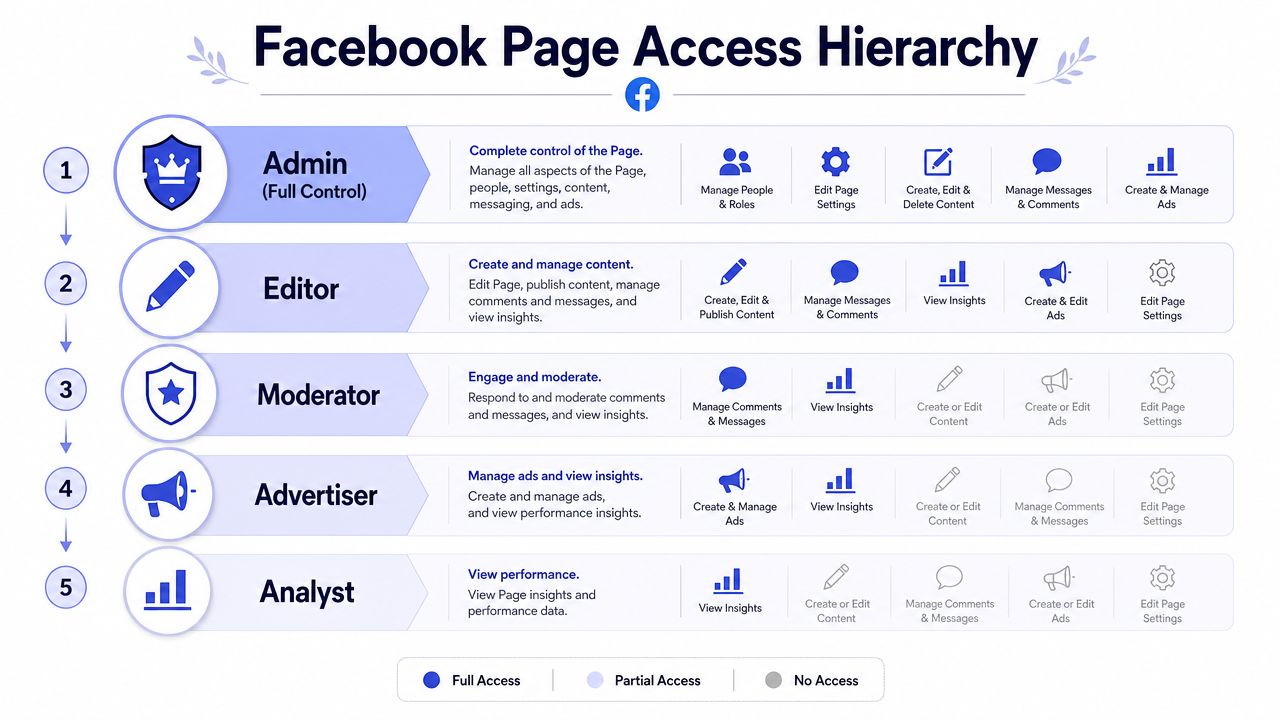 A hierarchy chart detailing Facebook page access roles from Admin to Analyst, including their specific management permissions.
Start with ownership, not publishing
A common mistake is treating access like a convenience setting. It isn't. It's your security model.
The Page should be created or claimed inside the organization's central business container first. That gives you one place to manage people, roles, and related assets. If the Page still depends on a former contractor's login or a founder's personal setup, you don't really control it yet.
Use this order:
Claim or verify the Page inside Business Manager. Make the business, not an individual, the durable owner.
Audit current people with access. Remove anyone who no longer has an operational reason to be there.
Map responsibilities before assigning roles. Publishing, moderation, analytics, and ads are different jobs.
Grant the minimum needed scope. Broad access should be rare and justified.
If you're working on automation or custom tooling, the token side of this becomes much easier once ownership is clean. This guide on Facebook Page access tokens is useful for the token layer specifically, because bad access design and token problems tend to show up together.
Use least privilege as a hard rule
Most Pages have too many “just in case” admins. That's the social media equivalent of giving production database access to everyone who might someday need to inspect a row. It feels flexible until something goes wrong.
Practical rule: If someone doesn't need to change access, ownership, or core settings, they probably don't need full control.
Partial control and task access exist for a reason. Use them. A moderator doesn't need the same scope as the person managing ads. The analyst reviewing performance doesn't need permission to publish. The person posting approved content doesn't need authority to reassign roles.
A sane access model for real teams
Here's a simple way to divide responsibilities without making the system unusable:
Responsibility | Recommended scope | Notes |
Business owner or lead admin | Full control | Keep this tightly limited |
Content publisher | Partial control or task access | Enough to schedule and publish |
Community moderator | Task access | Focus on comments and messages |
Analyst or reporting role | Task access | Read performance without editing |
Paid media specialist | Task access through ads tools | Separate ads from organic publishing |
This approach solves two problems at once. It reduces blast radius if one account is compromised, and it makes troubleshooting easier because each actor has a narrower operating surface.
The other benefit is organizational clarity. When a post goes out at the wrong time, or comments pile up unanswered, you can tell whether the issue came from process, staffing, or permissions. Without that separation, every failure looks the same.
Designing a Practical Content Strategy
Most advice about Facebook content is too vague to operationalize. “Post consistently” sounds reasonable, but it doesn't survive contact with a real team unless someone turns it into a system. The fix is to think in inputs, constraints, and feedback loops, not inspiration.
Practitioner guidance consistently points to a workflow built on consistency and KPI review, supported by a content calendar and ongoing use of Facebook Insights for reach, engagement, clicks, conversions, and sentiment. It also warns that a common failure is neglecting comment and message response, which drags down engagement, as described in this Feedbird guide to managing a Facebook Page.
Build a small content engine
A practical setup usually starts with a few content pillars. Not a giant brand manifesto. Just a small set of themes that make posting easier and review more useful.
For many teams, the useful pillars look something like this:
Product reality. Updates, use cases, launches, fixes, short demos.
Customer education. Answers to recurring questions, walkthroughs, misconceptions.
Trust signals. Team expertise, process, behind-the-scenes work, customer proof stated qualitatively.
Conversation starters. Opinionated prompts, lightweight questions, industry reactions.
The point of pillars isn't creativity. It's reducing decision fatigue. When a blank content calendar shows up on Monday, you shouldn't need a meeting just to decide what category of post is allowed to exist.
If a post doesn't fit a pillar, it may still be good content. It just probably belongs somewhere else.
Turn strategy into an operating rhythm
The best content calendars are often boring. A spreadsheet is enough if it captures the right fields: publish date, post owner, asset status, CTA, and the business goal behind the post.
Keep the cadence realistic. A missed “aggressive” calendar trains the team to ignore the calendar entirely. A sustainable schedule, maintained without disappearing for weeks, beats an ambitious plan that collapses after two sprints.
A useful rhythm looks like this:
Early in the cycle. Draft posts against the current pillars.
Before scheduling. Check whether each post has a clear purpose, not just decent copy.
After publishing. Review comments, messages, and initial audience response.
At the end of the cycle. Compare what performed well against the original goal.
That last step matters most. Facebook Page management gets better when every batch of content teaches the next batch something. If educational posts get saves and useful questions, make more of them. If company updates generate little response but still help credibility, keep them, just don't mistake them for growth levers.
A strategy becomes practical when it answers four recurring questions without drama:
What are we posting?
Who owns each piece?
Why is it being posted?
What do we change after reviewing the results?
If you can answer those in one place, the Page stops depending on last-minute energy.
Mastering the Publishing Workflow
Manual publishing is still the right starting point for a lot of teams. It gives you immediate visibility into the native tooling, surfaces approval gaps fast, and forces you to understand what the Page needs before you automate anything.
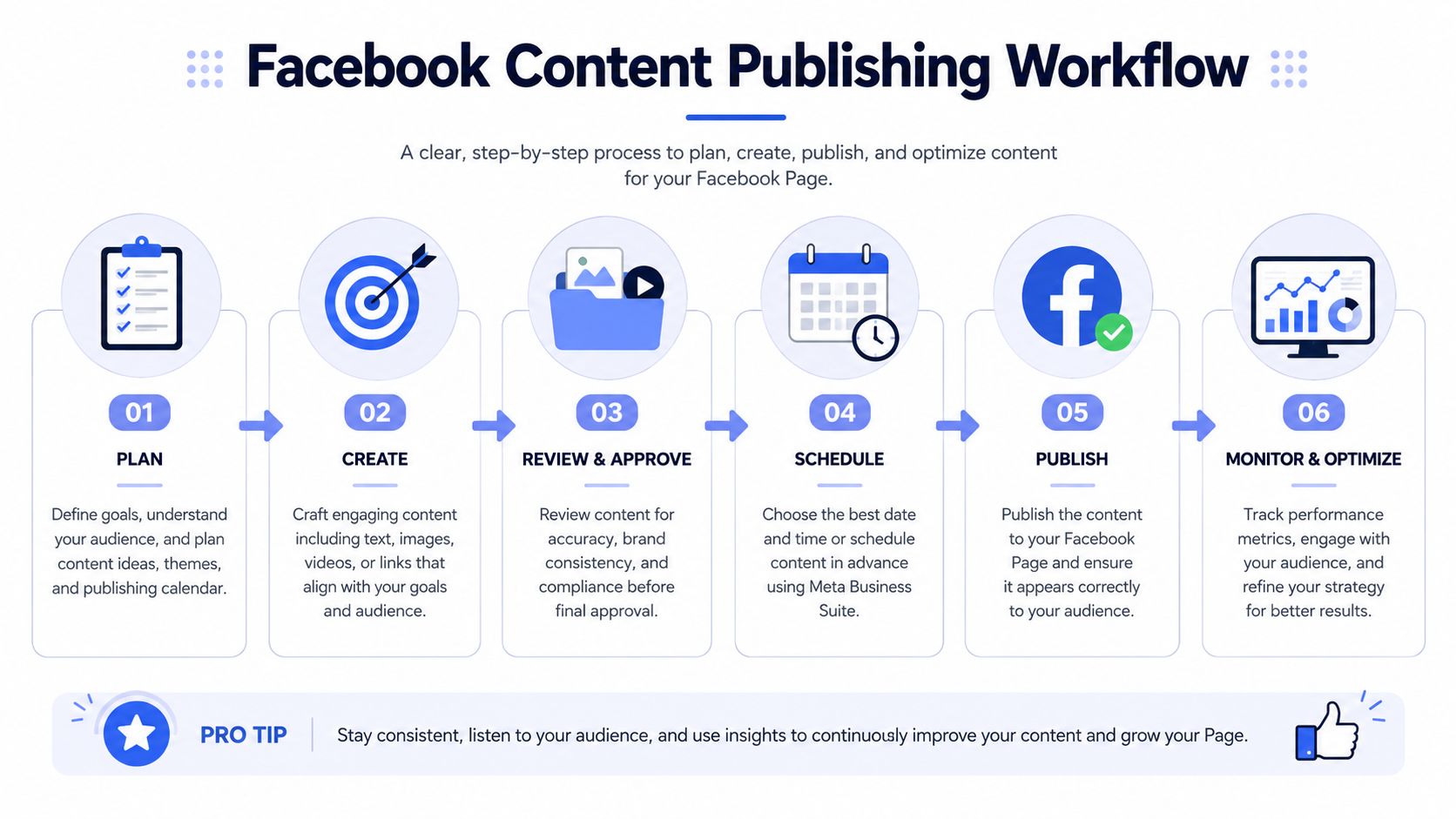 A step-by-step infographic illustrating the six-stage workflow for effective Facebook page content publishing and management.
Manual publishing is useful until it becomes a bottleneck
Meta Business Suite is fine for basic scheduling and operational sanity. If one team member is posting approved assets, checking comments, and keeping the calendar moving, native tooling can be enough for a while. It also lowers the number of moving parts, which helps during cleanup.
The downside appears when your workflow has dependencies. Maybe content originates in a CMS. Maybe approvals happen in Slack or Notion. Maybe you need content to publish across several platforms from one event in your application. At that point, “someone will copy this into Business Suite” becomes the weakest link.
This video gives a quick visual walkthrough of the native flow before you go deeper into custom automation:
API publishing gives control and adds maintenance
The Graph API is powerful, but the pain isn't just request formatting. The hard part is everything surrounding the request.
Different post types tend to create different operational paths. Text is simple. Single-image publishing is manageable. Video introduces more handling and more states to reason about. Error messages can be vague, and the debugging context often lives outside the code itself in permissions, account state, or app configuration.
For developers, the maintenance burden usually falls into a few buckets:
Authentication drift. A connection that worked last month can fail because the surrounding access setup changed.
Media handling differences. Text, images, and video rarely behave like one uniform payload flow.
Version churn. Platform integrations age quickly if nobody owns them.
Observability gaps. “Post failed” is useless unless you know whether the issue was access, media, payload shape, or review state.
If you're implementing a publishing layer for your own app, it helps to read the contract from the outside in. Start with the request shape and expected behavior in the API docs, then map your internal workflow around retries, failure states, and operator visibility.
A practical comparison
Approach | Best when | Main downside |
Meta Business Suite | Small team, simple approvals, native workflow is acceptable | Manual steps accumulate |
Direct Graph API integration | You need deep control and can own maintenance | Reliability work never really stops |
Unified publishing abstraction | You publish across channels or inside product workflows | Less direct platform-specific control |
Native tools are good for proving the workflow. APIs are good for scaling the workflow. The dangerous middle ground is needing automation but pretending manual posting is still enough.
That's the inflection point. If publishing is becoming part of your product, your internal tooling, or your automation stack, you need a system that behaves predictably under repeated use, not just something that works during a demo.
Effective Community Moderation and Engagement
A Page that gets no comments is easy to manage and useless as a community surface. A Page that gets active discussion can consume the entire day if nobody designs a triage model. That's why moderation needs rules, not heroics.
Treat the inbox like a queue
Comments, messages, and reviews aren't one blob. They're different classes of work. If you mix them together, your team either overreacts to noise or misses legitimate customer issues.
A simple triage model works well:
Support. Route questions about orders, bugs, access, or service status to the support owner.
Sales or partnership. Hand off commercial intent quickly while context is still warm.
Spam or low-value noise. Hide, ignore, or block based on pattern and severity.
High-signal engagement. Answer publicly when the response helps more than one person.
Responsiveness is key to a Page feeling maintained. A polished publishing calendar doesn't help much if comments sit unanswered and inbox threads go stale.
Moderate for signal, not perfection
Use moderation rules to filter obvious junk early. If your Page attracts repetitive spam, link drops, or profanity, native moderation settings can reduce the cleanup burden before a human ever sees it.
That doesn't mean automating every interaction. It means protecting attention. Teams burn out when they spend too much time on comments that don't deserve a response.
A practical playbook looks like this:
Hide obvious spam fast. Don't reward it with public back-and-forth.
Respond where the answer compounds. If multiple people may have the same question, reply publicly.
Move account-specific issues to private channels. Keep the thread helpful, not procedural.
Escalate emotionally charged issues to a named owner. Don't let five people improvise in parallel.
If you're wiring this into your own systems, webhooks for social events are the missing piece. They let you move from passive inbox checking to event-driven handling, which is a better fit for support queues, Slack alerts, and moderation automation.
Don't try to “win” every comment thread. Keep the Page readable, useful, and calm.
Canned responses help too, as long as they're treated as starting points. A short library for delivery questions, pricing inquiries, support redirects, and abuse handling saves time without making every interaction sound robotic.
Measuring Performance with Facebook Insights
A surprising number of teams still treat Facebook analytics like a scoreboard. They open the dashboard, glance at whatever went up or down, then move on. That's not analysis. It's dashboard tourism.
Meta positions Page Insights as the core management surface for admins to track audience demographics, identify when people are on Facebook, and see which posts generate the most engagement, and it documents access through the Page's Insights menu in the Meta Help Center. That matters because Facebook still operates at enormous scale. Sprout Social reports 3.070 billion monthly active users worldwide in 2025, and DataReportal says Meta's ad tools estimated Facebook could reach 2.28 billion users in January 2025, equal to 27.9% of the world's population, as summarized in that same referenced fact set and linked source context above.
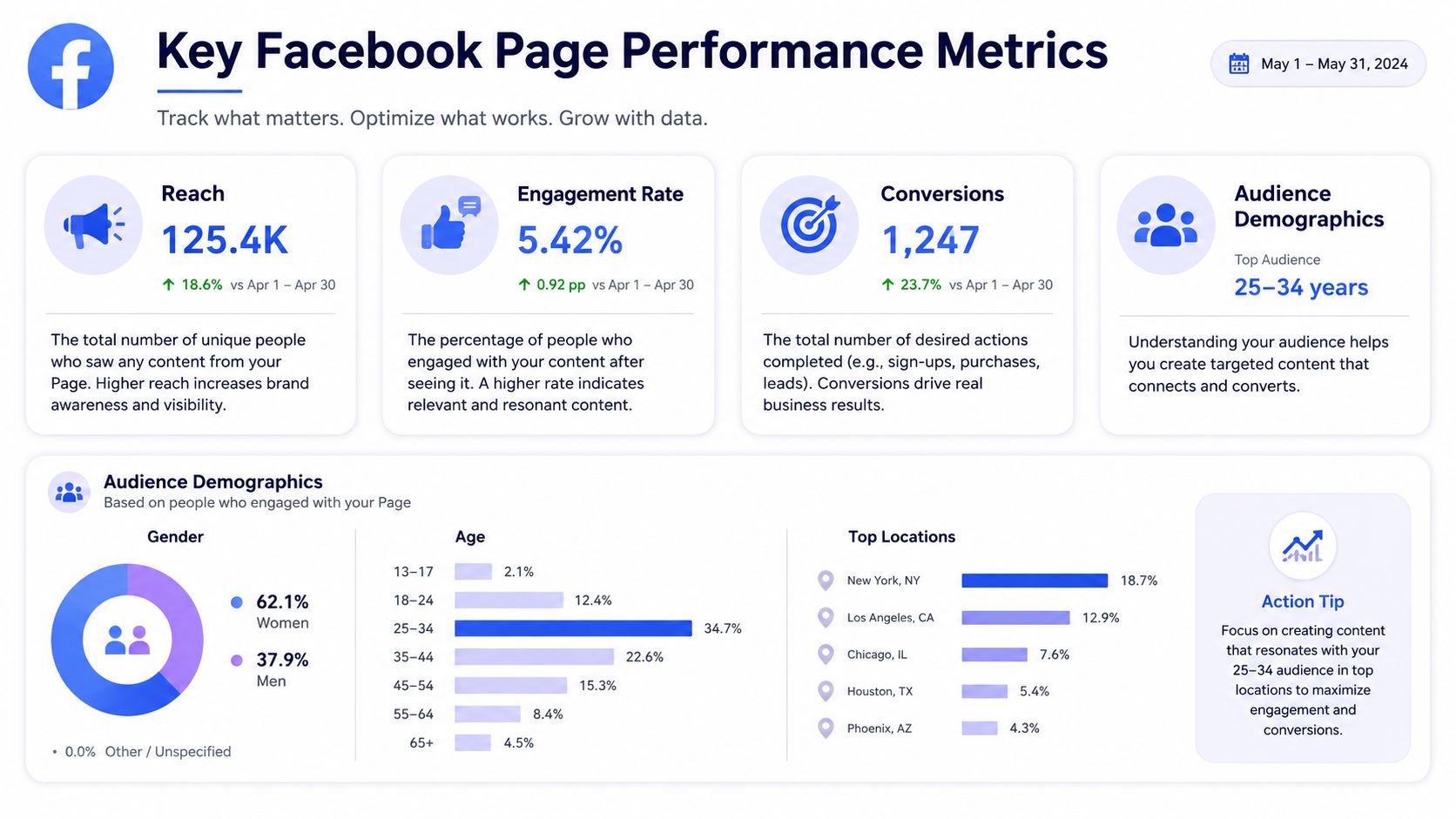 A dashboard showing Facebook page performance metrics including reach, engagement, conversions, and audience demographics for May 2024.
Read post-level metrics first
The biggest analytics mistake in Facebook Page management is overvaluing broad Page-level vanity numbers. Likes and raw fan growth are easy to obsess over because they look stable and familiar. They're also less useful for deciding what to post next.
Post-level metrics are where the action is. Reach, engagement, clicks, and response patterns tell you what happened when a specific piece of content hit a specific audience. Those signals are harder to distort and easier to act on.
When reviewing posts, look for patterns such as:
Which topics draw conversation. Not just reactions, but comments worth reading.
Which formats get ignored. Some content types consistently underperform for certain Pages.
Which posts drive clicks but weak engagement. Useful if referral traffic is the point.
Which posts generate sentiment issues. Performance without context can mislead.
What Insights is actually good at
Insights is most useful when you treat it like an operational console. It can help answer practical questions that teams ask every week but rarely formalize.
For example:
Question | Useful signal in Insights | Operational decision |
Are we posting at times our audience is active? | Audience timing and post response | Adjust scheduling windows |
Which posts are doing the real work? | Post-level reach and engagement | Double down on that pillar or format |
Are we attracting the right kind of response? | Comment quality and sentiment | Change framing or moderation approach |
Are link posts worth the slot? | Clicks alongside engagement | Keep, revise, or reduce link-heavy posts |
Notice what's missing here. There's no single magic KPI. The useful metric depends on the job the post was supposed to do.
Field note: A low-engagement post isn't always a bad post. If it answers a common customer question, supports credibility, or sends qualified referral traffic, it may still be doing its job.
That's also why your review process should include bad posts, not just winners. Weak performers often reveal more about your actual audience than your top hits do. Maybe the format was wrong. Maybe the topic belongs on LinkedIn instead. Maybe the post was fine, but the CTA asked for more intent than the audience was ready to give.
A weekly review that people will actually do
A useful review process needs to be short enough to survive a busy week. One shared document or dashboard is enough if it answers three things clearly:
What performed best
What underperformed
What changes next
Keep the meeting or async review focused on decisions, not narration. Pull a small set of recent posts, compare outcomes to intent, and log one change per content pillar if needed.
A practical weekly review can be as simple as this:
Top post. What element likely drove the result?
Weak post. Was the issue topic, format, timing, or CTA?
Comment pattern. Did the audience ask for more detail, disagree, or ignore it?
Next adjustment. One concrete change for the coming batch.
That loop is where Facebook Page management becomes durable. Instead of posting because the calendar says so, you publish, observe, and adapt. Over time, the Page becomes less dependent on hunches and more responsive to its actual audience behavior.
APIs Automation and Crisis Management
The most useful question to ask before automating anything is simple. Is this Page supposed to grow distribution, or just maintain credibility?
That distinction matters more than is often acknowledged. Practitioner commentary increasingly argues that some businesses should treat the Facebook Page as a polished trust layer rather than a primary organic growth engine, especially when organic reach is weak. That qualitative shift changes how much automation you need and what kind of automation is worth maintaining, as discussed in this commentary on Pages as a credibility layer.
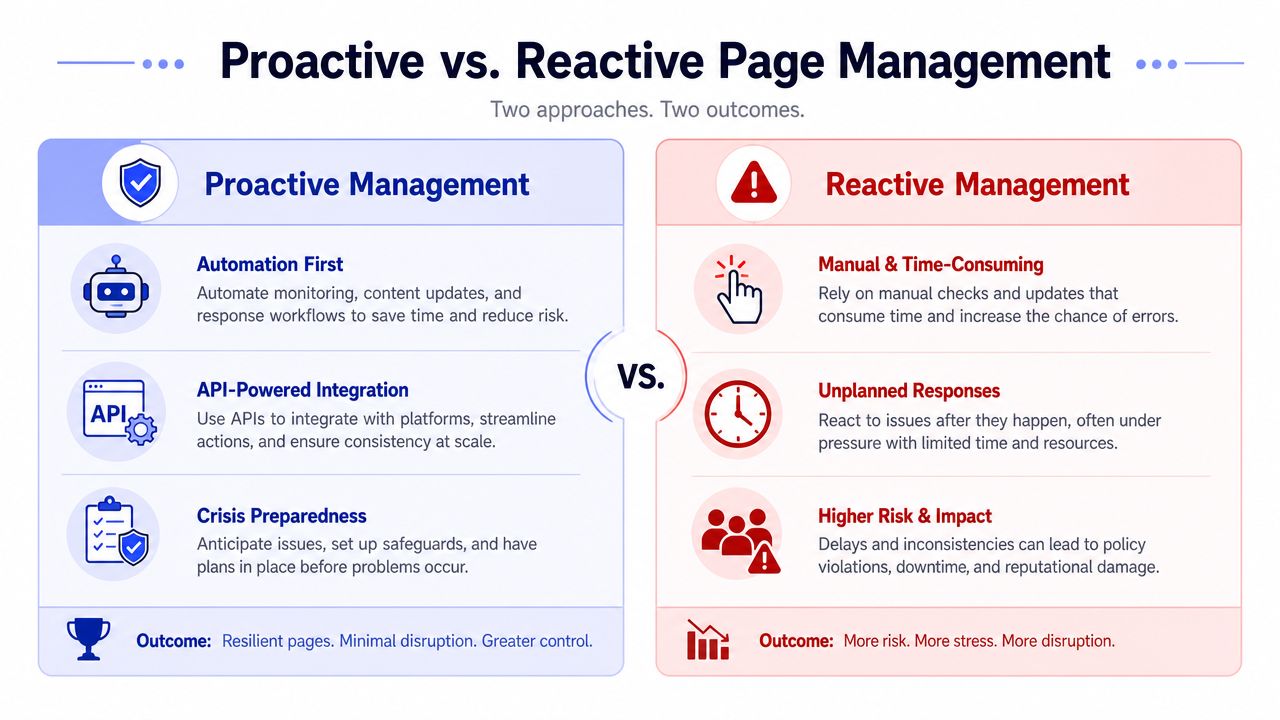 A comparison chart showing the benefits of proactive versus the risks of reactive page management strategies.
Decide what the Page is for
If the Page is a credibility layer, your system should optimize for polish, correctness, and responsiveness. You don't need a content firehose. You need clean branding, current information, a lightweight but reliable posting rhythm, and visible signs that real people still manage the account.
If the Page is a growth channel, the bar changes. Now you need tighter scheduling, stronger feedback loops, more deliberate testing, and better integration with the rest of your stack. That often includes analytics plumbing beyond native reporting. If you're connecting organic activity to downstream tracking, this guide on implementing the FB Conversion API is useful context because attribution and publishing tend to get discussed separately even though they inform the same operating decisions.
Crisis handling needs a runbook
Bad days on Facebook aren't rare edge cases. A page access issue, an accidental post, a flood of support complaints, or a thread that turns hostile can overwhelm a team fast if nobody owns the response.
A minimal crisis checklist should exist before you need it:
Access issue. Identify who can still change roles and who is responsible for containment.
Bad post or incorrect info. Decide who can unpublish, edit, or issue clarification.
Comment surge. Switch from ad hoc replies to a single response pattern approved by one owner.
Escalation path. Legal, support, comms, and leadership should each know when they enter the loop.
The key is reducing improvisation. Crisis handling fails when too many people can respond and nobody owns the canonical answer.
During an incident, consistency beats cleverness. One accurate message is better than five fast ones.
Automation is a reliability choice
Developers often frame automation as a speed decision. It's also a reliability decision.
Manual publishing failures often go unnoticed. Someone forgets a post. An approval sits in chat. A weekend message spike goes unnoticed. An access change breaks a connection and nobody notices until a campaign misses its window. Automation doesn't remove every failure mode, but it makes the system more observable and repeatable.
Good automation usually includes some combination of:
Scheduled publishing from a content source. CMS, spreadsheet, internal tool, or queue.
Event-based triggers. New article published, product change shipped, approval completed.
Alerting. Failed posts, comment surges, or connection problems routed to the right place.
Separation of concerns. Content creation, approval, publishing, and monitoring handled independently.
For engineering teams, the hard part isn't writing one successful publish call. It's handling all the surrounding state over time. OAuth, token refresh, changing permissions, platform-specific media handling, retries, and evolving API behavior are what make direct integrations expensive to own. That's why automation should be designed like infrastructure. You want predictable paths, narrow permissions, visible failures, and an operator who can tell what broke without reverse engineering the whole stack.
If your Page only needs to look alive, don't build an elaborate machine. If your Page is part of product or growth infrastructure, treat it like one.
If you're building social publishing into a product, an internal tool, or an automation stack, PostPulse is worth a look. It gives developers one integration for publishing across multiple platforms through a REST API, official n8n and Make.com nodes, or an MCP server, and it handles the messy parts like OAuth maintenance, refresh flow, and platform churn so you don't have to own every network integration yourself.
Written with Outrank tool
About the Author

Founder of PostPulse — a social media scheduling platform for creators and teams. Software engineer with a passion for building developer tools and simplifying complex API integrations across social media platforms.