7 Best Social Media Posting Tools for Developers
Published on
Tags:
Why does a post work in one environment, then fail because an OAuth token expired, a platform review blocked launch, or a media workflow needs separate handling on every network? That's the gap conventional “best social media posting tools” lists often miss. A polished calendar is useful, but it isn't the same thing as publishing infrastructure.
This comparison ranks tools by the integration problem they solve. It covers official platform support, API access, automation and AI paths, pricing structure, collaboration, white-label delivery, and the maintenance burden left with the buyer. Treat vendor capabilities as changeable, especially where platform policies and API access are involved. Before implementation, verify current features, limits, account types, and review requirements in each vendor's official documentation.
Table of Contents
1. PostPulse: Publishing Infrastructure for Apps and Agents
Does your product need social publishing inside its own interface rather than in another marketing dashboard? PostPulse targets that integration problem with a developer-facing REST API for Instagram, TikTok, YouTube, LinkedIn, X, Threads, Bluesky, Facebook Pages, and Telegram. App makers, no-code builders, AI agents, and internal-tool teams can use the same publishing layer across API calls, visual automations, and agent workflows through its MCP server and n8n and Make.com integrations.
The main trade-off is maintenance ownership. PostPulse provides verified Meta, TikTok, and Google developer apps, manages OAuth and refresh cycles, and handles rate limits and API-version changes. That can reduce duplicated platform work, but the abstraction still requires testing. Confirm supported post types, account requirements, media constraints, error semantics, and retry behavior in the current documentation before implementation.
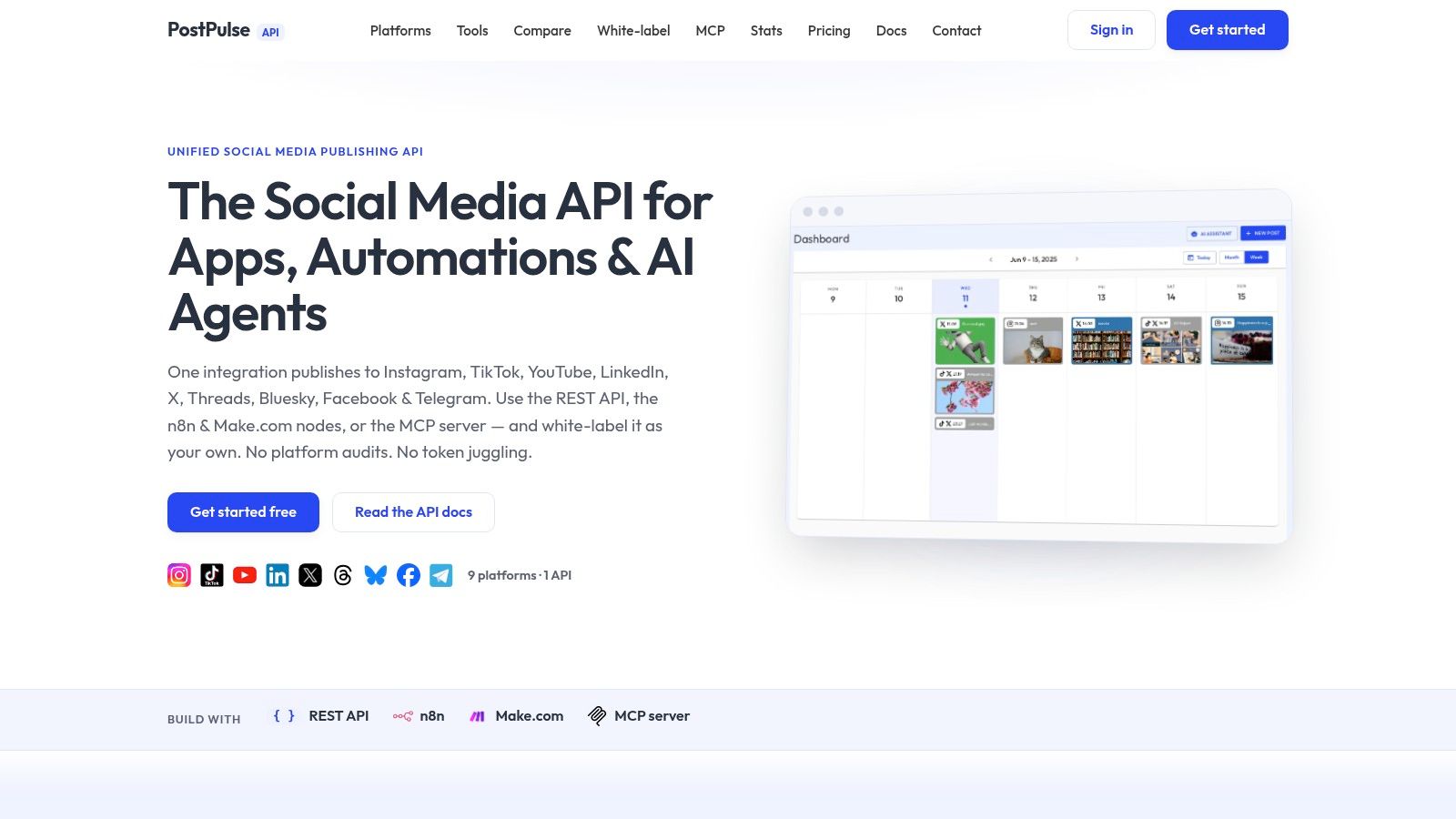 post-pulse Homepage
Where PostPulse fits best
PostPulse fits products that let users connect social accounts within a first-party interface. Its white-label option removes PostPulse branding from the user experience. Private-label usage also suits developers and internal teams that want one publishing surface across several workflows.
The pricing structure reflects these workloads. Private-label publishing costs $0.20 per publication on a pay-as-you-go basis, or $5 per account per month, with $48 per year pricing, according to the PostPulse pricing and product site. White-label usage starts at $200 per month plus $1 per active social account. A startup support program may waive fees while a product is being built or tested, subject to individual discussion.
Integration rule: A unified API reduces duplicated platform work, but it does not guarantee access to every network-specific feature. Test the formats your product requires before committing to the abstraction.
The cost is platform dependency. An outage or policy change at the gateway can affect your publishing flow, depending on PostPulse's response time. High-volume publishers should also assess whether per-publication charges become material. Direct integrations may remain preferable when a team needs advanced network-specific features or full control over operational behavior. For teams prioritizing speed to market, white-label delivery, and lower maintenance, the trade-off may be reasonable compared with owning nine separate integrations.
2. Buffer
Buffer is a good default for creators, small businesses, and agencies that want a clean scheduling workspace without building a publishing system. Its model is straightforward: connect social channels, compose posts, place them in a queue or calendar, and collaborate around the content. Paid plans provide unlimited scheduled posts, while billing is organized per channel, with volume discounts as more channels are added, according to Buffer's official product information.
Channel coverage is broad. Buffer supports Instagram, Facebook, LinkedIn, TikTok, Threads, YouTube, Pinterest, X, Bluesky, Mastodon, Google Business, and Substack. It also includes an AI Assistant on all plans, documented API access, and request limits that developers should inspect before designing automations.
Why choose Buffer
The interface is the main reason to choose it. Teams can understand the calendar and queue quickly, and the per-channel structure makes it easy to add or remove a profile as client work changes. Buffer also offers a free plan and a 14-day trial, but confirm current limits and plan entitlements before comparing it with a flat-price alternative.
Buffer is less attractive when reporting is the core requirement. Its deeper Analyze analytics product is being retired, leaving a simpler reporting experience. That's fine for teams focused on publishing and basic measurement, but it may not satisfy buyers who need extensive listening, customer care routing, or enterprise governance.
For a developer, Buffer's API and automation hooks are useful when Buffer remains the user-facing system. They're less compelling when you're embedding publishing into your own SaaS, because you're still building around another dashboard and account model. The Buffer comparison with PostPulse is useful if the decision is between a human scheduling workspace and a developer-facing publishing layer.
3. Hootsuite
Hootsuite solves a different problem from Buffer. It's built for organizations that need publishing alongside Inbox, Listening, Analytics, approvals, routing, and governance. The product offers Standard, Professional, Advanced, and Enterprise tiers, plus a 14-day trial, as described on the Hootsuite website.
The important distinction is collaboration control. Hootsuite supports team workflows and approvals, while advanced governance features help larger organizations route content and customer interactions through defined processes. Unlimited social accounts begin at the Professional tier, but the pricing is per seat, so total cost can rise as more people need access.
Where the suite earns its cost
Hootsuite makes sense when replacing several enterprise tools with one operational environment. Its app directory and paid add-ons extend the product into advanced analytics and listening, which can reduce tool sprawl for organizations that actively use those functions.
The trade-off is complexity and cost. A small team that only needs to queue posts may pay for capabilities it doesn't use. The trial also has posting limits and doesn't include bulk upload, so a trial workflow may not represent the full operating model you'd use after purchase.
Hootsuite is a dashboard-first product, not an embedded publishing API for your application. That doesn't make it a weak developer choice, but it changes the architecture. You're adopting Hootsuite as the team's system of record rather than exposing publishing natively inside your product.
Choose Hootsuite when governance, approvals, inbox operations, and listening matter as much as scheduling. Don't choose it solely because it has a large channel list.
4. Sprout Social
Sprout Social is the premium option for teams that combine publishing with engagement, customer care, analytics, and listening. Its product tiers include Essentials, Standard, Professional, Advanced, and Enterprise, with unlimited social profiles available from the Professional tier upward, according to Sprout Social's official site.
The platform's strength is depth around team operations. A consolidated inbox gives teams one place to manage interactions, while collaboration features support review and customer-care workflows. Add-ons for Premium Analytics, Listening, and Employee Advocacy let organizations expand the system when standard publishing and reporting aren't enough.
The cost of operational depth
Sprout Social is a better fit for brands and agencies with dedicated social teams than for an individual creator. Per-seat pricing means the bill scales with headcount, and smaller teams may pay for analytics and workflow depth they rarely use. That premium can still be rational when reporting quality, customer care, and internal coordination affect business operations.
Sprout also weaves Trellis AI into workflows. Buyers should verify which AI functions are included at their selected tier and how generated content is reviewed before publication. AI assistance can accelerate drafting, but it doesn't remove the need to adapt a post for each platform or to validate claims, links, and media.
Sprout Social is therefore best understood as a social operations suite. It's not the natural choice for an app developer seeking a white-label publishing backend, but it's strong when humans need to manage a substantial publishing and engagement process from one controlled workspace.
5. Later
Later remains a strong choice for teams that plan visually. Its Visual Planner, multi-profile scheduling, mobile apps, and best-time-to-post insights make it practical for creators and brand teams coordinating image and video campaigns across Instagram, Facebook, TikTok, Threads, YouTube, Pinterest, LinkedIn, and Snapchat. Current packaging and capabilities should be confirmed on Later's official website.
The product uses social-set packaging, which can scale sensibly for brands and agencies managing multiple profiles. Growth and Scale tiers add features such as an inbox, approvals, UGC collection, competitive benchmarking, and custom analytics. That gives Later more collaboration depth than a basic visual calendar, although the strongest team and reporting features sit higher in the plan structure.
A visual planner isn't a publishing abstraction
Later's advantage is presentation. Teams can review how a campaign will look across visual channels before posts go live, which helps catch gaps in creative sequencing and inconsistent campaign presentation. Best-time-to-post insights can support scheduling decisions, but they shouldn't replace platform-specific judgment or content testing.
The starter tier caps posts per profile each month, and advanced analytics and some collaboration features require Scale. That makes Later less suitable for high-volume workflows on entry-level plans. It also offers fewer enterprise governance features than Hootsuite or Sprout Social.
For teams managing multiple accounts, the practical question is whether you need visual planning or embedded distribution. Later is good at the former. If the requirement is to let customers publish from inside your own app, compare its workspace model with a social media scheduler for multiple accounts and verify whether the API surface matches your product requirements.
6. Loomly
Loomly is built around collaborative calendars rather than enterprise listening or developer infrastructure. Its workflow combines calendars, approvals, custom roles, an engagement inbox, mobile apps, and AI helpers for captions and post generation. It integrates with Slack, Teams, Zapier, and major networks including Facebook, Instagram, LinkedIn, TikTok, YouTube, Pinterest, Google Business Profile, and Threads, as detailed on Loomly's website.
The plan structure is relatively easy to reason about. Starter supports up to 12 accounts and 3 users, while Beyond supports up to 60 accounts and unlimited users, based on the stated product packaging. Annual billing receives a 25% discount, and nonprofit discounts are available. Those figures are plan details, so confirm the current limits before purchasing.
Collaboration without enterprise overhead
Loomly works well when the central problem is getting drafts reviewed and approved without forcing clients or teammates into a complicated enterprise system. Slack and Teams integrations help keep notifications close to existing work, while Zapier support provides a practical automation path for teams that don't need a custom API integration.
The pricing caveat is transparency. The public site emphasizes features more than fixed dollar amounts, and exact pricing may appear at checkout or vary by region. Annual plans are paid upfront and aren't cancelable mid-term, so procurement should confirm the commercial terms before committing.
Loomly is a sensible middle ground for agencies and marketing teams that need structured collaboration. It's less compelling for an AI agent or SaaS product that needs direct, branded, programmatic publishing.
7. SocialPilot
SocialPilot targets agencies and growing teams that need many accounts, client seats, bulk scheduling, and reporting without moving immediately to a premium enterprise suite. Its plans increase social-account and user-seat capacity, while upper tiers add white-label reporting. The product supports Facebook, Instagram, TikTok, YouTube, LinkedIn, Pinterest, Threads, Bluesky, and Google Business Profile, with integrations for Canva, Google Drive, Dropbox, RSS automation, and mobile workflows. Verify the current plan matrix on SocialPilot's official website.
The strongest use case is agency economics. Client-facing teams can organize accounts and users under one operational system, then produce branded reports for clients. Broad network coverage also makes it useful for teams that want newer text networks such as Threads and Bluesky in the same workspace.
Where the shortcuts appear
SocialPilot isn't equally deep across every posting format. Specific video constraints may require mobile reminders or workarounds, so test the exact media types your clients publish instead of assuming that channel support means full format support. Google Business Profile posts use a redirect link, and advanced listening and competitor monitoring are more limited than they are in premium suites.
The SocialPilot comparison with PostPulse highlights the underlying architectural choice. SocialPilot is a team dashboard with agency features. PostPulse is a publishing layer for applications, automations, and agents.
That difference matters if your users need to publish through your own interface. If they only need a cost-conscious scheduling workspace with client management, SocialPilot is easier to adopt. If you need white-label product delivery, REST publishing, or agent automation, inspect the integration model rather than comparing account counts alone.
Top 7 Social Media Posting Tools, Feature Comparison
Tool | 🔄 Implementation Complexity | ⚡ Resource Requirements | 📊 Expected Outcomes | 💡 Ideal Use Cases | ⭐ Key Advantages |
post-pulse Homepage | Low for developers, single REST API + n8n/Make nodes; relies on gateway | Modest engineering; pay‑per‑post or per‑account/white‑label fees | Fast time‑to‑market; unified multi‑platform publishing; lower maintenance | App makers, no‑code builders, AI agents, internal tools, white‑label platforms | Verified platform apps, handles OAuth/rate limits, white‑labeling, flexible billing |
Buffer | Low, SaaS dashboard and documented API | Predictable per‑channel costs; scales with channels added | Reliable scheduling and predictable spend | Creators, small businesses, agencies wanting per‑channel pricing | Per‑channel billing, unlimited scheduled posts, clean UI, API access |
Hootsuite | Moderate, team setup for governance, approvals and routing | Higher, per‑seat pricing; enterprise add‑ons may be needed | Centralized publishing, inbox, listening and analytics for teams | Large teams/enterprises needing governance and approval workflows | Mature governance, broad feature set, app directory and add‑ons |
Sprout Social | Moderate, setup for deep analytics and collaboration | High, premium per‑seat pricing and optional add‑ons | Deep reporting and strong customer‑care workflows | Brands/agencies prioritizing analytics and customer care at scale | Robust analytics, consolidated inbox, collaboration tools |
Later | Low, visual‑first scheduler with simple onboarding | Variable, starter caps posts; higher tiers add analytics/approvals | Polished visual planning and optimized post timing | Creators, influencers, brand teams focused on visuals | Visual planner, best‑time posting insights, mobile apps |
Loomly | Low, straightforward plans, calendars and approvals | Moderate, generous account/user caps on paid plans | Streamlined collaborative publishing with AI assistance | Teams seeking simple collaboration + AI content help | Unlimited calendars, AI assistant, Slack/Teams and Zapier integrations |
SocialPilot | Low, agency‑focused scheduler and bulk features | Low–Moderate, aggressive pricing for many seats/accounts | Affordable scaling and white‑label reporting for teams | Growing agencies needing many seats and client accounts | White‑label reporting, broad channel support, competitive pricing |
Choose the Layer You Actually Need
The best social media posting tools aren't interchangeable because they sit at different layers of the stack. Start with the workflow you need to own, then choose the product that leaves the least dangerous work with your team.
Choose PostPulse when an app needs embedded or white-label publishing, a no-code workflow needs official n8n or Make.com connectivity, an AI agent needs MCP-based autonomous publishing, or an internal tool needs one REST surface across nine networks. It's particularly useful when you don't want to build and maintain separate OAuth, token-refresh, rate-limit, and API-version integrations. Confirm the supported account types and media formats for every target network before launch.
Choose Buffer or Later when the priority is a straightforward scheduling workspace. Buffer is the leaner general-purpose queue and calendar choice, while Later is better when visual planning and campaign presentation drive the workflow. Neither should be selected solely for channel count. Cross-platform publishing still needs platform-specific adaptation, especially for captions, media dimensions, video formats, and cadence.
Choose Loomly or SocialPilot when collaboration, client seats, or agency economics matter. Loomly emphasizes review workflows and a simple team structure. SocialPilot is more oriented toward account volume, client operations, bulk scheduling, and white-label reporting. Test the media formats and reporting outputs your clients require.
Choose Hootsuite or Sprout Social when governance, engagement, analytics, listening, and customer-care depth justify per-seat or premium pricing. These suites make more sense when publishing is part of a larger social operations function, not when the only requirement is to send posts from a product backend.
Before implementation, confirm official platform support, inspect the vendor's API and automation documentation, model both account and publication costs, test OAuth and failure handling, and verify which platform-specific formats the chosen tool exposes. Also check platform review requirements. TikTok restricts unaudited clients to private visibility, and its official documentation states that each user access token is limited to 6 requests per minute, while returned upload URLs remain valid for one hour after issuance, so upload flows must complete promptly. YouTube similarly restricts uploads from unverified API projects created after 28 July 2020 to private viewing mode until the required audit is completed, as described in the relevant TikTok developer documentation, TikTok getting-started documentation, and YouTube publishing guidance.
PostPulse gives apps, automations, and AI agents one REST API, official n8n and Make.com nodes, and an MCP server for publishing across nine social networks. If you want to add branded or white-label distribution without maintaining every platform integration yourself, visit PostPulse and evaluate the publishing flow against your actual account and media requirements.
About the Author

Founder of PostPulse — a social media scheduling platform for creators and teams. Software engineer with a passion for building developer tools and simplifying complex API integrations across social media platforms.