API Documentation
Complete reference for the PostPulse API - unified publishing to 11 social media platforms.
Authentication
PostPulse API uses OAuth 2.0 for authentication. Sign up at PostPulse and create an OAuth application at PostPulse Developer Portal to get your API credentials instantly.
API Base URLs
Authentication: https://auth.post-pulse.com
API Endpoints:  https://api.post-pulse.com
OAuth Flow
// Step 1: Get authorization code
GET https://auth.post-pulse.com/authorize
  ?client_id=YOUR_CLIENT_ID
  &response_type=code
  &redirect_uri=YOUR_REDIRECT_URI
  &scope=offline_access postpulse-api/accounts.read postpulse-api/api postpulse-api/media.write postpulse-api/posts.read postpulse-api/posts.write postpulse-api/webhooks.write
  &state=YOUR_STATE_PARAMETER
  &audience=https://api.post-pulse.com

// Step 2: Exchange code for access token
POST https://auth.post-pulse.com/oauth/token
Content-Type: application/json

{
  "grant_type": "authorization_code",
  "client_id": "YOUR_CLIENT_ID",
  "client_secret": "YOUR_CLIENT_SECRET",
  "code": "AUTHORIZATION_CODE",
  "redirect_uri": "YOUR_REDIRECT_URI"
}
The token response contains an access token valid for 24 hours. Include offline_access in scope to also receive a refresh token, so your backend can keep working without another browser login:
{
  "access_token": "eyJhbGciOi...",
  "refresh_token": "v1.MjE3...",     // Present only when offline_access was requested
  "scope": "offline_access postpulse-api/accounts.read ...",
  "expires_in": 86400,
  "token_type": "Bearer"
}
Refreshing the Access Token
Exchange the refresh token for a new access token whenever the current one expires, or at the start of every run for scheduled jobs:
POST https://auth.post-pulse.com/oauth/token
Content-Type: application/json

{
  "grant_type": "refresh_token",
  "client_id": "YOUR_CLIENT_ID",
  "client_secret": "YOUR_CLIENT_SECRET",
  "refresh_token": "YOUR_REFRESH_TOKEN"
}

// Response: a new access_token AND a new refresh_token.
// Store the new refresh_token; the one you just sent no longer works.- Refresh tokens rotate. Every refresh returns a new refresh token and invalidates the one you sent. Reusing an old refresh token revokes the whole chain, and the user has to log in again. Persist the new token after every refresh.
- Don't refresh in parallel. If two workers refresh with the same token, one of them reuses an invalidated token. Serialize refreshes (one job at a time, or a lock).
- Lifetimes: a refresh token expires after 7 days without use and 1 year after the original login, whichever comes first. After that, repeat the authorization step.
- An
invalid_granterror means the refresh token is no longer valid. Send the user through the authorization step again.
Using Access Token
All API requests must include the Bearer token in the Authorization header:
Authorization: Bearer YOUR_ACCESS_TOKENAccounts
Retrieve connected social media accounts for the authenticated user.
Get All Accounts
Returns a list of all social media accounts connected by the user.
Response Example
[
  {
    "id": 123,
    "platform": "INSTAGRAM",
    "accountId": "instagram_user_id",
    "accountUsername": "myaccount",
    "accountDisplayName": "My Instagram Account",
    "accountAvatarUrl": "https://example.com/avatar.jpg",
    "createdTime": "2025-08-15T10:30:00.000000",
    "updatedTime": "2025-08-15T10:30:00.000000"
  }
]
Get Connected Chats
Returns the destinations a post can target on accounts that publish to a specific channel, Page, board or phone number. Pass the returned id as the post's chatId. What is returned depends on the account's platform:
TELEGRAM— channels/chats where the bot can publishFACEBOOK— Facebook Pages managed by the accountPINTEREST— the account's Pinterest boards (typeisBOARD)WHATSAPP— phone numbers of the WhatsApp Business account (typeisPHONE_NUMBER, see WhatsApp Broadcasts)
Accounts of any other platform, including FACEBOOK_PAGE, have no chats: the request returns 400. Publish to such an account directly, without chatId.
Response Example — Telegram
[
  {
    "id": "-1002726180643",
    "title": "PostPulse Official",
    "type": "channel",
    "platform": "TELEGRAM"
  }
]
Response Example — Pinterest
[
  {
    "id": "1018813041503562001",
    "title": "Spring Recipes",
    "type": "BOARD",
    "platform": "PINTEREST"
  }
]
Media Upload
Most platforms require media to be hosted in PostPulse storage before scheduling. You have three ways to get media there — pick the one that fits your use case.
Direct Upload
POST /v1/media/upload
Send the file as binary in a single multipart/form-data request.
- Simplest approach
- Best for small files
- Synchronous — returns the media key immediately
Pre-signed PUT URL
POST /v1/media/upload/urls
Request a pre-signed URL, then PUT the file directly to our storage.
- Best for large files
- Bypasses API size limits
- Confirm step recommended after upload
Public URL Import
POST /v1/media/upload/import
Provide a public URL — we download the file into our storage.
- Fully asynchronous
- Poll for completion
- Or pass the URL directly to
attachmentPaths
Direct Upload
Upload an image or video file in a single request.
Request
Content-Type: multipart/form-data

file: [binary file data]
Response Example
{
  "path": "6354d8d2-e0f1-702b-af6c-62e28e377ec7/e1992700-96f5-4f0b-bd48-45d902ffbb0c.jpeg"
}
Use the returned path as an entry in attachmentPaths when creating a post.
Pre-signed PUT URL
For large files, request a pre-signed URL and upload the binary directly to our storage. This takes three calls: request URL → PUT file → confirm upload.
1. Request the URL
Get a pre-signed URL configured for your file's filename, content type, and size.
Request Schema
{
  "filename": "my-video.mp4",
  "contentType": "video/mp4",
  "sizeBytes": 10485760
}
Response Schema
{
  "key": "f157080a-7c45-4b43-9d7c-d17dd83dbf92/b43ec45c-6367-4edd-868b-5f704a4ff04e.mp4",
  "method": "PUT",
  "url": "https://postpulse-prod-user-media.s3.eu-central-1.amazonaws.com/f157080a-7c45-4b43-9d7c-d17dd83dbf92/b43ec45c-6367-4edd-868b-5f704a4ff04e.mp4?X-Amz-Algorithm=AWS4-HMAC-SHA256&X-Amz-Date=20260418T193733Z&X-Amz-SignedHeaders=content-type%3Bhost%3Bx-amz-meta-declared-size%3Bx-amz-meta-orig-filename&X-Amz-Credential=...&X-Amz-Expires=600&X-Amz-Signature=...",
  "headers": {
    "Content-Type": "video/mp4",
    "x-amz-meta-declared-size": "10485760",
    "x-amz-meta-orig-filename": "my-video.mp4"
  },
  "expiresAt": "2026-04-18T19:47:33Z"
}url with the exact headers and HTTP method from the response — the signature is bound to them.2. PUT the file to the returned URL
PUT https://postpulse-prod-user-media.s3.eu-central-1.amazonaws.com/...?X-Amz-Signature=...
Content-Type: video/mp4
x-amz-meta-declared-size: 10485760
x-amz-meta-orig-filename: my-video.mp4

[binary file bytes]
Storage responds with 200 OK on success. The URL expires after the window shown in expiresAt.
3. Confirm the upload (recommended)
Confirms the file landed in our storage, runs a basic integrity check (for videos, this verifies the container is readable), and detects the file's real type from its bytes. Optional but recommended — catches transfer problems early and avoids surprises at post time.
Request Schema
{
  "key": "f157080a-7c45-4b43-9d7c-d17dd83dbf92/b43ec45c-6367-4edd-868b-5f704a4ff04e.mp4"
}
Response Schema
{
  "key": "b43ec45c-6367-4edd-868b-5f704a4ff04e.mp4",
  "path": "f157080a-7c45-4b43-9d7c-d17dd83dbf92/b43ec45c-6367-4edd-868b-5f704a4ff04e.mp4",
  "filename": "my-video.mp4",
  "contentType": "video/mp4",
  "sizeBytes": 10485760,
  "url": "https://..."
}
The returned path is always the key you were given in step 1 — a key never moves once it has been handed out, so it is safe to store it before confirming.
photo.jpeg keeps a .jpegkey. The returned contentType is detected from the file itself and is what we use when publishing (image conversion, platform format rules). Read the type from contentType, never from the key.A file whose bytes are neither an image nor a video is refused: confirm answers 400 naming the type we found, the stored object is deleted, and that key can no longer be used in attachmentPaths — scheduling a post with it fails with the same reason. Upload the file again as a supported image or video. A corrupt or incomplete file is refused the same way.
Confirm also checks that the file actually reached storage. If the PUT failed or was never made, confirm waits a few seconds for it, then answers 400 with Upload not found in storage. The key stays pending: PUT the file to the same URL while it is still valid (see expiresAt) and confirm again. A key that never receives its file expires and does not appear in the media library.
Public URL Import
Already have a public URL? Hand it to us and we'll pull the file into storage for you. This is fully asynchronous — you get an import job back and poll for completion.
attachmentPaths when creating a post — see the Post Scheduling section. The platform will create the import job for you and flip the post to SCHEDULED once the file is ready.Start an import
Kick off a background import from a public URL.
Request Schema
{
  "url": "https://example.com/image.jpg",
  "filenameHint": "image.jpg"
}
Response Schema
{
  "id": 12345,
  "state": "QUEUED"
}
Poll import status
Get the current status of a media import job.
Response Schema
{
  "id": 12345,
  "state": "READY",            // QUEUED, DOWNLOADING, VALIDATING, UPLOADING, READY, FAILED_TEMPORARY, FAILED_PERMANENT
  "sourceUrl": "https://example.com/image.jpg",
  "bytesDownloaded": 2048576,
  "totalBytes": 2048576,
  "detectedMime": "image/jpeg",
  "s3Key": "6354d8d2-e0f1-702b-af6c-62e28e377ec7/e1992700-96f5-4f0b-bd48-45d902ffbb0c.jpeg",
  "errorCode": null,
  "errorMessage": null
}
When state is READY, use s3Key as the attachmentPaths entry. FAILED_PERMANENT means the job is dead — inspect errorCode and errorMessage. FAILED_TEMPORARY may still recover.
media.import.ready event when the import is complete.Media Library
Every uploaded, confirmed or imported file stays in the user's media library until you delete it. Deleting a post does not delete its files.
List files
Returns the library page by page, newest first. Query parameters: page (from 0, default 0) and size (default 20).
Response Schema
{
  "items": [
    {
      "key": "e1992700-96f5-4f0b-bd48-45d902ffbb0c.jpeg",
      "path": "6354d8d2-e0f1-702b-af6c-62e28e377ec7/e1992700-96f5-4f0b-bd48-45d902ffbb0c.jpeg",
      "url": "https://...",            // Temporary download URL
      "filename": "launch.jpeg",
      "contentType": "image/jpeg",
      "sizeBytes": 245133,
      "thumbnailUrl": null             // Preview image of a video, or null
    }
  ],
  "page": 0,
  "size": 20,
  "totalItems": 43,
  "totalPages": 3
}
Check what deleting a file would do
Lists the posts that use the file and what deleting it would do to each of them. Pass the file's key from the list above, not its path.
MEDIA_DELETED— the post only loses the file. Always the case for a post that is published or failed: it stays as the record of what was published.PUBLICATION_DELETED— the post is not published yet, and on some accounts it is left without the media the platform requires (or without any content); those publications are deleted, the others stay.SCHEDULE_DELETED— every publication of a post that is not published yet is deleted, so the whole post is deleted.
Response Schema
[
  {
    "id": 9821,                        // Post id
    "content": "Ready to go!",
    "platforms": ["TELEGRAM", "INSTAGRAM"],
    "scheduledTime": "2026-04-17T23:33:00Z",
    "outcome": "SCHEDULE_DELETED"      // MEDIA_DELETED | PUBLICATION_DELETED | SCHEDULE_DELETED
  }
]
Delete a file
Deletes the file from storage and from the library, and changes the posts that use it as described above. Returns 204 No Content. If a post that uses the file is being published (IN_PROGRESS), the request is rejected with 409 and code post_in_progress, and nothing is deleted: the platform may still be fetching the file. Retry once publishing finishes. A key that matches no file returns 404, and so does deleting the same file again.
Subscribers get media.deleted for the file, and publication.deleted / schedule.deleted for every publication or post deleted with it (see Webhooks).
Post Scheduling
Schedule posts to one or multiple social media platforms simultaneously, then track, edit or delete them.
Understanding the Data Model
PostSchedule
The root object that contains common settings for all publications:
- scheduledTime: When to publish. Accepts ISO 8601 with or without timezone offset (see below).
- isDraft: Whether this is a draft (recommended: false for API)
- publications: Array of Publication objects
Publication
Represents publishing to one social media account:
- socialMediaAccountId: Required. The numeric
idof a connected account from the accounts endpoint (not the platform-sideaccountId). - platformSettings: Required. Object with at least a
typematching the account platform (e.g.{ "type": "TELEGRAM" }); some platforms need extra fields, see Platform Settings. - posts: Array of Post objects
Post
Individual post content:
- content: Post text/description
- attachmentPaths: Array of media references — each entry is either an s3 key returned by a media upload, or a public URL we should import.
- chatId: Target destination on the account: the Telegram channel ID, Facebook Page ID, Pinterest board ID (required for Pinterest) or the WhatsApp phone number to send from (required for WhatsApp). Get the IDs from Get Connected Chats. Only Telegram, Facebook, Pinterest and WhatsApp use
chatId; on any other platform it is ignored, not stored and left out of responses. - thumbnailPath: Optional cover for a video: the storage key of an image. Instagram uses it as the cover of a single-video Reel, and List Posts returns it as the post's
coverImageUrl(without it, a frame of the video). Other platforms don't use it.
Scheduled Time Formats
The scheduledTime field accepts ISO 8601 with or without a timezone offset. All values are normalized to UTC on the server.
// All three formats are accepted:

"2026-04-17T23:33:00"          // No offset — interpreted as UTC
"2026-04-17T23:33:00Z"         // Explicit UTC
"2026-04-17T19:33:00-04:00"    // With offset — normalized to UTC server-side
Attachments: Key vs Public URL
Each entry in attachmentPaths can be one of two things:
Post Lifecycle
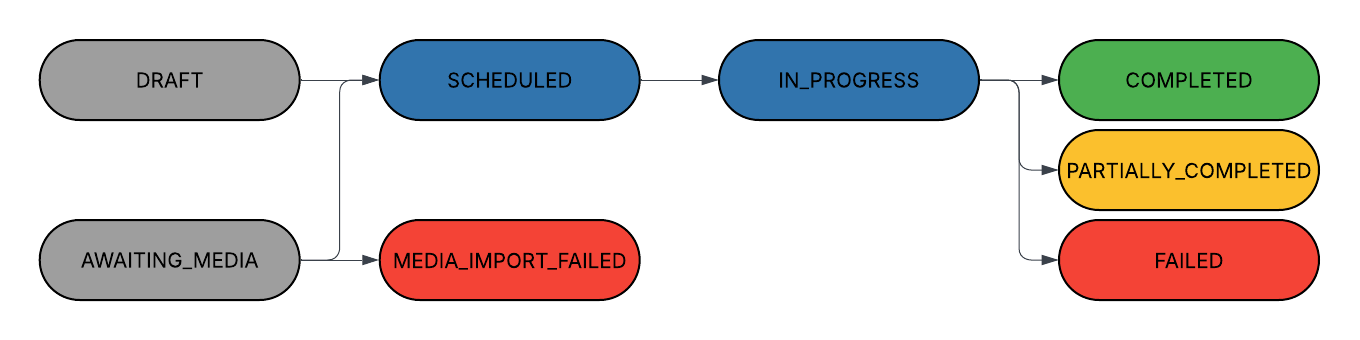
The diagram below shows how a posting schedule moves through statuses. Posts with s3 keys go straight to SCHEDULED. Posts with public URLs start in AWAITING_MEDIA and transition to SCHEDULED once every referenced file has been imported — or to MEDIA_IMPORT_FAILED if any import fails permanently.
Create Post Schedule
Schedule a post to one or multiple platforms.
Request Example — Storage Key
{
"scheduledTime": "2026-04-17T19:33:00-04:00",
"isDraft": false,
"publications": [
{
"socialMediaAccountId": 445,
"platformSettings": {
"type": "TELEGRAM"
},
"posts": [
{
"content": "Ready to go!",
"chatId": "-1001947450140",
"attachmentPaths": [
"6354d8d2-e0f1-702b-af6c-62e28e377ec7/e1992700-96f5-4f0b-bd48-45d902ffbb0c.jpeg"
]
}
]
}
]
}Request Example — Public URL
{
"scheduledTime": "2026-04-20T12:00:00Z",
"isDraft": false,
"publications": [
{
"socialMediaAccountId": 445,
"platformSettings": { "type": "TELEGRAM" },
"posts": [
{
"content": "Posting from a remote image",
"chatId": "-1001947450140",
"attachmentPaths": [
  "https://example.com/my-image.jpg"
]
}
]
}
]
}Request Example — Pinterest Pin
The board goes in chatId; pin options go in platformSettings (see Platform Settings).
{
  "scheduledTime": "2026-04-20T12:00:00Z",
  "isDraft": false,
  "publications": [
    {
      "socialMediaAccountId": 512,
      "platformSettings": {
        "type": "PINTEREST",
        "title": "Easy spring salad",
        "link": "https://example.com/recipes/spring-salad"
      },
      "posts": [
        {
          "content": "A 10-minute salad with seasonal greens.",
          "chatId": "1018813041503562001",
          "attachmentPaths": [
            "6354d8d2-e0f1-702b-af6c-62e28e377ec7/b7c1f0a2-3d4e-4f5a-9b6c-7d8e9f0a1b2c.jpeg"
          ]
        }
      ]
    }
  ]
}
Response
Returns 201 Created with the newly created posting schedule. Fields without a value (for example thumbnail, or pendingImports when nothing is being imported) are omitted from the response:
{
  "id": 9821,
  "overallStatus": "SCHEDULED",       // SCHEDULED | AWAITING_MEDIA | DRAFT
  "scheduledTime": "2026-04-17T23:33:00Z",
  "publications": [
    {
      "id": 14433,
      "socialMediaAccountId": 445,
      "platformSettings": { "type": "TELEGRAM" },
      "posts": [
        {
          "id": 28801,
          "chatId": "-1001947450140",
          "content": "Ready to go!",
          "attachmentPaths": [
            "6354d8d2-e0f1-702b-af6c-62e28e377ec7/e1992700-96f5-4f0b-bd48-45d902ffbb0c.jpeg"
          ]
        }
      ]
    }
  ]
  // "pendingImports" is added when attachmentPaths contain public URLs (see below)
}
When any attachmentPaths entry is a public URL, overallStatus is AWAITING_MEDIA and pendingImports is populated with one entry per in-flight import. Track progress by polling GET /v1/media/upload/import/{importTaskId}:
"pendingImports": [
  {
    "postId": 28801,
    "attachmentIndex": 0,
    "importTaskId": 12345,
    "sourceUrl": "https://example.com/my-image.jpg",
    "state": "QUEUED"                 // Poll GET /v1/media/upload/import/{importTaskId}
  }
]
List Posts
Returns the user's posting schedules, ordered by scheduledTime. Both query parameters are optional ISO 8601 instants and filter on scheduledTime (inclusive). Pass a window: without one, every post the user ever created is returned.
fromDate— earliestscheduledTimeto includetoDate— latestscheduledTimeto include
Request Example
GET /v1/posts?fromDate=2026-04-01T00:00:00Z&toDate=2026-05-01T00:00:00ZResponse Example
[
  {
    "id": 9821,
    "content": "Ready to go!",
    "overallStatus": "SCHEDULED",
    "scheduledTime": "2026-04-17T23:33:00Z",
    "platforms": ["TELEGRAM", "INSTAGRAM"],
    "coverImageUrl": "https://..."    // First attached image, or null
  }
]
Get Post Details
Returns one posting schedule with a status per account (publications[].status) and, for each post, the platform's post id and public link (permalink), or the error message. Published posts also carry metrics. Returns 404 if the post doesn't exist or belongs to another user.
Response Example
{
  "id": 9821,
  "overallStatus": "PARTIALLY_COMPLETED",
  "scheduledTime": "2026-04-17T23:33:00Z",
  "publications": [
    {
      "id": 14433,                      // Publication id (use it to remove one account)
      "socialMediaAccountId": 445,
      "accountUsername": "my_channel",
      "platformName": "TELEGRAM",
      "status": "COMPLETED",
      "platformSettingsNew": { "type": "TELEGRAM" },
      "posts": [
        {
          "id": 28801,
          "chatId": "-1001947450140",
          "platformPostIdentifier": "412",    // The post's id on the platform
          "permalink": "https://t.me/my_channel/412",  // Public link to the post, or null
          "errorMessage": null,
          "content": "Ready to go!",
          "media": [
            {
              "key": "e1992700-96f5-4f0b-bd48-45d902ffbb0c.jpeg",
              "path": "6354d8d2-.../e1992700-96f5-4f0b-bd48-45d902ffbb0c.jpeg",
              "url": "https://...",       // Temporary download URL
              "filename": "launch.jpeg",
              "contentType": "image/jpeg",
              "sizeBytes": 245133,
              "thumbnailUrl": null
            }
          ],
          "thumbnail": null,
          "metrics": null                // See Post Metrics below; null until collected
        }
      ]
    },
    {
      "id": 14434,
      "socialMediaAccountId": 512,
      "accountUsername": "my_brand",
      "platformName": "INSTAGRAM",
      "status": "FAILED",
      "platformSettingsNew": { "type": "INSTAGRAM", "publicationType": "FEED", "aiContent": false },
      "posts": [
        {
          "id": 28802,
          "chatId": null,
          "platformPostIdentifier": null,
          "permalink": null,
          "errorMessage": "...",          // Why publishing failed
          "content": "Ready to go!",
          "media": [ ... ],
          "thumbnail": null,
          "metrics": null
        }
      ]
    }
  ]
}schedule.*, publication.* and post.* events as statuses change.Post Metrics
Published posts carry metrics, refreshed from the platform on each call of this endpoint (if the platform returns nothing, the last known values are returned). impressions, engagements, likes, shares, comments and profileClicks are common to all platforms; a metric the platform does not report is null.
platformAnalytics holds the platform's own analytics for the post, named as the platform names them, for example view_count on TikTok or views and quotes on Threads. The platform is the publication's platformName. Its fields depend on the platform and the post type and may change with the platform's API, so do not rely on a fixed set. It is null when the platform reports none.
"metrics": {
  "impressions": 182,
  "engagements": null,              // null when the platform does not report this metric
  "likes": 1,
  "shares": 0,
  "comments": 0,
  "profileClicks": null,
  "lastUpdatedTime": "2026-10-27T12:17:34Z",
  "platformAnalytics": {            // The platform's own fields, named as the platform names them
    "like_count": 1,
    "comment_count": 0,
    "share_count": 0,
    "view_count": 182
  }
}
Edit a Post
Changes a posting schedule in place: its scheduledTime, and the text, attachments and cover of individual posts. Send only what changes: a field you leave out keeps its value, and posts you don't list stay as they are. Every id stays the same and a draft stays a draft. Platform settings, accounts and chatId can't be changed here. Returns 200 OK with the posting schedule in the same shape as Get Post Details.
A post can be edited while its overallStatus is DRAFT, SCHEDULED, AWAITING_MEDIA or MEDIA_IMPORT_FAILED. Once publishing starts, an edit gets 400.
Request Example
scheduledTime takes the same formats as on create and can't be in the past. Each entry of posts names a post by id and carries only the fields to change:
PATCH /v1/posts/9821

{
  "scheduledTime": "2026-04-18T09:00:00Z",
  "posts": [
    {
      "id": 28801,
      "content": "Ready to go, one day later!"
    },
    {
      "id": 28802,
      "attachmentPaths": [
        "6354d8d2-e0f1-702b-af6c-62e28e377ec7/e1992700-96f5-4f0b-bd48-45d902ffbb0c.jpeg",
        "https://example.com/second-image.jpg"
      ]
    }
  ]
}| Post field | Meaning |
|---|---|
id | Required. The post's id: posts[].id of a publication in Get Post Details. |
content | The new text. |
clearContent | true removes the text. Not together with content. |
attachmentPaths | The new list of attachments, in order; it replaces the current list. Entries are storage keys or public URLs, as on create. A public URL that is still being imported is not downloaded again. |
removeAttachments | true removes every attachment and the cover. Not together with attachmentPaths or thumbnailPath. |
thumbnailPath | The cover, as a storage key (see thumbnailPath in the Post model above). New attachmentPaths without it remove the cover; send both in one request to set a new one. |
Removing the Text or the Attachments
Empty values are refused, not read as "remove": an empty content, attachmentPaths or thumbnailPath gets 400. To remove the text, send clearContent: true; to remove the attachments, send removeAttachments: true. A flag set to false or null means the same as leaving it out.
{
  "posts": [
    { "id": 28801, "removeAttachments": true }
  ]
}
Statuses and Validation
The edited schedule is checked against the same platform rules as on create (text length, media types and so on), so an edit that breaks one gets 400 with the reason. A post whose text comes from the platform, such as a WhatsApp template message, can't take content or clearContent.
A new public URL in attachmentPaths moves the post to AWAITING_MEDIA until the file is imported, as on create. To get a post out of MEDIA_IMPORT_FAILED, replace the attachment that failed; sending the same URL again retries the import. When an edit changes a publication's status, subscribers get the matching publication.* event (see Webhooks).
Errors
Each of these gets 400 with a message in error, and nothing is changed:
- nothing to change: no
scheduledTimeand no post field or flag; - an empty
contentorthumbnailPath, an emptyattachmentPathsor an empty entry in it; - a field together with the flag that removes it:
contentwithclearContent,attachmentPathsorthumbnailPathwithremoveAttachments; scheduledTimein the past;- a post
idthat isn't in this schedule, or the same id twice; - an
overallStatusthat can't be edited; - a platform rule the edited post breaks;
contentorclearContenton a post whose text comes from the platform.
HTTP/1.1 400 Bad Request

{
  "error": "Post 28801: content is empty. To keep the text, leave content out; to remove it, send clearContent: true"
}
Delete a Post
Deletes the posting schedule with all its publications. Returns 204 No Content.
DRAFT,SCHEDULED,AWAITING_MEDIA,MEDIA_IMPORT_FAILED— the post is cancelled and never published.COMPLETED,PARTIALLY_COMPLETED,FAILED— the post is deleted from PostPulse permanently, with its metrics and analytics. This cannot be undone. The posts already published stay on the platforms, unless you passdeleteFromPlatform=true.IN_PROGRESS— rejected with409and codepost_in_progress; nothing is deleted. Retry once publishing finishes.
Files the post used stay in the media library; delete them with DELETE /v1/media/{key}. Subscribers get publication.deleted for every publication and then schedule.deleted (see Webhooks).
HTTP/1.1 409 Conflict

{
  "error": "Post 9821 is IN_PROGRESS; try again when it finishes",
  "code": "post_in_progress"
}
Remove One Account from a Post
Removes a single publication from the posting schedule and keeps the others. Use publications[].id from Get Post Details (not the socialMediaAccountId). Removing the last publication deletes the whole schedule. Returns 204 No Content.
The statuses work as for deleting the whole post, and a published or failed publication is deleted permanently as well. A published post then takes its overallStatus from the publications left: PARTIALLY_COMPLETED without its failed publication becomes COMPLETED. While overallStatus is IN_PROGRESS (even if this publication has already finished) or AWAITING_MEDIA, the request is rejected with 409 and code post_in_progress; retry once the post leaves that status. Subscribers get publication.deleted, and schedule.deleted when the last publication goes.
Delete on the Platforms
Both DELETE endpoints accept the optional query parameter deleteFromPlatform (default false). With true, the published posts are deleted on the platforms first, then the post is deleted in PostPulse, and the response is 204 No Content. It applies to COMPLETED, PARTIALLY_COMPLETED and FAILED posts; whatever failed to publish is skipped, since it never reached the platform. For any other status the parameter changes nothing.
DELETE /v1/posts/9821?deleteFromPlatform=trueIt is all or nothing:
400with codeplatform_deletion_not_supported— a published post can't be deleted on its platform (see Supported Platforms below);platformsnames those platforms. The request is refused before any platform call, and nothing is deleted. To remove the post from PostPulse only, repeat the request withoutdeleteFromPlatform.502with codeplatform_deletion_failed— a platform failed to delete a post;platformandpublicationIdname the publication. Nothing is deleted in PostPulse. Posts deleted on the platforms before the failure stay deleted. Retrying the same request is safe: a post already gone from the platform counts as deleted.
HTTP/1.1 400 Bad Request

{
  "error": "Can't delete the published post on TikTok; delete it without deleteFromPlatform to remove it from PostPulse only",
  "code": "platform_deletion_not_supported",
  "platforms": ["TIKTOK"]
}
HTTP/1.1 502 Bad Gateway
{
"error": "Failed to delete the post on X, nothing was deleted in PostPulse and retrying is safe: X Error: Service Unavailable",
"code": "platform_deletion_failed",
"platform": "X_TWITTER",
"publicationId": 10342
}Each publication.deleted event carries deletedFromPlatform: true when the publication's published posts were deleted on the platform (see Webhooks).
Supported Platforms
Posts are deleted on the platforms below. On any other platform a published post gets 400.
| Platform | Notes |
|---|---|
X (X_TWITTER) | Every post of a thread is deleted. X allows 50 deletions per account in 15 minutes; above that the request gets 502, retry later. |
Pinterest (PINTEREST) | The pin is deleted. |
YouTube (YOUTUBE) | The video is deleted. YouTube deletions count against a daily API quota shared across PostPulse; when it runs out the request gets 502, retry later. |
Bluesky (BLUE_SKY) | The post is deleted. |
Telegram (TELEGRAM) | Every message of the post is deleted, including each message of an album. Telegram allows this only within 48 hours of publishing; for an older post the whole request gets 400. |
Facebook (FACEBOOK) | Feed posts (text, photos, carousels and videos) and Reels are deleted along with their media. A Story can't be deleted: the whole request gets 400, and the Story disappears by itself 24 hours after publishing. For some seconds after publishing, Facebook refuses to delete a video or Reel, answering as if it were already gone. So while a post is under 5 minutes old, that answer gets 502: retry shortly. After that, a post Facebook reports as gone counts as deleted. |
Facebook Page (FACEBOOK_PAGE) | Feed posts (text, photos, carousels and videos) and Reels are deleted along with their media. A Story can't be deleted: the whole request gets 400, and the Story disappears by itself 24 hours after publishing. For some seconds after publishing, Facebook refuses to delete a video or Reel, answering as if it were already gone. So while a post is under 5 minutes old, that answer gets 502: retry shortly. After that, a post Facebook reports as gone counts as deleted. |
LinkedIn (LINKEDIN) | The post is deleted. Right after publishing, LinkedIn may fail the deletion; the request gets 502, retry shortly. |
Platform Settings
Each platform requires specific settings in the platformSettings JSON object. The type field is mandatory for all platforms and must match the platform name.
platformSettings field with the type value in your request.{
"type": "INSTAGRAM",
"publicationType": "FEED" | "REELS" | "STORY",
"aiContent": false
}aiContent (optional, default false) labels the post as AI-generated content on Instagram.
{
  "type": "LINKEDIN",
  "visibility": "PUBLIC" | "CONNECTIONS" | "GROUP"
}
Threads
{
  "type": "THREADS",
  "topicTag": "optional topic tag"
}
TikTok
{
  "type": "TIK_TOK",
  "title": "Video title",
  "privacyLevel": "PUBLIC_TO_EVERYONE" | "FOLLOWER_OF_CREATOR" | "MUTUAL_FOLLOW_FRIENDS" | "SELF_ONLY",
  "disableDuet": false,
  "disableComments": false,
  "disableStitch": false,
  "brandContent": false,
  "brandOrganic": false,
  "aiContent": false,
  "autoAddMusic": false,
  "hasUsageConfirmation": true
}
type also accepts TIKTOK. aiContent (optional, default false) discloses AI-generated content and applies to video posts. autoAddMusic (optional, default false) lets TikTok add background music and applies to photo posts. TikTok decides per creator which privacyLevel values are available and whether duet/stitch/comments can be enabled; a value the creator can't use is rejected when the post is published.
YouTube
{
  "type": "YOUTUBE",
  "title": "Video title",
  "privacyStatus": "PUBLIC" | "UNLISTED" | "PRIVATE",
  "category": "FILM_ANIMATION" | "AUTOS_VEHICLES" | "MUSIC" | "PETS_ANIMALS" | "SPORTS" | "TRAVEL_EVENTS" | "GAMING" | "PEOPLE_BLOGS" | "COMEDY" | "ENTERTAINMENT" | "NEWS_POLITICS" | "HOWTO_STYLE" | "EDUCATION" | "SCIENCE_TECHNOLOGY"
}
Telegram
{
  "type": "TELEGRAM"
}
X (Twitter)
{
  "type": "TWITTER"
}
type also accepts X_TWITTER.
Bluesky
{
  "type": "BLUE_SKY"
}
type also accepts BLUESKY.
{
  "type": "FACEBOOK",
  "publicationType": "FEED" | "REELS" | "STORY"
}{
"type": "PINTEREST",
"title": "Pin title",
"link": "https://example.com/landing-page",
"altText": "Description of the image for screen readers",
"boardSectionId": "5234567890123456789"
}Only type is required; title (up to 100 characters), link (destination URL opened when the pin is clicked), altText and boardSectionId (pin into a section of the board) are optional. The board itself is set per post via chatId — get board IDs from Get Connected Chats with platform=PINTEREST.
{
  "type": "WHATSAPP",
  "contactListId": 42,
  "templateName": "autumn_sale",
  "templateLanguage": "en",
  "headerParameter": "Autumn sale",
  "bodyParameters": { "1": "20%", "2": "Sunday" },
  "buttonParameters": { "0": "autumn-2026" }
}contactListId, templateName and templateLanguage are required; the variables depend on the template. androidVideoCompat (REPACK or SEND_AS_IS) is needed for a header video whose index is at the end of the file. The sending number is set per post via chatId. See WhatsApp Broadcasts.
WhatsApp Broadcasts
A WhatsApp account in PostPulse is a WhatsApp Business Account (WABA). A post sends one of the account's approved message templates to a contact list, from one of the account's phone numbers. In GET /v1/accounts each connected WABA is a separate account with platform WHATSAPP: accountDisplayName is the WABA name.
To send a broadcast:
- Pick the sending number with Get Connected Chats.
- Pick an approved template.
- Pick or create a contact list.
- Schedule the post, then follow its delivery.
Phone Numbers
GET /v1/accounts/{id}/chats returns the account's phone numbers. Pass the id of the number to send from as the post's chatId.
[
  {
    "id": "106540352242922",
    "title": "Acme Store +44 7700 900123",
    "type": "PHONE_NUMBER",
    "platform": "WHATSAPP"
  }
]
Templates
Returns the account's approved message templates. Templates are created and approved in WhatsApp Manager, not in PostPulse; a new or changed template shows up here within 10 minutes.
parameterFormat—POSITIONAL(variables{{1}},{{2}}, …) orNAMED(variables by name).headerFormat—TEXT,IMAGE,VIDEO, ornullwithout a header.headerParameterKeyis the variable of a text header, ornull.bodyParameterKeys— the body variables in the order they appear.buttons[].dynamicUrl— the URL of the button ends with a variable.supported—falsefor a template PostPulse can't send, with the reason inunsupportedReason: authentication templates, document or location headers, carousels and other components besides header, body, footer and buttons, and buttons other than quick reply, URL and phone number.
Response Example
[
  {
    "name": "autumn_sale",
    "language": "en",
    "category": "MARKETING",
    "parameterFormat": "POSITIONAL",
    "headerFormat": "TEXT",
    "headerText": "Our {{1}} is on!",
    "headerParameterKey": "1",
    "bodyText": "Get {{1}} off until {{2}}",
    "bodyParameterKeys": ["1", "2"],
    "footerText": "Reply STOP to opt out",
    "buttons": [
      {
        "type": "URL",
        "text": "Shop",
        "url": "https://example.com/{{1}}",
        "phoneNumber": null,
        "dynamicUrl": true
      },
      {
        "type": "PHONE_NUMBER",
        "text": "Call",
        "url": null,
        "phoneNumber": "+447700900456",
        "dynamicUrl": false
      }
    ],
    "supported": true,
    "unsupportedReason": null
  }
]
Contact Lists
Contact lists belong to the account. A list holds up to 1,000 contacts, and a broadcast goes to one list.
Returns the account's contact lists.
Creates a list. Body: { "name": "Newsletter" }, 1–100 characters, unique in the account regardless of case. Returns the list.
Renames the list. Same body as creating it. Returns the list.
Deletes the list with its contacts. Returns 204 No Content. A scheduled broadcast to a deleted list fails.
Contact List
{
  "id": 42,
  "name": "Newsletter",
  "contactCount": 318,
  "createdTime": "2026-11-02T09:15:00.000000"
}
Contacts
Returns a page of the list's contacts in the order they were added. Query parameters: page (from 0, default 0) and size (default 50). optedOut is true when the phone is on the account's opt-out list: broadcasts skip it.
Response Example
{
  "items": [
    {
      "id": 9001,
      "phone": "447700900123",
      "name": "Alex",
      "optedOut": false,
      "createdTime": "2026-11-02T09:16:00.000000"
    }
  ],
  "page": 0,
  "size": 50,
  "totalItems": 318,
  "totalPages": 7
}Adds up to 1,000 contacts per request. optInConfirmed must be true: it confirms that every contact agreed to receive WhatsApp messages from your business. name is optional, up to 255 characters.
Phones are in international format with the country code. Spaces, dashes, parentheses and a leading + or 00 are removed; what is left must be 7–15 digits. Phones are stored as digits without +. Invalid phones are returned in invalid, phones already in the list are counted in duplicates, and optedOut counts the added phones that are on the opt-out list. An upload that would take the list over 1,000 contacts adds nothing and returns 400.
Request Example
{
  "optInConfirmed": true,
  "contacts": [
    { "phone": "+44 7700 900123", "name": "Alex" },
    { "phone": "0044 7700 900124" },
    { "phone": "12345" }
  ]
}
Response Example
{
  "added": 2,
  "duplicates": 0,
  "optedOut": 0,
  "invalid": ["12345"]
}Removes the contact from the list. Returns 204 No Content. The phone stays on the opt-out list if it is there.
Schedule a Broadcast
Use POST /v1/posts (see Post Scheduling) with WhatsApp platformSettings:
{
  "scheduledTime": "2026-11-20T10:00:00Z",
  "isDraft": false,
  "publications": [
    {
      "socialMediaAccountId": 731,
      "platformSettings": {
        "type": "WHATSAPP",
        "contactListId": 42,
        "templateName": "autumn_sale",
        "templateLanguage": "en",
        "headerParameter": "Autumn sale",
        "bodyParameters": { "1": "20%", "2": "Sunday" },
        "buttonParameters": { "0": "autumn-2026" }
      },
      "posts": [
        { "chatId": "106540352242922" }
      ]
    }
  ]
}- A publication sends from one number to one list: it has exactly one post, whose
chatIdis the number. To send from two numbers or to two lists, add two publications. contentis not needed: PostPulse saves the template text (the text header and the body, with the variables filled in) as the post's content and replaces any content you send.bodyParametershas a value for every key in the template'sbodyParameterKeys.headerParameteris set only when the template has aheaderParameterKey, up to 60 characters.buttonParametersmaps the index of each button withdynamicUrlinbuttonsto the end of its URL. Values can't be empty or contain new lines, tabs or more than four spaces in a row.- A template with an
IMAGEheader needs exactly one image attachment (JPEG or PNG, up to 5 MB) inattachmentPaths; aVIDEOheader needs one video (MP4 or 3GPP, up to 16 MB). Other templates take no attachments. - WhatsApp on Android can't play a header video whose index (the MP4
moovbox) comes after its data. For such a video setandroidVideoCompat:REPACKlets PostPulse move the index to the front without re-encoding before sending,SEND_AS_ISsends the file unchanged. Without it the request returns400, and a video attached by URL ends the post inMEDIA_IMPORT_FAILEDonce it is imported. The field is returned with the post. - The list must have at least one contact that hasn't opted out.
If a rule is broken, or the template is no longer approved, the request returns 400 with the reason in error.
Sending and Result
At the scheduled time the post moves to IN_PROGRESS and the messages go out in batches of 200, about every two minutes: 1,000 contacts take about 15–25 minutes. Contacts on the opt-out list are skipped and don't count as failures. Once the messages are out and WhatsApp has reported their statuses, the post settles:
COMPLETED— WhatsApp accepted every message.PARTIALLY_COMPLETED— WhatsApp accepted some of the messages.errorMessagesays how many failed and why, for example12 of 320 messages failed: Message undeliverable (131026), or why the broadcast stopped, anderrorKindis the kind of that error.FAILED— WhatsApp accepted no message.
The broadcast stops on an error that affects every message: the template was paused or deleted, the account's access was revoked, the phone number's display name is not approved, or the WhatsApp Business Account has a payment problem. The messages not sent yet are dropped, and the post is PARTIALLY_COMPLETED if some messages had gone out, FAILED otherwise.
WhatsApp charges message fees to the payment method of the WhatsApp Business Account in WhatsApp Manager. Replies of recipients don't appear in PostPulse. A recipient who replies STOP or UNSUBSCRIBE, or stops marketing messages in WhatsApp, is put on the account's opt-out list automatically.
Delivery Summary
Returns how the broadcast went: the number of messages in each status and the most frequent errors. postId is publications[].posts[].id from Get Post Details, not the posting schedule id. The counts keep changing while WhatsApp reports statuses, also after the post has settled.
pending,sending— not sent yet;accepted— accepted by WhatsApp, no status yet.sent,delivered,read,failed— the last status WhatsApp reported.optedOut— skipped, the phone is on the opt-out list;cancelled— not sent because the broadcast stopped.topErrors— up to five WhatsApp errors of the failed messages, the most frequent first.
Response Example
{
  "total": 320,
  "pending": 0,
  "sending": 0,
  "accepted": 4,
  "sent": 21,
  "delivered": 180,
  "read": 96,
  "failed": 17,
  "optedOut": 2,
  "cancelled": 0,
  "topErrors": [
    { "code": 131026, "title": "Message undeliverable", "count": 12 },
    {
      "code": 131049,
      "title": "This message was not delivered to maintain healthy ecosystem engagement.",
      "count": 5
    }
  ]
}
Opt-outs
The opt-out list belongs to the account: an opted-out phone gets no broadcast of the account, from any of its numbers and to any of its lists. Mark a recipient who asked to stop in another way, for example in a chat or by email.
Body: { "phone": "+44 7700 900123" }, written as for contacts. Returns 204 No Content, also when the phone is already on the list.
Takes the phone off the opt-out list, whoever put it there. Pass the phone as digits, for example 447700900123. Returns 204 No Content, also when the phone is not on the list.
Disconnecting the account deletes its contact lists and its opt-out list.
Data Models
Account Model
{
  "id": "number",
  "platform": "X_TWITTER" | "YOUTUBE" | "THREADS" | "TIKTOK" | "INSTAGRAM" | "LINKEDIN" | "BLUE_SKY" | "TELEGRAM" | "FACEBOOK" | "PINTEREST" | "WHATSAPP",
  "accountId": "string",
  "accountUsername": "string",
  "accountDisplayName": "string",
  "accountAvatarUrl": "string",
  "createdTime": "ISO 8601 datetime",
  "updatedTime": "ISO 8601 datetime"
}
Chat Model
{
  "id": "string",
  "title": "string",
  "type": "string",
  "platform": "string"
}
Media Upload Response
{
  "path": "string"
}
Publication Model
{
  "socialMediaAccountId": "number",
  "platformSettings": {
    "type": "platform_enum"
  },
  "posts": [
    {
      "content": "string",
      "chatId": "string (Telegram channel, Facebook Page, Pinterest board or WhatsApp phone number)",
      "attachmentPaths": ["string — storage key (from media upload) OR public URL"]
    }
  ]
}
Posting Schedule Created Response
Returned from POST /v1/posts.
{
  "id": "number",
  "overallStatus": "SCHEDULED | AWAITING_MEDIA | DRAFT",
  "scheduledTime": "ISO 8601 datetime (UTC)",
  "publications": [
    {
      "id": "number",
      "socialMediaAccountId": "number",
      "platformSettings": { "type": "platform_enum" },
      "posts": [
        {
          "id": "number",
          "chatId": "string (omitted when not set)",
          "content": "string",
          "attachmentPaths": ["string"],
          "thumbnail": "string — the post's thumbnailPath (omitted when not set)"
        }
      ]
    }
  ],
  "pendingImports": [                // Omitted when no public URLs are being imported
    {
      "postId": "number",
      "attachmentIndex": "number",
      "importTaskId": "number",
      "sourceUrl": "string",
      "state": "QUEUED | DOWNLOADING | VALIDATING | UPLOADING | READY | FAILED_TEMPORARY | FAILED_PERMANENT"
    }
  ]
}
Error Handling
PostPulse API uses standard HTTP status codes. Every error response from the API is a JSON object with an error string. A few errors also carry a machine-readable code, for example post_in_progress (409), oauth_state_expired (410), or platform_deletion_not_supported (400) and platform_deletion_failed (502) when deleting posts on the platforms. Branch on code when it is present and on the HTTP status otherwise, and show error to the user or log it.
Error Response Format
HTTP/1.1 400 Bad Request
Content-Type: application/json

{
  "error": "Social media account ID cannot be null; Platform settings cannot be null"
}
When several fields fail validation at once, their messages are joined with ; in a single error string, as in the example above.
Common Status Codes
| HTTP Status | When | Example error message |
|---|---|---|
| 400 | Request validation failed, malformed JSON, or an invalid value | Platform settings cannot be null |
| 401 | Missing, expired or invalid access token | Unauthorized |
| 402 | Connecting a social media account that was already used by another PostPulse user | Social media account has already been used previously |
| 403 | Token lacks the required scope, or the account is suspended | Access denied |
| 404 | Unknown route or resource | Posting schedule not found: 9821 |
| 409 | A conflicting operation is running: the post is being published or awaits its media import (code post_in_progress), or the user is being deleted | Post 9821 is IN_PROGRESS; try again when it finishes |
| 410 | OAuth state of a connect flow expired — start the flow again | Invalid or expired OAuth state |
| 413 | Uploaded file exceeds the size limit | Uploaded file is too large. Max size is 100MB. |
| 500 | Unexpected server error | An unexpected error occurred |
| 502 | A platform failed to delete a post requested with deleteFromPlatform=true (code platform_deletion_failed); nothing was deleted in PostPulse | Failed to delete the post on X, nothing was deleted in PostPulse and retrying is safe: X Error: Service Unavailable |
Gateway Errors
Rate limiting (429) and a few infrastructure errors are returned by the API gateway in front of the service rather than by the API itself. Those responses use a message field instead of error:
HTTP/1.1 429 Too Many Requests
Content-Type: application/json

{
  "message": "Too Many Requests"
}
Retry 429 and 5xx responses with exponential backoff. Do not retry 4xx responses other than 429 without changing the request, except 409 with code post_in_progress: the same request succeeds once the post leaves that status.