YouTube Shorts Automation: The Developer's End-to-End Guide
Published on
Tags:
You're probably staring at a script that can already generate text, call a TTS provider, stitch clips with FFmpeg, and push a file to YouTube. On paper, that looks like the whole game. In practice, the pipeline breaks in uglier places: OAuth friction, upload edge cases, weak hooks, stale topics, and the quiet failure mode where everything “works” technically but the channel still goes nowhere.
That gap is why YouTube Shorts automation frustrates developers. The platform is huge, which makes the engineering effort worth it. YouTube Shorts generates over 70 billion views daily, and channels that regularly post Shorts see 25% higher audience retention compared to those that don't according to LenosTube's roundup of YouTube Shorts stats. But high upside also means low-quality automation gets exposed fast.
A lot of developers start from the monetization angle first, which is reasonable. If you're exploring the business model side, this guide on making money with YouTube automation is useful context. The engineering side is where most projects fail, though. The hard part isn't generating lots of content. It's building a system that publishes reliably, stays within documented API behavior, and still leaves room for a human to improve the parts automation usually ruins.
Table of Contents
The Automated Content Dream vs The API Reality
The dream is clean. Feed ideas into a queue, let GPT-4 or GPT-4o draft a script, hand it off to ElevenLabs, assemble footage, upload on schedule, collect views. You wake up to a fresh batch of Shorts and a dashboard moving in the right direction.
The actual version is messier. Your first OAuth attempt creates a token that works once and then forces another login. Your upload succeeds but the video isn't classified the way you expected. Your scheduler keeps publishing content that technically matches the niche, but nobody sticks around past the opening seconds. Then you discover that “fully automated” usually means “nobody reviewed the weakest part.”
Practical rule: If your pipeline can publish without human review, it can also publish garbage at machine speed.
That's the trap. Developers naturally optimize for throughput because throughput is measurable. But YouTube Shorts automation isn't just an infra problem. It's an editorial control problem with an API attached to it.
A lot of tutorials sell certainty where there isn't any. They imply that once the upload endpoint works, the rest is just scale. That's how people end up with channels full of low-effort clips, repetitive scripts, and hooks that die immediately. The code runs. The outcome doesn't.
The more honest way to think about it is this:
Automation is good at assembly. It can pull rows from a sheet, generate variants, render files, and publish on schedule.
Humans are still better at judgment. They spot weak openings, lazy topic choices, and concepts that feel obviously derivative.
Platforms care about output quality. Not in an abstract moral sense. In a practical ranking and distribution sense.
Most failed channels don't fail because the cron job stopped. They fail because the system kept producing the wrong thing without anyone correcting it.
That's why the rest of the stack needs to be designed around hybrid automation. Let the machine do repetitive work. Keep people in the loop where taste, timing, and iteration matter.
Mapping Your Automation Workflow
You don't need one canonical architecture for YouTube Shorts automation. You need one that matches your constraints. This is closer to choosing between Rails, serverless functions, or a visual builder than choosing a single “best” stack.
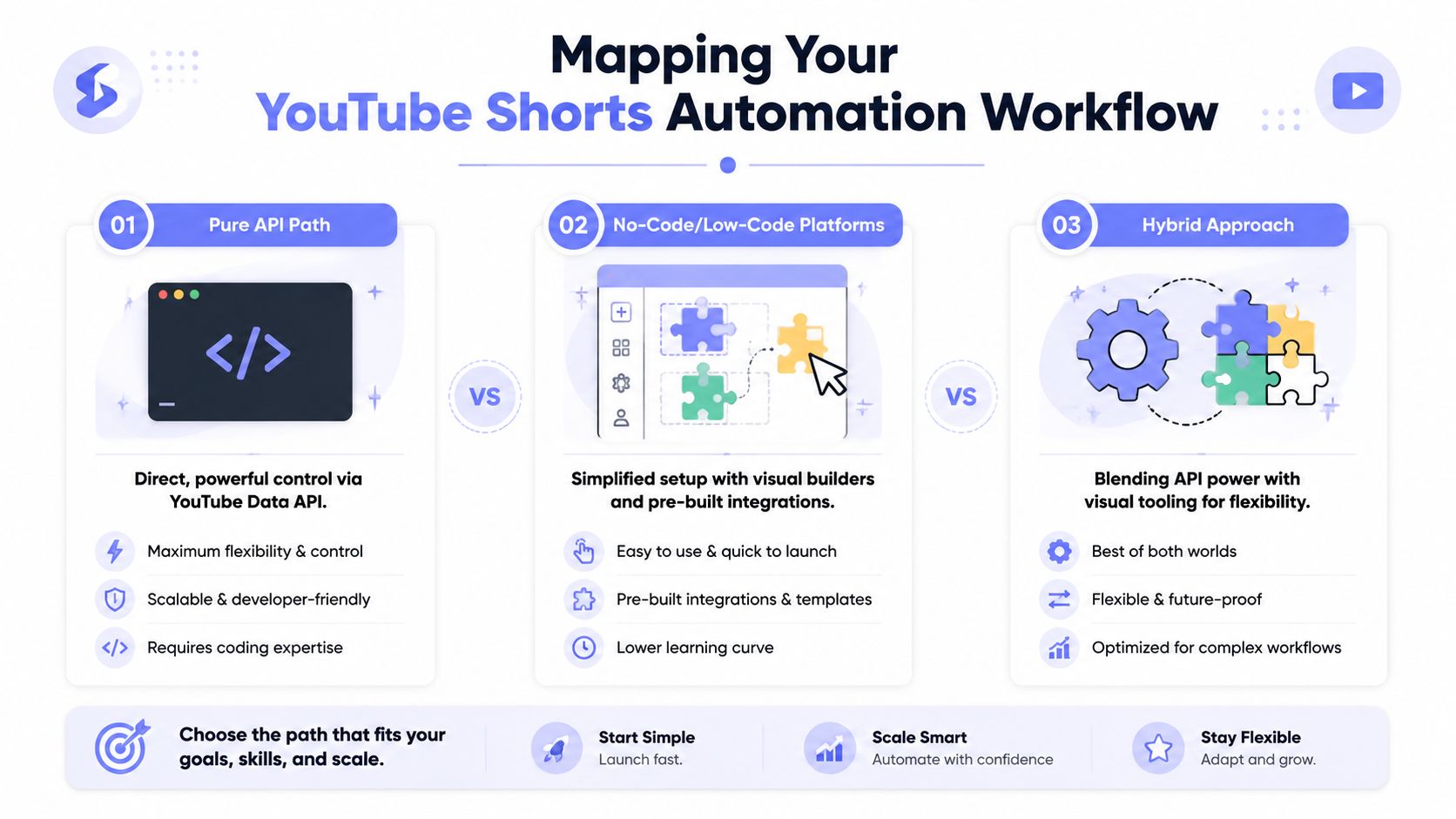 A visual guide illustrating three different approaches for automating YouTube Shorts workflows: API, no-code, and hybrid methods.
Three architectures that actually matter
The pure API path is what most engineers reach for first. You create a Google Cloud project, enable the YouTube Data API v3, and generate OAuth 2.0 credentials for a desktop application so your script can create and reuse token.json, as shown in this walkthrough on setting up YouTube Data API credentials for uploads. From there, your code owns the whole lifecycle.
This route gives you the sharpest control. You define state transitions, retries, metadata generation, and observability. It also means you own every annoying piece of glue code.
The no-code or low-code path is faster to stand up. n8n and Make are good examples. You can wire together Google Sheets, OpenAI, a TTS step, file storage, and a publishing action without writing the entire orchestration layer yourself. That's often enough for a small channel or an internal content tool.
The downside is friction at the edges. Complex branching, media processing, and debugging become awkward. Once you need custom rendering logic or richer failure handling, the visual flow starts to feel like trying to build a backend inside a UI.
The hybrid path is usually the strongest choice. Put rendering, file management, and custom business logic in code. Use visual automation for triggers, approvals, and orchestration where it saves time. That split tends to survive longer because each tool handles the part it's good at.
A quick decision table
Path | Best when | Strength | Trade-off |
Pure API | You want full control over upload, rendering, and scheduling | Precise behavior and custom logic | More auth, retry, and maintenance work |
No-code or low-code | You need to ship quickly and iterate on workflow shape | Fast setup and easy orchestration | Harder debugging and less flexibility |
Hybrid | You need control without rebuilding everything | Good balance of speed and extensibility | Requires discipline about system boundaries |
A useful way to decide is to ask where failure would hurt most.
If publishing reliability matters most, keep upload logic in code.
If editorial review matters most, add an approval checkpoint in your workflow tool.
If your team changes prompts often, separate prompt management from render logic.
If you're experimenting with agents, keep them away from direct publishing until you trust their outputs.
The “AI agent path” gets talked about like it replaces architecture. It doesn't. Agents still need a bounded role. Let them propose scripts, titles, or topic variants. Don't let them become the only quality filter.
Building Your Content Generation Pipeline
A Shorts pipeline usually looks clean in a diagram and messy in production. The script passes, the render finishes, the file uploads, and the channel still flatlines because the output feels machine-made. That is the failure mode worth designing around.
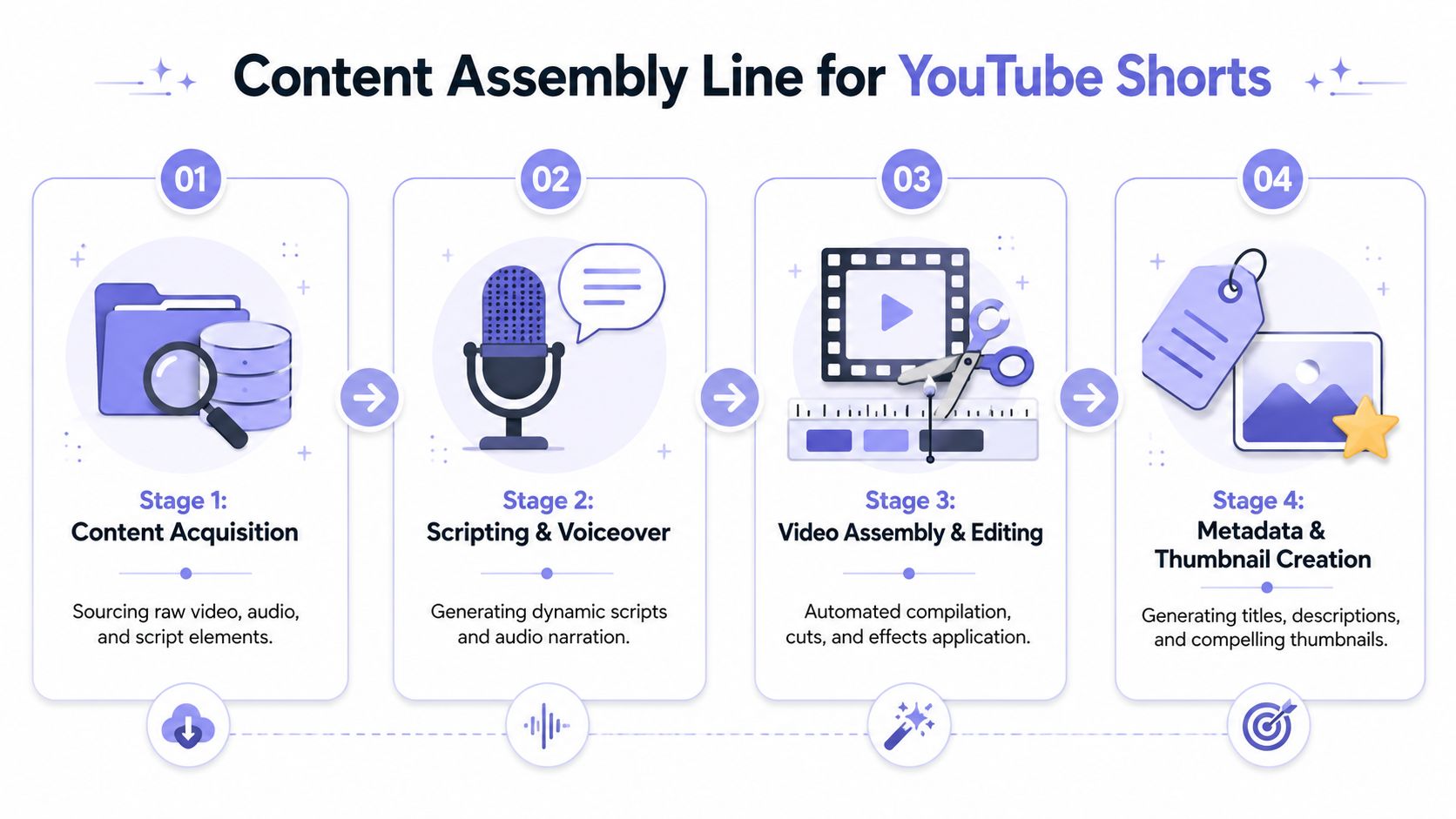 A flowchart showing the four-stage content assembly line process for creating and automating YouTube Shorts videos.
Treat content like a production system
The pipeline needs clear stages. I use four: idea intake, script generation, voice and media creation, and assembly. Publishing exists downstream, but the quality ceiling is set earlier.
The practical mistake is trying to fully automate creative judgment. That produces the kind of channel YouTube is good at suppressing over time: repetitive topics, recycled phrasing, weak hooks, and no editorial correction loop. A hybrid model holds up better. Let the system generate options at scale, then put a human checkpoint before rendering so bad ideas die early and good ones get sharpened.
I usually split the system into these workers:
Idea intake servicePull ideas from a sheet, CMS, Airtable, or database. Store topic, source notes, current angle, status, and constraints. If those fields only exist inside prompts, the pipeline becomes hard to debug.
Script generation workerGenerate multiple script candidates, not one. The reviewer should be choosing among hooks and framing options, not accepting the first model output by default.
Voice and media workerSend approved copy to your TTS provider and fetch visuals from your own asset store, stock libraries, or generated media. Keep filenames, durations, and asset IDs deterministic so retries do not create a different video by accident.
AssemblerBuild captions, time scenes, place text overlays, mix audio, and export a vertical render. This step should be as mechanical as possible. Creative choices belong earlier.
If you are comparing rendering stacks, this roundup of best AI video editing tools is a practical starting point because it shows the trade-offs between template-heavy editors and systems you can automate more extensively.
For teams already using AI earlier in the workflow, an ideation queue paired with an editorial workspace works well. A process similar to this guide on creating social media posts with AI fits naturally before the Short-specific render step.
Where pipelines break
Broken code is easy to find. Weak inputs are not.
Channels built around pure automation often keep pulling from static topic lists because that is simple to script. The output looks efficient on paper and stale in the feed. What matters is whether the intake layer captures why a topic deserves a video now, what angle makes it distinct, and what the first line needs to do.
That is why topic collection can be automated, but topic approval should stay human-in-the-loop.
A useful intake record includes:
Topic prompt: The raw idea for the model to expand
Current angle: Why this topic is timely or worth revisiting
Status:
to-do,drafted,approved,rendered,published,failedHook note: Human guidance for the opening line or first visual beat
Asset preference: Stock footage, motion graphics, screenshots, gameplay, or talking-head substitute
Risk note: Claims, citations, or niche-specific issues that need review
That last field matters more than people expect. In health, finance, and news-adjacent niches, a model can produce plausible garbage fast. If the pipeline has no place to flag risky claims before render, you end up scaling review debt instead of scaling content.
A practical content state machine
Treat each Short as a stateful job with artifacts attached to each step. That keeps retries cheap and makes it possible to inspect failures without rerunning everything.
State | What happens |
| Idea is queued for script generation |
| Model output exists and awaits review |
| Human accepted the hook, framing, and topic |
| Video file and captions were created |
| Upload completed and URL was logged |
| A worker, asset fetch, or upload step broke |
This structure solves a common operational problem. If subtitle generation fails, the system should retry captions. It should not regenerate the script, pick new visuals, and produce a different asset unless someone explicitly requests a new version.
I also recommend storing versioned outputs for the script, title, description, caption file, thumbnail frame, and final render. That gives the reviewer a way to compare iterations instead of arguing from memory about which prompt change improved retention. Hybrid automation works because the machine handles volume and repeatability, while a human keeps the channel from drifting into low-quality sludge.
Handling Authentication and Publishing
Clean architecture runs into platform reality. Your render job may be perfect, your queue may be stable, and your content may be decent. Then auth breaks at the point of publish and the whole system feels unreliable.
 A pensive programmer looking at a computer screen displaying an expired API token notification for YouTube.
The OAuth setup most people trip over
The direct YouTube route starts in Google Cloud Console. You create a project, enable the API, generate OAuth 2.0 credentials for a desktop application, run the consent flow once, and persist the resulting token.json for reuse. If you skip the credential type or mishandle token persistence, you end up doing manual login far more often than you should.
That's why local proof-of-concept code often feels fine while production automation feels brittle. The app works on your machine because you just authenticated. The scheduled worker fails later because token handling was treated like setup boilerplate instead of part of the system.
A second gotcha is discovery. The YouTube Data API v3 does not provide a native endpoint or parameter to list videos specifically by Shorts type, so if you need Shorts-aware downstream logic you have to inspect metadata yourself or use a wrapper that exposes it differently, as discussed in this Stack Overflow thread on Shorts support in the YouTube API.
That matters when you build reporting or reconciliation jobs. Don't assume the API exposes a dedicated “Shorts” filter just because the product does.
Publishing details that decide whether it becomes a Short
The upload itself has one rule that's easy to overlook. To guarantee a video is treated as a Short, it needs to be vertical in 9:16 and under 60 seconds, and the recommended best practice is to set youtube_shorts=true in the API request body, especially when the video is near the classification boundary. This write-up on automatically posting YouTube Shorts and forcing classification is one of the clearer explanations of that edge case.
If your system sometimes renders square assets, or exports clips that land very close to the time limit, you need explicit validation before upload.
Use a preflight check like this:
Validate orientation: Confirm the render is vertical before the upload job starts.
Validate duration: Reject anything at or above the boundary instead of hoping classification works out.
Set the Short flag: Include
youtube_shorts=truedeliberately.Log the payload: Store the metadata you sent so debugging isn't guesswork later.
Here's a good walkthrough if you want a visual refresher on the flow from auth to upload:
Operational hygiene for auth and retries
The publishing worker should behave like any other production integration. It needs structured logs, idempotent job handling, and a clear separation between permanent failure and retryable failure.
A social publishing system is still a distributed system. Treat it that way.
A few habits save a lot of pain:
Store tokens carefully: Don't scatter credential files across dev machines and servers. Centralize secrets and rotation practices. This guide on API key management patterns for automation systems is a useful reference for cleaning up that part of the stack.
Separate upload from publish bookkeeping: The file transfer, metadata registration, and URL logging should not be one opaque function.
Retry with judgment: Network failures and transient API issues deserve retries. Invalid media or malformed metadata should fail fast.
Keep agents boxed in: If you're experimenting with autonomous workers, tools like the OpenClaw API for AI employees are more useful when they operate inside constrained publishing workflows, not when they get unrestricted control over channel output.
Compliance Monitoring and Human Iteration
The channels that survive don't run as unattended scripts forever. They operate more like supervised systems. Automation does the repetitive work. People decide what deserves to ship and what should change next.
 A hand adjusts controls on a digital dashboard panel illustrating automated process management, policy compliance, and monitoring.
Why fully automated channels stall
The marketing around faceless channels pushes the “closed loop” fantasy hard. Generate script. Render video. Publish endlessly. But the stronger pattern is the opposite. Successful faceless channels in 2026 are described as using a hybrid automation model where content generation is automated but a manual iteration loop refines hooks and concepts based on real user feedback, adding the human signature that low-effort automation lacks, according to this guide on hybrid automation for YouTube channels.
That maps cleanly to what engineers already understand. You don't let a CI pipeline deploy every branch to production without review. You also shouldn't let a content pipeline publish every generated idea without review.
Use current demand, not vanity history
A second compliance problem looks editorial rather than technical. Teams automate against the wrong demand signal.
Historical view counts are seductive because they're easy to collect and easy to rank. But they don't tell you whether anyone wants that topic now. In practice, the better signal for automated channels is current velocity. That means trending tools, current commentary, and niche spikes that are active when you publish.
Your monitoring layer should answer questions like:
Did this topic still have momentum when we rendered it?
Did the hook match the audience expectation for that niche?
Did retention break immediately, suggesting the opening promised the wrong thing?
Did comments or saves suggest a direction worth repeating manually?
The feedback loop matters more than the initial prompt quality.
What the human should actually do
“Human in the loop” sounds good until it becomes vague. The reviewer needs concrete authority over specific checkpoints.
A useful division looks like this:
Before render: A person approves the topic and rewrites the first line if needed.
Before publish: A person scans the final clip for pacing, caption glitches, and obvious repetition.
After publish: A person reviews early performance signals and updates prompt guidance or intake criteria.
That's enough to keep the system from drifting.
The human's job isn't to do the machine's work. The human's job is to stop the machine from repeating bad decisions.
On the operations side, apply the same discipline to failures. Track failed uploads, retry transient issues with backoff, and route repeat failures to review instead of looping forever. A broken asset fetch and a weak creative are both failures. They just fail in different layers.
Real World Examples and Your First Pipeline
You don't need a giant system to get started. A minimal pipeline with one content source, one render path, and one uploader is enough to prove the model.
A minimal Python upload example
If you're using google-api-python-client, the first useful milestone is a script that reads a local file and uploads it with the right metadata. Keep it boring. Read credentials from the OAuth flow, reuse token.json, and validate the media before you call the upload method.
The shape looks like this:
authenticate with your stored OAuth credentials
create the YouTube service client
define snippet and status metadata
attach the media file
submit upload
log the returned video ID and final URL
Don't add AI generation to this script first. Prove publishing in isolation.
A simple no-code starter flow
For a no-code builder, the starter version is even simpler. Use a sheet or Airtable table as the queue. Trigger on rows marked approved. Call your script generator, pass the result to your render service, then publish and write the final URL back to the same row.
If you want a practical example of turning source material into Shorts inside a workflow builder, this guide on turning a YouTube video into YouTube Shorts in Make is a good starting point because it keeps the orchestration visible.
The best first pipeline is the one you can debug at midnight without guessing which layer lied to you. Keep the state machine obvious. Keep the review step real. Then automate one painful piece at a time.
If you want the publishing layer without rebuilding social platform plumbing yourself, PostPulse is worth a look. It gives developers one integration for publishing across multiple platforms through a REST API, official n8n and Make.com nodes, or an MCP server, which is useful when your actual work is the workflow and content logic, not maintaining OAuth edge cases and platform-specific publishing code forever.
About the Author

Founder of PostPulse — a social media scheduling platform for creators and teams. Software engineer with a passion for building developer tools and simplifying complex API integrations across social media platforms.