API Versioning Best Practices: 9 Essential Strategies
Published on
Tags:
Your API v1 is working. v2 just broke everything. Support tickets start piling up, your webhook retries spike, and someone on your team is diffing request payloads at 1 a.m. trying to figure out whether the bug is yours or an upstream platform's. If you build a unified API on top of other APIs, this isn't an edge case. It's normal operating conditions.
That's why api versioning best practices matter so much more in aggregation products than they do in isolated systems. You're not only managing the contract between your API and your customers. You're also absorbing changes from platforms you don't control, each with its own release cadence, deprecation policy, auth quirks, and migration surprises. Meta changes one thing, TikTok changes another, and suddenly your “simple” publish endpoint needs to behave consistently across both.
The mistake I see most often is treating versioning as naming. Teams debate /v1 versus headers, then stop there. But the actual work starts after you pick a format. You need rules for what counts as breaking, how long old behavior stays alive, how you monitor adoption, and how you roll out changes without taking down working integrations.
This guide gets straight to the parts that hold up in production. It covers the versioning patterns that work, where they fail, and how to use them when your API sits in front of multiple third-party platforms. If you expose your own API, or you're building on top of other APIs that keep changing under your feet, these are the practices that keep “new version” from turning into “incident.”
Table of Contents
2. URL Path Versioning
You feel the pain of versioning fastest when an upstream platform changes first and your support queue sees it before engineering does. A partner says publishing broke for Instagram Reels, logs show a spike in failures, and now everyone is trying to answer the same question. Which contract is this customer calling?
Path versioning answers that question immediately. If the request is hitting /v1/publications or /v2/publications, support, SRE, and customers can all see the version without inspecting headers or reproducing the call from a network trace. That simplicity matters when your API sits in front of several third-party APIs that change on their own schedule.
According to the OpenAPI Initiative's 2021 API Specifications Report, URI path versioning was the most commonly reported versioning method among surveyed API producers, at 58% (OpenAPI Initiative API Specifications Report 2021). The appeal is practical. Version-aware routing, cache rules, SDK generation, and gateway policies are easier to reason about when the version is visible in the URL.
Why path versioning keeps support sane
A unified social publishing API is a good example. In v1, you might accept a general content_type, one caption field, and a basic media array. In v2, you add platform-specific controls for TikTok privacy settings, YouTube Shorts options, or Threads metadata that did not exist, or were not exposed, in the earlier contract.
Putting that split in the path makes the migration explicit. Clients opt into the new shape. Your team can route v1 requests through a compatibility layer while v2 maps more directly to newer upstream capabilities. That separation lowers the odds that a Meta or TikTok API change leaks into older integrations that were built against a simpler contract.
The trade-off is maintenance cost. Path versioning is easy to operate, but every new major version can turn into another branch in routing, validation, test coverage, and docs. Keep the number of supported path versions small, and reserve new paths for contract changes customers can see and feel.
2. URL Path Versioning
Path versioning is the easiest versioning strategy to debug under pressure. When a request hits /v1/publications, support can see it. Logs can group it. Customers can tell which contract they're using without opening a docs tab or inspecting headers.
That visibility is a big reason this pattern stays popular. Moesif reports that URI path versioning accounts for 58% of public API implementations, ahead of query parameters and custom headers (Moesif analysis of API versioning strategies). In a multi-platform API, that clarity often beats architectural purity.
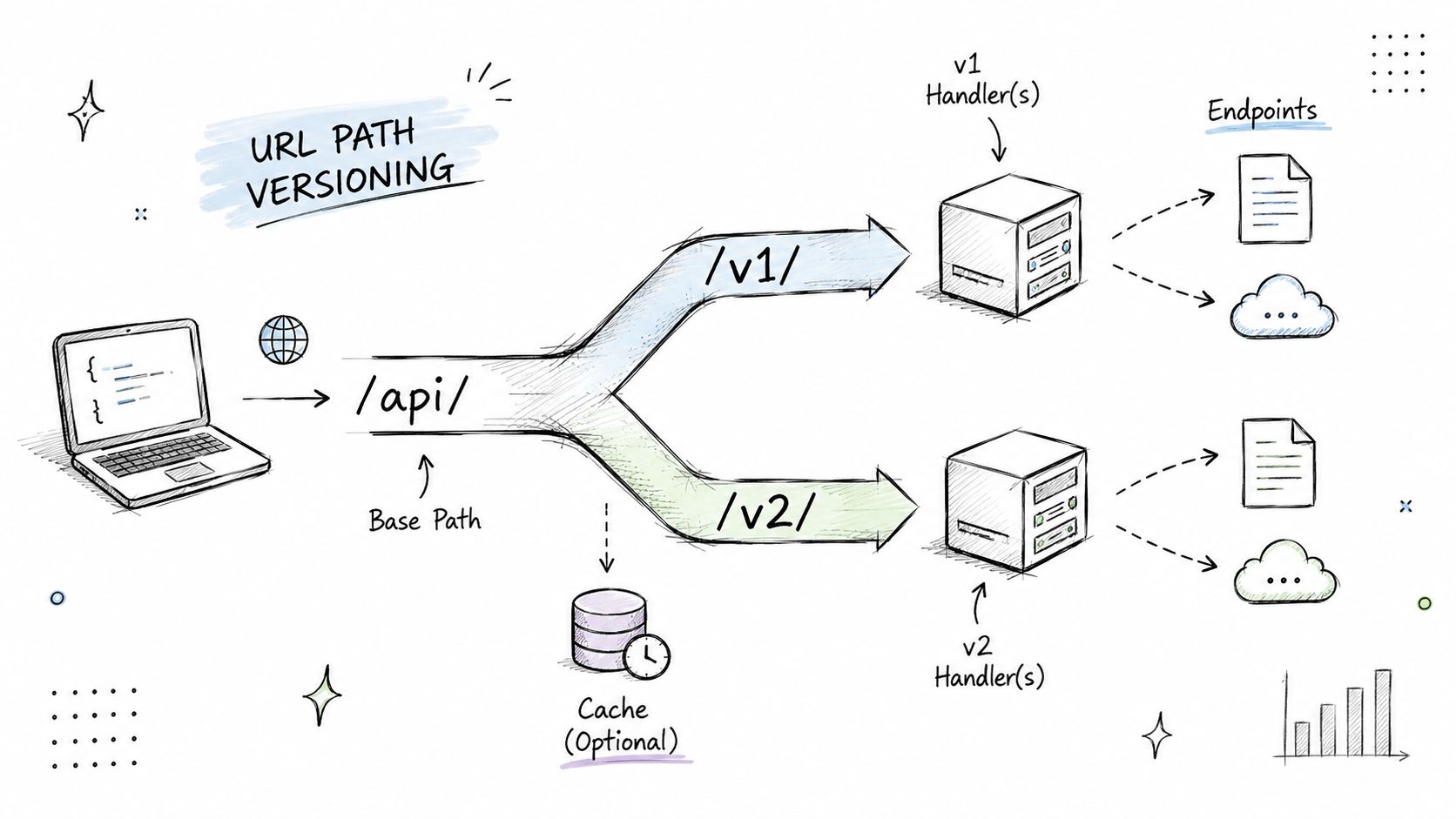 A hand-drawn diagram illustrating URL path versioning for API requests, showing version paths splitting to different handlers.
Why path versioning keeps support sane
Say you expose a unified endpoint for social publishing. In v1, your payload accepts a generic content_type and simple media fields. In v2, you introduce richer platform-specific options for Reels, Shorts, or Threads-specific metadata. Putting that split directly in the path makes migration explicit.
It also keeps tooling straightforward. SDK generation, gateway routing, cache rules, and integration dashboards all become easier when the version is part of the URL. That's especially useful for no-code environments like n8n or Make.com, where hidden headers are easy to forget but visible URLs are not.
What doesn't work well is path versioning combined with loose governance. Teams create /v2, then backport some changes into /v1, then everyone stops trusting the path. If you use path versioning, keep each path contract stable.
A few habits help:
Freeze behavior per major path: Don't let
/v1drift after/v2exists except for safe fixes.Publish migration guides: Show exact before-and-after payloads for
v1tov2.Expose version state in dashboards: If customers can see what they're using, they'll upgrade with fewer surprises.
3. Header-Based Versioning
Header-based versioning is cleaner on paper than it feels in production. Your URLs stay stable, your routing layer can negotiate behavior, and you can keep resource names free of version noise. That's attractive when you want /publications to remain the canonical endpoint forever.
The trade-off is discoverability. Developers debugging a failed request in a browser, proxy, or shared log excerpt may not immediately see the version. If you run a unified API over several third-party providers, that missing context can slow down incident response.
Where header versioning works best
Header versioning works well when your clients are controlled environments. SDKs, backend services, server-to-server integrations, and internal platform adapters usually handle custom headers reliably. It works less well when your consumers are hand-rolling requests in curl, Postman, low-code builders, or webhook relays that may strip or misconfigure headers.
If you go this route, make the contract obvious in your error handling and logs.
Echo the requested version: Return an error that tells clients which versions are supported.
Log version per request: Add the resolved version to every structured log event.
Document defaults carefully: If the header is missing, say exactly what behavior the client gets.
If a version selector is invisible to the caller, your diagnostics need to compensate for that.
A practical example is an API that keeps /publications fixed but accepts Accept-Version: v2. That can be elegant if your SDK owns request construction. It becomes messy if customers mix direct API calls, automation tools, and partner-built integrations across different stacks. In those cases, I've seen teams keep path versioning externally and use header-based routing internally between gateway and services. That hybrid approach reduces customer confusion without giving up flexibility inside the platform.
4. Deprecation and Sunset Policies
Most API pain doesn't come from releasing a new version. It comes from retiring the old one badly. Teams announce deprecation vaguely, forget follow-up communication, then finally remove an endpoint and act surprised when an enterprise customer still depends on it for some obscure but business-critical workflow.
A deprecation policy fixes that by turning retirement into an operating procedure instead of an argument.
Make retirement boring
Redocly's industry analysis says supporting multiple API versions at the same time increases operational costs by 30% to 50% per version because each one adds support, documentation, and security maintenance overhead (Redocly on API versioning best practices). That's why “we'll just keep v1 around forever” usually turns into a maintenance trap.
The same analysis describes a common deprecation rhythm: a 6-month announcement period, 12 months of active migration support, and a total lifecycle of 18 to 24 months before removal. That kind of timeline gives customers enough room to update SDKs, tests, and workflows without letting dead versions pile up indefinitely.
For teams managing release communication, a public changelog matters as much as the policy itself. A release feed like the PostPulse releases page is useful because customers can track version-impacting changes in one place instead of piecing them together from support replies.
Migration advice: Announce deprecation when the replacement is already usable, not when it's still half-built.
If you want to reduce breakage during retirement, add deprecation headers, keep migration docs close to the affected endpoints, and contact heavy users directly. The policy should tell customers what happens, when it happens, and where they can verify their remaining usage before the cutoff.
6. Backward Compatibility and Graceful Degradation
You feel this one the morning a provider changes a field, a client SDK still expects the old shape, and your “unified” API suddenly looks a lot less unified.
Backward compatibility is how you keep that kind of upstream churn from turning into customer-facing breakage. In a platform that sits between clients and fast-changing third-party APIs like Meta, TikTok, and Google, the public contract has to change more slowly than the dependencies behind it. Stripe's API design guidance makes the same point in practice. Additive changes are usually safe, while renames, removals, and type changes are where integrations fail because existing clients are already coded against the old behavior (Stripe API versioning and compatibility guidance).
The rule is simple. Add when you can. Translate when you must. Break only when the old contract is creating more risk than the compatibility layer.
Keep the public contract stable, absorb provider churn internally
A common example is field normalization. Older clients send caption_text. Newer internal services use text. You do not need a new public version just to force that rename. Accept both, map them internally, and return a deprecation notice in logs or response metadata.
That same pattern matters even more in aggregation products. One upstream API starts requiring a new enum value. Another provider drops a field that your customers still use. Your abstraction layer should absorb those differences so customers are insulated from changes they did not sign up for.
Graceful degradation matters when you cannot preserve identical behavior across every provider. If TikTok returns extra metrics but another platform does not, return the normalized fields consistently and mark provider-specific data as unavailable instead of failing the whole request. Partial success is often the right answer.
Useful tactics include:
Accept legacy parameters: Map old names to current internal models and warn before removal.
Add fields without changing existing ones: New response data is usually safer than repurposing a field clients already parse.
Treat unknown provider states carefully: Map them to a stable fallback status instead of throwing validation errors immediately.
Return partial results: If one downstream dependency fails, respond with the data you have and identify what is missing.
Isolate compatibility code: Put adapters at the boundary so old behavior does not leak through the whole codebase.
There is a cost. Translation layers add complexity, test cases, and edge conditions. They can also hide upstream instability long enough that your own API starts carrying dead aliases forever. Set limits. Keep a compatibility matrix, log who still uses legacy fields, and remove adapters on a schedule that matches your deprecation policy.
This is also where rollout discipline matters. Teams using strategies for zero downtime usually pair backward-compatible releases with contract tests, shadow traffic, and canary deploys so they can verify that old clients still work before the change reaches everyone.
The practical goal is stability with an expiration date. Protect customers from dependency chaos, but do it intentionally so your API stays predictable instead of turning into a museum of every upstream quirk you have ever had to support.
7. Feature Flags and Gradual Rollout
Nothing is more frustrating than shipping a clean abstraction over Meta, TikTok, and a few other provider APIs, then finding out one of them changed behavior in production before its docs caught up. A version number alone does not protect you from that. You also need a way to control who gets the new behavior, when they get it, and how fast you can back out.
Feature flags give you that control. They let you release behavior separately from the public contract, which matters when your API stays stable but the providers behind it do not. Instead of cutting a new public version every time a downstream platform adds a field, changes validation, or rolls out a new enum, you can ship the code path behind a flag, expose it to a small slice of traffic, and watch the results before widening the rollout.
A phased rollout also matches how mature teams release software. The 2024 State of Software Delivery report from Harness describes progressive delivery practices such as canary releases and feature flags as standard ways to reduce the blast radius of changes and roll back faster when production behavior differs from test results (Harness on progressive delivery).
In practice, this means separating three decisions that often get bundled together by mistake:
Deploy the code.
Enable the behavior.
Expose it to specific tenants, providers, or traffic segments.
That separation is valuable in a unified API. You may want to enable a new TikTok sync flow for one partner account, keep the old Meta path for everyone else, and hold back the public docs until the behavior is stable. Good API documentation practices and version management workflows help keep those states visible so support, product, and engineering are looking at the same rollout status.
A simple example: your /campaigns endpoint stays on v2, but the logic behind it changes for providers that now require an extra review state before publishing. With a flag, you can turn on the new mapping for internal test tenants first, then a few low-risk customers, then the rest. If the provider starts returning unexpected statuses, you disable the flag instead of rushing out a public rollback or forcing every client onto a new version.
Flags are not free. They add branching logic, test combinations, and cleanup work. Old flags linger. Provider-specific toggles spread through the code if you do not keep them contained. The fix is discipline. Name flags by behavior, scope them at the adapter or orchestration layer, log flag state with each request, and remove temporary flags once the rollout is complete.
Use versioning to define the contract. Use flags to control exposure to change you do not fully control. In a multi-provider API, that combination keeps upstream churn from turning every release into a customer migration.
7. Feature Flags and Gradual Rollout
Versioning answers “what contract is this client on?” Feature flags answer “which behavior is live for this client right now?” You need both.
When you're integrating with changing third-party APIs, feature flags let you absorb upstream changes without forcing a public version release every time. You can ship code paths early, enable them for a subset of traffic, watch what breaks, and roll back fast if an upstream platform behaves differently in production than it did in the docs.
Here's the rollout mindset visually:
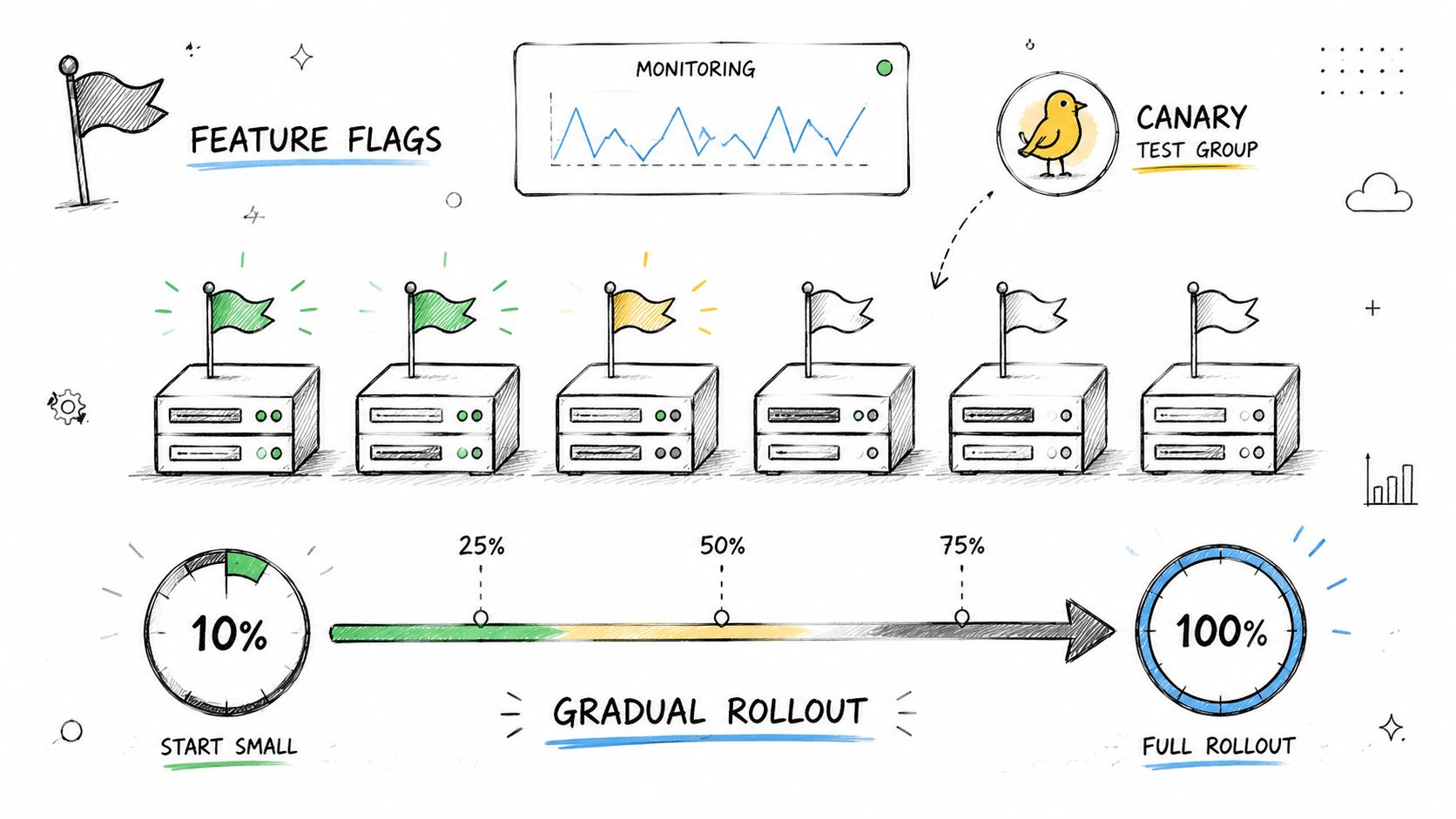 A hand-drawn illustration depicting feature flags, canary testing, and a gradual rollout process for software updates.
Release behavior separately from interface
Moesif notes that 85% of successful API migrations involve phased deployment, where the new version is first released to a small user group, typically 5 to 10% of traffic, before full rollout. It also reports that this kind of incremental release with version-specific monitoring reduces time-to-resolution for migration-related bugs by 45% compared to immediate full deployments (Moesif on phased API migrations).
That's exactly why flags help. You can keep the same published API version while gradually enabling a new provider adapter, new validation path, or new publish flow behind the scenes.
A few flagging habits save a lot of pain:
Name flags by behavior and platform:
instagram_reels_v2_publishis better thannew_publish_flow.Log flag decisions: Every request should tell you which path was taken.
Set cleanup owners: Old flags become permanent complexity if nobody removes them.
One more practical point. Flags aren't just for backend behavior. They're useful in docs, SDKs, and integration dashboards too. If a feature is beta, say so everywhere.
For a quick explainer on gradual release mechanics, this walkthrough is worth a watch:
8. Clear API Documentation and Version Management Tools
Bad versioning docs create their own support queue. Customers don't know which versions are active, which fields changed, or whether a broken workflow is caused by their code, your API, or the upstream platform. The result is guesswork on both sides.
Good docs make version boundaries explicit. Each version should have its own reference, changelog, and migration guidance. If you support multiple platform capabilities behind one API, your docs also need to say which features apply to which platforms and which versions expose them.
Docs need version switches, not footnotes
For larger portfolios, governance matters as much as prose. DigitalML recommends tracking versions in a single catalog and connecting provider and consumer workflows, while Gravitee recommends automated testing and validation for each version, version-specific monitoring, and gateway-based routing. The practical message is that versioning is an operational control plane problem, not just a docs formatting problem (DigitalML on API versioning governance).
That's why I prefer documentation systems generated from versioned OpenAPI specs instead of manually edited pages. You get schema consistency, SDK generation, diffing, and a cleaner review process when a change crosses a version boundary.
A version docs set should include:
A version index: Supported versions, status, and retirement state.
Migration pages: Before-and-after request and response examples.
Platform notes: Clear flags for provider-specific behavior.
Downloadable specs: Let customers pin against the schema they use.
If you want a concrete example of a product-facing reference, the PostPulse API docs show the kind of centralized documentation surface developers expect when they're integrating a versioned API into apps or automation workflows.
9. Monitoring, Observability, and Version-Aware Logging
You can't retire versions safely if you don't know who still uses them. You also can't debug version-specific failures if your logs only show endpoint and status code. Observability closes the loop between version policy and real usage.
This is the part many teams delay until after their first painful migration. Then they discover they can't answer basic questions like which customers are still on v1, whether v2 errors are clustered around one provider, or whether a deprecated field is still critical for a handful of large accounts.
Track usage before you remove anything
Guidance from XMatters, summarizing current practice from Speakeasy and Redocly, emphasizes version-specific monitoring, public deprecation policies, active communication, and removing old versions only after usage data confirms they're no longer needed (XMatters on retiring API versions safely). That's the right standard. Retirement should be evidence-based.
Your telemetry should include version as a first-class dimension in metrics, traces, and logs. If a request fans out from your public API to multiple provider adapters, carry the version context all the way through that chain.
Useful signals to capture:
Version usage by customer: Who is still calling old endpoints.
Error rate by version and platform: Whether one version fails more often on Instagram than TikTok, for example.
Deprecated field usage: Which clients still depend on compatibility shims.
Migration trend over time: Whether customers are moving or just ignoring notices.
If your stack uses Python services, this guide to structured Python logs is a solid reminder that parseable logs matter when you're tagging version, platform, request IDs, and downstream error context.
For a product example tied to customer-facing reporting, social media reporting workflows are a good reminder that version-aware observability isn't only for backend teams. It also helps explain performance and delivery issues to customers without turning every support case into forensic work.
9-Point API Versioning Comparison
Versioning Strategy | Implementation Complexity 🔄 | Resource & Maintenance ⚡ | Expected Outcomes ⭐ 📊 | Ideal Use Cases 💡 | Key Advantages |
Semantic Versioning (SemVer) for API Endpoints | Low–Medium: process discipline to classify changes | Low: tooling-friendly; supports automation | High ⭐: predictable upgrades, fewer integration surprises | Public APIs, dependency-managed ecosystems (n8n/Make.com) | Clear change semantics; machine-readable; simplifies communication about breaking changes |
URL Path Versioning (e.g., /v1/, /v2/) | Medium: routing and separate handlers per version | High: multiple code paths and docs to maintain | High ⭐: extremely transparent; simplifies debugging and caching | When breaking changes change request/response shapes; white-label visibility | Explicit URLs, CDN-friendly caching, supports parallel versions |
Header-Based Versioning (Accept-Version Header) | Medium: header routing and negotiation logic | Medium: logging, proxy support, caching by header | Medium⭐: clean URLs and flexible, but less discoverable | When you want clean endpoints and content negotiation (MCP) | Keeps URLs clean; single endpoint can serve multiple versions |
Deprecation and Sunset Policies | Low–Medium: policy design and enforcement | Medium: communication, migration tooling, long-term support | High ⭐📊: smooth transitions if followed; reduces surprises | Coordinating end-of-life and platform-forced changes | Predictable removal schedule; protects clients and reduces abrupt breakage |
Media Type Versioning (Content Negotiation) | High: implement content negotiation and media types | Medium–High: testing, cache keys, client sophistication | High ⭐: standards-compliant with granular control | Fine-grained response formats per platform (multi-platform APIs) | RESTful, single URL, supports platform-specific media types |
Backward Compatibility & Graceful Degradation | High: translation layers, tolerant validation, extensive tests | High: ongoing maintenance and potential tech debt | High ⭐📊: minimizes forced migrations; preserves stability | Long-lived clients, white-label customers, no-code integrations | Reduces breakage; allows gradual client upgrades |
Feature Flags & Gradual Rollout | High: flag infra, rollout logic, monitoring | High: operational overhead and cleanup discipline | High ⭐: safer rollouts with rapid rollback capability | Canary releases, A/B tests, staged platform feature enablement | Decouples deployment from activation; reduces release risk |
Clear API Documentation & Version Tools | Medium: spec-driven docs and per-version pages | Medium–High: writers, automation, SDK upkeep | High ⭐📊: reduces developer confusion; enables self-service migration | Public APIs with diverse consumers (devs, no-code, partners) | Acts as contract; enables codegen and migration guides |
Monitoring, Observability & Version-Aware Logging | Medium: instrumenting version tags across telemetry | Medium–High: storage, dashboards, alert tuning | High ⭐📊: data-driven insights; detects version-specific issues early | Tracking adoption, deprecation progress, diagnosing version bugs | Enables targeted alerts, adoption metrics, and informed deprecation decisions |
Versioning Isn't an Afterthought, It's Your API's Contract
API versioning best practices aren't really about where you put the version string. They're about whether your API behaves like a stable contract or like a moving target. That distinction becomes brutal when your system depends on upstream APIs that change on their own schedule.
The most reliable teams treat versioning as a product and operations discipline. They try hard to preserve backward compatibility. They use explicit versions when they need clear boundaries. They publish deprecation policies before they need them. They track usage by version, and they remove old behavior only after the data says it's safe. None of that is glamorous, but it's what prevents a routine upstream change from becoming a weekend incident.
There's also an important trade-off to accept. Supporting multiple versions forever feels customer-friendly in the moment, but it taxes everything else. Redocly's analysis noted earlier shows why. Every extra version adds support, security, docs, and operational drag. The answer isn't “version less” or “version more.” It's “version deliberately, preserve compatibility where possible, and retire old versions on a clear schedule.”
If you run a unified API over platforms like Meta, TikTok, YouTube, LinkedIn, X, or Threads, the versioning problem gets more layered. Your public API has to stay calmer than the APIs underneath it. That often means translating platform-specific changes into a stable internal model, using feature flags to stage risky behavior, and exposing version choices in a way customers can debug. In other words, you're not just versioning your API. You're buffering volatility for everyone who depends on it.
That's one reason platforms like PostPulse exist. PostPulse provides one integration surface for publishing to multiple social platforms and states that it handles ongoing API version changes as part of that layer. If you're building app integrations, no-code automations, or AI agent workflows, that kind of abstraction can reduce how much third-party churn your own team has to absorb. It doesn't remove the need to understand versioning, but it can move a lot of the day-to-day maintenance out of your application code.
Versioning is also tied directly to reliability and security. If you want a broader companion read, AuditYour.App's guide to API security best practices fits well alongside version planning, because stale versions and unclear retirement policies often turn into security problems too.
The short version is simple. Keep your contracts stable. Make breaking changes rare and obvious. Measure real usage before removals. Document every version like customers will debug from it at midnight, because they will. Do that, and new versions stop feeling like landmines and start feeling like planned releases.
If you're tired of chasing social platform API changes yourself, PostPulse is worth a look. It gives you one integration surface for publishing to 9 platforms through a REST API, official n8n and Make.com nodes, or an MCP server, so your team can spend less time adapting to upstream version churn and more time building the product in front of it.
About the Author

Founder of PostPulse — a social media scheduling platform for creators and teams. Software engineer with a passion for building developer tools and simplifying complex API integrations across social media platforms.