Best Time to Post on Instagram Today: 7 Data-Driven Ways
Published on
Tags:
You've seen the charts. Post on Instagram at 6 PM on Wednesdays, hit publish, and wait for the flood of engagement. Then nothing happens.
That advice fails because generic timing charts average millions of accounts. Your audience isn't an average. It has its own geography, habits, work hours, and content preferences. If you're trying to find the best time to post on Instagram today, the answer usually isn't a universal slot. It's a window hidden in your own follower activity, plus a bit of disciplined testing.
Developers already know this pattern. You don't tune a system from blog-post averages. You inspect production behavior, isolate variables, then automate what works. Instagram timing works the same way. Use platform data, watch for the early engagement window, and build a repeatable posting workflow instead of chasing one-size-fits-all advice.
If you want broader context beyond Instagram, this guide on social media timing for brands is useful. For today, though, I'd treat platform-wide benchmarks as a starting guess, not the answer.
Table of Contents
1. Use Instagram Insights to Identify Your Audience's Peak Activity Times
4. Monitor Competitor Activity and Industry Trends for Timing Insights
7. Automate Posting via Scheduling Tools and Treat Timing as Part of Your Workflow
1. Use Instagram Insights to Identify Your Audience's Peak Activity Times
If you have a Business or Creator account, Instagram already gives you the closest thing to ground truth. To find your specific optimal posting time, you need a Professional account first, then you can use Insights and the “Most Active Times” view to post 30 to 60 minutes before your audience's biggest activity spike, as explained in Instagram's Professional account guidance.
That matters more than any generic infographic because it's first-party behavior from your followers, not a blended average from other accounts.
A visual reference helps if you haven't looked at this screen in a while.
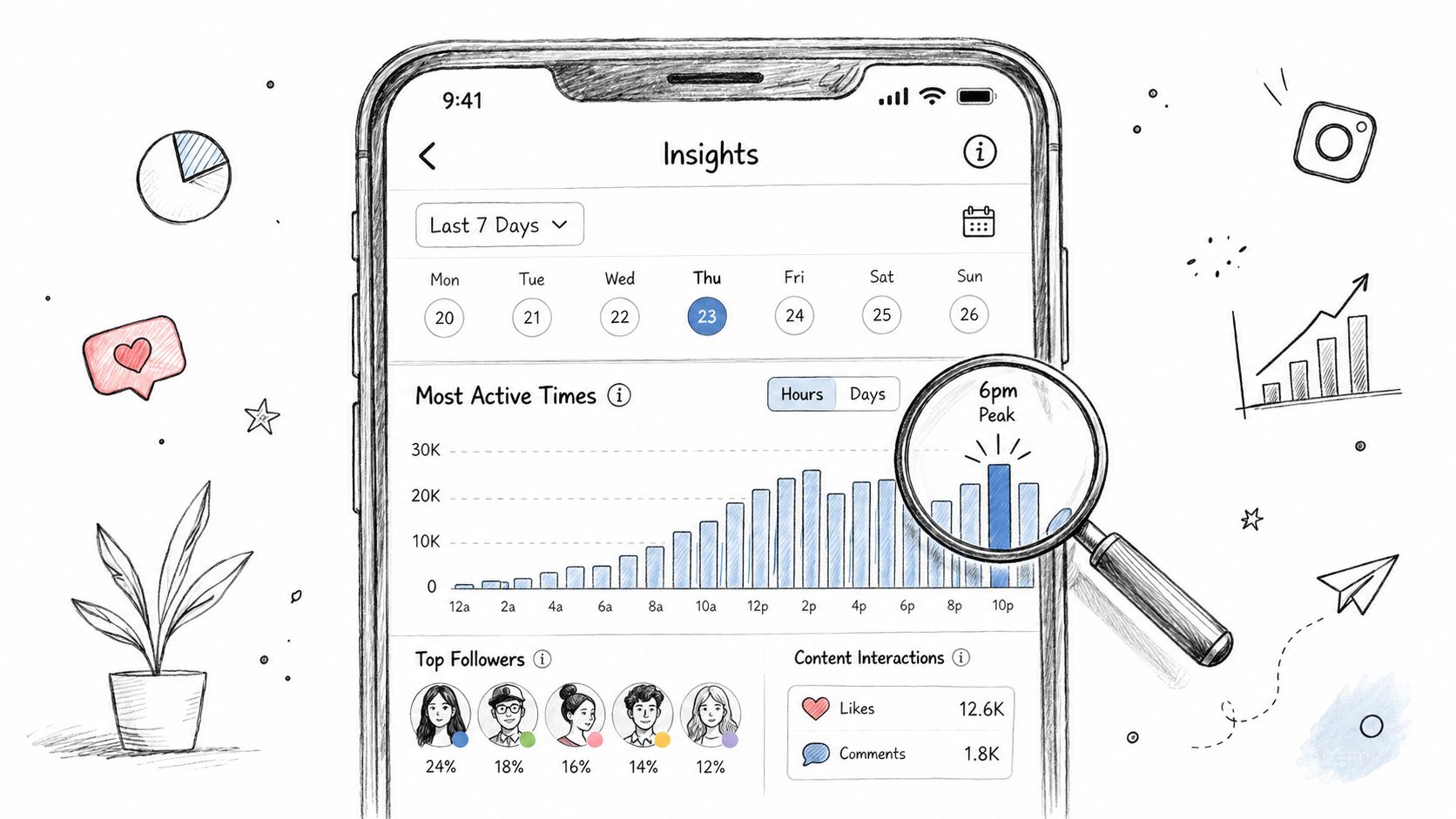 A smartphone interface displaying Instagram insights with a bar chart highlighting peak engagement times and follower analytics.
How to read the signal correctly
The main mistake people make is treating “followers online” as identical to “followers ready to engage.” It's not. A B2B account might see activity in the morning, while comments and shares land later when people have breathing room. A fashion creator might see evening spikes because people browse after work, but Stories may still get taps during lunch.
So don't just screenshot one chart and call it a strategy. Cross-check it against your own post history, especially reach, comments, shares, saves, and how fast a post starts moving. If you need a cleaner understanding of what Instagram counts as visibility versus interaction, this breakdown of Instagram impressions is worth reviewing.
Practical rule: Use Insights to pick your first test window, not your final answer.
A simple pattern works well:
Check recurring peaks: Look for the same hours showing up across multiple weekdays.
Separate by format: Reels, carousels, and Stories often behave differently.
Favor your largest segment: If most followers sit in one region, optimize for that group first.
Use enough history: One unusual week can mislead you. Trends are what matter.
If you want a walkthrough before digging into your own data, this explainer is decent:
2. Test Post Timing with A/B Testing on the Same Content
When timing advice feels contradictory, testing beats opinions. Keep the content as similar as possible and vary only the publish time. That's the closest thing to an honest experiment you'll get on Instagram without access to platform internals.
I'd run this the same way I'd test any distribution variable in software. Control the inputs, ship repeatedly, log the output, and ignore one-off wins.
A simple timing test that actually isolates variables
Say you publish educational Reels. Pick one recurring format, like “one tip, one screen recording, one CTA,” then publish close variants in different windows across different weeks. Don't change the hook style, thumbnail treatment, or caption length more than necessary. If everything changes at once, you learn nothing.
A small business can do the same with carousels. Post a similar promo or explainer on Tuesday evening, then a near-identical one on Wednesday lunch, then another in a later evening slot. Compare not just total engagement, but how quickly the post starts accumulating activity.
Here's the baseline benchmark I'd use when starting from scratch. Buffer's analysis of 9.6 million Instagram posts found the three highest-engagement slots in 2026 were Thursday at 9 a.m., Wednesday at 12 p.m., and Wednesday at 6 p.m., with Wednesday strongest overall and Friday and Saturday weakest, according to Buffer's Instagram timing analysis. That gives you a sane first set of windows to test against your own account.
Don't test during holidays, product launches, or weird news cycles unless that's your normal posting environment.
A lightweight process is enough:
Change one variable: Keep format, topic, and CTA close. Only move the posting time.
Wait before judging: Instagram can keep distributing a post after the first burst.
Log the context: Day, hour, format, topic, and whether you engaged in comments right after posting.
Look for repeatability: One winner is luck. A recurring winner is a schedule.
This is slower than grabbing a viral “best time today” chart. It's also the method that survives reality.
3. Leverage Platform-Specific Engagement Patterns
A lot of timing advice breaks because it treats Instagram like one surface. It isn't. Reels, feed posts, and Stories are consumed differently, so they should be scheduled differently too.
If you post a Reel, a carousel, and a Story at the same hour and expect the same behavior, you're flattening three different user habits into one guess.
Format changes the timing
For Reels, engagement tends to peak in three separate windows: the morning rush from 8 a.m. to 12 p.m., afternoon breaks from 2 to 4 p.m., and evenings from 6 to 9 p.m. Stories perform best in the evening from 6 to 9 p.m., and for B2B brands specifically around lunch from 11 a.m. to 1 p.m., based on Iconosquare's Instagram format timing guidance.
That lines up with how people use the app. Reels catch idle scrolling. Stories catch quick check-ins. Carousels often need a little more attention, so they tend to benefit from windows where people are willing to pause and swipe.
A fitness creator is a good example. Morning Reel for motivation, lunch carousel for educational content, evening Stories for polls or offers. A SaaS brand might flip that. Lunch Stories for quick updates, evening Reel for a product demo teaser, and a feed post when followers are more likely to read.
If you're still deciding what belongs in Stories versus Reels, this guide on the difference between Story and Reels pairs well with a timing workflow. There's also a useful high-level comparison on choosing the best Instagram format.
Use format-specific timing, not account-wide timing:
Reels: Good for commute, break, and unwind windows.
Stories: Strong for evening attention and quick midday touchpoints.
Carousels: Best tested separately from Reel timing.
Mixed weeks: Spread formats instead of stacking everything into one publish slot.
This is one of the fastest ways to improve results without changing the content itself.
4. Monitor Competitor Activity and Industry Trends for Timing Insights
If your account is new or your data is thin, competitor timing is a practical shortcut. Not because competitors know the secret, but because they reveal the posting norms in your niche.
That's useful in crowded spaces where audience behavior is somewhat shared. Wellness, gaming, B2B SaaS, fashion, local food, and creator education all have different rhythms.
What to copy and what to ignore
Don't just watch the biggest account in your category. Big accounts can brute-force mediocre timing because they already have strong brand recall and loyal followers. Mid-tier accounts are often better models because their audience behavior is closer to what you can realistically expect.
I'd track a small set of similar accounts for a few weeks. Note when they publish, what format they use, and whether the comments section starts moving quickly or sits flat. You can do this manually in a spreadsheet, or use a tool like Buffer or Later for visibility, but the core job is interpretation.
A gaming creator might notice that everyone posts Friday evening. That doesn't automatically mean Friday evening is your slot. It may mean the feed is overcrowded then, and a Wednesday evening post gives you cleaner attention. A B2B company might see that rivals cluster on Tuesday through Thursday mornings, which is a decent first test if the account has no internal history.
Watch for gaps, not just patterns. If every competitor posts at the same time, the underserved slot may be right next to it.
A few rules keep this from turning into cargo cult scheduling:
Track similar accounts: Close audience fit matters more than follower count.
Check engagement quality: Fast comments and saves matter more than vanity likes.
Look for recurring windows: One launch post proves nothing.
Update the sample: Posting habits shift with seasonality and product cycles.
Competitor timing won't give you the best time to post on Instagram today with certainty. It will give you a smarter place to start than guessing.
5. Use Instagram's Algorithm Preferences
The platform doesn't reward time slots directly. It rewards what happens after you publish. Timing matters because it affects whether people interact fast enough for the algorithm to keep distributing the post.
That distinction matters. People often chase a magical hour when the actual issue is weak early engagement.
Timing matters because the first hour matters
Instagram's 2026 algorithm prioritizes early interactions, especially comments, shares, and watch time in the first 30 to 60 minutes after publication. Posting slightly before your audience peak, such as 7:30 PM instead of 8:00 PM, can help the post collect engagement before traffic surges, according to this 2026 Instagram timing and algorithm guide.
That's a useful mental model. Don't publish at the exact top of the spike by default. Publish just before it, so the post has some momentum when more people arrive.
For accounts with an active community, this can be the difference between a post that keeps circulating and one that stalls. For new accounts, timing still helps, but it won't compensate for weak content or no engagement history. If nobody interacts early, the system has less reason to extend reach.
A practical way to use this:
Post ahead of the peak: Give the post time to collect early signals.
Stay available after publishing: Reply to comments and DMs while the post is fresh.
Watch velocity, not just totals: The first burst tells you more than the final count.
Treat timing as support: It amplifies good content. It doesn't rescue bad content.
Much “best time today” advice often misses a crucial point. It gives you a clock time without acknowledging the first-hour mechanics behind why that time matters.
6. Account for Time Zone Fragmentation in Global Audiences
If your audience spans North America, Europe, and India, there usually isn't one perfect post time. There's a compromise window, plus follow-up distribution choices.
Global brands and multi-region creators often get stuck. Generic advice says “weekday mornings” or “early afternoons,” which is too vague to run as an actual schedule.
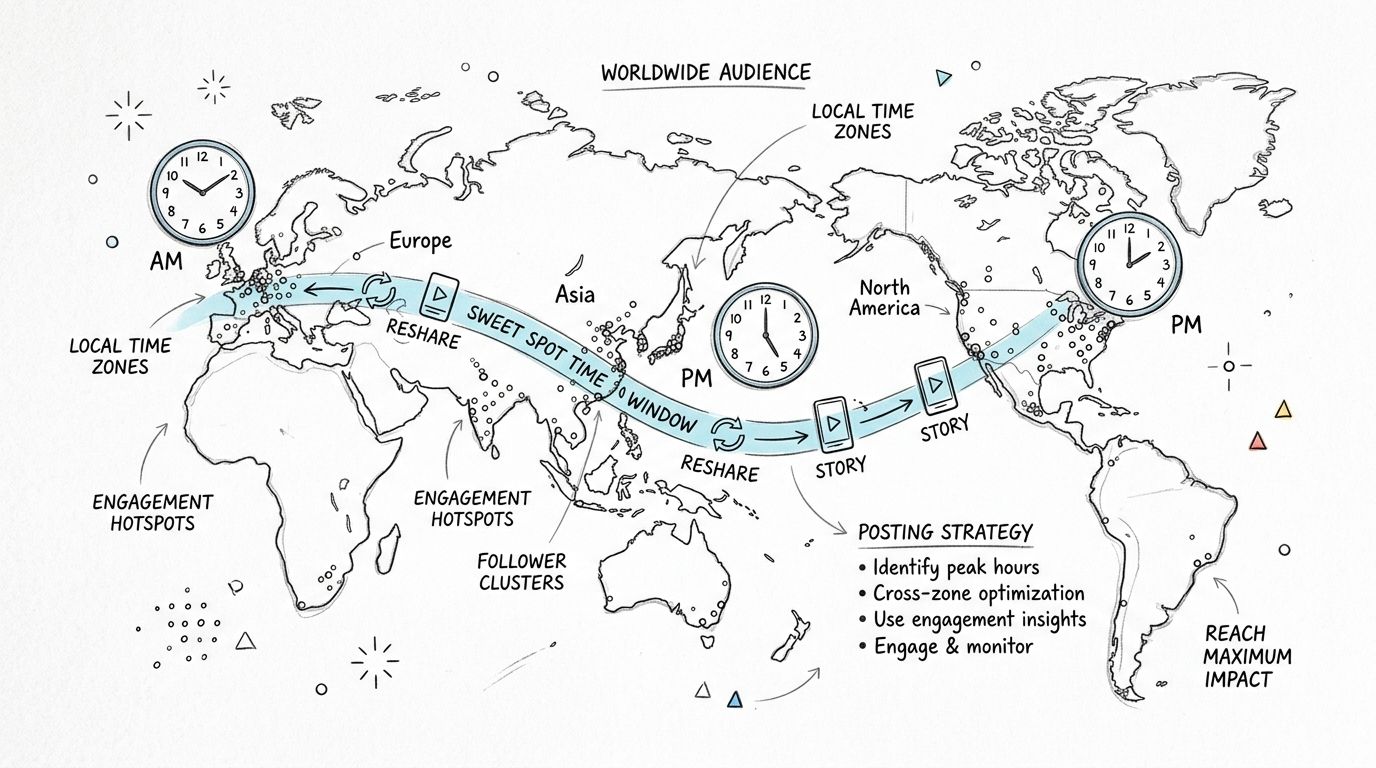 A world map illustration showing time zones, engagement hotspots, and strategies for posting content to global audiences.
A practical overlap method
There's a real gap here. One underserved angle is audience-specific overlap for global reach. Existing guidance often says general weekday mornings and early afternoons work best, but it rarely explains how to calculate overlap across EST, CET, and IST in a way a team can act on. One source notes that even a one- or two-hour shift can significantly affect early engagement and recommends testing overlapping windows across major time zones, as discussed in InVideo's guide to Instagram posting times.
That matches what global operators run into every week. The issue isn't knowing time zones exist. The issue is turning geography into a posting decision without hand-waving.
A practical approach looks like this:
List your top audience regions: Pull this from Insights, not assumptions.
Convert likely active windows: Map local lunch, commute, and evening periods into one reference zone.
Find the overlap band: Look for a window where your largest regions are all reasonably active.
Use Stories as follow-up: If one region misses the main post, reshare or re-engage later.
A UK creator with mostly UK followers and a smaller US segment may optimize for the UK evening and accept that the US catches it later. A developer tool account with a split US and European audience may target a UTC afternoon compromise. There's no universal formula, but there is a repeatable method.
Global scheduling is a trade-off problem, not a “find the one perfect hour” problem.
7. Automate Posting via Scheduling Tools and Treat Timing as Part of Your Workflow
Manual posting sounds fine until your best slot lands in the middle of meetings, dinner, or sleep. Then consistency falls apart, and your “strategy” becomes a set of intentions.
Scheduling fixes the operational problem. That's why I think of timing as a workflow concern, not just a content concern.
Build the workflow, not a reminder alarm
For Wednesday, July 8, 2026, one strong benchmark window is 12:00 PM to 9:00 PM UTC, with a specific late-night spike at 11:00 PM, according to Sprout Social's Wednesday Instagram timing guidance. I wouldn't treat that as your universal answer, but it's a useful fallback when you need a same-day decision and don't yet have account-specific evidence.
A significant win comes when you stop posting by hand. Use Instagram's native scheduler if that's enough. Use Buffer or Later if you want a calendar and analytics. Use Instagram auto publishing through PostPulse if you're building an app, wiring n8n, or letting an AI agent publish on a schedule.
The developer angle here matters. If you already automate everything else, social timing shouldn't live in someone's phone alarm. It should live in a workflow with inputs, rules, retries, and logs.
A sane setup looks like this:
Batch content creation: Prepare assets and captions ahead of time.
Schedule the primary post: Hit the tested window automatically.
Pair automation with presence: Be around for comments after the post goes live.
Refine monthly: Update schedule rules from actual performance, not habit.
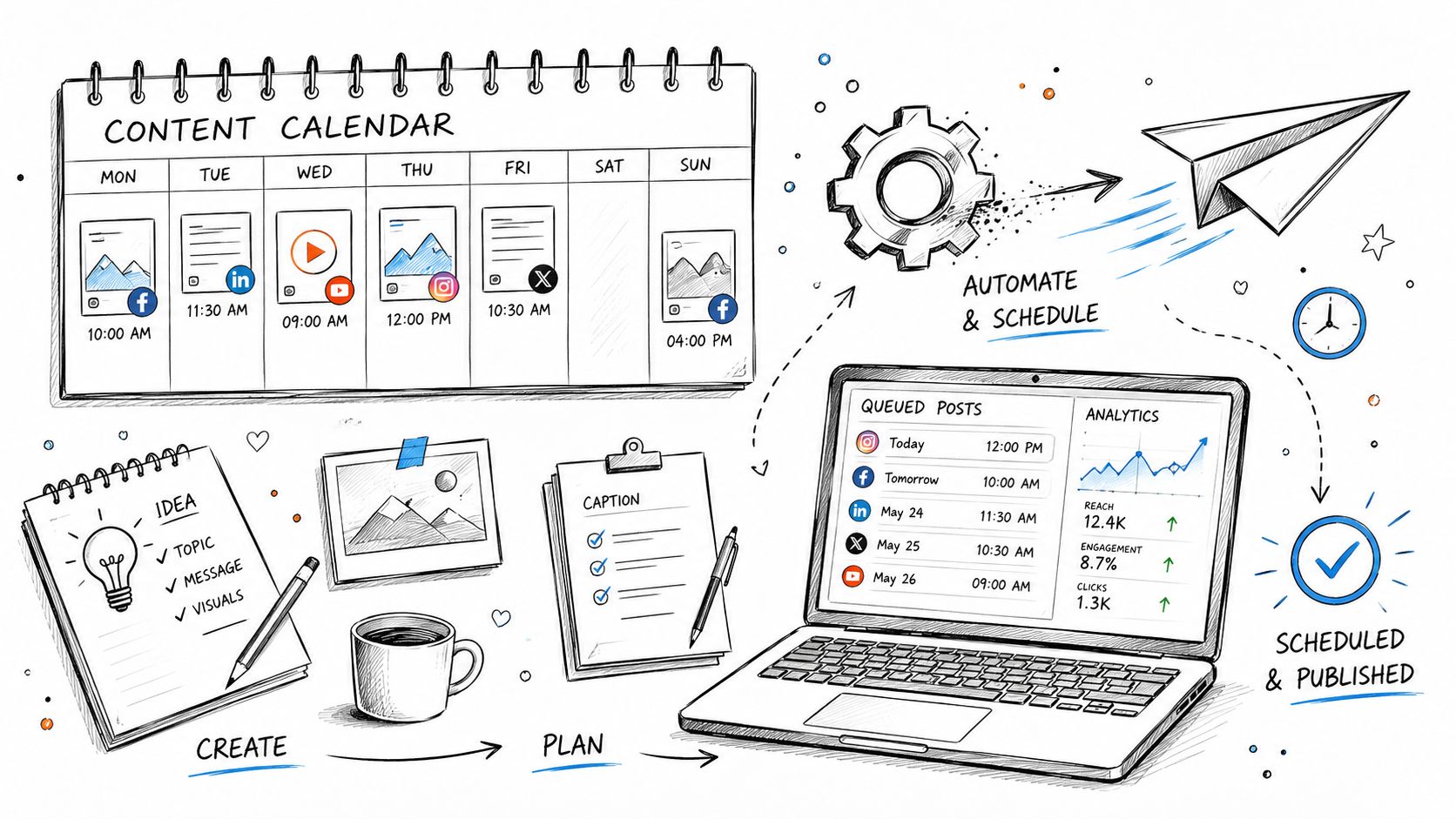 A hand-drawn illustration depicting a social media content management process, from brainstorming ideas to automated scheduling.
Automation doesn't replace judgment. It removes friction so you can apply judgment consistently.
Best Time to Post on Instagram Today, 7-Point Comparison
Strategy | 🔄 Implementation complexity | ⚡ Resource requirements | ⭐ Expected outcomes | 📊 Ideal use cases | 💡 Key advantages |
Use Instagram Insights to Identify Your Audience's Peak Activity Times | Low, built into app; Business/Creator account required | Low, free native tool; needs minimum follower volume | High, first‑party, audience‑specific timing data (⭐⭐⭐⭐) | Accounts with existing follower base seeking precise timing | Direct, real‑time audience data; no third‑party needed; check 4+ weeks |
Test Post Timing with A/B Testing on the Same Content | Medium, requires experimental design and consistency | Medium, time, consistent posting cadence, tracking tools/spreadsheet | High, isolates timing as the variable (⭐⭐⭐⭐) | Accounts that post frequently and can run multiple tests | Controls variables; adapts to algorithm shifts; repeat monthly |
Leverage Platform‑Specific Engagement Patterns (Feed vs. Reels vs. Stories) | Medium, manage multiple format schedules | Medium, create format‑specific content and monitor metrics | High, format‑aware timing boosts engagement (⭐⭐⭐⭐) | Creators/brands using mixed formats (Reels, feed, Stories) | Optimizes for user intent per format; allows higher posting frequency |
Monitor Competitor Activity and Industry Trends for Timing Insights | Low–Medium, manual observation or third‑party tools | Low–Medium, time investment or subscription to monitoring tools | Moderate, useful second‑hand signals (⭐⭐⭐) | New accounts or niche brands lacking historical data | Reveals niche patterns and gaps; quicker than building own dataset |
Use Instagram's Algorithm Preferences (Recency, Relationship, Engagement History) | Medium, requires ongoing engagement strategy | Low, focus on community building and quick engagement | High, improves reach via engagement velocity (⭐⭐⭐⭐) | Accounts aiming to boost early engagement and relationship signals | Emphasizes immediate engagement over perfect timing; build relationship history |
Account for Time Zone Fragmentation in Global Audiences | Medium–High, planning for multiple zones and reposts | High, more posts, scheduling complexity, possible team coordination | Moderate–High, better global coverage when executed (⭐⭐⭐) | Global brands/creators with significant audiences across regions | Serves multiple markets deliberately; use reshares/Stories to reach secondary zones |
Automate Posting via Scheduling Tools and Treat Timing as Workflow | Low, tools simplify scheduling; initial setup required | Medium, subscriptions or API/no‑code integrations and batching time | High, increases consistency and scalability (⭐⭐⭐⭐) | Agencies, multi‑account managers, and batch content creators | Removes friction, enforces consistency; pair with live engagement to avoid impersonal posting |
Stop Guessing, Start Automating Your Perfect Time
The frustrating part about Instagram timing is that most advice is both popular and incomplete. Generic “best times” aren't useless, but they're only useful in the same way default config values are useful. They get you started. They don't tell you what your production environment needs.
If you want a reliable answer to the best time to post on Instagram today, use a layered approach. Start with first-party follower activity in Instagram Insights. Use broad benchmarks only as a fallback when you need an initial slot. Then run controlled timing tests on similar content, separate your schedule by format, and watch what happens in the first stretch after publishing. That's where timing turns from folklore into a system.
This is also where a lot of creators and developers overcomplicate things. You do not need a giant analytics stack to make progress. You need a few repeated posting windows, a simple log of what you published and when, and the discipline to compare similar posts objectively. If Wednesday lunch keeps beating Friday evening for your carousel posts, accept that signal. If Stories keep getting replies in the evening while Reels move in the morning, split the schedule. Let the account teach you.
Global audiences add another layer, and there's no clean universal answer there. You're choosing trade-offs between regions, not solving a neat equation. That's fine. Pick the primary audience cluster, identify overlap windows where possible, and use Stories or secondary touchpoints for the rest. A workable schedule beats chasing a perfect one that never gets implemented.
The final step is operational. Once you know what windows are worth hitting, automate them. Scheduling is what turns a fragile timing idea into a dependable publishing system. If you're posting manually, your strategy is one missed meeting or one late dinner away from collapsing. If you're using a workflow, timing becomes part of your infrastructure.
That's why tools like PostPulse make sense in a developer stack. If you're already shipping with APIs, no-code automations, or AI agents, social publishing should fit the same model. Define the timing rule, push the content automatically, stay available for the human part, and revise the schedule when the data changes. That's how timing becomes a growth lever instead of a recurring guess.
If you want to stop babysitting publish times, PostPulse is built for exactly this kind of workflow. It lets app developers, automation builders, and AI agents publish to Instagram and other platforms through one API, official n8n and Make.com integrations, or an MCP server. You skip the usual platform integration headaches, keep OAuth and token handling off your plate, and can even white-label the experience under your own brand. For teams treating social publishing like infrastructure instead of a manual task, it's a practical way to turn timing rules into actual execution.
About the Author

Founder of PostPulse — a social media scheduling platform for creators and teams. Software engineer with a passion for building developer tools and simplifying complex API integrations across social media platforms.