The Difference Between Story and Reels for Developers
Published on June 15, 2026
Tags:
You're probably here because you tried to add “publish Instagram video” to your app and immediately hit an annoying fork in the road. Story or Reel? Then the docs and product requirements started fighting each other. Marketing wants “video support.” Your users want “post everywhere.” Instagram, meanwhile, treats these formats as different surfaces with different expectations, different user outcomes, and different implementation details.
That's the fundamental difference between Story and Reels. It isn't just presentation. It changes where content appears, how long it matters, what interactions users can trigger, and what your publishing workflow needs to validate before you send a request.
If you build social publishing features, this choice leaks into everything. Your composer UI, your media validation rules, your scheduling model, your analytics labels, and the guidance you give users all depend on it. A “video post” abstraction sounds clean until one customer expects discoverability and another expects a disappearing update with sticker-style interaction.
Table of Contents
Reels vs Stories The API Headache You Did Not Expect
The usual failure mode looks like this. You add Instagram publishing, create a video upload path, and assume format selection can be a late-stage UI toggle. Then someone asks whether that same upload should disappear after a day, appear in discovery surfaces, support reminders, or target existing followers. Suddenly “video” isn't a type anymore. It's a decision tree.
That's why the difference between Story and Reels matters before you write the first publishing job. If your app hides the distinction, users make the wrong choice. If your app exposes the distinction without explaining it, support tickets start piling up because people expected Story behavior from a Reel or Reel reach from a Story.
A lot of this pain comes from docs that are technically correct but not always kind to implementers. Good platform docs should answer not only “what fields are required” but also “what product behavior does this choice imply.” If you write developer-facing docs for your own team or customers, these API documentation best practices are worth borrowing. They save a lot of back-and-forth when one endpoint name hides several product consequences.
For a clean summary of the platform surface you're integrating against, it helps to keep an Instagram Graph API overview nearby while designing your publishing flow.
Don't model Instagram as “media upload plus destination.” Model it as “intent plus distribution surface.”
That framing changes the architecture. A Reel is usually chosen because the user wants ongoing visibility and discovery. A Story is chosen because the user wants immediacy, proximity, and a short shelf life. If your composer doesn't capture intent early, your backend ends up pretending two different publishing products are the same thing.
A Quick Comparison for Developers
The confusing part is not the media file. It is the publish target.
A 9:16 video can be valid for both surfaces, but the product behavior after publish is different enough that your API and UI should treat them as separate intents from day one.
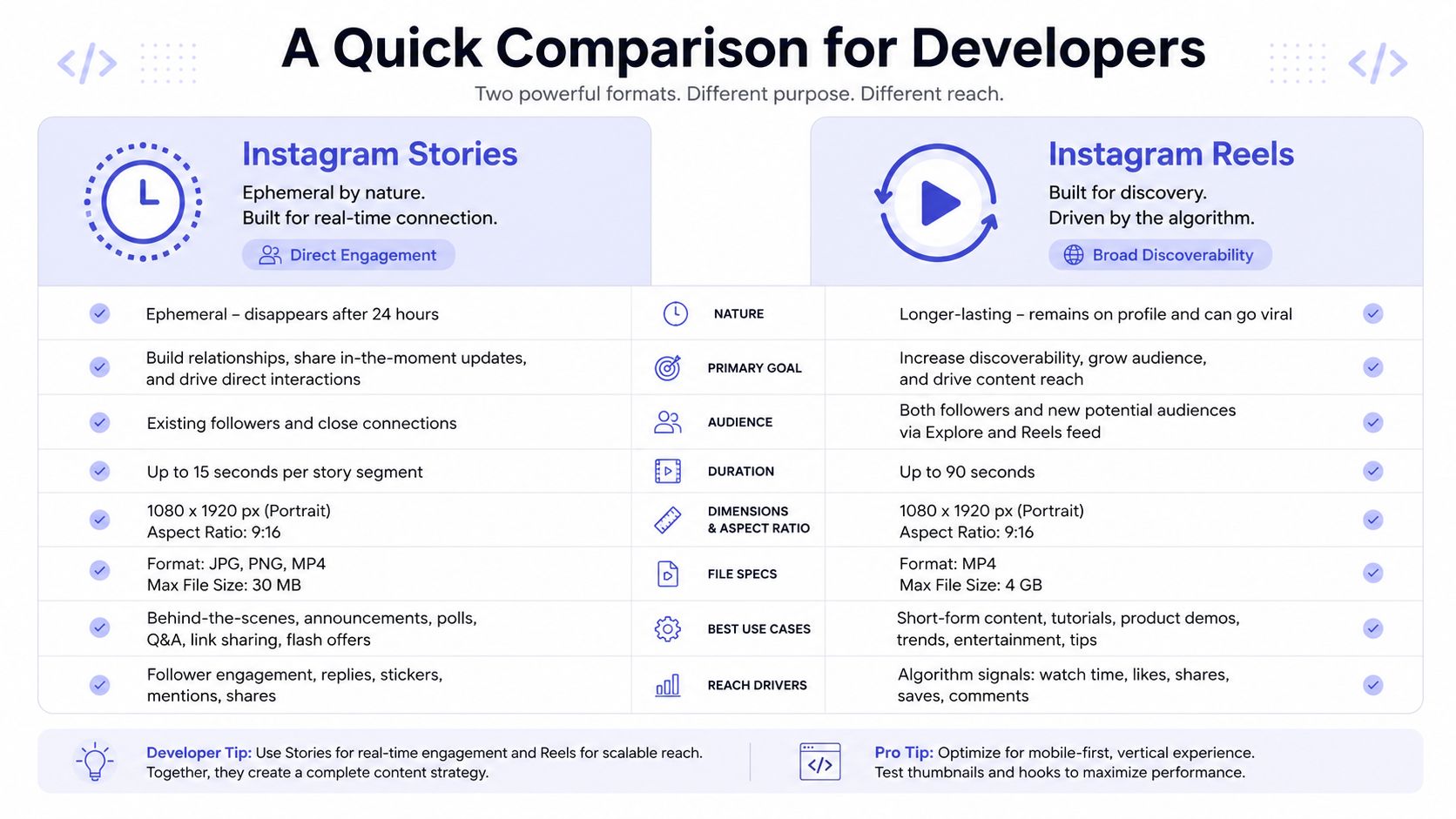 A comparison table for developers outlining the key differences between Instagram Stories and Instagram Reels content formats.
The developer view
Attribute | Stories | Reels |
Lifecycle | Ephemeral by default, with a short viewing window and optional extension through Highlights | Persistent short-form video meant to remain available on profile and discovery surfaces |
Primary audience | Existing followers and recent viewers | Followers plus non-followers across discovery surfaces |
Common content use | Time-sensitive updates, quick reactions, behind-the-scenes posts, interactive prompts | Edited short-form videos designed for reach, retention, and reuse |
Interaction style | Lightweight replies and tap-through behavior | Comments, shares, saves, profile visits, and broader discovery-driven engagement |
Product expectation | “Show this now because timing matters” | “Publish this because I want it to keep working after today” |
Best abstraction in code | Ephemeral session content | Discoverable video asset |
The implementation split shows up fast once you build a composer. Stories usually need fast capture, low-friction publishing, and controls that match a short-lived post. Reels usually need stronger validation, better previewing, richer metadata, and a publish flow that assumes the user cares about durability and distribution. If you want the endpoint details, the main constraints are easier to reason about once you map your product to the Instagram Reels publishing API flow.
What changes in your product
The practical differences usually surface in four places:
Composer defaults. Story creation should optimize for speed. Reel creation should support revision, captions, cover selection, and other choices users expect before publishing.
Scheduling UX. Reels fit planned publishing better. Stories often tie to a time window, an event, or a same-day prompt, so scheduling rules and reminders tend to be different.
Preview behavior. Story previews should answer, “Does this read clearly in full-screen right now?” Reel previews should answer, “Does this still make sense as a standalone asset later?”
Analytics labels. Keep Story and Reel reporting separate. A generic “video posts” bucket hides the reason the user chose the format in the first place.
A common pitfall is exposing one generic publishVideo endpoint, then pushing Story and Reel differences into flags such as is_story, distribution_type, or expire_after. That can work at the transport layer, but it usually makes the product layer harder to reason about, because the same request shape now represents two different publishing jobs with different validation, retry behavior, and user expectations.
That trade-off matters more than it sounds. A unified transport API is often fine. A unified product abstraction usually is not.
For the content guidance side, SleekPost's 2026 Reels strategy is a useful companion to the engineering view, especially if your team is deciding which editor controls belong only in the Reel flow.
How Instagram Prioritizes Reels for Growth
A familiar product bug starts like this. A user uploads one vertical video, your app offers both Story and Reel, and they assume the difference is mostly placement. It is not. On Instagram, the format choice changes the distribution path, the shelf life of the content, and the kind of automation logic your publishing system needs.
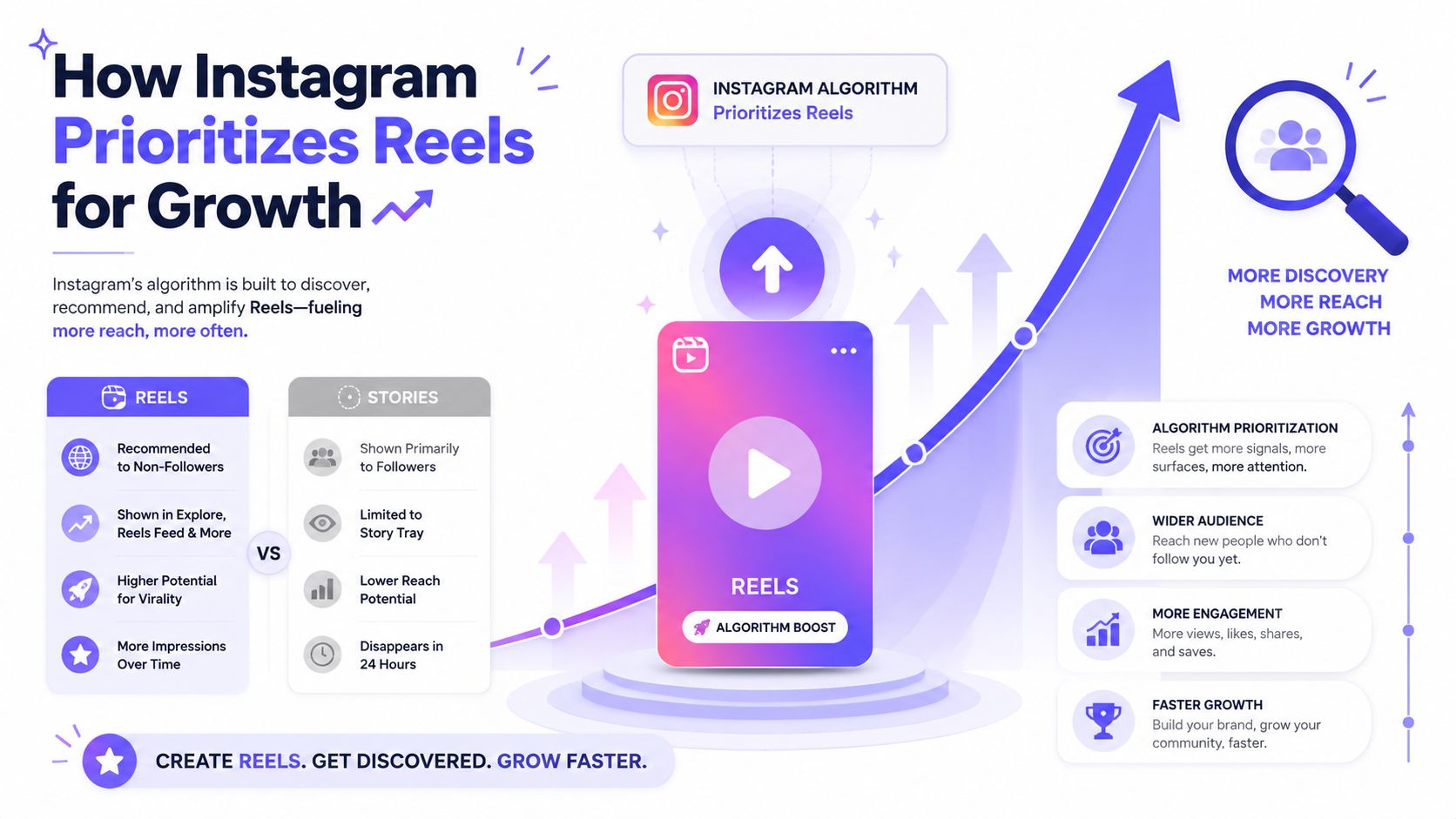 An infographic showing how Instagram's algorithm prioritizes Reels over Stories to increase reach and brand growth.
Why distribution matters more than media type
Reels are built for discovery surfaces. Stories are built for a current audience and a short response window. That split matters more than aspect ratio, clip length, or editor controls because it changes what “success” means before the request ever hits the API.
Analysts at Socialinsider found in its latest Instagram benchmarks that Reels generally outperform Stories on reach, while Stories stay more follower-facing because of where Instagram places each format in the app. A useful summary of that pattern appears in this analysis of Reels versus Stories reach.
For developers, this should shape product behavior, not just copy.
If the user goal is discovery, your publish flow should bias toward Reel-specific decisions such as caption quality, cover frame selection, and whether the asset still works outside the context of a same-day update. If the goal is immediate response from existing followers, Story is usually the better fit, even if the source media is identical.
That is why a generic “post video” abstraction causes trouble. It hides a real product choice behind one transport action. The upload step may look similar, but the ranking context is different, the expected outcomes are different, and the retries you can safely automate are different too.
For teams that need the implementation side as well as content guidance, SleekPost's 2026 Reels strategy is useful alongside a dedicated Instagram Reels API path. One helps with discovery-oriented content decisions. The other makes the format boundary clearer in code, validation, and docs.
What this means for your integration
Treat format choice as a first-class field in your publishing model. Do not bury it in optional flags on a shared endpoint if the rest of your system, including drafts, scheduling, analytics, and recommendations, behaves differently by format.
A few implementation patterns hold up well:
Recommendation by outcome. Ask whether the user wants discovery or fast response from current followers.
Format-specific validation. Return errors and warnings in product terms, not only API terms.
Different draft behavior. Reel drafts usually need more revision metadata. Story drafts usually need speed and low friction.
Ranking-aware analytics. Report Reel reach and Story response metrics separately so users can see why one format worked.
Reels are not just “video posts.” They are videos sent into a different distribution system.
That distinction clears up a lot of confusing product decisions. It also keeps your automation layer from treating two very different publishing jobs as if they were the same request with a different flag.
Driving User Action with Stories and Reels
Reels usually win the attention game. Stories often win the response game. If your product only teaches users to optimize for reach, you'll steer them into the wrong format for a lot of conversion-oriented use cases.
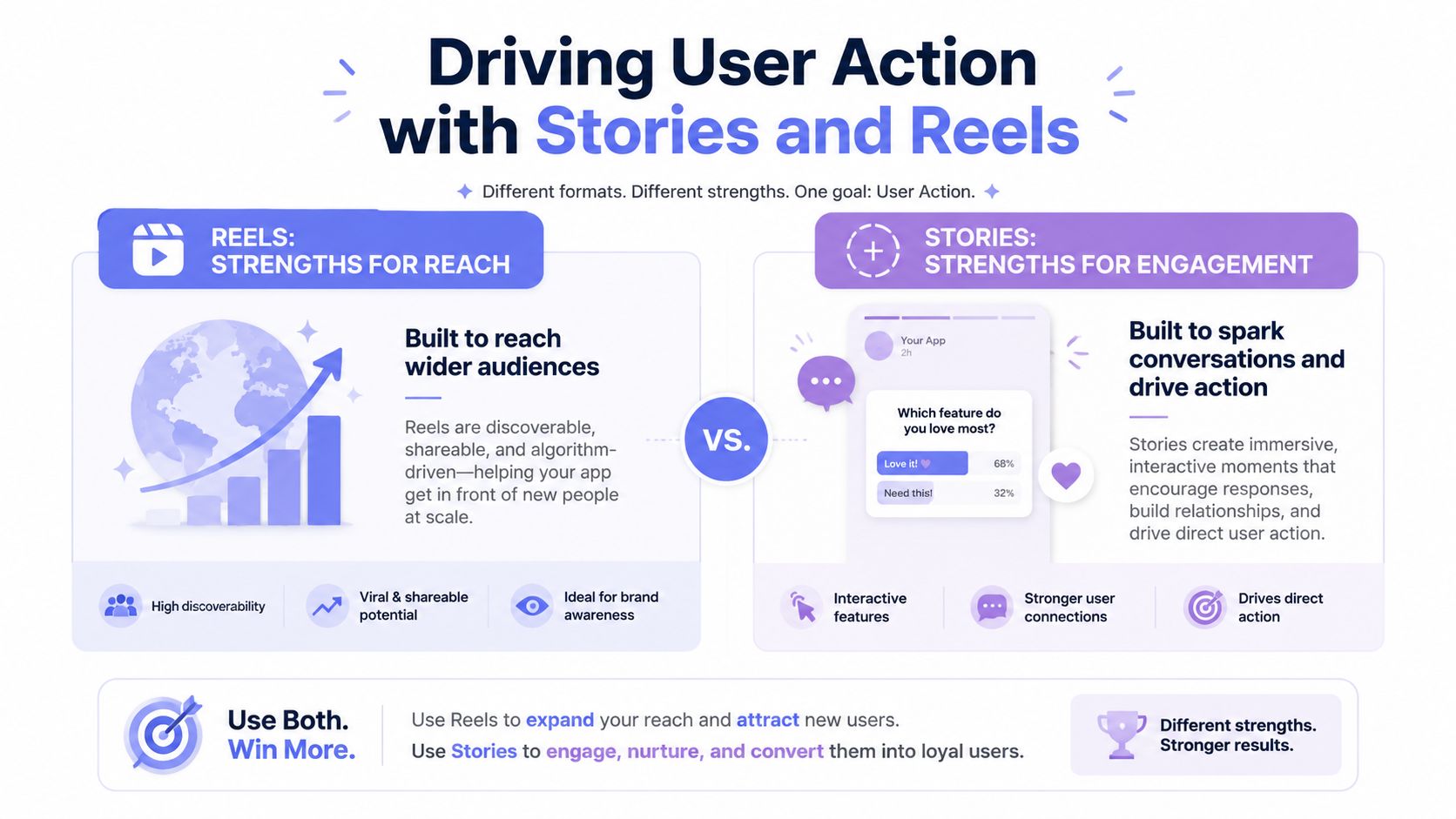 An infographic comparing Reels for reach and Stories for engagement to drive user action in marketing.
Stories are built for response
Stories are strong when the desired action is immediate and low friction. That includes things like tapping through updates, responding to prompts, reacting to a limited-time message, or paying attention to a timely reminder.
A useful contrarian point is that the best format depends on the funnel stage. Reels may widen attention, but Stories can be stronger for nudging an already-warm audience to respond immediately because they support direct engagement tools such as polls, quizzes, reminders, and temporary offers, as explained in Switcher Studio's guide to Reels and Stories.
For developers, this matters because “engagement” isn't one thing. If your customer success team says users want more engagement, ask what kind:
Immediate feedback. Stories fit polls, questions, and fast interactions.
Timed prompts. Stories fit countdown-like behavior and temporary offers.
Relationship maintenance. Stories fit frequent, low-production updates that would feel noisy on the main content surface.
If you build CRM-adjacent tools, creator tools, or community software, these distinctions matter more than general reach.
Reels are built for spread
Reels support a different kind of action. They're better suited to shareability, ongoing visibility, and content that keeps working after the publish moment has passed.
That makes Reels useful when the app goal is something like:
Awareness expansion. The user wants new people to encounter the brand or creator.
Content repurposing. The same short-form video can often be adapted across vertical video workflows.
Evergreen discovery. The asset should still make sense days later, not just right now.
This is why the difference between Story and Reels isn't “casual versus serious video.” That framing leads people astray. The fundamental split is response mechanics versus distribution mechanics.
If the user wants a reply today, Story is often the better default. If the user wants the clip to keep finding people, Reel is usually the cleaner fit.
When you build app logic around that distinction, feature decisions get easier. Your CTA templates, composer hints, automation rules, and analytics events all start mapping to user intent instead of generic media handling.
When to Use Reels vs Stories in Your App
Teams typically don't need another abstract format explainer. They need product decisions. If your app serves different customer types, the right choice usually becomes obvious once you look at the job the content is supposed to do.
Product patterns that fit Reels
A Reel-first workflow makes sense when content needs shelf life and discovery.
Take a real estate SaaS. Property tours, neighborhood snippets, and agent intro videos fit Reels because the point is visibility beyond the current follower base. A Story can support that campaign, but it usually shouldn't be the main discovery vehicle.
The same applies to user-generated content platforms. If users create challenge clips, demonstrations, reactions, or educational snippets, Reels are the more natural publishing target because the content is meant to circulate.
Other cases where Reel support should be a priority:
Creator tools. Templates, clip assembly, caption workflows, and publish queues all align naturally with Reel-style output.
Brand content systems. Launch teasers, product use cases, and educational snippets benefit from a format that remains visible.
AI content agents. If your automation generates evergreen short-form content, Reels are the safer default because they don't disappear on their own.
Product patterns that fit Stories
Story support matters when the content is tightly tied to time, context, or audience familiarity.
Think about a local business tool. “Open house this Saturday,” “new menu item today,” “we're live in an hour,” or “vote on tomorrow's feature” all behave like Stories. These aren't assets that need long shelf life. They need immediate attention from people who already care.
That same logic works for internal-brand or community software too. If the job is frequent updates, behind-the-scenes snippets, or lightweight prompts, Stories are a better fit.
Common Story-first scenarios include:
Event reminders. Good for things that become stale quickly.
Community prompts. Better for quick questions and warm-audience interaction.
Flash updates. Better when permanence would make the content worse.
A lot of failed social integrations come from assuming every piece of video content wants permanence. Plenty of content is only useful for a short window.
When supporting both is the right call
Some apps shouldn't force a choice. They should support both, but with opinionated defaults.
A good example is a scheduling platform for small businesses. The same business may want a polished Reel for broader exposure and a same-day Story to drive attendance or clicks from existing followers. The product shouldn't make that user learn platform theory. It should ask what outcome they want and route them toward the right format.
A few implementation patterns help:
Goal-based composer entry points. Start with “grow reach” or “drive action now” instead of “Reel” or “Story.”
Format-aware templates. Keep reusable structures tuned to the behavior of each surface.
Separate automation triggers. “Publish evergreen clip” and “publish time-sensitive update” shouldn't share the same assumptions.
That's usually the cleanest answer to the difference between Story and Reels in app design. They're not competing checkboxes. They're separate publishing intents that sometimes belong in the same workflow.
Automating Reels and Story Publishing with a Unified API
Once you support both formats, the true annoyance starts. Your publishing layer has to deal with different media paths, different validation assumptions, and asynchronous processing behavior that can fail in ways users don't understand.
The implementation pain is real
From a systems point of view, the hard part isn't sending the initial request. It's everything around it:
Preflight validation. You need to reject the wrong media before the platform rejects it later.
State handling. Async media processing means your job queue has to track statuses and retry sanely.
Error translation. Raw platform errors are often useless to end users, so you need format-aware messaging.
Scheduling discipline. A scheduled Story that misses the moment is often worthless. A delayed Reel is annoying, but still useful.
Teams start building lots of glue code. Polling workers. retry logic. token refresh plumbing. version-specific workarounds. Then six months later someone asks why the Instagram publisher is more complicated than the core product.
If you're prototyping quickly, it's often smarter to use a starter project that already assumes external API complexity and background jobs are part of the product. Something like the LunaBloom AI Starter App is useful for seeing how to structure an app when automation and orchestration are first-class concerns instead of afterthoughts.
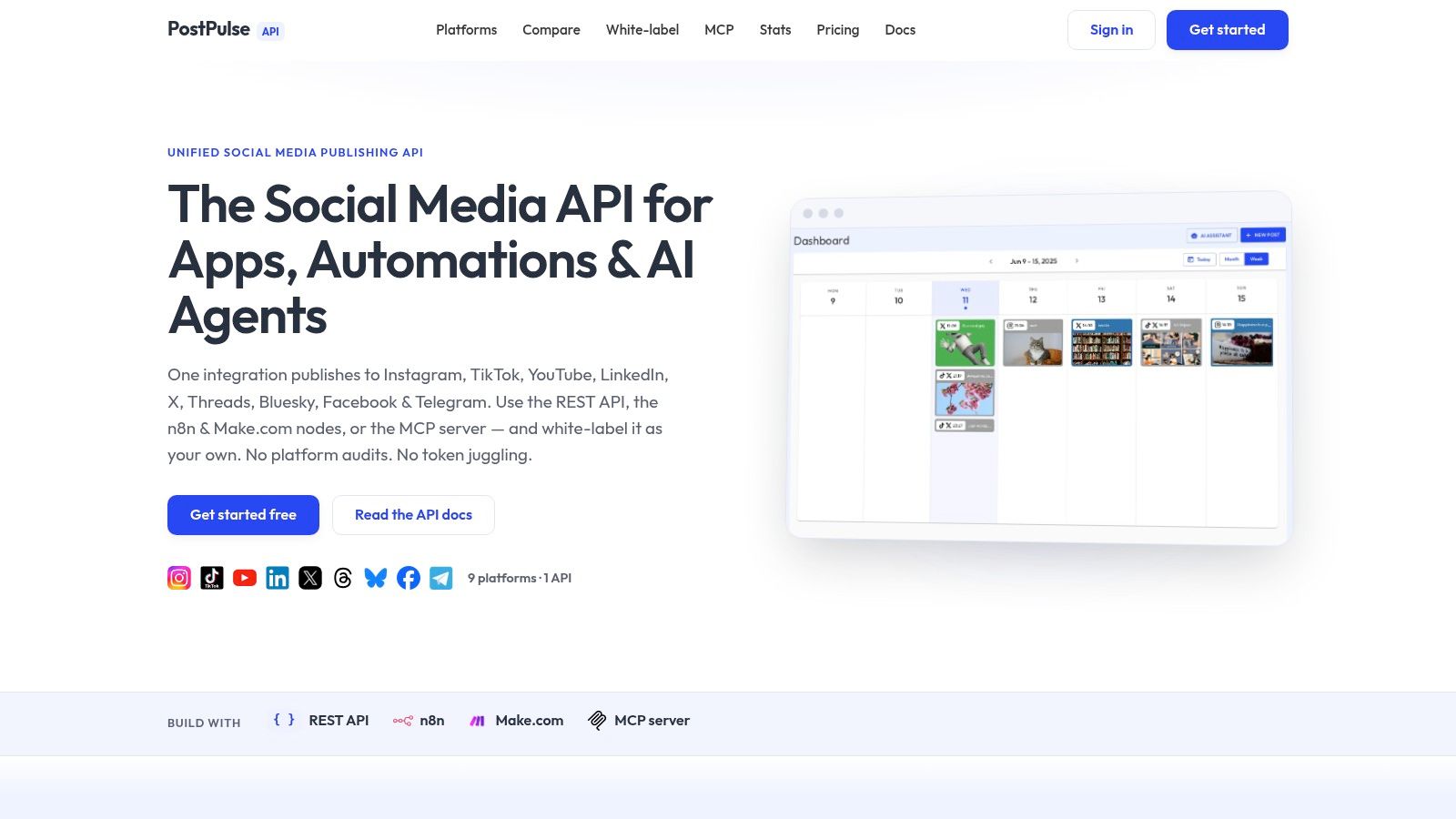
Here's the kind of interface developers usually want instead: one publish call, one format field, one status model.
 Screenshot from https://post-pulse.com
What a unified abstraction should do
A sane abstraction layer should let your app say “publish this Instagram asset as a Story” or “publish this as a Reel” without forcing your product code to own every platform-specific edge case.
That usually means the publishing layer should handle:
Format routing. Story and Reel shouldn't require your application code to fork all over the place.
Async lifecycle management. The system should absorb processing states and expose a stable status model back to you.
Credential maintenance. OAuth, refresh cycles, and version churn shouldn't leak into every feature team.
Operational consistency. Logs, retries, and webhook or polling behavior should look the same from your side even when the platform behavior doesn't.
If you need that kind of setup, an Instagram auto-publish layer can remove a lot of repetitive platform work from your codebase.
The main thing to avoid is pretending the formats are identical just because you can hide them behind one endpoint. Good abstractions preserve meaningful differences while removing repetitive plumbing. Bad abstractions flatten everything until debugging becomes guesswork.
If you're building social publishing into a product, PostPulse gives you one integration for multi-platform publishing, including Instagram workflows, without spending months on platform app reviews, token handling, and per-format maintenance.
About the Author

Founder of PostPulse — a social media scheduling platform for creators and teams. Software engineer with a passion for building developer tools and simplifying complex API integrations across social media platforms.