Whitelabel Social Media Management: Effortless SaaS
Published on
Tags:
You shipped the first social publishing integration and felt good for about two days. Then a token expired, a media upload got stuck in a status you couldn't reproduce locally, and a platform review request came back with a vague rejection that didn't tell you what to fix. That's the point where many realize they didn't add a feature. They adopted an operations burden.
That burden grows in ugly ways. Every network has its own auth flow, media rules, publishing quirks, and approval process. The hard part isn't the first successful post. It's keeping the whole thing alive when users connect real accounts, APIs change underneath you, and support tickets start arriving with screenshots from flows you don't control.
That's why whitelabel social media management matters to builders. Not as an agency buzzword, but as an infrastructure decision. If you're building product, automations, or AI agents, the question isn't whether you can integrate each platform yourself. It's whether you want to own the long tail of maintenance that follows.
Table of Contents
The Social Media Integration Nightmare
The first platform fools you. One OAuth flow, one publish endpoint, one green checkmark in your logs, and it looks manageable. Then reality shows up. A user reconnects an account and your stored assumptions break. A post works for an image but fails for a video. A support ticket says “scheduled but never posted,” and now you're digging through provider dashboards, app permissions, and retry workers instead of building your actual product.
Instagram is usually where teams lose their innocence. If you've ever had to reason through the platform's moving parts, this Instagram Graph API breakdown captures why the integration surface is bigger than it first appears. The problem isn't that any one platform is impossible. It's that each one is its own little universe of edge cases.
Then you add a second or third network and the codebase starts to smell. Your “publisher” becomes a pile of conditional branches. Error handling stops being semantic and turns into vendor-specific archaeology. Scheduling looks simple until retries, duplicate prevention, token refresh, and content validation all have different failure modes per platform.
You don't build one integration. You build a permanent compatibility layer that somebody has to babysit.
This is also where the product side feels pain. Teams want a clean way to coordinate multiple brands and channels, and that's why practical workflow guides like manage your social accounts with Narrareach keep resonating. The user problem is already hard. Adding brittle integration plumbing underneath it makes the whole feature harder to trust.
The hidden cost isn't just engineering hours. It's on-call time, support drag, compliance anxiety, and the fact that every new platform steals time from roadmap work customers would notice.
What Is White-Label Social Media Management
A white-label social media management product gives your app a ready-made social layer that runs under your brand. Instead of wiring up each network yourself, you integrate with one provider that handles account connection, publishing, media validation, scheduling, and the user-facing workflow your customers see.
For a product team, the true value is not a prettier dashboard. It is the removal of a maintenance category that tends to spread. One network changes an auth requirement. Another rejects a video that passed yesterday. A third adds a review step for permissions you already shipped against. A good white-label provider absorbs that churn behind a stable API and branded UI components.
The useful mental model
Stripe is the closest comparison. A team can process payments by stitching together gateway calls, token storage, retries, and compliance controls. The hard part is everything around the charge request. Social publishing has the same shape. The post endpoint is the easy part. The expensive part is keeping the full system reliable across Instagram, TikTok, LinkedIn, YouTube, X, Facebook, Threads, Bluesky, and Telegram.
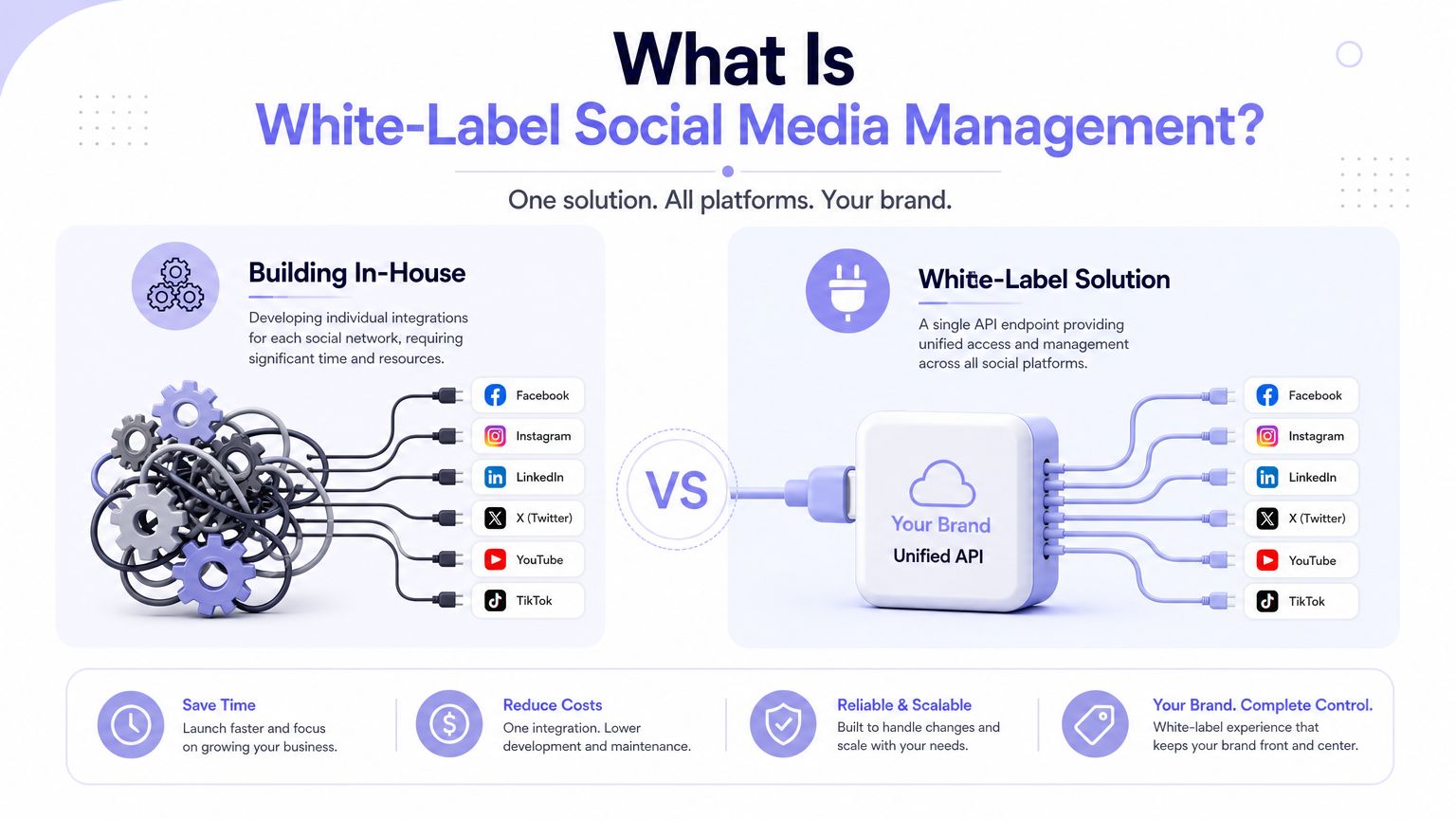 A diagram comparing building social media integrations in-house versus using a white-label unified API solution.
The better platforms do more than normalize endpoints. They package the operational surfaces that usually become side projects inside your codebase: approval flows, scheduled publishing, branded reports, permissions, and client-safe review links. PostPulse is a good example of the category done right. It gives builders one integration surface while keeping the customer experience branded and consistent.
Private-label versus white-label
Teams often blur these terms, and the distinction matters during evaluation.
Private-label usually means your team uses the provider as internal infrastructure. Your operators log in, connect accounts, schedule posts, and run publishing from internal tools or automations. Branding matters less than reliability, API coverage, and how quickly your team can get work done.
White-label means the feature is part of your product. Your customers connect their own accounts inside a flow that looks native to your app. Approval pages, emails, reports, and portals carry your brand instead of the vendor's.
That difference changes what you need to inspect:
Internal operations use case: API quality, account connection flow, rate-limit behavior, and publish reliability matter most.
Customer-facing SaaS: Branding gaps, custom domains, embedded workflows, approvals, and whether users ever hit a vendor-hosted surface matter just as much.
Agency product: Reports, client portals, and approval UX affect how professional the agency looks to clients.
Automation or AI workflow: Predictable API behavior, webhooks, idempotency, and error semantics matter more than a feature-heavy UI.
Practical rule: If your users touch the workflow directly, evaluate the white-label surface with the same scrutiny you give the API.
Plenty of vendors claim white-label support because they let you swap in a logo and brand color. That is cosmetic customization. A real white-label product lets you own the user experience without inheriting the integration and operations burden underneath it.
Who Actually Builds with This Stuff
A common product request sounds simple until engineering starts sizing it: add social publishing so users can create a post in your app, push it to LinkedIn, Instagram, and Facebook, and schedule it for next week. On paper, that looks like one feature. In practice, it drags in OAuth flows, token refresh jobs, media handling rules, review requirements, and a support queue for every platform edge case.
 A digital illustration of a young man coding a social media management app at his laptop.
The teams that buy white-label social media infrastructure are usually the ones that have already realized the hard part is not the first demo. It is owning the integration after launch.
SaaS teams
SaaS products add social publishing when it fits an existing workflow. A CRM wants outbound content tied to campaigns. A design tool wants users to post creative without exporting files. A content platform wants publishing built into review and approval.
For these teams, the trade-off is focus. Building direct integrations gives full control, but it also creates a side business inside your engineering org. Someone has to monitor expiring tokens, retry failed jobs, interpret platform-specific errors, and keep up with API changes that rarely arrive on your roadmap.
A white-label provider keeps that blast radius smaller. Your team still owns product design, permissions, billing, and customer experience. The provider owns more of the ugly operational layer underneath.
Agencies and client portals
Agencies care about branding, but the technical burden matters just as much. A client portal that schedules posts, collects approvals, and publishes under the agency brand still depends on infrastructure that has to work every day.
That changes the build-vs-buy math. Agencies rarely want to staff engineers to maintain direct platform integrations, yet they still need software that looks like their own product and holds up under client use. The pain shows up in support and operations before it shows up in code. Failed reconnects, inconsistent media rules, and last-minute publishing errors land on account managers and client success teams first.
A good white-label layer lets the agency sell a polished service without inheriting the full maintenance burden of the underlying APIs.
No-code builders and AI agents
This group usually has the lowest tolerance for platform quirks.
A no-code operator using Make or n8n wants a predictable step in a workflow: approved content goes in, published post IDs and status come out. They do not want to reverse engineer different auth flows, media upload sequences, and scheduling behavior for every network.
AI products have an even narrower margin for error. Agents need a clean contract, structured responses, and failure modes they can reason about. Platform APIs are often the opposite. They expose edge cases, inconsistent fields, and rules that only surface after review or publication attempts. Wrapping that complexity behind one stable interface makes the difference between an automation that survives production and one that falls apart on the first non-happy path.
Providers that expose a clear, unified surface are much easier to build on. The PostPulse API documentation for white-label social publishing workflows is a good example of what builders should look for.
Three builder profiles show up again and again:
Product teams adding social publishing to an existing SaaS workflow without creating a permanent integration maintenance project.
Agencies packaging approvals, reporting, and publishing inside a branded client experience.
Automation and AI builders who need one dependable interface instead of a stack of brittle platform-specific logic.
What they share is not industry or company size. It is a refusal to spend the next year babysitting social platform integrations.
The Nuts and Bolts of Technical Integration
A social publishing feature looks straightforward until it hits production. The first version posts to one network in a staging account. A month later you are dealing with expired tokens, media rules that differ by platform, callback failures, and support tickets that all say some variation of "scheduled post failed" without enough detail to reproduce the issue. A good white-label system earns its keep by removing that maintenance burden at the API, auth, and normalization layers.
The API surface you want
From your app's perspective, the best integration is predictable. Your system sends content, media references, target accounts, and a publish time. The provider validates the request, stores the job, handles platform-specific execution, and returns a status model you can build against.
That kind of API is easier to own over time. You can isolate publishing behind your own service layer, write integration tests against stable contracts, and avoid scattering platform logic across workers, schedulers, and UI code. The PostPulse API documentation for social publishing workflows shows the sort of surface area builders should expect: clear publishing inputs, account context, and status handling in one place instead of a pile of network-specific branches.
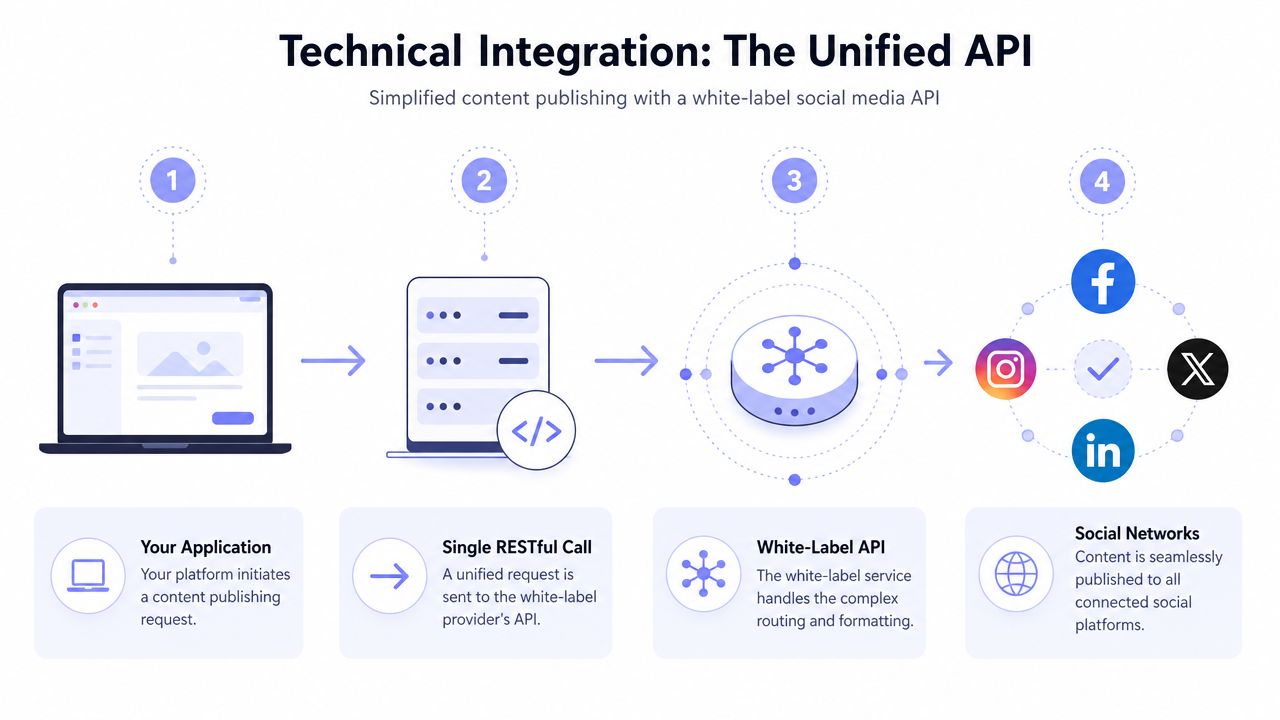 A diagram illustrating the four-step workflow of a white-label social media API for automated content publishing.
Scheduling also needs to be part of the contract from day one. Immediate publishing is one code path. Scheduled publishing adds job persistence, retry policy, idempotency, webhook timing, and a way to explain delayed failures after the original request has long since returned 200.
The auth and tenancy layer
Many in-house builds start collecting hidden ops cost.
A provider should give you clear tenant isolation, centralized token handling, and a permission model that maps cleanly to workspaces, brands, or clients. Every post, asset, profile, and credential should stay scoped to the right tenant. If that boundary is fuzzy in the data model, it will become a production incident later.
OAuth ownership is another trap. Social tokens expire, scopes change, refresh flows break, and platform review requirements shift with little warning. If you own those flows directly, your team also owns reconnect UX, secret rotation, token storage, audit trails, and the support queue when a client account loses publish access without warning. A white-label provider absorbs a large share of that operational drag.
A reliable tenancy model gives you:
Cleaner isolation: Posts, analytics, profiles, and tokens stay attached to the correct customer.
Faster onboarding: New accounts follow the same connection flow instead of custom setup work.
Lower maintenance load: One shared application can serve many customers without risky data crossover.
Safer incident response: Access boundaries are explicit, which makes debugging and remediation much simpler.
If a provider cannot explain tenant isolation and token ownership clearly, do not connect customer social accounts to it.
Normalization is the product
"One API for many networks" undersells the hard part. Normalization is the product.
Every network has its own rules for media preprocessing, aspect ratios, character limits, mentions, link handling, drafts, scheduling windows, and error responses. Even basic concepts like "published," "scheduled," or "failed" do not always map cleanly across APIs. A white-label provider sits between your application and that chaos, translating one request model into the right publish path for each destination.
That translation layer is what saves engineering time after launch. It standardizes responses, turns platform-specific errors into something your app can surface, and keeps retry and status logic from spreading into every part of your stack. For AI and automation products, that matters even more. Agents need a small set of reliable actions and machine-readable outcomes. They do not perform well when every platform exposes a different set of edge cases.
The benefit is not polish. It is less integration debt, fewer production surprises, and a social publishing feature your team does not have to babysit every week.
Decoding Pricing Models and Launch Timelines
Pricing is where a lot of teams make the wrong comparison. They compare subscription cost to engineering cost for the initial integration sprint. That's too narrow. The better comparison is subscription cost versus the total operating cost of owning the feature over time.
What the market pricing tells you
The verified market data gives a useful baseline. Budget-tier white-label scheduling tools for agencies range from $30 to $100 per month, while mid-tier platforms with custom domains and branded portals range from $100 to $300 monthly. The same verified data also notes that AI-driven white-label platforms introduced in 2025 charge between $33 and $42 per brand per month at scale, reflecting a shift toward per-brand pricing rather than per-user pricing.
That pricing shift matters. The same data says the per-brand model reduced agency operational costs by approximately 28% for teams managing 10 or more clients, because costs scale with client count instead of team size. That's the right incentive structure if you expect internal teams, contractors, strategists, and reviewers to touch the system without each seat increasing your bill.
For developers, the bigger issue is launch speed. A provider with verified platform apps and a stable integration surface can remove a lot of approval and maintenance drag. That's often more valuable than shaving a little off the monthly fee.
PostPulse pricing models compared
Here's the practical breakdown for PostPulse based on the provided pricing information.
Model | Cost Structure | Best For | User Experience |
Private-Label Pay-as-you-go | $0.20 per publication | Testing, internal tools, low-volume automations | Users connect accounts inside PostPulse and you publish through the API, n8n, Make.com, or MCP |
Private-Label Subscription | $5 per account per month, or $48 per year per account | Consistent posting across connected accounts | Users connect accounts inside PostPulse with unlimited posts on subscribed accounts |
White-Label | $200 per month platform fee plus $1 per active social account | SaaS products and customer-facing platforms | Fully branded experience where users never see PostPulse |
A detail I like in that white-label model is the definition of active. If an account only counts when it publishes at least one post that month, idle connected accounts don't distort your costs. That aligns better with real product usage than charging for every connected account regardless of activity.
Two trade-offs are worth stating plainly:
Pay-as-you-go is great for proving the feature. It's not the best fit if you expect steady recurring usage.
Per-active-account pricing is better for product businesses because adoption can grow before usage becomes dense.
If you're still evaluating whether to buy or build, launch timeline should sit next to price in the spreadsheet. Slow integration work usually costs more than it first appears.
How to Choose the Right Provider
A lot of teams reach this step after they have already felt the pain. One network changed its review rules. Another rotated tokens in a way your refresh job did not expect. Support tickets started piling up because scheduled posts were stuck in a queue with no clear failure reason. At that point, provider selection becomes an engineering decision about operational load, not a feature comparison.
The provider you choose should reduce the amount of API behavior your team has to own. If it still leaves you debugging auth edge cases, tracking per-network publishing rules, and explaining opaque failures to customers, you only moved the problem.
Start by checking whether the product fits the way your system is built. The PostPulse social media API for SaaS is a good reference point because it exposes the parts builders need: embedded publishing, automation paths, and white-label support that does not force users through a vendor-branded experience.
Before signing anything, it also helps to compare social media management platforms based on workflow fit. Feature grids are easy to pad. Clean API behavior, predictable status reporting, and a connection flow users can finish without support are harder to fake.
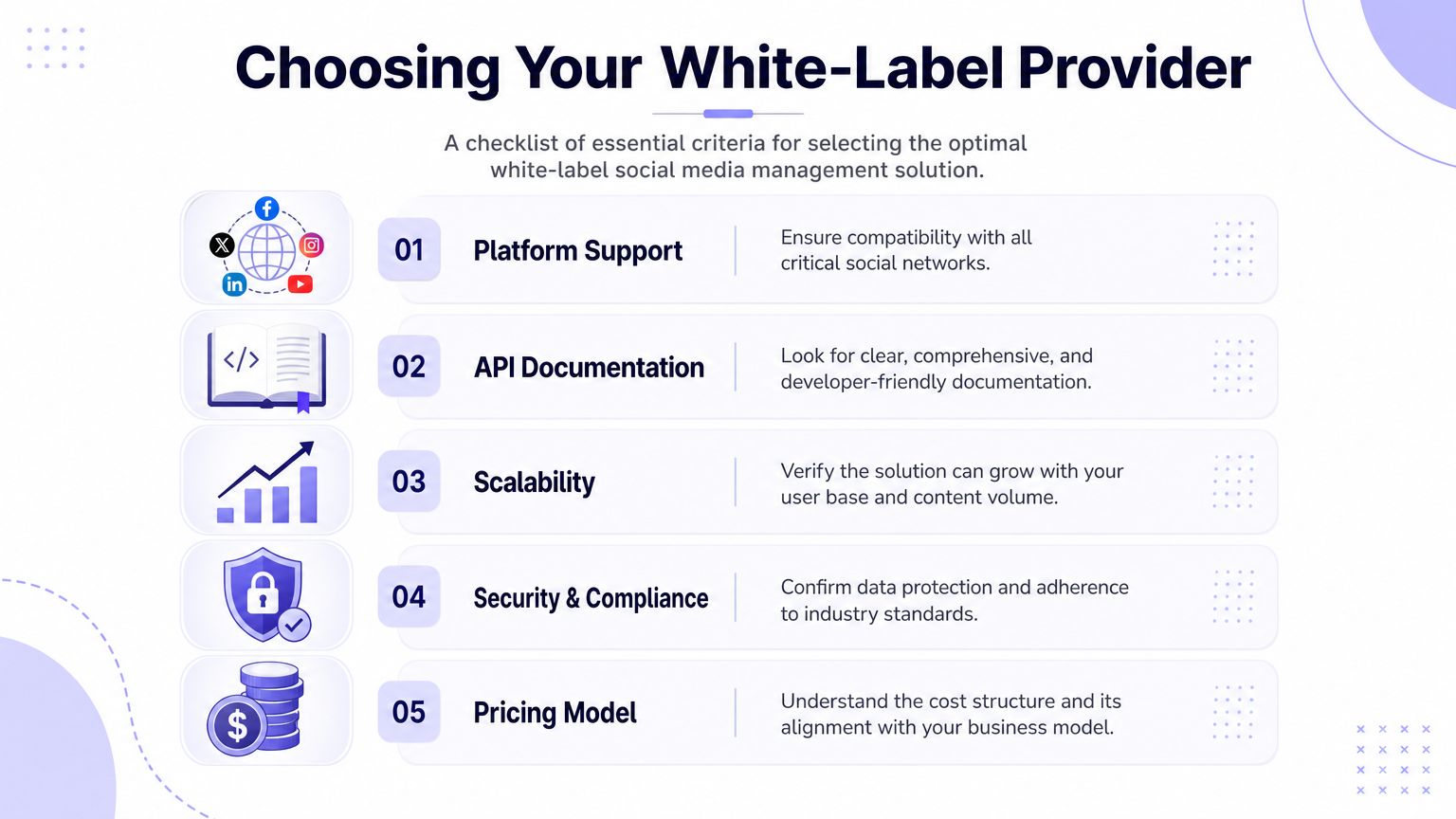 A checklist infographic titled Choosing Your White-Label Provider, highlighting five essential criteria for selecting social media software.
What I check first during evaluation:
Platform coverage: Support the networks your customers use now, but verify depth, not just logo count. Publishing support, media handling, account connection, and status feedback matter more than a badge on the homepage.
Developer experience: Read the docs before talking to sales. If authentication, webhooks, error codes, and rate limits are vague in the docs, your integration work will be vague too.
Operational ownership: Check who handles token refresh, retry logic, scheduling reliability, and provider-side monitoring. Hidden maintenance cost can manifest in these areas.
White-label completeness: Branding needs to cover the whole user path, including connect flows, approval pages, notifications, and any hosted surfaces your customers might see.
Integration options: REST API support is the baseline. Native paths for tools like n8n, Make.com, or agent workflows can save real implementation time if those matter in your product.
White-label quality shows up in the small leaks. A stray vendor email, a redirect to an unfamiliar domain, or a support flow that bypasses your team breaks continuity fast. That matters for agencies, but it also matters for SaaS products because every off-brand handoff creates confusion you will end up supporting.
I also look for failure visibility. Good providers expose useful status states, clear error messages, and enough event data to drive product logic on your side. Bad ones collapse everything into "failed" and leave your team guessing whether the issue was permissions, media validation, rate limits, or a network-side outage.
This video gives a helpful high-level look at what to examine when evaluating platforms:
The best provider is the one that removes ongoing integration and support work from your team while staying invisible to your users.
Your Go-Live and Migration Checklist
The nice part about moving to a unified layer is that rollout is usually much simpler than teams expect. The hard engineering happened on the provider side. Your job is to integrate it cleanly and migrate users without breaking trust.
A practical rollout sequence
Use a narrow rollout first. Don't start by migrating every account and every workflow.
Create the integration boundary
Add a dedicated service in your app for publishing, connection state, and delivery status. Even if the provider gives you a simple API, keep your own abstraction so you can control logging, retries on your side, and product-level analytics.
Connect one real account
Run through the provider's auth flow yourself first. Don't delegate this step. You want to see where users click, what permissions they grant, and how account selection feels.
Publish a minimal test post
Keep the first test boring. A simple text or image post is enough to verify that account connection, payload validation, scheduling, and status reporting all work end to end.
Add application logic around it
Once the raw publish flow works, wire in your app-specific behavior. Approval states, content review, audit logging, and customer notifications belong in your product layer, not scattered across ad hoc scripts.
What to watch during migration
Migration fails when teams treat it as a backend swap and ignore the user experience.
A few practical checks make the handoff smoother:
Reauthorization messaging: Tell users why they need to reconnect accounts, and keep the copy short.
Scheduling cutover: Freeze old scheduled jobs before enabling new ones, or you risk duplicate publishing.
Support readiness: Prepare canned replies for reconnect issues, permission confusion, and “why does this look different now?”
Tenant mapping: Verify every workspace or customer in your system maps cleanly to the provider's account structure.
Rollback plan: Know how to pause or disable publishing if something unexpected appears in production.
One more thing matters. Don't migrate every content type on day one. Start with the formats your users rely on most, then expand after you've seen the new flow behave under live traffic.
A migration like this isn't exciting work, but it pays back fast. You're trading a fragile pile of bespoke platform code for a cleaner boundary your team can maintain.
If you want to stop babysitting expiring tokens, platform review queues, and one-off publishing code, PostPulse is the kind of infrastructure worth testing. It gives you one integration for publishing across multiple platforms through a REST API, official n8n and Make.com nodes, or an MCP server, and the white-label option lets the whole flow live under your brand instead of theirs.
About the Author

Founder of PostPulse — a social media scheduling platform for creators and teams. Software engineer with a passion for building developer tools and simplifying complex API integrations across social media platforms.