LinkedIn MCP Server Setup for AI Publishing via PostPulse
Published on · Updated on
Tags:
You've got an AI agent ready to publish, a LinkedIn account connected, and a token that looked valid when you went to bed. At 2am, the publish call fails, the media upload is still processing, or the agent can read a profile but can't create a post. The frustrating part isn't usually the MCP wiring. It's the access model underneath it.
That's why a LinkedIn MCP server deserves a production review, not just an installation tutorial. MCP can give an agent a consistent tool interface, but it doesn't automatically make LinkedIn access official, durable, compliant, or observable. The question is whether the server can support publishing you can audit and trust after the demo ends.
Table of Contents
Why LinkedIn Publishing Breaks for Developers and Agents
A publish request can fail after the agent has already discovered the tool. The token may have expired, a permission change may still be tied to an older token, or a media post may require an upload before the final share can reference its media URN. Browser-driven implementations add another failure point because LinkedIn interface changes can break automation without any change to the agent configuration.
LinkedIn's authorization documentation makes the token lifecycle explicit. Its three-legged OAuth flow returns an expires_in value, and access tokens have a 60-day lifespan. A publishing service should record that value and renew credentials before they become invalid. Otherwise, the first indication of an expired token is a failed production post. (LinkedIn's Share on LinkedIn documentation explains the token behavior.)
Permissions introduce a separate failure mode. LinkedIn uses w_member_social for writing on behalf of an authenticated member and w_organization_social for writing on behalf of an organization. Changes to application access may not affect existing user access tokens until those tokens expire and are refreshed. (LinkedIn's migration FAQ covers that behavior.)
Practical rule: Treat every publish attempt as an authenticated, permissioned transaction. A successful MCP connection only proves that the agent can reach a server.
MCP gives AI clients a standard way to discover and call tools. It can turn an agent request into a structured operation, but the protocol does not determine whether the server uses an official API, a browser cookie, or another integration layer. For publishing, that implementation choice affects token handling, media uploads, auditability, and recovery after failure.
LinkedIn does not appear to publish an official MCP server. Search results instead point to independent community projects, including an implementation that requires a LinkedIn Developer Account, Node.js 16+, and an MCP-compatible client. The ecosystem is therefore developer-led rather than platform-native. (This community implementation writeup documents that distinction.)
MCP provides the control surface; the trust layer has to come from the integration behind it. The server must authenticate the account, apply the correct permission, upload media correctly, confirm the resulting post, and preserve an action trail. A community server built around browser cookies may work for experimentation, while a sanctioned PostPulse MCP path gives production teams a clearer basis for governance, token lifecycle management, and reliable publishing.
Understanding Your LinkedIn MCP Server Options
Before installing a repository, identify how it reaches LinkedIn. The same “LinkedIn MCP server” label can describe very different systems, with different failure modes and governance requirements.
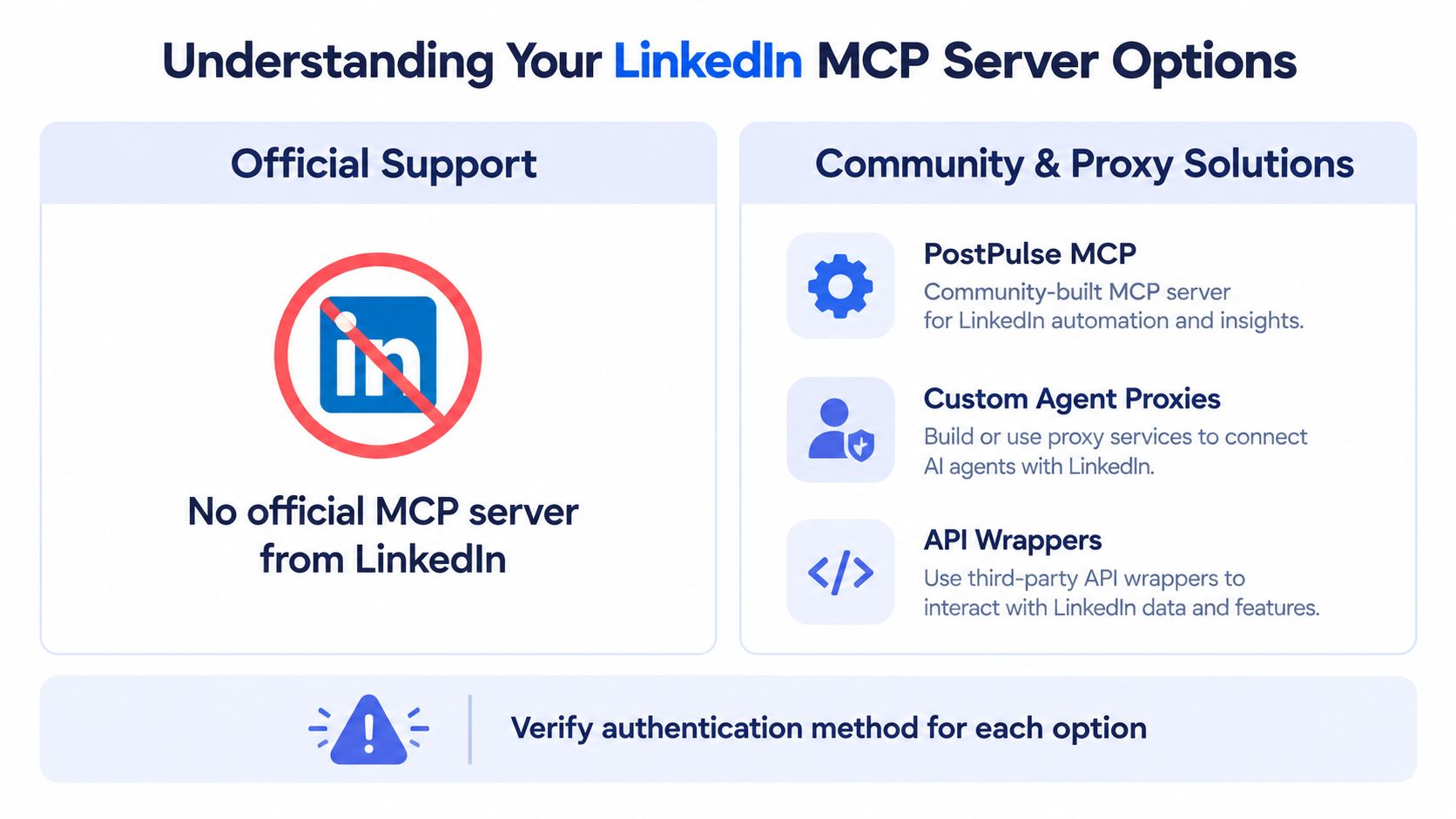 A visual guide explaining options for using a LinkedIn MCP server, highlighting community and proxy solutions.
LinkedIn itself hasn't published an official MCP server or an official Claude or ChatGPT connector. One GitHub LinkedIn MCP project is dated 2024-12-15, while other repositories and implementation writeups appeared in March and April 2025. A later comparison page also describes MCP as introduced by Anthropic in November 2024, which helps explain why the ecosystem appeared quickly after MCP became widely discussed. (The project repository shows the early community activity.)
Browser sessions and cookies
A browser-driven server can be attractive because it may expose capabilities without waiting for a formal API integration. One documented implementation relies on the logged-in LinkedIn browser cookie rather than a public LinkedIn MCP API. That makes the cookie the critical dependency. When the session expires, is invalidated, or triggers an additional verification step, the MCP tool can fail even though the agent configuration hasn't changed. (The implementation repository documents this browser-session approach.)
This pattern is useful for controlled experimentation, but it creates operational and policy questions. Browser automation can be brittle under interface changes, and you need to examine LinkedIn's applicable terms before using it for publishing.
Unofficial API wrappers
An API wrapper may feel cleaner because it avoids direct browser control. The risk hasn't disappeared, though. You still need to understand which endpoint is being called, whose credentials it stores, what permissions it requests, and whether it can provide reliable confirmation after a write.
A documented server exposes a limited tool surface, with examples such as profile and company scraping, job search, and recommended jobs. Another registry entry describes MCP requests sent through JSON-RPC 2.0 to a /mcp endpoint, with setup involving Node.js v16+, credential configuration, and either stdio or SSE wiring. (The MCP registry entry describes those implementation details.)
Sanctioned integration paths
A sanctioned integration generally offers a narrower but more defensible operating model. You exchange broad automation freedom for managed authentication, clearer ownership of credentials, and a better chance of receiving structured delivery status. PostPulse is one option in this category, exposing a social publishing MCP path that can connect an MCP-compatible client to LinkedIn publishing workflows. You can compare the broader architectural implications in this guide to MCP servers for AI.
The choice should follow the workload:
Requirement | Browser session | Unofficial wrapper | Sanctioned integration |
Fast experiment | Strong fit | Possible | Possible |
Repeatable publishing | Fragile | Depends on implementation | Better fit |
Credential governance | Cookie-dependent | Wrapper-dependent | Defined by integration |
Audit trail | Often limited | Varies | Should be a requirement |
UI-change resilience | Weak | Variable | Stronger when API-backed |
For production, monitor more than uptime. You need visibility into authentication failures, tool errors, publish status, and permission drift. A service such as Fivenines MCP server monitoring is relevant when you're evaluating how an MCP deployment behaves over time, not merely whether it responds during setup. The deeper issue is governance: who authorized the action, which account received it, and how can you prove what happened?
Prerequisites and Connecting PostPulse MCP to Your Agent
A failed publishing run often starts before the first tool call. Confirm that you have an active LinkedIn account, a PostPulse account with LinkedIn connected, an MCP-compatible client, and the Node.js runtime required by your chosen launcher. Community server setups commonly specify Node.js 16+. Check the server's actual requirement instead of assuming the version installed on your workstation is sufficient.
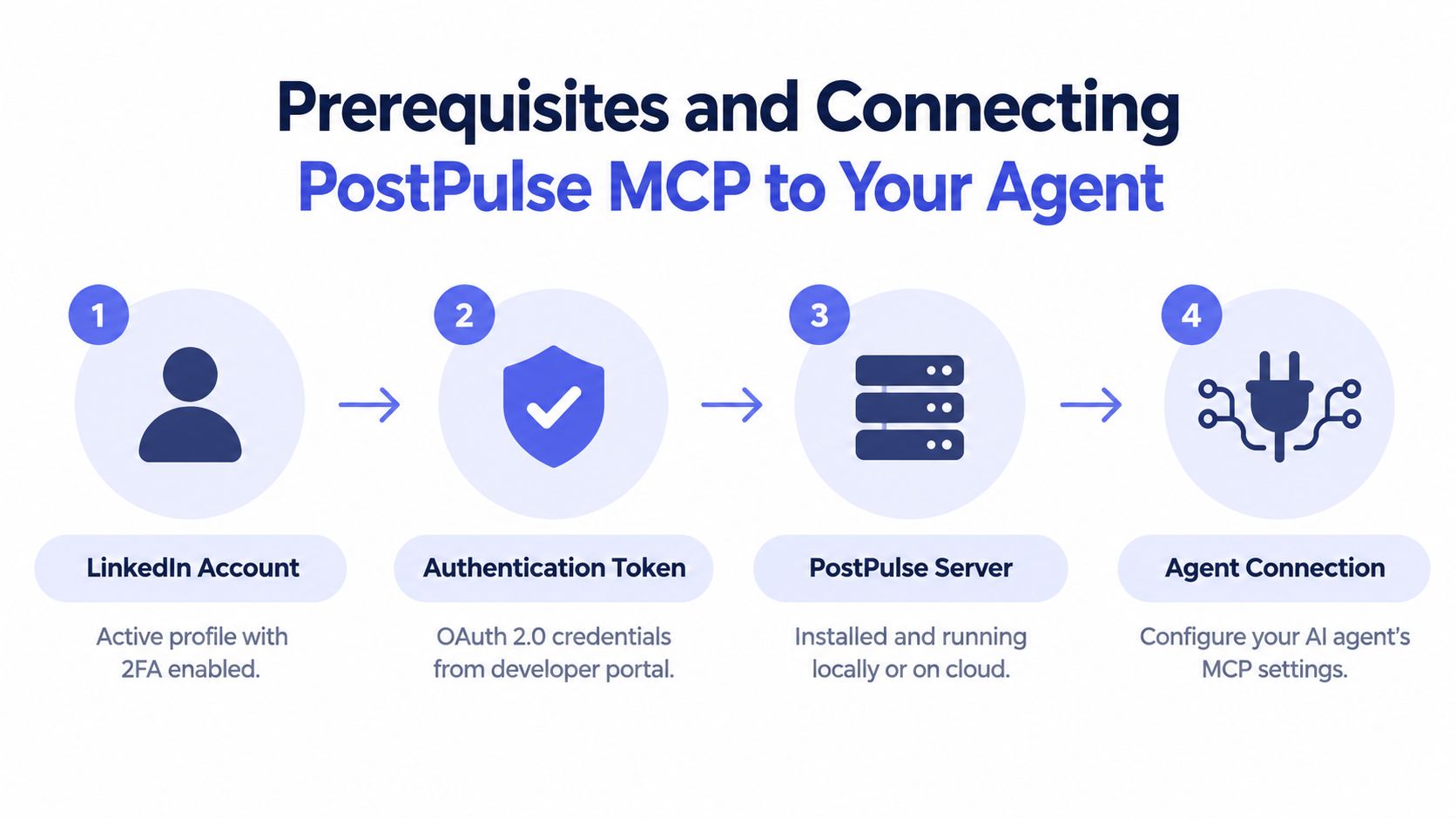 A four-step infographic illustrating the prerequisites and connection process for PostPulse MCP to an AI agent.
Prepare the account and credentials
Connect the LinkedIn profile or organization through the integration's OAuth flow. Browser cookies do not belong in an agent configuration, and access tokens should never be committed to a repository. Put credentials in the secret store provided by the deployment environment. Expose only the MCP server settings to the client.
Direct LinkedIn API publishing depends on the permission attached to the target. w_member_social authorizes writing for an authenticated member, while w_organization_social authorizes writing for an organization. LinkedIn's shares documentation also covers ugcPosts for video posts and the requirement to upload media before a rich media share can reference its resulting media URN. LinkedIn's shares getting-started documentation defines these publishing requirements.
A local client commonly connects through stdio. Property names vary by client, so treat this example as a configuration shape rather than a universal copy-and-paste file:
SSE deployments use a server URL instead. Keep the credential in the client's secret store, and confirm the endpoint expected by the server. Registry documentation describes JSON-RPC 2.0 requests sent to a /mcp endpoint, with stdio and SSE available as transport choices. The MCP server registry listing provides that transport context.
Verify before asking an agent to publish
Begin with discovery. Initialize the MCP connection, request the available tool list, and confirm that the expected LinkedIn publishing tools appear. Inspect connected-account metadata before sending any real content.
Use this sequence:
Load the server: Confirm that the process starts without missing environment variables.
Discover tools: Check that the client receives a tool list through the MCP connection.
Inspect the account: Verify the target LinkedIn profile or organization identifier.
Run a controlled publish: Use a clearly labeled test post and capture the returned status.
Check the destination: Confirm that LinkedIn displays the post, rather than relying only on a successful tool response.
Keep agent orchestration separate from credential handling. If several specialized agents coordinate the workflow, guidance on orchestrating AI agents with Swarm Forge can inform the broader control-plane design. The publishing agent still needs narrowly defined tools and an explicit approval policy for write operations.
For integration patterns beyond MCP, see the PostPulse integration guides. The verification that matters is whether the agent identifies the intended account, invokes the intended tool, and receives a traceable result.
Publishing to LinkedIn Through the MCP Server in Practice
A production publish is trustworthy only when the request, identity, content, and outcome remain auditable. Treat the agent's natural-language instruction as an orchestration layer, not as proof that LinkedIn accepted the post. The MCP server must expose enough structure to validate the operation before it writes.
 A digital illustration of a developer using an MCP server to automate publishing content to LinkedIn.
Text post to a personal profile
A personal text post needs an explicit member target and the content to publish. Even if the MCP client hides the underlying schema, pass the author, text, and visibility directly:
Record the response with the request payload, account identifier, timestamp, and agent run identifier. A successful tool response is not confirmation that the post is visible. If a timeout triggers a retry, use idempotency where the integration supports it, or inspect the destination before submitting identical content again.
The authenticated member owns the writing permission. Confirm that the selected account is the intended author before allowing the operation, as established earlier. A valid token attached to the wrong member can produce a technically successful but operationally incorrect post.
Rich media share
Media introduces an ordering requirement. Upload the asset first, wait for the upload operation to return a media URN, then include that URN in the share request:
A file URL cannot substitute for the URN expected by the API. A completed local upload also does not prove that LinkedIn has finished processing the asset. Apply the permission and media-order requirements established earlier, and treat the media status as part of the publish state. Video follows its own publishing path through the ugcPosts API.
Organization publication
Organization publishing changes the authoring context. Identify the organization in the payload and keep the organization identity separate from member identities in the account store:
The connected application also needs the organization-writing permission. A common production failure is choosing a real connected identity that lacks the required publishing role. Validate both the organization identifier and the caller's authorization before the agent receives a write-capable tool.
The final result should state the destination, content type, publication identifier, and delivery state. “Done” is insufficient. A reliable MCP workflow returns evidence of the operation, preserves that evidence with the request, and makes approval, retries, and later review possible.
Troubleshooting Authentication Media and Reliability Issues
A server can pass its connection check and still fail at the publish call. Diagnose the layer that failed rather than changing the MCP prompt and repeating the same request.
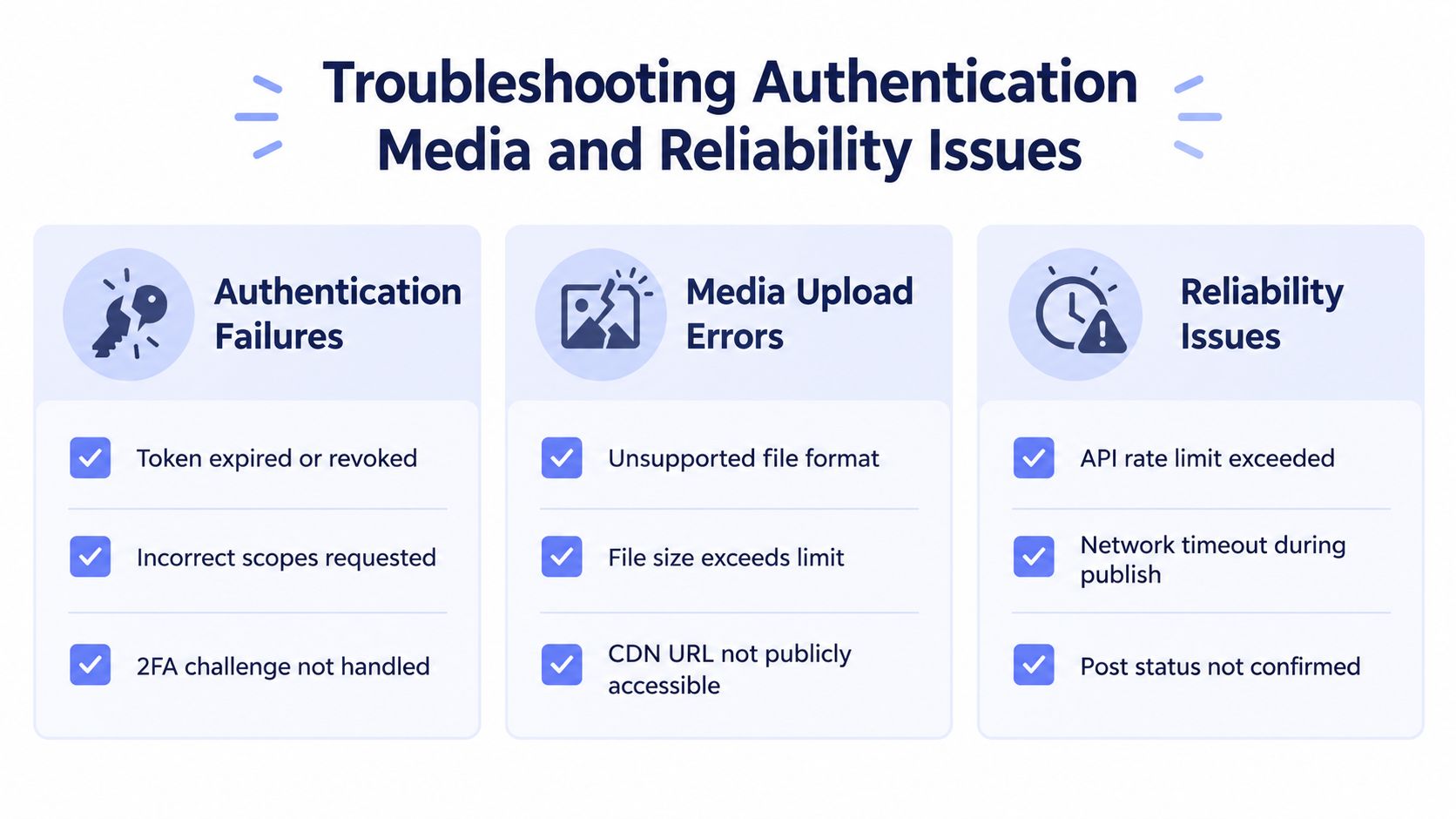 An infographic titled Troubleshooting Authentication Media and Reliability Issues, outlining common technical errors and solutions for API integrations.
Authentication failures
Symptom: The server connects, but publishing returns an authorization error.
Likely cause: The token lacks the required scope, has expired, or belongs to a different LinkedIn identity than the target. Permission changes may not take effect until existing access tokens expire and are refreshed.
Fix: Inspect granted scopes and the account identifier, then reauthorize after changing the permission set. Store expires_in when authorization completes and schedule refresh before the access token's documented 60-day lifespan ends.
A browser-session server has a different failure surface. Check the logged-in cookie and any verification prompt. LinkedIn can invalidate a session without any change to the MCP client, leaving the tool apparently connected but unable to publish.
Media upload errors
Symptom: The text post works, but an image or video post fails, remains unavailable, or produces an invalid media reference.
Likely cause: The workflow skipped registration or upload, submitted the final share before the media became usable, or sent a URL where the API expected a media URN. Upload media first, then use the returned URN in the share. Video uses its own ugcPosts publishing path.
Fix: Log each media operation separately. Capture the upload response, poll or validate the asset state when required, and pass only the returned URN into the final publish call. A completed local upload does not prove that LinkedIn has finished processing the asset.
Reliability and confirmation failures
Symptom: The agent reports success, but the post is not visible, or a retry creates duplicates.
Likely cause: The client treated a transport response as proof of publication, or LinkedIn accepted the request after a timeout but before the client received its response. Community servers that depend on unofficial APIs, browser cookies, or web automation add another maintenance risk when LinkedIn changes its interface.
Fix: Persist request and response identifiers, verify the destination, and make retries conditional. For a community implementation, pin tested versions, isolate the browser session, and monitor interface changes as a routine operational concern. A sanctioned PostPulse MCP path reduces browser-session fragility, but it still requires token, permission, and delivery checks.
Use this go-live checklist:
Authentication: Store the token expiry value and refresh before it becomes invalid.
Permissions: Match member publishing to
w_member_socialand organization publishing tow_organization_social.Media: Upload first, then publish with the returned media URN.
Confirmation: Record a publication identifier and verify the destination.
Governance: Log the agent, account, content, tool, result, and retry decision.
Fallback: Define what happens when the MCP server, token, or LinkedIn response is unavailable.
For implementation details, consult the LinkedIn API guide for developers. Aim for failures that are visible, attributable, and recoverable.
Putting It All Together for Reliable AI Publishing
A production-ready LinkedIn MCP workflow has four properties: explicit account selection, managed authorization, observable tool calls, and confirmed delivery. MCP handles the agent-facing interface. The integration behind it determines whether that interface is dependable enough for business publishing.
Before going live, verify that the LinkedIn account is connected, the requested publishing permission matches the destination, and a controlled test post reaches the intended profile or organization. Record the response, confirm the visible result, and test the recovery path for an expired credential or failed media upload.
For a private-label workflow, a pay-as-you-go model can suit an internal tool or an early integration. A white-label arrangement makes more sense when users need a fully branded publishing experience, and PostPulse supports publishing across ten platforms through one integration, including LinkedIn, according to its product information. Keep the decision tied to ownership and operational scope, not to the novelty of the MCP protocol.
The safest pattern is to let the agent draft and request publication while your policy layer controls which account, content type, and destination it can use. Once every write has a clear authorization path and an audit record, autonomous publishing becomes an engineering system rather than a browser demo.
PostPulse provides an MCP server for connecting AI agents to social publishing workflows, including LinkedIn, while handling the integration surface behind the agent call. If you're replacing cookie-driven experiments with a traceable publishing path, visit PostPulse and evaluate the setup for your workflow.
About the Author

Founder of PostPulse — a social media scheduling platform for creators and teams. Software engineer with a passion for building developer tools and simplifying complex API integrations across social media platforms.