How to Create an AI Agent: Build & Deploy in 2026
Published on
Tags:
You're probably here because your agent looked solid in a notebook, then fell apart the moment it touched a real API.
Maybe your Meta token expired after about 1 hour because you never exchanged the short-lived token, or the authorization code died in roughly 10 minutes, so the whole flow broke before your agent even got to the useful part of the job (Meta OAuth token behavior). Maybe the agent writes decent copy, but the second you ask it to publish, schedule, retry, or recover from auth failures, it turns into a brittle automation with a fancy prompt.
That's the gap most tutorials miss. They teach model wiring. They don't teach task selection, observability, deployment discipline, or the ugly reality of external integrations. If you want to learn how to create an AI agent that survives production, you have to solve the boring parts with the same care you give the LLM call.
Table of Contents
The Real Reason Your First AI Agent Will Fail
The first failure usually doesn't look dramatic. The agent answers a few prompts correctly, calls one tool, maybe even updates a record somewhere. You get confident. Then real inputs show up. An email is half-written. A support ticket is missing context. A token expires mid-run. A social API accepts the request but never finishes the job. Suddenly the “agent” is just a script that can fail in more creative ways.
The root problem usually isn't Python, LangChain, or your prompt template. It's that the build was optimized for a demo, not for messy production behavior. Local tests rarely simulate stale credentials, malformed payloads, ambiguous user intent, and the long tail of external system errors.
Practical rule: if your agent depends on outside systems, treat the integration layer as part of the product, not a thin wrapper around the model.
I've seen builders spend most of their time tweaking prompts when the primary issue was elsewhere. The task wasn't deterministic enough. The retrieval data was noisy. The tool contract was vague. The agent had no explicit loop, no run logs, and no safe fallback when an action failed.
That's why the first version often “works” right up until you need it to be useful. Production agents don't fail because they lack intelligence. They fail because nobody defined what they're allowed to do, what counts as success, and how they recover when the world refuses to behave like the notebook.
Before You Code Ask If Your Task Is Agent-Ready
Most failed agent projects are already doomed before the first line of code. The hard part isn't model selection. It's knowing whether the task should be handled by an agent at all.
Nesta's framework is the one I come back to because it's blunt and practical. Technical suitability requires three conditions: the output must be verifiable, the process must be clearly defined, and a specific bottleneck must exist. Nesta also notes that an estimated 80% of failed agent projects stem from poor task selection rather than coding issues (Nesta on whether a task is suitable for an agent).
Start with the bottleneck not the model
If the task can't be checked, don't automate it with an agent. “Write better content” is not a good agent brief. “Draft a support reply using the customer's order history and require approval before sending” is better because you can inspect the output and compare it to what a human would do.
If the process changes every time, don't start with an agent. Start by documenting the workflow. Agents do better when the path is known and the edge cases are visible. That's also why so much practical guidance on building robust AI agents ends up sounding like systems design rather than prompt engineering.
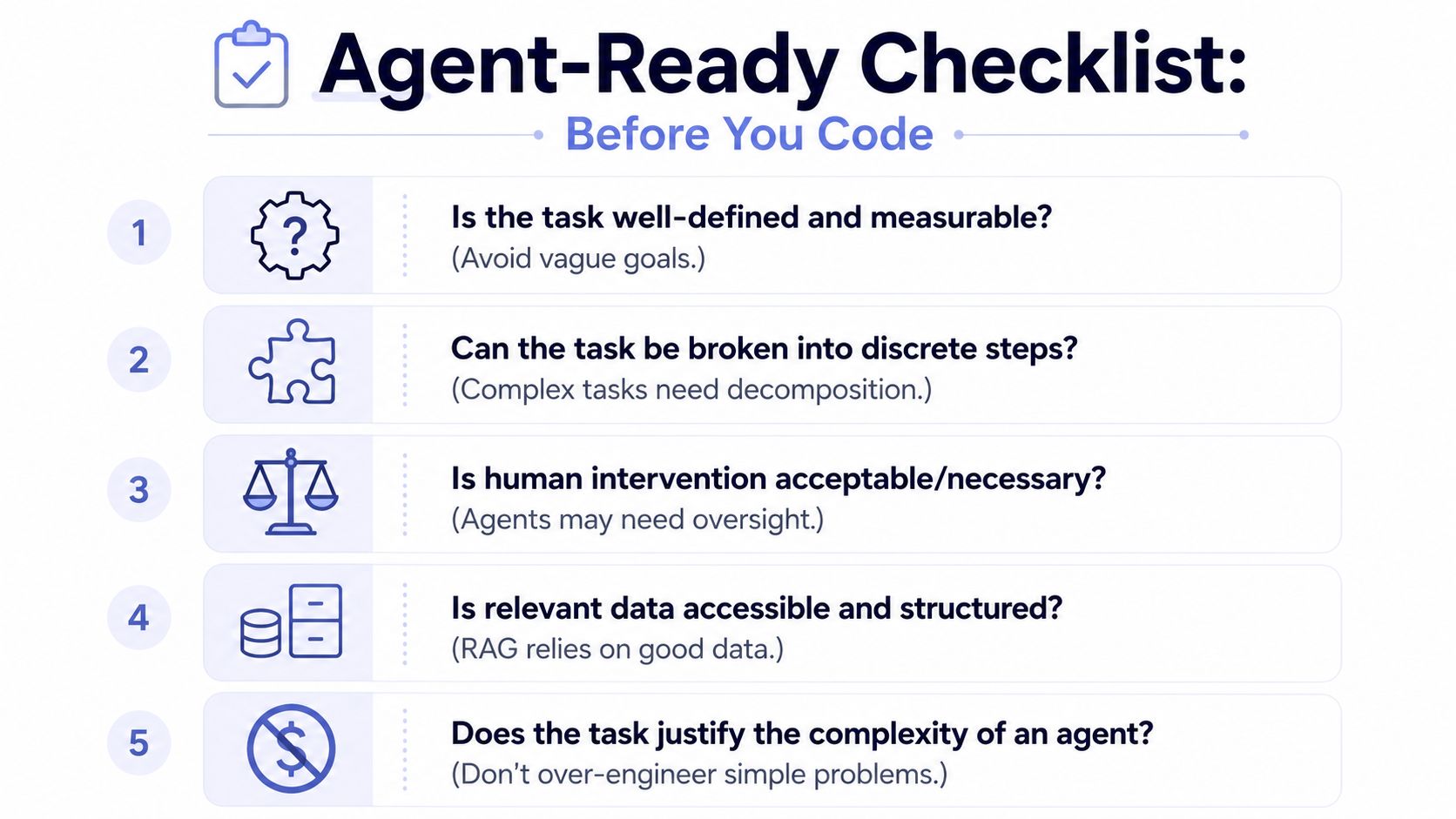 A checklist for preparing to develop an AI agent, covering task definition, decomposition, and data requirements.
A quick filter for go or no-go
Use a short decision pass before you build:
Verifiable output: Can a human reviewer tell whether the result is correct without guessing?
Defined process: Can you describe the task as a repeatable sequence instead of vibes and tribal knowledge?
Clear bottleneck: Is there an actual constraint worth removing, such as repetitive review, triage, or retrieval work?
Data access: Can the agent reach the documents, records, or APIs it needs in a consistent format?
Complexity check: Would a normal automation or a form with rules solve the problem with less complexity?
A lot of teams skip that last one. They reach for an agent when a deterministic workflow would be cheaper and easier to support. An agent earns its complexity when the task mixes judgment, retrieval, and tool use. It doesn't earn it when you just need a scheduled API call.
If you can't explain why this task needs reasoning instead of rules, you probably don't need an agent yet.
That one decision can save weeks of debugging later.
Architecting the Agent's Core Logic Loop
A reliable agent needs a structure. Without one, you don't have an agent. You have a prompt that occasionally calls tools.
The loop I trust is perception, reasoning, action, observation. That pattern matters because it forces the system to gather state, plan deliberately, execute through a defined interface, and then inspect what happened before continuing. Softermii's guide makes the same point and ties it to task decomposition and observability in production (perception-reasoning-action-observation architecture).
Treat the agent like a state machine
Here's the practical translation.
Perceive means collecting the current facts. Pull the user input, fetch relevant records, inspect previous run state, and normalize everything before the model sees it.
Reason means producing a plan, not just a final answer. The plan should be small enough to inspect. If the task is large, break it into subtasks and validate each one before moving on.
Act means calling tools with structured outputs. Don't let the model improvise request shapes. Give it a schema for tool arguments and reject malformed calls early.
Observe means reading the result and deciding what changed. Did the API accept the request? Did retrieval return anything useful? Did the last action reduce uncertainty or create more of it?
A simple comparison helps:
Mode | What it looks like | Why it breaks |
Prompt-only flow | One big prompt with tools attached | Hard to debug, easy to overreach |
Explicit loop | Gather state, plan, act, inspect, repeat | More code, far more controllable |
Make intermediate reasoning observable
You don't need to expose chain-of-thought to end users. You do need internal observability. Log the retrieved context, chosen tool, tool arguments, returned status, and the next intended step. That gives you a trail when something weird happens.
A few design choices reduce pain fast:
Task decomposition: Break broad goals into smaller operations the agent can complete and verify.
Structured outputs: Use JSON schemas or typed models for tool calls and action results.
Action limits: Put hard caps on retries, tool depth, and repeated failures.
Approval gates: Require review for anything public-facing, destructive, or customer-visible.
The common failure mode is letting the model carry too much implicit state. Once that happens, debugging turns into archaeology. An explicit loop keeps the reasoning legible enough that you can fix the system instead of staring at transcripts and guessing.
Implementing the Agent With Python and RAG
Most agents need a memory layer that's better than “paste the docs into the prompt.” That usually means RAG. If you want factual behavior, retrieval quality matters more than clever wording in your system prompt.
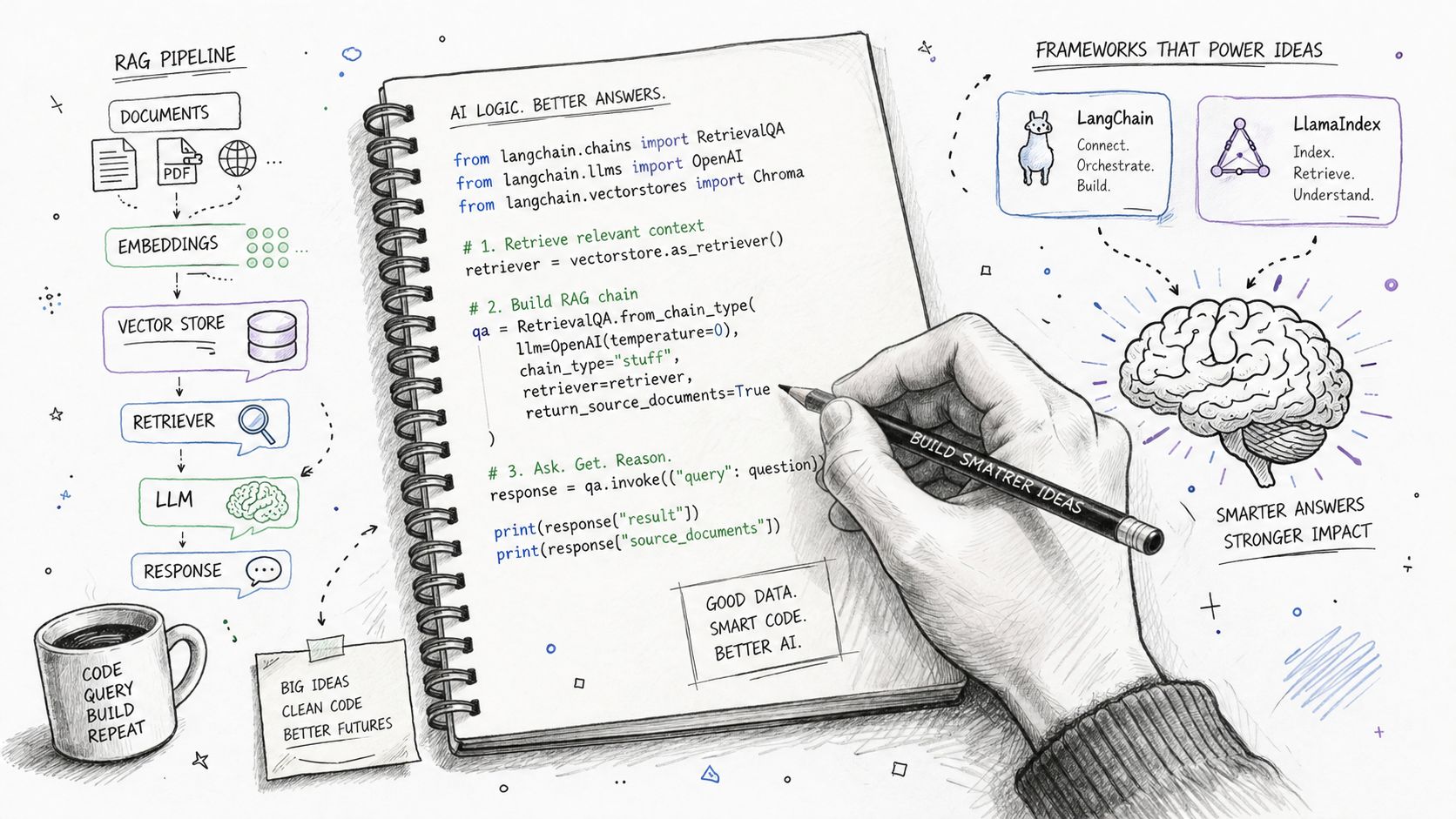 A hand-drawn illustration showing a RAG pipeline, code examples, and frameworks for building AI agents.
According to iSimplifyMe's guide, raw data often contains 20-30% duplicates that should be removed before indexing. The same guide recommends 512-token chunks for retrieval and a temperature of 0.1 for factual tasks to reduce hallucination risk (data preparation for RAG systems). Those details sound small until you debug a retrieval pipeline for a week and realize the agent kept surfacing duplicate or fragmented context.
Build the knowledge layer before the prompt
Before you write the agent loop, fix the data:
Deduplicate first: If your source data contains repeated records, your retriever will keep surfacing the same idea in multiple forms.
Standardize formats: Normalize headings, dates, metadata, and field names before chunking.
Protect sensitive data: Anonymize PII before it enters embeddings or prompt context.
Chunk deliberately: The 512-token guideline is a good default for long documents when you need factual recall.
Tune for factual work: Keep generation conservative. The cited guide recommends 0.1 for factual tasks.
If your docs are a mess, clean them before you touch the model. A small, curated knowledge base beats a giant sloppy one. If you need a process for organizing that material, this practical guide to LLM knowledge is useful because it focuses on the shape of a usable knowledge base rather than generic “content strategy.”
A practical Python shape for the agent
You can implement this with plain Python, or use LangChain or LlamaIndex for orchestration. The exact framework matters less than keeping the control flow explicit.
This example is intentionally boring. That's the point. The loop is visible. You can test each function. You can mock retrieval. You can inspect the plan and reject bad tool calls before they become side effects.
For a more end-to-end automation pattern that combines agent logic with workflow tooling, this AI content automation example is useful because it shows how the agent layer fits into a broader system instead of living in isolation.
A walkthrough helps once the shape is clear:
Where debugging time usually goes
The bugs usually aren't in the loop above. They show up at the boundaries.
Keep the prompt simple and move complexity into code, schemas, and retrieval. Prompts are hard to diff and easy to over-credit.
Watch for these traps:
Retriever mismatch: Good docs, bad metadata filters.
Overstuffed context: Too many chunks, not enough signal.
Loose tool contracts: The model invents arguments because the schema is weak.
Silent failures: External calls fail, but nothing writes back into agent state.
When people ask how to create an AI agent, they usually expect prompt examples. In practice, the durable answer is cleaner data, smaller steps, and a loop you can inspect without reading a hundred messages of transcript.
Deploying Your Agent With Production-Ready Guardrails
The first production version of an agent should be treated like a new hire who can act quickly but still needs review. Autonomy comes later.
One operational rule matters more than the rest. A mandatory human-in-the-loop period should cover the first 30 days of production, with every output reviewed. During that period, the agent should be tested against 5-10 real inputs from the previous week, and it should prove that it saves at least 2 hours per week before you consider it production-ready (production guardrails for AI agents).
Your first month is a supervised month
That review window does two things. It catches obvious failures, and it exposes the subtle ones that destroy trust later. Hallucinations on incomplete forms. Tool calls against stale state. Outputs that look polished but miss the point.
A good rollout policy is simple:
Review every output: No exceptions during the initial window.
Use real historical inputs: Synthetic test cases won't expose the same ambiguity.
Define pass or fail early: Time saved and output quality both matter.
Stop expansion if it misses the bar: Don't widen scope just because the demo looked good.
If your agent can't beat the manual process on a focused workflow, more autonomy won't fix it. It'll just spread the damage faster.
What to monitor in practice
You need logs that answer basic operational questions fast:
Signal | Why it matters |
Tool invocation logs | Show what the agent actually tried to do |
Retrieval traces | Explain why it answered with certain context |
Failure alerts | Catch timeouts, integration breaks, and malformed outputs |
Human review outcomes | Reveal recurring quality or policy failures |
Send failure alerts somewhere the team already watches, like Slack or email. Keep the output payloads and error reasons together so someone can reproduce the problem without replaying the whole run manually.
For teams doing security review before giving agents tool access, an AI agent security assessment is the right kind of checklist to borrow from because it forces you to think about action boundaries, permissions, and failure blast radius. The same goes for API hygiene. This piece on API security best practices is a good reminder that most “agent failures” are just standard integration failures with an LLM attached.
Giving Your Agent a Voice The Social Publishing Problem
A lot of first agent projects look solid right up until the moment they need to post to an external platform. The planner works. The prompt works. Retrieval works. Then the agent has to authenticate to a social API, map one piece of content into several platform-specific formats, and recover from partial failures without posting twice.
That is where teams discover they were not really building an LLM feature. They were building an integration system with an LLM attached.
The hard part is rarely text generation. It is the publishing layer. Social platforms each have their own app reviews, permission models, rate limits, media requirements, and changing API behavior. A build that looks done in a demo can still stall for weeks in credential setup or fail on the first token refresh. The overview in social publishing complexity for AI agents captures why this work gets underestimated so often.
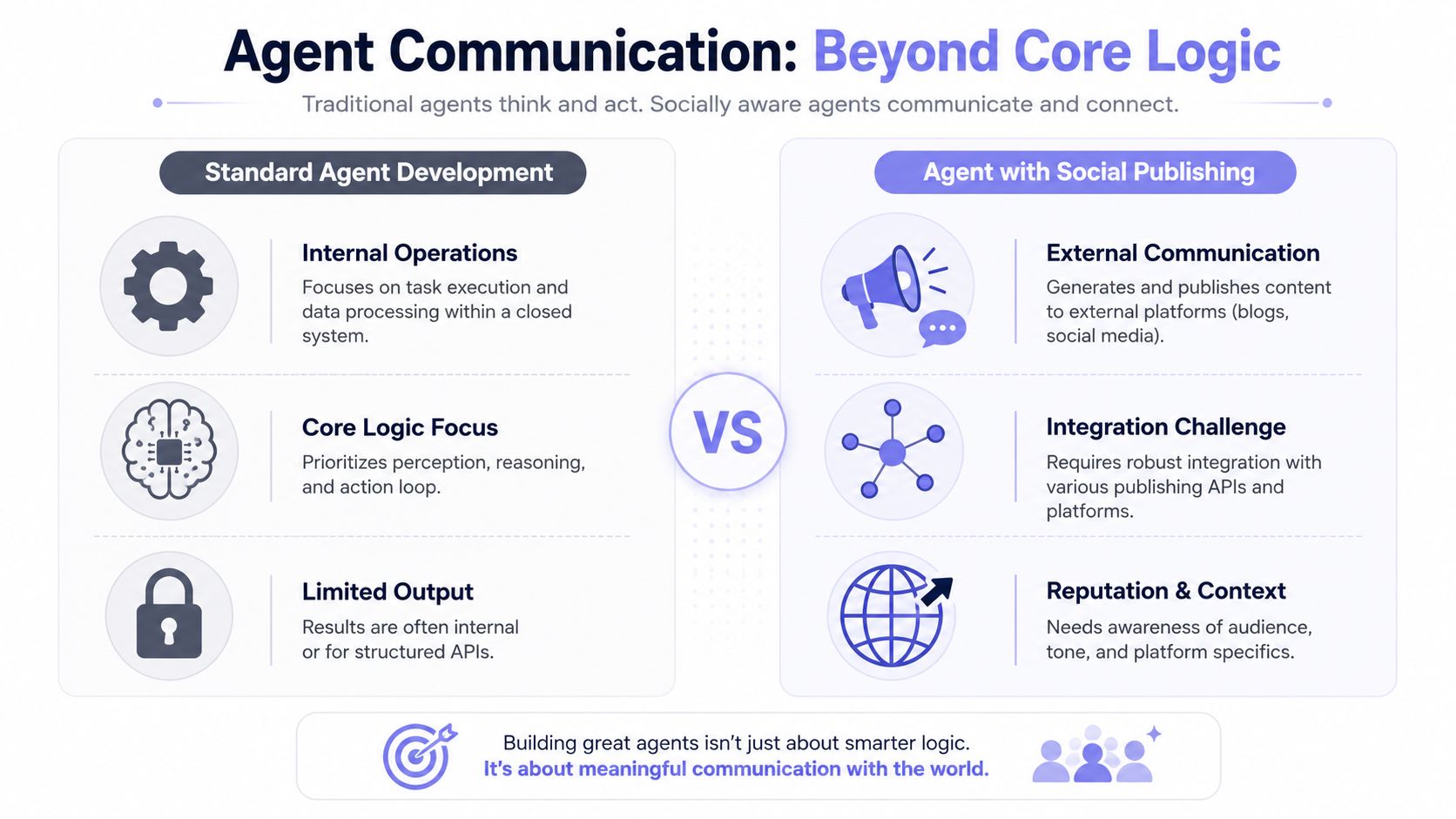 A comparison chart showing differences between standard agent development and agents with social publishing capabilities.
Social publishing is a systems problem
Once an agent can publish outside your app, the failure modes change:
OAuth lifecycle management: Tokens expire, scopes change, and refresh logic breaks in ways that are hard to spot during testing.
Platform-specific behavior: A valid post on one network may need different formatting, media rules, or metadata on another.
Compliance review: App approval and permission review often introduce manual gates that block rollout.
Failure recovery: Content generation success means nothing if the publish call fails halfway through a multi-platform job.
Meta token flows are a good example. The docs explain the mechanics of short-lived and long-lived tokens, but you still own the exchange flow, refresh timing, expiration handling, and retry behavior. If any part of that is wrong, the agent appears reliable in staging and then fails on auth in production.
Trust drops fast here. A social agent that publishes once and then starts missing scheduled posts is harder to recover than an internal copilot that gives a bad answer, because the failure is visible to customers and marketing teams immediately.
Generic agent tutorials usually skip this. They stop at tool calling, as if "publish_post" were just another function. In practice, external publishing brings policy, credentials, platform semantics, and operational support into the same workflow. If you are evaluating whether this workflow even belongs in an agent, the architecture notes in this AI social media agent breakdown are a useful reference.
What a sane publishing architecture looks like
For this kind of agent, keep the boundaries strict:
Decision layer decides what to publish, when to publish it, and which platform set applies.
Policy layer enforces approval rules, brand constraints, blocked topics, and scheduling windows.
Publishing layer handles authentication, retries, idempotency, and platform-specific API details.
That separation saves debugging time. If a post is rejected, you can tell whether the planner made a bad choice, the policy layer blocked it correctly, or the platform adapter failed. Without those boundaries, every incident looks like "the agent messed up," which is not actionable.
A unified publishing service also reduces risk. Instead of teaching the agent several different platform APIs, give it one stable tool surface and let the integration layer deal with OAuth refresh, rate limiting, and API drift. PostPulse fits that role as a factual example. It gives agents, apps, and automations a single publishing interface through REST, automation nodes, or an MCP server.
If your agent needs to publish outside your product, do not leave social API work for the final sprint. Treat publishing as a separate subsystem with its own testing, alerting, and rollback plan. PostPulse exists for that integration layer, giving apps, automations, and AI agents one connection for publishing across supported social platforms without rebuilding the auth and maintenance stack yourself.
About the Author

Founder of PostPulse — a social media scheduling platform for creators and teams. Software engineer with a passion for building developer tools and simplifying complex API integrations across social media platforms.