Content Repurposing Strategy: A Developer's Automated
Published on
Tags:
You start with a simple goal. Turn one good article, webinar, or product update into posts for every channel your users care about. Then the actual work begins.
One platform wants a media container first. Another returns a token that expires before your queue finishes. A third accepts the upload but leaves the job stuck in progress with no useful error. Then app review enters the chat. Privacy policy wording, scoped permissions, callback URLs, refresh handling, rate limits, version changes. Manual repurposing is annoying. Automated repurposing is where teams usually discover the actual problem: they weren't building a content workflow, they were building distributed infrastructure.
Most guides treat repurposing like a marketer's checklist. Chop up a blog post. Make a carousel. Pull quotes. That's fine if one person is doing it by hand. It breaks down fast when you're building a system for a product, an internal tool, or a white-label feature other people will depend on.
A practical content repurposing strategy for developers starts in a different place. You need a model for breaking content into reusable units, a publishing layer that doesn't collapse under OAuth friction, and an audit loop that tells the system what deserves another round.
Table of Contents
The Unscalable Hell of Manual Content Repurposing
The common version of content repurposing looks harmless. Copy a paragraph into LinkedIn. Pull a quote for X. Cut a clip for Shorts. Paste the CTA into Telegram. Repeat next week.
Then someone asks for automation.
Now you're not dealing with content anymore. You're dealing with account connection flows, token refresh behavior, permission scopes, media preprocessing, retry logic, and weird platform-specific publishing states that don't fail cleanly. The first script works on your account, then fails for real users because production always finds the untested OAuth branch.
 A person feeling overwhelmed by the content repurposing strategy process while sitting at a cluttered desk.
Where manual work turns into platform debt
The hardest part isn't writing transformation logic. Many organizations can already turn a blog post into shorter variants with templates or an LLM. The hard part is shipping that output reliably to many platforms without building nine mini integrations that all degrade differently.
A frequently asked but poorly answered question is: how do you automate repurposing across 9+ platforms without spending 6-12 months on app audits and OAuth maintenance? Recent data from Meta and TikTok developer portals shows 65% of automated content applications fail initial audits because of privacy policy or scoped permission errors, which leads to a 9-month average delay (verified infrastructure bottleneck data).
That failure mode changes the economics of the whole project. Teams don't quit because repurposing is a bad idea. They quit because the infrastructure tax gets larger than the content benefit.
Practical rule: If your repurposing system depends on every platform integration being equally healthy, your content pipeline will fail at the weakest OAuth flow.
Why the pain is structural, not personal
This isn't a skill issue. It's the shape of the ecosystem.
A lot of developers hit the same sequence:
Phase one: Manual copy-paste works for a while, but it's slow, inconsistent, and impossible to delegate cleanly.
Phase two: A script or automation flow handles one or two networks, then edge cases pile up.
Phase three: Product asks for customer-facing publishing, and now audit risk, token storage, and app verification become blockers.
Phase four: The team backs away and goes back to manual scheduling because it feels safer.
There's another reason this pain matters. Repurposing isn't optional anymore. A survey of 48 marketers found that 94% actively repurpose content across different mediums and channels, while only 6% don't (Referral Rock survey coverage via Optimizely). Demand is standard. The tooling burden is what still feels niche.
The practical takeaway is simple. A content repurposing strategy can't start with "what should we post on each platform?" It has to start with "what architecture can survive platform churn?"
The Core Principle Atomic Decomposition for Content
The cleanest way to stop treating repurposing as endless manual labor is to stop thinking in finished posts. Think in units.
A long-form asset is your source repository. The blog post, whitepaper, webinar, or demo isn't the final deliverable. It's the upstream artifact that contains multiple downstream publishing units. Once you see content that way, repurposing becomes extraction plus transformation, not reinvention.
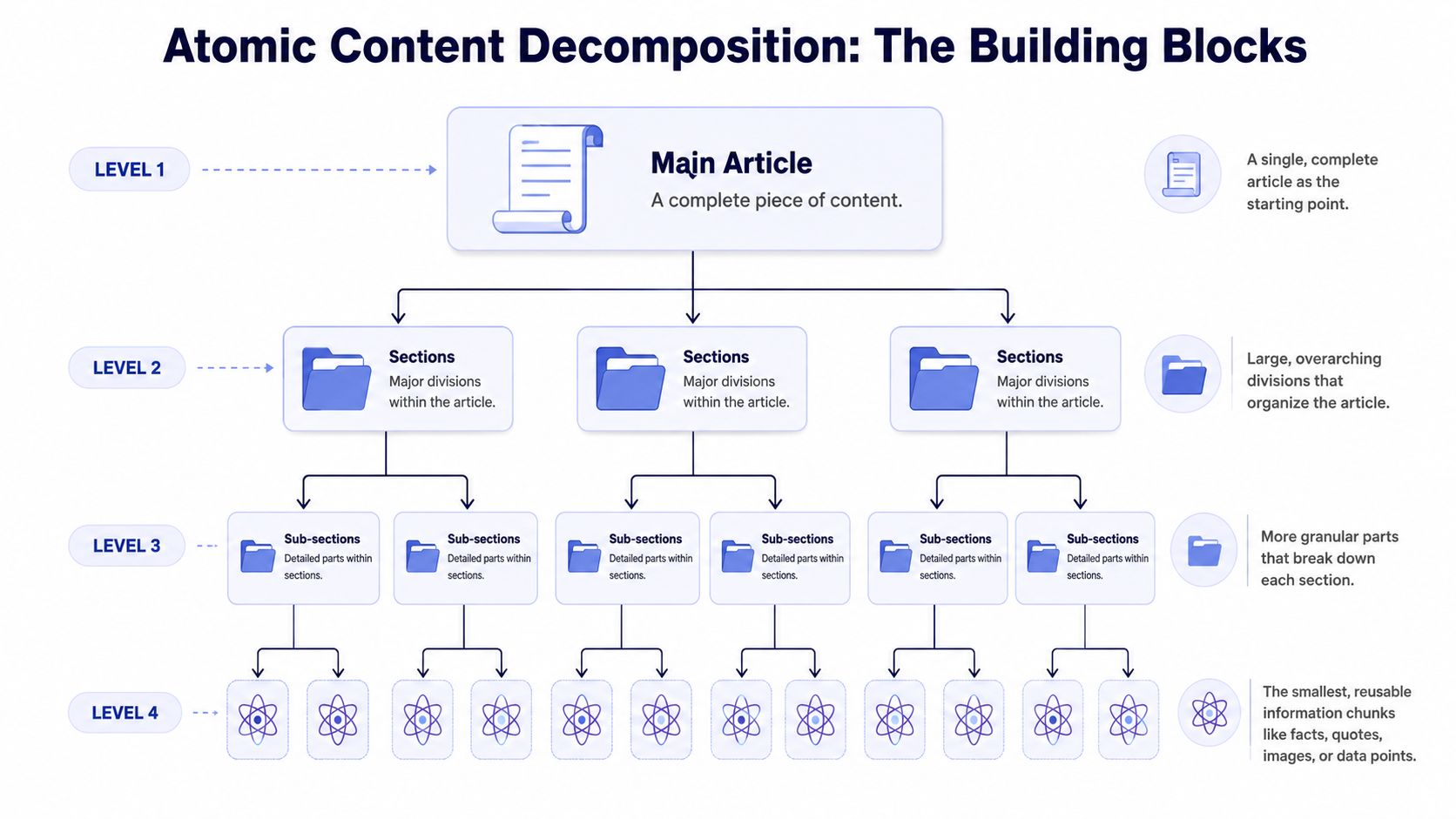 A diagram illustrating atomic content decomposition, breaking down a main article into sections, sub-sections, and granular atomic chunks.
Treat the anchor asset like a source repository
The useful model here is 1:N Atomic Decomposition. One anchor asset gets fractured into 8–12 distinct micro-units, and benchmark data ties that approach to 340% higher content inventory velocity and 65% lower author hours per unit. The same methodology also uses contextual linking to drive 25–30% referral traffic back to the anchor asset (atomic decomposition benchmark details).
The method has three parts:
Semantic segmentation Find the key hooks inside the asset. Not sections. Hooks. A contrarian claim, a failure pattern, a process screenshot, a short story, a useful data point, a checklist.
Format-specific re-encodingDon't cross-post identical text. Rebuild the unit for the destination. A hook from a webinar might become a LinkedIn text post, a vertical short video script, a Telegram channel note, or a static infographic.
Contextual linkingEvery derivative piece should know where it came from and where it can send people next. That means embedding paths back to the anchor rather than treating each post as a disconnected fragment.
What good decomposition looks like
Here's the mistake I see most often. Teams split a blog post by paragraph and call it repurposing. That's not decomposition. That's slicing.
Good decomposition preserves meaning while changing packaging.
Asset part | Weak output | Better output |
Product lesson from a webinar | A transcript excerpt | A short post naming one failure mode and one fix |
Research summary from a guide | A wall of bullet points | A platform-native carousel or text thread around one insight |
Customer objection in a podcast | A long quote | A single objection/response post with a clear point of view |
A derivative unit should stand on its own. If it only makes sense after the click, it isn't repurposed content. It's promotion.
A solid decomposition pass usually produces a mixed inventory such as:
One opinionated text post built around the strongest claim.
A short visual explainer taken from a process diagram or architecture concept.
A clip script focused on one friction point, not the whole topic.
A conversion-oriented variant aimed at readers who already know the problem and need the next step.
A community-safe version that works in places where overt promotion performs badly.
At this stage, a content repurposing strategy becomes operational. You aren't asking, "How many posts can we squeeze from this?" You're asking, "Which atomic units are durable enough to transform across formats without losing the original signal?"
Building the Engine with APIs No-Code and AI Agents
Once the content is decomposed, the implementation question gets practical fast. Where should the automation live?
Some teams need a visual workflow. Some want a direct API inside their app. Others want an agent that can decide when to publish, assemble the payload, and ship it without a human in the loop.
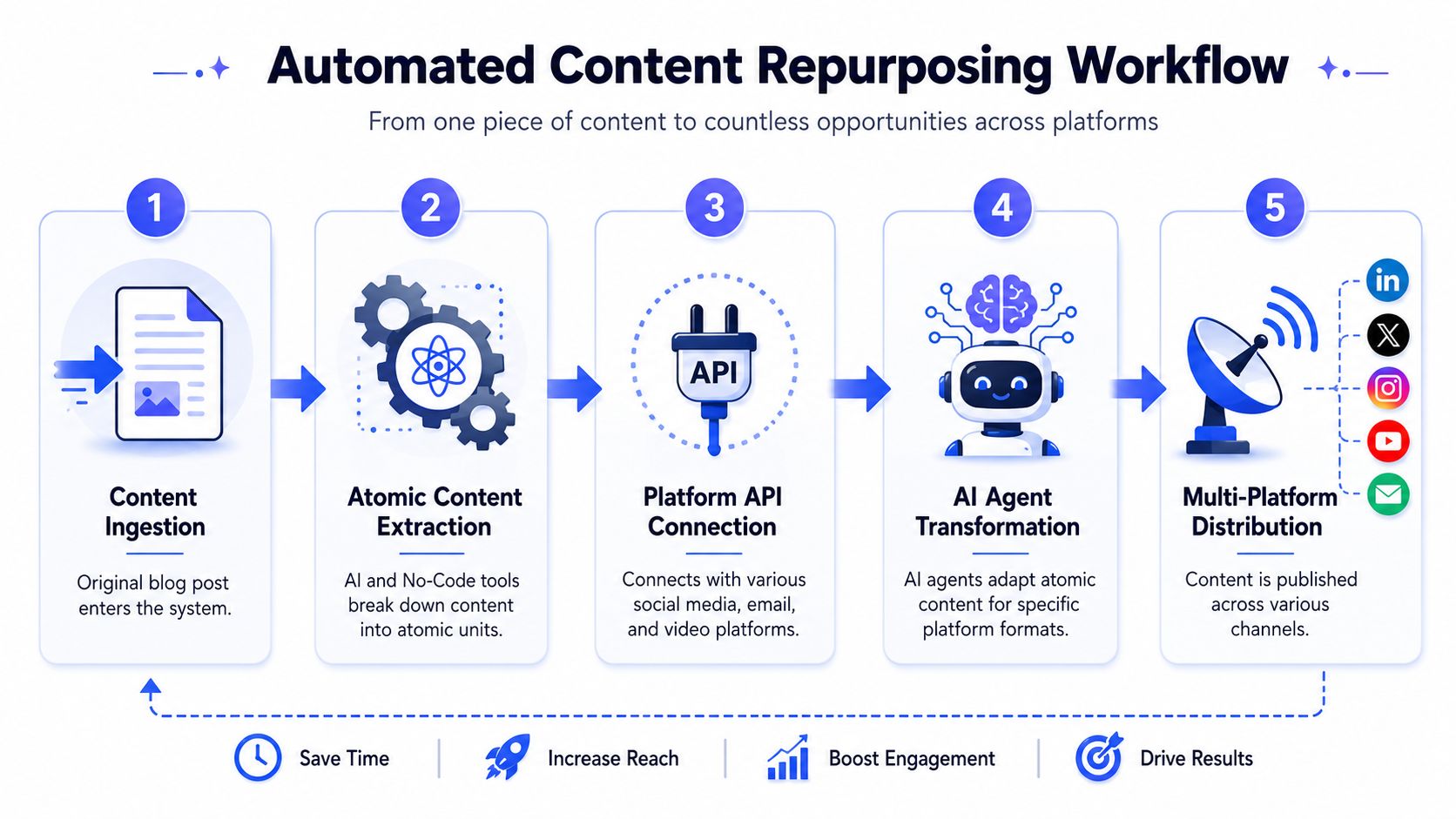 A five-step infographic showing an automated content repurposing workflow, from content ingestion to multi-platform distribution.
A useful mental model is a five-stage pipeline: ingest the anchor asset, extract atomic units, connect platform APIs, transform content for each destination, then distribute. This short walkthrough is a decent visual companion:
Three implementation paths
According to Referral Rock, 94% of marketers explicitly repurpose content for different mediums and channels, which tells you this isn't an edge workflow. It's a mainstream requirement, and developers are the ones who have to make it reliable at scale (Referral Rock-based summary).
The implementation options usually fall into three buckets.
No-code workflow builders
This is the fastest path for internal ops teams or agencies. Use something like n8n or Make.com to watch a source, run transformation steps, and queue derivatives for publishing.
Good fit:
Operations-heavy teams that want to iterate quickly
Founders validating a repurposing flow before writing code
Mixed teams where non-engineers need to edit logic
Trade-off:
Complex branches get messy. Once you add retries, approvals, asset lookups, and channel-specific formatting, visual flows can become hard to maintain.
Direct REST API integration
This is the stronger option when repurposing is part of your product, not just your internal workflow. You keep orchestration in your own backend, decide how scheduling works, and expose a cleaner feature surface to users.
Good fit:
SaaS products adding publishing as a feature
Internal tools that need strict control over queueing and permissions
Developer teams that already have service boundaries and job workers
Trade-off:
You own more of the lifecycle design. That's good for control, but it means you need stronger observability around publish attempts, payload normalization, and retries.
AI agent execution
This is the most interesting path, but also the easiest to misuse. An agent can evaluate an anchor asset, pick candidate hooks, map them to channels, and publish through a controlled tool layer. The upside is adaptive behavior. The downside is that unconstrained agents invent bad copy, duplicate messages, or fire at the wrong times.
Good fit:
Agentic systems that already summarize, classify, and schedule
Teams experimenting with autonomous distribution
Builders using MCP-style tool access for controlled actions
Trade-off:
You need guardrails. The publishing tool should be deterministic even if the reasoning layer is not.
What each path is good at
Path | Best for | Main risk |
No-code | Fast setup and cross-functional editing | Workflow sprawl |
REST API | Product integration and backend control | More engineering responsibility |
AI agent | Adaptive publishing and autonomous decisions | Weak guardrails create noisy output |
If you're building transformation stages, it's worth reviewing adjacent tooling too. A lot of repurposing quality depends on whether your visual and video derivatives are worth publishing, and this roundup of AI tools for content creators is useful for that part of the stack.
For teams thinking in agent workflows instead of fixed automations, this write-up on an AI social media agent is worth reading because it frames publishing as a tool-enabled action rather than a generic chatbot trick.
A sane workflow shape
A system that holds up in production usually looks like this:
Ingestion layer: Pull from CMS, docs, transcripts, or recordings.
Extraction layer: Generate atomic units and store them with metadata like topic, audience, format, and source URL.
Policy layer: Decide which units can go where, with human approval where needed.
Publishing layer: Deliver platform-ready payloads and collect status back into your queue.
Feedback layer: Record what happened so the next cycle isn't blind.
Operational note: Keep transformation and publishing separate. When a post fails, you want to retry delivery without regenerating the content.
The Developer's Edge The White-Label Repurposing Gap
The most effective repurposing work usually isn't for your own brand. It's for your users.
That's the gap most content repurposing strategy articles miss. They assume the reader is a marketer trying to get more mileage out of a webinar. A lot of developers are solving a different problem: they need to make repurposing a feature inside a SaaS product, creator tool, CRM, or AI workspace.
The bigger opportunity is productizing repurposing
There's a real market blind spot here. Data from the 2024 AI automation surge says 78% of developers prioritize embedded AI features, yet there are zero in-depth guides on codifying repurposing workflows into a white-label API layer (embedded AI and white-label gap summary).
That matters because users don't experience repurposing as a strategy document. They experience it as product behavior.
They want things like:
Turn a webinar upload into channel-ready drafts
Take a long announcement and generate publishable variants
Reuse a successful post without manually rebuilding it for each destination
Keep the whole flow inside the product they already pay for
If your app already helps create content, schedule work, manage leads, or run campaigns, repurposing is a natural extension. Users don't think, "I need atomic decomposition." They think, "I already wrote this. Why am I rebuilding it again?"
What white-label architecture changes
White-label repurposing changes both product value and system design.
From a product perspective, you stop shipping a utility and start shipping a workflow. The feature isn't "export text" or "schedule post." It's "take this source artifact and distribute useful variants."
From an engineering perspective, the architecture needs a few things:
Tenant-aware source mappingEvery derivative needs to retain the relationship to the original asset per tenant, not globally.
Reusable transformation templatesYou want defaults for common output types, but tenants should still be able to apply tone, CTA, and compliance rules.
Approval statesSome users want one-click autopublish. Others need drafts, review queues, or role-based approval.
Brand encapsulationThe repurposing engine should feel native to the host product, not like a bolted-on side panel.
A white-label approach also changes how you evaluate vendors or infrastructure partners. The question isn't just "Can this publish?" It's "Can this disappear into my product cleanly?" If you're thinking through that layer, this guide to white-label social media management gives a useful framing for what native-feeling distribution should look like.
Build the repurposing system your users wish already existed inside your app. That's where the leverage is.
Closing the Loop The Quarterly Content Audit Protocol
Automation without selection logic just creates better-organized noise.
A real content repurposing strategy needs a recurrence loop that decides what gets another life and what should stay buried. The cleanest operating rhythm is a quarterly audit. Not because quarters are magical, but because they create enough distance to see engagement decay without waiting so long that good assets go stale.
What to pull from the content library
Organizations that run systematic 90-day audits of their content library see 2.5x higher ROI from repurposed assets. That protocol relies on metric filtering, especially identifying assets with more than 10% engagement decay but strong historical performance, and it warns against static re-deployment because that correlates with a 55% increase in negative user sentiment (quarterly audit and recurrence data).
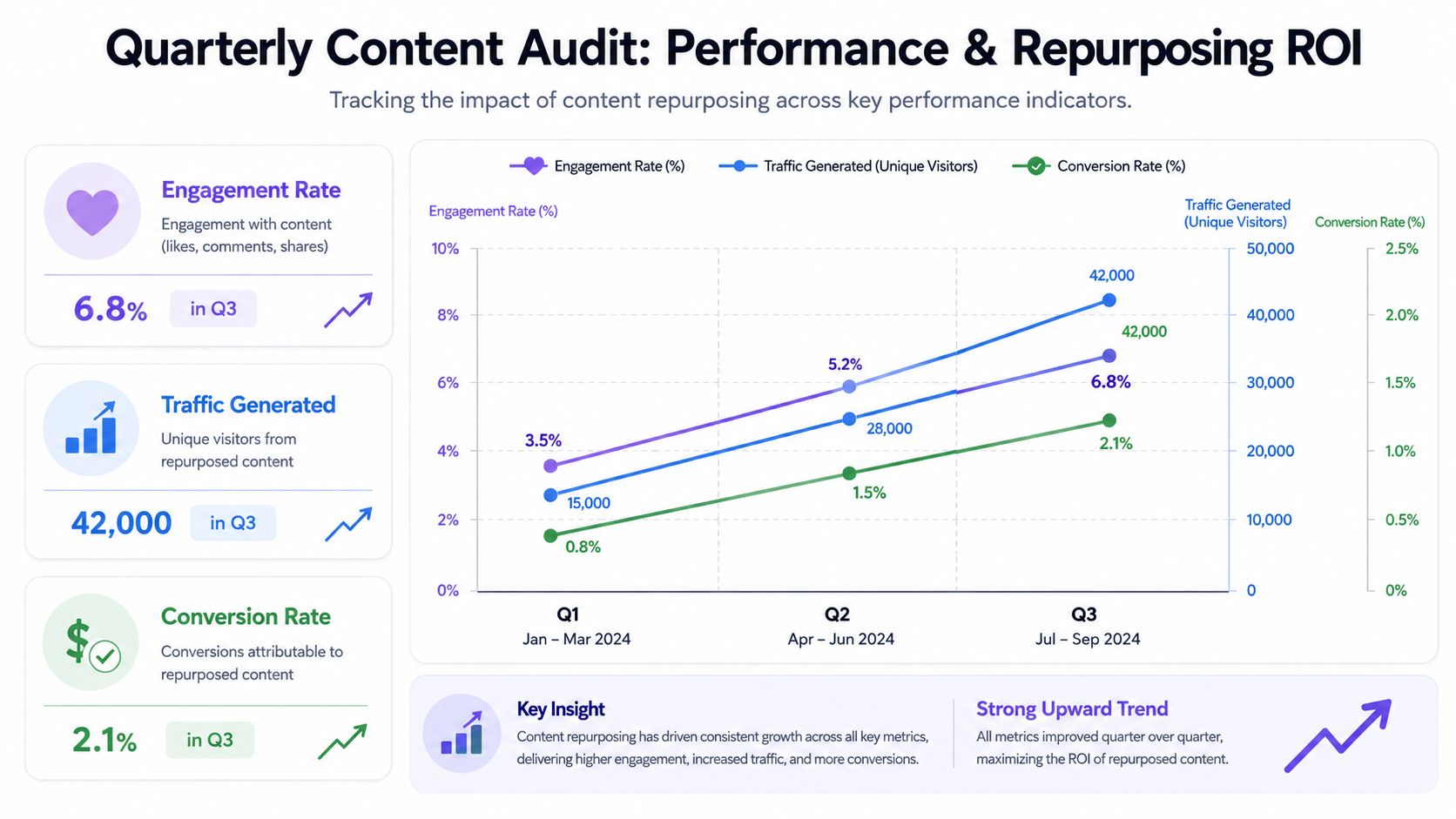 A quarterly performance chart tracking engagement, traffic, and conversion metrics from a content repurposing strategy.
Use the audit to pull candidates into a rework queue, not directly into publishing. That queue should answer four questions:
Did this asset perform well historically?
Is performance fading now?
Is the core idea still relevant?
Can it be updated before re-release?
A quick audit table helps.
Check | Keep | Reject |
Historical performance | Strong prior engagement or conversions | Never meaningfully landed |
Current trend | Clear decay from prior level | Still actively performing as-is |
Relevance | Evergreen or lightly updateable | Time-bound and outdated |
Transformability | Has extractable hooks and reusable visuals | Too thin to split into useful units |
How to avoid stale re-deployment
The biggest failure here is reposting old material with old assumptions baked in. Old stats, dead screenshots, broken UI references, expired pricing, obsolete platform behavior. The queue says "winner." The audience sees "outdated."
Audit habit: Update the source before you regenerate the derivatives. If the anchor is stale, the micro-content will inherit the same problem faster.
I like to treat the recurrence loop as two jobs, not one:
Editorial refresh jobReview dates, claims, screenshots, references, and product names.
Distribution jobRebuild derivatives only after the source is clean.
That split matters because it keeps the automation honest. The system should not blindly amplify whatever once worked. It should amplify what still deserves distribution.
If you're wiring this into a toolchain, it's helpful to make the audit state machine explicit: candidate, needs refresh, approved for regeneration, queued for publish, published, under review. That gives you traceability when someone asks why an old piece resurfaced.
From Playbook to Production Your First Steps
The shift that matters is this: stop treating repurposing as a recurring task and start treating it as a content system.
That system has three moving parts. An anchor asset that can be decomposed. A publishing path that matches your team's implementation style. An audit loop that keeps the engine from resurfacing junk.
If you're putting this into production, keep the first pass small:
Choose one execution pathUse no-code if you're validating process, API if it's going into your product, or an agent setup if you already have strong tool guardrails.
Pick one anchor assetDon't start with your whole library. Start with one webinar, one detailed post, or one product announcement that already has enough substance to split cleanly.
Track one meaningful signal Measure whether repurposed outputs are earning attention or sending people back to the source. You can expand the dashboard later.
If you want another perspective from the editorial side, SparkPod's content playbook is a useful complement because it shows how teams think about repurposing before the infrastructure layer gets involved.
When you're ready to wire the system into something real, a practical next step is a small pilot with one source type, one queue, and one publish flow. Keep the control surface narrow. Add more destinations only after the core loop is stable. For the implementation side, the PostPulse getting started guide is a straightforward place to see how a unified publishing workflow can be connected without building each platform integration yourself.
If you're building a programmable content repurposing system, PostPulse is worth a look. It gives developers one publishing layer for apps, automations, and AI agents, with REST API, official n8n and Make.com integrations, MCP support, and a white-label path when the feature needs to live under your own brand.
About the Author

Founder of PostPulse — a social media scheduling platform for creators and teams. Software engineer with a passion for building developer tools and simplifying complex API integrations across social media platforms.