
How to Build Social Media App: Your 2026 Roadmap
Published on
Tags:
You're probably here because the idea sounds simple on paper. Build a social app, add profiles, let people post, maybe connect Instagram or TikTok, and ship. Then the actual work starts. A token expires sooner than you expected, one platform wants a review flow that drags on forever, and your “simple cross-posting feature” turns into backend maintenance you didn't budget for.
That disconnect is where most social app projects go sideways. The product idea is often fine. The operational reality is what hurts. Social media is already used by 5.79 billion people, or nearly 70% of the world's population, and the average user touches 6.5 platforms per month according to Backlinko's social media usage data. That means the opportunity usually isn't “build the next giant network.” It's building something useful inside an already fragmented ecosystem.
If you're still shaping the concept, it also helps to look at adjacent product patterns like how to build community apps, because the mechanics of identity, interaction, moderation, and retention overlap more than most first-time founders expect.
Table of Contents
So You Want to Build a Social App
Teams often start with the same mental picture. A clean feed. Profiles. Notifications. Sharing. Maybe creators show up, maybe communities form, maybe there's a nice growth loop. Then week two hits and the engineering board fills up with uglier tickets: auth edge cases, media failures, retries, moderation flags, webhook drift, and “why did this account disconnect?”
That's normal. A lot of “build social media app” advice stops at UI flows and database tables, but production work lives in the seams between systems. You aren't just building a product. You're building around platform rules, user behavior, and the fact that people already live across multiple apps.
Practical rule: If your first pitch sounds like “a better Instagram” or “LinkedIn for everyone in X category,” you're usually heading toward an empty network with expensive infrastructure.
The thing that works is narrower. Solve one workflow for one group. A team planner for creators. A posting tool for clubs. A social content hub for field reps. A lightweight app that coordinates content, approvals, or publishing around existing audiences.
That framing matters because it changes the build order. You stop obsessing over virality and start caring about whether the product removes friction for a real user on day one. That's the difference between a demo and a business.
The Blueprint Defining Your MVP and Data Models
The fastest way to kill a social app is to ship version one with feeds, stories, chat, comments, notifications, creator analytics, moderation AI, and nine platform integrations. That scope looks ambitious in a roadmap and disastrous in code.
Start with one painful job
A real MVP is tiny. It should answer one question: what is the smallest interaction loop that makes someone come back?
For most early social products, that loop is built from three things:
Identity: user account, handle, avatar, short bio
Publishing: a text post, or one media attachment if your product needs it
Consumption: a simple feed or list view that shows relevant posts
That's enough to validate whether anyone wants the thing.
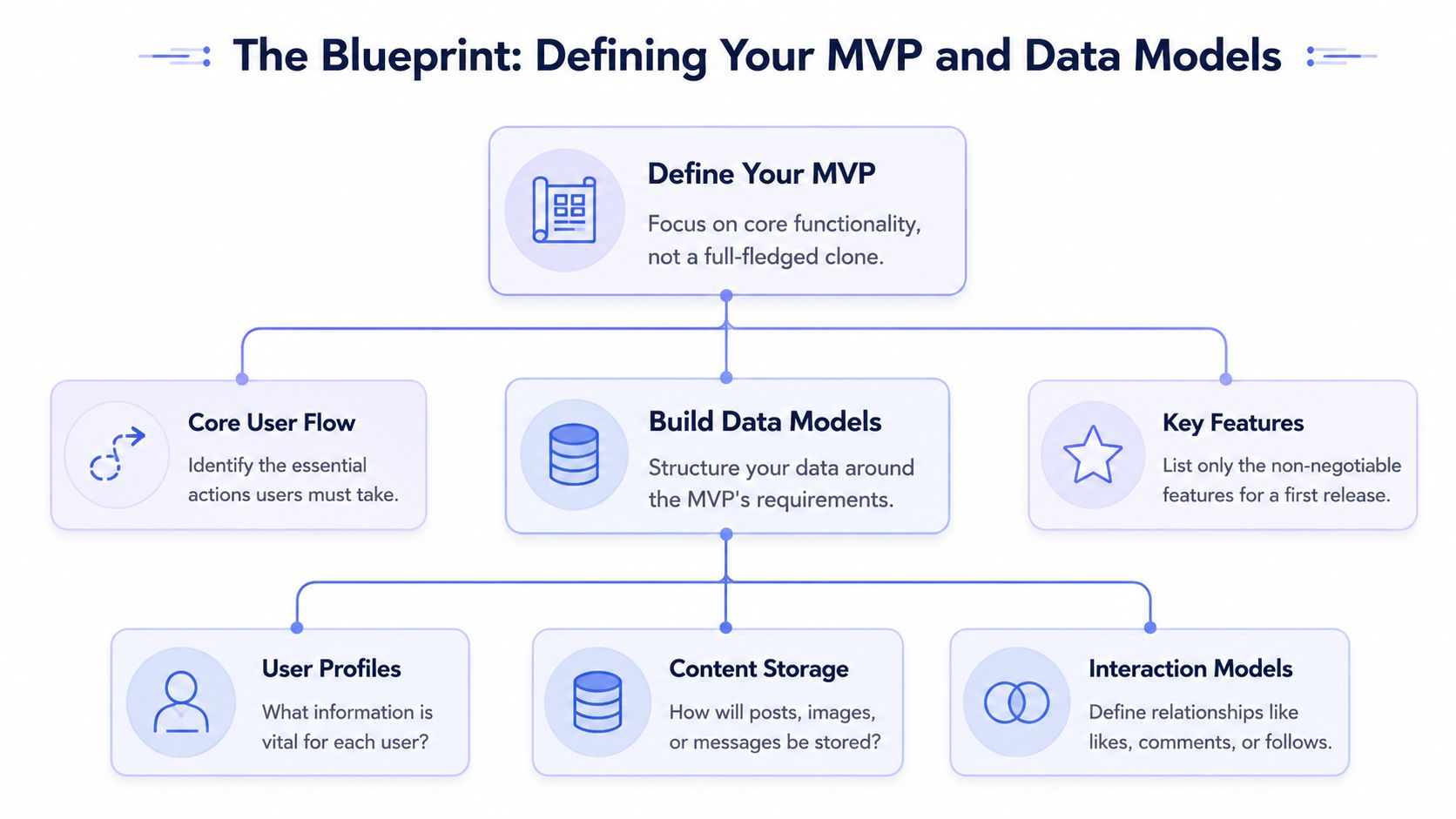 A diagram illustrating the blueprint process for defining an MVP and data models for a mobile application.
The discipline here is harder than the engineering. Teams want to “just add” comments, reactions, DMs, and discovery. Don't. The first release should feel almost suspiciously small.
Data also supports staying narrow. Restricting an initial launch to 1–3 core platforms aligned with your audience increases retention success rates by 40%, according to the AMA's guidance on social media marketing strategy. That same discipline applies to product scope. Fewer surfaces means fewer broken assumptions.
If you need a good product-side sanity check, AppLighter's MVP strategy is a useful companion read because it forces the feature list back down to what users need first.
The minimum data model that actually ships
You do not need a galaxy-brain schema to get started. You need a schema that's boring, readable, and easy to change.
A basic relational model usually starts like this:
Entity | Core fields | Why it exists |
users | id, auth_provider_id, username, bio, avatar_url, created_at | stores account and profile data |
posts | id, author_id, body, media_url, visibility, created_at | stores publishable content |
follows | follower_id, following_id, created_at | defines who sees whom |
media_assets | id, owner_id, storage_key, mime_type, status | tracks uploaded files and processing |
reports | id, reporter_id, target_type, target_id, reason, status | gives you a moderation path later |
A couple of practical notes save pain later:
Use stable internal IDs. Don't let usernames become foreign keys.
Separate media from posts. Even if you support one attachment today, you'll thank yourself later.
Add status fields early. “pending”, “processed”, “failed”, and “deleted” are boring until your queue starts dropping jobs.
Store audit timestamps. They help during moderation, support, and migration work.
Most early rewrites don't happen because the app got “too big.” They happen because the first schema mixed identity, content, and media state into one fragile table.
If your app centers on publishing into external networks rather than hosting a full native social graph, the data model gets even simpler. You may only need users, connected accounts, publishing jobs, media assets, and delivery logs. That's often the smarter path.
Choosing Your Stack Core Architecture Decisions
There isn't one perfect stack for a social app. There is a stack that lets you ship without turning setup into its own startup.
Pick boring tech for the first version
For the backend, a monolith wins more often than people want to admit. One deployable service with clear modules is easier to reason about than microservices, queues, and service discovery before you even know if users care.
A practical setup looks like this:
Backend: Node.js with Express or NestJS, Django, or Rails
Database: PostgreSQL if you want strong relational modeling, MongoDB if the schema is moving fast and your team knows how to avoid document sprawl
Mobile client: React Native if you need iOS and Android quickly
Storage: object storage for media
Jobs: a background worker for thumbnails, transcoding, notifications, and cleanup
You can absolutely build native clients in Swift and Kotlin. You'll also absolutely pay for it in duplicated effort unless the app needs platform-specific performance from day one.
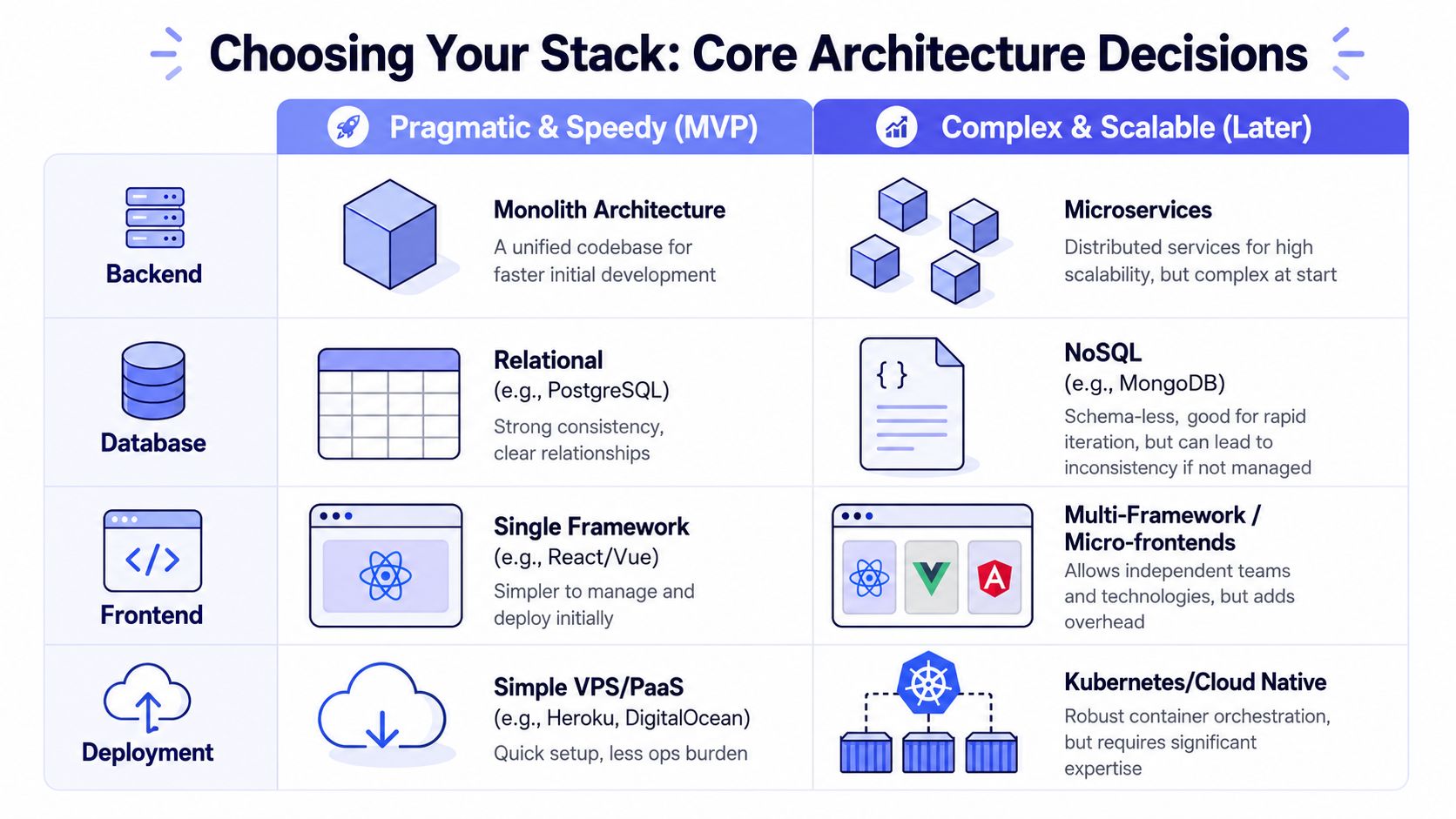 A comparison chart showing technical architectural choices for building a scalable software application from MVP to mature stage.
One architectural trap shows up a lot in social products: founders assume they need a giant custom backend because they're “building social.” In practice, many products are really building coordination, scheduling, approvals, or publishing around social channels. If that's your shape, it's worth studying patterns from putting all social media in one app, because the center of gravity shifts from feed ranking to integration reliability.
A practical comparison
Here's the trade-off table I'd use with a junior team:
Decision | Start here | Move later when |
Architecture | monolith | one codebase slows independent teams |
Frontend | React Native | platform-specific performance becomes core |
Database | PostgreSQL or MongoDB | access patterns force specialized storage |
Deployment | PaaS or simple containers | ops needs justify orchestration complexity |
Realtime | polling or lightweight sockets | product genuinely depends on instant updates |
Build for change, not for fantasy scale. Your first infrastructure problem is usually shipping too slowly, not serving too many users.
The best stack choice is the one your team can debug at 2 a.m. without opening six dashboards and three cloud bills.
The API Gauntlet Authentication and Cross-Platform Posting
At this juncture, optimism usually dies.
A developer adds “connect Instagram and publish to Facebook too” to the sprint board. Everyone nods because it sounds like a standard feature. Then OAuth starts failing in edge cases, refresh logic multiplies, app reviews drag on, and publishing flows differ enough that your “unified” abstraction starts leaking everywhere.
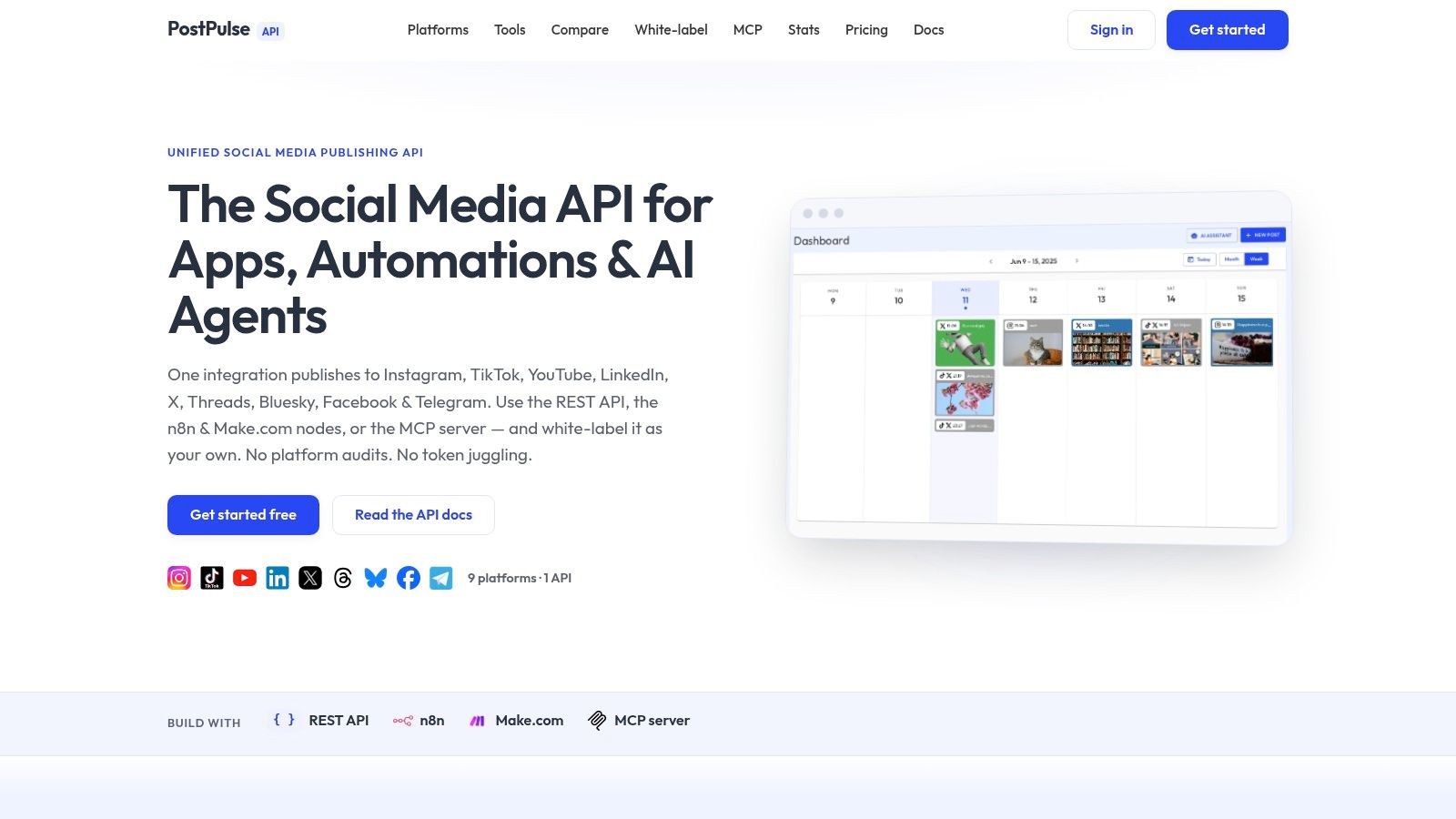 Screenshot from https://post-pulse.com
Why this part frustrates experienced teams
Most tutorials pretend platform integration is just “authenticate, store token, post content.” It isn't. The hidden cost is the 3–6 month audit and verification bottleneck for apps targeting platforms like Meta and TikTok, as noted by Zernio's write-up on building a social media app. That's before you count version churn and maintenance work.
That delay changes product strategy. If your roadmap depends on direct platform publishing, then integration work isn't a side quest. It's a core delivery risk.
Here's what usually expands the scope:
OAuth state handling: login redirects, callback mismatches, revoked sessions
Token storage: encryption, expiry tracking, account reconnect UX
Background refresh: workers that rotate credentials before user-facing failures
Publishing differences: media prep, capability checks, account-type restrictions where officially documented
Operational support: “why did this account disconnect?” becomes a recurring ticket
What token lifecycles force you to build
Meta token behavior alone is enough to reshape your backend. According to Adamigo's explanation of Meta API key expiration policies, short-lived user access tokens expire within 1–2 hours, while long-lived tokens generally last about 60 days, and they degrade if the app stays inactive for 90 days, which forces a user login again.
That means a serious integration needs:
A token metadata store with issued time, expiry, refresh status, and owning user.
A refresh scheduler that runs ahead of expiry, not after failure.
Reconnect UX because some failures cannot be automatically repaired.
Per-platform error mapping so support can tell “expired token” from “permission issue” from “account changed.”
There's another gotcha on page publishing. A Facebook Page token can persist up to 60 days (5,184,000 seconds), but its actual lifetime is capped by the underlying user token that created it, based on the accepted explanation in this Stack Overflow discussion of page token expiry behavior. In plain English, when the user token dies, the page token can become useless with it.
The official way works. It just comes with more lifecycle management than most product specs admit.
One more thing. This article follows a strict rule for technical accuracy. If a platform limitation isn't clearly documented in official docs or the verified material above, don't hard-code assumptions around it. Build capability checks, defensive retries, and explicit error handling instead of folklore.
A walkthrough helps more than another paragraph. This demo is a good reference point for what a unified publishing surface looks like in practice:
The shortcut most tutorials skip
If cross-platform publishing is support work around your real product, don't spend months becoming an unpaid maintainer of nine APIs. Use a verified integration layer and move on.
That's the reason teams look for unified surfaces such as the patterns discussed in social media platform integration. The point isn't convenience for its own sake. The point is protecting your roadmap from audit delays, token churn, and inconsistent publishing logic.
Build direct integrations only when the integration itself is your product moat. If it isn't, buy back your time.
Building the Core Experience Feeds and Media Handling
A social app lives or dies on the first few user interactions. Not on the logo. Not on the onboarding animation. On whether the feed feels responsive and media loads cleanly.
Keep the feed dumb at first
For an MVP, a reverse-chronological feed is enough. Query posts from followed accounts, order by created time, paginate cleanly, and cache what you can. That gives users something understandable and gives you a baseline for behavior.
Don't jump straight to an algorithmic feed. Ranking systems need feedback loops, moderation inputs, content quality signals, abuse controls, and enough event data to justify the complexity. Early on, a simple feed is easier to debug and easier to explain.
A basic feed service should handle:
Pagination: cursor-based pagination ages better than page numbers
Visibility rules: public, private, followers-only, or scoped content
Deletion behavior: soft-delete first so support can investigate issues
Fan-out choices: compute on read until product usage proves you need more
Media pipelines matter more than feed ranking
Media handling creates more pain than most first-time teams expect. If users upload directly through your app server, you'll feel that mistake quickly. A safer pattern is to let the client request a short-lived upload target from your backend, send the file directly to object storage, and then notify your backend that the upload completed.
After upload, hand work to background jobs:
Images: normalize format, resize, create thumbnails
Video: transcode into delivery-friendly variants, generate preview images
Validation: reject unsupported or broken media before it hits the feed
Status tracking: let the UI show processing state instead of pretending the upload is done
Business pressure reinforces this. In 2026, the average smartphone user spends 2 hours and 20 minutes per day on social apps, short-form video drives 2.8x higher engagement than static content, and Reels account for 35% of time spent on Instagram, according to Business of Apps social app market data. If your app touches social publishing or consumption, mobile-first video support isn't optional.
If you're integrating Instagram publishing, the implementation details around staged media workflows are worth reviewing in this piece on Instagram container-based publishing. Even when your product isn't “about Instagram,” those workflow constraints influence job design, retries, and user messaging.
A feed can be simple and still feel good. A broken upload flow never feels good.
From MVP to Scale Moderation and Infrastructure
Once people trust the app enough to use it regularly, the hard problems change. They're less about feature completeness and more about safety, latency, and reliability.
Moderation shows up earlier than you think
Every social feature creates a moderation surface. Posts, comments, profile text, media captions, usernames, DMs if you add them later. You don't need a giant trust-and-safety org to start, but you do need a path from report to review to action.
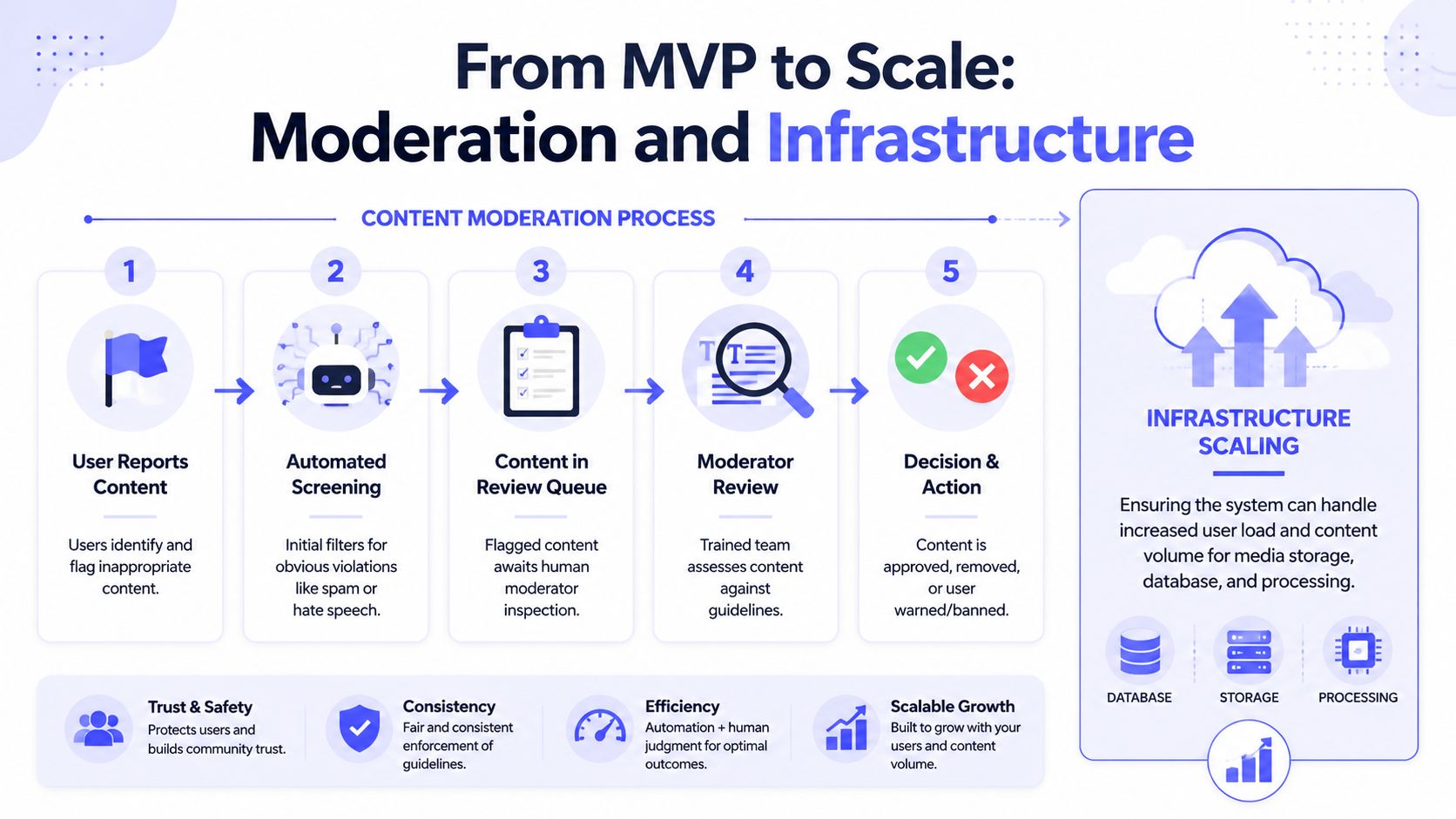 A diagram illustrating the five-step content moderation process for social media applications and infrastructure scaling requirements.
A lean moderation setup usually includes:
User reporting: every visible content type should be reportable
Admin queue: sort by status, recency, and severity
Action logging: record who removed what and why
Appeal handling: even a basic review path helps avoid support chaos
You'll also run into abuse that isn't “content” in the classic sense. Automated scraping, scripted signup flows, and spam account creation show up fast on any public product. For teams researching that layer, this guide on anti-bot measures is useful reading in a defensive context because it shows how bot operators think and what weak protections they target first.
Infrastructure changes once users trust the app
The architecture that gets you to launch often isn't the one that carries steady usage. That doesn't mean a rewrite. It means adding layers where they matter.
A sensible progression looks like this:
Need | Practical addition |
DB load rising | move to a managed database service |
Repeated reads | add Redis or another cache for hot objects |
More traffic | place a load balancer in front of app instances |
Media growth | separate processing workers from web traffic |
Realtime UX | add WebSockets or similar persistent channels |
Field note: Don't add realtime infrastructure because it feels modern. Add it when the product gets worse without it.
Notifications are often the first realtime feature that earns its complexity. Chat is usually the feature that multiplies it. If you add persistent realtime channels, isolate them from the request-response app layer so one noisy subsystem doesn't drag the whole product down.
Finding Your Wedge Launch and Monetization Strategy
The market doesn't need another generic social network. It definitely doesn't need one that launches with an empty feed and hopes growth hacks will save it.
Don't launch a ghost town
The stronger play is tool-first, not network-first. Build something that helps people do social work better inside the networks they already use.
That's not just opinion. The most successful niche apps of 2025 and 2026 often avoided cold-starting communities entirely. According to Anything AI's analysis of fresh social media app ideas, 70% of niche apps with traction inherited existing social graphs through tools like the WhatsApp Business API, Telegram bots, or the AT Protocol.
That pattern is important because it solves the worst launch problem. You don't need strangers to show up and create value for each other on day one. Users already have audiences, groups, chats, or identities elsewhere. Your app just helps them coordinate, publish, respond, organize, or repurpose content.
Examples of good wedges:
A club operations app that publishes fixtures, results, and recap posts to existing channels
A creator workflow tool that handles drafting, approvals, asset reuse, and scheduled publishing
A community organizer app that turns event updates into social-ready posts across the places members already follow
Monetize the workflow not the audience
If your product saves time, reduces missed posts, or makes approvals less painful, charging gets easier. People pay for a job done. They rarely pay because your feed is “pretty good.”
That usually leads to a cleaner business model:
Subscription: best when the workflow repeats every month
Usage-based pricing: works when publishing volume or automation runs vary
Premium features: useful when teams need approvals, brand controls, or advanced scheduling
The nice part is that monetization can start before “community scale.” A narrow workflow product can sell to a small but motivated group long before a broad social network can sell attention.
Build something a group already wants to use with the audience they already have. That's a much safer launch than hoping a new network effect appears on schedule.
If your app needs social publishing but you don't want to spend months on platform audits, token refresh logic, and API churn, take a look at PostPulse. It gives developers one integration surface for publishing across major platforms, which is often the cleanest option when social posting is part of your product, not the whole product.
About the Author

Founder of PostPulse — a social media scheduling platform for creators and teams. Software engineer with a passion for building developer tools and simplifying complex API integrations across social media platforms.