10 Advanced YouTube Shorts Ideas: Content Automation 2026
Published on · Updated on
Tags:
You already know the feeling. You have a backlog of strong YouTube Shorts ideas, maybe product demos, coding tips, changelog clips, customer wins, or AI-generated explainers. The hard part isn't coming up with another angle. The hard part starts after export.
You upload to YouTube. Then you resize for TikTok. Then you rewrite the caption for Instagram Reels. Then you turn the same idea into something text-friendly for X, Threads, and LinkedIn. By the time you finish the distribution work, the content itself feels like the easy part. That manual grind is why so many content plans collapse after a week. The bottleneck isn't creativity. It's operational drag.
That pain is even worse for developers, because social APIs don't fail in obvious ways. Tokens expire. Uploads succeed but classify wrong. One platform wants metadata one way, another simply rejects the same asset. You spend more time debugging publishing than shipping the thing you intended to promote.
So these YouTube Shorts ideas aren't really about what to film next. They're about the systems that get your content out, everywhere, automatically, without turning your week into a queue of repetitive uploads. If you treat distribution like an engineering problem, you can build a repeatable engine instead of relying on brute force. Tools like PostPulse fit into that model because they collapse a messy platform surface into one operational layer.
Table of Contents
1. API Integration Walkthrough Publishing to 9 Platforms with One REST Call
2. No-Code Automation Building Social Publishing Workflows with n8n
3. AI Agent Publishing Autonomous Content Distribution via MCP Server
4. White-Label Social Publishing Embed Multi-Platform Posting in Your App
5. The Hidden Cost of DIY Multi-Platform Publishing Why Token Management Breaks Scaling
6. YouTube Shorts Formatting 101 Why Your Vertical Video Doesnt Post Correctly
7. Bluesky Threads and the Emerging Social Networks Why You Should Post There Now
8. Measuring Multi-Platform Success How to Track Performance Across 9 Social Channels
9. Private-Label vs White-Label Choosing the Right PostPulse Model for Your Product
10. Building a Social Posting Feature in 48 Hours From API Docs to Live
1. API Integration Walkthrough Publishing to 9 Platforms with One REST Call
If you've ever tried to wire up social publishing platform by platform, you know where the time goes. It's not in making the POST request. It's in handling different auth flows, payload shapes, media constraints, retries, and status tracking for each network. That's why one of the most useful YouTube Shorts ideas is to stop thinking like a creator and start thinking like an integration engineer.
The practical move is simple. Publish one asset through one API surface, then let the integration layer fan it out to YouTube Shorts, TikTok, Instagram, LinkedIn, X, Threads, Bluesky, Facebook, Telegram, and Pinterest. If you're exploring that pattern, the YouTube Shorts API guide from PostPulse is the kind of reference worth checking because it sits in the actual implementation path, not in generic content advice.
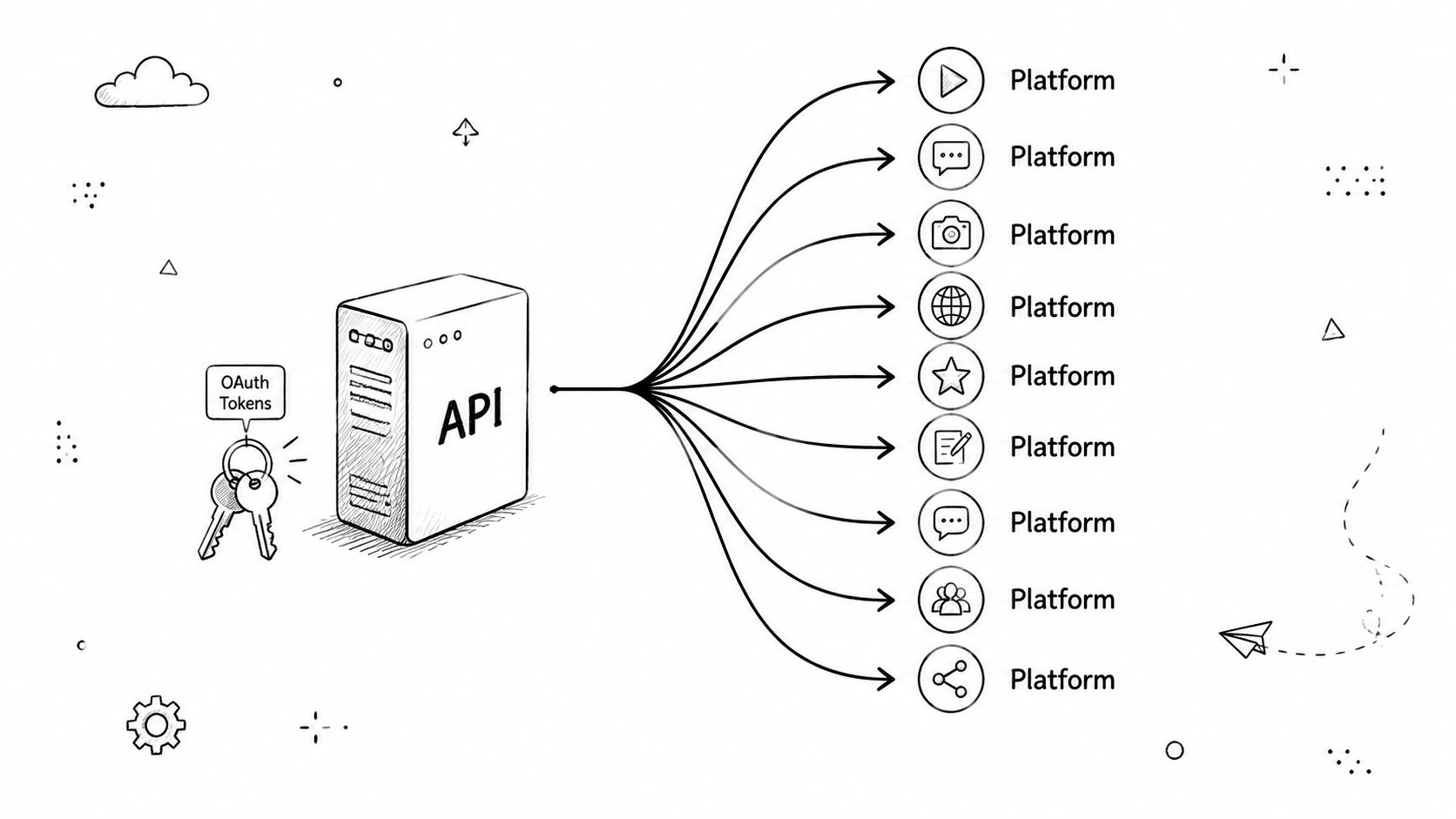 A diagram illustrating an API using OAuth tokens to connect and distribute content across multiple platforms.
Start with the simplest publish path
Don't start with video. Start with a plain text post across every supported platform that accepts text. That exposes auth and routing issues early, before you add media processing to the blast radius.
Then add one vertical video and track publication state carefully.
Cache idempotency keys: Retries happen. If your worker crashes after a partial success, you need a way to avoid duplicate posts.
Log per-platform outcomes: “Batch failed” is useless. You need “YouTube succeeded, TikTok pending, Threads rejected caption.”
Use webhooks where available: Pulling every platform for status wastes time and quota.
Practical rule: Get one ugly end-to-end publish working before you design the elegant abstraction.
A SaaS team adding social distribution to a CMS doesn't need nine native integrations on day one. They need one stable path from “content approved” to “published everywhere.” That's the difference between a feature that ships and a roadmap item that keeps expanding.
2. No-Code Automation Building Social Publishing Workflows with n8n
Some teams don't need another service in the backend. They need a workflow that non-engineers can understand, edit, and recover when it breaks. That's where n8n becomes useful for YouTube Shorts ideas at scale, especially when content originates from forms, CMS entries, Airtable rows, or scheduled jobs.
A solid pattern looks like this: webhook or cron trigger, fetch content from a source of truth, run validation, publish, then write the result back to the database. If you want the implementation flavor, this YouTube Shorts automation walkthrough is relevant because it aligns with how these no-code pipelines get assembled.
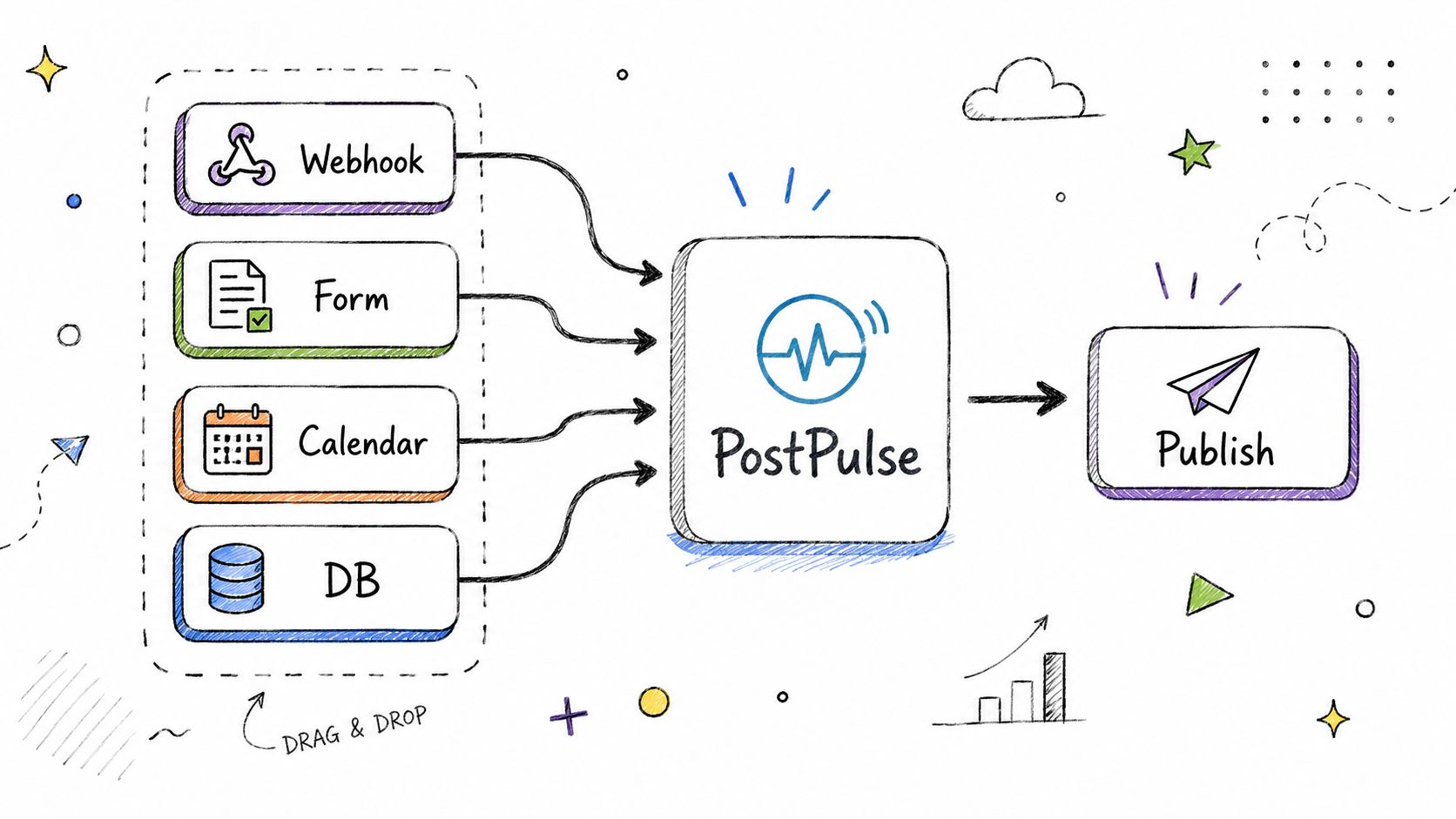 A hand-drawn illustration showing how PostPulse integrates data from webhooks, forms, calendars, and databases to publish content.
Keep the workflow boring on purpose
The best n8n flows are almost dull. One trigger. One validator. One publish action. One result handler. The moment you cram enrichment, AI rewriting, scheduling, approvals, and analytics into a single graph, debugging turns miserable.
A few patterns hold up well:
Use one content repository: Airtable, Google Sheets, Notion, or a database table. Don't scatter publishable assets across tools.
Gate on status fields: Only publish rows marked approved. That prevents accidental repeats and half-finished drafts from leaking out.
Write back the outcome: Store platform IDs, timestamps, and errors in the same row that triggered the workflow.
The no-code mistake isn't using visual automation. It's pretending visual automation removes the need for system design.
A WordPress site can push every new article into a social queue. A Typeform can feed testimonials into a moderation step, then cross-post approved entries. A store can trigger restock announcements from inventory events. You don't need custom code for every one of those. You need a workflow that has clear state and a small failure surface.
3. AI Agent Publishing Autonomous Content Distribution via MCP Server
A lot of “AI content automation” still depends on a human clicking publish at the end. That's not autonomy. That's autocomplete with extra steps. If you're building agents, one of the more interesting YouTube Shorts ideas is letting the agent handle distribution too, but only after you narrow the job enough that failure is survivable.
The underserved angle here is technical. Existing content about YouTube Shorts ideas usually tells people to clip streams, react to trends, or repurpose long-form. It rarely addresses the gap around AI-agent-driven autonomous creation and publishing for developers working with APIs, despite that gap being explicitly noted in this analysis of AI-automated niche Shorts. That's where MCP becomes useful, especially for agents that already know how to draft, summarize, and schedule.
Give the agent a narrow lane
Don't ask an agent to “run our social strategy.” Ask it to do one repeatable task. Good examples include posting daily release-note snippets, publishing support updates, summarizing research, or turning changelog entries into short scripts and captions.
Guardrails matter more than model cleverness:
Define one content type: Release summary, bug fix, educational tip, or support notice.
Constrain tone in the prompt: Friendly, direct, no claims beyond supplied source text.
Route through scheduled publishing: Immediate publish is harder to audit than queue-based release.
Notify a human after publish: Auditing after the fact is still better than invisible automation.
If you're already deploying automated support agents, the same architectural thinking applies here. Give the agent a bounded responsibility and a verified publishing surface. The bad version is an unconstrained model improvising brand copy on ten networks. The good version is an agent operating inside a strict contract.
4. White-Label Social Publishing Embed Multi-Platform Posting in Your App
Users hate context switching. If your product helps people create content, manage campaigns, publish newsletters, run a CRM, or handle customer communication, forcing them into a separate social tool breaks the flow. One of the strongest YouTube Shorts ideas for product teams is to make publishing feel native inside the app they already use.
White-label becomes attractive when posting is part of your product's actual job, not a novelty button in the sidebar. A podcast platform can let creators auto-share episode clips. A Notion-style content tool can push approved assets directly to social. A CRM can let sales or support teams publish updates tied to records or workflows.
Where white-label actually makes sense
This is mostly a product decision disguised as an integration choice. If social posting is core to retention, white-label can justify the engineering effort. If it's incidental, it can become expensive UI glue around a feature few users touch.
The pricing model matters because it reveals the business fit. PostPulse's white-label option is listed at $200 per month plus $1 per active social account, with “active” defined as an account that publishes at least one post that month. The same pricing section also notes a startup support program where fees are waived until launch, which is useful for beta products that need to prototype before demand is proven.
A practical split looks like this:
Use white-label when users expect native UX: CRM, CMS, creator tools, agency dashboards.
Skip white-label when posting is occasional: Internal tools and one-off admin actions usually don't need branded publishing flows.
Model revenue before building UI: If the feature won't support pricing, support load, and maintenance, embedding it won't save you.
Teams usually overestimate the value of “built-in” and underestimate the cost of supporting it well. Native beats bolted-on only when the workflow itself is central.
5. The Hidden Cost of DIY Multi-Platform Publishing Why Token Management Breaks Scaling
Everyone wants to build the first version in-house. That instinct makes sense. A single YouTube uploader sounds manageable. Then someone asks for TikTok. Then Instagram. Then LinkedIn. Then support tickets start arriving because one user's account disconnected, another user's refresh flow failed, and a third user got a success message even though the publish never landed.
That's the true cost. Not the initial integration. The maintenance treadmill after launch.
What breaks first
Token handling is usually the first pain point users notice and the last one engineering fully simplifies. The second pain point is silent drift. Platform APIs change, auth scopes evolve, payload requirements move, and your previously “done” integration starts behaving differently.
YouTube adds another layer of friction because upload capacity is constrained by quota. Each videos.insert call costs 1,600 quota units, and the default daily quota for a Google Cloud project is 10,000 units, which limits uploads to about 6 videos per day unless you request an extension through Google Cloud's quota process, as summarized in this YouTube Data API quota breakdown.
Building the first happy path is development work. Keeping nine publishing integrations stable is operations work.
That distinction matters. If your team is building a core product, every hour spent chasing token refresh edge cases is an hour not spent on the thing customers are buying. That's why outsourced publishing layers are often less about convenience and more about reducing maintenance ownership.
6. YouTube Shorts Formatting 101 Why Your Vertical Video Doesnt Post Correctly
A lot of developers assume that if a video is vertical and short, YouTube will treat it as a Short. That assumption causes more headaches than it should. You can upload a valid video, get a successful response, and still end up unsure whether it landed in the Shorts system the way you intended.
The first technical fact to internalize is that there's no dedicated Shorts upload endpoint. Developers use the standard videos.insert method in YouTube Data API v3, and YouTube classifies the result as a Short based on the media and metadata properties rather than an explicit flag, as explained in this YouTube upload API guide. There is no madeForShorts boolean to set.
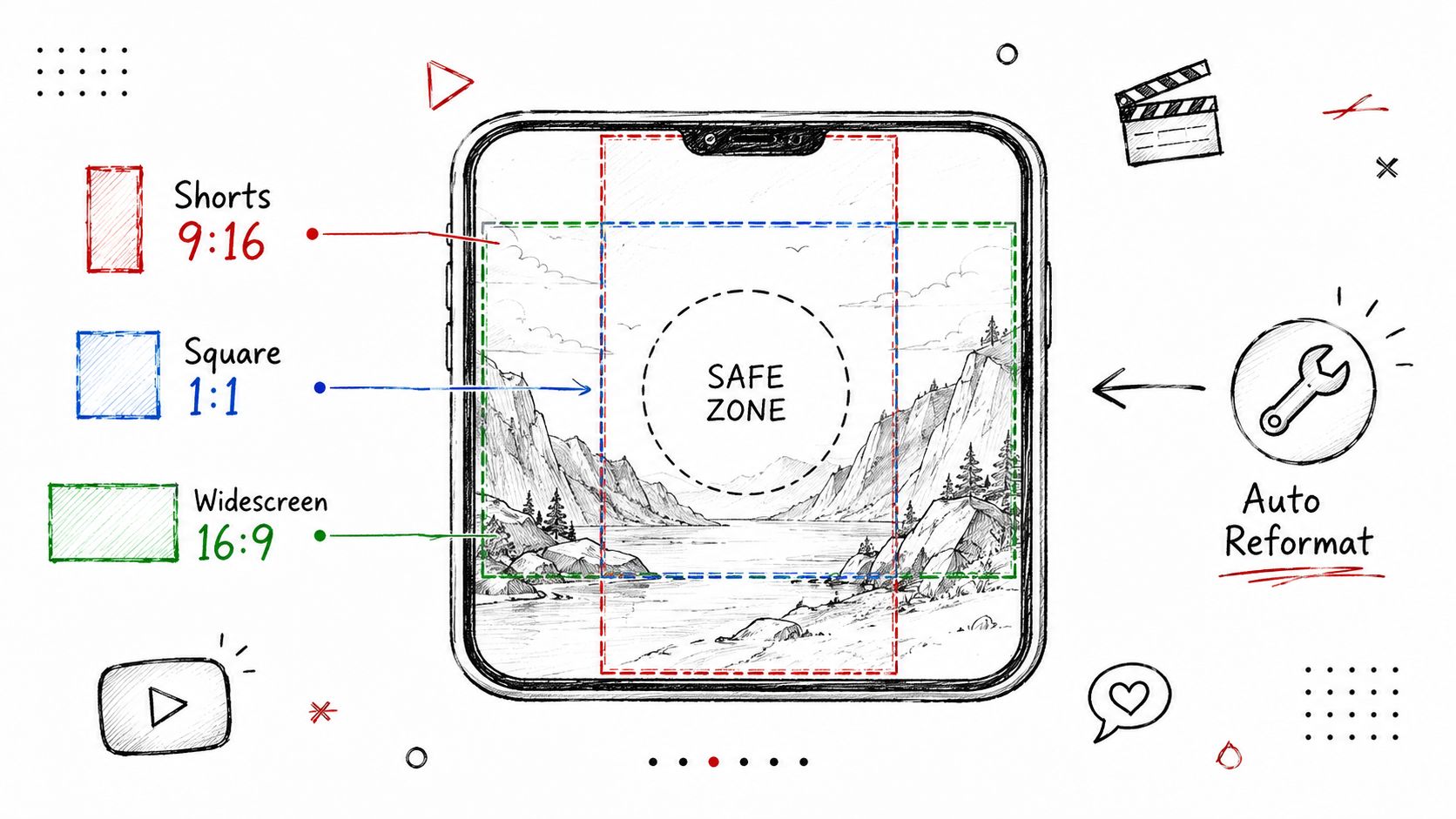 A hand-drawn illustration showing auto-reformat options for YouTube videos including Shorts, square, and widescreen aspect ratios.
For a strategic view of why format handling matters at all, this YouTube Shorts business strategy piece is worth reading alongside implementation docs. And if you need production tooling on the editing side, this guide for YouTube content creators is a reasonable companion resource.
Shorts classification is inferred, not declared
That design creates two common mistakes. First, teams assume upload success equals Shorts success. Second, they skip verification entirely.
The safer workflow is:
Upload with
videos.insert: Treat Shorts like a standard video upload from the API perspective.Verify after upload: The API does not return a dedicated
isShortfield, so developers need to inspectcontentDetails.durationand check for#Shortsin the title or description throughvideos.list, as described in this overview of Shorts verification in the API.Build retry logic carefully: If Shorts classification matters to your app, verification has to be part of the pipeline.
A reformatting layer proves its worth. You upload one clean source asset, then let your publishing system reshape it for each destination. The hard rule is to keep important visual content centered, because crops vary and edge text gets sacrificed first.
7. Bluesky Threads and the Emerging Social Networks Why You Should Post There Now
A common distribution mistake is treating newer platforms like optional extras you'll “get to later.” In practice, they're low-cost experiments when you already have a multi-platform pipeline. If the content is already being produced, adding Bluesky or Threads is often a routing decision, not a whole new strategy.
That matters because YouTube Shorts themselves now sit inside a much larger short-form ecosystem. In 2025, Shorts accounted for 77% of global YouTube views, according to Tubular Labs coverage summarized by TVREV, and YouTube was generating over 200 billion daily Shorts views globally in the same reporting context (TVREV on Tubular's 2025 Shorts view data). When short-form is already that central on YouTube, syndicating the same core idea to adjacent networks becomes the rational next step.
Use emerging platforms as cheap routing tests
The trick isn't to craft bespoke content for every smaller network on day one. The trick is to publish the same core asset, then observe where specific messages resonate. Technical audiences might talk more on Threads. Indie builders might reply more on Bluesky. Product launches may get cleaner signal on one network than on older platforms with noisier feeds.
A few useful habits:
Post the same asset first: Don't create work before you have evidence that a channel deserves custom treatment.
Track conversation quality, not just reach: A smaller thread with useful replies can beat broad, empty exposure.
Keep human follow-up separate from automated publishing: Automation gets the post out. Humans handle the relationship.
New platforms are useful because they lower publishing friction when your system is already built.
That's the main point. If distribution is automated, adding one more destination doesn't feel like extra labor. It feels like widening the net.
8. Measuring Multi-Platform Success How to Track Performance Across 9 Social Channels
Many organizations measure social badly because they flatten unlike platforms into one scoreboard. A YouTube Short, a LinkedIn post, a Thread, and a Telegram message do different jobs. If you compare them by one vanity metric, you'll make bad decisions fast.
Short-form video is the clearest example. Current Shorts analysis points to retention and engagement quality, not raw views, as the metrics that shape distribution. One cited benchmark says the viral sweet spot has been around 34 seconds, with roughly 90% viewer retention as the key threshold for feed amplification, and it notes that the algorithm prioritizes engaged views over passive counts in that framework (video analysis discussing viral Shorts length and retention). Even if you don't treat that as a universal rule, it's a useful reminder that view count alone tells you almost nothing.
Track different goals per channel
Set one job per platform before you open the analytics tab. YouTube might be for discovery. LinkedIn might be for trust. X might be for commentary loops. Telegram might be for direct audience reach.
A simple operating model works better than a giant dashboard:
Reach metric: Did the platform distribute it?
Engagement metric: Did people care enough to react, reply, or watch through?
Conversion metric: Did it drive the next action you want?
If you're serious about YouTube Shorts ideas as a growth system, use UTM-tagged links where the platform allows them, store performance back into your content database, and compare assets by intent, not by ego. A modest Short that drives qualified traffic can be more valuable than a heavily viewed clip that sends nobody anywhere.
9. Private-Label vs White-Label Choosing the Right PostPulse Model for Your Product
This choice gets framed as branding, but it's really about ownership. Who handles the user experience, who manages the account connection flow, and who absorbs the complexity when something goes wrong. If you pick the wrong model, you either overbuild too early or lock users into a clunky path they'll never love.
Private-label is usually the better starting point when you want multi-platform publishing inside a workflow but don't need a fully native UX. White-label fits when publishing is part of the product promise and users expect it to feel first-party from auth to posting.
Use pricing to expose the real fit
The numbers help because they force honesty. PostPulse lists private-label as either pay-as-you-go at $0.20 per publication or subscription pricing at $5 per account per month, or $48 per year per account. White-label is listed separately at $200 per month plus $1 per active social account.
That leads to practical decisions:
Choose private-label for variable posting volume: Internal tools, side projects, automation-heavy products, and early-stage builders usually benefit from the lighter commitment.
Choose subscription private-label when usage is steady: If your users publish often, predictable account-based pricing is easier to model.
Choose white-label only when UX is product-critical: If your customers expect social publishing as a native feature, the branding and flow control can justify the higher baseline cost.
Prototype before locking in: If you're unsure, start with the lighter model and move up when demand is real.
The mistake isn't picking the cheaper option. The mistake is treating architecture like branding theater instead of a cost and support decision.
10. Building a Social Posting Feature in 48 Hours From API Docs to Live
A lot of founders postpone social publishing because they assume it's a quarter-long integration. It doesn't have to be. If you use an existing publishing layer, a weekend is enough to get a credible first version live.
The trick is keeping the scope brutally small. One auth flow. One upload form. One backend route. One publish action. One status response. Save drafts, scheduling logic, analytics views, and approval systems for later.
The weekend build that actually ships
Day one is mostly setup. Read the API docs, wire your environment variables, implement your redirect handler, and make one successful test publish. Don't build frontend polish before you have a working backend path.
Day two is glue code and failure handling. Turn your manual request into a UI action, store the result, and surface errors in plain language. That's enough for a beta.
A few details matter more than people expect:
Write tests for auth: Social connection failures waste more time than publishing failures.
Use a sandbox if the platform offers one: Real production accounts are a terrible test harness.
Return granular errors: Users need to know whether media upload failed, auth failed, or one downstream platform rejected the post.
For YouTube-specific validation, use the platform's own observable metrics after publishing. One benchmark often used by Shorts creators is the Viewed vs. Swiped Away rate. A cited target is 75% to 80%, with lower than 60% signaling a hook problem that needs revision. The same analysis also says 15-second Shorts should aim for APV above 100% through looping, while 60-second Shorts need 70% to 80% APV for stronger distribution signals (analysis of YouTube Shorts performance metrics).
Those metrics belong after launch, not before it. First ship the pipe. Then optimize the media going through it.
YouTube Shorts Ideas: 10-Item Comparison
Item | Implementation Complexity 🔄 | Resource Requirements ⚡ | Expected Outcomes ⭐📊 | Ideal Use Cases 💡 | Key Advantages ⭐ |
API Integration Walkthrough: Publishing to 9 Platforms with One REST Call | Moderate 🔄, server-side integration, single endpoint simplifies orchestration | Low–Medium ⚡, small dev effort, server hosting, depends on third‑party uptime | High ⭐📊, fast time-to-market, reduced maintenance, unified publishing metrics | SaaS apps, CMS, automation builders adding multi-platform publish | Single endpoint, automatic OAuth & rate-limit handling |
No-Code Automation: Building Social Publishing Workflows with n8n | Low 🔄, visual drag‑and‑drop; minimal coding | Minimal ⚡, no devs required, platform familiarity (n8n/Make) | Moderate ⭐📊, rapid automation, repeatable workflows, faster ops | Non-technical teams, marketing workflows, form→post automations | Zero-code, reusable workflows, official maintained nodes |
AI Agent Publishing: Autonomous Content Distribution via MCP Server | High 🔄, agent design, prompt engineering, MCP integration | High ⚡, ML/agent expertise, monitoring, safety guardrails | Variable ⭐📊, autonomous 24/7 publishing; quality depends on agent | Autonomous content tools, research/curation agents, AI-driven marketers | True autonomy for agents, direct MCP tool access, single publish endpoint |
White-Label Social Publishing: Embed Multi-Platform Posting in Your App | Moderate–High 🔄, UI embedding + integration and pricing model design | Medium–High ⚡, $200/mo + $1/active account; engineering to embed UI | High ⭐📊, native UX, higher retention, scalable posting | SaaS founders, CRMs, platforms selling premium features | Fully branded UX, predictable per-account pricing, scale without DIY |
The Hidden Cost of DIY Multi-Platform Publishing | High 🔄, building/maintaining nine integrations is complex | Very High ⚡, ongoing engineering, monitoring, incident handling | Negative if DIY ⭐📊, scaling pain, frequent outages, high maintenance | Teams evaluating build vs. outsource decisions | Highlights maintenance tax; makes outsourcing ROI clear |
YouTube Shorts Formatting 101 | Low–Medium 🔄, platform formatting handled automatically | Low ⚡, need quality source assets and testing | High ⭐📊, fewer rejections, consistent cross‑platform video quality | Creators, video SaaS, agencies repurposing content | Automatic aspect/codec/length conversion; caption handling |
Bluesky, Threads, and Emerging Social Networks | Low 🔄, same API call covers new platforms | Low ⚡, light tracking/experimentation effort | Moderate ⭐📊, early-adopter audience, higher engagement potential | Brands testing new networks, creators building early followings | Easy experimentation on emerging networks with minimal engineering |
Measuring Multi-Platform Success: How to Track Performance Across 9 Social Channels | Moderate 🔄, analytics integration and per‑platform mapping | Medium ⚡, attribution setup, UTMs, dashboarding effort | High ⭐📊, clearer ROI, platform-specific KPIs, better allocation | Marketers, growth teams, creators optimizing channel mix | Unified metrics, platform-aware KPIs, conversion attribution guidance |
Private-Label vs. White-Label: Choosing the Right PostPulse Model | Moderate 🔄, decision + implementation varies by model | Varies ⚡, private-label = pay-as-you-go; white-label = $200/mo + per-account | Strategic ⭐📊, choose model to optimize unit economics and UX | SaaS evaluating monetization and product fit for social posting | Clear tradeoffs and pricing guidance to match product strategy |
Building a Social Posting Feature in 48 Hours: From API Docs to Live | Low–Moderate 🔄, straightforward REST calls and OAuth redirect handler | Low ⚡, basic API familiarity, test environment, webhook support | High ⭐📊, rapid MVP launch (48 hours) with working multi-platform posts | Indie hackers, startups building fast MVPs, demos | Fast integration, pre‑approved OAuth apps, clear docs & examples |
Stop Brainstorming Content Start Building Your Engine
Most YouTube Shorts ideas don't fail because the concept was weak. They fail because the operational cost of publishing kills consistency. A clip sits in drafts because someone still needs to resize it, upload it, rewrite the caption, connect another account, or debug another expired token. That's not a creativity problem. That's a systems problem.
Developers should treat distribution the same way they treat any repetitive production task. Reduce manual steps. Define a reliable interface. Add verification where the platforms are ambiguous. Log outcomes. Retry safely. Keep one source of truth for assets and state. Once that exists, your content backlog stops feeling like unfinished work and starts feeling like inventory.
That shift matters more now because short-form keeps absorbing attention. One 2026 projection says the optimal YouTube Shorts length moved to an average of 42 seconds, with the 38 to 48 second bracket achieving higher completion and share rates than the previously dominant 30 to 40 second range, driven by a late-2025 feed update that allegedly gave longer Shorts a reach bonus (2026 Shorts statistics roundup). Whether you adopt that exact pacing or not, the broader lesson is clear. The format keeps changing, and manual workflows don't adapt fast enough.
That's another reason to build the engine instead of obsessing over one clip. When YouTube changes behavior, you should be able to swap formatting rules, tweak metadata, or update prompts without rebuilding your whole process. When a new network matters, you should add a route, not invent a second job for yourself. When AI helps generate ideas or scripts, it should plug into the same pipeline instead of creating yet another isolated tool.
If you're building for clients, users, or your own product, the greatest advantage usually comes from one clean publishing layer that sits between your content source and every destination. PostPulse is one option in that category if you want a unified API, no-code nodes, or MCP support instead of maintaining direct integrations yourself. The useful question isn't “how do I get one more Short out today?” The useful question is “what system lets me publish every good idea I already have?”
Stop hunting for another brainstorming template. Start reducing the friction between finished content and live distribution. That's the engine that compounds.
For broader creator-side promotion ideas beyond distribution infrastructure, Trendy's Instagram growth tips are a reasonable adjacent read.
If you want to turn your YouTube Shorts ideas into an actual publishing system, take a look at PostPulse. It gives developers, no-code builders, and AI agent teams one integration surface for publishing across multiple social platforms, with REST API access, official n8n and Make.com support, and an MCP server for autonomous workflows.
About the Author

Founder of PostPulse — a social media scheduling platform for creators and teams. Software engineer with a passion for building developer tools and simplifying complex API integrations across social media platforms.